• Regeln für den Video-Bereich:

    In den Börsenbereich gehören nur Angebote die bereits den Allgemeinen Regeln entsprechen.

    Einteilung

    - Folgende Formate gehören in die angegeben Bereiche:
    - Filme: Encodierte Filme von BluRay, DVD, R5, TV, Screener sowie Telesyncs im Format DivX, XviD und x264.
    - DVD: Filme im Format DVD5, DVD9 und HD2DVD.
    - HD: Encodierte Filme mit der Auflösung 720p oder darüber von BluRay, DVD, R5, TV, Screener sowie Telesyncs im Format x264.
    - 3D: Encodierte Filme von BluRay, die in einem 3D Format vorliegen. Dies gilt auch für Dokus, Animation usw.
    - Serien: Cartoon/Zeichentrick, Anime, Tutorials, Dokumentationen, Konzerte/Musik, Sonstiges sind demnach in die entsprechenden Bereiche einzuordnen, auch wenn sie beispielsweise im High Definition-Format oder als DVD5/DVD9/HD2DVD vorliegen. Ausnahme 3D.
    - Bereich Englisch: Englische Releases gehören immer in diesen Bereich.
    - Bereich Talk: Der Bereich, in dem über die Releases diskutiert werden kann, darf, soll und erwünscht ist.


    Angebot/Beitrag erstellen

    - Ein Beitrag darf erst dann erstellt werden, wenn der Upload bei mindestens einem OCH komplett ist. Platzhalter sind untersagt.
    - Bei einem Scenerelease hat der Threadtitel ausschließlich aus dem originalen, unveränderten Releasenamen zu bestehen. Es dürfen keine Veränderungen wie z.B. Sterne, kleine Buchstaben o.ä. vorgenommen werden. Ausnahme Serienbörse:
    - Bei einem Sammelthread für eine Staffel entfällt aus dem Releasename natürlich der Name der Folge. Beispiel: Die Simpsons S21 German DVDRip XviD - ITG
    - Dementsprechend sind also u.a. verboten: Erweiterungen wie "Tipp", "empfehlenswert", "only", "reup", usw. / jegliche andere Zusatzinformation oder Ergänzung, welche nicht in obiger Beschreibung zu finden ist.

    Aufbau des Angebots und Threadtitel

    Der Titel nach folgendem Muster erstellt zu werden. <Name> [3D] [Staffel] [German] <Jahr> <Tonspur> [DL] [Auflösung] <Quelle> <Codec> - <Group>
    Beispiel: The Dark Knight German 2008 AC3 DVDRip XviD - iND
    Beispiel: The Dark Knight 2008 DTS DL BDRip x264 - iND
    Beispiel: The Dark Knight 2008 AC3 DL BDRip XviD - iND
    Beispiel: The Dark Knight German 2008 AC3 720p BluRay x264 iND
    Beispiel: The Dark Knight 2008 DTS DL 1080p BluRay x264 iND
    Beispiel: Die Simpsons S01 German AC3 DVDRip XviD iND
    Beispiel: Die Simpsons S20 German AC3 720p BluRay x264 iND
    Beispiel: Sword Art Online II Ger Sub 2014 AAC 1080p WEBRip x264 - peppermint
    Entsprechend sind also u.a. verboten: Sonderzeichen wie Klammern, Sterne, Ausrufezeichen, Unterstriche, Anführungszeichen / Erweiterungen wie "Tipp", "empfehlenswert", "only", "reup", usw. / jegliche andere Zusatzinformation oder Ergänzung, welche nicht in obiger Beschreibung zu finden ist
    Ausnahmen hiervon können in den Bereichen geregelt sein.

    Die Beiträge sollen wie folgt aufgebaut werden:
    Überschrift entspricht dem Threadtitel
    Cover
    kurze Inhaltsbeschreibung
    Format, Größe, Dauer sind gut lesbar für Downloader außerhalb des Spoilers zu vermerken
    Nfo sind immer Anzugeben und selbige immer im Spoiler in Textform.
    Sind keine Nfo vorhanden z.B. Eigenpublikationen, sind im Spoiler folgende Dateiinformationen zusätzlich anzugeben :
    Quelle
    Video (Auflösung und Bitrate)
    Ton (Sprache, Format und Bitrate der einzelnen Spuren)
    Untertitel (sofern vorhanden)
    Hosterangabe in Textform außerhalb eines Spoiler mit allen enthaltenen Hostern.
    Bei SD kann auf diese zusätzlichen Dateiinformationen verzichtet werden.

    Alle benötigten Passwörter sind, sofern vorhanden, in Textform im Angebot anzugeben.
    Spoiler im Spoiler mit Kommentaren :"Schon Bedankt?" sind unerwünscht.


    Releases

    - Sind Retail-Release verfügbar, sind alle anderen Variationen untersagt. Ausnahmen: Alle deutschen Retail-Release sind CUT, in diesem Fall sind dubbed UNCUT-Release zulässig.
    - Im Serien-Bereich gilt speziell: Wenn ein Retail vor Abschluss einer laufenden Staffel erscheint, darf diese Staffel noch zu Ende gebracht werden.62
    - Gleiche Releases sind unbedingt zusammenzufassen. Das bedeutet, es ist zwingend erforderlich, vor dem Erstellen eines Themas per Suchfunktion zu überprüfen, ob bereits ein Beitrag mit demselben Release besteht. Ist dies der Fall, ist der bereits vorhandene Beitrag zu verwenden.
    - P2P und Scene Releases dürfen nicht verändert oder gar unter einem iND Tag eingestellt werden.


    Support, Diskussionen und Suche

    - Supportanfragen sind entweder per PN oder im Bereich Talk zu stellen.
    - Diskussionen und Bewertungen sind im Talk Bereich zu führen. Fragen an die Uploader haben ausschließlich via PN zu erfolgen, und sind in den Angeboten untersagt.
    - Anfragen zu Upload-Wünschen sind nur im Bereich Suche Video erlaubt. Antworten dürfen nur auf Angebote von MyBoerse.bz verlinkt werden.


    Verbote

    - Untersagt sind mehrere Formate in einem einzigen Angebotsthread, wie beispielsweise das gleichzeitige Anbieten von DivX/XviD, 720p und 1080p in einem Thread. Pro Format, Release und Auflösung ist ein eigener Thread zu eröffnen.
    - Grundsätzlich ebenso verboten sind Dupes. Uploader haben sich an geeigneter Stelle darüber zu informieren, ob es sich bei einem Release um ein Dupe handelt.
    - Gefakte, nur teilweise lauffähige oder unvollständige Angebote sind untersagt. Dies gilt auch für eigene Publikationen, die augenscheinlich nicht selbst von z.B. einer DVD gerippt wurden. Laufende Serien, bei denen noch nicht alle Folgen verfügbar sind, dürfen erstellt und regelmäßig geupdatet werden.
    - Untersagt sind Angebote, welche nur und ausschließlich in einer anderen Sprache als deutsch oder englisch vorliegen. Ausnahmen sind VORHER mit den Moderatoren zu klären.


    Verstoß gegen die Regeln

    - Angebote oder Beiträge, die gegen die Forenregeln verstoßen, sind über den "Melden"-Button im Beitrag zu melden.
  • Bitte registriere dich zunächst um Beiträge zu verfassen und externe Links aufzurufen.

*** Bestes IPTV *** bester Preis *** gratis Test ***


Englische Tutorials

008b8c26_medium.jpg

Price Action Trading Master Course (Forex and Crypto)
MP4 | Video: h264, 1280x720 | Audio: AAC, 44.1 KHz, 2 Ch
Genre: eLearning | Language: English + srt | Duration: 29 lectures (4h 2m) | Size: 4.16 GB

Learn How To Trade Naked Charts From Former Investment Bank Treasurers. From Beginner to Advanced (+50 Live Examples))
What you'll learn
The Logic of Price Action Trading
Market Structures
How to Draw Efficient Trendlines
Different Price Action Trading Styles
Breakout Trading Strategies
Pullback Trading Strategies
Candlestick Formations
Fake Breaks
Finding Sweet Spots for Stop Loss and Take Profit Orders
Blueprint of Successful Trades
Advanced Techniques
Fibonacci Trading
Moving Average Trading
Break of Structure
What is Trailing Stop Loss and How to Use It
Trading Psychology
Requirements
You must know what is Long and Short positions
You must know how to place orders
Description
Price action trading is an extremely popular trading approach in trading world. Unlike other trading strategies, it focuses on naked charts and it doesn't give importance to complex indicators. Price action strategies are the best methods to identify the market structure, if you know how to use it. It is definitely the reflection of the : "Simplicity is the most ultimate sophistication"
As the former treasurers of an investment bank who has their income from full time forex and crypto trading at the moment, our aim is to put our favourite strategies one step ahead, by combining the discipline, psychology and by teaching how to create the most efficient trading setups. In the course, we focused on simplicity and kept all the concepts clear and understandable. Moreover, we supported all the concepts with live examples. We structured the course step by step. First, we covered the fundamental parts and then focused on advanced techniques to increase your odds.
You will see the power of price action by combining
Trendlines
Moving Averages
Fibonacci Retracements
Candlestick Formations
At the end of the course, you will be able to
Create your own trading setups.
Learn how to enter "high probability" trades
Understand how to use healthy Risk-Reward ratio
Control your psychology
Apply our step by step recipe
Put a side income next to your paycheck
Become a full time forex or cyrpto trader like us (This requires time and experience)
Witnessing the exact approach of professionals to the market will be a strong leverage for your future trades.
So lets start today! No need to lose time!
Who this course is for
People who wants to learn "Price Action Trading" strategies from A to Z
People who wants to trade with naked charts
People who know technical analysis but unable to make sustainable profits
People who want to create passive income from trading
People who wants to learn 'How to be in top 1%' and 'The right approach of professionals'
Homepage


322f0f34-e9e5-4741-8520-41ab54babb10.png

How To Edit A Feature Film By Yourself
Last Update: 12/2021
Duration: 2h 36m | Video: .MP4, 1280x720 30 fps | Audio: AAC, 48 kHz, 2ch | Size: 2.05 GB
Genre: eLearning | Language: English​

A to Z Complete Editing Guide From RAW Footage To Final Master
What you'll learn:
Organizing Folders And Bins
Preparing Your Footage To Edit
Importing Files To Premiere Pro
Creating A Timeline
Setting Up Audio Timeline
Creating Closing Credits Roll
Creating Film Opening Sequence
Editing Your Film
Useful Shortcuts While Editing
Locking Your Picture
Exporting Film To Color Grade In Davinci Resolve
Alternative: Grading In Premiere Pro
Exporting Audio For Sound Work
iZotope RX Mastering
Preparing For Final Render
Rendering Your Master
Creating Other Delivery Formats
Let's Talk About Subtitles
Requirements
Basic Understanding Of Adobe Premiere Pro, Davinci Resolve, Adobe Audition
Description
By independent director, producer and screenwriter Hank Orion. In this course we will dive deep into editing tips and techniques for independent films. From raw footage to final master and more. We will talk about stuff they don't teach you at film school.
Some of the topics we will cover in this course are
Preparing Your Footage To Edit
Importing Files To Premiere Pro
Creating Closing Credits Roll
Creating Film Opening Sequence
Editing Tips Film
Locking Your Picture
Color Grading Your Film
Working With Sound
Creating Final Film Master
And much more!*You will learn what it takes to edit a great film by yourself, on your own, using what you have at your disposal. Editing is all about storytelling. And having a good understanding is crucial to be able to finish your film and be able to bring it to the audience. Learn how to edit, grade, work with sound all by yourself and how to make your film look and sound better. We will dive into tips and techniques that will help you improve your editing and give you an idea of what it takes to bring film from raw footage to final master.
For years I've made independent films and had to make a lot of mistakes. Learn from mine. Let's take that footage and bring it to life. Happy filmmaking.
Who this course is for
This course is ideal for independent filmmaker who wants to learn how to edit their own films
Homepage
Screenshots


2201112152520088.jpg

speak arbic like natives
MP4 | Video: h264, 1280x720 | Audio: AAC, 44.1 KHz
Language: English | Size: 2.88 GB | Duration: 4h 0m
listen to speak​

What you'll learn
arabic letters and its sounds
words for each letter
types of Arabic sentences
Arabic conversations
Requirements
only interesting in Arabic language
Description
Arabic is an old language . It is believed to have originated in the Arabian Peninsula. rabic, which first emerged in the northwest of the Arabian Peninsula, is a member of the Semitic family of languages which also includes Hebrew and Aramaic. Whilst very early manifestations of Arabic date back as far as the 8th century BCE, the language has been defined and refined over a considerable period of time.Arabic is at least 1,500 years old. Classical Arabic originated in the sixth century, but earlier versions of the language existed, including the Safaitic dialect, an old Arabic dialect used by the pre-Islamic nomadic inhabitants of the Syro-Arabian desert. Some of its inscriptions date back to the first century.Proto-Arabs are presumed to have originated from what is now modern-day Hejaz and Najd in Saudi Arabia. Arabs spread from there to the central and southern parts of the Levant, sometimes replacing previously spoken Semitic languages. Arabic is widely taught in schools and universities around the world and is used to varying degrees in workplaces, governments and the media.[9] Arabic, in its standard form, is the official language of 26 states, as well as the liturgical language of the religion of Islam, since the Quran and the Hadiths were written in Arabic.[10]Arabic has influenced many other languages around the globe throughout its history especially languages of Muslim cultures and countries that were conquered by Muslims. Some of the most influenced languages are Persian, Turkish, Hindustani (Hindi and Urdu),[12] Kashmiri, Kurdish, Bosnian, Kazakh, Bengali, Malay (Indonesian and Malaysian), Maldivian, Pashto, Punjabi, Albanian, Armenian, Azerbaijani, Sicilian, Spanish, Greek, Bulgarian, Tagalog, Sindhi, Odia[13] and Hausa and some languages in parts of Africa. Conversely, Arabic has borrowed words from other languages, including Aramaic, Hebrew, Latin, Greek, Persian and to a lesser extent Turkish and other Semitic languages such as Abyssinian in medieval times and languages such as English and French in modern times and some loanwords from theArabic is the liturgical language of 1.8 billion Muslims, and Arabic[14] is one of six official languages of the United Nations.[15][16][17][18] All varieties of Arabic combined are spoken by perhaps as many as 422 million speakers (native and non-native) in the Arab world,[19] making it the fifth most spoken language in the world.[20] Arabic is written with the Arabic alphabet, which is an abjad script and is written from right to left, although the spoken varieties are sometimes written in ASCII Latin from left to right with no standardized orthography. Arabic and Islam
Classical Arabic is the language of poetry and literature (including news); it is also mainly the language of the Quran. Classical Arabic is closely associated with the religion of Islam because the Quran was written in it. Most of the world's Muslims do not speak Classical Arabic as their native language, but many can read the Quranic script and recite the Quran. Among non-Arab Muslims, translations of the Quran are most often accompanied by the original text. At present, Modern Standard Arabic (MSA) is also used in modernized versions of literary forms of the Quran.
It was first spoken by nomadic tribes in the northwestern frontier of the Peninsula 150 millions people speak Arabic to learn its vocabularies you should listen to Arabic speakers in every field listen before speak the Arabic grammar is very important to know the structure of the sentence s
how can I speak like native listen to drama listen to old songs listen to sport listen to cartoon video clips all in Arabic try to repeat the words and phrases
Who this course is for
any one interesting in arabic
Screenshots


0c70cc06-76f1-45c4-859a-898cfcceb7c2.png

Swift Video Diaries
MP4 | Video: h264, 1280x720 | Audio: AAC, 44.1 KHz
Language: English | Size: 1.65 GB | Duration: 3h 7m
Learn Swift for iOS
What you'll learn​

How to use Swift to write iOS Apps
Requirements
Basic Programming knowledge will help
Description
Introduction
This course is aimed at entry level to intermediate programmers.
If you want to learn how to program in swift, and create great iOS applications, then this course is for you.
I will teach you the building blocks required to make great apps.
You will learn good coding practices, which you can take to the work force.
About me
I have been developing apps for IOS for at least 10 years.
I started out with Objective C, and then moved onto using Swift language.
I have developed apps from camera apps to apps which control hardware devices.
Course Details
Introduction
xCode
Swift Langauge
User Interface
What will you learn
You will understand how xCode is setup for programmers to use.
What sort of user interface objects exists for making your apps.
How swift is used to develop applications.
How to test your applications using the simulator, and a real device.
More content is coming!
Coming soon
Git
Sample Application
Constraints
App Store Publishing
How to write test cases
Summary
Stay tuned and get ready to take on the world, as an iOS developer.
The skills you will learn will help you be a better developer.
You will have the tool set to start making your own applications, which you can publish to the app store.
Once you have the essential skills you are only limited by your imagination.
You have lots of help as a developer, as many people have programmed, so they are ready to help.
Let me know if you have any queries, and I will be happy to help.
I also plan to start a course on Swift UI, which is another exciting technology from Apple.
So have fun coding, and I am here to help.
Who this course is for
Beginner Swift Programmers
Screenshots


63ddfb6e-044c-4527-a564-4aeaa8964eb8.png

The best Excel pivot tables course in the world
MP4 | Video: h264, 1280x720 | Audio: AAC, 44.1 KHz, 2 Ch
Genre: eLearning | Language: English | Duration: 87 lectures (5h 45m) | Size: 2.93 GB

Easily create pivot tables, charts & dashboards
What you'll learn
The course consists only of hands-on exercises in which I share my many years of experience working with a pivot table and show you various tricks.
Thanks to it, every Excel user will quickly learn to work with a pivot table and learn about the possibilities of creating dashboards with their use.
You will learn preparing the data, inserting pivot tables, changing the calculations.
There is also a lot of content on dashboards with pivot tables, pivot charts and slicers.
Requirements
I recorded the course in 2019 in Office 365, but the pivot table has been working the same for years. You can easily follow the course in Excel 2007, 2010, 2013, 2016, 2019 and 365. In older versions, you may encounter different nomenclature or lack of certain functions (e.g. slicer, timeline, + - icons next to the chart).
Description
Hi, my name is Bartosz and I'm the author of this course that can be found on udemy and on the Excel BI Academy. In today's data world, fast analysis is worth its weight in gold, and each of us is an analyst. And how to efficiently analyze data in Excel?
With a pivot table, of course.
It is a mechanism with which you can quickly create automated, interactive, functional reports in Excel and design them graphically in a dashboard. Since there are millions of "pivots" in the world every day since 1994, I believe that pivot table is the most important functionality of Excel and the best data analysis tool ever.
To make it easier for you to learn about this functionality, I have prepared a course in which I describe the pivot table mechanism from A to Z (you can find also find a second course: Formulas and operations on Excel data). The course consists only of hands-on exercises in which I share my many years of experience working with a pivot table and show you various tricks. Thanks to it, you will quickly learn to work with a pivot table and learn about the possibilities of creating dashboards with their use.
7 benefits of pivot tables
Speed - It will take you a few seconds to insert and analyze the data in a PivotTable
Flexibility - Changing the layout of a PivotTable is just a few clicks away
Ease of use - every user understands the mechanism of action
Automation - a pivot table is the easiest way to get automatic reports
Interactivity - Thanks to slicers, you can easily add data filtering to the report
Data visualization - the pivot chart is your new friend
Binding to Power Query and Power Pivot - You can insert the report directly on the data, but you will achieve even better results by inserting a pivot table on a Power Query query or a data model designed in Power Pivot.
Who this course is for
There are no prerequisites for the course as the pivot table is a standalone functionality.
Usually, a pivot table is taken by users who have a basic understanding of Excel and formulas.
The course is aimed at both beginners and advanced users of Excel. I hope everyone will find something interesting in it.
Homepage


d5562002-256f-46ae-a1af-9ace41dcf443.png

A Guide to Django ORM Master the Art of Querying Database
MP4 | Video: h264, 1280x720 | Audio: AAC, 44.1 KHz, 2 Ch
Genre: eLearning | Language: English + srt | Duration: 27 lectures (3h 14m) | Size: 1.1 GB

Learn about virtual environment, models, migration, meta classes, database relationships, queryset API methods in Django
What you'll learn
Creating Virtual Environment in Python and Setting Up Django Project in that virtual environment.
Writing Models in Django
Performing CRUD Operation via Django ORM
Learning about different queryset API provided by Django ORM like order_by, values, only, defer, select related, prefetch related
Getting Familiar with Q objects and F expressions
Requirements
Basics of Python
Object Oriented Programming Using Python
Database Management System[Optional]
Description
In this course, you are going to learn various concepts related to Django ORM. Django ORM is a core and powerful component of the Django Framework. Using this ORM, we can simplify the database-related operations in an object-oriented way. In this course, you are going to learn how to model for a Blogging project. The agenda is not to make a blogging site, but to teach you about what can you do with the Django ORM and what Django ORM has to offer, to make your project performant. Then, we will deep dive into querying the database which is the most important section of this course. Without knowing how to query the database, you are never going to feel confident as a Django developer. So, you will be taught different things about queryset API provided by Django ORM in order to interact with the databases. You are going to learn various methods which are used in CRUD operations. Like order_by, values, only, defer, select_related, prefetch_related, Q objects, F expressions, raw SQL query, and many more.
At the end of this course, you will get familiar with the following topics, and you can apply this learning in any Django project.
Virtual Environments
Creating and Setting up Django Project in a virtual environment
Writing Models
Migrations
Django Admin Panel
Database Relationships
Primary Key, Verbose Name
Model Methods
Meta Options
Database CRUD Operation
Using order_by, values, only, defer methods
Performing union, intersection, and difference using Django ORM
Performing field Lookups
Querying Database Relationships
About Q objects, F expression
Select Related and Prefetch Related
Performing raw SQL query
and many more
Who this course is for
Beginner Python developer curious about web development using Django
Any developer who wants to understand how to setup Django in virtual environment.
Any django developer who wants to understand how to write models in Django.
Any django developer who want to understand how to query the database.
Any django developer who wants to understand Django ORM
Homepage


e74e4e97-a30a-464b-89de-c7a9bd6d740e.png

Mastering AMC 8
MP4 | Video: h264, 1280x720 | Audio: AAC, 44.1 KHz
Language: English | Size: 2.52 GB | Duration: 6h 23m
A step by step guide for AMC 8 competition math
What you'll learn​

A lot of interesting questions that you will never see in school math!
Learn Pre-Algebra, Algebra, Geometry, Counting and Probability, and more!
Learn competition math step by step from beginner to master!
Enhance math and problem-solving skills, and school math becomes so easy!
Enjoy the beauty and fun of math!
Prepare you for the 2022 AMC 8 math competition
Requirements
Basic Calculation
Description
Let's enjoy the beauty and fun of competition math !
Whether you have never participated math competition before, or want to learn advanced math skills, this course is for you!
In this course, AMC 8 real exam questions are organized into 4 major areas of math - Algebra, Geometry, Counting and probability, and Number theory.
The four areas are then separated into part A, part B and part C, based on the level of difficulty.
Part A typically are questions 1-10 in an AMC 8 paper. These questions are very good for beginners who just start competition math. The questions are a bit harder than school math.
Part B typically are questions 11-20 in an AMC 8 paper. These questions are the core of an AMC paper, where we should spend most of our learning time.
Part C typically are questions 21-25 in an AMC 8 paper. These are the most complex questions.
And here's what you get inside of every section
Videos: Each video will focus on one specific topic, with detailed explanation and examples from real paper.
Workbook: The Mastering AMC 8 workbook is very handy to use and includes all your needs for AMC 8
Notes: Key takeaways that you can print out for future reference.
Quizzes: After each topic I will put a quiz with one or two questions. I also provide detailed solution for the quiz.
You'll also get
Lifetime access to this course
Friendly support in the Q&A section
Udemy Certificate of Completion available for download
30-day money back guarantee
Enroll today! Learn competition math in a way that will advance your problem solving skill and increase your knowledge, and have fun!
Who this course is for
Those under 18 may use the services only if a parent or guardian opens their account, handles any enrollments, and manages their account usage.
Current middle school/junior high students, or students about to start middle school who are interested in competition math
Homeschool parents looking for extra support with math
Screenshots


3969ac2b-7289-4e9c-b86a-3e369f7cac0c.png

Cinematic Frames In Blender
Instructors: Jorge Barrero
Project Files • 6 lectures • 1h 35m
Video: MP4 1920x1080 48 KHz | English
Updated 2021 | Size: 448 MB​

In this tutorial, I share my process to make CINEMATIC FRAMES in BLENDER
Around 1H and 40 Min of videos
Content
1. 35 Min videos with Audio to setup the scenes including
- Shading
-EEVEE settings
-Fog
- Lights and cameras
-scenes
2. 1H video with Paint-overs.


f6501829-6262-4d70-bf5d-ef1c1a4c7178.png

Sonic Academy - Demixing
King Unique | Duration: 2h 22m | Video: H264 1280x800 | Audio: AAC 44,1 kHz 2ch | 1,2 Gb | Language: English​

So you want to remix a track but can't get the individual stems? Do not worry - just roll out the red carpet and let King Unique grace us with his presence again as he takes an in-depth look into the world of Demixing.
Over these 14 videos, he checks out some very different types of software that take on the challenge of separating audio elements, including some free, paid, online and plugin formats to get your teeth into.
All of these methods give varying levels of success and can also be used in a more creative way as we find out during the course before getting a glimpse into what the future holds as AI and software improve.
A fascinating insight into what's proving to be some very useful tools!
Check it out!
Homepage


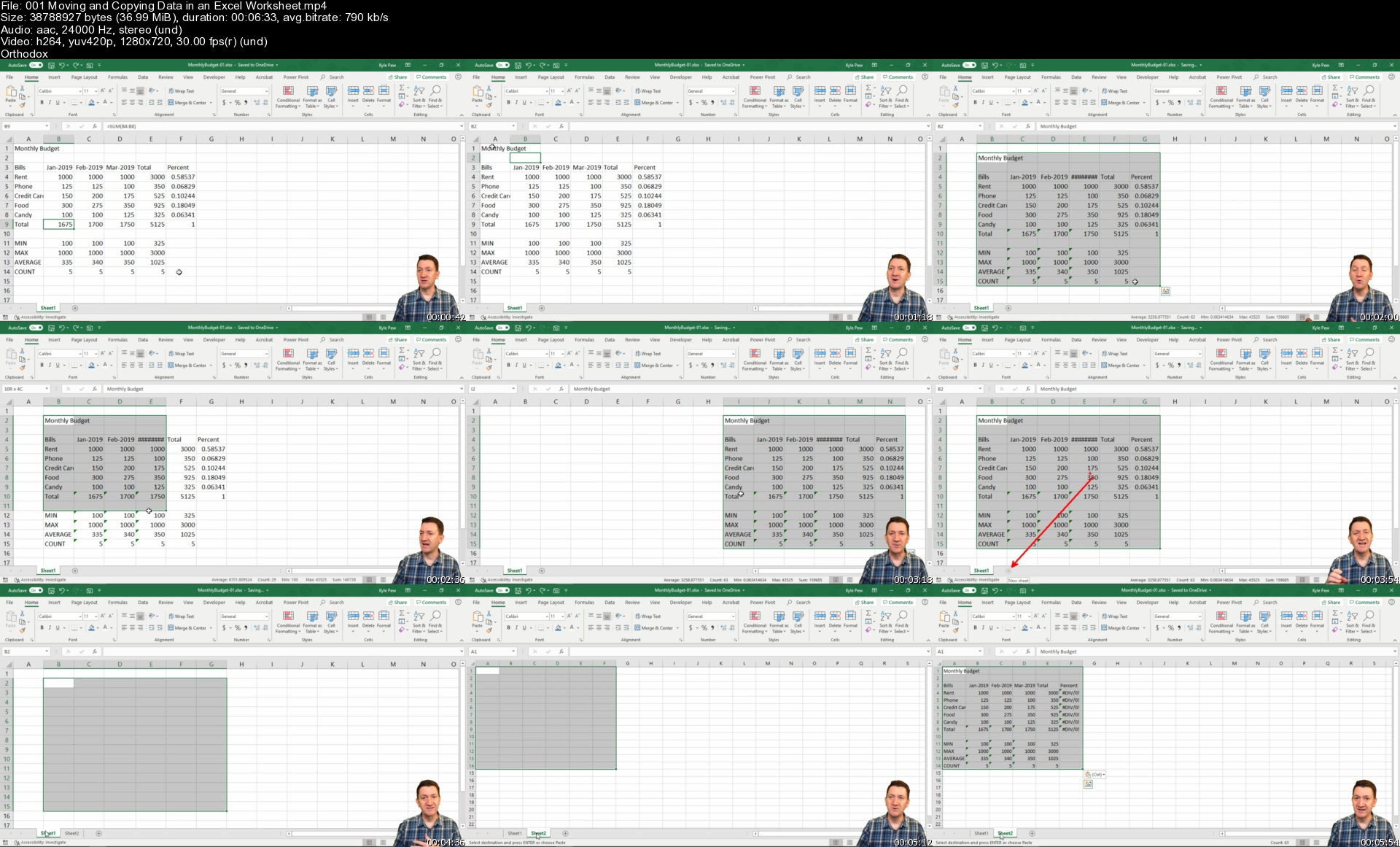
Microsoft Excel - Excel from Beginner to Advanced by Kyle Pew

7937960e892eokox.jpg


Microsoft Excel - Excel from Beginner to Advanced by Kyle Pew
MP4 | Video: h264, 1280x720 | Audio: AAC, 44.1 KHz, 2 Ch
Genre: eLearning | Language: English + srt | Duration: 218 lectures (18h 9m) | Size: 7.46 GB

Excel with this A-Z Microsoft Excel Course. Microsoft Excel 2010, 2013, 2016, Excel 2019 and Microsoft/Office 365


What you'll learn
Master Microsoft Excel from Beginner to Advanced
Build a solid understanding on the Basics of Microsoft Excel
Learn the most common Excel functions used in the Office
Harness the full power of Microsoft Excel by automating your day to day tasks through Macros and VBA
Maintain large sets of Excel data in a list or table
Create dynamic reports by mastering one of the most popular tools, PivotTables
Wow your boss by unlocking dynamic formulas with IF, VLOOKUP, INDEX, MATCH functions and many more
Access to a Professional Trainer with 10+ years of Excel Training

Requirements
No Prior Excel Knowledge Required
Microsoft Excel 2007, 2010, 2013, 2013, 2019 or Microsoft 365 Excel Loaded on Computer to Follow Along with Instructor Lectures is Recommended


Description
Microsoft Excel all in One Package

This Microsoft Excel course combines 4 different courses.

Microsoft Excel 101 - An Introduction to Excel

Microsoft Excel 102 - Intermediate Level Excel

Microsoft Excel 103 - Advanced Level Excel

Master Microsoft Excel Macros and VBA in 6 Simple Projects

Topics covered in this course apply to Excel 2007, 2010, 2013, 2016, 2019 (Microsoft/Office 365)

Recent Student Review

"You sir are a life saver. Not everyone has the ability to teach. Thank you so much for taking the time to put together an amazing course bro. If anyone doubts buying this course, don't doubt it, buy it. I've learned so much in this course. Hope more courses are on the way because I'd buy every single one of them. Thanks again bro. God bless you and your family."

"Happy to say that I now "know" excel. I realize there is so much more to learn, but it's a start! Thank you for being such a great instructor... now on to the next class."

"Thanks for a well made course. The progression of topics is well structured and the part about Macro and VBA was new for me. Excel is a really powerful tool and it is worth know all of its aspects. Kyle did a good job at explaining them."

Enroll now to go through a deep dive of the most popular spreadsheet tool on the market, Microsoft Excel. As a Microsoft Certified Trainer I will use my 20+ years of Excel training to guide you step by step through the beginner to advanced level and beyond.

As you participate in each of the 4 courses you will master Excel tools that will clear away the pain of stumbling through your daily tasks. You will start with the basics, building a solid foundation that will give you further knowledge as you progress into intermediate and advanced level topics.

At completion of this course you will have mastered the most popular Excel tools and come out with confidence to complete any Excel tasks with efficiency and grace. Below are just a few of the topics that you will master:

Creating effective spreadsheets

Managing large sets of data

Mastering the use of some of Excel's most popular and highly sought after functions (SUM, VLOOKUP, IF, AVERAGE, INDEX/MATCH and many more...)

Create dynamic report with Excel PivotTables

Unlock the power and versatility of Microsoft Excel's Add-In, PowerPivot

Audit Excel Worksheet formulas to ensure clean formulas

Automate your day to day Excel tasks by mastering the power of Macros and VBA

What's Included?

18+ Hours of Step by Step Video Lectures by a Microsoft Certified Trainer (MCT)

Downloadable Exercise Files to follow along and practice with

Additional Exercise Files are provided at the end of each major section (101, 102, 103 and VBA) that you can download and practice the skills you've learned

Section Quizzes to Test Your Knowledge on the Lecture Topics

QA board where you can post questions, screenshots of your progress and communicate with the instructor and fellow students in the course.

So, what are you waiting for, enroll now and take the next step in mastering Excel and go from Excel Newb to Excel Guru!

Who this course is for
This Microsoft Excel courses will take you through 4 levels of Microsoft Excel topics (Beginner, Intermediate, Advanced and Macros/VBA).
If your looking to take your Excel skills from beginner to advanced level and beyond, then this course is for you.

Homepage


001movingandcopyingdagrkg2.jpg


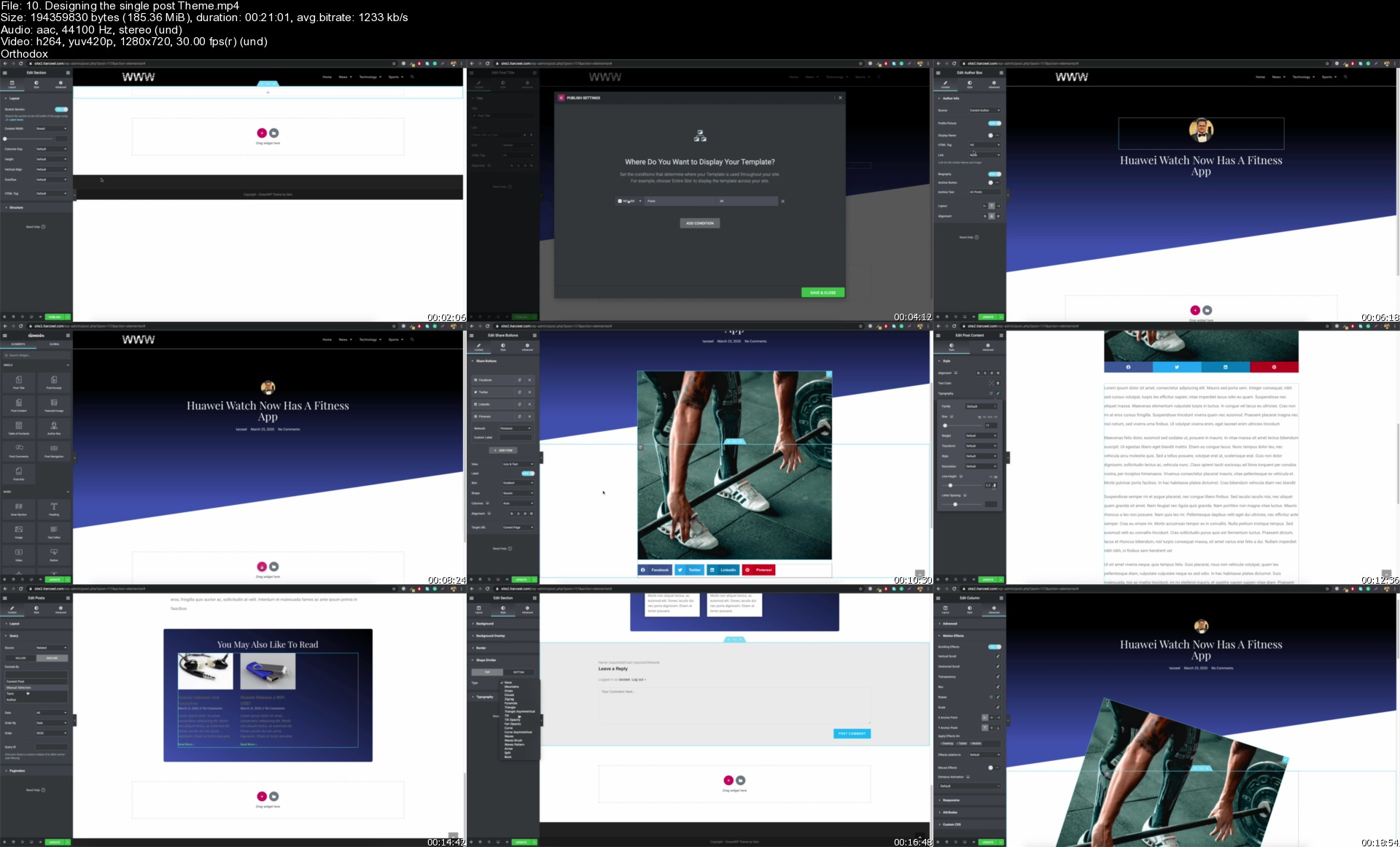
WordPress 2021: The Complete WordPress Website Course

1455618592a44tjnc.jpg


WordPress 2021: The Complete WordPress Website Course
Last Update: 9/2021
Duration: 26h 14m | Video: .MP4, 1280x720 30 fps | Audio: AAC, 44.1 kHz, 2ch | Size: 11.9 GB
Genre: eLearning | Language: English

Master The Complete WordPress - Build any Dynamic WordPress Website without Programming with WordPress Custom Post types


What you'll learn:
Be able to start your own WordPress web design business
Project 1: Personal/resume Website with WordPress
Project 2: Business Corporate Websites with WordPress
Project 3: Professional Blog with WordPress
Project 4: eCommerce website with WordPress and PayPal for accepting payments
Project 5: A real estate website with WordPress custom post types
Be able to work with WordPress APIs to accept credit Card payments
Be able to build your own Template
Be able to create any custom post type website i.e. movie review site, property selling site, affiliate coupons site, etc.
Be able to design a template for your custom post type

Description:
You're here because you want to master WordPress, right?
This WordPress Course was created for you!
Take this course if either of these applies to you:
You own a business and need more clients OR
Your Idea involves making a website OR
You want to learn WordPress
You want to start your own web design business and sell websites.
75 million users use WordPress making it Number One website content management system (CMS) worldwide. This course explains the most basic features of WordPress and also deals with advanced web design concepts. By the end of this WordPress online training, you will have enough knowledge to create a Professional WordPress website of your own, and not only that but you can create websites for your clients.
WordPress is the perfect tool for creating a fully customized website for any purpose. Whether you want to create a blog, a personal portfolio, a corporate business site, a forum, a classified website, an eCommerce site, or a business website to sell your products and services, you can do it with WordPress.
While it's never been easier to build a website, many people get lost when it comes to creating a stylish WordPress website. By following this Complete WordPress course, you will build powerful WordPress websites with different plugins and get ahead on your journey as an entrepreneur.

Why am I Worth Your Time?
Through this course, I'll teach you everything I've learned and mastered through 8 years of building, managing, migrating, and hosting WordPress websites.
"The instructor Tanzeel is very passionate about the topic of WordPress and it shows. He is very knowledgeable and I learned a lot! I am very confident about how to build my own WordPress site now, all thanks to this course" ~~Wendy Aston
I'll walk you through every step in how to use WordPress through a series of videos. I've also included useful resource documents for you to reference.
~I know where you're at.
~I know where you're coming from.
_____________________________
WHAT PROJECTS ARE INCLUDED IN THE COMPLETE WORDPRESS WEBSITE COURSE?
PROJECT#1: A personal Website: In this project we design a single-page responsive personal/resume WordPress-based website with a contact form that is connected via SMTP Server so it may send emails.
PROJECT#2: A Business Website: In this project, we build a multi-page responsive business WordPress website with a contact form and a portfolio.
PROJECT#3: A Blog: In this project, we design a professional blog with pagination and custom WordPress Blog Posts.
PROJECT#4: An eCommerce Website: In this project, we build an amazing eCommerce website that consists of a cart and checkout page. Shipping rates, tax, use of coupons, variable products, and everything that is used to build an eCommerce website with WordPress is explained briefly.
PROJECT#5: A real estate Website: In this project, we design a customized website. Since WordPress comes with posts and pages only, we create our own custom post type and name it as property, then we build a template for it.
After you are done with all these projects, you would be able to work with the WordPress Custom Post type feature to build and design your own custom post type instead of just post and pages. You would also be able to add custom fields to that custom post type and design that page dynamically.
_______________________________________
Summary of what you'll learn?
How WordPress works and why it uses PHP as its main language.
You will learn in detail about Domain, Hosting, Xampp for running WordPress
Manual and Auto Installation of WordPress
Creation and integration of databases with WordPress
WordPress Basic Settings
How to Choose a Perfect WordPress theme for your business
How to build a personal/resume site with WordPress
What are the WordPress plugins and how to use them
How to build professional blogs with WordPress
How to build a Corporate style business website with WordPress
How to set up an eCommerce site (online store) and sell your products using WordPress and WooCommerce
What is Paypal and how to integrate WordPress with API to receive payments
What is Stripe and how to integrate WordPress with API to receive Credit Card Payments
How to register your own custom post type in WordPress
How to add custom fields in WordPress
How to build a template in WordPress
How to build archive templates in WordPress
How to optimize your WordPress website for SEO
___________________________________
Paid Hosting, Plugins, and themes recommended in this course:
1. Siteground web hosting: worth $80. (you can also go with a free method, explained in the course)
2. Elementor pro plugin: worth $49. (You can go with the free version if you do not wish to buy that, however, the 5th project requires you to purchase that).
___________________________________
What This Course Does NOT Include:
This course is a 100% complete "Front End course" and does NOT cover WordPress Backend PHP Programming.


Who this course is for:
You want to start your own Website Design Business? This Course is for you!
If you are already a WordPress developer, You may not need this Course

Homepage

10.designingthesingleecje6.jpg


Calculus MASTER, Zero To Mastery

nxdtew1urlwhgv0orkaxea8kr6.jpg


Calculus MASTER, Zero To Mastery
MP4 | Video: h264, 1280x720 | Audio: AAC, 44.1 KHz
Language: English | Size: 10.1 GB | Duration: 44h 6m

Being CALCULUS MASTER. Zero To Mastery. From PreCALCULUS to CALCULUS III


What you'll learn
Calculus
Advanced Calculus
Integrals
Dervatives
College Algebra
Functions and Graphs
Graphs of Key Functions
Exponents and Logarithms
Limits
Applications of Derivatives
Antiderivatives and Integration
Applications of Integration
Advanced Integration Techniques
Sequences and Series
Parametric and Polar Coordinates
Vectors
Vector-Valued Functions
Pre Calculus
Calculus I
Calculus II
Calculus III
Requirements
Only Computer
Notebook

Description
Calculus MASTER, Zero To Mastery

Being CALCULUS MASTER. Zero To Mastery. From PreCALCULUS to CALCULUS III

Pre CALCULUS, CALCULUS I, CALCULUS II,CALCULUS III

Calculus is the branch of mathematics that deals with the finding and properties of derivatives and integrals of functions, by methods originally based on the summation of infinitesimal differences. The two main types are differential calculus and integral calculus.

Calculus is a branch of mathematics that involves the study of rates of change. Before calculus was invented, all math was static: It could only help calculate objects that were perfectly still. But the universe is constantly moving and changing. No objects-from the stars in space to subatomic particles or cells in the body-are always at rest. Indeed, just about everything in the universe is constantly moving. Calculus helped to determine how particles, stars, and matter actually move and change in real time.

Calculus is used in a multitude of fields that you wouldn't ordinarily think would make use of its concepts. Among them are physics, engineering, economics, statistics, and medicine. Calculus is also used in such disparate areas as space travel, as well as determining how medications interact with the body, and even how to build safer structures. You'll understand why calculus is useful in so many areas if you know a bit about its history as well as what it is designed to do and measure.

PreCalculus, This course will present the following concepts: non-linear inequalities, matrices and determinants, polynomial and rational functions, conic sections, theory of equations, sequences and series, mathematical induction.

Calculus I, This course will introduce the student to the basic concepts of the calculus. It will give the student an appreciation of the calculus and its applications in the real world and will prepare the student for future work in mathematics and the sciences. Course includes functions, limits, continuity, derivatives and their applications, and integration and its applications.

Calculus II, This course will expand on the applications and techniques of differentiation learned in the first quarter and give a depth study of integration including the fundamental methods of integrating elementary algebraic and transcendental functions. It will include the applications of the calculus to transcendental functions, analytical geometry and other relevant topics.

Calculus III, This course will expand on the applications and techniques of differentiation learned in the first and second quarters. It will introduce the student to the calculus of sequences and series and the use of the MacLaurin and Taylor series to approximate functions. It will introduce the student to the calculus of curvilinear functions and the concept of the vector and vector functions. It will also introduce the concept of a partial derivative and the maximization of functions given in more than one independent variable.

You will zero to mystery about CALCULUS.

Who this course is for
Who want to learn Pre Calculus
Who want to learn Calculus I
Who want to learn Calculus II
Who want to learn Calculus III
Who want to learn Calculus for Machine Learning
Who want to be hero for CALCULUS

Homepage


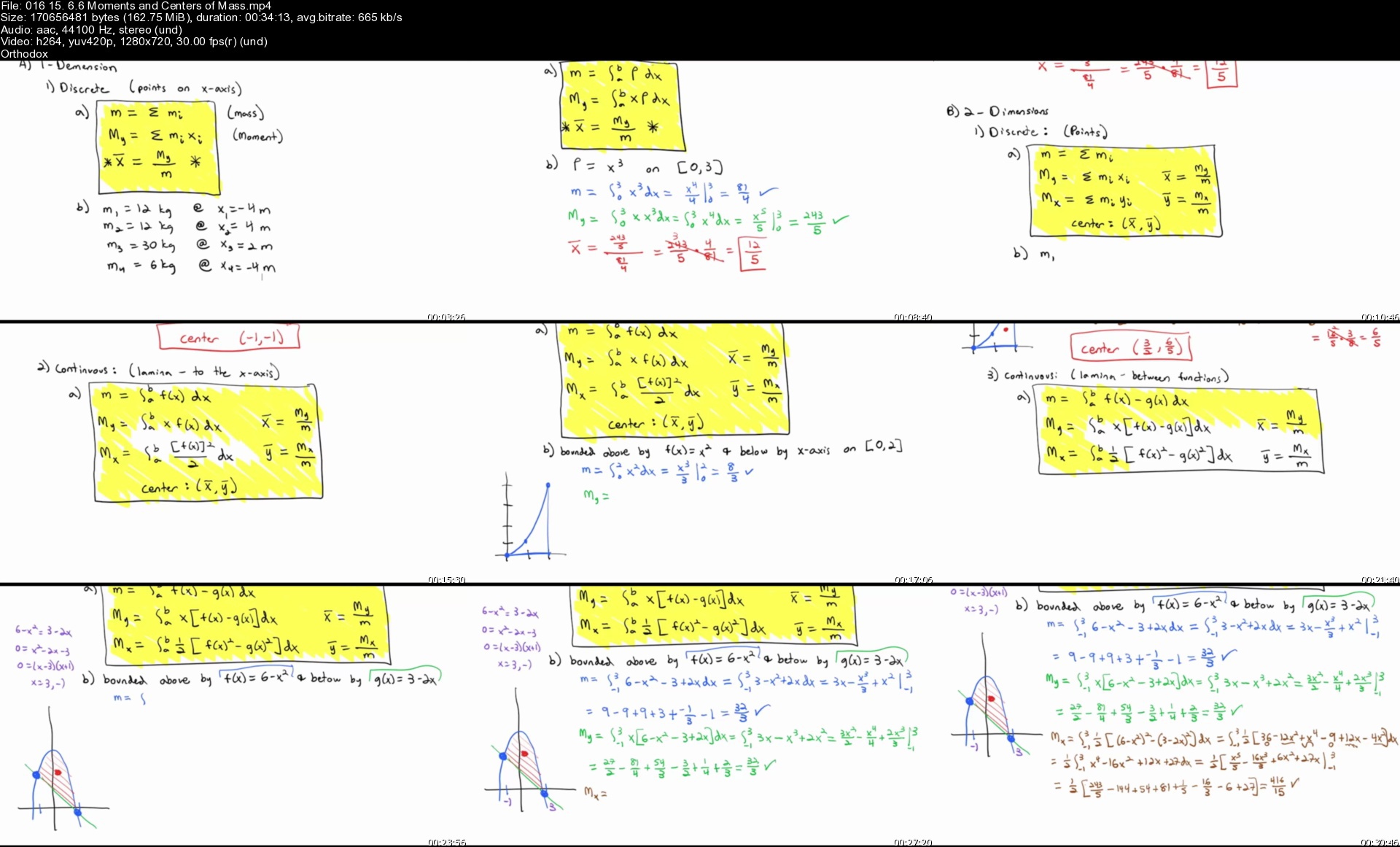
01615.6.6momentsandcebrjjl.jpg


Zurück
Oben Unten