• Regeln für den Video-Bereich:

    In den Börsenbereich gehören nur Angebote die bereits den Allgemeinen Regeln entsprechen.

    Einteilung

    - Folgende Formate gehören in die angegeben Bereiche:
    - Filme: Encodierte Filme von BluRay, DVD, R5, TV, Screener sowie Telesyncs im Format DivX, XviD und x264.
    - DVD: Filme im Format DVD5, DVD9 und HD2DVD.
    - HD: Encodierte Filme mit der Auflösung 720p oder darüber von BluRay, DVD, R5, TV, Screener sowie Telesyncs im Format x264.
    - 3D: Encodierte Filme von BluRay, die in einem 3D Format vorliegen. Dies gilt auch für Dokus, Animation usw.
    - Serien: Cartoon/Zeichentrick, Anime, Tutorials, Dokumentationen, Konzerte/Musik, Sonstiges sind demnach in die entsprechenden Bereiche einzuordnen, auch wenn sie beispielsweise im High Definition-Format oder als DVD5/DVD9/HD2DVD vorliegen. Ausnahme 3D.
    - Bereich Englisch: Englische Releases gehören immer in diesen Bereich.
    - Bereich Talk: Der Bereich, in dem über die Releases diskutiert werden kann, darf, soll und erwünscht ist.


    Angebot/Beitrag erstellen

    - Ein Beitrag darf erst dann erstellt werden, wenn der Upload bei mindestens einem OCH komplett ist. Platzhalter sind untersagt.
    - Bei einem Scenerelease hat der Threadtitel ausschließlich aus dem originalen, unveränderten Releasenamen zu bestehen. Es dürfen keine Veränderungen wie z.B. Sterne, kleine Buchstaben o.ä. vorgenommen werden. Ausnahme Serienbörse:
    - Bei einem Sammelthread für eine Staffel entfällt aus dem Releasename natürlich der Name der Folge. Beispiel: Die Simpsons S21 German DVDRip XviD - ITG
    - Dementsprechend sind also u.a. verboten: Erweiterungen wie "Tipp", "empfehlenswert", "only", "reup", usw. / jegliche andere Zusatzinformation oder Ergänzung, welche nicht in obiger Beschreibung zu finden ist.

    Aufbau des Angebots und Threadtitel

    Der Titel nach folgendem Muster erstellt zu werden. <Name> [3D] [Staffel] [German] <Jahr> <Tonspur> [DL] [Auflösung] <Quelle> <Codec> - <Group>
    Beispiel: The Dark Knight German 2008 AC3 DVDRip XviD - iND
    Beispiel: The Dark Knight 2008 DTS DL BDRip x264 - iND
    Beispiel: The Dark Knight 2008 AC3 DL BDRip XviD - iND
    Beispiel: The Dark Knight German 2008 AC3 720p BluRay x264 iND
    Beispiel: The Dark Knight 2008 DTS DL 1080p BluRay x264 iND
    Beispiel: Die Simpsons S01 German AC3 DVDRip XviD iND
    Beispiel: Die Simpsons S20 German AC3 720p BluRay x264 iND
    Beispiel: Sword Art Online II Ger Sub 2014 AAC 1080p WEBRip x264 - peppermint
    Entsprechend sind also u.a. verboten: Sonderzeichen wie Klammern, Sterne, Ausrufezeichen, Unterstriche, Anführungszeichen / Erweiterungen wie "Tipp", "empfehlenswert", "only", "reup", usw. / jegliche andere Zusatzinformation oder Ergänzung, welche nicht in obiger Beschreibung zu finden ist
    Ausnahmen hiervon können in den Bereichen geregelt sein.

    Die Beiträge sollen wie folgt aufgebaut werden:
    Überschrift entspricht dem Threadtitel
    Cover
    kurze Inhaltsbeschreibung
    Format, Größe, Dauer sind gut lesbar für Downloader außerhalb des Spoilers zu vermerken
    Nfo sind immer Anzugeben und selbige immer im Spoiler in Textform.
    Sind keine Nfo vorhanden z.B. Eigenpublikationen, sind im Spoiler folgende Dateiinformationen zusätzlich anzugeben :
    Quelle
    Video (Auflösung und Bitrate)
    Ton (Sprache, Format und Bitrate der einzelnen Spuren)
    Untertitel (sofern vorhanden)
    Hosterangabe in Textform außerhalb eines Spoiler mit allen enthaltenen Hostern.
    Bei SD kann auf diese zusätzlichen Dateiinformationen verzichtet werden.

    Alle benötigten Passwörter sind, sofern vorhanden, in Textform im Angebot anzugeben.
    Spoiler im Spoiler mit Kommentaren :"Schon Bedankt?" sind unerwünscht.


    Releases

    - Sind Retail-Release verfügbar, sind alle anderen Variationen untersagt. Ausnahmen: Alle deutschen Retail-Release sind CUT, in diesem Fall sind dubbed UNCUT-Release zulässig.
    - Im Serien-Bereich gilt speziell: Wenn ein Retail vor Abschluss einer laufenden Staffel erscheint, darf diese Staffel noch zu Ende gebracht werden.62
    - Gleiche Releases sind unbedingt zusammenzufassen. Das bedeutet, es ist zwingend erforderlich, vor dem Erstellen eines Themas per Suchfunktion zu überprüfen, ob bereits ein Beitrag mit demselben Release besteht. Ist dies der Fall, ist der bereits vorhandene Beitrag zu verwenden.
    - P2P und Scene Releases dürfen nicht verändert oder gar unter einem iND Tag eingestellt werden.


    Support, Diskussionen und Suche

    - Supportanfragen sind entweder per PN oder im Bereich Talk zu stellen.
    - Diskussionen und Bewertungen sind im Talk Bereich zu führen. Fragen an die Uploader haben ausschließlich via PN zu erfolgen, und sind in den Angeboten untersagt.
    - Anfragen zu Upload-Wünschen sind nur im Bereich Suche Video erlaubt. Antworten dürfen nur auf Angebote von MyBoerse.bz verlinkt werden.


    Verbote

    - Untersagt sind mehrere Formate in einem einzigen Angebotsthread, wie beispielsweise das gleichzeitige Anbieten von DivX/XviD, 720p und 1080p in einem Thread. Pro Format, Release und Auflösung ist ein eigener Thread zu eröffnen.
    - Grundsätzlich ebenso verboten sind Dupes. Uploader haben sich an geeigneter Stelle darüber zu informieren, ob es sich bei einem Release um ein Dupe handelt.
    - Gefakte, nur teilweise lauffähige oder unvollständige Angebote sind untersagt. Dies gilt auch für eigene Publikationen, die augenscheinlich nicht selbst von z.B. einer DVD gerippt wurden. Laufende Serien, bei denen noch nicht alle Folgen verfügbar sind, dürfen erstellt und regelmäßig geupdatet werden.
    - Untersagt sind Angebote, welche nur und ausschließlich in einer anderen Sprache als deutsch oder englisch vorliegen. Ausnahmen sind VORHER mit den Moderatoren zu klären.


    Verstoß gegen die Regeln

    - Angebote oder Beiträge, die gegen die Forenregeln verstoßen, sind über den "Melden"-Button im Beitrag zu melden.
  • Bitte registriere dich zunächst um Beiträge zu verfassen und externe Links aufzurufen.

*** Bestes IPTV *** bester Preis *** gratis Test ***


Englische Tutorials

18fce703-262b-4e3b-9c0c-b6744cc69118.png

Easy Gemology: Applied Gemology For Emerald Jewelry Sparkers
MP4 | Video: h264, 1280x720 | Audio: AAC, 44.1 KHz
Language: English | Size: 1.41 GB | Duration: 2h 36m
A Practical Guide On Emerald Jewelry Identification, Grading, Buying and Caring
What you'll learn​

You will learn in-depth knowledge about emerald
You will be able to buy and sell emerald confidentially
You can start your colored stone business in your town or area
Requirements
You should study Fundamental of gemology as a prerequisite.
Description
Emerald is a gemstone and a variety of the mineral beryl (Be3Al2(SiO3)6) colored green by trace amounts of chromium and/or sometimes vanadium. Beryl has a hardness of 7.5-8 on the Mohs scale. Most emeralds are highly included, so their toughness (resistance to breakage) is classified as generally poor. Emerald is a cyclosilicate. May's birthstone, emerald, is aptly named the gem of spring. Its vibrant green color evokes a lush garden. In fact, inclusions in emeralds are sometimes called an internal "jardin," the French word for "garden." The most desirable emeralds range from bluish-green to green with vivid color saturation.
Easy Gemology: Applied Gemology For Emerald Jewelry Sparkers is a course that teaches you all the above information. in addition, you will learn about emeralds, from origin name, basic information, identification up to buying and caring. this course is mandatory for all who want to buy emeralds for themselves or their loved ones. this course will instruct you the emerald knowledge in a step-by-step way that helps you to become an emerald expert. in this course, you will learn the following topics
Introduction
History of Emerald
Basic information of Emerald
Main producers of Emerald
Introduction to 4C Parameters of Emerald
Color of Emerald
Cut of Emerald
Clarity of Emerald
Carat weight (Size) of Emerald
Enhancement methods of Emerald
Synthesizing and synthetic Emerald
Imitation Emerald
Emerald caring and attentions
Part 1- How To Buy Emerald Without Dead Mistake
Part 2- How To Buy Emerald Without Dead Mistake
Who this course is for
Anyone who love gemstones
Screenshots


eb34667c-3941-48b2-8cbb-731abb3f7fba.png

Embracing Times of Uncertainty
MP4 | Video: h264, 1280x720 | Audio: AAC, 44.1 KHz, 2 Ch
Skill Level: Beginner | Genre: eLearning | Language: English | Duration: 14m | Size: 185.2 MB

When you're faced with uncertain times, it's only natural to feel uncomfortable. What's more, all the things you usually lean on-security, reflexive confidence, absolute truths, wishful thinking-can leave you feeling even more uncomfortable and frustrated than before. In this course, creativity consultant and best-selling author Sam Bennet shows you how to learn to live with uncertainty, embrace it, and find your own ways to thrive in its midst.
Learn about why times of uncertainty have such an intense effect on each of us. Get concrete strategies so you can make a shift and glean lessons from your discomfort. Find out how to let go of your fear, control, and discouragement and turn them into confidence, optimism, and hope. By the end of this course, you'll have the tools you need to thrive and flourish anew, even during unexpected, uncertain times ahead.
Homepage


2594104-694f-3.jpg

Google Ads BluePrint (AdWords): Grow with Google Ads
MP4 | Video: h264, 1280x720 | Audio: AAC, 44.1 KHz
Language: English | Size: 555 MB | Duration: 1h 15m
Google Ads 2022: Master PPC, Remarketing, Display Campaigns, Search Campaigns, Google Tag Manage from Basic to Advanced.​

What you'll learn
Build an effective Google Adwords Search Campaign in 1 hour.
Learn how to use the Adwords Keyword Planner
Boost your website traffic by up to 1000%.
Learn how to write effective Ads
Learn all the tips and tricks needed to get a good quality score.
From Beginner to Expert in 1 hour
Create Search Ads, placing your ads on the first page of Google in front of millions of people
Create super optimized YouTube Ads, which is the second-largest search engine in the world
Optimize your ads by increasing your click rates by up to 30%
Create optimized Google Ads / Google Adwords that reach new clients all over the world
Dominate all PPC strategies (Pay Per Click)
Requirements
No prior knowledge is required, this is a complete course that goes from basic to advance in creating ads on Google Ads
You must be ready to learn, and apply the best strategies for Google Ads that will bring you real results!
Internet conenction
Description
Work smarter, not harder with our 1 hour Google Ads crash course.
So, there's a good chance that you're looking to build a Google Adwords campaign for yourself or a client in a hurry, and need a crash course that will help you do just that.
If that's the case, give yourself a pat on the back, because you're right on the money.
Literally.
We're about to show you how to not only create a ROCKING Google Adwords campaign in just one hour, but give you all the tips and tricks you need to know to make sure your campaign does well.
We're talking about a step by step guide that you can simply follow, with no prior experience, that will get your phone ringing and your email buzzing within 48 hours.
Even better, is that you're going to learn the whole process from beginning to end, with high quality, simple step-by-step video lessons.
You're about to learn all about setup. From campaign and budget settings to location targeting and scheduling.
You're going to learn how to target the most popular Google keywords using the Keyword Planner and then add those findings to your Ad Groups.
You're going to learn how to write effective Ads with different strategies to reach your different audience types.
Add all the bells and whistles that only experience could teach you, and get your Ads up infront with the best of them.
Discover the ease and power of Google Ads.
This course will take you from the basics (from zero) to advanced techniques in Google Ads.
We'll start learning how to create Search Ads campaigns, placing your ads on the first page of Google in front of millions of people.
We'll learn how to create Display Ads campaigns, showing your ads on Google's partner sites.
And, of course, learn how to create super optimized YouTube Ads, which is the second-largest search engine in the world.
Once the campaigns are created, we will analyze the results and data and see how to optimize.
You will learn an easy system, a recipe to plan irresistible Google Ads.
You will learn to pick the best keywords for your business and optimize your target audience for better results.
You will also dominate the Google Ads Campaign structure.
Ad Extensions
Automatic bidding strategies.
And how to optimize your ads by increasing your click rates by up to 30%.
Google Shopping Ads.
PPC strategies (Pay Per Click).
Google Ads is formerly known as Google Adwords.
And finally, we're going to work with Remarketing on Google Ads, which is one of the most powerful tools we have today in digital marketing, and you can start using it today.
It doesn't matter if your goal is to increase your company's sales, spread your brand, or maybe start a new career as a Google Ads expert. This course will teach you everything you need to achieve any of these goals.
Who this course is for
This course is for anyone, business, or brand that wants to use all the power of Google Ads to exponentially grow their sales
Anyone who wants to start a new career as a Google Ads expert
If you want to promote your products, services, or your personal brand, this course is for you!
Freelancers
Digital Marketing Professionals
Small Business Owners
Anyone who wants to dominate ads on Google Ads
Screenshots


86acb53b-9260-4a5b-a8c2-2062417f77de.png

Google Classroom - Teaching and Learning with Google
MP4 | Video: h264, 1280x720 | Audio: AAC, 44.1 KHz
Language: English | Size: 723 MB | Duration: 2h 48m
Learn how to teach with Google Tools, in a simple and brief way
What you'll learn​

Understand how to use Google Classroom
Learn about Google Tools for Education
Create Class, Assignments, Quizzes, Tests
Manage and Organize Students
Google Docs, Google Sheets, Google Slides, Google Forms
Requirements
Basic Computer and Internet Use
Teaching Experience
Description
Education and Instruction changes shape with the technology-integrated new era. As educators, all we need is to create dynamic and online classroom environments to engage our students in new ways. Do you want to join us? Then this is the right course for you. This course will show you how to use Google Classroom like a pro in a simple and explained way.
Google Classroom provides dynamic, student-centered, collaborative online lessons. Remember the COVID-19 process and almost all of the educational institutions make online sessions for their education all over the world. Maybe that was an obligatory situation, the problem is still ongoing but this is the reality of new century and we need to integrate our classes into technology-supported environments. Google Classroom is a very easy to use learning management system and provides interaction between teacher-student and student-students.
By the end of this course, you will be able to create a class, manage your class, manage your students, assign studies, homeworks, and interact with your students whenever and wherever you are. Do not forget that there is no need for a physical environment or a specific time period for online courses. You will create your lessons and reach your students -and also they will reach to you- independent from time and place.
Who this course is for
Teachers, Instructors, Lecturers
Instructional Material Developers
Educators who willing to train students Online
Screenshots


c9912124-bc4a-4e2e-b4f3-7642085c61f3.png

The Ubuntu Linux Desktop Power User Guide
MP4 | Video: h264, 1280x720 | Audio: AAC, 44.1 KHz, 2 Ch
Genre: eLearning | Language: English + srt | Duration: 40 lectures (2h 22m) | Size: 1.52 GB

Become a Linux power user using Ubuntu Desktop 21.10
What you'll learn
Install Ubuntu Linux in Virtualbox and manage virtual machines
Become proficient navigating Ubuntu desktop interface
Managing files and directories using Ubuntu file manager
Customize Ubuntu desktop interface
Install Desktop and icon themes
Update, upgrade, installing and removing packages
Start applications automatically after login
Setting default applications
File and folder permission, sorting and searching files
Internet and communication using the browser and email client
Understanding ip configuration in Ubuntu
Connecting to the network using WIFI and ethernet
Testing network connectivity (ping, tracerout)
Connecting to remote network share
Securing the computer with firewall (gufw)
User management (adding, removing users)
Storage management (adding and removing disk)
Mounting media
Installing printers and printing documents
Productivity with LibreOffice: learn how to create word documents, spread sheets and presentations
Multimedia: play videos, music and manage your photos
Create periodic backups
Webcam with cheese
Record your desktop
Monitor system resources (cpu, ram, network, storage)
Learn the basics of bash (Linux commands)
Create and run bash scripts
Requirements
No experience required.
Description
I created this course, so students can learn from the amazing world of Ubuntu Linux. In this course you will learn, not only how to do things using the Graphical Interface, but also the Linux Bash.
You will learn how to install and configure Ubuntu Desktop 21.10. Also you will learn the basics of virtualization with Virtualbox. In addition, you will learn how to perform post-installation task like: connecting to the WIFI network, updating packages, installation drivers. Become familiar with the Ubuntu Gnome interface. Setup default application and startup applications. This course contains a whole section on how to customize the default Ubuntu interface. Learn how to navigate the file system and manage files and directories. Navigate the Web with Firefox and email communication with Thunderbird.
You will gain experience in Linux Networking as there's a full section dedicated to network communication. Learn how to add storage devices, partition and format using disk app. Manage Users. Perform backup and restore lost data to your hard drive. And learn how to monitor system resources.
Finally, The key to learning Ubuntu and Linux in general is to practice what you learn. I strongly advise you to watch the videos and follow by doing in your computer. Also, take the practice quiz at the end of each section.
Who this course is for
This course is intended for all levels, but especially for beginners and intermediate users
Homepage


7615e59c-90d6-49d5-9c9a-45298feef88b.png

Job-ready Excel skills : Beginner to Advanced (Dashboards)
MP4 | Video: h264, 1280x720 | Audio: AAC, 44.1 KHz
Language: English | Size: 4.16 GB | Duration: 5h 27m
Become an intermediate or advanced Excel user and create your first interactive dashboard in less than 6 hours.​

What you'll learn
Essential Excel skills taking them from Ground "Zero to Hero" (from Basic to Advanced skills in Excel)
Skills focused on Job-readiness.
Formatting tables, conditional formulas (eg. Sumif), sorting
Introduction to Pivot tables and pivot charts
Advanced functions : VLookup, Index & Match
Transformations : Split Column, Concatenate & Filter, text manipulation, date transformations
Other Data Cleaning : Removal of duplicate rows
Combining multiple worksheets
Recording a macro
More Pivot tables
Interactive Dashboard creation
Requirements
No prerequisites, jump in even if you have never ever used Excel before.
Expected to have basic working knowledge of how to use a computer.
Description
This course will help to prepare you to land your next job or promotion. Whether completely new to Excel, in need of a refresher or just looking to skill up to an advanced Excel user, THIS COURSE IS FOR YOU. You will feel so confident on completion that you will be excited to show off your newly acquired skills. This follow-along demo style will enable you to both grasp concepts while you try them out yourself, saving you tons of time.
You will learn to create your first DASHBOARD with lots of great tips & tricks along the way. Become da boss at Excel and feel GREAT !!
The course is deliberately structured into three main sections
1) The BEGINNER
2) for those looking to become INTERMEDIATE Excel users and
3) those who want to upskill to an ADVANCED Excel user.
Simply go to the section that matches your level and skill goal. We got you covered.
We encourage students to not just watch the video but to actually work along with me. You will find that I go at a steady pace and I explain in detail so you understand and are not just going through the motions. The idea is to be able to immediately apply what you have learnt in this course on your job. IMMEDIATELY !! Or to crush that interview.
Actual Student Reviews
"I found this lesson to be very user-friendly & comprehensive & I'll definitely be transferring the knowledge gained." Monique Hamilton
"So far it is great. Her instructions are very easy to follow."Carol Levy
"Without a doubt, the instruction is clear and engaging!" Alvin Schwapp
Who this course is for
Complete Beginners in Excel, those needing a refresher and those wanting to expand their skills to the advanced Excel user level.
Anyone looking to to upskill in data analysis using Excel.
Excel users who want to create INTERACTIVE DASHBOARDS in Excel, taking their Excel skills to the next level.
Anyone looking to get a job promotion by demonstrating advanced Analysis skills in Excel.
Screenshots


1ba9b4f1-f4bc-483f-a828-079de57854e5.png

Learn Microsoft Excel Charts & Graphs
MP4 | Video: h264, 1280x720 | Audio: AAC, 44.1 KHz, 2 Ch
Genre: eLearning | Language: English + srt | Duration: 6 lectures (41m) | Size: 280.2 MB


Be an Expert of Excel Chart in Short Span of Time
What you'll learn
Learn basics of Microsoft Excel Charts and Graphs
Be Expert in Microsoft Excel Charts
Create Charts with Confidence
Get Jobs Where Microsoft Excel is Used
Requirements
You need a Computer/Laptop with Microsoft Excel installed (preferably version of 2016) and Internet connection to watch the course videos
Description
Learn MS Excel Chart & Graphs and impress your employer or bag a job which you always dreamt of! MS Excel is used and can be used in different situations and always gives amazing insights. You will be astonished to see the power of Microsoft Excel. In this course, we are going to show you how to use data and how you can visualize your quantitative data graphically.
There is absolutely no pre-condition in Excel to use this video course. But you must know how to open, close, save data in an MS Excel Sheet. This course has been made for absolute beginners and explains the important concepts in plain English. Anybody who is interested in learning MS Excel is welcome to use the course as a handy guide. The course is to-the-point, jumps straight to the point so that the learner can grasp the basic skills in Excel in no time! The example data used in this course are easy to understand and based on real-life examples so that the data can be easily adapted for a person's particular needs.
After completing this course, you will be confident to use Excel charts in your office, business, or coursework.
Hope you enjoy the course!
Who this course is for
Beginner Microsoft Excel learners
Homepage


3d8a557a-17c5-4589-8871-4c1ae997541c.png

Learn the Command Line ... for Science!
MP4 | Video: h264, 1280x720 | Audio: AAC, 44.1 KHz
Language: English | Size: 623 MB | Duration: 1h 30m
Start from zero, harness the power of the command line, and cultivate a healthier relationship with your computer​

What you'll learn
Use command line tools to download, extract, analyze and create scientific data
Install scientific computing software, run it, and manage its output from the command line
Requirements
Patience -- required!
Typing skills -- very helpful!
That's it.
Description
You should take this course because Science. For real, though, every branch of science has a growing computational component, but traditional science education is lagging behind. If you're a scientist, you don't necessarily need to learn to code, but you do need to level up your computer skills. That's what this course is about.
Think about it -- you may understand mitosis, or RNA transcription, or galaxy formation, or covalent bonds, but how well do you understand what's going on inside your computer? Learning the command line is the first step toward a healthier relationship with your machine. It's great preparation for learning to code. It puts a TON of free, open source scientific computing tools (and infrastructure) at your fingertips. And it's fun!
So make 2016 the year you finally learn the command line. This course is custom designed for scientific computing -- that's why it goes beyond simple navigation and file operations to include installing software and even building programs from source code. Get up to speed with your colleagues, fancy up your resume, and become a part of the scientific computing community. It's easier than you think!
Featuring Joshua Treeson as The Voice of the Command Line!
Who this course is for
Scientists
Science majors
Anybody interested in computational science
Screenshots


6f87ec89-011a-4bb6-b416-e1d39b2d746a.png

Master 3D Sculpting in Blender PART 3
CGBoost
Instructors: Zach Reinhardt
Project Files • 16 lessons • 2h 10m
Video: MP4 1920x1080 48 KHz | English
Updated 2021 | Size: 2 GB​

This course teaches you all important Blender sculpting fundamentals and how to create stunning 3D sculptures from scratch, using only free tools.
You have a basic understanding on how to use Blender, and now you want to level up your skills, by diving into the great sculpting tool set Blender offers.


The tutorials you can find online are giving you a basic idea, but they don't teach you how to create stunning high-quality sculptures, in a step-by-step approach.
That is why we created this comprehensive course to give you an easy and fun guide into the world of digital sculpting.
No previous sculpting knowledge is required. We teach you the fundamentals, with simple exercises, and then step-by-step guide you into more advanced sculpting workflows.
After going through this course, you have done multiple small sculpting exercises and created some high-quality creature sculptings. Then you will be prepared to turn any 2D character or creature concept into a digital sculpting.
Everything you need to learn about digital sculpting in ONE place
This course will teach you everything that is important to start your digital sculpting journey in Blender. All the important brushes, tools, settings and workflows are explained, and you will learn the full sculpting process on multiple practical exercises.
No need for gathering online videos from different sources.
Suitable for sculpting beginners
No matter if you never sculpted before or if you have some knowledge, this course focuses on quality content suitable for both, sculpting beginners and intermediate artists.
However, it is assumed, that you know how to use Blender in general, like navigation, basic modeling tools etc.
We highly recommend taking our comprehensive Blender Launch Pad course first (there is a special discount at the checkout page when purchasing this course). The minimum Blender knowledge you need, you can also find in our free Blender Beginners course.
No paid add-ons or tools necessary
In this course we will only work with Blender, which is completely free and might combine it with other free add-ons and tools.
Get help along the way
We take all efforts to make our courses as understandable and easy to follow as possible. However, if it still happens that you get stuck along the way, you can ask for help in the discussion section under each lesson or in our CG Boost community. The CG Boost team and other students are there to help you.
Thorough structured in high quality
Currently, (with part 1, 2 and partially 3 out), over 16 hrs of content awaits you. To make this easy to chew, we split the course into multiple chapters and currently 120+ short and fun videos, mostly between 5 and 15 minutes long. The videos can be streamed online in up to 4k resolution, or be fully downloaded in 2k resolution.
PART 3 | Chapter 8 - Epic Creature Base Sculpting
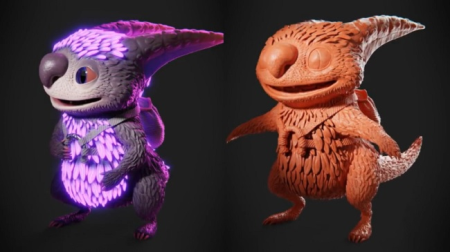
In this chapter, you will learn a creative sculpting workflow where we start with a simple sphere and then step by step build the base sculpting of the creature out of it. We will also learn how to use anatomy references to make the different body parts look more realistic. At the end you will have a finished sculpting without fine details (these will be added in the following chapter).
PART 1+2
/blogs/blogs/tomorrowland2/master_d_sculpting_in_blender_part.3970193.html
/blogs/tomorrowland2/master_d_sculpting_in_blender_part.3970569.html
Homepage
Screenshots


fe6aceac-eac7-40b2-9c91-c805583a554b.png

Master Statistical Process Control in Excel: Control Charts
MP4 | Video: h264, 1280x720 | Audio: AAC, 44.1 KHz, 2 Ch
Genre: eLearning | Language: English + srt | Duration: 20 lectures (3h 32m) | Size: 1.31 GB

Using and Applying Control Charts in Industry
What you'll learn
Statistical Process Control
how to use and interpret Control Charts
how to understand Process Variation
Six Sigma concepts and tools
Process Improvement concepts and tools
Continuous Improvement concepts and tools
how to perform statistical Data Analysis
Statistics
Data Visualizations
Requirements
Basic Excel Skills (Formulas, Charts)
Basic knowledge of statistics (Mean, St. Dev, normal distribution)
Description
Statistical process control and control charts are an important part of operations management. For years, these tools have been used in all kinds of industries including healthcare, manufacturing, software development finance and Human Resources. With the increasing accessibility and the increasing demand for data analysis and data-based decision making, control charting is an important tool to be able to create, understand and apply.
This course will walk through the fundamentals of what control charts are, what insights can be gathered from them and how different control charts can be used to answered different strategic and operational questions.
Each module features several lectures, downloadable lecture files and a quiz to test your learning.
Additionally, The course features an entire module tackling specific real-world cases for using control charts and statistical process control.
Topics covered include
Module 1
The history of statistical process control (SPC) and control charting
Parts of a control chart
Advantages of using control charts
Types of control charts (I chart, U chart, P chart, etc.)
Module 2
Key assumptions
Change in mean signals
External influence signals
Change in process stability/capability signals
Module 3
Exercises for building individual range charts
Exercises for building moving range charts
Exercises for building P charts
Exercises for building U charts
Module 4
Applying control charts to hospital wait times
Applying control charts to manufacturing process control
Applying control charts to A/B testing in software development
Applying control charts to an inspection process
Who this course is for
Six Sigma Green Belt
Six Sigma Yellow Belt
Operations Managers
Process Engineers
Design Engineers
Industrial Engineers
Data Analysts
Statisticians
Quality Engineers
Quality Managers
Homepage


53681077-5002-43d9-84e5-b89a117b81ae.png

SELL MORE: Facebook Ads & Instagram Ads for E-Commerce 2022
Last Update: 1/2022
Duration: 13h 18m | Video: .MP4, 1280x720 30 fps | Audio: AAC, 48 kHz, 2ch | Size: 7.74 GB
Genre: eLearning | Language: English​

MASTER GUIDE TO SELLING WITH FACEBOOK ADS - Sell More, Sell Faster, and Find your PERFECT CUSTOMERS with Conversion Ads.
What you'll learn:
Learn how to SELL MORE using Facebook Ads. Hands on, sales focused training that gives REAL RESULTS from Facebook Conversion & Dynamic Ads, & Ecommerce
Become a Facebook Ads & Facebook Conversion Ads PROFESSIONAL - gain highly in-demand skills & BOOST YOUR BUSINESS, or get hired as an e-commerce PRO
CREATE FACEBOOK CONVERSIONS ADS THAT PUSH YOUR PURCHASES THROUGH THE ROOF!
Integrate your Facebook & Instagram Ads across Multiple Channels to MARKET 10X MORE EFFECTIVELY
Create Custom Audiences and Lookalike Audiences using Facebook Pixel Events -and SAVE TIME, ENERGY, & MONEY!
AVOID THE MOST COMMON ROOKIE MISTAKES THAT DRAIN YOUR FACEBOOK AD BUDGET
Find out how to set up and use the Facebook Carousel for e-commerce to POWER promote your products
Understand the VITAL importance of the three stage Customer Journey to Purchase
Follow my step-by-step PROVEN process to creating a WINNING Facebook Ad
Understand the different Facebook Ads and when and WHY you should use them
Use Facebook Business Manager to EFFICIENTLY MANAGE YOUR FACEBOOK AD CAMPAIGNS AND SAVE TIME AND HASSLE
Discover how to set up the Facebook Pixel CORRECTLY - and avoid one of the most common Facebook Marketing mistakes!
Learn how to utilise the POWER of Facebook Pixel Events - & save time by creating PERFECT AUDIENCES THAT ARE HIGHLY RECEPTIVE TO YOUR ADS
Comprehensive guide to Facebook Ad creation techniques - learn the art of successful Ad Targeting, Retargeting, Placements, & Budgeting
Use creative content like Images, Carousels, Videos & Slideshows to MAXIMISE the effect of ALL your Facebook Ads
Use targeting and retargeting to CAPTURE CUSTOMER INTEREST and precision tailor your marketing
EFFORTLESSLY create Custom Audiences from your email databases & website traffic
Source Lookalike Audiences from Facebook Pages using Facebook Pixel Events
Create Lookalike Audiences from your Custom Audiences - and TURBO CHARGE YOUR REACH
Target Custom and Lookalike Audiences using advanced Constraining techniques I'll personally demonstrate
Use Breakdowns to extract detail from your data and gain INVALUABLE CUSTOMER INSIGHTS
Learn how to SCALE your Facebook Ad campaigns so you get the MOST from your Ad budget
EVERYTHING YOU EVER NEED TO KNOW TO SELL MORE USING FACEBOOK ADS - SIGN UP ONCE & GET CONSTANTLY UPDATED CUTTING-EDGE INSIDER STRATEGIES
No PRIOR EXPERIENCE WITH FACEBOOK ADS REQUIRED. I'll teach you everything from scratch, including how to SET UP your 1st Facebook Dynamic and Conversion Ads.
Requirements
An active internet connection and your smartphone, laptop, or computer.
Determination, willingness to put the knowledge you learn into practice, and a desire to succeed. That's it. We will teach you the rest.
Description
THIS FACEBOOK ADS & INSTAGRAM ADS COURSE FOR E-COMMERCE IS COMPLETELY UPDATED FOR ALL iOS 14.5+ RESTRICTIONS. SETUP CONVERSION API ON WORDPRESS IN 10*MINUTES. UNDERSTAND CUSTOMER JOURNEY & FACEBOOK ADS OBJECTIVES. NEW VIDEOS ABOUT LEADING BIG CAMPAIGNS, CATALOG SALES & COMMERCE MANAGER. NEW QUIZZES MAKING LEARNING FUN!!!
"Excellent Facebook Ads & Instagram Ads Course. Would highly recommend this course to someone who is looking to learn or for that matter even gain knowledge. No institute or a YouTube video teaches this in so much detail as much as Tomas. I haven't come across so far a genuine course teaching material as much as you have designed. Thanks Tomas a ton." Ridhima
"Best course for Facebook e-commerce ads. Really in depth. The teacher answers all your questions. It's worth the money." Efya Thomas
"This course is literally the best one I've ever had. Every detail is helping me to understand the fundamentals of Facebook ads and everything under it. I really recommend this to my colleagues." Christelle
Get MAX conversions with hands on training and learn how to sell using Facebook Dynamic and Conversion Ads. Sell MORE, and sell FASTER, using proven, tested e-commerce strategies developed by an Internet Efficiency Award Winning instructor. Convert more customers on Facebook, Instagram, Shopify, and your e-commerce platform, using the tremendous power of Facebook Ads.
This is real, practical instruction that focuses on sales and results. No waffling theory based on "where to click", just informative step-by-step tuition you'll learn by watching. Discover how to set up Facebook Business Manager to your advantage and harness the full power of Facebook Ads & Instagram Ads, to SELL MORE & SELL FASTER.
Dear Students,
Hi, it's Ing. Tomas Moravek, Internet Efficiency Award-winning digital strategist. I'm excited to introduce my newest course, that will teach you how to use Facebook Ads & Instagram to skyrocket your sales. This course is designed to help you massively boost your conversions, so you get real results from Facebook Ads, Instagram Ads, Shopify, & e-commerce.
You'll be able to watch over my shoulder, as using high quality video explainers, I demonstrate how to sell effectively on Facebook, Instagram, & the web.
Do you want to sell more on Facebook, Instagram and on your website?
Are you struggling to get the high number of conversions you want?
Would you like your business to be much more successful and enjoy many more sales, every day?
If so, that's great news, as I've created this course for YOU.
Sign up and join me today, and I'll take you from Facebook Ads novice to PRO in a matter of weeks. Let me help turn your business from underperforming to thriving, with exclusive techniques you can LEARN FAST and immediately put into practice.
Watch over my shoulder and copy the same strategies I used to become a successful Facebook Conversion Ads & Facebook Dynamic Ads professional.
I'll teach you my AWARD-WINNING TECHNIQUES FOR ULTIMATE ECOMMERCE SUCCESS and show you how to SUPERPOWER YOUR FACEBOOK ADS by integrating them into your Multi-Channel Marketing.
Learn how to use Facebook Ads to sell more effectively on Facebook, Instagram, Shopify and the Web. Power boost your profits, and rocket fuel your Facebook Ad conversion rate.
Sounds great, so what does it involve?
In this course, we'll be taking a really deep dive into the world of Facebook Ads and e-commerce. Using easy-to-follow video tutorials, I'll show you from start to finish how to set up successful Facebook Ads. Including Facebook Dynamic and Facebook Conversion Ads, which will really help you MAX your sales.
When you sign up, you'll get HIGH QUALITY VIDEO EXPLAINERS, blueprints you can follow, and handy To Do Lists you can check off. I've designed this course to make learning the art of Facebook advertising, and selling, a breeze, even if you're a complete novice.
This is real, practical hands on training you can watch, not reams of boring written theory, or hypothetical waffle.
Inside, I'll share with you the same PROVEN TECHNIQUES I personally used to achieve record breaking results from Facebook Ads. I have the proof, AND the receipts - I even won the Internet Efficiency Award for my budget saving Facebook Ad strategies!
If you're serious about being successful, and you have a computer or smart phone and an internet connection, you can jump in and start making money almost immediately. If you're willing to learn and apply the knowledge I share with you, I can teach you the rest.
Okay, I'm interested, so what will I learn exactly?
First, you'll get a comprehensive, high quality video overview that will show you how to CREATE FACEBOOK ADS THAT DELIVER REAL RESULTS. I'll show you step by step, every stage of setting up and running successful ad campaigns on Facebook, from start to finish.
You'll learn how to create your very first Facebook business page and set up the Facebook catalogue. This is important, so you can automate your marketing across different e-commerce channels in the Facebook Audience Network.
I'll take you through the process of creating and setting up an Ads Manager account and I'll show you how to correctly navigate Facebook Ads Manager. I'll walk you through setting up your payment information, ad budget, and ad expenditure limits.
Then I'll take you step-by-step through the architecture of a WINNING FACEBOOK AD CAMPAIGN, so you can see what you need to do and WHY. I'll also show you how to set up and use Facebook Business Manager correctly, so you can efficiently organise and manage your Facebook Ad accounts and Pages.
Select the right Ad to achieve your marketing goals
You'll learn the different types of Facebook Ads, when you should use them, and the different marketing goals the various types of ads Facebook offers. We'll be particularly focusing on the top two ways to sell on Facebook - Facebook Dynamic Ads and Facebook Conversion Ads.
Dynamic Ads
Here you can watch as I show you how to get more from your website traffic and teach you how to activate people's needs, wants, and pain points, using highly relevant, ENGAGING Ads.
Dynamic Ads help you target or re-target people who have already browsed or purchased on your website. With these Ads, Facebook automatically shows the right products to the right audience, based on people's online interests and previous purchasing and browsing behaviour.
Conversion Ads
Conversion Ads require the Facebook Pixel to be set up correctly on your website, which I'll show you how to do in this course. They differ from lead generation Ads because the goal here is to direct people away from social media, to your ecommerce website, where they convert, i.e. make that purchase.
Facebook Carousel for ecommerce
Watch me as I show you how to set up your first Facebook carousel ad for ecommerce. I'll be demonstrating how you can use the carousel format to display up to ten product images or videos in one single ad, and how each image or video can have its own link too.
Carousel Ads are great if you want more space to highlight several products, showcase different product features, or give details about a promotion. They are also a great way to tell your brand story, as you can develop a narrative across each carousel card.
Set up your first Facebook Catalogue
I'll take you through the exact process you need to follow to correctly SET UP YOUR FIRST FACEBOOK CATALOGUE. Once you've done this, you can add new products easily, and will be able to advertise all your items across multiple channels.
The Facebook catalogue works by storing data you've entered about the products you want to advertise on the Facebook network. You can connect your catalogue to different Facebook platforms to display your products to potential customers, including Instagram, the Facebook Dynamic Ad network, Facebook Page Shops, and more.
Discover the customer journey to purchase
The customer journey is a CRITICAL part of the selling process, and I'll be covering the three crucial stages of this process inside. I'll demonstrate how you can use Dynamic and Conversion Ads, to gain your audiences trust and encourage them to purchase.
Find your IDEAL customer
We'll also look at how to target your ads correctly, so you get maximum results from your ad spend.
You'll be able to watch as I demonstrate you how to use Breakdowns to HONE IN ON YOUR PERFECT CUSTOMER. I'll demonstrate how to use targeting and retargeting to attract potential customers who have already expressed an interest in your product, or in a similar product. I'll also show you how to reel customers in who have already visited your website or interacted with your content.
You'll learn how you can use lookalike and custom audiences to reach a wider audience of suitable customers, who will be primed for what you're offering. You'll discover the exact steps needed to create custom audiences, and you'll understand how to create Lookalike Audiences you can advertise to on Facebook and on Instagram.
I'll also be sharing POWERFUL INSIDER TARGETING STRATEGIES that will SUPERPOWER your custom and lookalike audience set up.
As well as this, we'll be using the Audience Insight Tool to help you gain more understanding of your target market. Using this tool will help you to strategize ways to connect with your perfect customer.
Getting the most out of the Facebook Pixel and Facebook Pixel Events
Watch as I show you how to correctly set up and use Facebook Pixel Events, so you can target and retarget better, and catch more interested potential customers.
Setting up the Facebook Pixel and using Facebook Pixel Events are two things many people fail to do correctly. Yet they're so vital for boosting the results you get from Facebook Ads. With my help you'll be able to carry out a complete set up and install, easily, and FAST.
I'll also be demonstrating how to install the Facebook Pixel on Shopify, so you can use that platform to expand your market reach. And you'll learn how to use Facebook Pixel Events to understand and respond to your customer's path to purchase.
Facebook Pixel Events to take your Ad game to the next level
This is a crucial step that will take your sales from flabby to fabulous, as it allows you to tailor your marketing precisely. With it you'll maximise your chances of getting the desired response you want from potential customers.
With Facebook Pixel Events you can automatically create Custom Audiences based on actions people take in your app or on your website. You can then target them with relevant ads whenever they visit Facebook, Instagram, or websites in the Facebook Audience Network. You can also use Facebook Pixel Events to create highly targeted Lookalike audiences, based on actions visitors take on your website or in your app.
I'll be showing you how to use Facebook Pixel Events to GET MORE from your Facebook Ad budget, by greatly expanding your customer reach and selling power.
Facebook Ads Reporting and Attributions
I'll show you how to use Facebook Reporting to create interactive weekly email reports on all your Facebook Ad campaigns. This will help you see how all your Facebook Ads are performing and where your Ad spend is going.
This is invaluable information as you'll be able to funnel your ad spend to where it returns you the best investment. It also helps you identify weak areas, so you can see where you might be going wrong, and where you can improve.
You'll also learn how to harness the power of Facebook Attributions, so you can use data driven tracking models to understand browser's interaction with your ads, across multiple platforms.
Facebook attributions let you gain a greater insight into the customer journey to purchase. This is an awesome tool for any advertiser, as it enables you to measure the incremental impact of each of your ads in your customer's path to conversion.
WAIT THAT'S NOT ALL.
You'll also be getting some amazing bonuses that will really help you to TAKE YOUR MARKETING GAME TO THE NEXT LEVEL.
Convert more, sell FASTER
You'll receive my EXCLUSIVE TECHNIQUES FOR MAXIMISING YOUR AD CONVERSION RATE ON FACEBOOK.
Conversions are hard to get but there are some pro-level tricks that can help you quickly boost your percentages. I'll be sharing what these are, and how you can easily implement them in my course.
Create compelling AD COPY THAT SELLS
You'll also get a comprehensive QUICK START GUIDE TO COPYWRITING MASTERY, so you can create copy that engages right off the bat. This guide was authored by a professional copywriter, who will share the essential secrets you need to know to get people to take the actions you want.
MAKE MANY MORE SALES and get more click throughs, reads, shares, and engagements, with this ultimate BONUS shortcut guide to Copywriting success.
Why do you need this course?
The digital marketplace is changing fast and there's just so much competition out there. Job security is becoming a thing of the past too and being adaptable and multi-skilled is now an essential. If you want to sell online in today's fast paced marketplace, it's not enough anymore just to have a great product or service.
Even if you have professional level qualifications, you still need to KNOW HOW TO SELL. Facebook Ads are an incredibly powerful tool that can help you quickly reach many customers, allowing you to promote to a huge slice of the digital market.
Learning how to do them right will MASSIVELY INCREASE YOUR SALES and will bring an avalanche of highly targeted traffic and conversions to your brand and to your website.
This course has been specifically designed to help anyone who wants to SELL MORE USING FACEBOOK ADS. Learn from watching over my shoulder and copy the same success strategies I share with clients I've helped go from broke to prosperous in just a matter of weeks!
Whether you want to use your newfound skills to gain a better job, strike out on your own and set up as a freelance Facebook Ads consultant, or boost your own business, this course gives you everything you need to succeed.












361cedf1-917d-4a47-a66b-6914bc22ea16.png

Build a side-scrolling space shooter in Unity with Playmaker
MP4 | Video: h264, 1280x720 | Audio: AAC, 44.1 KHz, 2 Ch
Genre: eLearning | Language: English + srt | Duration: 28 lectures (5h 10m) | Size: 3.4 GB

Build a side-scrolling shooter game with an upgrade system using Playmaker
What you'll learn
How to create a fully working game from start to finish
How to create a working upgrade system
How to create a simple but effective save system
How to build a game with no coding needed
Requirements
No programming experience needed. Playmaker and Unity are required with a decent computer or laptop
Description
In this course you will build a side scrolling shooter in Unity using Playmaker a visual coding asset which lets you build games with out needing to know how to write code.
In this course we will cover
How to make our player move
How to shoot
How to create and spawn enemies
How to save high scores and player upgrades
How to create an upgrade system
& more
You will also be able to add controller support to your game to make it work with controllers such as the Xbox series S.
By the end of the course you will have a fully working game which you can build to work on your computer and share it with your friends.
If you have any issues during the course you will be fully supported by me and over time extra lessons may be added showing you how to add new features such as touch support, how to build a version to run a a website, how to build to your phone.
If there are any things you would like to be added to the course let me know and I will try my best to have it added to the course. And if you have any questions contact me and I will do my best to help you.
Who this course is for
beginner to Intermediate Playmaker users
Homepage


Zurück
Oben Unten