• Regeln für den Video-Bereich:

    In den Börsenbereich gehören nur Angebote die bereits den Allgemeinen Regeln entsprechen.

    Einteilung

    - Folgende Formate gehören in die angegeben Bereiche:
    - Filme: Encodierte Filme von BluRay, DVD, R5, TV, Screener sowie Telesyncs im Format DivX, XviD und x264.
    - DVD: Filme im Format DVD5, DVD9 und HD2DVD.
    - HD: Encodierte Filme mit der Auflösung 720p oder darüber von BluRay, DVD, R5, TV, Screener sowie Telesyncs im Format x264.
    - 3D: Encodierte Filme von BluRay, die in einem 3D Format vorliegen. Dies gilt auch für Dokus, Animation usw.
    - Serien: Cartoon/Zeichentrick, Anime, Tutorials, Dokumentationen, Konzerte/Musik, Sonstiges sind demnach in die entsprechenden Bereiche einzuordnen, auch wenn sie beispielsweise im High Definition-Format oder als DVD5/DVD9/HD2DVD vorliegen. Ausnahme 3D.
    - Bereich Englisch: Englische Releases gehören immer in diesen Bereich.
    - Bereich Talk: Der Bereich, in dem über die Releases diskutiert werden kann, darf, soll und erwünscht ist.


    Angebot/Beitrag erstellen

    - Ein Beitrag darf erst dann erstellt werden, wenn der Upload bei mindestens einem OCH komplett ist. Platzhalter sind untersagt.
    - Bei einem Scenerelease hat der Threadtitel ausschließlich aus dem originalen, unveränderten Releasenamen zu bestehen. Es dürfen keine Veränderungen wie z.B. Sterne, kleine Buchstaben o.ä. vorgenommen werden. Ausnahme Serienbörse:
    - Bei einem Sammelthread für eine Staffel entfällt aus dem Releasename natürlich der Name der Folge. Beispiel: Die Simpsons S21 German DVDRip XviD - ITG
    - Dementsprechend sind also u.a. verboten: Erweiterungen wie "Tipp", "empfehlenswert", "only", "reup", usw. / jegliche andere Zusatzinformation oder Ergänzung, welche nicht in obiger Beschreibung zu finden ist.

    Aufbau des Angebots und Threadtitel

    Der Titel nach folgendem Muster erstellt zu werden. <Name> [3D] [Staffel] [German] <Jahr> <Tonspur> [DL] [Auflösung] <Quelle> <Codec> - <Group>
    Beispiel: The Dark Knight German 2008 AC3 DVDRip XviD - iND
    Beispiel: The Dark Knight 2008 DTS DL BDRip x264 - iND
    Beispiel: The Dark Knight 2008 AC3 DL BDRip XviD - iND
    Beispiel: The Dark Knight German 2008 AC3 720p BluRay x264 iND
    Beispiel: The Dark Knight 2008 DTS DL 1080p BluRay x264 iND
    Beispiel: Die Simpsons S01 German AC3 DVDRip XviD iND
    Beispiel: Die Simpsons S20 German AC3 720p BluRay x264 iND
    Beispiel: Sword Art Online II Ger Sub 2014 AAC 1080p WEBRip x264 - peppermint
    Entsprechend sind also u.a. verboten: Sonderzeichen wie Klammern, Sterne, Ausrufezeichen, Unterstriche, Anführungszeichen / Erweiterungen wie "Tipp", "empfehlenswert", "only", "reup", usw. / jegliche andere Zusatzinformation oder Ergänzung, welche nicht in obiger Beschreibung zu finden ist
    Ausnahmen hiervon können in den Bereichen geregelt sein.

    Die Beiträge sollen wie folgt aufgebaut werden:
    Überschrift entspricht dem Threadtitel
    Cover
    kurze Inhaltsbeschreibung
    Format, Größe, Dauer sind gut lesbar für Downloader außerhalb des Spoilers zu vermerken
    Nfo sind immer Anzugeben und selbige immer im Spoiler in Textform.
    Sind keine Nfo vorhanden z.B. Eigenpublikationen, sind im Spoiler folgende Dateiinformationen zusätzlich anzugeben :
    Quelle
    Video (Auflösung und Bitrate)
    Ton (Sprache, Format und Bitrate der einzelnen Spuren)
    Untertitel (sofern vorhanden)
    Hosterangabe in Textform außerhalb eines Spoiler mit allen enthaltenen Hostern.
    Bei SD kann auf diese zusätzlichen Dateiinformationen verzichtet werden.

    Alle benötigten Passwörter sind, sofern vorhanden, in Textform im Angebot anzugeben.
    Spoiler im Spoiler mit Kommentaren :"Schon Bedankt?" sind unerwünscht.


    Releases

    - Sind Retail-Release verfügbar, sind alle anderen Variationen untersagt. Ausnahmen: Alle deutschen Retail-Release sind CUT, in diesem Fall sind dubbed UNCUT-Release zulässig.
    - Im Serien-Bereich gilt speziell: Wenn ein Retail vor Abschluss einer laufenden Staffel erscheint, darf diese Staffel noch zu Ende gebracht werden.62
    - Gleiche Releases sind unbedingt zusammenzufassen. Das bedeutet, es ist zwingend erforderlich, vor dem Erstellen eines Themas per Suchfunktion zu überprüfen, ob bereits ein Beitrag mit demselben Release besteht. Ist dies der Fall, ist der bereits vorhandene Beitrag zu verwenden.
    - P2P und Scene Releases dürfen nicht verändert oder gar unter einem iND Tag eingestellt werden.


    Support, Diskussionen und Suche

    - Supportanfragen sind entweder per PN oder im Bereich Talk zu stellen.
    - Diskussionen und Bewertungen sind im Talk Bereich zu führen. Fragen an die Uploader haben ausschließlich via PN zu erfolgen, und sind in den Angeboten untersagt.
    - Anfragen zu Upload-Wünschen sind nur im Bereich Suche Video erlaubt. Antworten dürfen nur auf Angebote von MyBoerse.bz verlinkt werden.


    Verbote

    - Untersagt sind mehrere Formate in einem einzigen Angebotsthread, wie beispielsweise das gleichzeitige Anbieten von DivX/XviD, 720p und 1080p in einem Thread. Pro Format, Release und Auflösung ist ein eigener Thread zu eröffnen.
    - Grundsätzlich ebenso verboten sind Dupes. Uploader haben sich an geeigneter Stelle darüber zu informieren, ob es sich bei einem Release um ein Dupe handelt.
    - Gefakte, nur teilweise lauffähige oder unvollständige Angebote sind untersagt. Dies gilt auch für eigene Publikationen, die augenscheinlich nicht selbst von z.B. einer DVD gerippt wurden. Laufende Serien, bei denen noch nicht alle Folgen verfügbar sind, dürfen erstellt und regelmäßig geupdatet werden.
    - Untersagt sind Angebote, welche nur und ausschließlich in einer anderen Sprache als deutsch oder englisch vorliegen. Ausnahmen sind VORHER mit den Moderatoren zu klären.


    Verstoß gegen die Regeln

    - Angebote oder Beiträge, die gegen die Forenregeln verstoßen, sind über den "Melden"-Button im Beitrag zu melden.
  • Bitte registriere dich zunächst um Beiträge zu verfassen und externe Links aufzurufen.

++ Premium IPTV ++ 7000 Live Sender ++ UHD Qualität ++ Mediathek mit 18.000 Inhalten ++


VenneTV


Englische Tutorials

Beginner's Guide to Stylized Character Creation for Games

gy3jyh1d4jl6k8rfdlmoywekwp.jpg


Beginner's Guide to Stylized Character Creation for Games
Genre: eLearning | MP4 | Video: h264, 1920x1080 | Audio: AAC, 44.1 KHz
Language: English | VTT | Size: 13 GB | Duration: 33 hours

Learn to make a complete real time stylized character from start to finish with Abraham Leal.

Description
Is this course right for me : If you are a complete beginner looking for a course which teaches you how to create a real time game character and covers everything form Sculpting, retopology and texturing of a game character, specifically stylized kind of character then yes, this course is for you. Basically you want to learn to create a complete real time character from start to finish.

This course is not for me if : If you are an advance artist or student who knows the entire pipeline and looking for a realistic character making course then this is not a course for you. We have other courses which covers that.

Requirements to enrol : This course is for complete beginners that means you don't need any prior knowledge of the used software in this course.

We have covered the basics of each software we have used in this course. But you need to have Zbrush, Maya, Substance Painter, Marmoset Toolbag and Photoshop installed on your PC.

Software we are gonna use : Maya, Zbrush, Marmoset Toolbag, Substance painter and Photoshop.

If it sounds like you then keep reading.

What will you learn :

Character Modeling and Sculpting

Retopology in Maya

Texturing in Substance Painter

Rendering in Marmoset Toolbag

Who am I to teach : My name is Abraham Leal, I am 3D Artist and producer and I have 8 years of experience in the industry. Currently I lead my own studio Critical Hit where we design and produce projects for the entertainment Industry.

Thanks again for watching Nexttut education and as always, enjoy.


What you'll learn

Stylized Character Modelling and Sculpting
Making the High poly character Game ready
Stylized Character Texturing in Substance Painter
Rendering in Marmoset Toolbag


Homepage

91.retopologyofthechec8j6o.jpg


Arduino under the Hood

y1yljbqejrsks6uq2mvmalejoj.jpg


Arduino under the Hood
MP4 | Video: h264, 1280x720 | Audio: AAC, 44.1 KHz, 2 Ch
Genre: eLearning | Language: English + .srt | Duration: 169 lectures (20h 3m) | Size: 5.96 GB

Developing, Debugging and Optimizing the AVR platform for High Performance and Low Power Consumption

What you'll learn:
Program and Software Optimizations to reduce Power Consumption
What is under the hood of Arduino?
Effective Computing for embedded Systems and the Arduino Platform
Pointers to Registers in C
Steps in the GNU Compiler Chain
How to use Makefiles
Communciation Protocols of Embedded Systems
How to debug the AVR using debugWIRE
Programming the AVR using ISP
Fuses and Locks of the AVR

Requirements
Working Knowledge in C or Arduino
Soldering/Breadboard Skills for the Examples and Exercises
Able to work with a Multimeter and read Circuit Diagrams


Description
As one of the most extensive course available: we will be looking at everything and more under the hood of Arduino. In its core the ATmega328P MCU integrates many features, that are not exposed through the Arduino library. While learning how the periphery works, the student will be able to write code exhibiting high performance at a low power consumption. Embedded systems deployed in the field and powered by small batteries can run and collect data for years.

The big advantage of the AVR platform is that many concepts introduced in this course are also applicable to other MCUs. Therefore an entire portfolio of MCUs ranging from the small ATtiny to the larger ATmega series becomes accessible. The ATmega328P used in this course is just an example and the student is encouraged to obtain programming experience for embedded systems not limited to Arduino. This is motivated by practical sessions as well as exercises in which a real world problems are to be solved. In case, questions during implementation arise, the student is able to peek at hints and tips and if nothing works, also the solutions are provided with plenty of comments in the source code.

In this course the following topics are covered, which focus on the practical aspects and what a concept can be used for. In addition, the course does not follow a particular outline and the topics can be taken in any order based on the interest and needs. The covered topics include:

GNU Compiler Collection and what happens at every step and why

A small introduction into C and pointers

Moving from the Ardiuno library to AVR: Less luxury, faster execution, lesser resources

How to compile with Makefiles? Targets, rules and shortcuts

Easy mistakes in C: In C the developer has great power to implement the functionality. But with great power, comes also great responsibility. How to avoid some of the common mistakes and reduce the area for attack vectors (this is not limited to Embedded Systems)?

Peripheries:

Timers, Counters, and Pulse Width Modulation

Interrupts

Communication Protocols

UART/USART

I2C/TWI

SPI

DHT and 1-Wire

USI

How to mimic other, former incompatible, protocols?

Analog Digital Converter

How does it work?

Measuring the Temperature without external components

Measuring Battery Level with the ADC

Analog Comparator

Non-volatile Memories

Flash

How to use the flash (program memory) for constants?

How to use the flash while executing a program?

EEPROM

Fuses

Running the AVR on a Breadboard.

Saving power

Sleeping

Dynamic Clock Frequency

Turning off unnecessary Components

Wake-up Sources

Debugging (with practical examples)

Simulators

JTAG

debugWIRE

After completing this course, the successful student will have the experience not only to evaluate existing software, but also create implementations which are highly optimized to be deployed on small microcontrollers to squeeze out every quanta of performance and battery life.

Who this course is for
Professional Developers curious about various Program Optimizations for Embedded Systems
Embedded System and IoT Engineers looking for tips how to reduce Power Consumption and extend Battery Life for the Arduinoi Platform
Entrepreneurs who want to lauch a product or start-up

Homepage

1.clockfrequencyvsvccpcjvv.jpg


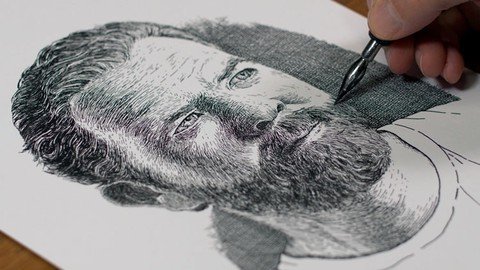
Subjects with Pen and Ink

z4mcfux55je4voyf64ktfukj76.jpg


Subjects with Pen and Ink
Genre: eLearning | MP4 | Video: h264, 1280x720 | Audio: aac, 48000 Hz
Language: English | VTT | Size: 10.4 GB | Duration: 8h 19m


What you'll learn
The basic materials, tools, and surfaces for working with pen and ink.
Application techniques including hatching, cross hatching, scribbling, stippling, and ink wash.
How to draw any subject with basic shapes to ensure accuracy.
How to adjust line quality to create the illusion of form.
How to apply ink with technical drawing pens and nib pens.
How to apply ink with a brush in order to create a variety of different values.
How to draw still life objects with pen and ink.
How to create different textures with pen and ink.
How to draw a variety of different foods with pen and ink.
How to draw a variety of animals with pen and ink.
How to draw a variety of landscape elements with pen and ink.
How to draw a portrait with pen and ink.
How to draw the figure with pen and ink.
How to combine ink wash with traditional pen and ink techniques.
How to create the illusion of form and light by manipulating line.
Requirements
A willingness to learn and practice drawing.

Description
In this course, we take a look at drawing 31 different subjects with pen and ink. Each series within the course features a different overarching subject with several different approaches and methods for applying pen and ink. Subjects covered include still life objects, flowers, food, animals, landscapes, and people all while covering a variety of pen and ink methods including hatching, cross hatching, stippling, ink wash and more. This course is truly a master-class on the medium of pen and ink.


Who this course is for:
Beginner and intermediate artists wishing to improve their pen and ink drawing skills.


Homepage

1.introductions3hj46.jpg


VHDL for an FPGA Engineer with Vivado Design Suite

bhwt06lczlr4thmhgrytufkjiy.jpg


VHDL for an FPGA Engineer with Vivado Design Suite
Genre: eLearning | MP4 | Video: h264, 1280x720 | Audio: aac, 44100 Hz
Language: English | SRT | Size: 6.01 GB | Duration: 18h 45m


What you'll learn
Fundamentals of VHDL Programming that will help to ace RTL Engineer Job Interviews.
Understand Vivado Design Suite flow for Digital System Design.
How to write an RTL for Synthesis
Different Modelling Styles in Hardware Description Language , Concurrent and Sequential Statements in VHDL
How to use Xilinx IP's and create Custom IP's.
IP integrator Design flow of the Vivado.
Writing VHDL Test benches.
Hardware Debugging in Vivado viz. Integrated Logic Analyzer, Virtual I/O.
From Zero to Hero in VHDL
Requirements
Fundamental of Digital Circuit will give an added advantages.

Description
This Course will teach you Fundamentals of VHDL which every VLSI Job aspirant must know before appearing for the Recruitment process or anyone interested in FPGA's. The course will explore various VHDL constructs through real system examples along with assignments, quizzes to enhance learning. Each module consists of some discussion on common interview questions to create a framework for Interview preparation. The entire course is taught using the Xilinx Vivado Design Suite to give practical exposure with Industry's most popular Toolsets.


Who this course is for:
VLSI Job Seeker/ Graduate student looking to pursue career as RTL Engineer/ Design Engineer/ Verification Engineer.
Anyone interested to learn Xilinx FPGA/ Vivado Design Suite/ VHDL Hardware Description Language
Anyone interested to start career in ASIC/ VLSI domain.


Homepage

089completefpgadesignxyjxv.jpg


Verilog for an FPGA Engineer with Xilinx Vivado Design Suite

qy2yzskgtnqgdqhrgrtv69gkhk.jpg


Verilog for an FPGA Engineer with Xilinx Vivado Design Suite
Genre: eLearning | MP4 | Video: h264, 1280x720 | Audio: aac, 44100 Hz
Language: English | SRT | Size: 5.58 GB | Duration: 19h 25m


What you'll learn
Fundamentals of Verilog Programming that will help to ace RTL Engineer Job Interviews.
Understand Vivado Design Suite flow for Digital System Design.
Hardware Debugging in Vivado viz. Integrated Logic Analyzer, Virtual I/O.
Different Modelling Styles in Hardware Description Language.
How to use Xilinx IP's and create Custom IP's.
IP integrator Design flow of the Vivado.
Writing Verilog Test benches.
Design of some real world projects such as : PMOD DA4 DAC interface, Function Generator, Small Processor Architecture, UART Interface, PWM, BIST for Development boards and many more.
Common Interview Questions

Requirements
Fundamental of Digital Circuit will give an added advantages.


Description
This Course will teach you Fundamentals of Verilog which every VLSI Job aspirant must know before appearing for the Recruitment process or anyone interested in FPGA's. The course will explore various Verilog constructs through real system examples along with assignments, quizzes to enhance learning. Each module consists of some discussion on common interview questions to create a framework for Interview preparation. The entire course is taught using the Xilinx Vivado Design Suite to give practical exposure with Industry's most popular Toolsets.


Who this course is for:
VLSI Job Seeker/ Graduate student looking to pursue career as RTL Engineer/ Design Engineer/ Verification Engineer.
Anyone interested to learn Xilinx FPGA/ Vivado Design Suite/ Verilog Hardware Description Language
Anyone interested to start career in ASIC/ VLSI domain.


Homepage

051operatorsforperforygjeo.jpg


The Complete Guide to Bubble Visual Programming

pbmfvrl2airckovgxgcgflzjtq.jpg


The Complete Guide to Bubble Visual Programming
MP4 | Video: h264, 1280x720 | Audio: AAC, 44.1 KHz, 2 Ch
Genre: eLearning | Language: English + .srt | Duration: 160 lectures (15h 45m) | Size: 5.88 GB

Learn how to build sophisticated web applications like AirBnB Yelp Twitter with no code using Bubble Visual Programming

What you'll learn:
Bubble Visual Programming ecosystem to create websites and web applications using a No-Code platform
Build functional and professional grade web applications, websites, and apps
All elements of Bubble, including responsive design, databases, workflows, users, and much more
Build a fully functional project and task management web application with a complete walkthrough
Build a thin version of AirBnB, complete with Google Maps integration and user-to-user messaging
Responsive web design that adapts to the user's screen and looks beautiful
Database management system that easily stores, organizes, and shows all your data
Workflow management system that allows complex interaction between the front-end and back-end, similar to what many other web applications like Twitter and Yelp do
How to go from having an idea to building a fully functional MVP, with many examples in between
Interacting with the Bubble community to continue learning and building your skillset

Requirements
No Bubble or web development experienced is required


Description
Build amazing professional web applications like Twitter, Asana, Todoist, AirBnB, Trip Advisor, Yelp and launch your startup, SaaS, or any web product in days instead of months with no code using the Bubble ecosystem

Learn from over 16 hours worth of relevant instructional video content on Bubble to become an expert and start building today! No coding required!

Are you an entrepreneur who wants to build the next big thing without a full-time developer? Do you want to quickly create an MVP for your startup idea, or quickly build your side hustle? Then harness the power of No-Code web application development using Bubble.

Bubble is rated as the #1 No-Code Tool of 2020. Apps built on Bubble have raised more than $1B dollars (see: Plato, Dividend Finance, Plato, all of which were made using Bubble). With Bubble, you can create everything from sophisticated marketplaces like AirBnb, to SaaS like Trello, to simple landing pages. This is No-Code development at its finest!

People use Bubble to quickly create professional web applications. In fact, one student used Bubble to launched their application in only 3 days, and then subsequently sold it to USA Today (see: GiveLocal).

This course is the only comprehensive guide you'll ever need to Bubble. It covers everything from Beginner topics like pages, inputs, and elements to more advanced topics like plugin implementation, messaging, and data manipulation. The course also takes you step-by-step and assumes you have no experience at all with building web applications or with Bubble.

The course is designed so you become an expert at Bubble. We first learn all the building blocks required, and then create our own functional Bubble applications from complete scratch. We also continuously update the course!

If you're looking for something that will teach you how to create professional grade web applications using no-code from beginner to advanced, then this is the course for you!

What is Bubble?

Bubble is a no-code platform that allows you to build sophisticated and professional-grade web applications. It's the best way to develop your application in days, not months. It contains responsive web design, element manipulation, database functionality, workflow management, and a whole host of community-built plugins and third-party APIs that can enhance your application like Stripe, Plaid, and more! Bubble has been rated as the #1 No-Code platform of 2020.

What are the main features of Bubble? / Why should I learn Bubble?

No-Code platform: Bubble uses a drag-and-drop and logic gates system instead of complicated code, but is still powerful and comprehensive to run AirBnB or even Facebook; it's the next evolution of web development.

Build it quickly: Since Bubble is a No-Code platform, you can make your application in days and not months

Total freedom: Bubble allows you total 100% freedom with your website - modify, add, delete, and change anything and everything about your web application

Sophisticated / comprehensive: Bubble comes with a robust scalable database management system, and workflow integration that allows you to create virtually any application - it also contains Responsive Design and so is lightning fast!

Collaboration: Bubble comes with its own version control system, that lets you manage changes and lets you collaborate with up to 40 other individuals

Community of plugins: Plugins that are developed by the Bubble community extend your application by allowing third-party elements, like payment, SEO, analytics, and more! You can even integrate with your own REST API.

Why take this course?

Comprehensive guide: This is the only 100% start to finish, zero to hero, basic to advanced guide on Bubble. This course assumes you have zero experience with Bubble and develops you to a Bubble power user!

Instructional with examples: The course is structured in a way to maximize your learning. We first go through learning "Building Blocks" where we develop our Bubble toolkit. We then apply the toolkit to future modules through app development from complete scratch.

Great resources: There are hours of content and resources in this course. There is more than 16 hours of video content available. You also have lifetime access to not only the videos, but to me as well through the Q&A feature

Course and Module Overview

Introduction to Bubble: In this section, you will learn everything about Bubble! What it is, when to use it, what it can and cannot do, and we will go through the course overview

BB - Environment Setup: In this section, you will set up your Bubble environment, which means creating a free Bubble account and entering the Bubble environment

BB - Editor: In this section, you will learn about the Bubble editor

BB - Pages and Elements: In this section, you will learn how to set up your Bubble pages and how to add Bubble elements to your pages

BB - Responsive Design: In this section, you will learn about the responsive design features that are available with Bubble

BB - Data: In this section, you will learn how Bubble manages its data environment

BB - Workflows: In this section, you will learn about Bubble workflows and how they can be used to enhance your Bubble application

BB - Design with Data: In this section, you will learn how to make web pages by mixing design principles with data and workflows, including repeating groups

BB - Users: In this section, you will learn about Bubble's default and powerful user management system

BB - Settings and Publishing: In this section, you will change your Bubble settings, and how to publish your web application

BB - Advanced Features and Plugins: In this section, you will learn about some of the advanced features with Bubble like plugins

App - ProjectIO: In this section, we will build a project and task management application from scratch

App - BubbleBnB: In this section, we will build a very thin version of AirBnB, complete with Google Maps integration, messaging, and more, and all from scratch

Conclusion: In this section, we'll wrap everything up and talk about next steps

We're looking forward to having you in the course and hope you earn the certificate. Please let me to know if you have any questions!

Music: bensound

Who this course is for
Entrepreneurs who want to build sophisticated web applications and websites quickly and without code
Students who want to learn a revolutionary new way to create web applications
Individuals who want to create and launch an MVP
Individuals who do not know how to code and want to focus on function over form
People who want to create any SaaS product
Entrepreneurs who want to create an online MVP to secure funding
Anybody who wants to turn a startup idea into reality
Beginner, intermediate, and advanced users of Bubble

Homepage

4.makinguserprofilechogk85.jpg


Step By Step VHDL for Xilinx FPGA + Career Options :Overview

nvepadou9piwnum4sruhutzkqr.jpg


Step By Step VHDL for Xilinx FPGA + Career Options :Overview
Genre: eLearning | MP4 | Video: h264, 1280x720 | Audio: aac, 44100 Hz
Language: English | SRT | Size: 12.6 GB | Duration: 19h 1m


What you'll learn
VHDL Programming Synthesis & Simulation Xilinx FPGA & CPLD Devices Xilinx ISE Design Suite & Implementation
Requirements
Digitial Logic Design Concepts Basic knowledge of any Programming Language ( Like Ex. C Programming )

Description
Description : Contents of this PCB Design Course are developed using a VHDL language for Xilinx ISE Design Suite , Design Software , for Xilinx based FPGAs & CPLDs devices . This Tool supports to Windows & Linux Platforms . The VHDL Programs runs on all Editions of Xilinx ISE Design Suite , including Xilinx ISE Webpack Edition , which is a Free Download Edition after completing successful Registration procedure with Xilinx ( On Xilinx Website ) .

Course Learning Duration - You can Learn VHDL Programming within 2 (Two ) Days , provided you have prior knowledge of Digital Electronics Fundamentals of Combinational & Sequential Logic Design & any basic level knowledge of Programming language like C Programming .

Video Content of VHDL Programs is explained in a Step by Step manner ( Like VHDL Source Code , VHDL Synthesis ( RTL & Technology Schematic ) , Test Bench & Behavioral Simulation ) and with Short Video sessions in a simple way for better understanding , even for the Beginners .

This Course is mainly designed for Beginners / Polytechnic & Engineering Students / University Students / Hobbyists .

In this course you will learn about --

About IC Technology

Digital Logic Design Concepts

Digital Logic Families

VHDL Language Basics - Reserve Words ( Keywords ) , Identifiers , Operators , DataTypes , Data Objects .

VHDL Structure - Entity , Architecture , Library, Package .

VHDL Process .

VHDL - Sequential & Concurrent Statements .

Target Device Selection ( FPGA or CPLD )

VHDL Program ( Design / Source Code )

VHDL Test bench ( Source Code )

Simulation Using ISim

Synthesis ( RTL & Technology Schematic )

Applying Constraints ( Pin Locking Constraints & Timing Constraints )

Design Implementation ( Post Route Timing Simulation ) ( Static Timing )

VHDL Programming Examples :

- Logic Gates

- MUX (Multiplexers )

- Decoder

- Encoder

- Half Adder & Full Adder

- VHDL Behavioral Modeling Example

- VHDL Data Flow Modeling Example

- VHDL Structural Modeling Example

- D Latch

- D Flip-Flop

- D Flip-Flop ( with Synchronous Reset & with Asynchronous Reset )

- FSM - Finite state Machine using VHDL

- Counters ( Binary Up Counter , Binary Down Counter & Binary Up-Down Counter )

- Shift Registers ( SISO, SIPO , PISO & PIPO Type )

- ALU - Arithmetic & Logic Unit

- Memory Unit - RAM

- Memory Unit - ROM

- VHDL Project Integration

Instructor has more than a 22 Years of Design / Training Experience after M.Tech. in Electronics Design & Technology , which includes the Experience in Electronic Circuit Design , Embedded System , VLSI - VHDL & Verilog Programming for Xilinx FPGAs , CPLDs using Xilinx ISE Tool / Xilinx Vivado Tool , PSOC1 using Cypress PSOC Designer & PSOC3 /PSOC4 using Cypress PSOC Creator , Microcontroller Programming for MCS-51 (8051 ) family using Keil uVision 4 , Programming ATMega 16/32/128 using Atmel AVR Studio , Programming Microchip PIC 16/18 using MPLAB , Arduino Programming for Arduino Uno , MSP430 of Texas Instruments with Energia , Raspberry Pi & Raspbian Linux , Python Programming with Python 3.8 ( IDLE) , Python Thonny , Python Pycharm , Anaconda Navigator - Jupyter Notebook , Spyder Python , Google Colab , Crouzet Millenium 3 for PLC Programming & also PCB design which includes PCB Softwares such as EasyEDA , KiCad 5.1 , Fritzing & Express PCB .


Who this course is for:
Beginners , Hobbyists , Teachers & anyone who is interested to Learn to Create Digital Logic Designs , using FPGA / CPLD . University Students , Students from Engineering colleges & Polytechnic Institutes , who want to create the Design for their Programmable Electronics based Academic Project . Anyone who wants to make career in FPGA , VHDL Programming . Electronic Designers / Embedded Engineers / Electronic Circuit Design Professionals , who are new to VHDL Programming & FPGA / CPLD Device Architectures .


Homepage

001ictechnologyintrodu9j99.jpg


PCB Design +PCB For MicroController System + MultiLayer PCB

j5bqgtmp6dbvxvhdskhcw6hjsa.jpg


PCB Design +PCB For MicroController System + MultiLayer PCB
Genre: eLearning | MP4 | Video: h264, 1280x720 | Audio: aac, 48000 Hz
Language: English | SRT | Size: 10.5 GB | Duration: 13h 9m


What you'll learn
Designing Single Layer , Double Layer & MultiLayer PCBs using EasyEDA PCB Tool & considering General Guidelines for Layout / PCB Design & with DRCs. Designing Surface Mount PCBs ( Single Layer & Double Layer ) Creating Library parts like Custom Components ,Schematic Modules & PCB Modules . Designing Big PCB Project for Microcontroller Based system Design . Generating Artwork Files & Creating small in-house PCB Fabrication setup . Generating Gerber File & Ordering PCBs and also BOM for Ordering Components
Requirements
Basic Understanding of Electronic Components . Basic Knowledge of Computer & Internet . Electronic Circuit concepts is advantageous . Some Patience !

Description
Hello Dear Student ,

I welcome you , for Enrolling this Course .

Description : Contents of this PCB Design Course are developed using a very Popular EasyEDA PCB Design Software , which is a Free , Web based ( OnLine ) Tool & it has huge Components & Part Library. EasyEDA PCB Tool supports to Windows platform , Linux O.S. & also runs on Mac & Android platforms,as long as there is one browser on the O.S. & connecting to Internet.

Course Learning Duration - You need to spend Two Full working Days ( Approximately 6 Hours per Day - i.e. Approx. Total 12 Hours ) to Start Designing Professional PCBs , very comfortably , considering even if you don't have any background of PCB designing .

This Course is designed for Beginners , with wide content coverage , starting from the basics of PCB Design upto considering the various aspects of Electronics required for PCB Design .

This Course is extended to Intermediate & Expert Level also , by updating the Contents by adding MultiLayer PCB Design.

Video Contents for every stages for Professional PCB Designs are explained with separate & Short Video sessions in a simple way for better understanding,even for the Beginners .

- Schematic Design Stage

- PCB Layout Design Guidelines ( Component Placement Guidelines )

- PCB Layout Design ( Component Placement Stage )

- PCB Design Guidelines ( Track Routing Guidelines , DRCs )

- PCB Design ( Track Routing Stage )

After observing Video sessions & also for the practice purpose , I have added the PDF / Text Documents , called as - "Quick Reference Guide" , which explains the Step by Step Designing Procedure for Single Layer , Double Layer & MultiLayer PCBs for some Examples . Separate Quick Reference Guide is provided to each type of PCBs .

Some Quiz / MCQs - Multiple Choice Questions are also incorporated by adding the separate Document for its Answer Key .

In this course you will learn about -

- Creating Single Layer PCB Design - Two Examples

- Creating Single Layer Surface Mount ( SMT / SMD ) PCB Design - Example .

- Creating Single Layer PCB Design with AutoRouter - Example

- Creating Double Layer PCB Design - Two Examples

- Creating Double Layer Surface Mount ( SMT / SMD ) PCB Design - Example

- Creating Double Layer PCB Design Example with AutoRouter - Example

- Creating MultiLayer PCB Design - Example

- Creating Schematic Module - Example

- Creating PCB Module - Example

- Creating Schematic Symbol - Example

- Creating Footprint - Example

- Creating Custom Component - Example

- Creating Big PCB Project - Microcontroller ( 8051 ) based System Design

( which is a Multisheet Design having Schematic Modules

> 8051 Micro-controller with Clock & Reset Circuit

> DC Power Supply

> ADC 0804 Circuit

> 16 x 2 Char. LCD Display )

For Entrepreneurs / who want to start the Business , I have explained the generation of Artwork Files & small Setup for PCB fabrication ( For Single Layer PCB ) .

For Electronics Professionals / Designers , I have explained the Sizable PCB Project of Microcontoller based System Design . Also PCB Layout Guidelines / PCB Design Guidelines ( Component Placement & Track Routing Guidelines ), DRCs , Crosstalk Issues , Maximizing Grounding , MultiLayer Stackup Planning , Multisheet design etc. will be useful information .

Instructor has more than a 22 Years of Design Experience after M.Tech. in Electronics Design & Technology , which includes the Experience in Electronic Circuit Design , Embedded System / VLSI- FPGA & CPLD Design . He has experience on a variety of EDA tools & Programming Softwares / Platforms like Python3.8 ( IDLE ) , Thonny , Google Colab , Anaconda Navigator - Jupyter Notebook , Spyder Python , Xilinx ISE Tool & Xilinx Vivado Tool for Xilinx FPGAs SPARTAN6 / Artix -7 & CPLDs XC9572 / 108 with VHDL & Verilog Programming , Cypress PSOC Designer for PSOC1 & PSOC Creator for PSOC 3 & PSOC 4 , Keil uVision4 for MCS-51 Family Microcontrollers , Atmel AVR Studio for ATMega32 /128 Microcontrollers , Microchip MPLAB for PIC 16 / PIC 18 Microcontrollers , Crouzet Millenium3 for PLCs Ladder programming , FBD , Arduino CC s/w for Arduino Uno Boards , Energia for MSP430 from Texas Instruments and also which includes PCB Softwares such as EasyEDA , KiCad ,Fritzing & Express PCB etc .


Who this course is for:
Initially Contents were for Basic Level & then Updated the Contents for - All Levels - Beginners , Hobbyists , Teachers who are interested to Learn to Create Professional PCB Designs , by applying knowledge of Electronics . University Students , Students from Engineering colleges & Polytechnic Institutes , who want to Design the PCB for their Electronics based Academic Project . Anyone who wants to make career in PCB design . Entrepreneurs / who want to start Business in PCB Design & Fabrication setup with Low cost for Single Layer PCBs. Electronic Designers / Embedded Engineers / Electronic Circuit Design Professionals , who are new to PCB Design field .
Contents are Extended for Intermediate & Advanced Level , by adding MultiLayer PCB Design


Homepage

018singlelayerpcbdesifgjio.jpg


Microservicios con ASP.NET Core,Docker y RabbitMQ

pubbrvuswz12n30vdhawb9vjqe.jpg


Microservicios con ASP.NET Core,Docker y RabbitMQ
Genre: eLearning | MP4 | Video: h264, 1280x720 | Audio: aac, 44100 Hz
Language: Spanish | SRT | Size: 6.27 GB | Duration: 13h 52m


What you'll learn
Creacion de Microservicios usando ASP NET Core
Creacion de Microservicios usando Postgresql
Creacion de Microservicios usando MySql
Creacion de Microservicios usando Sql Server
Persistencia a multiples bases de datos usando Entity Framework Core
Creacion de bases de datos en Microsoft Azure
Implementacion de continous integration utilizando Git y Microsoft Azure
Implementacion de pipelines en Microsoft Azure
Creacion de Endpoints usando Microservices y ASP NET Core
Creacion de Docker containers

Requirements
Conocimientos de ASP NET Core
Conocimientos de Entity Framework Core


Description
Aprende a crear Microservicios ASP.NET Core utilizando Docker Containers, RabbitMQ, Postgresql, MySql y SQL Server!

Te enseñaremos desde cero como crear arquitecturas escalables usando Entity Framework Core, Web Api, ASP.NET Core y el pattern CQRS, aprenderas paso a paso como implementar tus microservicios NET Core en Docker Containers.

Implementamos comunicación asincrona entre microservicios usando RabbitMQ y Docker Containers.

Estos seran algunos de los temas que veras en el curso:

Modelo y Arquitectura de Microservices en .NET Core

Comunicacion asincrona con RabbitMQ

Deployment de Microservicios NET Core en Docker Containers

Continuous Integration (CI) Net Core/Github/Azure DevOps Pipelines

Entity Framework Core

ASP.NET Core

Unit Test en Microservices

Code First y Entity Framework Core

Deploy de una microservice en Docker

MySql integrado en una Microservice

Postgresql integrado en una Microservice

SQL Server integrado en una Microservice

Protocolos de comunicación entre Microservices

Arquitectura CQRS

Deploy de Dockers Containers para servicios de Postgresql, MySql y SQL Server.


Who this course is for:
Developers


Homepage

003instalacionde.netc51jei.jpg


Juniper Jncia-Junos (JN0-103) with Labs

yb0cwflo5xqtberh15zsc9vkqj.jpg


Juniper Jncia-Junos (JN0-103) with Labs
Genre: eLearning | MP4 | Video: h264, 1280x720 | Audio: aac, 44100 Hz
Language: English | VTT | Size: 9.57 GB | Duration: 10h 57m


What you'll learn
Learn the topics for the JNCIA-JUNOS JN0-103
Learn all JNCIA concepts and apply them in practical LABS
Be ready for the Juniper JN0-103 JNCIA exam
Requirements
No prerequisites required (Basic Networking lectures are provided as bonus lectures in this course)
Preferably CCNA level (not required)

Description
Juniper is considered one of the biggest networking company which is in direct competition with Cisco in the market. As having a big market share, learning how to configure Juniper devices is becoming an essence for many network engineers.

The 1st level that you need to start with in Juniper world is the JNCIA-JUNOS track which is based on the exam number JN0-103. For this reason, I have designed this course to explain to you all concepts in the JNCIA track and to apply them on practical LABS so you can repeat them yourself to be more familiar with Junos command line and be ready for the JN0-103 exam.

In this course, I will explain to you everything you need to know in the JNCIA level. Topics that I am going to cover in this course are:

Junos OS Fundamentals

User Interfaces

Configuration Basics

Operational Monitoring and Maintenance

Routing Fundamentals

Routing Policy and Firewall Filters

To be able to follow this course, you require 2 Juniper SRX routers. You can buy used ones if you don't have them, and 2 x SRX100 will be more than enough.

Finally, If you want to be familiar with Juniper Junos OS and be ready for the JNCIA JN0-103 exam then I am sure that my course will be a good match for you and will help you to pass the exam and become JNCIA certified engineer.


Who this course is for:
Network Engineers
Students learning Juniper


Homepage

8.understandconfigural2jow.jpg


Don's Introduction to Ethical Hacking for Beginners

myk4cjw8uu5afyd0sd9khb9j10.jpg


Don's Introduction to Ethical Hacking for Beginners
Genre: eLearning | MP4 | Video: h264, 1280x720 | Audio: aac, 44100 Hz
Language: English | VTT | Size: 9.60 GB | Duration: 11h 50m


What you'll learn
Ethical Hacking
Penetration Testing
Virtual machines
Hacker hats
BASH
BASH Scripting
Netcat
Nmap
Passive Reconnaissance
Email enumeration
WHOIS Fingerprinting
DNS Enumeration
Active Reconnaissance
Dirb
Dirbuster
Google hacking
Metadata
Public password databreaches
Security Vulnerabilities - Heartbleed
Security Vulnerabilities - Shellshock
Security Vulnerabilities - Dirty COW
Nikto
Arachni
Wordpress Scanning
Nessus
Metasploit
Meterpreter
MSF Venom
EternalBlue Exploitation
Web / HTTP / HTML
SQL Injection
Cross-Site Scripting
HTML Injection
Burpsuite
Session Hijacking
Session Fixation
Local File Include
Remote File Include
OS Command Injection
Cross-Site Request Forgery
Direct Object Reference
Buffer Overflow
Denial of Service attacks
Linux Password Cracking
Windows Password Cracking
Linux Privilege Escalation
Windows Privilege Escalation
BurpSuite
Requirements
No prior knowledge expected! This course starts from ground-zero.

Description
Hello!

Don here and I work as a penetration tester / ethical hacking. A LOT of people interested in jumping into my world ask me "Where do I even start?"

So I've built a hands-on practical subject to address this question. Exploitation, Website hacking, SQLi, XSS, Buffer Overflow, Metasploit, Privilege Escalation & More.

Worried about the pre-requisites? Don't be! I've assumed a ground-zero no knowledge approach to this and include introduce the technologies before demonstrating how to break them.

The best part? I'll do the exploitation right in front of you, and then you can do it yourself against Virtual Machines I've built for you.


Who this course is for:
Beginners who want to dip their toes into the world of ethical hacking and peak behind the curtain


Homepage

2.nmapscantechniquess1ljao.jpg


Data Analysis Fundamentals with Excel

007fb3c231k7z.jpg


Data Analysis Fundamentals with Excel
.MP4, AVC, 1280x720, 30 fps | English, AAC, 2 Ch | 8h | 12.57 GB
Instructors: Chris Sorensen, Ammul Shergill

This video course takes youthe business user, business analyst, or data analystthrough an end-to-end solution for collecting, cleaning, importing, managing, and sharing data for operational and reporting purposes using Excel.

A story-based approach is used to teach you the data and analytics lifecycle. Learn the how and why behind the options available to you in Excel. These best practices go beyond just tips and tricks; learn pros and cons of the techniques to make you a more proficient analyst.

Instructors Chris Sorensen and Ammul Shergill have decades of experience helping companies and business professionals get the most out of their data. Together, Chris and Ammul will be your guides as you learn the fundamentals of data analysis with Excel and gain skills to design, build, and share Excel solutions.

Skill Level

Beginner-Intermediate

Learn How To

* Get and transform data
* Structure data for analysis in Excel
* Design data models
* Write formulas
* Create PivotTables and use PivotTable commands
* Create and format PivotCharts
* Build a reusable interactive dashboard
* Present meaningful, accessible analysis for effective decision making

Who Should Take This Course

* Excel users who need to level-up their analytics skills
* Professionals who need to produce accurate and timely analysis of business performance
* Business analysts who want to work on an end-to-end data analysis use case with Excel
* Business analysts who want to learn best practices for building sustainable data models
* MBAs who need to learn or refresh their knowledge of analyzing data with Excel

Course Requirements

This video assumes you have a basic understanding of Microsoft Excel, including menus and navigation, workbook components, and formulas.

More Info

1dataanalysisfundameno5kaw.jpg


Zurück
Oben Unten