• Regeln für den Video-Bereich:

    In den Börsenbereich gehören nur Angebote die bereits den Allgemeinen Regeln entsprechen.

    Einteilung

    - Folgende Formate gehören in die angegeben Bereiche:
    - Filme: Encodierte Filme von BluRay, DVD, R5, TV, Screener sowie Telesyncs im Format DivX, XviD und x264.
    - DVD: Filme im Format DVD5, DVD9 und HD2DVD.
    - HD: Encodierte Filme mit der Auflösung 720p oder darüber von BluRay, DVD, R5, TV, Screener sowie Telesyncs im Format x264.
    - 3D: Encodierte Filme von BluRay, die in einem 3D Format vorliegen. Dies gilt auch für Dokus, Animation usw.
    - Serien: Cartoon/Zeichentrick, Anime, Tutorials, Dokumentationen, Konzerte/Musik, Sonstiges sind demnach in die entsprechenden Bereiche einzuordnen, auch wenn sie beispielsweise im High Definition-Format oder als DVD5/DVD9/HD2DVD vorliegen. Ausnahme 3D.
    - Bereich Englisch: Englische Releases gehören immer in diesen Bereich.
    - Bereich Talk: Der Bereich, in dem über die Releases diskutiert werden kann, darf, soll und erwünscht ist.


    Angebot/Beitrag erstellen

    - Ein Beitrag darf erst dann erstellt werden, wenn der Upload bei mindestens einem OCH komplett ist. Platzhalter sind untersagt.
    - Bei einem Scenerelease hat der Threadtitel ausschließlich aus dem originalen, unveränderten Releasenamen zu bestehen. Es dürfen keine Veränderungen wie z.B. Sterne, kleine Buchstaben o.ä. vorgenommen werden. Ausnahme Serienbörse:
    - Bei einem Sammelthread für eine Staffel entfällt aus dem Releasename natürlich der Name der Folge. Beispiel: Die Simpsons S21 German DVDRip XviD - ITG
    - Dementsprechend sind also u.a. verboten: Erweiterungen wie "Tipp", "empfehlenswert", "only", "reup", usw. / jegliche andere Zusatzinformation oder Ergänzung, welche nicht in obiger Beschreibung zu finden ist.

    Aufbau des Angebots und Threadtitel

    Der Titel nach folgendem Muster erstellt zu werden. <Name> [3D] [Staffel] [German] <Jahr> <Tonspur> [DL] [Auflösung] <Quelle> <Codec> - <Group>
    Beispiel: The Dark Knight German 2008 AC3 DVDRip XviD - iND
    Beispiel: The Dark Knight 2008 DTS DL BDRip x264 - iND
    Beispiel: The Dark Knight 2008 AC3 DL BDRip XviD - iND
    Beispiel: The Dark Knight German 2008 AC3 720p BluRay x264 iND
    Beispiel: The Dark Knight 2008 DTS DL 1080p BluRay x264 iND
    Beispiel: Die Simpsons S01 German AC3 DVDRip XviD iND
    Beispiel: Die Simpsons S20 German AC3 720p BluRay x264 iND
    Beispiel: Sword Art Online II Ger Sub 2014 AAC 1080p WEBRip x264 - peppermint
    Entsprechend sind also u.a. verboten: Sonderzeichen wie Klammern, Sterne, Ausrufezeichen, Unterstriche, Anführungszeichen / Erweiterungen wie "Tipp", "empfehlenswert", "only", "reup", usw. / jegliche andere Zusatzinformation oder Ergänzung, welche nicht in obiger Beschreibung zu finden ist
    Ausnahmen hiervon können in den Bereichen geregelt sein.

    Die Beiträge sollen wie folgt aufgebaut werden:
    Überschrift entspricht dem Threadtitel
    Cover
    kurze Inhaltsbeschreibung
    Format, Größe, Dauer sind gut lesbar für Downloader außerhalb des Spoilers zu vermerken
    Nfo sind immer Anzugeben und selbige immer im Spoiler in Textform.
    Sind keine Nfo vorhanden z.B. Eigenpublikationen, sind im Spoiler folgende Dateiinformationen zusätzlich anzugeben :
    Quelle
    Video (Auflösung und Bitrate)
    Ton (Sprache, Format und Bitrate der einzelnen Spuren)
    Untertitel (sofern vorhanden)
    Hosterangabe in Textform außerhalb eines Spoiler mit allen enthaltenen Hostern.
    Bei SD kann auf diese zusätzlichen Dateiinformationen verzichtet werden.

    Alle benötigten Passwörter sind, sofern vorhanden, in Textform im Angebot anzugeben.
    Spoiler im Spoiler mit Kommentaren :"Schon Bedankt?" sind unerwünscht.


    Releases

    - Sind Retail-Release verfügbar, sind alle anderen Variationen untersagt. Ausnahmen: Alle deutschen Retail-Release sind CUT, in diesem Fall sind dubbed UNCUT-Release zulässig.
    - Im Serien-Bereich gilt speziell: Wenn ein Retail vor Abschluss einer laufenden Staffel erscheint, darf diese Staffel noch zu Ende gebracht werden.62
    - Gleiche Releases sind unbedingt zusammenzufassen. Das bedeutet, es ist zwingend erforderlich, vor dem Erstellen eines Themas per Suchfunktion zu überprüfen, ob bereits ein Beitrag mit demselben Release besteht. Ist dies der Fall, ist der bereits vorhandene Beitrag zu verwenden.
    - P2P und Scene Releases dürfen nicht verändert oder gar unter einem iND Tag eingestellt werden.


    Support, Diskussionen und Suche

    - Supportanfragen sind entweder per PN oder im Bereich Talk zu stellen.
    - Diskussionen und Bewertungen sind im Talk Bereich zu führen. Fragen an die Uploader haben ausschließlich via PN zu erfolgen, und sind in den Angeboten untersagt.
    - Anfragen zu Upload-Wünschen sind nur im Bereich Suche Video erlaubt. Antworten dürfen nur auf Angebote von MyBoerse.bz verlinkt werden.


    Verbote

    - Untersagt sind mehrere Formate in einem einzigen Angebotsthread, wie beispielsweise das gleichzeitige Anbieten von DivX/XviD, 720p und 1080p in einem Thread. Pro Format, Release und Auflösung ist ein eigener Thread zu eröffnen.
    - Grundsätzlich ebenso verboten sind Dupes. Uploader haben sich an geeigneter Stelle darüber zu informieren, ob es sich bei einem Release um ein Dupe handelt.
    - Gefakte, nur teilweise lauffähige oder unvollständige Angebote sind untersagt. Dies gilt auch für eigene Publikationen, die augenscheinlich nicht selbst von z.B. einer DVD gerippt wurden. Laufende Serien, bei denen noch nicht alle Folgen verfügbar sind, dürfen erstellt und regelmäßig geupdatet werden.
    - Untersagt sind Angebote, welche nur und ausschließlich in einer anderen Sprache als deutsch oder englisch vorliegen. Ausnahmen sind VORHER mit den Moderatoren zu klären.


    Verstoß gegen die Regeln

    - Angebote oder Beiträge, die gegen die Forenregeln verstoßen, sind über den "Melden"-Button im Beitrag zu melden.
  • Bitte registriere dich zunächst um Beiträge zu verfassen und externe Links aufzurufen.

++ Premium IPTV ++ 7000 Live Sender ++ UHD Qualität ++ Mediathek mit 18.000 Inhalten ++


VenneTV


Englische Tutorials

Develop A Covid-19 Live Web App With Python Django

uc00xecf8dbdqevjw8zussukmg.jpg


Develop A Covid-19 Live Web App With Python Django
Genre: eLearning | MP4 | Video: h264, 1280x720 | Audio: aac, 48000 Hz
Language: English | VTT | Size: 406 MB | Duration: 4 section | 15 lectures | (46m)


What you'll learn
Django
How To Use API's In Your Django App
Managing Url's
Django Templates
Getting Covid Live Data
Dealing With Views

Requirements
Should Be Able To Understand Python
Should Be Able To Understand HTML,CSS,Bootstrap

Description
This course will realise you how easy to create a professional website that displays the live data,

by the time we finish this course, you will get a solid understanding of how to eat any API.

we will deal with programming as well as page design too, although you should know the python and bootstrap as a prerequisite.

SignUp today to this course and lets have a wonderful journey while learning.

caution : dont join to this course if you are new to python and bootstrap.


Who this course is for:
Python Developers Curious About Web Development


Homepage

2.helloworldappsiakhc.jpg


Hands-on Covid-19 Data Visualization using Plotly Express

007c396c9gksl.jpg


Hands-on Covid-19 Data Visualization using Plotly Express
Video: .mp4 (1280x720, 30 fps(r)) | Audio: aac, 48000 Hz, 2ch | Size: 1.33 GB
Genre: eLearning Video | Duration: 15 lectures (2 hour, 5 mins) | Language: English

Data Science : A practical Hands-on project on Covid-19 Data Analysis and Visualization using Plotly Express (45 graphs)


What you'll learn

Statistical Data Visualization using Bar graphs and Scatter plots and Bubble charts
Geographical Data Visualization using Choropleth maps
Text Visualization using WordCloud
Learn to Create Animations to analyse how the Covid infection grows with time and location
Learn to create Bar graphs, Scatter plots , Bubble charts and Animation in Plotly express


Requirements

Very Basic knowledge of Python


Description

Have you always wanted to create amazing graphs and charts to present your ideas but did not know where to start?


Would you like to Visualize Covid-19 using bar graphs, bubble graphs, WordCloud and Animations?


Have you ever wanted to create graphs and charts that would bring your ideas to life and

make your audience go "WOW"?


If the answer to any of the questions is "YES", then this is your course on data visualization in Python using Plotly express: A hands-on, practical and comprehensive course on Data Visualization using Plotly express.


Create Amazing, Excellent quality, publication-ready graph with just one line of Code.


Yes, you heard it right. With just a single line of code.


1 Graph= 1 Line of Code


Do you know what the best part is?


You don't need to be a programming expert to do it. You just need a very basic understanding of Python and that would be more than enough to create amazing publication-ready graphs.

This is a Practical Hands-on Course hence for the best learning experience we recommend you to type the codes in your own notebook following the lessons carefully. No Unnecessary lectures. No unnecessary details.


In the next 2 hours, learn to create 45 different publication-ready graphs and charts that will "WOW" anyone who sees them..


But that's not all:


The same data visualization skills can be used for many other purposes like :


Sales Data Visualization

Office reports Visualization

Any other kind of Visualization


You can Visualize absolutely any kind of data.


We will complete the following tasks in this hand-on project :


Task 1: Importing Libraries

Task 2: Importing Datasets

Task 3: Data Cleaning

Task 4: Bar graphs- Comparisons between COVID infected countries in terms of total cases, total deaths, total recovered & total tests

Task 5: Data Visualization through Bubble Charts-Continent Wise

Task 6: Data Visualization through Bubble Charts-Country Wise

Task 7: Visualizing relationship between Total cases, Total deaths and Total tests

Task 8: Advanced Data Visualization- Bar graphs for All top infected Countries

Task 9: Advanced Data Visualization- Countries Specific COVID Data Visualization: United States

Task 10: Advanced Data Visualization- Countries Specific COVID Data Visualization: India

Task 11: Geographical Data Visualization - Choropleth maps Animation- Equi-rectangular projection

Task 12: Geographical Data Visualization - Choropleth maps Animation- Orthographic and Natural Earth projection

Task 13: Bar animation- Cases growth through Continent

Task 14: Text Visualization using WordCloud- Specific reasons for COVID related deaths

Task 15: Text Visualization using WordCloud- Generic reasons for COVID related deaths


We will be using Google Colab as our notebook.


This course is a Hands-on guided project which essentially means, you will be creating these 45 amazing publication-ready graphs on your notebook alongside the lessons. I write the code and then you write the code.


At the end of this course, you will have created 45 graphs all by yourself: One simple line of code for one amazing graph.


Data Visualization is the most demanded skill of the 21st century. And This skill can be yours just for the price of lunch.


You will receive :


Certificate of completion from the School of Disruptive Education

All the datasets in the resources section of the respective lecture

Link to the Google Colab notebook which has all the codes in it.


So what are you waiting for?


Grab a coffee, click on the ENROLL NOW Button and start learning the most demanded skill of the 21st century.


Happy Learning


Who this course is for:

Anyone who is interested in learning Data Visualization
Anyone who is interested in learning Plotly Express
Anyone who is interested in Visualizing Covid-19
Students and Corporate Employees who wants to learn to create excellent quality graphs and charts for presentations and meetings

007c396domj7f.jpeg


Create Photorealistic Renders With Corona Renderer

86bkcedumr5sz5dyoqwiu1yj2u.jpg


Create Photorealistic Renders With Corona Renderer
Genre: eLearning | MP4 | Video: h264, 1280x720 | Audio: aac, 48000 Hz
Language: English | VTT | Size: 16.4 GB | Duration: 16 section | 73 lectures | (21h 10m)


What you'll learn
Rendering With Corona Renderer in 3Ds Max
Creating Realistic Renders
Rendering an Interior Scene
Rendering an Exterior Scene
Creating Product Renders
Requirements
Basic 3Ds Max UI and Controls

Description
In this course, we are going to share the workflow we use to create realistic renders. You'll learn lighting, creating realistic materials, setting up striking compositions and even post-production. We are hoping that you'll grow to enjoy this process as much as we do!

We have used 3ds Max 2020 and Corona Renderer 5.0 through the course.

We will be sharing the 3ds Max models so that you can follow along. The oldest 3ds Max Version you can use to follow this series is 3ds Max 2017.

Throughout the course, we generally approached problems from the point of view of a 3D Artist. However in some cases we found it more practical to approach things like a photographer. This combination of approaches helps us understand and solve problems very effectively.

About the Instructor

Gökçe Gün is a rare combination of an expert 3D artist & a seasoned teacher.

As a 3D Artist, he is an expert with 10 years of experience in 3D Modeling, 3D Sculpting and 3D Rendering. He worked on creating various of graphical content including interior and exterior renders. His work was in ads for many major companies such as Ford, Algida and Coca Cola.

As a teacher, he shared his passion and experiences to teach how to use 3ds Max, V-Ray and Corona Render in universities and private institutes. His experiences in solving many type of problems with tight deadlines allows him to impart a practical understanding of his craft.

Currently he is the co-founder of Yakın Kampüs; one of the largest online learning platforms in Turkey. Also he is the 3D Supervisor of Matte-Studio.


Who this course is for:
Interior Architects
Exterior Architects
Product Designers
Designers
CG Artists
3D Artists


Homepage

3.someusefulsoftwares60j31.jpg


CopyHackers - 10x Emails (Update 1)

78b5368e9ef39adb1e90ae3189d59f28.jpg

10x Emails by Copyhackers(Update 1)
WEBRip | English | MP4 + PDF Guides | 1920 x 1080 | AVC ~199 kbps | 5.957 fps
AAC | 128 Kbps | 44.1 KHz | 2 channels | ~20 hours | 3.49 GB
Genre: eLearning Video / Business, Sales, Marketing​
You'll 10x your strategic marketing brain and: Plan your email sequence by mapping out the precise emotional and persuasive triggers you need to pull to bring your reader to the AHA moment she has to experience to say yes - the moment that convinces her your tool is the right choice.

Use smart audience segmentation so that - when you send them the emails they want - these emails translate into stripe notification pings.
Know what strategies to test and how to test them so you can do a whole lot more winnin' by running meaningful tests instead of pitting elements against each other like a weird A/B testing version of the Hunger Games.

Sending sales emails that don't make people hate you and don't make you feel like a giant sleezeball
Using the "bag of emails" - a pick-n-mix assortment you didn't know you were missing, full of cash and loyalty generating email frameworks you can set to work straight away/

You'll 10x your convert-and-persuade copywriting brain by:
Gaining access to proven, repeatable frameworks and blueprints that take your copy from meh to whoa-fickin-awesome in a fraction of the time.
Wave adieu - confidently - to the blank page. To the feeling that you don't know what to write. And instead, embrace the feeling of confidence - and dare I say, certainty - that can come with feeling like you know what you're doing by using qualitative research techniques to mine voice of customer data.
Incorporating key psychological triggers and proven formulas that persuasively - and ethically - guide your reader to the yes without sounding like everyone else.

HOmepage:

Screenshots
62c5267aacf9cc9757b7ebf0e6be2f2d.jpg


Link Download
​
Extract files with WinRar 5 or Latest !

 
Dream Cloud Academy - YouTube Masterclass 2020

5088cf6b33fe1fede76c51c7b519f760.jpg

Dream Cloud Academy - YouTube Masterclass 2020 | 1.66 GB​
YOUTUBE MASTERCLASS - COMPLETE GUIDE to building an online business with YouTube
Complete guide to starting a YouTube channel, getting more views & subscribers, and building a brand with videos!

(Even if you are a complete beginner)
Created By: Shan Ruthra
CREATE YOUR OWN SUCCESSFUL YOUTUBE CHANNEL?
YouTube has more than 2 billion active users.
Let than sink in.
Many marketers seem to forget that one of the platforms where you can find customers is YouTube.
Why?
Because YouTube is accessible, and video is the new king of content. But if you do not know how to
make videos, how will you take advantage of this situation?
This is what many of my friends asked me. And this also why I created my YouTube Masterclass.
I want to help people make money on the YouTube platform, even if they do not have any background
in marketing, video editing, or ad creation.
But why should you choose YouTube?
Why not blogging or other platforms?
Why should you make money on YouTube?
81% of people between 15 and 25 in the United States use YouTube
15% of the traffic on YouTube come from the US
Each YouTube visitor spends about 11 minutes on the site per day
Every visit on YouTube, on average, results to 6.5 page views
70% of YouTube usage is done on mobile
The revenue of YouTube in the US is about 5.5 billion dollars
Can you see now why YouTube is the best platform to make money?
YouTube is very much alive, and other social media channels pale in comparison to it.
And the best part?
YouTube is a platform that is hard to penetrate.
What does this mean?
It means that people cannot easily build a YouTube channel.
And why is this important?
The lesser competition, the better for you.
If you put all these facts together, YouTube is a more promising platform in making money than
anything else.
Don't believe me?
These are some of my students:
Within months of launching his YouTube channel, Freud got 3.6M views and made $7,884.73 USD!
And how did they all earn that much money?
They made YouTube content.
And so should you.
But how?
The solution to your financial problem
If you have been struggling financially, YouTube is the solution.
Now, I am not saying that making money on YouTube is easy. It requires hard work.
But if you do it right, and if you are patient, you have the potential to earn as much money as these students.
HERE ARE THE BENEFITS OF HAVING A CHANNEL:
Massive Amount of Traffic - I mentioned earlier that YouTube is home to 2 billion active users
per month. It is the second-largest search engine in the world and the third most visited website
below Google and Facebook.
If you can tap into this traffic, your business is all set. But this is not going to easy-you need to
learn the techniques that I use to succeed in this area.
You have an asset - on YouTube, the videos you post will be there forever, and why is this
good? This is good because you only upload that video once, and you can expect tens of
thousands of views.
And once your YouTube video is gaining traffic, the algorithms are going to trust it. What this means
is that it will recommend your video to users who have an interest in your niche.
You will be found on Google - if you the right keyword, Google will show your videos not just
on YouTube, but also on the Google search results pages. And if a person sees that you have an
interesting video, the user will watch it instead of clicking on a blog post.
One interesting thing you need to understand about the internet is that 60% of all clicks on Google
are for the first three recommendations. And if your YouTube video is out there on top, you can
expect more traffic and views.
Now, how does this solve your financial problems?
If you have YouTube assets, you can earn via the following:
Ads - YouTube pays content creators money. This is the main monetization method for
YouTubers. If people watch your videos, they are forced to watch ads.
You get a percentage of how much the advertiser paid YouTube. And if your viewer clicked in
the ad, you would even get paid more money!
Merch - many YouTubers have a massive follower count. These followers buy their
merchandise, such as hoodies, shirts, and mugs.
You can do the same if this is the way you want to monetize your YouTube channel.
Traffic - if you are a blogger, dropshipper, or online store operator, you need traffic. If you rely
on only organic traffic to traffic via tour blogs, you will spend years building traffic.
But if you have a YouTube channel, you can direct your YouTube traffic to your website. If they like what you offer, they will make a purchase from your store, or even click on your affiliate links!
But how do you do all this?
And where do you even start?
The solution is YouTube Masterclass!
What is YouTube Masterclass?
YouTube Masterclass is an online course that I created. It took me many years of hard work and failure
to be successful on YouTube.
All this time, I couldn't find a reliable YouTube course. I was frustrated.

HOmepage:

Screenshots
6713f2dd887b3acf1f2ff90a8b6bfa49.jpg


Link Download
​
Extract files with WinRar 5 or Latest !

 
The Real Estate Agent Academy by Graham Stephan

2009261954520259.jpg

The Real Estate Agent Academy - The Real Estate Agent Academy | 3.6 GB​
In less than 10 years, I've gone from an 18-year old kid - fresh out of high school - with ZERO college degree - ZERO connections - and ZERO real estate experience - and became a millionaire by the age of 26, with over $120,000,000 in sales as a Real Estate Agent by the age of 27.

In this course, I'll detail how I've done this STEP BY STEP, and how you can begin to replicate what's worked well for me - whether you're a brand new agent or a current real estate agent looking to expand your career, this will outline everything that I've spent years learning, and what's led to over $22,000,000 in sales in 2017 alone - while still having the freedom to travel, take time off, and live life to the fullest.

You'll learn:
1. Why the #1 Happiest Job in America is working as a Real Estate Agent (Forbes)
2. How to find and interview the best brokerage to work with
3. How you can find a mentor to help boost your success
4. How to get seller leads - even without any experience or contacts
5. How to get buyers leads - even if you're brand new to the business
6. How I make $100,000 per year posting ads on Craigslist
7. Going over the ideal listing presentation
8. Common seller and buyer objections you'll need to overcome - and what to say
9. How to build your business just by doing open houses
10. Nearly 100 other topics.

Real Estate has been the funnest career I've ever experienced, I've met the most amazing people from it, and it's allowed me to be my own boss, make my own hours, work with the clients I want to work with, and the freedom to run the business how I felt best. By doing so, I've also made a considerable amount of money in the process, while also catering to everything my clients want - because customer service is absolutely crucial.
If you're interested in considering a career in real estate, or currently work as a Real Estate Agent and want to expand what you're already doing, I believe this will be a great place to start and I'm laying it all out for you to see what's worked best for me and how I've built my entire business from the ground up.

Homepage:

Link Download
​
Extract files with WinRar 5 or Latest !

 
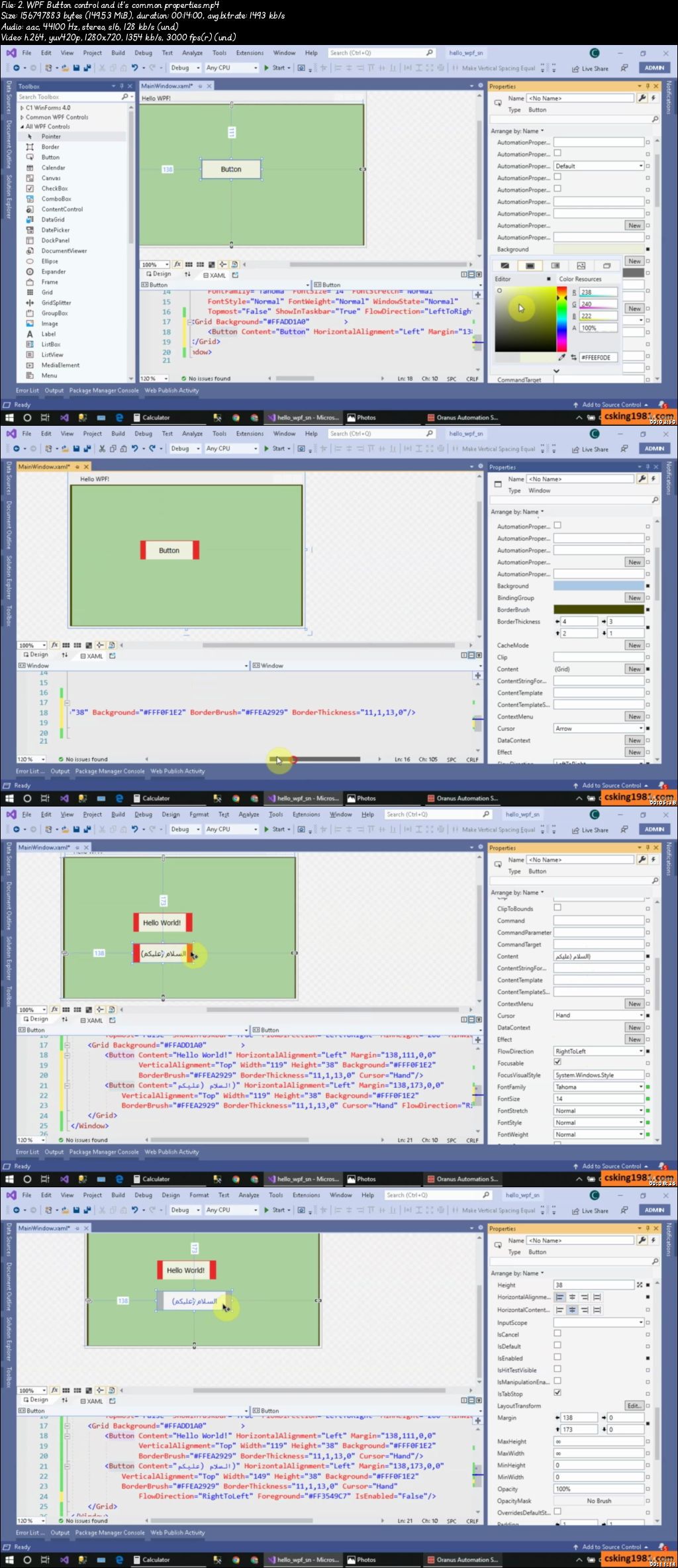
WPF in C# for Beginners,Windows Presentation Foundation XAML (9/2020)

007c2c6dfkjko.jpg


WPF in C# for Beginners,Windows Presentation Foundation XAML
Video: .mp4 (1280x720, 30 fps(r)) | Audio: aac, 44100 Hz, 2ch | Size: 10.5 GB
Genre: eLearning Video | Duration: 154 lectures (18 hour, 52 mins) | Language: English

Easily Learn to Using the WPF in C# Project to Design Real World App , Using XAML and Windows Presentation Foundation


What you'll learn

WPF in C# for Absolute Beginners
Build WPF projects in C# & structure of XAML
Using WPF Window and it's Common properties
Using Grid, Button, Label, TextBox & ComboBox
Change the font,border & title & . in XAML
MDI and SDI projects
Project 1: Design App settings form
Advance WPF App design: Tab order,group controls,aligning,layers and .
Using C# code in WPF to: Enable/Disable, Show/Hide,Change text ,Change color and .
Using C# to: close window or App and return keyword
Using Image control in XAML and C# code
Using open file dialog & save file dialog
Using text file in C# and WPF
Project 2: Simple customer info saver in text file
Using Menu control for create pro WPF Apps
C# code to: Get App folder, Special folders, Run external app and .


Requirements

General Knowledge in Visual Studio and C#


Description

Hi There!

With my 20 years programming skills i'm with you to share my knowledge with you.

So

If you try you will learn using WPF in C# to create C# Apps!

If you are beginners or student looking for a tutorial to create WPF App in C# in simplest way!


I started from beginning and show you how to :

Start creating WPF projects in C#

Learn the structure of XAML

Using WPF Window and it's Common properties

Change the font,border & title in XAML

Using Grid , Button, Label, TextBox & ComboBox

MDI and SDI projects

Advance WPF App design: Tab order,group controls,aligning,layers and .

Project 1: Design App settings form

Using C# code in WPF project

C# code to: Enable/Disable, Show/Hide,Change text ,Change color and .

Using C# to: close window or App and return keyword

C# code to: Get App folder, Special folders, Run external app and .

Using Image control in XAML and C# code

Using open file dialog & save file dialog

Using text file in C# and WPF

Project 2: Simple customer info saver in text file

Using Menu control for create pro WPF Apps

and.

Don't hesitate to start learning WPF in C#!

Every thing will be discussed with sample project and you will have lot of fun within my course.

Say Hi WPF in C# world and let's go !!!


Who this course is for:

Any one who wants to create WPF Application and Want to leave Windows form!

007c2c6eqojtj.jpeg


DesignCode - UI Design for Developers (Updated)

oac6djtksfpp2wy9auo3egbjge.jpg


DesignCode - UI Design for Developers (Updated)
MP4 | Video: h264, 1920x1080 | Audio: AAC, 44.1 KHz, 2 Ch
Genre: eLearning | Language: English | Duration: 22 Lessons (4h 15m) | Size: 5 GB

Learn just enough visual design to be dangerous as a developer
Many design courses focus on the finer details, heavy theories, getting you to the 99% of being a visual designer, but often disregard the code and handoff aspect. They end up alienating developers who just wish to learn the essentials. If you're looking to learn "just enough" UI design to be 100% self-sufficient and collaborate better with designers, this course if for you.

As a developer, your goal should be to create designs that are as objectively good as possible, using design systems, well-established principles and techniques that translate well to code. You should work on your speed, since you don't want to steal away from your coding time. My goal is to get you to be satisfied with your designs and to find a system to consistently improve over time by not only explaining the foundations of UI design, but my personal insights on how it's feasible to divide your time between design and code. We'll be using free icons and illustrations from shape.so and mockups from angle.sh.

Starting from the dreaded blank page, we'll work our way through UI patterns, inspiration, colors, typography and practice in the design tool for every step. In this course, you'll design an entire app from scratch, from the landing page to the mobile version and we'll create a design system that will bring everything together.

Homepage

29.14.iconsandcustomit2jo4.jpg


Train and deploy deep learning models

007c23a2ujj0i.jpg


Train and deploy deep learning models
Video: .mp4 (1280x720, 30 fps(r)) | Audio: aac, 48000 Hz, 2ch | Size: 5.36 GB
Genre: eLearning Video | Duration: 61 lectures (8 hour, 14 mins) | Language: English

Build your neural network using Keras, train it using Google AI-Platform then deploy it using Flask and Google Cloud Run


What you'll learn

Build a deep convolutional neural network using Keras and tensorflow.
Leverage the power of transfer learning to get high accuracy on your classification task.
Use google cloud platform to make training and deploying your deep learning model easy and scalable.
Leverage the power of AI-Platform on Google Cloud Platform to focus on the training of your deep learning model and not on infrastructure.
Containerize your training code and deployment code to make sure your code runs smoothly and everywhere.
How to deploy your deep learning model as a web app using Flask and Cloud Run.

Requirements

Basic knowledge of Python.
Basic knowledge of Keras (although I will be explaining the code thoroughly).
Some knowledge of cloud computing is a plus but not required.


Description

This course will take you through the steps that a machine learning engineer would take to train and deploy a deep learning model. We will start the course by defining an end goal that we want to achieve. Then, we will download a dataset that will help us achieve that goal. We will build a Convolutional Neural Network using Tensorflow with Keras and then we will train this network on Google AI-Platform. After saving the best trained model, we will deploy it as a web app using Flask and Google Cloud Run. Throughout the course, we will be using Docker to containerize our code.


Who this course is for:

Data scientists who want to learn how to leverage cloud computing to train and deploy deep learning model.
Software engineers who want to learn how to train and deploy deep learning models using Keras and tensorflow.
Students who are trying to decide whether to choose data science and machine learning as a possible career.
Hobbyists who want to learn how to build and deploy deep learning models for their DIY or side projects.

007c23a35skkl.jpeg


Python Programming for Beginners : Hands-On (Online Lab)

kvrmihkyoh1wgkyg8rvief3jqn.jpg


Python Programming for Beginners : Hands-On (Online Lab)
Genre: eLearning | MP4 | Video: h264, 1280x720 | Audio: aac, 44100 Hz
Language: English | VTT | Size: 6.04 GB | Duration: 22 section | 179 lectures | (15h 5m)


What you'll learn
Python Programming Concepts
Python Datatypes
Python Conditional Statement
Python Loops - while & for
Working with different datatypes - Strings, Lists, Dictionaries, Sets, Tuples, Numbers & Date and Time
FileIO - Writing, Apending & Reading
Working with csv files
Debugging Techniques
Creating and working with modules
Creating and working packages & sub-packages
Managing Python Packages using "pip"
Creating and working with Python Virtual Environments using "virtualenv" and "virtualenvwrapper"
Create and work with comprehensions - list comprehensions, dictionary comprehensions and set comprehensions
Create and work with decorators
Requirements
Computer & Internet basics

Description
Python Programming is easy to learn! Spare some time and you will be well on your way to becoming an expert!

There is a very high demand for Python programmers as it had gained popularity in various fields - Web/Application Development, Data Science, Infrastructure Automation, Internet of Things, Cloud, DevOps, Backend Development, etc.

Don't wait, start learning Python Programming!

Assignments/Projects at the end of each module will put your learning to test!


Who this course is for:
Anyone who is looking for hands-on python programming course!
Python Programming Aspirants
Data Science Aspirants
System/Network Admins
DevOps Engineers
Cloud Engineers


Homepage

12.typeconversionseekd4.jpg


Microsoft Excel - All in one Course for Beginner to advanced

obzcdzmwznacgzwnmvvqwwqkzu.jpg


Microsoft Excel - All in one Course for Beginner to advanced
MP4 | Video: h264, 1280x720 | Audio: AAC, 44.1 KHz, 2 Ch
Genre: eLearning | Language: English + .srt | Duration: 80 lectures (7h 42m) | Size: 8.32 GB

Become Excel Pro user and organize your business and workload

What you'll learn:
Proficient in Microsoft Excel from Beginner to Advanced
Learn to think like Excel using Powerful and Dynamic Functions
Customize and streamline you office workload in excel
Master all the Formula and Functions from basic to Advanced
Revolutionize your work using formulas to customize dates, text, numbers, arrays, fields in excel
Learn powerful VBA in excel
Proficient unique tips, tools for business practical work in excel
Microsoft Excel for Finance Professionals

Requirements
Course made in MS office 2016 but covers everything from MS office 2003, 2007, 2010, 2013, 2016 onwards
Passionate to learn the Microsoft # 1 Productivity Software


Description
Microsoft Excel all in One Course from Beginner to Advanced

This Microsoft Excel course covers topics ranging from

MS Excel Introductory level of Excel

MS Excel Intermediate Level of Excel

MS Excel for Finance Professionals

MS Excel Advanced Level and

Proficient in MS Excel VBA/Macros

Material recorded with Excel 2016 but covers all topics along with MS Excel 2003, 2007, 2010, 2016 and onwards

At completion of this course you will be proficient in the most popular Excel tools and will be master to complete any Excel tasks with efficiently and effectively. for reference below are just are some topics but not limited to it:

Creating dynamic spreadsheets

Manage multiple source data sets

Be the confident to apply MS Excel's Powerful formulas & functions to any kind of data for customized results

Pivot tables for dynamic reports and data visualizations

unleash your excel work potential with powerful data analysis

Audit tools in excel

Customize and streamline your daily office workload with VBA?Macros

don't wait more, just enroll in the course to learn and go out to serve in your bright career confidently as a professional ....

Who this course is for
This course will covers all topics from Beginner, intermediate and advanced level to VBA/Macros
This course is designed for those who want to take your excel skills to more than advanced level

Homepage

1.creatinghyperlinktom4kcn.jpg


Mastering Linux Command Line (with Live Linux Labs)

f81o68pxlcjvj1ns6erxuhikjf.jpg


Mastering Linux Command Line (with Live Linux Labs)
Genre: eLearning | MP4 | Video: h264, 1280x720 | Audio: aac, 44100 Hz
Language: English | VTT | Size: 5.22 GB | Duration: 20 section | 158 lectures | (12h 54m)


What you'll learn
Learn Linux Command Line from basics
Learn Linux File System & Navigation
Learn to work with file attributes and permissions
Learn vi Editor with practical usages
Use "cron" to schedule tasks
Learn various text processing commands to work efficiently
Learn to create your own AWS Linux EC2 instance to practice
Access to Live Linux Lab environment!
Requirements
The course is geared towards a Linux Beginner!
For experienced Linux Users - This course might work as a refresher!

Description
08/2020 Update: Access to Live Linux Labs

The course teaches you the Linux Command Line fundamentals, and take you on a journey with a good learning experience. We have also included few videos that guide you to set up your own Linux VM and also a Linux EC2 instance in the AWS cloud!

Linux Command-line:

You will learn to work with the Linux files and folders!

You will learn to navigate the Linux File System efficiently!

You will learn to create our own command to save time!

You will learn to create links & understand their limitations!

You will learn to use many Text Processing commands!

You will learn to use many commands effectively - ls, cd, grep, find..... etc

You will learn to Standard I/O and Redirection with all concepts around it!

You will learn to use "su" and "sudo" commands!

You will learn to work with file attributes and permissions!

You will learn to edit files using the "vi" editor!

You will learn to schedule jobs!

You will learn to archive files & folders using tar command!

You will learn to customize your bash shell!

PLUS!

You will learn to install VirtualBox, create VM and install ubuntu OS!

You will learn to create an AWS account!

You will learn to create a Linux EC2 instance!

You will learn to SSH into your Linux EC2 instance!


Who this course is for:
DevOps & Cloud Engineers/Architects
Linux System/Network Administrators
QA Professionals working with Linux Systems
Anyone who has a desire to learn Linux!


Homepage

4.viewingtherunningprhtjlk.jpg


Zurück
Oben Unten