





• Regeln für den Video-Bereich:

    In den Börsenbereich gehören nur Angebote die bereits den Allgemeinen Regeln entsprechen.

    Einteilung

    - Folgende Formate gehören in die angegeben Bereiche:
    - Filme: Encodierte Filme von BluRay, DVD, R5, TV, Screener sowie Telesyncs im Format DivX, XviD und x264.
    - DVD: Filme im Format DVD5, DVD9 und HD2DVD.
    - HD: Encodierte Filme mit der Auflösung 720p oder darüber von BluRay, DVD, R5, TV, Screener sowie Telesyncs im Format x264.
    - 3D: Encodierte Filme von BluRay, die in einem 3D Format vorliegen. Dies gilt auch für Dokus, Animation usw.
    - Serien: Cartoon/Zeichentrick, Anime, Tutorials, Dokumentationen, Konzerte/Musik, Sonstiges sind demnach in die entsprechenden Bereiche einzuordnen, auch wenn sie beispielsweise im High Definition-Format oder als DVD5/DVD9/HD2DVD vorliegen. Ausnahme 3D.
    - Bereich Englisch: Englische Releases gehören immer in diesen Bereich.
    - Bereich Talk: Der Bereich, in dem über die Releases diskutiert werden kann, darf, soll und erwünscht ist.


    Angebot/Beitrag erstellen

    - Ein Beitrag darf erst dann erstellt werden, wenn der Upload bei mindestens einem OCH komplett ist. Platzhalter sind untersagt.
    - Bei einem Scenerelease hat der Threadtitel ausschließlich aus dem originalen, unveränderten Releasenamen zu bestehen. Es dürfen keine Veränderungen wie z.B. Sterne, kleine Buchstaben o.ä. vorgenommen werden. Ausnahme Serienbörse:
    - Bei einem Sammelthread für eine Staffel entfällt aus dem Releasename natürlich der Name der Folge. Beispiel: Die Simpsons S21 German DVDRip XviD - ITG
    - Dementsprechend sind also u.a. verboten: Erweiterungen wie "Tipp", "empfehlenswert", "only", "reup", usw. / jegliche andere Zusatzinformation oder Ergänzung, welche nicht in obiger Beschreibung zu finden ist.

    Aufbau des Angebots und Threadtitel

    Der Titel nach folgendem Muster erstellt zu werden. <Name> [3D] [Staffel] [German] <Jahr> <Tonspur> [DL] [Auflösung] <Quelle> <Codec> - <Group>
    Beispiel: The Dark Knight German 2008 AC3 DVDRip XviD - iND
    Beispiel: The Dark Knight 2008 DTS DL BDRip x264 - iND
    Beispiel: The Dark Knight 2008 AC3 DL BDRip XviD - iND
    Beispiel: The Dark Knight German 2008 AC3 720p BluRay x264 iND
    Beispiel: The Dark Knight 2008 DTS DL 1080p BluRay x264 iND
    Beispiel: Die Simpsons S01 German AC3 DVDRip XviD iND
    Beispiel: Die Simpsons S20 German AC3 720p BluRay x264 iND
    Beispiel: Sword Art Online II Ger Sub 2014 AAC 1080p WEBRip x264 - peppermint
    Entsprechend sind also u.a. verboten: Sonderzeichen wie Klammern, Sterne, Ausrufezeichen, Unterstriche, Anführungszeichen / Erweiterungen wie "Tipp", "empfehlenswert", "only", "reup", usw. / jegliche andere Zusatzinformation oder Ergänzung, welche nicht in obiger Beschreibung zu finden ist
    Ausnahmen hiervon können in den Bereichen geregelt sein.

    Die Beiträge sollen wie folgt aufgebaut werden:
    Überschrift entspricht dem Threadtitel
    Cover
    kurze Inhaltsbeschreibung
    Format, Größe, Dauer sind gut lesbar für Downloader außerhalb des Spoilers zu vermerken
    Nfo sind immer Anzugeben und selbige immer im Spoiler in Textform.
    Sind keine Nfo vorhanden z.B. Eigenpublikationen, sind im Spoiler folgende Dateiinformationen zusätzlich anzugeben :
    Quelle
    Video (Auflösung und Bitrate)
    Ton (Sprache, Format und Bitrate der einzelnen Spuren)
    Untertitel (sofern vorhanden)
    Hosterangabe in Textform außerhalb eines Spoiler mit allen enthaltenen Hostern.
    Bei SD kann auf diese zusätzlichen Dateiinformationen verzichtet werden.

    Alle benötigten Passwörter sind, sofern vorhanden, in Textform im Angebot anzugeben.
    Spoiler im Spoiler mit Kommentaren :"Schon Bedankt?" sind unerwünscht.


    Releases

    - Sind Retail-Release verfügbar, sind alle anderen Variationen untersagt. Ausnahmen: Alle deutschen Retail-Release sind CUT, in diesem Fall sind dubbed UNCUT-Release zulässig.
    - Im Serien-Bereich gilt speziell: Wenn ein Retail vor Abschluss einer laufenden Staffel erscheint, darf diese Staffel noch zu Ende gebracht werden.62
    - Gleiche Releases sind unbedingt zusammenzufassen. Das bedeutet, es ist zwingend erforderlich, vor dem Erstellen eines Themas per Suchfunktion zu überprüfen, ob bereits ein Beitrag mit demselben Release besteht. Ist dies der Fall, ist der bereits vorhandene Beitrag zu verwenden.
    - P2P und Scene Releases dürfen nicht verändert oder gar unter einem iND Tag eingestellt werden.


    Support, Diskussionen und Suche

    - Supportanfragen sind entweder per PN oder im Bereich Talk zu stellen.
    - Diskussionen und Bewertungen sind im Talk Bereich zu führen. Fragen an die Uploader haben ausschließlich via PN zu erfolgen, und sind in den Angeboten untersagt.
    - Anfragen zu Upload-Wünschen sind nur im Bereich Suche Video erlaubt. Antworten dürfen nur auf Angebote von MyBoerse.bz verlinkt werden.


    Verbote

    - Untersagt sind mehrere Formate in einem einzigen Angebotsthread, wie beispielsweise das gleichzeitige Anbieten von DivX/XviD, 720p und 1080p in einem Thread. Pro Format, Release und Auflösung ist ein eigener Thread zu eröffnen.
    - Grundsätzlich ebenso verboten sind Dupes. Uploader haben sich an geeigneter Stelle darüber zu informieren, ob es sich bei einem Release um ein Dupe handelt.
    - Gefakte, nur teilweise lauffähige oder unvollständige Angebote sind untersagt. Dies gilt auch für eigene Publikationen, die augenscheinlich nicht selbst von z.B. einer DVD gerippt wurden. Laufende Serien, bei denen noch nicht alle Folgen verfügbar sind, dürfen erstellt und regelmäßig geupdatet werden.
    - Untersagt sind Angebote, welche nur und ausschließlich in einer anderen Sprache als deutsch oder englisch vorliegen. Ausnahmen sind VORHER mit den Moderatoren zu klären.


    Verstoß gegen die Regeln

    - Angebote oder Beiträge, die gegen die Forenregeln verstoßen, sind über den "Melden"-Button im Beitrag zu melden.
  • Bitte registriere dich zunächst um Beiträge zu verfassen und externe Links aufzurufen.

*** Bestes IPTV *** bester Preis *** gratis Test ***


Englische Tutorials

f5e30726-cc1d-4769-a10e-0512e83e2560.png

Complete Blender Creator Modelling To Render Total Beginners
Published 04/2022
MP4 | Video: h264, 1280x720 | Audio: AAC, 44.1 KHz, 2 Ch
Genre: eLearning | Language: English + srt | Duration: 44 lectures (9h 35m) | Size: 9.3 GB


Create from Modeling to Rendering, game assets, stylized props and house
What you'll learn
Use Blender and understand it's interface
Learn all the tools to create anything in 3D, and put it all into practice with step by step projects like modeling, shading, and rendering
Learn PBR texture and mix them to get even more interesting material
Learn UV map and unwrap all the Models you see in demo or intro
Project file and all assets, including grass, trees, barrel, textures and more
Lighting using Easy-HDRI & Blender lights
How to use graffiti and project them on models
How to mix tuxtures and paint them on a model (we use mouse for painting)
How to make cloth or flags
Requirements
Mac or PC capable of Running Blender Version 3.1 or above
You will learn all of the tools that will be needed for this course.
Description
Hello and welcome. You may all have experienced that creating 3d art can be really exciting but also confusing about where to start. that is why we've created complete beginners and intermediate guide to blender.
We will take you through modeling texturing lighting animating.
Specifically we start off in the first section just very basic, taking you through the fundamentals of blender and then we jump into next section where we do modeling and we will learn how to create simple models using a low poly technique. Here we create a interesting and fantasy 3d stylized house and its props. during this section you will learn all the tools and techniques that is necessary for creating easy and complex models.
in the next section will be getting a bit more complicated by creating a small collection of nature package. We explain how to create stylized tree by using particle system to spreed the leafs over the branches and how to model cool low poly barrel and plants.
in the next section we talk about Blender render engine & how to enable Easy-HDRI add-on for really basic lighting.
next section we will take you though the texturing presses. Here you learn Texturing, Texture painting, UV Mapping & UV Unwrapping from zero to hero.
Last section you will learn how to set up camera and take render animation.
As a part of this course, you get access to all of your amazing resources.
Who this course is for
Game Developers who wish to expand their Skill Set.
People who are curious about the world of 3D modeling and animation.
Artists who want to learn to bring their assets alive.
This course can be your expanded version of the Blender manual.
Homepage











cd6b7b07-00a3-49ff-b75e-0f08ee50eee1.png

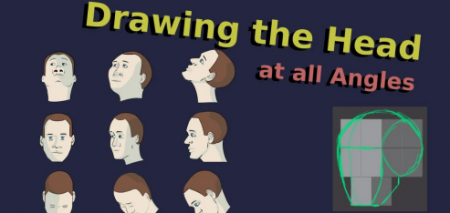
Constructing the Head from the Imagination
Duration: 1h 15m | Video: .MP4, 1280x720, 30 fps | Audio: AAC, 48 kHz, 2ch | Size: 444 MB
Genre: eLearning | Language: English​

In this course we will learn to draw the head*at all angles from the imagination. Drawing the head can be very tricky. I have stumbled upon a method that makes drawing the head at any angle more accessible and intuitive for beginners.
In this method
We start by drawing in 9 cubes
We use these cubes to construct the basic forms of the head
Next we sketch in the features, like the brows, the ears, the eyes, etc...
Having all features in place we draw in the clean lines
And finally we color in and paint.
This course is perfect for beginners, because not only does it make drawing the head more accessible and understandable, it is also full of meaningful exercises that target very important 'drawing muscles' that all artists need to learn. For example, drawing in cubes at different angles we build up a feel for volume and orientation. We also get practice sketching and drawing in clean lines, as well coloring and shading.
Participants of this course can follow along on pencil and paper, or using digital painting software.*If you plan to follow along on*pencil and paper you need to be aware that*you may not be able to follow along with me precisely as I will be working digitally.
If you are following along digitally you will need a stylus, and you will need to be familiar with the very basics of your software.
Homepage
Screenshots


c7d373c6-15cb-4929-b3b2-865f1f396099.png

Creating asteroid scene in Blender (Backrooms, cinematic)
Published 04/2022
MP4 | Video: h264, 1280x720 | Audio: AAC, 44.1 KHz, 2 Ch
Genre: eLearning | Language: English + srt | Duration: 5 lectures (1h 57m) | Size: 1.38 GB


I will show you the simplest way to make an asteroid in Blender without animation and simulations and how to make a real
What you'll learn
They will learn the basics in Blender
You will learn how to create a scene, set up a camera and lighting in Blender
You will be taught how to achieve a cinematic look
You will be taught how to achieve old camera VHS look
I will teach you how to use After Effects for post-processing
Requirements
No previous experience required
Description
Hello everyone and welcome to my new course. In this course we are doing a scene with an asteroid from my short film which you can watch on Course Preview. The film is inspired by Backrooms
In this 2-hour-long, step-by-step tutorial we will make an asteroid scene that you can see in the video.
In the first part of the tutorial, we work with Blender. I will introduce you to the basics of Blender and how to set the scene.
I will show you the simplest way to make an asteroid in Blender without animation and simulations and how to make a realistic scene in Blender quickly and efficiently. Therefore, the course can be easily followed by beginners.
The second part of the tutorial deals with After Effects. We will try to achieve an Old camera, VHS looks in After Effects in post-processing. I will show you the basics of After Effects, how to do color-correction and colo-grading in After Effects in order to achieve the cinematic look of an old camera. I'll show you how to use Overlays in After Effects and suggest places online where you can download them for free.
Tutorial length: 2 hours
Language: English + subtitles
Software: Blender + After Effects
Project files: included
Who this course is for
The course is for those who want to learn how to use Blender and make one movie scene
Homepage


bc342264-1322-4377-a870-6d32ab80561d.png

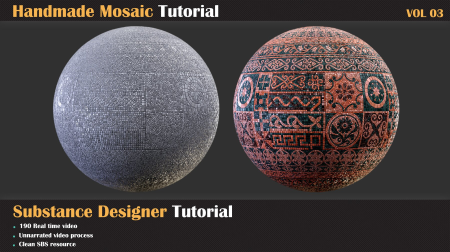
Damaged Concrete Tutorial VOL-02
Instructors: Milad Kambari
Duration: 3h 38m • 2 Chapters
Video: MP4 1920x1080 44 KHz | English
Level: Intermediate | Size: 628 MB​

How to make Damage Concrete in Substance Designer
Concrete material is one of the most widely used materials that We should learn how to create. When we learn how to make it, we can have the largest number of outputs of this material model in the shortest time. Due to the ubiquity and widespread use of this material model, it is very important that you can produce this material model with high quality. In this material creation process, you can easily produce concrete materials and learn good points. I hope you enjoy and learn new things by watching this tutorial.
Contents
* 218 minutes unnarrated videos
* 1080 Resolution
Chapters
* 01- First step: Creating Height - In this chapter, we create concrete layers and combine them to achieve the result that we want. And after that, we add some details like cracks and pebbles to have more realistic results from our material
* Part 02: in this chapter, we are going to add color and roughness data to our material. we create all decals we need in our graph but you can use premade decals too.
Software Used
* Substance Designer
Level
* Intermediate
Prerequisite Basic knowledge of Substance designer
Attention: Clean SBS file are included in this product that you can study over that
Attention: For using SBS you need to install 2 fonts which included in the project file
Attention: all videos are unnarrated ( it means there are no voice-over videos or subtitles )
Screenshots


4646050-c227.jpg

Data Build Tool (DBT) - Build Your First Project
Published 04/2022
MP4 | Video: h264, 1280x720 | Audio: AAC, 44.1 KHz, 2 Ch
Genre: eLearning | Language: English + srt | Duration: 22 lectures (2h 7m) | Size: 937.1 MB


Learn from scratch how to use DBT to test, deploy, document and visualize your data transformation process
What you'll learn
Learn how to use the DBT command line tool
Test data quality, integration, and code performance.
Manually run scripts that will then run automated tests and deploy changes after passing said tests.
Publish both public and private repositories using Dbt built-in package manager.
Deploy a dbt project after merging updated code in git.
Automatically create a visual representation of how data flows throughout your organization.
Easily create documentation through schema files.
Requirements
Knowledge of working with data
Description
Before loading data into a centralized data warehouse, it must be cleaned up, made consistent, and combined as necessary. In other words, data must be transformed - the "T" in ETL (extract, transform, load) and ELT. This allows an organization to develop valuable, trust-worthy insights through analytics and reporting.
DBT enables data analysts and data engineers to automate the testing and deployment of the data transformation process. This is especially useful because many companies have increasingly complex business logic behind their reporting data. The DBT tool keeps a record of all changes made to the underlying logic and makes it easy to trace data and update or fix the pipeline through version control.
In this course you will learn
Install DBT, initialize a new project and then publish your project to a GitHub repository.
Learn how to add sources to your DBT project and add them to your model scripts using the Jijna templates.
Learn how DBT translates the combination of SQL and Jijna functions into a pure SQL script that you can use to debug your model logic.
Allter the default DBT settings so that you can deploy to custom models based on your DBTproject folders.
Foundation for how tests are run and how you can use them to debug any errors to ensure data quality.
Materializations are strategies for persisting DBT models in a warehouse. Learn how to adjust this setting in your project.
Package management and DBT Hub.
Using the built-in DBT docs command to serve your files up as a website. You can either view the site locally or host it on a separate web server for others to see.
Use DBT Seeds to work with static CSV data
Learn the process of creating a custom schema test, overriding the default tests and finally where to find some pre-packaged schema tests that may save you the time of writing your own.
Learn to use the two ways that DBT allows you to define variables - In the dbt_project.yml file and on the command line.
Use hooks to simplify repetitive dbt run activities
Simplify dbt documentation with docs blocks as sometimes your documentation becomes a bit complex to the point where it would be better to write it outside of your YML file. Or perhaps you find you are re-writing the same definition multiple times.
Learn the syntax of the freshness block and how it works under the hood to define the acceptable amount of time between the most recent record, and now, for a table to be considered "fresh".
Learn how to add query tags to a DBT project and then review the results in Snowflake.
Learn the manifest.json artifact and review step-by-step how to use the state method to only run modified models.
The multi-repo approach - how to structure DBT projects
Audit your DBT runs by using {{ invocation_id }}
The process of installing DBT into a virtual environment on windows, and look at how to install DBT directly from DBT core (GitHub) rather than by using pip.
Clean DBT project files, run/test models in group, and use EPHEMERAL DBT model
All project files used in this course are provided for students to use along the way.
Who this course is for
Data Analysts
Data Engineers
Database Administrators
Students
Homepage


691dc36f-5bc2-417d-8ddd-51b51373ec0a.png

Digital Marketing Crash Course For Non-Techie Entrepreneurs
MP4 | Video: h264, 1280x720 | Audio: AAC, 44.1 KHz
Language: English | Size: 664 MB | Duration: 52m​

Know the Language of the Digital World to Build Your High Converting Online Presence NOW
What you'll learn
Crash Course for Know-How on Social Media and Digital Marketing
Proven Powerful Digital Marketing Strategies to Make this Digital World Work for You
How much of Digital Marketing you must know for Your Business
Understand Why Digital Marketing is NOT working for you
Know the Language of the Digital World so you do not get fooled again
Know What you require to Make it Work for You
Find Your Vendors with Confidence to Build Your Online Presence
Know How to Get ROI on your Digital Marketing Spend
Requirements
Ready to Invest in Your Learnings by Taking Necessary Actions
Only Actions will give your Results
Ready to come out of your comfort zone to adapt yourself to changing world
Description
Digital marketing refers to marketing through an electronic device or the internet.
Today, hundreds of thousands of businesses engage in digital marketing, as they find it easier and more cost-effective to find and reach a large number of people who need their products/services
Traditionally, businesses reached their target audience using channels like television, radio, magazines, events, flyers and direct mail. Now, as people spend more time online, businesses are trying to reach potential buyers through digital channels.
You need to be where your target audience are, right?
So get Handle on the 8 Pieces of the Digital Puzzle and 5 Pillars of Digital Marketing to Build Your High Converting Online Presence NOW.
Get an end-to-end perspective of the digital marketing ecosystem
This will empower you to take your offline business online or create another revenue-generating vertical using the strategies shared in the course
Once you Learn the Language of the Digital World, it will benefit you as follows
· Increase Customer Loyalty with Frequent Communications
· Find & Target the Right Audience with Your Content
· Engage the Customer at Every Buying Stage.
· Optimize and Obtain Better Conversion Rates
· Accurately Measure All Results.
· Gain Brand Credibility.
· Generate a Consistent Lead Pipeline.
Time to Go Digital & Grow Digital!
Keep Growing, Keep Evolving!
Who this course is for
Non Techie Small & Medium Business Owners who want to understand Digital Marketing fundamentals
Teachers/Trainers/Coaches/Consultants who feel Tech Challenged
If the Digital World is Over Whelming for You and you dont know where to start
Those Who Want to Cut-Short Years of Learning Curve to less than 1 hour of Deep Insights and Wisdom related to Digital World
Screenshots


5b1c455c-66fe-4348-a5cc-69c489b36849.png

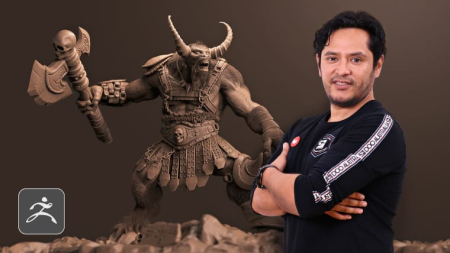
Domestika - Digital Sculpture of Fantastic Creatures with ZBrush by Luis Alberto Gayoso Berrospi
Video: h264, 1920x1080, 548 kb/s, 25.00 fps | Audio: aac, 44100 Hz, 2 channels, 64 kb/s
Genre: eLearning | Duration: 18 lessons (3h 17m) | Language: Spanish | Subtitle: English | File size: 1.1 GB​

Learn 3D modelling alternative techniques and methods to create a ******

In the world of 3D modeling, specialists give life not only to human figures and figures but also to creatures from a science fiction or video game movie. Luis Gayoso - 3D generalist - specializes in the creation of fantastic characters and has more than 15 years of experience as a digital artist and, since 2014, he has been devoted entirely to the design of creatures, and in this course he invites you to give your first steps in digital sculpture.
Designed to lose your fear of ZBrush, because you do not need to be an expert to get great results, Luis will teach you in this course a simple methodology to design and model a ******.
Homepage


a4729d42-defe-44cb-ae6a-40f2f1f1b6a1.png

Frontend Master - Introduction to Unity for Web Developers
MP4 | Video: h264, 1920x1080 | Audio: AAC, 44.1 KHz, 2 Ch
Genre: eLearning | Language: English | Duration: 5 Lessons (5h 11m) | Size: 794.1 MB

By participating along with us in the workshop, you'll learn
Learn about the key factors involved in making modern games, both big and small.
Discover the power of Unity's component-based architecture and create emergent behavior from small reusable parts.
Leverage the power of the C# programming language and learn how to format your gameplay ideas into classes, methods, and data structures.
Unlock Unity's powerful tools for creating elegant toon shaded experiences or hyper realistic simulations.
Explore deployment options for your creations, such as web, PC, mobile, console, VR, and more.
Homepage


58003620-d2c8-4b65-a088-7b8a81eef2c0.png

Frontend Master - Web Components
MP4 | Video: h264, 1920x1080 | Audio: AAC, 44.1 KHz, 2 Ch
Genre: eLearning | Language: English | Duration: 7 Lessons (4h 42m) | Size: 2 GB

By participating along with us in the workshop, you'll learn
Understand the web standards behind Web Components
How to use Web Components
How to style Web Components
How to write a custom web component
Homepage


eff6abd0-4421-4e30-9487-038194c4337c.png

Fundamentals of Machine Learning 2022
Genre: eLearning | MP4 | Video: h264, 1280x720 | Audio: AAC, 44.1 KHz
Language: English | Size: 3.91 GB | Duration: 8h 40m
This course will start your career in data science.

What you'll learn
Learn about the fundamental principles of machine learning
Build customized models to use in handle different data science projects
Build customized Deep Learning models to start your own data science career
Start your data science career and connect with the tutor in industry
Requirements
No prior mathematical or programming knowledge required. Some python programming experience is helpful.
Description
This is an introduction course of machine learning. The course will cover a wide range of topics to teach you step by step from handling a dataset to model delivery. The course assumes no prior knowledge of the students. However, some prior training in python programming and some basic calculus knowledge is definitely helpful for the course. The expectation is to provide you the same knowledge and training as that is provided in an intro Machine Learning or Artificial Intelligence course at a credited undergraduate university computer science program.
The course is taught by Yiqiao Yin, and the course materials are provided by a team of amazing instructors with 5+ years of industry experience. All instructors come from Ivy League background and everyone is eager to share with you what they know about the industry.
The course has the following topics
Introduction
Basics in Statistical Learning
Linear Regression
Clasification
Sampling and Bootstrap
Model Selection & Regularization
Going Beyond Linearity
Tree-based Method
Support Vector Machine
Deep Learning
Unsupervised Learning
Classification Metrics
The course is composed of 3 sections
Lecture series <= Each chapter has its designated lecture(s). The lecture walks through the technical component of a model to prepare students with the mathematical background.
Lab sessions <= Each lab session covers one single topic. The lab session is complementary to a chapter as well as a lecture video.
Python notebooks <= This course provides students with downloadable python notebooks to ensure the students are equipped with the technical knowledge and can deploy projects on their own.
Who this course is for
Beginners in python programming, machine learning, and data science.
Screenshots


4dcaff9e-92ab-42d6-ad5f-12abd5582234.png

How to Create and Complete Goals
MP4 | Video: h264, 1280x720 | Audio: AAC, 44.1 KHz
Language: English | Size: 211 MB | Duration: 34m
Crush Your Goals
What you'll learn
Goal setting​

Tips to accomplish goals
Methods of breaking down goals
Mindset for goal completion
Requirements
None
Description
Goals often fail. But why do they fail? How do we prevent ourselves from failure?
Planning.
Good planning will greatly increase your ability to achieve your goals.
In this course we will go over planning to achieve your goals and we will take time to go over the things that cause goals to fail. In truth, most goals fail before work ever starts towards them. This is because the plan is poorly put together.
Accomplishing a goal requires
Consistency
Good Planning
Time Set Aside for Specific Purposes
If you have trouble finishing goals this course will help you to build good habits that change that behavior.
"Do not plan for ventures before finishing what's at hand." - Euripides (Philosopher)
What Euripides means by that is that if you do not finish what you have already started and you take on another task or venture you are unlikely to ever complete the task at hand. Your previous goal will fail because of your new one. We have a limited amount of time and energy. If we spend it focused on a group of goals that are always changing before completion we end up never actually finishing anything.
"Plan your work. Work your Plan." - Napoleon Hill.
What Napoleon Hill means by that is that if you plan your work you will have structure and tasks that keep you on track. If you stay on that track you will complete your plan. But you must always work at staying on the plan that you have created. There will always be distractions and things that could steer you away. But maintaining that focus will lead you to greater achievement.
In this course we will learn about how to stay on task and create a focus that leads to us accomplishing more goals.
Who this course is for
Anyone who is trying to accomplish a goal
Screenshots


c54b9b83-951e-463c-a0f9-48fef7c5db49.png

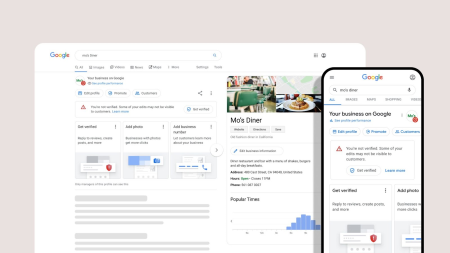
How to add Google Business Profile to Google My Business and Google Maps
Duration: 49m | Video: .MP4, 1280x720, 30 fps | Audio: AAC, 48 kHz, 2ch | Size: 202 MB
Genre: eLearning | Language: English​

Google My Business is a free tool that you can use to create a Google My Business listing to promote your business online so it can be found easily in Google search results and Google maps.
If customers want to find your new opening hours or want to call you to inquire about your services or products, you can bet they probably aren't going to crack open the Yellow Pages. Instead, they're going to Google your business's name and check the right-hand panel for the information they need. If it's not there, they might look elsewhere.
As a digital marketing specialist, I've spent more than a 3years helping customers improve their business's online visibility. And now I'd like to share some of my top skills for perfecting your Google My Business profile, at a time when it's more important to do so than ever.
In this class am going to walk you through how to set up a Google My Business listing step by step, so you can start listing your business or client's business as soon as possible.
What you'll learn in this class
How to create Google my Business Profile
How to Edit GMB Information Section
GMB Insights
GMB Messaging
Posting on GMB
Necessary information
GMB Strategies and tricks
Why Google my Business Is more important than in 2022
97% of consumers searched online to find a local business in their area. (Hubspot), Amid the Covid-19 pandemic, it's more crucial than ever that you utilize and optimize GMB to display accurate, updated information about your business. Think of your GMB panel as the first point of contact between you and your customer. If your business hours or description are out of date, you can lose a customer's trust and miss out on the lifetime value of the relationship.
Homepage
Screenshots


Zurück
Oben Unten