• Regeln für den Video-Bereich:

    In den Börsenbereich gehören nur Angebote die bereits den Allgemeinen Regeln entsprechen.

    Einteilung

    - Folgende Formate gehören in die angegeben Bereiche:
    - Filme: Encodierte Filme von BluRay, DVD, R5, TV, Screener sowie Telesyncs im Format DivX, XviD und x264.
    - DVD: Filme im Format DVD5, DVD9 und HD2DVD.
    - HD: Encodierte Filme mit der Auflösung 720p oder darüber von BluRay, DVD, R5, TV, Screener sowie Telesyncs im Format x264.
    - 3D: Encodierte Filme von BluRay, die in einem 3D Format vorliegen. Dies gilt auch für Dokus, Animation usw.
    - Serien: Cartoon/Zeichentrick, Anime, Tutorials, Dokumentationen, Konzerte/Musik, Sonstiges sind demnach in die entsprechenden Bereiche einzuordnen, auch wenn sie beispielsweise im High Definition-Format oder als DVD5/DVD9/HD2DVD vorliegen. Ausnahme 3D.
    - Bereich Englisch: Englische Releases gehören immer in diesen Bereich.
    - Bereich Talk: Der Bereich, in dem über die Releases diskutiert werden kann, darf, soll und erwünscht ist.


    Angebot/Beitrag erstellen

    - Ein Beitrag darf erst dann erstellt werden, wenn der Upload bei mindestens einem OCH komplett ist. Platzhalter sind untersagt.
    - Bei einem Scenerelease hat der Threadtitel ausschließlich aus dem originalen, unveränderten Releasenamen zu bestehen. Es dürfen keine Veränderungen wie z.B. Sterne, kleine Buchstaben o.ä. vorgenommen werden. Ausnahme Serienbörse:
    - Bei einem Sammelthread für eine Staffel entfällt aus dem Releasename natürlich der Name der Folge. Beispiel: Die Simpsons S21 German DVDRip XviD - ITG
    - Dementsprechend sind also u.a. verboten: Erweiterungen wie "Tipp", "empfehlenswert", "only", "reup", usw. / jegliche andere Zusatzinformation oder Ergänzung, welche nicht in obiger Beschreibung zu finden ist.

    Aufbau des Angebots und Threadtitel

    Der Titel nach folgendem Muster erstellt zu werden. <Name> [3D] [Staffel] [German] <Jahr> <Tonspur> [DL] [Auflösung] <Quelle> <Codec> - <Group>
    Beispiel: The Dark Knight German 2008 AC3 DVDRip XviD - iND
    Beispiel: The Dark Knight 2008 DTS DL BDRip x264 - iND
    Beispiel: The Dark Knight 2008 AC3 DL BDRip XviD - iND
    Beispiel: The Dark Knight German 2008 AC3 720p BluRay x264 iND
    Beispiel: The Dark Knight 2008 DTS DL 1080p BluRay x264 iND
    Beispiel: Die Simpsons S01 German AC3 DVDRip XviD iND
    Beispiel: Die Simpsons S20 German AC3 720p BluRay x264 iND
    Beispiel: Sword Art Online II Ger Sub 2014 AAC 1080p WEBRip x264 - peppermint
    Entsprechend sind also u.a. verboten: Sonderzeichen wie Klammern, Sterne, Ausrufezeichen, Unterstriche, Anführungszeichen / Erweiterungen wie "Tipp", "empfehlenswert", "only", "reup", usw. / jegliche andere Zusatzinformation oder Ergänzung, welche nicht in obiger Beschreibung zu finden ist
    Ausnahmen hiervon können in den Bereichen geregelt sein.

    Die Beiträge sollen wie folgt aufgebaut werden:
    Überschrift entspricht dem Threadtitel
    Cover
    kurze Inhaltsbeschreibung
    Format, Größe, Dauer sind gut lesbar für Downloader außerhalb des Spoilers zu vermerken
    Nfo sind immer Anzugeben und selbige immer im Spoiler in Textform.
    Sind keine Nfo vorhanden z.B. Eigenpublikationen, sind im Spoiler folgende Dateiinformationen zusätzlich anzugeben :
    Quelle
    Video (Auflösung und Bitrate)
    Ton (Sprache, Format und Bitrate der einzelnen Spuren)
    Untertitel (sofern vorhanden)
    Hosterangabe in Textform außerhalb eines Spoiler mit allen enthaltenen Hostern.
    Bei SD kann auf diese zusätzlichen Dateiinformationen verzichtet werden.

    Alle benötigten Passwörter sind, sofern vorhanden, in Textform im Angebot anzugeben.
    Spoiler im Spoiler mit Kommentaren :"Schon Bedankt?" sind unerwünscht.


    Releases

    - Sind Retail-Release verfügbar, sind alle anderen Variationen untersagt. Ausnahmen: Alle deutschen Retail-Release sind CUT, in diesem Fall sind dubbed UNCUT-Release zulässig.
    - Im Serien-Bereich gilt speziell: Wenn ein Retail vor Abschluss einer laufenden Staffel erscheint, darf diese Staffel noch zu Ende gebracht werden.62
    - Gleiche Releases sind unbedingt zusammenzufassen. Das bedeutet, es ist zwingend erforderlich, vor dem Erstellen eines Themas per Suchfunktion zu überprüfen, ob bereits ein Beitrag mit demselben Release besteht. Ist dies der Fall, ist der bereits vorhandene Beitrag zu verwenden.
    - P2P und Scene Releases dürfen nicht verändert oder gar unter einem iND Tag eingestellt werden.


    Support, Diskussionen und Suche

    - Supportanfragen sind entweder per PN oder im Bereich Talk zu stellen.
    - Diskussionen und Bewertungen sind im Talk Bereich zu führen. Fragen an die Uploader haben ausschließlich via PN zu erfolgen, und sind in den Angeboten untersagt.
    - Anfragen zu Upload-Wünschen sind nur im Bereich Suche Video erlaubt. Antworten dürfen nur auf Angebote von MyBoerse.bz verlinkt werden.


    Verbote

    - Untersagt sind mehrere Formate in einem einzigen Angebotsthread, wie beispielsweise das gleichzeitige Anbieten von DivX/XviD, 720p und 1080p in einem Thread. Pro Format, Release und Auflösung ist ein eigener Thread zu eröffnen.
    - Grundsätzlich ebenso verboten sind Dupes. Uploader haben sich an geeigneter Stelle darüber zu informieren, ob es sich bei einem Release um ein Dupe handelt.
    - Gefakte, nur teilweise lauffähige oder unvollständige Angebote sind untersagt. Dies gilt auch für eigene Publikationen, die augenscheinlich nicht selbst von z.B. einer DVD gerippt wurden. Laufende Serien, bei denen noch nicht alle Folgen verfügbar sind, dürfen erstellt und regelmäßig geupdatet werden.
    - Untersagt sind Angebote, welche nur und ausschließlich in einer anderen Sprache als deutsch oder englisch vorliegen. Ausnahmen sind VORHER mit den Moderatoren zu klären.


    Verstoß gegen die Regeln

    - Angebote oder Beiträge, die gegen die Forenregeln verstoßen, sind über den "Melden"-Button im Beitrag zu melden.
  • Bitte registriere dich zunächst um Beiträge zu verfassen und externe Links aufzurufen.

*** Bestes IPTV *** bester Preis *** gratis Test ***


Englische Tutorials

7f894ca3-b6ec-4a8c-bbf7-167200be98d5.png

Illustration for Beginners in Procreate
Duration: 2h 8m | Video: .MP4, 1280x720, 30 fps | Audio: AAC, 48 kHz, 2ch | Size: 1.69 GB
Genre: eLearning | Language: English


Welcome to the "Illustration For Beginners in Procreate" class.
In this class you will learn to*use Procreate on the iPad Pro to create a cute digital illustration with a simple animation.
Getting*started with illustration in the digital media might be confusing even to those who have experience in traditional art techniques. Digital simply works differently but it is not necessarily harder.*it just has a logic you have to understand.
Procreate is one of the most trending digital drawing apps out there - it is really user friendly and makes it easy for anyone to dab into the digital media.
In this class we will create one full illustration with little fun animation, but don't worry, the whole artwork is divided into 5 comprehensive stages that build upon each other, so by finishing a stage, you and your skills will be ready to proceed.
The*class is perfect for those beginners who have just got their iPad and are opening Procreate for the first time, also to those who are already using it - they might already know the functions, but might get carried away with the illustration process. The class is perfect*also to anyone who just wants to relax and spend a reasonable amount of time with artistic self care:)
By the end of this class, you will be totally confident in using Procreate and ready to create beautiful illustrations.
Now you need your iPad with Procreate, your Apple Pencil....and let's get started!
Homepage
Screenshots


0c76b547-656d-4d03-8833-b1fd7f747d3b.png

Income Streams For Artists: Which Are Best For You?
Duration: 37m | Video: .MP4, 1280x720, 30 fps | Audio: AAC, 48 kHz, 2ch | Size: 297 MB
Genre: eLearning | Language: English


Choosing*the*right income streams to pursue as a freelance artist can be hard. There are so many options! So how do we know which ones are right for us?
In this class you will*determine how many income streams you can manage, which ones are the best for you, and how they all fit together. By the end of class you*should have the clarity you need to*be more efficient and effective*in your business.
Business stuff can be FUN!
It will also be fun because I believe that business is a creative process and doesn't need to be boring or stuffy. In fact, I get quite excited about business things, as you can see from my expression!
And, I'm an artist, so*there are some cute illustrations to*help make some points.
Who this class is for?
This class*will help any creative freelancer determine the best income streams for them. So whilst the examples I use relate specifically to artists and surface designers, the Income Stream Assessment Workbook (your class project) is relevant to any creative entrepreneur.
What will you need?
All you need to complete this class is a print-out of the Income Stream Assessment Workbook and a pen.
Why should you take this class?
Having multiple streams of income as a freelance artist is a tried and tested way to increase your overall revenue and*reduce your financial risk. Whether you are a fine artist, illustrator, or surface pattern designer, there are now loads of*opportunities*to make money from your creations, but*there isn't enough time to do everything and it's easy to feel a bit lost.
This class will guide you through a process that takes into account your individual situation and goals, so you can*determine which income streams will work best for you, so you no longer waste any of your valuable time and energy.
What will you will learn?
You will learn about the pros and cons of having multiple income streams, the various types of income you can earn as an artist and how to use all of that*information to make a decision.
You will also get a bonus at the end of your workbook, which will help you to make a decision about any opportunity that presents itself to you in your business.
Homepage
Screenshots


def71caf-c257-42c0-a65d-8eca0c0fc2cd.png

Interior sketching and perspective, reference Arriety's Room - Studio Ghibli
Duration: 2h 54m | Video: .MP4, 1280x720, 30 fps | Audio: AAC, 48 kHz, 2ch | Size: 2.51 GB
Genre: eLearning | Language: English


During this class you will learn how to draw and paint interior of a room. Interior sketching is a study apart, as in a very small space you have to identify the right perspective, how the objects in the room are positioned and to draw correctly the dimentions of each of those.
I decided that Arriety's room is a perfect room to learn all the mentioned above. The work is complex as it has lots of details, of diferent colors, and different dimentions.
In this class*you will get*familiar with how to render perspective, create the composition, split into forms, values, and then mix of colours on watercolor paper.
In this class you will learn
- how to*create the composition, and to draw
-*sketch*without fear in pencil
- learn interior perspective
- create*the main color of the background using*wet on wet technique
-*mix colors*in the way you learn how to apply different shades of the same color, and how to represent each object in the room
- during the class*you will apply 2 main techniques that we usually work in watercolors:*wet-on-wet*and*wet-on-dry
Once you will finish this class you will adquire these skills
- understand how to identify the perspective rules
- learn how to draw from big to small a composition
- will learn 2 main techniques that are used in watercolor: wet-on-wet and wet-on-dry
- will understand how to mix colors correctly that watercolors looks transparent
Homepage
Screenshots


f31c45ee-89bd-42fc-883e-2143622c9714.png

Intro to UI Design: User Interface Design Principles for UX/UI Designer (+Figma Design Exercise)
Duration: 48m | Video: .MP4, 1280x720, 30 fps | Audio: AAC, 48 kHz, 2ch | Size: 279 MB
Genre: eLearning | Language: English


Today we're going to learn about the principles of UI Design.
When looking at UI Design, we can usually tell which design works better, but when you start working on your own designs, it's suddenly not that easy anymore.
What is the secret behind this perfect distribution of space, size, and contrast that seems so pleasing to us?
I will show you the principles of User Interface Design and what, how, and why they make a difference.
We will look into:
Aesthetic-Usability Effect - Why even bother?
What is Visual Hierarchy?
Law of Prägnanz - Simplicity is key!
Law of Similarity - use colour, size, and shape to create a design system
A little more on text- and touch target size
Law of Proximity - Spacing systems and grids
Law of Common Region - Creating sections and adding structure to your layout
Von Restorff Effect - Drawing attention where you need it
Law of Common Fate - Behavioural prediction
Visceral reaction - Emotion in your design
We will finish by designing our own co-working website from a wireframe, using all our new knowledge.
This course is for you if you're new to UX design or simply want to brush up on your skills.
Make sure to check out the first part of this series here on Skillshare: UX Design Principles!
© moonlearning.io with moon learning
Homepage
Screenshots


09uAlyd.jpg

Introduction to Cloud Computing on AWS for Beginners [2022]
Genre: eLearning | MP4 | Video: h264, 1280x720 | Audio: AAC, 44.1 KHz
Language: English | Size: 3.27 GB | Duration: 3h 24m
Learn cloud computing with AWS

What you'll learn
Learn general cloud computing concepts
Gain an understanding of the fundamental systems on which the cloud is based
Build knowledge from beginner level to advanced concepts
Learn the basics of Amazon Web Services (AWS)
Develop hands-on skills using core Amazon Web Services (AWS) services
Requirements
This course is designed for Cloud Computing beginners and AWS beginners
Absolutely no prior experience necessary
Description
This Introduction to Cloud Computing on Amazon AWS course takes you from the AWS basics to being a competent AWS cloud practitioner. You'll learn general cloud computing concepts and AWS from fundamentals right through to advanced concepts. You'll also build hands-on skills using many of the core Amazon Web Services (AWS) services. Ideal for beginners - absolutely no cloud computing experience is required!
We use a highly visual and effective method of teaching cloud computing and AWS concepts using diagrams and animations (no bullet-point slides!). There are lots of hands-on exercises using an Amazon Web Services (AWS) free tier account to give you practical experience.
If you're interested in moving into a high-paying career working with cloud computing services - this is the best way to get started. You'll build knowledge from beginner level to advanced concepts, with plenty of opportunities to practice what you're learning.
Here's a snapshot of some of the awesome skills you'll learn using this course
Learn fundamental concepts of cloud computing and including storage, database, networking, virtualization, containers, and cloud architecture
Create an AWS Free Tier account and launch your first virtual servers (Amazon EC2 instances) on the AWS Cloud
Configure elasticity, high availability and fault tolerance using Amazon EC2 Auto Scaling and Amazon Elastic Load Balancing
Create and configure storage services and upload files and objects using Amazon EBS, Amazon EFS and Amazon S3
Launch a relational database on Amazon RDS and a NoSQL database using Amazon DynamoDB
Automatically deploy infrastructure using code through AWS CloudFormation
Create a Platform as a Service (PaaS) application on AWS Elastic Beanstalk
Learn how to use DevOps tools on AWS to automate a continuous integration and continuous delivery (CI/CD) pipeline
Implement serverless computing and Docker containers on AWS using AWS Lambda and Amazon ECS
Create serverless event-driven architectures on Lambda
Create loosely coupled services with Amazon SQS and Amazon SNS
This is a great way to get started with cloud computing and also a great starting point for those planning to earn their AWS Certified Cloud Practitioner or AWS Certified Solutions Architect certifications (you will need additional courses aimed at those AWS certifications).
Watch the intro video to learn how this course will help you gain a solid understanding of Cloud Computing on AWS.
In this ultimate guide to cloud computing on AWS the topics you'll learn include
Section1: The building blocks of cloud computing
1. Introduction
2. Basic Architect of a computer
3. Server Vs Desktop
4. Client Server Computing
5. HDDs VS SSDs
6. Storage
7. IP Addressing
8. Networking
9. Databases
10. Virtualization
11. API
Section2: Introduction to Cloud Computing
1. Introduction
2. Traditional IT
3. Cloud Computing
4. Launching Cloud Services
5. Cloud Computing service models
6. Cloud Computing Deployment Models
Section3: Demystifying Cloud Architecture
1. Introduction
2. Stateful VS Stateless Services
3. Horizontal VS Vertical Scaling
4. Load Balancing
5. Fault Tolerance
6. Loose Coupling
7. Monolithic and Microservices architecture
8. Event-driven Architecture
Section4: AWS Basics
1. Introduction
2. AWS Overview
3. AWS Global Infrastructure
4. AWS Pricing
5. Setup your AWS Free Tier Account
6. Create a Billing Alarm
7. IAM Overview
8. Create IAM user and group
9. Amazon Virtual Private Cloud (VPC)
10. Security groups and Network ACLs
11. Install the AWS Command Line Interface
12. CLI part-2
Section5: Amazon Elastic Compute Cloud (EC2))
1. Introduction
2. Amazon EC2 overview
3. Launching an Amazon EC2 Instance
4. Connecting to Amazon EC2 instances
5. Create a Website using User Data
6. Using IAM Role with EC2
7. Add load balancing with Amazon ELB
8. Scale Elastically with Amazon EC2 Auto Scaling
Section6: AWS Storage services
1. Introduction
2. AWS Storage Service Overview
3. Create and Attach EBS Volume
4. Instance Store Volumes
5. EBS Snapshots and AMI
6. Create Amazon EFS Filesystem
7. Amazon S3 Create Bucket and Make Public
8. Working with S3 Objects from the AWS CLI
Section7: AWS Databases
1. Introduction
2. Amazon RDS Overview
3. Create Amazon RDS
4. RDS Multi-AZ and Read Replica
5. Install WordPress on EC2 with RDS Database
6. Amazon DynamoDBB
Section8: Automation on AWS
1. Introduction
2. Cloud Formation
3. How to deploy infrastructure using AWS CloudFormation
4. Elastic Beanstalk
5. Deploy an application using AWS Elastic Beanstalk
Section9: DevOps on AWS
1. Introduction
2. Continuous Integration and Continuous Delivery (CI/CD)
3. CodePipeline
4. Create AWS CodeStar Project
Section10 : DNS Service & Content Delivery
1. Introduction
2. Amazon Route 53 Overview and Routing Policies
3. Register domain using Route 53
4. Create Amazon CloudFront distribution with S3 static website
5. SSL/TLS
Section11: Containers & Serverless Computing
1. Introduction
2. Docker Containers
3. ECS ECR EKS & Fargate
4. Lab on ECS
5. Serverless with AWS Lambda
Section12 : Application Integration & Loose Coupling
1. Introduction
2. Amazon SNS
3. Amazon SQS
4. Lab on Amazon SNS and SQS
5. AWS Lambda to Amazon SQS Event Source Mapping
Section13: How to get Certified on AWS
1. How to get certified on AWS
Who this course is for
Anyone keen to learn more about cloud computing
Ideal for newbies to cloud computing
Professionals keen to explore cloud computing services
Anyone interested in understanding Amazon Web Services (AWS)
Aspiring developers who want to build applications on AWS Students
keen to learn the fundamental concepts of cloud computing
Screenshots


[2022].part1.rar.html
[2022].part2.rar.html
[2022].part3.rar.html
[2022].part4.rar.html
 
d4ee1648-a66e-4f54-9f6c-10317cbed6f0.png

Introduction: Create a flat character in Affinity Designer
Duration: 1h | Video: .MP4, 1280x720, 30 fps | Audio: AAC, 48 kHz, 2ch | Size: 438 MB
Genre: eLearning | Language: English


Hi Guys, in this class, I'll show you how to create flat character illustrations using Affinity designer. Using the tools and techniques you'll be able to create any kind of illustrations and drawings in Affinity designer.
Affinity designer is a wonderful Vector illustration software and a Great alternative for Adobe Illustrator and it'll help you to learn vector illustration with ease .
We will cover these topics in the class:-
UI and tools
Creating character head
Creating the Hair
Creating the Facial Features
Creating the body
Adding details to the head
Adding details to the body
By the end of this class you'll be able to create any kind of illustration with an Affinity designer, So if you are interested feel free to check out the class.
Happy Learning
Homepage
Screenshots


1960445e-2269-4960-b147-a6441f23b2dc.png

Java And Python Programming Complete Training Course
Genre: eLearning | MP4 | Video: h264, 1280x720 | Audio: AAC, 44.1 KHz
Language: English | Size: 3.0 GB | Duration: 6h 53m
Learn Two Programming Languages In one complete course, Java And Python Complete Training Course

What you'll learn
Learn 2 major programming languages Java Programming And Python Programming In general
Practical demonstrations of Java And Python Concepts
Learn about Java programming and Python programming the software's interface
Java Arrays, Lists and Structured Data Class ,Java: Discovering its Power Class
Learn java operators, java datatypes and java conditional statements
Learn Python operators, Python datatypes and Python functional statements
Python Arrays, Lists and Structured Class ,Python Loops And Datatypes
Requirements
Basic Computer Knowledge
No programming knowledge required to learn java and python, and PHP programming.
Description
Java And Python Complete Training Course For Beginners
Why This Course
7 hours of Applied Learning
Hands-on coding and implementation of each tutorial
Lifetime access to self-paced learning
Flexibility to choose careers in two different programming languages, Java Programming And Python Programming
1) Java Complete Course
This advanced Java Certification Training is designed to guide you through the concepts of Java from introductory techniques to advanced programming skills. This Java course will also provide you with the knowledge of Core Java 8, operators, arrays, loops, methods, and constructors while giving you hands-on experience In java programming language.
In this course, students will learn fundamentals of Java programming. Using the Java Developmental Kit (JDK 6 SE), students will learn basic object-oriented formatting so they can move on to more advanced classes.
The curriculum for this course covers Java Remote Method Invocation (RMI), socket-based network programming, I/O files, serialization and the Java runtime environment. Students in this class also practice native methods, thread handling and synchronization.
The purpose of this course is teach students how to write programs in Java that will solve real world issues. After this course, students should be able to design software that solves problems on a scalable level.
This class furthers students' knowledge of Java programming. Those enrolled will learn to manipulate and read data with more complex structure.
* Java Course Contents
Introduction To Java Programming
Identifier rules
Naming variables, constants (final) and references
Primitive data types
Arithmetic Operators
Assignment Operators
Relational and Logical Operators.
2) python programming language.
Python is a language with a simple syntax, and a powerful set of libraries. It is an interpreted language, with a rich programming environment, including a robust debugger and profiler. While it is easy for beginners to learn, it is widely used in many scientific areas for data exploration. This course section provides an introduction to programming and the python language. students are introduced to core python programming concepts like conditionals, loops, variables, and functions. this section includes an overview of the various python aspects. It also provides hands-on coding exercises using commonly used writing custom functions, and reading and writing to files. this section or whole course may be more robust than some other courses, as it delves deeper into certain essential programming topics.
what you will learn in this section
Identify core aspects of programming and features of the Python language
Understand and apply core programming concepts like conditionals, loops, variables, and functions
Use different ways for writing and running Python code
Design and write fully-functional Python programs using commonly used data structures, custom functions, and reading and writing to files
and more..
Who this course is for
For People New to C++ And Java, Python
Who want to learn Java And Python programming and later Transition into software development
Screenshots


008d8482-medium.jpg

Java Complete Course For Begineers 2022
Instructors: Global Code Institute
1 section • 52 lectures • 4h 9m
Video: MP4 1280x720 44 KHz | English + Sub
Updated 1/2022 | Size: 2.1 GB​

Java Complete Course For Begineers 2022
What you'll learn
Introduction to Java Programming In general
Theory And Practical demonstrations of Java Concepts
learn about Java programming and the software's interface
learn how to read complex data, create applications and graphic user interfaces by learning java programming language
learn java operators, java datatypes and java conditional statements
learn java Arrays, Lists and Structured Data Class ,Java: Discovering its Power Class
Intermediate Principles of Java Class and Advanced Principles of Java Class
Requirements
Basic Computer Knowledge
No programming knowledge required to learn java programming.
Description
Java Complete Training Course For Begineers
This advanced Java Certification Training is designed to guide you through the concepts of Java from introductory techniques to advanced programming skills. This Java course will also provide you with the knowledge of Core Java 8, operators, arrays, loops, methods, and constructors while giving you hands-on experience In java programming language.
In this course, students will learn fundamentals of Java programming. Using the Java Developmental Kit (JDK 6 SE), students will learn basic object-oriented formatting so they can move on to more advanced classes.
The curriculum for this course covers Java Remote Method Invocation (RMI), socket-based network programming, I/O files, serialization and the Java runtime environment. Students in this class also practice native methods, thread handling and synchronization.
The purpose of this course is teach students how to write programs in Java that will solve real world issues. After this course, students should be able to design software that solves problems on a scalable level.
This class furthers students' knowledge of Java programming. Those enrolled will learn to manipulate and read data with more complex structure.
* Why This Course
5 hours of Applied Learning
Hands-on coding and implementation of each tutorial
Lifetime access to self-paced learning
Flexibility to choose careers in java.
* Java Course Contents
Introduction To Java Programming
Identifier rules
Naming variables, constants (final) and references
Primitive data types
Arithmetic Operators
Assignment Operators
Relational and Logical Operators
Who this course is for
For People New to Java
For People Who want to learn Java Fundamentals and later Transition into software development
Screenshots


090845fd-5882-4584-8308-4e550f63ef73.png

JavaScript Course 2022: From Zero to Expert!
MP4 | Video: h264, 1280x720 | Audio: AAC, 44.1 KHz, 2 Ch
Genre: eLearning | Language: English + srt | Duration: 242 lectures (12h 39m) | Size: 8 GB


Modern JavaScript from the beginning - all the way up to JS expert level! THE must-have JavaScript resource in 2022
What you'll learn
Become an advanced, confident, and modern JavaScript developer from scratch
Become job-ready by understanding how JavaScript really works behind the scenes
JavaScript fundamentals: variables, if/else, operators, boolean logic, functions, arrays, objects, loops, strings, etc.
Modern OOP: Classes, constructors, prototypal inheritance, encapsulation, etc.
Asynchronous JavaScript: Event loop, promises, async/await, AJAX calls and APIs
Modern tools for 2022 and beyond: NPM, Parcel, Babel and ES6 modules
Get friendly support in the Q&A area
How to think and work like a developer: problem-solving, researching, workflows
Modern ES6+ from the beginning: arrow functions, destructuring, spread operator, optional chaining (ES2020), etc.
Complex concepts like the 'this' keyword, higher-order functions, closures, etc.
How to architect your code using flowcharts and common patterns
Design your unique learning path according to your goals: course pathways
Requirements
No coding experience is necessary to take this course! I take you from beginner to expert!
Any computer and OS will work - Windows, macOS or Linux. We will set up your text editor the course.
A basic understanding of HTML and CSS is a plus, but not a must! The course includes an HTML and CSS crash course.
Description
JavaScript is the most popular programming language in the world. It powers the entire modern web. It provides millions of high-paying jobs all over the world.
That's why you want to learn JavaScript too. And you came to the right place!
Why is this the right JavaScript course for you?
This is the most complete JavaScript course on Udemy. It's an all-in-one package that will take you from the very fundamentals of JavaScript, all the way to building modern and complex applications.
You will learn modern JavaScript from the very beginning, step-by-step. I will guide you through practical and fun code examples, important theory about how JavaScript works behind the scenes, and beautiful and complete projects.
You will also learn how to think like a developer, how to plan application features, how to architect your code, how to debug code, and a lot of other real-world skills that you will need on your developer job.
And unlike other courses, this one actually contains beginner, intermediate, advanced, and even expert topics, so you don't have to buy any other course in order to master JavaScript from the ground up!
But... You don't have to go into all these topics. This is a huge course, because, after all, it's "The Complete JavaScript Course". In fact, it's like many courses in one! But you can become an excellent developer by watching only parts of the course. That's why I built this course in a very modular way, and designed pathways that will take you through the course faster.
By the end of the course, you will have the knowledge and confidence that you need in order to ace your job interviews and become a professional developer.
Why am I the right JavaScript teacher for you?
My name is Waleed Morgan I'm an experienced developing apps for Android; programming in a range of languages including Java, Java script and Python; and helping the next generation of programmers gain the skills that I have acquired over the years.
Recently, I took all my teaching experience to build this new and greatly improved JavaScript course. It's now the best and most in-depth JavaScript course that you will find on Udemy (and maybe the entire internet).
I know how students learn JavaScript and what they need in order to master it. And with that knowledge, I designed the ideal course curriculum. It's a unique blend of real-world projects, deep explanations, theory lectures, and challenges, that will take you from zero to an expert and confident JavaScript developer in just a couple of weeks.
So what exactly is covered in the course?
Master the JavaScript fundamentals: variables, if/else, operators, boolean logic, functions, arrays, objects, loops, strings, and more
Learn modern JavaScript (ES6+) from the beginning: arrow functions, destructuring, spread operator, default arguments, optional chaining (ES2020), and more
How JavaScript works behind the scenes: engines, the call stack, hoisting, scoping, the 'this' keyword, reference values, and more.
Deep dive into functions: arrow functions, first-class and higher-order functions, bind, and closures.
Deep dive into object-oriented programming: prototypal inheritance, constructor functions (ES5), classes (ES6), encapsulation, abstraction, inheritance, and polymorphism.[This is like a small standalone course]
Deep dive into asynchronous JavaScript: the event loop, promises, async/await, and error handling. You will use these to access data from third-party APIs with AJAX calls.[This is like a small standalone course]
Learn modern tools that are used by professional web developers: NPM, Parcel (module bundler), Babel, and ES6 modules
Check out the course curriculum for an even more detailed overview of the content :)
This course is for you if...
... you want to gain a true and deep understanding of JavaScript
... you have been trying to learn JavaScript but: 1) still don't really understand JavaScript, or 2) still don't feel confident to code real apps
... you are interested in using a library/framework like React, Angular, Vue, or Node.js in the future
... you already know JavaScript and are looking for an advanced course. This course includes expert topics!
... you want to get started with programming: JavaScript is a great first language!
Who this course is for
Take this course if you want to gain a true and deep understanding of JavaScript
Take this course if you have been trying to learn JavaScript but: 1) still don't really understand JavaScript, or 2) still don't feel confident to code real apps
Take this course if you're interested in using a library/framework like React, Angular, Vue or Node in the future
Take this course if you already know JavaScript and are looking for an advanced course. This course includes expert topics!
Take this course if you want to get started with programming: JavaScript is a great first language!
Homepage


















1c7bb94a-6c07-4d9f-8422-92503f40a524.png

Learn Python MySql Opencv from scratch &develop crypto alert
Genre: eLearning | MP4 | Video: h264, 1280x720 | Audio: AAC, 48.0 KHz
Language: English | Size: 3.41 GB | Duration: 7h 4m
Entry in Python as beginner, exit as Image recognition, Selenium Web driver, opencv2,mysql,Postgresql,googleauth EXPERT

What you'll learn
Selenium Web testing learners
Beginner and advanced Python learners
People that want to automate boring tasks on web applications
People that want to dive into web scraping
People that want to create the own trading strategy without paying thousands of dollars fees to trading - crypto platforms
Improve the own crypto - stock investment strategy by studying old data trends
Make automatically the login in a crypto platform and invest immediately for the crypto without make the login by hands
People that want to learn how image recognition works
People that want to create professional trading crypto alerts
People that want to create professional items pricing alerts
People that want to create professional stock alerts
Create and mantain a mySql Db
Create , edit and mantain a remote Postgres Db, check when you overload the max allowed capacity and cancel eventually some rows
Override the check of the image check puzzle window by moving the slider, with the package opencv2
Override an email verification check window by checking the content of your email inbox and look for the current verification code
Deploy a python application to a remote server through GitHub
Requirements
No prior programming experience is required, I will teach you everything from the beginning
Description
Basic Python Language features explained from the beginning
Installation of visual studio code editor and of the python relevant packages
Basic Types in Python
Python Lists
Python dictionaries
Python tuples
Python sets
Python - if else conditional statement
Python while loops
Python for loops
Python Functions
Python lambda functions
OOP Concepts - Classes and objects explained with real life examples
OOP concepts
Python classes definition and object instantation
Python Inheritance
Selenium WebDriver framework explained in detail
Fill the input fields out
ActionChains to move a slider
More Web element detections strategies for a better web scraping strategy
Explicit WebWait strategy to wait for the Web elements without losing performances
MySQl - Postgres db interaction
all queries needed for the project explained in detail
cancellation of the oldest rows in case the remote db is full
OpenCV2 for detailed image pixel analysis
Filter out the relevant pixels of a given image
Detect the edges and the x-y coordinates of the edges
Detect the distance between two edges to shift a slider of the correct amount
Numpy arrays management
Python App development on Heroku Remote Host Provider
Installation of the relevant packages to make the Linux remote host running properly
Deployment of the Python App directly from GitHub environment
Take a screenshot on the remote host machine to analyze in real time the flow of the applications , save that screenshot to a cloud provider
Build a Real crypto alert python application to scrape crypto - stocks market
Get in real time the all crypto - value pairs
Store those values in a database (MySQl,Postgres)
Pull all the values in the past
Decide , for each crypto wheter it's the moment to invest or not according to a complete customable strategy
Send the crypto alert notification on a Telegram Account
Trade automatically a crypto without human intervention
login to Pionex
by ovverriding the puzzle shifting authorization check window
by overriding the email verification code window (Google Restful APIs)
click the crypto for which the algorithm decides to invest
invest money on that crypto with 0.05% fees !
Typical recruiters questions to apply to python and web testing positions
Final developing challenge for you
Entire source code is provided
Who this course is for
Beginner Python developers that want to discover the power of this language !
People that want to understand images recognition mechanism
People that wish to apply for a web testing position
People that want to understand how mysql and postgres databases work
Professional traders that want to understand the trend of crypto,stocks market in real time
Professional traders that want to trade with lowest fees in the market
Professional traders that want to develop easily an app trading automatically after the decision tree is met
Screenshots


55f0e767-7722-4f89-a7fd-962149c47eeb.png

Learn mechanical ventilation from the scratch
Genre: eLearning | MP4 | Video: h264, 1280x720 | Audio: AAC, 44.1 KHz
Language: English | Size: 2.08 GB | Duration: 3h 9m
A comprehensive course that will take you from a beginner to intermediate if not advanced level in mechanical ventilatio

What you'll learn
Know the basics of mechanical ventilation
Understand and interpret everything on the ventilator screen
Know how to manage mechanically ventilated pateints
Know how to wean patients of the ventilator
Requirements
Basic knowledge in human breathing physiology
Description
This course is intended for those taking care of mechanically ventilated patients, including attending physicians, medical and surgical residents, medical students, respiratory therapists, ICU nurses, nurse practitioners, and physician assistants. The only thing this course requires is to have basic knowledge in breathing physiology and respiratory system anatomy, that's all, you don't need to be a fellow in pulmonary and critical care medicine to learn mechanical ventilation and you will find out soon how true this is!
Our course consists of around 65 short videos organized in 6 sections, most videos are less than 4 minutes each, very few are above 4 minutes, the longest video is about 8 minutes long. I made sure to keep the videos short to make it easy to stay on track and stay focused, you will have a practice test at the end of each section to make sure the information in that section has sunk in
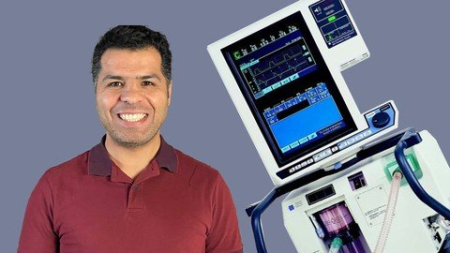
by the end of this course, you will be able to understand and interpret everything on this screen "the ventilator screen", to pick the right mode of mechanical ventilation, pick your initial ventilator settings, adjust the ventilator settings according to your patient's need, monitor respiratory mechanics on the ventilator screen, and finally, you will know how to wean your patients of the ventilator, it's a comprehensive course that will take you from a beginner to an intermediate if not advanced level in mechanical ventilation
Who this course is for
Attending physicians, residents, medical students, ICU nurses, CRNAs, Nurse practitioners and physicians assistants working in ICU.
Screenshots


079925ad-97f5-49c2-beb0-dbd5752ad7d8.png

Learn to Paint Digital Watercolors in Adobe Fresco
Duration: 1h 14m | Video: .MP4, 1280x720, 30 fps | Audio: AAC, 48 kHz, 2ch | Size: 446 MB
Genre: eLearning | Language: English


This class will help you learn to paint with digital watercolors using Adobe Fresco's Live Watercolor Brushes. You will discover
Each of the 5 basic brushes and their unique attributes.
Best practices for creating realistic digital watercolor illustrations.
How to organize your workspace efficiently.
How to recolor your artwork with the fill bucket tool.
Techniques similar to traditional watercolors such as:
Wet on Wet
Wet on Dry
Masking areas to create white space
Adding water with the Primary Touch Shortcut
How to use clipping masks to add in paper textures.
This class is for all levels, whether you are an experienced watercolor artist looking to learn a digital format or someone new to painting with watercolor. No experience is necessary but it may be helpful to have some basic knowledge of Adobe Fresco. If you need a refresher on Adobe Fresco, you can check out my class Intro to iPad Art Part 2: Adobe Fresco on Skillshare.
Why is this class helpful?
For many artists, watercolor is their preferred medium but for their artwork to be used on products they have to scan in their watercolors to digitize their art. Creating watercolors in Adobe Fresco cuts out the steps of scanning, removing the background and cleaning up any mistakes. With Adobe Fresco, you have the ability to save yourself time and resources.
This class gives you another tool for creating your artwork. It can be hard to learn new techniques so I created this class to make it easy to get started with these new tools. I'll teach you best practices for creating your best work. You can take what you learn in my class and explore ways to incorporate this new medium into your work.
Materials and Resources
This class requires an iPad and Apple Pencil combined with Adobe Fresco.
With an Adobe CC account you*will have access to Adobe Fresco and many other Adobe apps with one subscription. Adobe also offers free trials of its*apps so you can*start with the free trial if you*don't want to commit to paying for the app immediately but it won't offer all of the premium features.
In the Projects & Resources section, you will find
Three botanical images you can use for your painting.
A file with paper texture to add into your project in the final lesson.
A little about me
I have a Bachelors of Fine Art and over three decades of experience as an artist. I have been using the iPad Pro and Apple Pencil since early 2016 (shortly after its initial launch). I tested many drawing apps and tools over the years and have a lot of experience working on the iPad.
Using the Live Brushes in Adobe Fresco to create traditional watercolor effects can be intimidating at first. I started using Adobe's live brushes when they were first introduced in Adobe Sketch so I have a lot of tips on getting the best results with digital painting.
I learned with pencil and paper but have transitioned to working digitally to create my art so I know first hand how intimidating the switch from traditional media to digital media can be in the beginning. I also know the benefits of working digitally to save time and resources and increase productivity.
Adobe and Adobe Fresco are either registered trademarks or trademarks of Adobe in the United States and/or other countries.
Homepage
Screenshots


Zurück
Oben Unten