• Regeln für den Video-Bereich:

    In den Börsenbereich gehören nur Angebote die bereits den Allgemeinen Regeln entsprechen.

    Einteilung

    - Folgende Formate gehören in die angegeben Bereiche:
    - Filme: Encodierte Filme von BluRay, DVD, R5, TV, Screener sowie Telesyncs im Format DivX, XviD und x264.
    - DVD: Filme im Format DVD5, DVD9 und HD2DVD.
    - HD: Encodierte Filme mit der Auflösung 720p oder darüber von BluRay, DVD, R5, TV, Screener sowie Telesyncs im Format x264.
    - 3D: Encodierte Filme von BluRay, die in einem 3D Format vorliegen. Dies gilt auch für Dokus, Animation usw.
    - Serien: Cartoon/Zeichentrick, Anime, Tutorials, Dokumentationen, Konzerte/Musik, Sonstiges sind demnach in die entsprechenden Bereiche einzuordnen, auch wenn sie beispielsweise im High Definition-Format oder als DVD5/DVD9/HD2DVD vorliegen. Ausnahme 3D.
    - Bereich Englisch: Englische Releases gehören immer in diesen Bereich.
    - Bereich Talk: Der Bereich, in dem über die Releases diskutiert werden kann, darf, soll und erwünscht ist.


    Angebot/Beitrag erstellen

    - Ein Beitrag darf erst dann erstellt werden, wenn der Upload bei mindestens einem OCH komplett ist. Platzhalter sind untersagt.
    - Bei einem Scenerelease hat der Threadtitel ausschließlich aus dem originalen, unveränderten Releasenamen zu bestehen. Es dürfen keine Veränderungen wie z.B. Sterne, kleine Buchstaben o.ä. vorgenommen werden. Ausnahme Serienbörse:
    - Bei einem Sammelthread für eine Staffel entfällt aus dem Releasename natürlich der Name der Folge. Beispiel: Die Simpsons S21 German DVDRip XviD - ITG
    - Dementsprechend sind also u.a. verboten: Erweiterungen wie "Tipp", "empfehlenswert", "only", "reup", usw. / jegliche andere Zusatzinformation oder Ergänzung, welche nicht in obiger Beschreibung zu finden ist.

    Aufbau des Angebots und Threadtitel

    Der Titel nach folgendem Muster erstellt zu werden. <Name> [3D] [Staffel] [German] <Jahr> <Tonspur> [DL] [Auflösung] <Quelle> <Codec> - <Group>
    Beispiel: The Dark Knight German 2008 AC3 DVDRip XviD - iND
    Beispiel: The Dark Knight 2008 DTS DL BDRip x264 - iND
    Beispiel: The Dark Knight 2008 AC3 DL BDRip XviD - iND
    Beispiel: The Dark Knight German 2008 AC3 720p BluRay x264 iND
    Beispiel: The Dark Knight 2008 DTS DL 1080p BluRay x264 iND
    Beispiel: Die Simpsons S01 German AC3 DVDRip XviD iND
    Beispiel: Die Simpsons S20 German AC3 720p BluRay x264 iND
    Beispiel: Sword Art Online II Ger Sub 2014 AAC 1080p WEBRip x264 - peppermint
    Entsprechend sind also u.a. verboten: Sonderzeichen wie Klammern, Sterne, Ausrufezeichen, Unterstriche, Anführungszeichen / Erweiterungen wie "Tipp", "empfehlenswert", "only", "reup", usw. / jegliche andere Zusatzinformation oder Ergänzung, welche nicht in obiger Beschreibung zu finden ist
    Ausnahmen hiervon können in den Bereichen geregelt sein.

    Die Beiträge sollen wie folgt aufgebaut werden:
    Überschrift entspricht dem Threadtitel
    Cover
    kurze Inhaltsbeschreibung
    Format, Größe, Dauer sind gut lesbar für Downloader außerhalb des Spoilers zu vermerken
    Nfo sind immer Anzugeben und selbige immer im Spoiler in Textform.
    Sind keine Nfo vorhanden z.B. Eigenpublikationen, sind im Spoiler folgende Dateiinformationen zusätzlich anzugeben :
    Quelle
    Video (Auflösung und Bitrate)
    Ton (Sprache, Format und Bitrate der einzelnen Spuren)
    Untertitel (sofern vorhanden)
    Hosterangabe in Textform außerhalb eines Spoiler mit allen enthaltenen Hostern.
    Bei SD kann auf diese zusätzlichen Dateiinformationen verzichtet werden.

    Alle benötigten Passwörter sind, sofern vorhanden, in Textform im Angebot anzugeben.
    Spoiler im Spoiler mit Kommentaren :"Schon Bedankt?" sind unerwünscht.


    Releases

    - Sind Retail-Release verfügbar, sind alle anderen Variationen untersagt. Ausnahmen: Alle deutschen Retail-Release sind CUT, in diesem Fall sind dubbed UNCUT-Release zulässig.
    - Im Serien-Bereich gilt speziell: Wenn ein Retail vor Abschluss einer laufenden Staffel erscheint, darf diese Staffel noch zu Ende gebracht werden.62
    - Gleiche Releases sind unbedingt zusammenzufassen. Das bedeutet, es ist zwingend erforderlich, vor dem Erstellen eines Themas per Suchfunktion zu überprüfen, ob bereits ein Beitrag mit demselben Release besteht. Ist dies der Fall, ist der bereits vorhandene Beitrag zu verwenden.
    - P2P und Scene Releases dürfen nicht verändert oder gar unter einem iND Tag eingestellt werden.


    Support, Diskussionen und Suche

    - Supportanfragen sind entweder per PN oder im Bereich Talk zu stellen.
    - Diskussionen und Bewertungen sind im Talk Bereich zu führen. Fragen an die Uploader haben ausschließlich via PN zu erfolgen, und sind in den Angeboten untersagt.
    - Anfragen zu Upload-Wünschen sind nur im Bereich Suche Video erlaubt. Antworten dürfen nur auf Angebote von MyBoerse.bz verlinkt werden.


    Verbote

    - Untersagt sind mehrere Formate in einem einzigen Angebotsthread, wie beispielsweise das gleichzeitige Anbieten von DivX/XviD, 720p und 1080p in einem Thread. Pro Format, Release und Auflösung ist ein eigener Thread zu eröffnen.
    - Grundsätzlich ebenso verboten sind Dupes. Uploader haben sich an geeigneter Stelle darüber zu informieren, ob es sich bei einem Release um ein Dupe handelt.
    - Gefakte, nur teilweise lauffähige oder unvollständige Angebote sind untersagt. Dies gilt auch für eigene Publikationen, die augenscheinlich nicht selbst von z.B. einer DVD gerippt wurden. Laufende Serien, bei denen noch nicht alle Folgen verfügbar sind, dürfen erstellt und regelmäßig geupdatet werden.
    - Untersagt sind Angebote, welche nur und ausschließlich in einer anderen Sprache als deutsch oder englisch vorliegen. Ausnahmen sind VORHER mit den Moderatoren zu klären.


    Verstoß gegen die Regeln

    - Angebote oder Beiträge, die gegen die Forenregeln verstoßen, sind über den "Melden"-Button im Beitrag zu melden.
  • Bitte registriere dich zunächst um Beiträge zu verfassen und externe Links aufzurufen.

*** Bestes IPTV *** bester Preis *** gratis Test ***


Englische Tutorials

AdOw0HIeKw5loQ3zMX0uNx6UMpQ08UbP.jpg

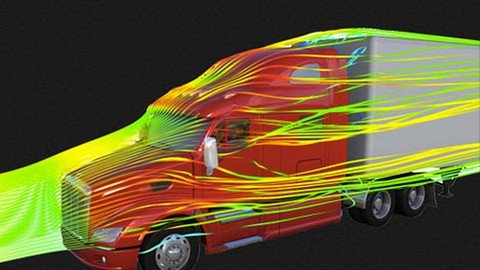
SOLIDWORKS Flow Simulation for CFD: Complete Course
MP4 | Video: h264, 1280x720 | Audio: AAC, 44.1 KHz
Language: English | Size: 604 MB | Duration: 56m
CFD Simulation using SOLIDWORKS Flow Simulation
What you'll learn​

Get introduced to CFD and SOLIDWORKS Flow Simulation
Understand meshing CFD Applications
Learn to set-up a CFD Simulation
Learn aerodynamic CFD modelling and simulation
Learn CFD post-processing and result visualization
Requirements
Basic understanding of fluid mechanics is needed
Computer with good computing power (minimum of 4GB RAM)
Install SOLIDWORKS integrated with Flow Simulation Program
Description
This course on computational fluid dynamics (CFD) simulation in SOLIDWORKS Flow Simulation is designed and developed to bring you from an absolute beginner to become an expert of CFD simulation. I have schedule the teaching to engage you not only in the theoretical simulation but take many practical CFD simulation exercises for each section and sub-section of the course.
This course primarily introduces you to choosing the appropriate mesh method for your CFD model and teaches you how to set-up the method for your CFD model and teaches you how to set-up the method. Also, you will be free from the confusion of which CFD turbulent model is the appropriate model for my flow simulation.
Who this course is for
Engineering students
Beginner fluid mechanic students
CFD students
Screenshots


k2FDdCNX3iyZvKWJwiOvXWHqDGgoBjEH.jpg

The Airtable Academy | Become a Pro with Airtable & Zapier
MP4 | Video: h264, 1280x720 | Audio: AAC, 44.1 KHz
Language: English | Size: 0.99 GB | Duration: 1h 38m
Elevate your projects to the next level using Airtable & Zapier
What you'll learn​

How to solve everything data-related with Airtable - with practical examples
How to unleash the power of Airtable
How to set up your database and link records together
How to build an interactive database for your business or private project
How to automate your workflows with Airtable and Zapier
Requirements
An internet connection
A web browser (Google Chrome/Safari/Firefox/Internet Explorer/etc.)
No accounts to any tool needed - we will set-up all (free) accounts during the course!
Basic Excel or Google Sheets skills are a plus but definitely not required
Description
Tons of Excel-Files, redundant and inconsistent data sets, long hours of manual data cleanup and vague guesses rather than informed decisions due to a lack of reliable data insights.
Does that sound familiar?
Do you look for a data management solution you can tweak and adapt on the fly to your needs?
Do you strive to ditch all these locally stored excel files for one central web-based solution?
Are you tired of watching your files to load, your PC to crash and to boot up again?
Do you look for a tool to design your own workflows and automate your processes?
Well, with Airtable the years of struggle come to an end.
Learn Airtable and tap into a new world of managing your business and your private projects
Create one single source of truth instead of tons of Excel-Files
Stop manual monkey work and create automated workflows
Start managing your project instead of managing your data
With Airtable Academy you can get from beginner to expert in only a couple of hours.
This course was specifically designed to get you ramped up fast, so that you can start building your own solutions. After going through the lessons once, it will also be a helpful ressource to pull up if you would like a refresher on one of the topics.
The practical examples inside this course will help you to understand how flexible Airtable is and you can take base your work on these solutions instead of starting from scratch.
This course uses the latest version of Airtable so that you'll get an explanation of everything currently available.
What you will get in this course
A step-by-step video course, taking you from beginner to expert level
All the resources to download and follow along
Access to the course community
An instructor to ask everything, so you won't get stuck in your learning journey
A certificate of completion (if you complete the course ;-) )
This course is designed for all the creators out there, who love to tackle projects on their own instead of using predefined solutions.
You don't need any knowledge about code or databases, we will cover everything necessary in the course.
If you have any questions beforehand, please do not hesitate to get in touch with me! I want to help you on your learning journey in the best way possible.
Thank you so much for considering this course and see you in class very soon!
Who this course is for
Creators striving for a flexible and powerful solution to their data management
Employees wanting to get rid of overcomplicated Excel-files
Entrepreneurs looking for an easy-to-use solution to manage their business around one central system
Automators trying to achieve the next level of workflow automation without coding
Anyone looking for a clever and easy solution to manage their data
Screenshots


th_TXsVmEmgnJbXqCNJFd9Ope0RKDfQ3gCd.jpg

The Complete Nmap Ethical Hacking MasterClass
MP4 | Video: h264, 1280x720 | Audio: AAC, 44.1 KHz, 2 Ch
Genre: eLearning | Language: English + srt | Duration: 77 lectures (7h 14m) | Size: 3.46 GB

Nmap - Network Scanning - Nathan house - Ethical hacking - Networking - Nmap course
What you'll learn
Nmap and Network Mapping
OSI Model
Port and Access Port
Three-way Handshake
Scanning Target
Scan Result
+30 Type of Scan in System Administrator, Ethical Hacker
Detect the Operating System
Find the Owner of The Website
Everything About Verbosity
Packet Tracing
How to Do TCP and UDP Scanning
Traceroute, IP Protocol Ping
DNS in Nmap
Port States Recognized by Nmap
Time Optimization
Scripting Engine
Location with Scripts
Different Script from NSE Documentation
Everything About Evading Firewalls
Spoof Mac Address
Auditing Web Servers
And much more in Nmap
Requirements
No Previous Experience Necessary!
Willingness to Learn :)
Description
The Complete Nmap Ethical Hacking MasterClass: Nmap - Network Scanning - Nathan house - Ethical hacking - Networking - Nmap Course
Nmap ("Network Mapper") is a free and open-source utility for network discovery and security auditing. Many systems and network administrators also find it useful for tasks such as network inventory, managing service upgrade schedules, and monitoring host or service uptime. Nmap uses raw IP packets in novel ways to determine what hosts are available on the network, what services (application name and version) those hosts are offering, what operating systems (and OS versions) they are running, what type of packet filters/firewalls are in use, and dozens of other characteristics. It was designed to rapidly scan large networks but works fine against single hosts. Nmap runs on all major computer operating systems, and official binary packages are available for Linux, Windows, and Mac OS X. In addition to the classic command-line Nmap executable, the Nmap suite includes an advanced GUI and results in the viewer (Zenmap), a flexible data transfer, redirection, and debugging tool (Ncat), a utility for comparing scan results (Ndiff), and a packet generation and response analysis tool (Nping). (Nmap org's definition of Nmap)
We did this course to teach you everything about theory, use examples and projects to deliver you the concept of Nmap better. We wouldn't bombard you with a lot of theory. We do our best to teach everything as an example.
By taking this The Complete Nmap Ethical Hacking MasterClass you will be able to
What network is it? How does it work?
What OSI model is? How does it work?
What is a port? How do we get access to the computer using a port?
What three-way handshake is? How does it work?
How to choose the target to scan?
How to log the scan result in all types of files that Nmap supports?
More than thirty types of scans you need to learn as a system administrator, Ethical hacker.
How to detect the Operating System?
Find the Owner of the Website?
Learn everything about verbosity
Learn Packet Tracing
Learn how to do TCP and UDP scanning?
Learn Traceroute, IP Protocol Ping?
Using someone's DNS?
Learn everything Port states Recognized by Nmap?
Learn about everything about Time Optimization
What is a Scripting Engine?
Finding someone's location with scripts
How to use d Script from NSE documentation.
You will everything about Evading Firewalls.
Learn how to spoof mac addresses.
You will learn to audit the webserver.
So don't hesitate anymore,
Join us now to make new experiences with The Complete Nmap Ethical Hacking Masterclass today!
This Nmap course is ideal for anyone searching for more info on the following: Nmap - network security - Nathan house - ethical hacking - nmap course - networking. Plus, this course will be a great addition to anyone trying to build out their knowledge in the following areas: Network Scanning - Network Security - Ethical Hacking.
Who this course is for
Anyone Who Wants to Learn Network Scan Techniques
People Who Are Willing to Make a Career in Cyber Security
System Administrators, Ethical Hacker, Penetration Tester
People Who Want to Take Their Hacking Skills to Next Level
Homepage


uXVjWIW9HbRvdhgMg0vyj81vGEhYqa8j.jpg

Wireshark: A Comprehensive Guide to Network Analysis
MP4 | Video: h264, 1280x720 | Audio: AAC, 44.1 KHz
Language: English | Size: 999 MB | Duration: 6h 2m
Wireshark is the world's most popular and widely-used network protocol analyzer to deep inspect hundreds of protocols!​

What you'll learn
Analyse Network using Wireshark
Perform Live capture and offline analysis
Create and Interpret Trace File Statistics
Learn Powerful display filters
Navigate Quickly and Focus Faster with Coloring Techniques and Exporting Packets
Spot Network and Application Issues
Understand TCP/IP Communications
Identify glitches in network performance
Filtering Traffic: ICMP, DHCH, IP and MAC Addresses, TCP-UDP
Reassembling network traffic
Learn Tools and Internals
Effectively Use Command-Line Tools
Requirements
Familiarity with networking concepts and protocols
A computer with an Internet connection
Description
Wireshark is the world's most popular and widely-used network protocol analyzer. It captures packets in real time and display them in human-readable format.
WireShark has become the de facto protocol analyser across all industries to deep inspect hundreds of protocols
Whether you need to perform a security application analysis or troubleshoot something on a network, Wireshark is the tool for you!
By the end of the course you will be able to
Analyse Network using Wireshark
Perform Live capture and offline analysis
Create and Interpret Trace File Statistics
Learn Powerful display filters
Navigate Quickly and Focus Faster with Coloring Techniques and Exporting Packets
Spot Network and Application Issues
Understand TCP/IP Communications
Identify glitches in network performance
Filtering Traffic: ICMP, DHCH, IP and MAC Addresses, TCP-UDP
Reassembling network traffic
Learn Tools and Internals
Effectively Use Command-Line Tools
Learning Wireshark is a definite way to advance your career and will open doors to new Job opportunities.
100% MONEY-BACK GUARANTEE
This course comes with a 30-day money back guarantee. If you're not happy, ask for a refund, all your money back, no questions asked.
Feel forward to have a look at course description and demo videos and we look forward to see you inside.
Who this course is for
Network professionals of all levels
Security experts
Freelancers wishing to add an in demand skill to their profile.
Anyone interested to learn more about network protocols.
Screenshots


243e7cea-30c0-4a53-a42b-0c944d916047.png

10 projects in10 Day HTML5, CSS3, JavaScript in 2022
Instructors: Neamat Andishmand
11 sections • 52 lectures • 8h 46m
Video: MP4 1280x720 44 KHz | English + Sub
Updated 2/2022 | Size: 3.5 GB​

JavaScript - CSS - HTML - Arrow Functions - CallBack functions - simple functions- let -const -10 project in 10 day
What you'll learn
Start learning about JavaScript, HTML,CSS
Dynamically generate HTML in JavaScript
learn core JavaScript
Work with local storage and save high score in local storage
ES6 JavaScript features like arrow functions, const, let and template literal string
How to use FlexBox, Animations and REM units in CSS
Good technique of programming
Project based teaching to charpen your HTML, CSS and JavaScript
Modern styling with flexbox, CSS animation custom properties...
Requirements
A basic understanding of HTML and CSS is a plus, but not a must!
Description
Welcome to 10 projects in 10 Day in this course we are trying to take you through core web development with javascript, HTML, CSS.
This is a fun, practical & project based course for all skill levels. The projects in this course are designed to get you building things using HTML5, CSS & JavaScript with no frameworks or libraries. Every project is built from scratch and has some kind of dynamic functionality from small games to an expense tracker to a breathing relax app.
Although this is a project based course, I will still be explaining everything as I go. These are mini-projects designed for you to complete in a few hours.
JavaScript is the most popular programming language in the world and that makes it a programmer's great choice. Once you learnt, it helps you develop great front-end as well as back-end software using different Javascript-based frameworks like jQuery, Node.JS etc.
in this course we are going to create 10 project with javascript that you really need to know as a web developer.
so also you have access to the source code of each project, By taking this course you will not just get master in JavaScript but also CSS and HTML because we are working hard with CSS too.
project that we are going to create in this course
quick quiz
color flipper
counter
review
navbar
sidebar
question
modal
menu
video
Some Things You Will Learn In These Projects
Working with Local Storage
High Order Array Methods - forEach, map, filter, reduce, sort
setTimout, setInterval
Arrow Functions
Dynamically generate HTML in JavaScript
ES6 JavaScript features like arrow functions, const, let and template literal string
How to use flexBox animation and Rem units in css
Good technique of programming
Intelligence thinking about writing code
and More!
So don't hesitate anymore,
Join us now to make new experiences with 10 project in 10 day with JS today!
Who this course is for
Anyone that wants to build some fun and easy to intermediate projects
Who this course is for
Anyone who want to start working with javascript
Screenshots


07cc9952-b791-4239-9f8e-cc61ab4f7a14.png

Advance Multi Time Frame Trading Strategy
MP4 | Video: h264, 1280x720 | Audio: AAC, 44.1 KHz, 2 Ch
Genre: eLearning | Language: English + srt | Duration: 23 lectures (1h 38m) | Size: 803.3 MB

Find your trading edge using multi time frame, Learn swing trading, day trading, Do professional Technical analysis
What you'll learn
Multi Time Frame strategy
Candlestick Sentiment
Directional bias who is the driver
Supply demand Exclusive
Technical analysis using Multi Time Frame
Deep Explanation of market Structure
Live market practice Entry and Exit
Pull back trading, continuation trading, breakout trading , reversal trading,
Requirements
Need Basic Forex Background
Need Dedication in Forex Trading
If you need Extra Boosting then its for you
Description
how helpful this course
1. This course help you to trading with the Multi Time Frame trading edge,
2. understanding the price action with multiple time frame.
3. how not miss big profit.
4. how can we take perfect entry like a pro.
5. this course boost your trading skill step by step,
6. when to wait for market and when to enter the market.
7. i will show you a magical way how i select the entry.
8. Boost your trading skill like a boos,
9. its extremely high professional trading style.
in this course i expose 4 trading system. 1. pullback trading. 2. continuation trading 3. breakout trading. 4. reversal trading. also i show you how to use magical 50 EMA. i show you totally deferment method basic to advance price action trading component. you can learn pure price action trading using only reading candlestick , supply demand, momentum, Multi Time Frame confluence. its gives you so much idea out of the box. you can read the chart perfectly using my technique. so much easy and logical theory i apply on it. you just need to understand the behind the seen. how price go up and down who is the market mover. i will expose the real information.
Who this course is for
Help to improve intermediate and advance Trader to a coplete Professional Trading.
Who are strugling to catch Big move
Who are lossing there money Every day
who not get perfect logical strategy
who not found best information about forex trading
Who are Trying to catch swing point
Who are Searching best forex Trading method
Homepage


d6443d4b-ee56-4fb5-8327-4dacd39ef2ca.png

Advanced Excel for Financial Reporting & Financial Analysis
MP4 | Video: h264, 1280x720 | Audio: AAC, 44.1 KHz, 2 Ch
Genre: eLearning | Language: English + srt | Duration: 66 lectures (6h 11m) | Size: 3.53 GB

Transform the way you do Financial Reporting and Financial Analysis with Advanced Excel, leveraging Power Pivot & DAX
What you'll learn
Financial Reporting
Financial Ratios and Financial Analysis
Visualizing Financial data
Power Pivot & DAX
Requirements
Basic knowledge of Financial Reports and Ratios
Description
Reporting and Analysis are the two of the most common tasks that Accountants, Bookkeepers, and Financial Analysts perform on their job. Like most other tasks that we do, yet again Microsoft Excel is the most used software for these tasks.
But, using basic Excel for these tasks is like using a bullock cart for travelling in 2021. Oh yes, using the advanced Excel tools like Power Pivot & DAX, we can completely revolutionize the way we do reporting and analysis.
We can directly connect our database with Excel, automate the data cleaning and transformation of data, prepare cash key financial reports, including financial statements, prepare key insights including ratio analysis, and even prepare visualizations.
And the best part, all of this reporting and analytics can be set up as dynamic, meaning that these reports can be filter for any country, any cost center, or any business segment with just a click of a button.
Well, this is exactly what this course is all about!
In this course you will learning everything that you need to completely transform the way you do you perform your Reporting and Analytics.
Prerequisites
Basic knowledge of Accounting/Bookkeeping, financial statements, and ratios is required.
Basic knowledge of Excel will be helpful.
Who should take this course
Accountants and Bookkeepers
Finance professionals
Financial Analysts
Business Analysts
Finance Managers
Financial Controllers
Business Leaders
Software Requirement
Any version of Microsoft Excel 2010 or later.
Money-Back Guarantee:
Nothing to lose! If you won't be satisfied with the course, Udemy offers 30 days money-back guarantee!
Introduction to the teacher
Chartered Accountant | 12 years of work experience | 12 years of teaching experience as visiting faculty | 4000+ in-class students | 100,000+ online students on Udemy | In love with Excel for 15 years
Who this course is for
Financial Analysts
Business Analysts
Finance Managers
Financial Controllers
Accountants
Bookkeepers
Accounting & Finance students
Homepage


08d899eb-29c0-4fd3-8434-4da50148702c.png

Algo Trading with Python: Build Indicators and Manage Risks
MP4 | Video: h264, 1280x720 | Audio: AAC, 44.1 KHz, 2 Ch
Genre: eLearning | Language: English + srt | Duration: 61 lectures (4h 22m) | Size: 3.88 GB

The Complete Course of Programming, Indicator Building and Risk Management for Forex and Crypto
What you'll learn
Build a complete algorithm, from scanning market, placing trades, to managing trades
Lean how to build indicators that work for you
Learn how to interact with your brokers programmatically and directly
Use code to be systematic in trading and get your time back
Learn how to entry a trade, exit a trade, and get other account data
Learn the Python skills to protect your accounts and profits
Learn all the skills so that you are able to build a backtesitng system for your algorithm from this course
Requirements
No programming experience is required. I will teach you everything you need to know.
Description
Are you a trader who is interested in learning how to build their own trading algorithm?
If so, this course will teach you the basics of Python - you will learn about all the native data types in Python, and know how to work with control flow structure so that you can have decision logic built into your code.
Trading is hard, but it is also highly rewarding. With Python, you can put in a methodical system to build your own rule-based algorithm in order to get to your goal efficiently.
Python is also the perfect language for AI-based algorithms using a variety of machine learning techniques. The AI-based courses are coming soon.
This complete course of algo trading with Python will teach all the Python syntax you need to know, and get you ready for working with Pandas, taking care of the DateTime objects, and handling errors. You will then immediately learn about how to use Python to connect to the MetaTrader5 terminal, and get market data as well as account information programmatically from your broker directly. You will also learn about constructing indicators that work for your style of trading, by using Pandas, Ta-Lib, or writing your own user-defined functions. You will learn how to programmatically compute position size but first decide where you would like to place your stop loss level, and then query some account information to complete the computation. You will learn about the specific ways that you will communicate, using Python, with your brokers to enter and/or exit trades with the computed size for your risk tolerance. Further, you will also learn about how to set the stop loss and take profit, how to move stop loss to breakeven, and how to update (trail) your stop-loss level after that point. Once you have learned all about these topics, you are able to build as many elaborate risk management strategies as you want in a way that you like to trade.
At the end of this course, you will have a firm understanding of what goes into building an algorithmic trading strategy from scratch. You will have not only all the tools necessary to create your own algorithmic strategies, but you will also know how to manage your positions, as well as take what you already know and set up a backtesting environment for yourself, so that you are able to systematically build and test strategies on an on-going basis.
The goal of the series is to give you an understanding of what goes into building an algorithmic trading strategy from scratch. By the end of the three-part series, you should have not only all the tools necessary to create your own algorithmic strategies, but you will also know how to manage your positions.
Who this course is for
Forex and crypto traders who are interested in algorithimic trading
Forex and crypto traders who are interested in using machine learning in your algorithms in the future
Homepage


930d4b76-2414-4e3c-8292-2333c219d8af.png

Artificial Intelligence In Game - FPS Aimbot
MP4 | Video: h264, 1280x720 | Audio: AAC, 44.1 KHz, 2 Ch
Genre: eLearning | Language: English + srt | Duration: 15 lectures (1h 24m) | Size: 966.5 MB

Yolov5 training and detecting, Writing mouse driver, collecting data from inside the games, making AI aiming bot.
What you'll learn
How to Train Custom Yolov5 Model
How to Run Detecting Algorithm With Custom Model.
How to Collect Data Easily From Inside The Games.
How to Label Your Datas.
How to Make Mouse Driver With Arduino Leonardo.
How to Give Mouse Input To All Games With Programming.
Requirements
Basic python knowledge.
Basic information about installing applications on computer.
Having Arduino Leonardo and USB Host Shield.
Be able to solder (simple level).
Description
Rapidly developing artificial intelligence has outperformed humans in the esports sector, as in most sectors.
I think the use of 3rd party artificial intelligence software in games will increase in the future.
In this course we give a simple introduction to this technology
This course aims to make auto aiming bot at fps games.
This course contains
how to easily collect data from games,
how to label your dataset,
how to train your custom model with Yolov5,
how to use detecting with your custom model,
how to make mouse driver for be able to give mouse input to all games.
With the mouse driver we have made, you can give mouse input to all games.
I published on udemy all materials used in this course like dataset, scripts, arduino leonardo scripts, trained model.
You can follow course easily with use this materials.
I did not explain the codes I wrote in this course in detail. It would be helpful to have basic python knowledge. It will be beneficial for you to know how to install programs such as cuda and python on your computer.
If you use the techniques in this course, there is a possibility that you will be punished by the game be carefull
Who this course is for
Tech-savvy people.
People who want to learn Yolov5.
People who want to learn how to make mouse driver.
Homepage


e4097f27-8879-4d15-a0af-cd108a074efa.png

Autodesk AutoCAD - Beginner to an advanced level
MP4 | Video: h264, 1280x720 | Audio: AAC, 44.1 KHz, 2 Ch
Genre: eLearning | Language: English + srt | Duration: 182 lectures (12h 33m) | Size: 5.74 GB

All years covered!
What you'll learn
On completion, you will have gained the skills and knowledge to take a project from start to finish, utilizing all tools and drawing methods.
You will be taught how to create your own types of text, dimensions, layers, and blocks to use in your own working environment.
All tools will be explained in detail by their true definitions, illustrated with easy-to-follow images and put into practice with guided exercises.
Setting you up to work on your own as well as understand typical office standards.
At the end of the course is an extra section where you can request a video ex-plainer on any issues you are having.
Requirements
No prior knowledge of AutoCAD is required.
Students should have a good working knowledge of how to use a PC.
A working mouse with a scroll wheel is essential.
A second screen is recommended to view the videos while using AutoCAD on the other.
AutoCAD software must be installed, 30-day free trial available from Autodesk. The first section of this course will guide you through the download and install process if you have not done so already.
Description
Whether you are self-taught and want to fill in the gaps to become more efficient and productive, or you have never used the software before, this Autodesk AutoCAD course will give you a solid foundation to become a confident AutoCAD user and develop advanced skills.
This comprehensive course is the perfect start to your career in CAD design. This course will give you a competitive edge in your career, making you stand out from all other applicants and employees.
As one of the leading course providers and most renowned e-learning specialists, I am committed to providing you with the best educational experience possible. This course is designed by an industry expert to help you learn quickly and efficiently, at your own pace and convenience.
Course Aspects
I have been teaching this course in person and online since 2017 and have perfected the course material, teaching method, and explanations to ensure all the bases are covered and the student has a full understanding of the software.
Your level of experience will develop as we progress through the course, rather than overloading you from the start with unnecessary information that you will not use.
We start with the basic features of each tool and then move on to the more advanced features as the course progresses, continually putting these newly acquired skills to practice with multiple exercises.
Course Topics
Interface: Start Tab, Templates, Application Menu, Quick Access Toolbar, InfoCentre, Layout Tabs, Status Bar, Options, Mouse controls, Navigation, Object Selection,
Drawing Tools: Line, Polyline, Circle, Rectangle, Polygon, Ellipse, Hatch, Gradient, Spline, Object Snap
Drawing Methods: Absolute & Relative Coordinates, Orthomode, Grid & Snap, Polar Tracking
Modification Tools: Move, Copy, Stretch, Rotate, Mirror, Scale, Trim, Extend, Fillet, Chamfer, Array, Erase, Explode, Offset, Align, Join,
Annotation: Text, Dimension, Leader, create own styles
Layers: Colour Manager, Linetype Manager, Lineweight Manager, Creation, properties, application, functions
Blocks: Create, Edit, Insert, Design Centre
Palettes: Properties, Blocks, Layers, Command-Line, Design Centre
Layout: Viewports, Page Setups, Printing
I continually update this course to keep it up to date with the new releases as well as the addition of new videos and practice exercises.
I look forward to seeing you in class!
Who this course is for
This course has been designed for beginners to an advanced level
Existing users looking for a refresher course
Want to improve your drawing skills, find out tips & tricks from an industry professional
AutoCAD is not only used by Architects & Engineers, it suits all types of drafting
Great preparation for the Autodesk Certified User exam (ACU)
Homepage













 
https://i.postimg.cc/8C8sNx7S/c8c18732-8055-4f67-9703-376b55201904.png/img]
Awwwards.Academy - Looping Softbodies in Houdini and Redshift with Paul Esteves
Video: MPEG4 Video (H264) 1920x1080 30fps 2166kbps | Audio: AAC 48000Hz stereo 160kbps
Genre: eLearning | Duration: 1hrs+ | Language: English | File size: 285 MB
This course is aimed at beginners and intermediate users. A basic understanding of the Houdini interface is assumed.[/center]

We will go step by step, so you understand each section properly, and can adapt the principles to your unique project. We will cover every aspect needed to create a production level softbody simulation from start to final render.
We'll look at a variety of methods to achieve the same result so you can adapt and use these principles on whatever your current project requires.
Homepage

[url]https://rapidgator.net/file/4a1f5fe976ba1499a2e7dfab2423ff1a/AALSHRSP.rar.html[/url]

[url]https://uploadgig.com/file/download/e7B2662e53c7A2c9/AALSHRSP.rar[/url]​
 
f6e5101e-85aa-4c78-913d-34e72ce3a70d.png

Be Pro with Redshift for C4D
MP4 | Video: h264, 1280x720 | Audio: AAC, 44.1 KHz, 2 Ch
Genre: eLearning | Language: English + srt | Duration: 23 lectures (3h 23m) | Size: 2.2 GB


Learn Redshift on a professional way
What you'll learn
Use Redshift on a professional way
Create professional Images and Animation on the right way
Learn different ways to render an image and animations
Learn an easy and a professional way to produce images
Save a lot of rendertime, if you understand the things behind the wall
Requirements
You should be able to operate cinema 4d very well.
Description
If you want to quickly implement your own ideas without sacrificing quality, I can help you if you work with Redshift and C4D.
I would like to introduce you to different workflows. From very simple, medium to advanced. All workflows have their pros and cons.
The first workflow is extremely easy to understand and you can create perfect results with it. But you have to wait a bit longer for the renderings.
The second workflow is slightly more difficult, but you will be rewarded with faster renderings. This is especially worthwhile if you want to render animations.
In the last workflow, we get everything out of Redshift and save a lot of render time. For this you have to learn to understand some parameters. Here you just need some practice with the parameters.
Anyway, I want to show you all three workflows so you can get a perfect result.
Of course I will cover all important topics.
From working with cameras and light, creating materials and of course everything you need for rendering. I will explain complex things simply and show you some practical scenes.
In the topic materials I will show you how you can create the basic materials without the presets and thus understand the parameters for the future better to create professional materials.
My name is Andreas Fülscher and I have been working in 3D for many years. I am a Maxon Certified Trainer and 3D is my great passion. This is my first course in English. My English will not be the best. If you have difficulties to understand certain things, just send me a message. I will be happy to fix these errors in future updates.
Currently I only show the first workflow in the course. I have already created the course in German, but I will translate it bit by bit into English. Please be patient. The course will be updated soon.
And now have fun to learn new things.
Andreas Fülscher
Who this course is for
Graphic designer
3D Artists
Graphic enthusiasts
People who love 3D Software
All those who already know Redshift but want to look behind the scenes,
Homepage


Zurück
Oben Unten