• Regeln für den Video-Bereich:

    In den Börsenbereich gehören nur Angebote die bereits den Allgemeinen Regeln entsprechen.

    Einteilung

    - Folgende Formate gehören in die angegeben Bereiche:
    - Filme: Encodierte Filme von BluRay, DVD, R5, TV, Screener sowie Telesyncs im Format DivX, XviD und x264.
    - DVD: Filme im Format DVD5, DVD9 und HD2DVD.
    - HD: Encodierte Filme mit der Auflösung 720p oder darüber von BluRay, DVD, R5, TV, Screener sowie Telesyncs im Format x264.
    - 3D: Encodierte Filme von BluRay, die in einem 3D Format vorliegen. Dies gilt auch für Dokus, Animation usw.
    - Serien: Cartoon/Zeichentrick, Anime, Tutorials, Dokumentationen, Konzerte/Musik, Sonstiges sind demnach in die entsprechenden Bereiche einzuordnen, auch wenn sie beispielsweise im High Definition-Format oder als DVD5/DVD9/HD2DVD vorliegen. Ausnahme 3D.
    - Bereich Englisch: Englische Releases gehören immer in diesen Bereich.
    - Bereich Talk: Der Bereich, in dem über die Releases diskutiert werden kann, darf, soll und erwünscht ist.


    Angebot/Beitrag erstellen

    - Ein Beitrag darf erst dann erstellt werden, wenn der Upload bei mindestens einem OCH komplett ist. Platzhalter sind untersagt.
    - Bei einem Scenerelease hat der Threadtitel ausschließlich aus dem originalen, unveränderten Releasenamen zu bestehen. Es dürfen keine Veränderungen wie z.B. Sterne, kleine Buchstaben o.ä. vorgenommen werden. Ausnahme Serienbörse:
    - Bei einem Sammelthread für eine Staffel entfällt aus dem Releasename natürlich der Name der Folge. Beispiel: Die Simpsons S21 German DVDRip XviD - ITG
    - Dementsprechend sind also u.a. verboten: Erweiterungen wie "Tipp", "empfehlenswert", "only", "reup", usw. / jegliche andere Zusatzinformation oder Ergänzung, welche nicht in obiger Beschreibung zu finden ist.

    Aufbau des Angebots und Threadtitel

    Der Titel nach folgendem Muster erstellt zu werden. <Name> [3D] [Staffel] [German] <Jahr> <Tonspur> [DL] [Auflösung] <Quelle> <Codec> - <Group>
    Beispiel: The Dark Knight German 2008 AC3 DVDRip XviD - iND
    Beispiel: The Dark Knight 2008 DTS DL BDRip x264 - iND
    Beispiel: The Dark Knight 2008 AC3 DL BDRip XviD - iND
    Beispiel: The Dark Knight German 2008 AC3 720p BluRay x264 iND
    Beispiel: The Dark Knight 2008 DTS DL 1080p BluRay x264 iND
    Beispiel: Die Simpsons S01 German AC3 DVDRip XviD iND
    Beispiel: Die Simpsons S20 German AC3 720p BluRay x264 iND
    Beispiel: Sword Art Online II Ger Sub 2014 AAC 1080p WEBRip x264 - peppermint
    Entsprechend sind also u.a. verboten: Sonderzeichen wie Klammern, Sterne, Ausrufezeichen, Unterstriche, Anführungszeichen / Erweiterungen wie "Tipp", "empfehlenswert", "only", "reup", usw. / jegliche andere Zusatzinformation oder Ergänzung, welche nicht in obiger Beschreibung zu finden ist
    Ausnahmen hiervon können in den Bereichen geregelt sein.

    Die Beiträge sollen wie folgt aufgebaut werden:
    Überschrift entspricht dem Threadtitel
    Cover
    kurze Inhaltsbeschreibung
    Format, Größe, Dauer sind gut lesbar für Downloader außerhalb des Spoilers zu vermerken
    Nfo sind immer Anzugeben und selbige immer im Spoiler in Textform.
    Sind keine Nfo vorhanden z.B. Eigenpublikationen, sind im Spoiler folgende Dateiinformationen zusätzlich anzugeben :
    Quelle
    Video (Auflösung und Bitrate)
    Ton (Sprache, Format und Bitrate der einzelnen Spuren)
    Untertitel (sofern vorhanden)
    Hosterangabe in Textform außerhalb eines Spoiler mit allen enthaltenen Hostern.
    Bei SD kann auf diese zusätzlichen Dateiinformationen verzichtet werden.

    Alle benötigten Passwörter sind, sofern vorhanden, in Textform im Angebot anzugeben.
    Spoiler im Spoiler mit Kommentaren :"Schon Bedankt?" sind unerwünscht.


    Releases

    - Sind Retail-Release verfügbar, sind alle anderen Variationen untersagt. Ausnahmen: Alle deutschen Retail-Release sind CUT, in diesem Fall sind dubbed UNCUT-Release zulässig.
    - Im Serien-Bereich gilt speziell: Wenn ein Retail vor Abschluss einer laufenden Staffel erscheint, darf diese Staffel noch zu Ende gebracht werden.62
    - Gleiche Releases sind unbedingt zusammenzufassen. Das bedeutet, es ist zwingend erforderlich, vor dem Erstellen eines Themas per Suchfunktion zu überprüfen, ob bereits ein Beitrag mit demselben Release besteht. Ist dies der Fall, ist der bereits vorhandene Beitrag zu verwenden.
    - P2P und Scene Releases dürfen nicht verändert oder gar unter einem iND Tag eingestellt werden.


    Support, Diskussionen und Suche

    - Supportanfragen sind entweder per PN oder im Bereich Talk zu stellen.
    - Diskussionen und Bewertungen sind im Talk Bereich zu führen. Fragen an die Uploader haben ausschließlich via PN zu erfolgen, und sind in den Angeboten untersagt.
    - Anfragen zu Upload-Wünschen sind nur im Bereich Suche Video erlaubt. Antworten dürfen nur auf Angebote von MyBoerse.bz verlinkt werden.


    Verbote

    - Untersagt sind mehrere Formate in einem einzigen Angebotsthread, wie beispielsweise das gleichzeitige Anbieten von DivX/XviD, 720p und 1080p in einem Thread. Pro Format, Release und Auflösung ist ein eigener Thread zu eröffnen.
    - Grundsätzlich ebenso verboten sind Dupes. Uploader haben sich an geeigneter Stelle darüber zu informieren, ob es sich bei einem Release um ein Dupe handelt.
    - Gefakte, nur teilweise lauffähige oder unvollständige Angebote sind untersagt. Dies gilt auch für eigene Publikationen, die augenscheinlich nicht selbst von z.B. einer DVD gerippt wurden. Laufende Serien, bei denen noch nicht alle Folgen verfügbar sind, dürfen erstellt und regelmäßig geupdatet werden.
    - Untersagt sind Angebote, welche nur und ausschließlich in einer anderen Sprache als deutsch oder englisch vorliegen. Ausnahmen sind VORHER mit den Moderatoren zu klären.


    Verstoß gegen die Regeln

    - Angebote oder Beiträge, die gegen die Forenregeln verstoßen, sind über den "Melden"-Button im Beitrag zu melden.
  • Bitte registriere dich zunächst um Beiträge zu verfassen und externe Links aufzurufen.

*** Bestes IPTV *** bester Preis *** gratis Test ***


Englische Tutorials

b2bad2f8-675f-4780-a334-d1b7dff70d67.png

Learn Microsoft Endpoint Manager (Intune) for Windows
MP4 | Video: h264, 1280x720 | Audio: AAC, 44.1 KHz, 2 Ch
Genre: eLearning | Language: English + srt | Duration: 25 lectures (2h 56m) | Size: 3.13 GB

Instructor Led Training
What you'll learn
How to get started with Microsoft Endpoint Manager (Intune)
Understand how Microsoft Endpoint Manager can deploy, manage and secure Windows devices
Gain relevant skills and experience to quickly configure Microsoft Endpoint Manager within a production environment
Apply knowledge gained from the course to practice exams and topical quiz questions to verify your learning
Requirements
No experience needed; learn at your own pace.
Access to a test Windows computer (or virtual machine) that has a fresh installation of Windows 10 or 11 if you want to put your knew skills to the test
Description
Bored of slides? Want to see how Intune is configured for real?
Developed and taught by a Microsoft Enterprise Mobility MVP and Certified Trainer, this course thoroughly explains and demonstrates the basics of deploying and managing Windows devices with Microsoft Endpoint Manager (Intune).
With the help of knowledge-checker quizzes, and self-paced labs, learners who complete the course will be ready to begin managing Windows devices via Intune.
MICROSOFT MVP: The only Intune course on Udemy delivered by a Microsoft Enterprise Mobility MVP.
3+ HOURS OF LIVE DEMONSTRATION: Every lesson includes a full explanation of the concept being discussed, as well as a full walkthrough of how it's configured.
NO SLIDES: Just hands-on, experience-based learning. Follow live with the instructor as you configure a lab environment from scratch,
REAL-WORLD INSIGHTS: Theory isn't enough. Practical, real-world experience makes the difference when learning about managing Windows devices.
COMMUNITY VIDEOS: Bonus community videos, linked in key lessons, help reinforce the message and let you continue your learning once you've completed this course.
END OF SECTION KNOWLEDGE-CHECKER: Each section contains a knowledge-checker quiz, to help you check what you've learned.
Even if you have no Microsoft Endpoint Manager or Intune experience, this course will teach you what you need to know to get started with managing Windows devices with Intune.
Who this course is for
Learners who have little to no experience in Microsoft Endpoint Manager will be able to learn a lot from this course
Those who have some experience of Intune will be guided through the best practice methods for dealing with common scenarios
Learners who are very experienced in MDM (either Intune or another technology) will likely learn tips and tricks that the instructor has learned from their many years of experience
Homepage


c3d9b9fe-1b78-492e-b570-0202e98ba4a3.png

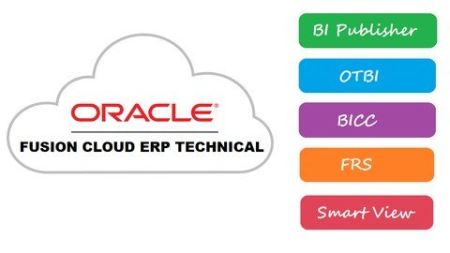
Oracle Fusion Technical - BI | OTBI | BICC | FRS | SmartView
MP4 | Video: h264, 1280x720 | Audio: AAC, 44.1 KHz
Language: English | Size: 2.91 GB | Duration: 9h 15m​

All Reporting Tools of Oracle Cloud ERP (Fusion) - BI,OTBI,BICC,FRS,SmartView,ESS Jobs,Scheduling,Outbound Integration
What you'll learn
Business Intelligence (BI)
BI - Yeh Dil Maange More
All about BI Publisher RTF Templates
Schedule BI Reports
BI as Outbound Integration Tool
BI ESS Jobs & Report Security
Oracle Transactional Business Intelligence (OTBI)
Business Intelligence Cloud Connector (BICC)
Financial reporting Studio (FRS)
Smart View
UCM Web Service
Export BI Report Output from Fusion using OIC
Requirements
Basics of SQL
Microsoft Word & Excel
Description
What's this course about?
Learn Oracle Cloud Fusion ERP Technical - BI, OTBI, BICC, FRS, SmartView and dive deeper into it. Understand the Reporting tools and solutions of Oracle Fusion ERP Cloud. To be precise the reporting capabilities being provided by Oracle in Fusion Cloud SaaS.
What do you expect end of this course?
By the end of the course, you will be equipped with all the knowledge of Reporting tools and solutions of Oracle Fusion ERP Cloud e.g. BI Publisher, OTBI, BICC, FRS, Smart View ! And you will be ready for your next assignment! :)
A detailed list with the course content can be found below.
Who's teaching you in this course?
My name is Raja Dutta and I have my partner Leena, We are both Fusion Cloud, PaaS and Fusion Middlware Consultant and we are passionate about helping more people to learn Fusion Cloud Technologies. After huge postive feedbacks we are here at Udemy with our second course of Oracle Fusion Technical - BI, OTBI, BICC, FRS, SmartView and we had lot of fun in preparing this course! Hope you too will have fun learning this course!
It's our goal to get you started with Oracle Fusion Technical - BI, OTBI, BICC, FRS, SmartView as soon as possible and ensure your success. I want everyone to get benefited out of this course and to us, helping others is the best way of learning. So Let's Learn together!
Is this course for you?
This course is for you if ...
.. you want to upskill with Reports and Analytics in Oracle Fusion ERP Cloud
.. you want to pursue your career with Oracle Fusion BI & Analytics
.. you have idea on ERP and Package solutions
What's inside the course?
BI Publisher
- BI Roles & Configuration
- Develop First BI Report
- BIP Report with Parameters
- Export BIP Report Output
- BI Report Migration
- Master Details BI Report
- BIP Bursting & Delivery Channel
- Secure BI Report
BI - Yeh Dil Maange More
- BI Report using Excel Template
- Print Barcode in BI Report Output
- Secure your PDF Report Output - Static Method
- Secure your PDF Report Output - Dynamic Method
- SubTemplates in Fusion BI
- Explore different features of RTF Template
- Fixed Position flat file using BI Report
- Generate BI Report Output in Multi-Languages - Part1
- Generate BI Report Output in Multi-Languages - Part2
- Customize Standard BI Report
BI - All about RTF Templates
- Auto Generate RTF Templates
BI - Schedule BI Reports
- FTP Delivery Channel Configuration
- Schedule BI Report From Fusion & Burst Report Output to FTP Server
- Prepare SOAP Payload to schedule BI Report using SOAP UI
- Schedule BI Report through SOAP Web Service using PLSQL
BI ESS Jobs
- Getting Started with Enterprise Scheduler Services (ESS) Jobs
- Creating first ESS Job on BI Report
- Lookups in Fusion - Use in ESS Jobs Parameter
- ValueSets in Fusion - Use in ESS Jobs Parameter
- Secure your BI ESS Job
BI Outbound Integration Tool
- All about Report Service
- Fetch Data from Fusion using BI & Java
- Fetch Data from Fusion using BI & SOA
Oracle Transactional Business Intelligence (OTBI)
- Getting Started with OTBI
- OTBI Analysis - Tabular Representation
- OTBI Analysis - Graphical Representation
- Create Dashboard using OTBI
- Create Drill Down Report using OTBI
- Create BI Report using OTBI Analysis
- All about OTBI Report Security
- Create Infolet using OTBI Analysis
BI Cloud Connector (BICC)
- BICC - What is this??
- Get Ready with BICC
- Create your first BICC Extract(Full)
- Run for Incremental Extracts
- Secure your BICC Extract
Financial Reporting Studio (FRS)
- Getting started with FRS
- Build Report using FRS
Smart View
- Getting started with Smart View
- Build Report using Smart View
Export BI Report Output to DB/FTP using OIC (Bonus)
- Export BI Report Output to DB using OIC
- Export BI Report Output to FTP using OIC
Who this course is for
ERP Functional & Technical Consultants
Programmers
Database Developers
Fresh Graduates
Screenshots


1ec60804-66f2-494d-a285-debcfff322e7.png

Full Stack Data Analyst A-Z™ BootCamp
MP4 | Video: h264, 1280x720 | Audio: AAC, 44.1 KHz, 2 Ch
Genre: eLearning | Language: English + srt | Duration: 136 lectures (9h 45m) | Size: 4.97 GB


Full Excel Course | Full SQL Course | Full Python Course | Full Data Visualization: Tableau & Power BI | All In One
What you'll learn
learn how to use python to analyse data
learn to draw useful insights from data with python
learn to perform EDA
learn how to visulaise and present findings in data
learn from experts
Requirements
Beginner level course. No prerequisite
Description
This course is designed for anyone who aims to use python programming language clean, analyze and to draw useful insights from their data.
It covers the basics of python programming.
It presents use cases where the instructor will demonstrate you can use python to make decisions on data.
The field of data analysis is lucrative and learning analytical skills will go a long way to help you in your career.
Professionals with Analytical Skills are highly sought after. Many organizations seek to hire Data Analysts.
This course has been designed by industry professional Data Analysts to help you gain analytical skills. You will get an understanding of Data Analyst work on industry projects and present their findings to stakeholder.
In this course, you will learn
learn how to use python to analyse data
learn from experts
learn to perform Exploratory Data Analysis
learn how to visulaise and present findings in data
how to prepare and draw insights from data using Python
how to present your findings in data analysis
Who this course is for
Anyone interested in the field of data analysis
anyone curious of learning how to draw insights from data
Homepage


83682601-1141-4882-92ec-f27015e7026a.png

Mac Pages Mastering Apple Pages Word Processing App
MP4 | Video: h264, 1280x720 | Audio: AAC, 44.1 KHz, 2 Ch
Genre: eLearning | Language: English + srt | Duration: 57 lectures (4h 21m) | Size: 2.72 GB


Learn everything on how to use your Mac pages or Apple pages word processor with 8 practical examples
What you'll learn
Create documents in Mac Pages or Apple Pages.
Learn to style and format text.
Use copy, paste, find, replace, spell check and other writing tools.
Modify and create your own templates.
Use Pages as a simple page layout tool to make posters, flyers and other documents.
Use techniques like footnotes, table of contents, headers and footers.
Insert images, charts, tables, links and other elements.
Collaborate with others using comments and change tracking.
Export your finished document as a PDF, Word or in ePub format.
Open, edit and save documents
How to create paragraph, character and column styles
Working with Templates and customise them
Using Spelling and Grammar checker
Dealing with Special characters
Working with graphic shapes, edit them and create your own ones.
Working with Tables and Charts
Adding watermarks, add math equations, locking documents
Recovering deleted elements in documents
Use Pages as a simple page layout tool to make posters, flyers and other documents.
Requirements
Must have Mac :)
Description
What's inside this course, Mac Pages: Mastering Apple Pages Word Processing App.
Mac Pages is a complete course with more than 60 lessons that show you all of the features in the Pages app. It includes three and a half hours of video tutorials.
The course looks at each feature individually and shows you how and why you may want to use that feature. You'll learn about fonts, styles, formatting, special characters, headers, footers, footnotes, table of contents and more. You'll discover how you can add graphic elements like shapes, images, links, tables, charts, text boxes and videos. There are also tutorials on exporting, collaboration and editing, templates and much more.
Whether you need to use Pages for work, school, or to write the next great novel, this course can get you up to speed fast. It does not assume that you have prior experience with other word processor software. However, if you have used something like Microsoft Word in the past, you can also use this course to quickly learn the ins-and-outs of Pages.
Mac Pages is simply the perfect word-processing tool for Mac users
Learn everything that you need to know about word-processing and publishing with Pages.
This Master course in Pages will guide you through step-by-step from creating a document from scratch to a gorgeous looking document you can be proud of.
You have access to 100 lectures spread in a little over 6-hour content that will take you from zero to hero!
This course is designed for beginners and intermediate users in mind. And yes, there are advanced features that we will cover as well.
We will update the course, especially with custom video requests from our students, so you are never left alone in your journey to master Pages.
Create professionally looking documents in minutes.
You can start from one of the beautiful templates or start from a blank document and design it yourself.
Format your document with gorgeous styles, fonts and enhance it with over 700 editable shapes
Add easily images, videos and audios to make your documents more interactive
Create interactive ePub books to share or sell to Apple Books
Get access to shapes, tables, charts and other media directly into your pages
Choose from over 70 pre-designed templates to create beautiful reports, digital books CV's, brochures, Cards, Posters and more
Import and edit Microsoft Word directly once opened.
Pages isn't just a simple word processing software...here's why
• Turn on change tracking to mark up a document as you edit it
• Add bookmarks to easily link from one part of your document to another
• View pages side by side as you work
• Create master pages to keep the design consistent across your page layout document
• Add linked text boxes so text easily flows from one place to another
• Create footnotes and endnotes and view word counts
• Use the table of contents view to easily navigate your document or book
• Add comments and join threaded conversations
• Turn on facing pages to format your document as two-page spreads
• Use powerful graphics tools including Instant Alpha and masking
• Add elegant mathematical equations using LaTeX or MathML notation
• Seamless integration with MathType* and EndNote* for inserting equations and citations
Share your documents in a breeze.
iCloud allows you to keep your documents always up to date across all your devices and with the new Collaboration tool you and your team will be able to work on a document at the same time. whether they have a Mac, iPad, iPhone, iPod Touch or a PC.
When you Turn on iCloud your documents are automatically available on your Mac, iPad, iPhone, iPod touch and iCloud dot com
You can access and edit your documents from a Mac or PC browser at dot com with Pages for iCloud
Pages automatically saves your documents as you make changes
Quickly send a link to your document via Mail, Messenger, Twitter and Facebook
Export your work as Microsoft Word, PDF, ePub and more
Print wirelessly with AirPrint, including page range selection, number of copies and two-sided printing
So enroll inside this course, Mac Pages: Mastering Apple Pages Word Processing App
Enrol today!
I cant wait to see you inside!
Who this course is for
This course is for anyone who wants to learn to use Pages on their Mac, whether it is for work, school or personal projects.
Students who want to learn how to use a word-processing software on their mac
Professional who wants to write and publish a book, design a brochure or a poster
Microsoft Word users switching to Mac
Homepage









 
12e4ed40eb697c6b3bf8a5ad44a6b755.png

Chase Conley - Energetic Character Design
Project City
Instructors: Chase Conley
Duration: 27h • 6 week course
Video: MP4 1280x720 44 KHz | English
January 14, 2022 | Size: 13.8 GB​

As a character designer, story board artist, and director, I'll be teaching the fundamentals of drawing characters for animation. Whether you want to be a character designer, or storyboard artist, I will show you how I break the figure down in an easy to understand approach. Part of my design process is posing and moving the character around to test how well it will animate. This is the difference between just a static design and an animatable design. This is also a key skill you'll need not just for character design, but for storyboarding and animating as well.
By the end of this class, students will have several character designs they can use for their portfolio or pitch deck. Students will also have a strong understanding of how to move the figure into energetic poses.
-6 week course
-Fundamentals of anatomy and structure
-The process of finding a style
-Exploring character personality through posing
-Using references to dress your character
-The importance of shape language and how to convey kinetic energy
-Using color and lighting to emphasize mood and attitude
Live class includes 30 min Q and A every week
I will include brushes used, and recordings of each class.
Screenshots


4cbb6e77b4dd2b4b256e2760bfbe9a14.jpg

The Ultimate Guide to Illustration: From Beginner to Intermediate
Class101
Instructors: Inhyuk Lee
32 lessons • Project Files • 27h 43m
MP4 1920x1080 48 KHz | English/Japanese/Korean subtitles
Level: Beginner | Size: 13.8 GB​

No one can master in any skill within a second. It takes time and effort to draw so-called masterpiece. Regardless of your skill level, having a dedicated drawing practice is a key. In this class, I am going to encourage you to take as much as time to draw and make yourself feel more confident and prepared in drawing.
1. Go at your own pace in this 20-week online course
2. Artistic guidance & pointers from the instructor
3. English subtitles (Original audio in Korean).
4. Class available NOW! Enroll Today!
Illustrator Inhyuk Has Made the World His Stage
Hello, My name is Inhyuk Lee.
I am an illustrator, and the concept artist based in Seoul, South Korea. Since 2012, I've worked with Marvel, DC Comics, Boom! Studios, Dynamite, IDW, and other public publishers.
In this class, I would like to teach the basics of character illlustration, from the first sketch to the final finish, using digital techniques.
Re-building the Fundamentals of Drawing
For over a decade, I have been teaching students and I am well aware of the struggles they face when drawing a character. Many beginners believe that they need to fully understand the human anatomy to successfully draw a character; however, it is not true. In this class, you will be able to establish a solid understanding of the foundations of drawing.
The Importance of Understanding the Fundamentals
Every drawing begins with the simple understanding of the geometry shapes. From the shapes, we can construct human figures, animals, objects - in fact anything. Once you understand the basic principles you will be able to draw any complex figures.
In this class, I am going to teach you how to transform basic shapes into any 3D forms.
On to the Next Level : Color, Value & Light
After familiarizing yourself with the shapes, we will move on to learn how to add color, value & light to your illustration. Once learning these three elements, you'll see your illustration come alive.
This class will help you develop your own drawing style so that you can illustrate any styles without any boundaries.
Practice Makes Perfect
A lot of students have asked, "How can I improve on my art?" "What should I do to draw like you?"
The answer is very simple. "Practice."
No one can master in any skill within a second. It takes time and effort to draw so-called masterpiece. Regardless of your skill level, having a dedicated drawing practice is a key. In this class, I am going to encourage you to take as much as time to draw and make yourself feel more confident and prepared in drawing.
Welcome
Meet Your Instructor: Inhyuk Lee
Introduction to the Course
Introduction to the Materials
Chapter 1: Preparation
How to Conceptualize the Drawing
The groundworks of illustration
Familiarize yourself with basic tools (brush, layer, shortcuts, etc)
Chapter 2. Easy Steps to Figure Drawing : Sketch
How to Use Lines
Sketch of Body Figure - Front, Side, Back
Sketch of Body Figure - Transformation
Chapter 3. Easy Steps to Figure Drawing : Structure
Use of Light and Shadow
Structure of Body Figure - Front, Side, Back
Structure of Body Figure -Transformation
Chapter 4. Easy Steps to Figure Drawing : Application
Sketches of Dynamic Gestures & Poses
Application of Body Figure - Sketch
Application of Body Figure - 3D
Chapter 5. Fundamentals of Drawing Faces
Understanding the proportions of the face
The Facial features : From the Eyes to the Lips
Sketching different shapes of faces
Turning Sketches into 3D
Chapter 6. Fundamentals of Drawing Hands & Feet
Basic Structure of a Hand
Basic Structure of Feet
Layering : How to layer in Gloves and Shoes
Chapter 7. Fundamentals of Drawing Hair
The Form of Hair
Sketching Different styles of Hair
Turning Sketches into 3D
Chapter 8. Fundamentals of Drawing Clothes
Understanding the Art of Drapery
Drawing Folds, Creases and Wrinkles
Basic Sketch of Different Fabrics
Turning Sketches into 3D
Chapter 9. Fundamentals of Coloring
Understanding of Color Harmony & Color Contrast
Color Adjustment for Digital Painting
Basics of Coloring
Chapter 10. Finalizing the Character
Character Sketch
Character Sketch to 3D
Character Sketch to Coloring
Outro
Congratulations on Completing the Course


7b2ab0fb-9938-4f4c-bb5e-43b8e9648298.png

Essential English for restaurant and food&beverage workers
Instructors: Jonathan M
1 section • 5 lectures • 1h 34m total length
Video: MP4 1280x720 44 KHz | English + Sub
Updated 12/2021 | Size: 1.8 GB​

an invaluable resource for the trainer and trainee in restaurant work as it gives both the language and the basic skill
What you'll learn
Important General Restaurant English vocabulary needed in this field of work
important job-specific verbs and nouns
how restaurants tasks are done in a step-by-step picture process format
common phrases, terms, and expressions that recur constantly
restaurant work such as equipment used, cooking methods, alcoholic and non-alcholic beverages, different meats and vegetables, etc.
test the user's understanding and knowledge of restaurant English
Requirements
Elementary English course on my instructor page, no restaurant experience needed
Description
English for Restaurant Workers is designed for trainee waiters and waitresses, and for
trainers in the restaurant and catering industry. This post-elementary course has been specially developed using a novel picture based format. English for Restaurant Workers is an invaluable resource for the trainer and trainee in restaurant work as it gives both the language and the basic skill needed for this field.
Key Features
- Incorporates the English vocabulary needed in this field of work
- Illustrates important job-specific verbs and nouns
- Shows how restaurants tasks are done in a step-by-step picture process format
- Includes common phrases, terms, and expressions that recur constantly
- Provides a basic reference to aspect of restaurant work such as equipment used, cooking
methods, alcoholic and non-alcholic beverages, different meats and vegetables, etc.
- Exercises that are interesting and fun and test the user's understanding
and knowledge of restaurant English
- Audio files includes dialogs from each chapter
English for Restaurant Workers is designed for trainee waiters and waitresses, and for
trainers in the restaurant and catering industry. This post-elementary course has been specially developed using a novel picture based format. English for Restaurant Workers is an invaluable resource for the trainer and trainee in restaurant work as it gives both the language and the basic skill needed for this field.
Key Features
- Incorporates the English vocabulary needed in this field of work
- Illustrates important job-specific verbs and nouns
- Shows how restaurants tasks are done in a step-by-step picture process format
- Includes common phrases, terms, and expressions that recur constantly
- Provides a basic reference to aspect of restaurant work such as equipment used, cooking
methods, alcoholic and non-alcholic beverages, different meats and vegetables, etc.
- Exercises that are interesting and fun and test the user's understanding
and knowledge of restaurant English
- Audio files includes dialogs from each chapter
Who this course is for
designed for trainee waiters and waitresses, and for trainers in the restaurant and catering industry. This post-elementary course has been specially developed using a novel picture based format. English for Restaurant Workers is an invaluable resource for the trainer and trainee in restaurant work as it gives both the language and the basic skill needed for this field.


150b5556-e4bf-407b-a522-beddd7ddfad6.png

Udemy - Adobe Premiere Pro Complete Video Editing Masterclass
Last Update: 11/2021
Duration: 14h 37m | Video: .MP4, 1280x720 30 fps | Audio: AAC, 48 kHz, 2ch | Size: 7.99 GB
Genre: eLearning | Language: English​


Complete guide video editing Premiere Pro CC. Edit your epic video using all provided assets and music (step by step)
What you'll learn:
Complete guide in video editing from start to finish with all fundamentals and Concepts of Premiere Pro
You'll have your own edited videos using supplied free footages, photos and music available from downloadable materials.
Many bonus tutorials, latest transition and troubleshooting videos
Project Set up, Media importing and organization
Green screen replacing and fine tuning
Program monitor, markers and clips
Timeline editing using fast keyboard shortcuts
Video editing basics and essentials
fixing shaky footage
Video transitions
Advance editing techniques
Add motion to clips
Audio editing and enhancing
Remove background noise
VIdeo slide show editing
Color correction and white balance without 3rd party software
Color grading without 3rd party software
Titles and graphics making
Video slow motion and time remapping
Video review and finding gap
Video Export and save it to your computer
Description
ABOUT*THE*COURSE The Ultimate Course for Beginners Adobe Premiere Pro
Adobe Premiere Pro Complete Video Editing Masterclass
How to Learn Video Editing: Adobe Premiere Complete Guide
Edit your epic video. All assets like video footage, awesome music and templates that will be provided all through out the course.
At he end of this lesson. You will have a solid understanding how to use Premiere Pro. You will know how to import, edit video, edit audio, titles, transition, green screen, color correction, export and many more!
The Lessons in are created so that you can learn video editing at your own pace. The screen was was captured big enough that you can watch it even in your phone.
If you are a beginner you will learn all the essential concept for video editing and features to use the Adobe Premiere efficiently. This course will also teach you tips, techniques and some advance features using the latest version of Adobe Premiere Pro. It also includes many bonus tutorials.
It also include ACTIVITY*Exercises and Hands on practice to efficiently Edit your Video Professionally. We will guide you all through out the course. Video editing should be fun and simple. Also, Adobe Premiere did a great job designing a user friendly interface that is easy to use and easy to understand.
CURRICULUM
Carefully Designed and Outline below
1. Introduction to adobe Premier pro
2. Setting up a project
3. Import Media
4. Organising media
5. Edit Video Basics and Essentials
6. Organise Markers and Clips
7. Add video transitions
8. Advance Editing Techniques
9. Add motion to clips
10. Edit Audio
11. Enhance Audio
12. Add video Effects
13. Color Correction and grading
14. Composition and Green Screen
15. Create Video Slide Show
16. Create new Graphics
17. Add titles
18. Video Speed and Time remapping
19. Export Video
20. Congratulations
21. Many Bonus Tutorials
ABOUT*THE*INSTRUCTOR
My name is Paul and I am a professional videographer and video editor. I*love Adobe Premiere Pro and I have been editing videos for almost 10 years now, from family videos, to travel, to corporate, to youtube videos, wedding videos, documentary, almost everything.
I have produced and edited tons of videos over the last decade and with that I have learned a lot. I will teach you the simplest and easiest approach to editing amazing videos using Adobe Premiere Pro.
I know what it's like to start from scratch. I remember when I first opened Adobe premiere and saw all the tabs, I was intimidated and discouraged but with research and hard work I was able to create a workflow that will greatly help people like you who are just starting out. This course will also teach you all the necessary tools to make epic videos as well as shortcuts to make editing fast and fun. All through-out the course I will guide you in making a short video so by the end of this course you have created and edited your own amazing video. See you inside of Video Editing in Adobe Premiere Pro Complete Masterclass
ENROLL*NOW!
And let's get started!
Who this course is for
Anyone who wants to edit videos for facebook, youtube, instagram or any social media using Adobe Premiere
Total Beginner who wants to know how to edit any videos using Adobe Premiere Pro CC
Beginner video editors who wants to develop their skills to the next level
Anyone who wants to start video editing career
Experienced video editor who wants to review and wants a complete knowledge in Premiere Pro
who wants to make video using Adobe Premiere Pro (the Best Video editing application)
Beginner who don't know where and how to start.
Migrating from iMovie, Final Cut, Screenflow, Sony Vegas, Nero Video, Corel Video Studio, Premiere Elements, Camtasia, Windows Movie Maker to ADOBE PREMIERE PRO CC (Best Professional Application)
Who wants to know and practice SIMPLE tactics to edit video FASTER
Anyone who wants to edit film or documentary using Adobe Premiere
Anyone who wants to create promotional video using Adobe Premiere
Anyone who wants to make family vacation videos using Adobe Premiere
Homepage
Screenshots


0086f290_medium.jpg

Pursue Top 1% Career: Become The No. 1 Success Magnet
Last Update: 1/2022
Duration: 1h 37m | Video: .MP4, 1280x720 30 fps | Audio: AAC, 48 kHz, 2ch | Size: 1.87 GB
Genre: eLearning | Language: English​

Hidden Success Formula to conquer the corporate world
What you'll learn:
Learn all the tools and techniques to be successful in their corporate careers
Apply the success blueprint in your day-to-day work environment
Join the bandwagon of winners
Requirements
You should be ready to learn new things
You want to WIN the world
Description
**Course Updated - Jan 2022**
Are you not able to convert job interviews into job offers? Or your appraisals into promotion?
Do you have all of the required qualifications, yet are not able to create an unforgettable impression?
Are you looking for a key that will unlock success in your life?
What if I tell you that except YOU, nothing else matters when it comes to YOUR success.
Did you know, people remember you the way you make them feel instead of the words that you actually said. So, if you want to create an unforgettable first impression, it is very important that you prepare yourself with the correct tools and techniques before you even go to meet the person in question whom you want to impress or go to the event/interview.
I have asked this one question to the many decision-makers all over the world "If you would like to see the change that will make your organization more productive, what would it be?"
And everybody came back with one word and they said ATTITUDE. If people had a better disposition, they would have better team coordination, quality would go up, the bottom line would go up, and obviously, success is bound to follow.
Did you know that 85% of the time a person gets a job or a promotion is because of the disposition? ONLY 15% depends on how intelligent they are or how many facts and figures they know.
And almost 100% of the education dollars go to teach facts and figures which accounts for only 15% of the success, and what we are talking about in this course is 85%. This is what brings us to a point that it is not our position but our disposition that determines our success.
Now, once you are standing in front of the person you want to impress, you want to make sure that you connect with them on a personal as well as on a professional level. Ahh!! It is not as simple as it sounds. It is such a gift to give somebody your undivided attention and really share with them and exchange.
And the way we connect with somebody is the set of tools and techniques that you will learn in this course. Well! Doesn't it feel very awful to receive a limp handshake from somebody? It's the extension of your energy, and when you cut that energy off and kind of dangle it meekly with the person in front of you creates a disconnect.
So, make sure you master all these techniques and attract the feelings of openness and positive vibes all around you. So that anyone in this world genuinely wants to connect with you and be friends with you for the rest of their lives.
This course will empower you with the entire blueprint, which can transform you into a success magnet. This course will help you create a long-lasting impression and they will remember the WAY you made them feel. That's how you become UNFORGETTABLE and a SUCCESS Magnet
Who this course is for
Corporate employees
Recent Graduates
Students
Anyone who wants to be a winner in the corporate world
Homepage
Screenshots


b8a5597c-b6c1-439c-8e83-223093b83d21.png

Excel Financial & Business Modeling Power Pack 2022
Last Update: 1/2022
Duration: 3h 8m | Video: .MP4, 1280x720 30 fps | Audio: AAC, 48 kHz, 2ch | Size:
Genre: eLearning | Language: English​

Excel Financial Modeling Plus Excel Business Modeling Bundle would allow you walk into Dream Job and Become a Champion
What you'll learn:
Master Microsoft Excel and its many powerful features
Become one of the best Excel users on your team
Get routine tasks faster than ever
Generate P&L report from raw data retrieval
Get financial modeling skills
Get Business modeling skills
Create Business models with multiple scenarios
Design professional, good-looking advanced diagrams
Become a skilled user who can work with Excel functions, summary tables, previews, and advanced features
Learn to Create Automated Business Models for Data Analysis Including EMI management , Loan Amortization , NPV , IRR , Dashboard Reporting , Accounting System
Description
MS Excel Financial Modeling Plus Excel Business Modeling Bundle would allow you walk into Dream Job and Become a Champion
Learn the ins and outs of MS Excel Financial Modeling from someone who has gone down the same path. Overcome the learning curve and stand out from your peers with this course today.
Comprehensive Guide to MS Excel Financial Modeling in Excel
Become an MS Excel Financial Modeling Expert
Learn how to build a solid financial model
Gain an in-depth understanding of the business valuation mechanism
Learn how to create professionally formatted files
Demonstrate excellent Excel skills at work
Be prepared from day one when you enter investment banking, financial advisory, corporate finance or consulting
What we offer
Well-designed and easy-to-understand material
Detailed explanation with understandable case based on real situation
Download course materials
Regular course updates
Professional chart examples that are 1:1 in line with major banks and consulting firms.
Real life example step by step
By completing this course you will
Comfortable working with MS Microsoft Excel and its many advanced functions
Become one of the best Excel users on your team
It becomes much faster when you do ordinary tasks
To be able to generate P&L reports by extracting raw data
To be able to make a cash flow statement
Know how to value a company
Able to build an assessment model from scratch
Know how to build a model with multiple scenarios
Learn how to create professional, good-looking advanced graphics
Acquire knowledge of Excel: You will learn about extended functions, overview tables, visualizations, and Excel functions
About the course
Udemy's 30-day unconditional money-back guarantee - because we believe in the quality of our content
No substantial prior knowledge is required to understand the course and use its content properly.
Unlimited access to all course materials
Emphasis on learning by doing
You can contact us at any time for clarification for free
Our goal is to take your Microsoft Excel and financial modeling skills to the next level
Make an investment that pays off in career prospects, positive feedback, and personal growth.
This course is suitable for graduates who wish to become investment bankers, as it contains a well-structured DCF model and goes through the theoretical concepts behind it. In addition, you will become more confident in handling day-to-day tasks and will have an advantage when the company has to decide whether to hire you on a full time basis.
Individuals with basic Excel skills who pass the course will improve their Excel skills dramatically.
What People Say About Accountech Training & Solutions Courses
Sageline 50 course review
"Yes, course is exactly what was looking for. I would like to see journal entries for car depreciation, purchase of cars etc... Plus after doing first year accounts, how to do roll over for next year. Learned quite a few short cuts. Thanks." - Meera Patel
"Easy to follow, feels like a Pro already" - Kath Munyua
"This is a very Amazing course in Excel. In this course you learn how to use excel basic to advance program, formulas, etc. this is very helpful for beginners." Ahsanpervaiz
Advance Excel Course Reviews
"Thanks ,You for everything.I have thoroughly enjoyed this course. The course is great and the concepts are easy to understand" - Qudsia Ali Manzar
"its just an amazing course for all the people who want to be an Excel expert in their offices. I have learnt so many new things and i will help my staff with my knowledge and I will definitely recommend this to many others. Thank you for bringing a lot of changes in my life. love this. Lock-down helped me a lot to learn this faster. Now i want the lock down to be lifted at the earliest to go to my office with this new learning experience." Asif M Pathan
Tally ERP Course Reviews
"It's a fantastic course for grasping the knowledge of Tally software from scratch. It helped me a lot in building my foundation knowledge as well as other blocks level. Everything is perfect. Thank you !!!!! "- Devraj Raghuwanshi
"YES IT IS GOOD AND BEST TO UNDERSTAND AS THE EXPLANATION IS BEST...THANKS I ENJOYED" - Nitin P. Shah
Xero Cloud Accounting Course Reviews
"Great teaching, learned a lot, thanks. " - Ewa Schreiber
" i understand the course so far. very well explained "- Monica
Microsoft Word Course Reviews
"Very useful, especially for creating professional documents. Loved how each and every step was explained." - Manisha Sharma
"Great Content love the way he is explaining it." - Amit
Excel Business and Financial Modeling Course Review
" Best course to go for........if you really want a zero to advance level course. everything was explained soo nicely that i got all the things in one go. Thank You. "- Ratnesh
"This course is highly recommended for anyone who wants to learn excel from the very basics to the most advanced level. The instructor has a very strong grip and deep experience about MS excel. It was a wonderful experience and that God that I have life time access to this course. I will surely keep watching the videos again and again and practice more and more to make my learning more useful for me in my job. Thank you Sir Saad "- Ziyad Khan
Please register for this course today! Those who did not acquire these skills are now missing out on the opportunity to gain an advantage over other candidates. Don't risk your future success! Let's start this amazing journey now!
Who this course is for
Anyone who Wants to master Excel Skills for Financial and Business Analysis in a short span of time
Homepage


d05e191d-352e-414b-b589-42b26d6983cb.png

Marketing Principles - Kotler & Armstrong Text
Last Update: 7/2019
Duration: 8h 50m | Video: .MP4, 1280x720 30 fps | Audio: AAC, 48 kHz, 2ch | Size: 0.98 GB
Genre: eLearning | Language: English​

An introduction to the marketing concept and its role in business strategy. NOTE: Options A and B use different texts.
What you'll learn:
1. How to develop a marketing strategy. 2. How to use market research to test their ideas. 3. How to develop an effective marketing mix, including new products and advertising, 4) How to write a complete marketing plan.
Requirements
entry level
Description
This introductory marketing course covers identifying segmentation, differentiation, target marketing and positioning opportunities that can be addressed with the proper marketing mix. All of this is taught in the context of today's complex global environment.*By course end, you will be able to analyze a marketing opportunity and write a marketing plan to address that opportunity. A must for both corporate marketing employees and budding entrepreneurs.
The course includes "Real World Applications" for you to develop your own marketing strategy, field your own marketing research, develop and test new product ideas and an advertising campaign. At the end, you will also be able to write a complete, professional marketing plan!
Who this course is for
business students, business owners and anyone interested in marketing
Homepage
Screenshots


3621af7b-8c79-4d20-bc47-d38ebb34de4b.png

Usability Testing 101: Introduction to UX Usability Testing
Instructors: Pierluigi Giglio
4 sections • 16 lectures • 1h 50m total length
Video: MP4 1280x720 44 KHz | English + Sub
Updated 11/2021 | Size: 768 MB​

Learn to use effective usability testing and UX research methodologies for apps and website experiences
What you'll learn
You will learn what is Usability Testing and how you can leverage it to bring projects to the next level
You will know how to create and run your own tests
You will learn practical test facilitation techniques
You will know how to find actionable usability insights that enlightens Designers, Engineers and PMs
You will learn basic and advanced concepts of Usability Testing
You will learn what are the best tools and methodologies to create efficient usability tests
Requirements
Computer and a basic internet connection
Description
If you want to learn Usability Testing, this is the course for you!
By the end of this course you will learn how to conduct a Usability Test that will allow you to measure the user experience of any app or website for both B2B and B2C companies.
In fact, usability testing will allow you to discover how real people will use the product in the real world. This will help you gather useful UX data that will help you make better decisions for the user experience direction of your app or website.
However, since there are so many distinct kinds of usability tests, it's difficult for design teams to agree on one. Usability testing is also distinct from interviews or focus groups in that it necessitates the use of a skilled test moderator with knowledge of usability testing and UX research methodologies.
With the help of this usability testing course, you will be able to
Quickly learn the fundamentals of usability testing and UX research.
Moderate usability tests like a pro.
Learn how to pick between remote and lab-based usability testing, as well as moderated and unmoderated tests.
Recruit the top and most qualified users to take part in your research.
Discover the true challenges that your customers face while using your app or website.
Get started with the procedures necessary to conduct your first usability test.
Use expert UX research methodologies to get reliable findings and user experience flaws
Learn from experienced usability testers about the issues you're likely to face while moderating and recording usability tests - and how to address them.
Take a look at the forms, templates, and cheat sheets that UX Researchers and testers utilize on a daily basis.
Complete activities to assist you in mastering the fundamentals of usability testing.
Learn how to convey the findings to developers, managers, and customers using tried-and-true persuasive tactics.
Learn where to look for usability test subjects.
Learn tips and tricks, as well as design workflows from a UI/UX Designer with 10+ years of experience
Your customers expect you to provide fantastic experiences. In fact, they can tell you whether your work is simple to utilize or if they should move to your competitor's solution. They also aim to assist you by providing helpful input, but you must know how to request the right information. This process is known as usability testing (which is a subset of UX research) and in this course you will learn both basic and advanced methodologies to become a prepared and efficient UX tester.
Years of trial and error in the field of UI/UX Design taught me usability testing the hard way. I now want to share my expertise with you, as this training will help you save time and gain the knowledge and confidence needed to perform strong usability tests. When you conduct your UX research correctly, the data that you will bring to the table is going to help you bring your user experience project to the next level.
But why should you learn usability testing from me?
I'll briefly introduce myself: my name is Pierluigi and I'm a full-time designer with over 8 years of experience.
After graduating with a BA Graphic Design from one of the top Design Universities in London I worked and managed hundreds of design projects for companies of all sizes and tech backgrounds, from Fortune 500 companies to Million-Dollar Companies that needed to raise their next round of funding.
On the side, I have also designed over 20 design products and my designs have been downloaded over 50000+ times.
I also have a design channel on Youtube with over 300 videos and I'm active on Dribbble and Instagram with over 30000 followers.
I had a deep passion for design ever since I was in high school and since this industry gave me so much, I want to give back by sharing the knowledge I gathered as a designer over all these years.
So join me today in this course and let's learn how to perform great usability testing sessions, so that you can bring your design career to the next level!
Who this course is for
Designers who want to experience hands-on techniques for testing and evaluating their designs with end users
Junior, Middleweight ad Senior Designers who want to bring their Usability Testing skills to the next level
Students who are looking to learn the basics and advanced principles of Usability Testing
Amateurs and Hobbyists that want to learn Usability Testing
UX Researchers and Testers who want to provide better services and gain more insights
Managers who are looking to hire Usability testers or UX Designers for their projects
Screenshots


Zurück
Oben Unten