• Regeln für den Video-Bereich:

    In den Börsenbereich gehören nur Angebote die bereits den Allgemeinen Regeln entsprechen.

    Einteilung

    - Folgende Formate gehören in die angegeben Bereiche:
    - Filme: Encodierte Filme von BluRay, DVD, R5, TV, Screener sowie Telesyncs im Format DivX, XviD und x264.
    - DVD: Filme im Format DVD5, DVD9 und HD2DVD.
    - HD: Encodierte Filme mit der Auflösung 720p oder darüber von BluRay, DVD, R5, TV, Screener sowie Telesyncs im Format x264.
    - 3D: Encodierte Filme von BluRay, die in einem 3D Format vorliegen. Dies gilt auch für Dokus, Animation usw.
    - Serien: Cartoon/Zeichentrick, Anime, Tutorials, Dokumentationen, Konzerte/Musik, Sonstiges sind demnach in die entsprechenden Bereiche einzuordnen, auch wenn sie beispielsweise im High Definition-Format oder als DVD5/DVD9/HD2DVD vorliegen. Ausnahme 3D.
    - Bereich Englisch: Englische Releases gehören immer in diesen Bereich.
    - Bereich Talk: Der Bereich, in dem über die Releases diskutiert werden kann, darf, soll und erwünscht ist.


    Angebot/Beitrag erstellen

    - Ein Beitrag darf erst dann erstellt werden, wenn der Upload bei mindestens einem OCH komplett ist. Platzhalter sind untersagt.
    - Bei einem Scenerelease hat der Threadtitel ausschließlich aus dem originalen, unveränderten Releasenamen zu bestehen. Es dürfen keine Veränderungen wie z.B. Sterne, kleine Buchstaben o.ä. vorgenommen werden. Ausnahme Serienbörse:
    - Bei einem Sammelthread für eine Staffel entfällt aus dem Releasename natürlich der Name der Folge. Beispiel: Die Simpsons S21 German DVDRip XviD - ITG
    - Dementsprechend sind also u.a. verboten: Erweiterungen wie "Tipp", "empfehlenswert", "only", "reup", usw. / jegliche andere Zusatzinformation oder Ergänzung, welche nicht in obiger Beschreibung zu finden ist.

    Aufbau des Angebots und Threadtitel

    Der Titel nach folgendem Muster erstellt zu werden. <Name> [3D] [Staffel] [German] <Jahr> <Tonspur> [DL] [Auflösung] <Quelle> <Codec> - <Group>
    Beispiel: The Dark Knight German 2008 AC3 DVDRip XviD - iND
    Beispiel: The Dark Knight 2008 DTS DL BDRip x264 - iND
    Beispiel: The Dark Knight 2008 AC3 DL BDRip XviD - iND
    Beispiel: The Dark Knight German 2008 AC3 720p BluRay x264 iND
    Beispiel: The Dark Knight 2008 DTS DL 1080p BluRay x264 iND
    Beispiel: Die Simpsons S01 German AC3 DVDRip XviD iND
    Beispiel: Die Simpsons S20 German AC3 720p BluRay x264 iND
    Beispiel: Sword Art Online II Ger Sub 2014 AAC 1080p WEBRip x264 - peppermint
    Entsprechend sind also u.a. verboten: Sonderzeichen wie Klammern, Sterne, Ausrufezeichen, Unterstriche, Anführungszeichen / Erweiterungen wie "Tipp", "empfehlenswert", "only", "reup", usw. / jegliche andere Zusatzinformation oder Ergänzung, welche nicht in obiger Beschreibung zu finden ist
    Ausnahmen hiervon können in den Bereichen geregelt sein.

    Die Beiträge sollen wie folgt aufgebaut werden:
    Überschrift entspricht dem Threadtitel
    Cover
    kurze Inhaltsbeschreibung
    Format, Größe, Dauer sind gut lesbar für Downloader außerhalb des Spoilers zu vermerken
    Nfo sind immer Anzugeben und selbige immer im Spoiler in Textform.
    Sind keine Nfo vorhanden z.B. Eigenpublikationen, sind im Spoiler folgende Dateiinformationen zusätzlich anzugeben :
    Quelle
    Video (Auflösung und Bitrate)
    Ton (Sprache, Format und Bitrate der einzelnen Spuren)
    Untertitel (sofern vorhanden)
    Hosterangabe in Textform außerhalb eines Spoiler mit allen enthaltenen Hostern.
    Bei SD kann auf diese zusätzlichen Dateiinformationen verzichtet werden.

    Alle benötigten Passwörter sind, sofern vorhanden, in Textform im Angebot anzugeben.
    Spoiler im Spoiler mit Kommentaren :"Schon Bedankt?" sind unerwünscht.


    Releases

    - Sind Retail-Release verfügbar, sind alle anderen Variationen untersagt. Ausnahmen: Alle deutschen Retail-Release sind CUT, in diesem Fall sind dubbed UNCUT-Release zulässig.
    - Im Serien-Bereich gilt speziell: Wenn ein Retail vor Abschluss einer laufenden Staffel erscheint, darf diese Staffel noch zu Ende gebracht werden.62
    - Gleiche Releases sind unbedingt zusammenzufassen. Das bedeutet, es ist zwingend erforderlich, vor dem Erstellen eines Themas per Suchfunktion zu überprüfen, ob bereits ein Beitrag mit demselben Release besteht. Ist dies der Fall, ist der bereits vorhandene Beitrag zu verwenden.
    - P2P und Scene Releases dürfen nicht verändert oder gar unter einem iND Tag eingestellt werden.


    Support, Diskussionen und Suche

    - Supportanfragen sind entweder per PN oder im Bereich Talk zu stellen.
    - Diskussionen und Bewertungen sind im Talk Bereich zu führen. Fragen an die Uploader haben ausschließlich via PN zu erfolgen, und sind in den Angeboten untersagt.
    - Anfragen zu Upload-Wünschen sind nur im Bereich Suche Video erlaubt. Antworten dürfen nur auf Angebote von MyBoerse.bz verlinkt werden.


    Verbote

    - Untersagt sind mehrere Formate in einem einzigen Angebotsthread, wie beispielsweise das gleichzeitige Anbieten von DivX/XviD, 720p und 1080p in einem Thread. Pro Format, Release und Auflösung ist ein eigener Thread zu eröffnen.
    - Grundsätzlich ebenso verboten sind Dupes. Uploader haben sich an geeigneter Stelle darüber zu informieren, ob es sich bei einem Release um ein Dupe handelt.
    - Gefakte, nur teilweise lauffähige oder unvollständige Angebote sind untersagt. Dies gilt auch für eigene Publikationen, die augenscheinlich nicht selbst von z.B. einer DVD gerippt wurden. Laufende Serien, bei denen noch nicht alle Folgen verfügbar sind, dürfen erstellt und regelmäßig geupdatet werden.
    - Untersagt sind Angebote, welche nur und ausschließlich in einer anderen Sprache als deutsch oder englisch vorliegen. Ausnahmen sind VORHER mit den Moderatoren zu klären.


    Verstoß gegen die Regeln

    - Angebote oder Beiträge, die gegen die Forenregeln verstoßen, sind über den "Melden"-Button im Beitrag zu melden.
  • Bitte registriere dich zunächst um Beiträge zu verfassen und externe Links aufzurufen.

*** Bestes IPTV *** bester Preis *** gratis Test ***


Englische Tutorials

5669556-79879-UY630-SR1200630.jpg

Notion - From Head to Toe
MP4 | Video: h264, 1280x720 | Audio: AAC, 44.1 KHz, 2 Ch
Genre: eLearning | Language: English + srt | Duration: 32 lectures (2h 4m) | Size: 1.3 GB


Learn how Notion will empower you to improve your personal and professional lifestyle
What you'll learn
How to create pages and blocks, and how to use them concurrently
How to format databases with different views tailored to your needs
How to use Linked Databases and the benefits of doing so
How to organise your personal and work life, be it for university students or project managers
How to collaborate efficiently with others within Notion
How to automate your personal Notion with other commonly used applications (coming soon)
Requirements
Absolutely nothing! Grab your laptop, create an account on Notion and you are ready to go!
Description
Introducing Notion
Notion is a productivity tool that provides users the ability to create databases with multiple views and various methods to organise information. These facilities are not just limited to single users, but teams as a whole as well. Common uses include note taking, personal task management, project management, amongst others.
Notion's unique selling point is that it is an all-in-one workspace for individuals or teams, allowing everyone to concentrate all their information on one platform rather than having multiple platforms and cluttered information. Additionally, organising and beautifying information has been made extremely user-friendly and seamless.
What you can expect from Notion - From Head to Toe
This is truly a complete Notion course where we bring you every feature available in Notion, right from the basics to the advanced. You will be studying our content in a chronological fashion as our videos are arranged to bring you through Notion step-by-step. Some of the topics that we will cover in this course are
Blocks, Pages, and Table Properties
Databases (and multiple views)
Relational Databases
Formulas, Relations and Rollups
Team Collaboration
Ready-to-use templates
Automations (coming soon)
And much much more!
What makes our course special?
There are several tools out there that help teams and individuals get acclimatised to Notion. So what makes our course stand out from the crowd? Well, we offer the following as well
Database Demonstrations
When we teach our content, we focus purely on the logic of the feature first to ensure you understand what it means. However, we know that it might be confusing to apply logic to real-life situations, and hence at the end of major milestones in the video, we included Database Demonstrations to better facilitate our teaching.
The Miscellaneous Section
In our videos, we go the extra mile to provide Notion templates that we use on a day-to-day basis to help organise our teams and individual workspaces. However, these templates are not very straightforward and require some prior setting up. Our videos will bring you through a detailed walkthrough of how these templates are set up and how you can use them to empower your lives.
Constant Updates
We are always trying to improve so we welcome any feedback that you might have for us. Thereafter, we are willing to reshoot particular videos to allow for better teaching. Secondly, as Notion updates particular features, we will update our videos to match these features to ensure consistency. Lastly, as we develop more templates, we will update the Miscellaneous Section with new templates and updated videos.
Automations (coming soon)
Automations are extremely tricky to get right, and most enterprise automation systems are not affordable and simple enough for consumers. We will show you the right way to build automations into Notion. What's better is that it is extremely simple, efficient, and best of all, no coding is required.
Overall, we have made this course for you. In one line, this course is Made by students and entrepreneurs, for students and entrepreneurs.
It's your Choice!
To conclude, we are entrepreneurs who began using Notion together and understood the applications facilities incrementally. As we went around educating our friends on how they can empower their journeys, we received several remarks that we should make videos on how Notion is used and upload them on learning platforms for worldwide accessibility, bringing us here.
We'd like to thank you for considering our course and we hope to see you soon!
Who this course is for
Anyone or any group of people interested to increase their productivity by a mile
Teams keen on enhancing their project management processes
Homepage





 
1d830968-66f4-45f0-9ab3-4aff8316c181.png

Vmware and Microsoft Hyper V Fundamentals For Begginners
Instructors:Tariq Khan
4 sections • 57 lectures • 5h 7m total length
Video: MP4 1280x720 44 KHz | English + Sub
Updated 12/2021 | Size: 1.5 GB​

Specialize Course Design for IT Beginners to Learn Concepts with Hands on Demo 70% Lab Demos For Hands on Skills
What you'll learn
Fundamental concepts of virtualization in IT
What is Virtualization brief overview
Types of Virtualization type 1 and type 2 with examples
Vmware latest workstation deployment and configuration
Creating virtual machines VM
Customizing VM
VM settings and Configurations
LAN Connectivity
Vmware Tools overview
Operating System Installation on Virtual Machine
Demo Exploring Networking Features inside Virtualization World
Remote connectivity with VMs
Snapshots and backups operation in virtualization world
Requirements
Any one can enrolled and learn skills related to virtualization
Description
Learn fundamental to intermediate skills and theoretical concepts with hands on lab demos for easy understanding for those who want to learn virtualization and gain basic knowledge about types of hyper visor and how this technology beneficial for IT industry and its certification for career growth on Microsoft and VMware platform.
Vmware & Hyper V Implementation Scenarios with Virtual Machines | Virtual Switches and Its Types | Storage.
Discuss is detail about Compute | Storage | Networking.
Types of Virtual Switches External | Internal | Private
Differences between Type 1 & Type 2 Hyper Visors.
Exploring Concepts inside Microsoft server operating systems regarding Hyper V Server 2012 | Server 2016 | Server 2019 and discuss in detail about standard vs data center edition as well.
Virtual machines concepts, configuration and deployments with customization of different features.
Generation 1 vs Generation 2 VMs Types.
Fundamental concepts of virtualization in IT
What is Virtualization brief overview
Types of Virtualization type 1 and type 2 with examples
Vmware latest workstation deployment and configuration
Creating virtual machines VM
Customizing VM
VM settings and Configurations
LAN Connectivity
Vmware Tools overview
Operating System Installation on Virtual Machine
Demo Exploring Networking Features inside Virtualization World
Remote connectivity with VMs
Snapshots and backups operation in virtualization world
Microsoft Hyper V
Type2 Hyper Vsor Limitations For Production Infrastructure
Type 1 Hyper Visor Major Capabilities for Virtualization Industry
Understand Types Of Virtual Swicthes and Implementation Inside Hyper V
Virtual Machine Customization and Adding New Resources
Virtual Machine LAN Connectivity & RDC Connections
Pre Requisites For VM Deployment Inside Hyper V
Operating System Installation on Virtual Machine
Hyper V Installation on Microsoft Server Operating System
Microsoft Hyper V Installation Verification
Who this course is for
University Graduate
IT Support staff
IT Engineers
System engineers
System Administrator
Screenshots


2201121931510085.jpg

Vue 3 and Golang: A Practical Guide
MP4 | Video: h264, 1280x720 | Audio: AAC, 44.1 KHz
Language: English | Size: 2.24 GB | Duration: 6h 19m
Go APIs, Vue 3 Composition API, Typescript, Vuex, MySQL, Upload Images, Export CSV
What you'll learn​

Use Go with Fiber Framework
Generate Jwt Token
Use HttpOnly Cookies
Connect Go with MySQL
Use Vue 3 with Typescript
Dispatch events with Vuex
Use Composition API
Upload Images
Export CSV files
Requirements
Some knowledge of Go and Javascript is preferred but not required
Description
Learn how to create an Admin App using Vue 3 and Deno.
In Go you will learn:
Use the Fiber framework inspired by express.js
Create public and secure routes
Connect with MySQL
Run Migrations
Validate Requests
Generate Jwt Tokens
Use HttpOnly Cookies
Upload Images
Export CSV files
In Vue you will learn:
Use Vue with Typescript
Use Vuex
How to use Composition API
Create classes, interfaces
Create public and private routes
Restrict routes for unauthorized users
Upload Images
Export CSV's
Build a chart with c3.js (part of d3.js)
I'm a FullStack Developer with 10+ years of experience. I'm obsessed with clean code and I try my best that my courses have the cleanest code possible.
My teaching style is very straightforward, I will not waste too much time explaining all the ways you can create something or other unnecessary information to increase the length of my lectures. If you want to learn things rapidly then this course is for you.
I also update my courses regularly over time because I don't want them to get outdated. So you can expect more content over time from just one course with better video and audio quality.
If you have any coding problems I will offer my support within 12 hours when you post the question. I'm very active when trying to help my students.
So what are you waiting for, give this course a try and you won't get disappointed.
Who this course is for
Beginner Javascript and Go Developers
Screenshots


2f043f0f-8728-4e14-a204-74989a5b8da0.png

Microsoft Viva Essential Training
MP4 | Video: h264, 1280x720 | Audio: AAC, 44.1 KHz, 2 Ch
Skill Level: Beginner + Intermediate | Genre: eLearning | Language: English + srt | Duration: 1h 35m | Size: 251.3 MB

With a significant increase in hybrid and full-time remote roles, organizations need new ways to keep employees connected, supported, and thriving. Viva, an employee experience platform from Microsoft, was designed to provide just that. In this course, LinkedIn staff instructor Nick Brazzi walks you through Viva's four modules: Learning, Insights, Topics, and Connections. Nick shows you best practices for using the four modules to share content, make connections, keep your work schedule organized, and more. He also covers how the Viva modules integrate with Teams, SharePoint, and other Microsoft applications
Homepage


c3d4c10f-58f8-415f-bbc4-329c71883352.png

Filmora X & Filmora 9 Full Course In English
Instructors: Manoj Shukla
1 section • 9 lectures • 45m total length
Video: MP4 1280x720 44 KHz | English + Sub
Updated 12/2021 | Size: 650 MB​


Learn Video Editing In Filmora 9 From Scratch In English (This is for both version)
What you'll learn
The Students will learn important features to start doing editing.
Requirements
No
Description
This Course will tells you how to become editor. In this course I taught every important features which we have to know before starting your editing career. This properly designed for beginners but intermediate and professional also can join.
Filmora is great for a beginner and is easy to use. I found the interface very intuitive and was exporting my first video in about 30 minutes. I would recommend this to people who are new to video editing and don't need the capabilities and features of a professional package such as Adobe Premier.
Filmora9 is designed for all video content creators, whether a beginner, an amateur or a professional. It has a simple interface that lets you find the features and tools you need easily. ... It has plans for individuals, businesses, educators, and students, making it an attractive choice for video editing
The full-featured editing tools and in-built effects and templates in Filmora are totally free to use, but there will be a watermark in the exported video. If you want to remove the watermark from the video, you need to subscribe.
The evaluation time for the trial version is 30 days. After you purchase and register the program, these limitations will be removed.
Who this course is for
Beginners
Screenshots


c85486c4-0beb-4e63-a872-87bbaabbc592.png

Raft Foundation Design
MP4 | Video: h264, 1280x720 | Audio: AAC, 44.1 KHz
Language: English | Size: 876 MB | Duration: 2h 6m
Learn How to Analysis and Design Concrete Raft Foundation With Solved Examples
What you'll learn​

Advantages and Disadvantages of Raft Foundation
Common mistakes that you need to avoid when using raft foundation.
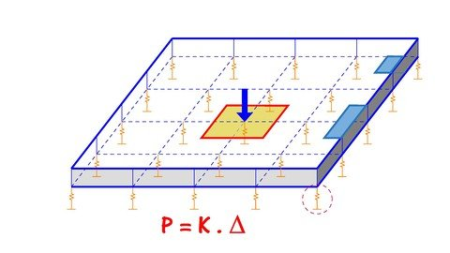
Modulus of Subgrade Reaction
Conventional Rigid Analysis Method
Approximate Flexible Analysis Method
Plate Load Test
Construction Joints In Raft Foundation
Differential settlement of Rafts
Requirements
Only Structural Engineering basics is required
Description
Students will gain the knowledge of analyzing and designing of raft foundation on different types of soil , you will learn how to calculate and estimate all the soil properties that are related to raft analysis and how to read any geotechnical report so by the ending of this course you will gain both the theoretical, practical and real projects experience on how to analyze and reinforce concrete rafts.
Who this course is for
Structural Engineers & Students, Civil Engineers, Architects


52cb0de4-0943-441d-8529-b2ccb7ab1769.png

Inside Sales (2022)
MP4 | Video: h264, 1280x720 | Audio: AAC, 44.1 KHz, 2 Ch
Skill Level: Intermediate | Genre: eLearning | Language: English + srt | Duration: 42m | Size: 296.7 MB


Inside sales professionals face a noisy, crowded, and fast-paced marketplace with distracted and risk-averse decision makers. In this course, best-selling author and global inside sales expert Josiane Chriqui Feigon helps you build the trust you need to capture the interest from today's buyer. She helps you understand what attributes you need to be successful, what your customer expects from you, what tools you should use to enhance the virtual and digital relationships with your prospects, and how to establish your plan, set your goals, and do your pre-call research. Once you're prepared, she walks you through the specific techniques of the sale, including getting past gatekeepers, questioning techniques that generate qualified leads, overcoming objections, and closing the sale.
Homepage


a27adb2f-4c26-41e2-9590-26f01f171dbb.png

LiveLessons - System and Privacy Data Protection
MP4 | Video: h264, 1280x720 | Audio: AAC, 44.1 KHz, 2 Ch
Genre: eLearning | Language: English + srt | Duration: 63 Lessons (4h 30m) | Size: 1.14 GB

Cybersecurity is not only about preventing data breaches and hunting for attackers, it also involves many aspects of system and data privacy. With more than 4 hours of video training, System and Privacy Data Protection LiveLessons provides learners with an understanding of how to protect and store existing data, as well as understand that data confidentiality and business impacts are critical to data protection. In this course, the learner will examine multiple aspects of system privacy and data protection ranging from basic concepts to tools that are commonly used by data practitioners.
System and Privacy Data Protection LiveLessons is taught by expert trainer, author, and cybersecurity expert Aamir Lakhani using hands-on demos, in-depth discussions, and lightboard explanations. This course will cover the best practices cybersecurity fundamentals in a way that is easy to access and implement in real world situations.
Topics include
Data Privacy and Protection
Risk Mitigation
Importance of Policies, Procedures, and Controls
Analyzing Logs and Impact Analysis
SIEMs and Query Writing
E-Mail Analysis
Automation
About the Instructor
Aamir Lakhani is a leading senior security strategist. He is responsible for providing IT security solutions to major enterprises and government organizations.
Mr. Lakhani creates technical security strategies and leads security implementation projects for Fortune 500 companies. Industries of focus include healthcare providers, educational institutions, financial institutions, and government organizations. Aamir has designed offensive counter-defense measures for the Department of Defense and national intelligence agencies. He has also assisted organizations with safeguarding IT and physical environments from attacks perpetrated by underground cybercriminal groups. His areas of expertise include cyber defense, mobile application threats, malware management, Advanced Persistent Threat (APT) research, and investigations relating to the Internet's dark security movement.
Skill Level
Beginner
Learn How To
Manage your security and privacy
Protect and store existing data
Use common tools to analyze and store logs
Conduct impact analysis and risk mitigation
Who Should Take This Course
Cybersecurity Professionals
Anyone interested in learning cyber security fundamentals
Course Requirements
There is no required prerequisite
Screenshots


b27435a2-de0b-4489-98e1-3b69c2e10e54.png

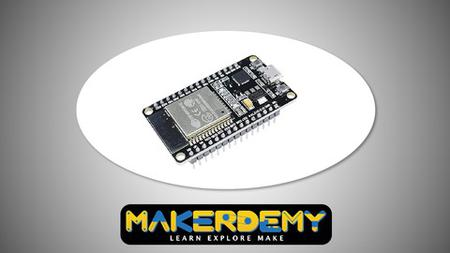
ESP32 OTA Update(On-the-Air) course
MP4 | Video: h264, 1280x720 | Audio: AAC, 44.1 KHz, 2 Ch
Genre: eLearning | Language: English + srt | Duration: 8 lectures (37m) | Size: 163.9 MB

ESP32 Basic Over The Air (OTA) Programming In Arduino IDE
What you'll learn
Learn about the ESP32 and why you must start using it
Learn about the variants of the ESP32 module.
Learn how to replace Arduino with ESP32 without coding effort
Learn about the differences and similarities between the ESP32 and the Arduino
Requirements
A Computer
Download the provided software which is free and included
Description
ESP32 OTA (Over-the-Air) Updates - AsyncElegantOTA Using Arduino IDE Arduino training course.
ESP32 OTA (Over-the-Air) Updates - AsyncElegantOTA using Arduino IDE
In this guide, you'll learn how to do over-the-air (OTA) updates to your ESP32 boards using the AsyncElegantOTA library. This library creates a web server that allows you to upload new firmware (a new sketch) to your board without the need to make a serial connection between the ESP32 and your computer.
Introduction
What is an ESP32 and what is OTA updating
ESP32 OTA Update is a great way to update the ESP32's firmware. One of the benefits is that it doesn't require a physical connection to make the update and can be done over the air and in any location.
One downside with this update is that it uses flash memory, which is lower capacity than what we see in most other electronics. And if we want to add more features, they will take up more space on the flash memory.
Another downside of ESP32 OTA Update is that it takes a long time to complete the updating process.
The ESP32 has an internal bootloader that is "seemingly" not accessible.
This is because it is written in flash memory. However, this can be changed by flashing a bootloader to the ESP32. This bootloader is called esp-idf.
ESP32 OTA (Over-the-Air) Programming
OTA (Over-the-Air) update is the process of loading new firmware to the ESP32 board using a Wi-Fi connection rather than serial communication. This functionality is extremely useful in case of no physical access to the ESP32 board.
There are different ways to perform OTA updates. In this tutorial, we'll cover how to do that using the AsyncElegantOTA library. In our opinion, this is one of the best and easiest ways to perform OTA updates.
The AsyncElegantOTA library creates a web server that you can access on your local network to upload new firmware or files to the filesystem (SPIFFS). The files you upload should be in .bin format. We'll show you later in the tutorial how to convert your files to .bin format.
Ways To Implement OTA In ESP32There are two ways to implement OTA functionality in ESP32.
Basic OTA - Over-the-air updates are sent through Arduino IDE
Web Updater OTA - Over-the-air updates are sent through a web browser
Each one has its own advantages. You can implement anyone according to your project's requirements.
OTA Update Process: How to carry out the update process for ESP32
The OTA update process is as follows
1. Connect to WiFi/cellular network.
2. Bootloader should be running in the ESP32.
Update ESP32 from ESP32 OTA Update tool.
3. Update should be complete.
Enabling OTA Update
Connect to WiFi/cellular network
The ESP32 must be connected to a cellular network for the OTA update to work. To do this, you can use the following steps
♦ Ensure that power is connected to the ESP32.
♦ Open your WiFi network page.
♦ Select a WiFi network from the list.
♦ Press Scan to start searching for access points.
♦ The ESP32 will automatically connect to the wifi network that opens.
(You can view this in the Serial monitor window, by typing Serial.println("Connected"))
Configuring the ESP32 to enable OTA updates
The steps for configuring the ESP32 to enable OTA updates are as follows
1. Go to app menu.
2. Select system settings.
3. Go to Wi-Fi and select your wifi network.
4. Press the APN button from the Wi-Fi Connections.
5. Open the APN page.
6. Select your cellular service and select the setting "OTA update from cellular".
7. Press the APN button to save the settings.
Conclusion
It is a Binary file system, which is Read and Write only.
The best way to update your device is to flash your device.
(You can connect to the wifi network and Flash the firmware to your device)
The reason why I said the best method is because it is the easiest way to flash the firmware and update your device.
However, if you are not comfortable with this method. I would recommend either using the OTA update feature.
(You can just follow the steps below to update your device)
3. Open the app menu.
4. Select the system settings.
5. Go to Wi-Fi and select your wifi network.
6. Press the APN button from the Wi-Fi Connections.
7. Open the APN page.
8. Select your cellular service and select the setting "OTA update from cellular".
9. Press the APN button to save the settings.
NOTE: OTA update may take some time to update the firmware. It generally takes around 10 Minutes.
Why you should take this course?
Learn about the benefits of using OTA updates for ESP32 such as not draining the battery because it only sends data when there is a change in code
Learn the ESP32 deep-sleep power-saving technique
It can help you understand the full process of how to create the firmware with the Arduino IDE
This is a course that teaches how to update an ESP32 device wirelessly
Learn how to configure a wireless access point and many more.
Over-the-Air(OTA) Updates are a really good way to update your ESP32 projects. It's fast, simple, and saves you from having to plug your device into the computer to flash it with new firmware every time you need to update your code.OTA Updates are easy to implement and work with very little effort on your part. This course will teach you how OTA Updates work and how to implement them in your own projects.
ESP32 is a chip that has been widely integrated into products due to its low cost and flexible hardware architecture. This course will teach you everything about programming this chip, from setting up the development environment all the way to building your own web server. It also teaches you how to update firmware using OTA (Over The Air).
Take this course now!
Who this course is for
Anyone who wants to learn How to program and update ESP board via OTA
Homepage


06d944fe-a0b7-4113-bd6d-d3daec4cf5c1.png

Master Class React Native + Hooks Course | For Beginners
MP4 | Video: h264, 1280x720 | Audio: AAC, 44.1 KHz, 2 Ch
Genre: eLearning | Language: English + srt | Duration: 8 lectures (2h 28m) | Size: 1.5 GB

Build your own music player app for your Android or IOS.
What you'll learn
Create real-world native apps using React Native
Get up to speed with React design principles and methodologies
Make truly reusable components that look great
Discover mobile design patterns used by experienced engineers
Requirements
All you need is basic understanding of Javascript
A computer installed with Windows/Linux /OS X
Minimum of 8GB RAM
Description
This course will get you up and running with React Native quickly, and teach you the core knowledge you need to deeply understand and build React components for mobile devices.
Both OSX and Windows supported - develop iOS or Android!
This course includes content on both v0.62.2 and the legacy v0.30.x, which is widely used in industry.
We'll start by mastering the fundamentals of React, including JSX, "props", "state", and event handling. Source code is provided for each lecture, so you will always stay up-to-date with the course pacing. Special attention has been paid to creating reusable components that you'll be able to make use of on your own fantastic projects.
React Native is an excellent solution for developing apps on mobile in a fraction of the time it takes to make an equivalent iOS or Swift app. You'll love seeing your changes instantly appear on your own device, rather than waiting for Swift/Java code to recompile! This quick feedback loop, along with excellent cross platform support, is what has catapulted React Native to the top must-have skill for Javascript engineers.
If you are new to React, or if you've been working to learn it but sometimes feel like you still don't quite 'get it', this is the React course for you! To learn React you have to understand it.
Learn how to use React's custom markup language, JSX, to clean up your Javascript code
Master the process of breaking down a complex component into many smaller, interchangeable components
Grasp the difference between "props" and "state" and when to use each
Render interactive, media-rich components in beautifully styled apps
Develop apps that are unique, fun, and responsive
Build on both Android and iOS platforms
Who this course is for
This course is for anyone looking to make native apps with React Native
What Will I Get ?
Learn how to use React's custom markup language, JSX, to clean up your Javascript code
Master the process of breaking down a complex component into many smaller, interchangeable components
Grasp the difference between "props" and "state" and when to use each
Render interactive, media-rich components in beautifully styled apps
Develop apps that are unique, fun, and responsive
Who this course is for
Beginner Mobil App developer curious about modern native app development
Homepage


20d14ac30f72d95319abb3fe99b4e1cd.jpg

Cinematic Lighting and Set Design
Andrey Beresnev | Duration: 2h 26m | Video: H264 1920x1080 | Audio: AAC 48 kHz 2ch | 2,47 Gb | Language: English​

Learn to make cinematic videos with professional lighting and working with set design.
Everyone can make a video, but how many people can make the video beautiful and cinematic? In order to upgrade the visual level of your video works, you need to work with lighting and set design like a pro.
The goal of this course is to help you improve the quality of your shots, so that in the long-term prospective you can sell your service for a higher price or to have a partnership with big brands that will appreciate your style. I sincerely believe that the skills of working with lighting and set design helped me enter the movie world, big advertising, music videos with celebs and build partnership with world-famous brands such as Blackmagic, Lite panels, Godox, Hollyland, Tiffen company.
You will learn how to come up with your own lighting schemes. Learn to deeply analyze the light when working with references shots. You will learn to make cinematic light using a variety of simple techniques and tools that I will share and demonstrate. You will master the basics of set design which will help you create stunning and expensive shots using tools to influence color, location, props and composition.
Homepage


bb2f9c4f-ab5c-4461-a43d-34535befb87e.png

Marketing on Facebook (2022)
MP4 | Video: h264, 1280x720 | Audio: AAC, 44.1 KHz, 2 Ch
Skill Level: Beginner | Genre: eLearning | Language: English + srt | Duration: 1h 38m | Size: 299.3 MB

When your business is on Facebook, your reach increases exponentially. You can find new prospects and market directly to customers. This course helps you set up a Facebook account exclusively for business use and teaches you how to build out your page in a way that clearly identifies your brand. Instructor Megan Adams shows you how to create a page, build your audience, and craft and share interesting, meaningful content. She also shows how to use advanced features, including events, stories, and Facebook Live. Plus, see how to promote your business and engage with your followers by leveraging Facebooks offers. The course wraps with tips for continuing to grow your business on Facebook, including using Facebook Insights to track the effectiveness of your page.
Homepage


Zurück
Oben Unten