• Regeln für den Video-Bereich:

    In den Börsenbereich gehören nur Angebote die bereits den Allgemeinen Regeln entsprechen.

    Einteilung

    - Folgende Formate gehören in die angegeben Bereiche:
    - Filme: Encodierte Filme von BluRay, DVD, R5, TV, Screener sowie Telesyncs im Format DivX, XviD und x264.
    - DVD: Filme im Format DVD5, DVD9 und HD2DVD.
    - HD: Encodierte Filme mit der Auflösung 720p oder darüber von BluRay, DVD, R5, TV, Screener sowie Telesyncs im Format x264.
    - 3D: Encodierte Filme von BluRay, die in einem 3D Format vorliegen. Dies gilt auch für Dokus, Animation usw.
    - Serien: Cartoon/Zeichentrick, Anime, Tutorials, Dokumentationen, Konzerte/Musik, Sonstiges sind demnach in die entsprechenden Bereiche einzuordnen, auch wenn sie beispielsweise im High Definition-Format oder als DVD5/DVD9/HD2DVD vorliegen. Ausnahme 3D.
    - Bereich Englisch: Englische Releases gehören immer in diesen Bereich.
    - Bereich Talk: Der Bereich, in dem über die Releases diskutiert werden kann, darf, soll und erwünscht ist.


    Angebot/Beitrag erstellen

    - Ein Beitrag darf erst dann erstellt werden, wenn der Upload bei mindestens einem OCH komplett ist. Platzhalter sind untersagt.
    - Bei einem Scenerelease hat der Threadtitel ausschließlich aus dem originalen, unveränderten Releasenamen zu bestehen. Es dürfen keine Veränderungen wie z.B. Sterne, kleine Buchstaben o.ä. vorgenommen werden. Ausnahme Serienbörse:
    - Bei einem Sammelthread für eine Staffel entfällt aus dem Releasename natürlich der Name der Folge. Beispiel: Die Simpsons S21 German DVDRip XviD - ITG
    - Dementsprechend sind also u.a. verboten: Erweiterungen wie "Tipp", "empfehlenswert", "only", "reup", usw. / jegliche andere Zusatzinformation oder Ergänzung, welche nicht in obiger Beschreibung zu finden ist.

    Aufbau des Angebots und Threadtitel

    Der Titel nach folgendem Muster erstellt zu werden. <Name> [3D] [Staffel] [German] <Jahr> <Tonspur> [DL] [Auflösung] <Quelle> <Codec> - <Group>
    Beispiel: The Dark Knight German 2008 AC3 DVDRip XviD - iND
    Beispiel: The Dark Knight 2008 DTS DL BDRip x264 - iND
    Beispiel: The Dark Knight 2008 AC3 DL BDRip XviD - iND
    Beispiel: The Dark Knight German 2008 AC3 720p BluRay x264 iND
    Beispiel: The Dark Knight 2008 DTS DL 1080p BluRay x264 iND
    Beispiel: Die Simpsons S01 German AC3 DVDRip XviD iND
    Beispiel: Die Simpsons S20 German AC3 720p BluRay x264 iND
    Beispiel: Sword Art Online II Ger Sub 2014 AAC 1080p WEBRip x264 - peppermint
    Entsprechend sind also u.a. verboten: Sonderzeichen wie Klammern, Sterne, Ausrufezeichen, Unterstriche, Anführungszeichen / Erweiterungen wie "Tipp", "empfehlenswert", "only", "reup", usw. / jegliche andere Zusatzinformation oder Ergänzung, welche nicht in obiger Beschreibung zu finden ist
    Ausnahmen hiervon können in den Bereichen geregelt sein.

    Die Beiträge sollen wie folgt aufgebaut werden:
    Überschrift entspricht dem Threadtitel
    Cover
    kurze Inhaltsbeschreibung
    Format, Größe, Dauer sind gut lesbar für Downloader außerhalb des Spoilers zu vermerken
    Nfo sind immer Anzugeben und selbige immer im Spoiler in Textform.
    Sind keine Nfo vorhanden z.B. Eigenpublikationen, sind im Spoiler folgende Dateiinformationen zusätzlich anzugeben :
    Quelle
    Video (Auflösung und Bitrate)
    Ton (Sprache, Format und Bitrate der einzelnen Spuren)
    Untertitel (sofern vorhanden)
    Hosterangabe in Textform außerhalb eines Spoiler mit allen enthaltenen Hostern.
    Bei SD kann auf diese zusätzlichen Dateiinformationen verzichtet werden.

    Alle benötigten Passwörter sind, sofern vorhanden, in Textform im Angebot anzugeben.
    Spoiler im Spoiler mit Kommentaren :"Schon Bedankt?" sind unerwünscht.


    Releases

    - Sind Retail-Release verfügbar, sind alle anderen Variationen untersagt. Ausnahmen: Alle deutschen Retail-Release sind CUT, in diesem Fall sind dubbed UNCUT-Release zulässig.
    - Im Serien-Bereich gilt speziell: Wenn ein Retail vor Abschluss einer laufenden Staffel erscheint, darf diese Staffel noch zu Ende gebracht werden.62
    - Gleiche Releases sind unbedingt zusammenzufassen. Das bedeutet, es ist zwingend erforderlich, vor dem Erstellen eines Themas per Suchfunktion zu überprüfen, ob bereits ein Beitrag mit demselben Release besteht. Ist dies der Fall, ist der bereits vorhandene Beitrag zu verwenden.
    - P2P und Scene Releases dürfen nicht verändert oder gar unter einem iND Tag eingestellt werden.


    Support, Diskussionen und Suche

    - Supportanfragen sind entweder per PN oder im Bereich Talk zu stellen.
    - Diskussionen und Bewertungen sind im Talk Bereich zu führen. Fragen an die Uploader haben ausschließlich via PN zu erfolgen, und sind in den Angeboten untersagt.
    - Anfragen zu Upload-Wünschen sind nur im Bereich Suche Video erlaubt. Antworten dürfen nur auf Angebote von MyBoerse.bz verlinkt werden.


    Verbote

    - Untersagt sind mehrere Formate in einem einzigen Angebotsthread, wie beispielsweise das gleichzeitige Anbieten von DivX/XviD, 720p und 1080p in einem Thread. Pro Format, Release und Auflösung ist ein eigener Thread zu eröffnen.
    - Grundsätzlich ebenso verboten sind Dupes. Uploader haben sich an geeigneter Stelle darüber zu informieren, ob es sich bei einem Release um ein Dupe handelt.
    - Gefakte, nur teilweise lauffähige oder unvollständige Angebote sind untersagt. Dies gilt auch für eigene Publikationen, die augenscheinlich nicht selbst von z.B. einer DVD gerippt wurden. Laufende Serien, bei denen noch nicht alle Folgen verfügbar sind, dürfen erstellt und regelmäßig geupdatet werden.
    - Untersagt sind Angebote, welche nur und ausschließlich in einer anderen Sprache als deutsch oder englisch vorliegen. Ausnahmen sind VORHER mit den Moderatoren zu klären.


    Verstoß gegen die Regeln

    - Angebote oder Beiträge, die gegen die Forenregeln verstoßen, sind über den "Melden"-Button im Beitrag zu melden.
  • Bitte registriere dich zunächst um Beiträge zu verfassen und externe Links aufzurufen.

++ Premium IPTV ++ 7000 Live Sender ++ UHD Qualität ++ Mediathek mit 18.000 Inhalten ++


VenneTV


Englische Tutorials


c035a85fbcf470f4e14635250a5f2708.jpg


The Creative Spark: Brian Taylor, Handmade Photography
MP4 | Video: 720p | Duration: 30:29 | English | Subtitles: VTT | 554.3 MB​


Gum printing and Photoshop. Light sensitive materials exposed by sunlight, negatives created with an Epson printer. Meet Brian Taylor, a photographer who combines the love of 19th and 21st century processes to create striking images, each a unique masterpiece with a handmade quality.
In this installment of The Creative Spark, Brian talks about why he uses historical processes and shows how he combines them with Photoshop and other modern imaging tools. We follow Brian as he creates a digital negative, exposes a print, and then adds additional layers to create a final image.

Recommend Download Link Hight Speed | Please Say Thanks Keep Topic Live ​

 

b574677ea8056f1b2fb59ecb462ac43b.jpg


Creating EPUBs from a Word Document
MP4 | Video: 720p | Duration: 1:28:52 | English | Subtitles: VTT | 243.3 MB​


Many authors compose their manuscripts in Word. But did you know that if you're planning to publish to EPUB or Kindle formats, there's a lot you can do in Word to make the conversion smoother? In this course, Tony Harmer shows how to take your lovingly crafted text and turn your Word document into HTML, which can be transformed into an EPUB via a variety of free software and services. The course takes you through the whole process and identifies the common pitfalls, so you can avoid them. You'll learn how to format documents and add the features-such as media, bookmarks, and links-that make for more engaging and dynamic ebooks. The final chapters cover the troubleshooting and export processes, and then Tony provides direction on where to go next to finish off your EPUB. (Hint: Most of this is covered in his companion course, Creating Ebooks for the Kindle.) Start watching and learn how to turn your "words" into EPUBs everyone can enjoy.

Topics include:
Avoiding redundant formattingFormatting new or existing Word documentsAdding a book coverUnderstanding how images work in EPUBsAdding bookmarks and linksConverting footnotes and endnotesExporting to HTML on Mac and on Windows

Recommend Download Link Hight Speed | Please Say Thanks Keep Topic Live ​

 

a45d9f9665a10b67879926fb1b2a12ee.jpg


**** Photography: In Parks at Play
MP4 | Video: 720p | Duration: 40:50 | English | Subtitles: VTT | 229.0 MB​


Photographing **** can be tricky. Some **** love the camera, but many freeze up as soon as you point one at them. To take great portraits, it helps to meet the **** on their turf and on their terms. That means photographing them in environments where they get to be ****.

In this course, we join photographer Erika Thornes in a sun-dappled park for a look at the techniques she employs to shoot her beautiful, natural-light portraits. Watch as Erika engages with a little girl and adjusts her shooting approach based on what the child is doing. Erika also demonstrates tricks for dealing with high-energy ****. The course concludes with a review of the day's shoot and some post-processing tips.

Recommend Download Link Hight Speed | Please Say Thanks Keep Topic Live ​

 

3accc47d40f2ea6eb88ca7d22d7be7cc.jpg


Photo Essay: An Artist at Work
MP4 | Video: 720p | Duration: 1:06:06 | English | Subtitles: VTT | 582.5 MB​


A photo essay is a series of photographs that tell a story about a person, place, event, or trend. In this course, photojournalist Paul Taggart takes us on assignment as he photographs Kevin Carman, an artist in Ventura, California.

Paul, whose work has appeared in publications such the New York Times and National Geographic, shares insights into how he prepares for an assignment, how he engages his subject, and how he takes advantage of unpredictable and unforeseen situations. The course concludes with a look at how the final essay might be sequenced and distributed.

Recommend Download Link Hight Speed | Please Say Thanks Keep Topic Live ​

 

99ad13d36088bc0cbbbf74477785a7b0.jpg


HTML5: Managing Browser History
MP4 | Video: 540p | Duration: 35:29 | English | Subtitles: VTT | 60.3 MB​


This course describes how to use the HTML5 Session History application programming interface to present bookmark-friendly URLs while updating parts of a page and preventing unnecessary network activity. Author Bill Weinman shows how to manipulate history by adding entries to the stack, visibly changing the URL in the address bar, and removing entries when the user presses the back or forward buttons, all without reloading the web page. The course uses practical examples that can be applied to most web sites, and also shows how to detect support for the History API in browsers and how to handle exceptions.

Topics include:
Manipulating browser history: an overviewDetecting History API supportPushing a new URL onto the stackHandling back and forward buttons with the popstate eventUpdating the stack with replaceState()

Recommend Download Link Hight Speed | Please Say Thanks Keep Topic Live ​

 
bcb240bac8157c7a0002a49d8b162e30.jpg


The Taping Bible, The Magic Healing (Kinesio Taping - KT)
MP4 | Video: AVC 1280x720 | Audio: AAC 44KHz 2ch | Duration: 1 Hours | Lec: 32 | 389 MB
Genre: eLearning | Language: English
All what you need to know about the Elite Kinesiotaping methods for expert sports injuries and home selfcare improvement​

This course is about the Taping Techniques and Methods, and if you are not aware about "Taping" means, no worries.

Taping is known for years by the healthcare and sports professionals as to apply on the skin with adhesive tape for purpose of relieving the muscles and joints pain.
As that said, special type of adhesive tape should be used to accomplish the best results.
The Tape materials have a certain elasticity similar to human skin elasticity. It is available now online and at your corner store.
This course designed by a professional Physical therapist who spend more than 15 years traveling around the world to collect the best methods and techniques of taping and make available for you in this course. This course is a collective introduction for the taping science.
To complete this course, you should have a general body anatomy background or be open to learn a new course.
Within this course time frame you should be able to understand the main concept of taping. In addition, you will master the 9 principles of taping structure. once you complete this course you will be able to take the advanced level of taping techniques to treat more complicated muscles or joints problems.
If you are a professional healthcare provider or a sports or fitness or athletic person who care about his or her joints and muscles upkeep and to be pain free, this course is a must.
However, for those who are interested to learn something new about their own body and want to help themselves to be pain free, you are most welcome to join the class room.
A notice, this course has been designed for the education purpose only not for any treatment of medical conditions. If you have any medical issues you have to consult your physician before you apply any tape on yourself.
The method of teaching this course is going to be through a utilized and demonstrated application skills in a very easy guided style. You will enjoy this course as if you were attending in person.

At the end of my course, students will be able toR30;

Choose the Right Tape for Muscles and Joints Pain.

Spot major 9 principles in Taping techniques and methods.

Apply the right skills of taping on your skin just like the expertise.

Use the taping concept to relief muscles, joints, nerves pain instantly.

Discover the magic effects of a piece of tape on your skin.


Who should take this course? Who should not?

This course is meant for newbies who are not familiar with the Taping Techniques and Methods to relief muscles and joints pain.

This course also serving the professional healthcare and Sports individuals, who are interested to advance their treatment methods to the highest level.

This Taping course is a unique opportunity for you to help your clients or players to heal faster and better.


What will students need to know or do before starting this course?

If you have a healthcare or sports background this course will be an extension to your skills. if you do not then you are welcome to learn something new to help to relieve your own muscles, joints, and back pain.

You will need to choose the Right Tape for the course practice part.

BONUS, this course come with a special supplementary materials are Priceless.


b338686d16809f1aa7f4f2eb6a6ff519.jpg


Recommend Download Link Hight Speed | Please Say Thanks Keep Topic Live ​
 
f268922ec58f3fd3847f99bdee53ba24.jpg


Getting Started with Python Concurrency
MP4 | Video: AVC 1280x720 | Audio: AAC 44KHz 2ch | Duration: 2.5 Hours | 313 MB
Genre: eLearning | Language: English
This course will teach you how to make your Python programs faster, more efficient, and responsive. You will learn how and when to use the threading, multi-processing, concurrent.futures, and asyncio modules.​

Until recently, you could speed up your programs by simply running them on newer, faster hardware. Now, instead of making CPU's faster, hardware makers are adding more CPU cores to your computing devices. To make programs run faster today, employing concurrency techniques to get your programs running on multiple cores simultaneously is paramount. In this course, Getting Started with Python Concurrency, you'll learn how to make your Python programs more efficient, responsive, and faster using Python's concurrency packages. First, you'll explore how to choose the right concurrency package for your task. Next, you'll discover how to distribute a task to worker processes to speed up execution by running on multiple cores. Finally, you'll cover how to do node.js style asynchronous programming using the asyncio package. When you're finished with this course, you'll have a solid understanding of concurrency concepts and how to apply them in Python in a simple and readable manner to achieve greater performance results.


7abe3714c6fefa521a0fdd6cb5b4ed88.jpg


Recommend Download Link Hight Speed | Please Say Thanks Keep Topic Live ​

 

b7acfe6565ce9d9e7ae4849becd28e26.jpg


CSS Shorts Weekly
MP4 | Video: 720p | Duration: 4:50:51 | English | Subtitles: VTT | 954.2 MB​


CSS Shorts is a weekly series covering all aspects of CSS, including properties, preprocessors, positioning, floats, and the most up-to-date styling techniques. Instructor Chris Converse returns every Tuesday, bringing you short and timely tips that will help new and experienced web developers alike create more beautiful websites and more efficient code. Tune in and learn how to take more control over the style, layout, and even the user experience of your web designs.

Note: There will be free exercise files for most episodes, which will allow you to follow along with author Chris Converse, as you explore all the possibilities CSS has to offer.

Recommend Download Link Hight Speed | Please Say Thanks Keep Topic Live ​

 

cbc860453b0f18c9fe8a57d5ae8ba8df.jpg


Excel 2013: Data Validation
MP4 | Video: 720p | Duration: 1:05:11 | English | Subtitles: VTT | 177.1 MB​


With Excel's data validation tools, you can control how users input data into workbooks and ensure data is entered consistently and accurately. You can control the dates, the times, even the length of the text they enter, or simply provide a list of acceptable choices to eliminate any possible mistakes. Here, Dennis Taylor explores how the data validation tools in Excel 2013 can be used to set dropdown lists, and control numeric data, dates and times, and text data.

Topics include:
Testing for whole numbers and decimalsUsing the input message boxSequencing and placing listsCreating multitiered listsSetting date and time limitationsLimiting text lengthLocating data validation rulesRequiring entries to be unique

Recommend Download Link Hight Speed | Please Say Thanks Keep Topic Live ​
 

1953f94b6c9a31dc6efcfb3cc533b93d.jpg


Motion: Principles of Motion Graphics
MP4 | Video: 540p | Duration: 3:43:24 | English | Subtitles: VTT | 762.9 MB​


In Motion: Principles of Motion Graphics, Ian Robinson shares the core concepts and techniques used to create real-world motion graphic elements in Apple Motion. The course starts with finding the initial inspiration for a project and then covers how to bring those ideas to life using the tools in Motion, including type treatments, filters, textures, and lighting. Two projects demonstrating how to animate a title sequence and how to assemble a graphics package are also included. Exercise files accompany the course.

Topics include:
Shortcuts for previewing and setting typeUsing type as a design elementCreating dynamic transitionsCreating and using color palettesWorking with particles to create depthAdding details with lightingIntegrating audio in a projectEditing techniquesAnimating a lower 3rdAnimating and styling a mapBuilding a storyboard

Recommend Download Link Hight Speed | Please Say Thanks Keep Topic Live ​
 

276d165f98cf0ec587261326a8c1e2b4.jpg


Photoshop: Curves (2010)
MP4 | Video: 720p | Duration: 1:45:59 | English | Subtitles: VTT | 546.2 MB​


The Curves adjustment in Adobe Photoshop has a reputation for being challenging for some photographers. In this workshop, Photoshop expert Tim Grey takes you step by step through every aspect of the Curves adjustment, helping you truly understand the concepts behind it so that you can quickly and easily maximize tonal range, optimize contrast, and enhance your photos' color balance. Note: This course was recorded in Photoshop CS5, but was created with users of both Photoshop CS5 and Photoshop CS4 in mind.

Topics include:
Reading a curveCreating a Curves adjustmentWorking with the Adjustments panelUsing presets and eyedroppersAdding and adjusting anchor pointsUsing the Luminosity blend modeCurves for colorCreativity with Curves

Recommend Download Link Hight Speed | Please Say Thanks Keep Topic Live ​
 
5b5cc1f30f8f4998df1e0336ae51f7bb.jpg


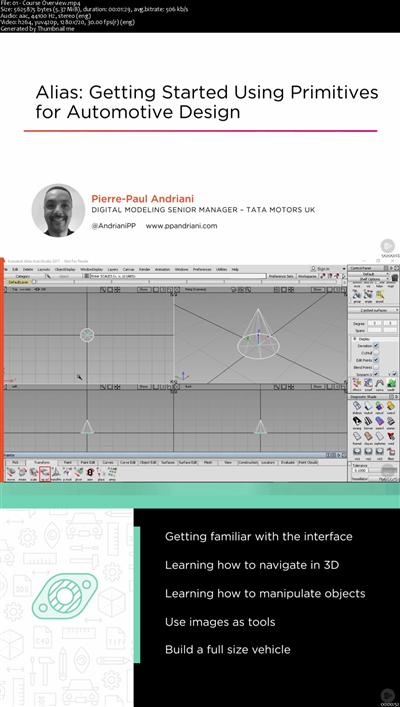
Alias: Getting Started Using Primitives for Automotive Design
MP4 | Video: AVC 1280x720 | Audio: AAC 44KHz 2ch | Duration: 46M | 227 MB
Genre: eLearning | Language: English​

This course will introduce you to Alias and take the mystery out of the program. You will learn the basics of object creation and manipulation.

Because of its enormous depth and scope Alias can look very intimidating at first. However, a big part of Alias' appeal is its user friendliness. In this course, Alias: Getting Started Using Primitives for Automotive Design, you will find the foundation you need to get started. First, you'll get to see the basics of object creation and manipulation in Alias. Next, you'll be up and moving around in 3D. Finally, you will create a simple full size truck using those objects and three crucial functions; layers/object lister, image planes, and marking menus. When you're finished with this course, you'll be ready to showcase your design with a simple light setup. Software required: Alias AutoStudio 2017 and Alias SurfaceStudio 2017.


d83d5885513f70c5253bc7c5e1c6d47a.jpg


Recommend Download Link Hight Speed | Please Say Thanks Keep Topic Live ​
 
Zurück
Oben Unten