




• Regeln für den Video-Bereich:

    In den Börsenbereich gehören nur Angebote die bereits den Allgemeinen Regeln entsprechen.

    Einteilung

    - Folgende Formate gehören in die angegeben Bereiche:
    - Filme: Encodierte Filme von BluRay, DVD, R5, TV, Screener sowie Telesyncs im Format DivX, XviD und x264.
    - DVD: Filme im Format DVD5, DVD9 und HD2DVD.
    - HD: Encodierte Filme mit der Auflösung 720p oder darüber von BluRay, DVD, R5, TV, Screener sowie Telesyncs im Format x264.
    - 3D: Encodierte Filme von BluRay, die in einem 3D Format vorliegen. Dies gilt auch für Dokus, Animation usw.
    - Serien: Cartoon/Zeichentrick, Anime, Tutorials, Dokumentationen, Konzerte/Musik, Sonstiges sind demnach in die entsprechenden Bereiche einzuordnen, auch wenn sie beispielsweise im High Definition-Format oder als DVD5/DVD9/HD2DVD vorliegen. Ausnahme 3D.
    - Bereich Englisch: Englische Releases gehören immer in diesen Bereich.
    - Bereich Talk: Der Bereich, in dem über die Releases diskutiert werden kann, darf, soll und erwünscht ist.


    Angebot/Beitrag erstellen

    - Ein Beitrag darf erst dann erstellt werden, wenn der Upload bei mindestens einem OCH komplett ist. Platzhalter sind untersagt.
    - Bei einem Scenerelease hat der Threadtitel ausschließlich aus dem originalen, unveränderten Releasenamen zu bestehen. Es dürfen keine Veränderungen wie z.B. Sterne, kleine Buchstaben o.ä. vorgenommen werden. Ausnahme Serienbörse:
    - Bei einem Sammelthread für eine Staffel entfällt aus dem Releasename natürlich der Name der Folge. Beispiel: Die Simpsons S21 German DVDRip XviD - ITG
    - Dementsprechend sind also u.a. verboten: Erweiterungen wie "Tipp", "empfehlenswert", "only", "reup", usw. / jegliche andere Zusatzinformation oder Ergänzung, welche nicht in obiger Beschreibung zu finden ist.

    Aufbau des Angebots und Threadtitel

    Der Titel nach folgendem Muster erstellt zu werden. <Name> [3D] [Staffel] [German] <Jahr> <Tonspur> [DL] [Auflösung] <Quelle> <Codec> - <Group>
    Beispiel: The Dark Knight German 2008 AC3 DVDRip XviD - iND
    Beispiel: The Dark Knight 2008 DTS DL BDRip x264 - iND
    Beispiel: The Dark Knight 2008 AC3 DL BDRip XviD - iND
    Beispiel: The Dark Knight German 2008 AC3 720p BluRay x264 iND
    Beispiel: The Dark Knight 2008 DTS DL 1080p BluRay x264 iND
    Beispiel: Die Simpsons S01 German AC3 DVDRip XviD iND
    Beispiel: Die Simpsons S20 German AC3 720p BluRay x264 iND
    Beispiel: Sword Art Online II Ger Sub 2014 AAC 1080p WEBRip x264 - peppermint
    Entsprechend sind also u.a. verboten: Sonderzeichen wie Klammern, Sterne, Ausrufezeichen, Unterstriche, Anführungszeichen / Erweiterungen wie "Tipp", "empfehlenswert", "only", "reup", usw. / jegliche andere Zusatzinformation oder Ergänzung, welche nicht in obiger Beschreibung zu finden ist
    Ausnahmen hiervon können in den Bereichen geregelt sein.

    Die Beiträge sollen wie folgt aufgebaut werden:
    Überschrift entspricht dem Threadtitel
    Cover
    kurze Inhaltsbeschreibung
    Format, Größe, Dauer sind gut lesbar für Downloader außerhalb des Spoilers zu vermerken
    Nfo sind immer Anzugeben und selbige immer im Spoiler in Textform.
    Sind keine Nfo vorhanden z.B. Eigenpublikationen, sind im Spoiler folgende Dateiinformationen zusätzlich anzugeben :
    Quelle
    Video (Auflösung und Bitrate)
    Ton (Sprache, Format und Bitrate der einzelnen Spuren)
    Untertitel (sofern vorhanden)
    Hosterangabe in Textform außerhalb eines Spoiler mit allen enthaltenen Hostern.
    Bei SD kann auf diese zusätzlichen Dateiinformationen verzichtet werden.

    Alle benötigten Passwörter sind, sofern vorhanden, in Textform im Angebot anzugeben.
    Spoiler im Spoiler mit Kommentaren :"Schon Bedankt?" sind unerwünscht.


    Releases

    - Sind Retail-Release verfügbar, sind alle anderen Variationen untersagt. Ausnahmen: Alle deutschen Retail-Release sind CUT, in diesem Fall sind dubbed UNCUT-Release zulässig.
    - Im Serien-Bereich gilt speziell: Wenn ein Retail vor Abschluss einer laufenden Staffel erscheint, darf diese Staffel noch zu Ende gebracht werden.62
    - Gleiche Releases sind unbedingt zusammenzufassen. Das bedeutet, es ist zwingend erforderlich, vor dem Erstellen eines Themas per Suchfunktion zu überprüfen, ob bereits ein Beitrag mit demselben Release besteht. Ist dies der Fall, ist der bereits vorhandene Beitrag zu verwenden.
    - P2P und Scene Releases dürfen nicht verändert oder gar unter einem iND Tag eingestellt werden.


    Support, Diskussionen und Suche

    - Supportanfragen sind entweder per PN oder im Bereich Talk zu stellen.
    - Diskussionen und Bewertungen sind im Talk Bereich zu führen. Fragen an die Uploader haben ausschließlich via PN zu erfolgen, und sind in den Angeboten untersagt.
    - Anfragen zu Upload-Wünschen sind nur im Bereich Suche Video erlaubt. Antworten dürfen nur auf Angebote von MyBoerse.bz verlinkt werden.


    Verbote

    - Untersagt sind mehrere Formate in einem einzigen Angebotsthread, wie beispielsweise das gleichzeitige Anbieten von DivX/XviD, 720p und 1080p in einem Thread. Pro Format, Release und Auflösung ist ein eigener Thread zu eröffnen.
    - Grundsätzlich ebenso verboten sind Dupes. Uploader haben sich an geeigneter Stelle darüber zu informieren, ob es sich bei einem Release um ein Dupe handelt.
    - Gefakte, nur teilweise lauffähige oder unvollständige Angebote sind untersagt. Dies gilt auch für eigene Publikationen, die augenscheinlich nicht selbst von z.B. einer DVD gerippt wurden. Laufende Serien, bei denen noch nicht alle Folgen verfügbar sind, dürfen erstellt und regelmäßig geupdatet werden.
    - Untersagt sind Angebote, welche nur und ausschließlich in einer anderen Sprache als deutsch oder englisch vorliegen. Ausnahmen sind VORHER mit den Moderatoren zu klären.


    Verstoß gegen die Regeln

    - Angebote oder Beiträge, die gegen die Forenregeln verstoßen, sind über den "Melden"-Button im Beitrag zu melden.
  • Bitte registriere dich zunächst um Beiträge zu verfassen und externe Links aufzurufen.

++ Premium IPTV ++ 7000 Live Sender ++ UHD Qualität ++ Mediathek mit 18.000 Inhalten ++


VenneTV


Englische Tutorials


906abdef086024c6c36b4b1f3b6c24be.jpg


Learning Premiere Elements 14
MP4 | Video: 720p | Duration: 3:51:00 | English | Subtitles: VTT | 1563.5 MB​


Adobe has completely overhauled the interface of Premiere Elements 14, and provided performance improvements to handle virtually every consumer video format, from tape-based DV and AVCHD to smartphone and tablet video. But the greatest strength of Premiere Elements remains that it's a surprisingly simple program to get to know-at least once you learn a few basic moves. And it's those basic moves that this series of tutorials is all about.

Join Steve Grisetti as he reviews the basics of editing in Premiere Elements, from adding, splitting, and trimming clips to advanced techniques for color correction, audio, transitions, and text. Plus, learn how to select the best segments from a long clip with the Favorite Moments tool, and use Guided Edit to help speed up your workflow. When the editing is complete, Steve will show how to use the Export and Share workspace to publish your project on DVD or Blu-ray disc or post it online.

Topics include:
Importing and organizing mediaAdding, slicing, and trimming clipsUsing Guided EditRecording narrationCreating motion pathsChanging video speed with Time RemappingAdjusting color, lighting, and audioStabilizing shaky videoAdding transitions, titles, and textKeyframingCreating DVDs and Blu-ray discsUploading videos to Facebook and YouTube

Recommend Download Link Hight Speed | Please Say Thanks Keep Topic Live ​

 

e08d27b7f27e9d96f2bf40d7550fae7e.jpg


Public Speaking Foundations
MP4 | Video: 720p | Duration: 1:03:58 | English | Subtitles: VTT | 288.1 MB​


Develop the skills you need to prepare and deliver an outstanding speech or presentation with our public speaking training. Author Laura Bergells offers practical insights that can help presenters prepare, open, deliver, and close their speeches. Along the way, discover how to project confidence, storyboard a speech, take questions, respond with thoughtful answers, and develop the creative story that adds life to a speech.

Lynda.com is a PMI Registered Education Provider. This course qualifies for professional development units (PDUs). To view the activity and PDU details for this course, click here.

The PMI Registered Education Provider logo is a registered mark of the Project Management Institute, Inc.

Topics include:
Identifying your audienceDeveloping credibilityIntroducing an agendaExploring five strong opening techniquesDeveloping great body languageUnderstanding room dynamicsHandling questions and answersGetting feedback<br><br>The PMI Registered Education Provider logo is a registered mark of the Project Management Institute, Inc.

Recommend Download Link Hight Speed | Please Say Thanks Keep Topic Live ​

 

8269c74c8a26473811f0aaf13673e051.jpg


Chess 101- Everything you need to know about the basics
MP4 | Video: AVC 1280x720 | Audio: AAC 44KHz 2ch | Duration: 1.5 Hours | Lec: 25 | 197 MB
Genre: eLearning | Language: English​

Learn the rules, strategies, and basic tactics of chess

Chess 101 is an easy-to-follow video series that simplifies the process of learning the chess basics. The course focuses on teaching a beginner about the rules of Chess, the movements & value of each chess piece, and the basic chess strategies ideal for a beginner to know. There are over 23 Lectures that cover a variety of topics that are sure to train a beginner the essentials of Chess. The course will also have chess quiz questions at the end of each section for the student to reflect his/her understanding on the chess material taught. A beginner is guaranteed to have improved his/her chess knowledge at the end of this course.


f65066c9f0261246c3824c907fc833b6.jpg


Recommend Download Link Hight Speed | Please Say Thanks Keep Topic Live ​

 

38a9d6b3f9b069f72742300e4e1a9534.jpg


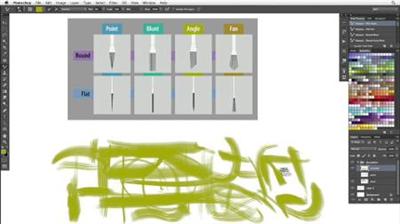
Photoshop CS6 New Features: Brushes
MP4 | Video: 720p | Duration: 1:42:38 | English | Subtitles: VTT | 491.7 MB​


Join John Derry, one of the world's top experts in natural-media digital painting, as he teaches how to quickly get up to speed painting with the new brush enhancements and capabilities in Adobe Photoshop CS6, such as the Mixer Brush tool presets. These features expand the ability of Photoshop to mimic the real world with new erodible tips and airbrushes. The lessons cover adding textures to brushes, working with erodible dry media, and introduces particulate airbrushes and the Brush Projection feature. This course serves as a concise guide to what's new in Photoshop CS6 for digital painting.

This course was created and produced by John Derry. We are honored to host his tutorials in the lynda.com library.

Topics include:
Setting up the painting workspaceGetting acquainted with brush tip typesUnderstanding brush behaviorsLoading your brush with colorsManaging the tool presetsDrawing with pencils

Recommend Download Link Hight Speed | Please Say Thanks Keep Topic Live ​
 

8263fa8d9fe1f5d2363f4c16c5958a5d.jpg


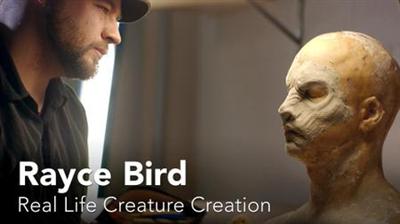
Rayce Bird: Real Life Creature Creation
MP4 | Video: 720p | Duration: 14:21 | English | Subtitles: VTT | 259.0 MB​


Rayce Bird is a special effects makeup artist, creature creator, graphic designer, tattoo artist, and winner of Face Off, the Syfy network's special effects reality competition. In this short film, we follow Rayce to his studio, where he creates his latex masks (a process involving a clay sculpture, a plaster mold, and a foam latex cast), and to Comic-Con, where he does a demo for his fans. Rayce explains his lifelong fascination with the "monstrous" and his insights on becoming a great designer, regardless of the medium.

Want to see how Rayce created the 3D model for the mask shown in the film? Watch his course, Sculpting a Creature in ZBrush and Photoshop.

Recommend Download Link Hight Speed | Please Say Thanks Keep Topic Live ​
 

9422bb01ec109ca878f13fedd30e8e7a.jpg


Illustrator CC 2013 One-on-One: Fundamentals
MP4 | Video: 720p | Duration: 10:45:37 | English | Subtitles: VTT | 2095.7 MB​


Learn to create elegant, optimized graphics with Adobe Illustrator and industry-pro Deke McClelland's patented One-on-One path to mastery-now updated for Illustrator Creative Cloud. This installment introduces the basic features of Illustrator CC: sizing and arranging artboards; accessing panels, menus, and tools; and creating your first illustrations with line art, shapes, and type. This includes manipulating paths with the Pen tool; painting, grouping, and coloring objects; and placing and adjusting text. Deke shows you how to select fonts, create hanging indents, and tweak the kerning and leading of your text. You'll also learn to trace images you've imported into Illustrator and scale, rotate, and duplicate artwork.

Deke will add new videos as new features for Illustrator CC are revealed, ensuring you'll always be up to date on the latest tools.

Topics include:
Creating new documentsMoving, modifying, and resizing artboardsDrawing with the line toolsDrawing geometric shapesAuto-tracing an imageRotating and duplicating objectsGrouping and stackingErasing and painting selected pathsUsing the Shape Builder toolReflecting across an angled axisPlacing and flowing textPreviewing and assigning fontsAdjusting type sizeCreating and applying paragraph stylesUsing the Glyphs panelInserting and removing anchor points with the Pen tool

Recommend Download Link Hight Speed | Please Say Thanks Keep Topic Live ​
 

e69261b45062490736373fea44a39948.jpg


Installing Windows 8 in VMware Fusion
MP4 | Video: 720p | Duration: 29:43 | English | Subtitles: VTT | 82.4 MB​


VMware Fusion allows you to run many different operating systems on your Mac, but Windows is the most popular among IT professionals and power users alike. In this short course, Doug Winnie introduces two methods for installing Windows 8 successfully in VMware Fusion: Easy Install and an advanced option that gives you more control over your virtual machine.

Recommend Download Link Hight Speed | Please Say Thanks Keep Topic Live ​
 

ad8d4e4b0f0bb6c096dbdfc3c8edbb4a.jpg


Finale 2012 Essential Training
MP4 | Video: 540p | Duration: 6:13:33 | English | Subtitles: VTT | 730.6 MB​


Finale is the standard application used by musicians of all levels to compose, arrange, play, and print music. In this course, Rick Schmunk shows any aspiring or professional musician, composer, or arranger how to become proficient with Finale 2012. The course shows how to notate musical scores, ranging from simple lead sheets and guitar tablature parts to detailed scores, and bring them to life with instruments and share them with an audience.

Topics include:
Setting up the hardware and softwareCreating a Finale score documentImporting filesViewing and navigating documentsEntering and editing notes with the mouse, keyboard, and real or virtual instrumentsUnderstanding measuring basics and music spacingAdding lyricsNotating music on a grand staffNotating choral music with layersNotating for guitar, including tablature and Smart ShapesRecording in real timeAdding expressions and articulationsFormatting scoresPrinting scoresExporting documents

Recommend Download Link Hight Speed | Please Say Thanks Keep Topic Live ​
 

afa200c9a3749a5b289faec1498c457f.jpg


Insights on Illustrative Design
MP4 | Video: 720p | Duration: 31:02 | English | Subtitles: VTT | 276.3 MB​


This insightful interview with Von Glitschka, covers a variety of topics, including living a creatively curious life and leveraging moments of inspiration. Learn how Von got started in design, started his own business, and handles sticky issues like piracy and plagiarism. Von also talks about the power of collaboration, the impact of the digital age on fields like illustration, and the importance of making drawing a daily habit.

Recommend Download Link Hight Speed | Please Say Thanks Keep Topic Live ​
 
92fb27a843cf7794cfbcb2e8a50120d7.jpg


Play by Play: Angular Design Solutions
MP4 | Video: AVC 1280x720 | Audio: AAC 44KHz 2ch | Duration: 2 Hours 13M| 950 MB
Genre: eLearning | Language: English​

In this course, you'll learn how to avoid pitfalls, tweak your apps to get the most out of them, and solve common scenarios with Angular. The materials for this course are available at:
Play by Play is a series in which top technologists work through a problem in real time, unrehearsed, and unscripted. In this course, Play by Play: Angular Design Solutions, Ward Bell and John Papa discuss how to detect and solve some of these challenges with setup and bootstrapping, binding, debugging, NgModules, Dependency Injection, RxJS, and Http. By the end of this course, you'll go beyond the basics and learn how to identify and solve challenges in your Angular development experience.


30f62d9be3a5230c07b15f73e985c192.jpg


Recommend Download Link Hight Speed | Please Say Thanks Keep Topic Live ​
 

c851076bef3fe7ae67d6e19d1b779bf6.jpg


Learning 3ds Max
MP4 | Video: 720p | Duration: 4:15:44 | English | Subtitles: VTT | 1197.7 MB​


Autodesk 3ds Max is a popular and powerful tool used by game developers, visual effects artists, and graphic designers for 3D modeling, animation, and rendering. In this course, educators Dariush and Randi Derakhshani introduce you to this multifaceted software, starting with the interface and how to navigate it. Once you're comfortable getting around 3ds Max, you'll learn how to use its many tools to make models with 3D objects, edit polygonal meshes, create surfaces and models with 2D shapes and splines, and more. All of this is presented in the context of a hands-on project where you create a model of an alarm clock.

Topics include:
The interface and navigationCreating and manipulating objectsWorking with modifiersVertex, edge, and border modelingWorking in Element modeEditable polys and NURMSCreating 3D shapes from 2D shapesVertex sub-object editing for splinesLathing and lofting splines

Recommend Download Link Hight Speed | Please Say Thanks Keep Topic Live ​

 

7a63d58435125c39682dc7346d2fc4df.jpg


Print Production: Packaging
MP4 | Video: 720p | Duration: 1:47:34 | English | Subtitles: VTT | 298.2 MB​


Packaging is where engineering meets design. Learn about the basics of designing packages for everything from foodstuffs to fragrance, in ways that are practical for manufacturing and shipping, and make the products visually appealing. Author Claudia McCue reviews the types of containers real packaging engineers consider, and then concentrates on folding cartons, which can be created with the tools available to most designers: Adobe InDesign and Illustrator. Learn how to create dielines (the flattened view of your product) and add artwork and text. Then find out how to print and cut out a mockup version of your packaging, and prepare the job for professional printing. Claudia also takes you for a quick view of the factory floor, where products are packed into their final containers.

Topics include:
Deciding on the type of packageConsidering the consumer experienceReplicating an existing packageAdding flaps and fold-in tabsUsing Illustrator and InDesign for layoutCreating a dielineChecking the mockupPreparing your jobs for the printer

Recommend Download Link Hight Speed | Please Say Thanks Keep Topic Live ​
 
Zurück
Oben Unten