• Regeln für den Video-Bereich:

    In den Börsenbereich gehören nur Angebote die bereits den Allgemeinen Regeln entsprechen.

    Einteilung

    - Folgende Formate gehören in die angegeben Bereiche:
    - Filme: Encodierte Filme von BluRay, DVD, R5, TV, Screener sowie Telesyncs im Format DivX, XviD und x264.
    - DVD: Filme im Format DVD5, DVD9 und HD2DVD.
    - HD: Encodierte Filme mit der Auflösung 720p oder darüber von BluRay, DVD, R5, TV, Screener sowie Telesyncs im Format x264.
    - 3D: Encodierte Filme von BluRay, die in einem 3D Format vorliegen. Dies gilt auch für Dokus, Animation usw.
    - Serien: Cartoon/Zeichentrick, Anime, Tutorials, Dokumentationen, Konzerte/Musik, Sonstiges sind demnach in die entsprechenden Bereiche einzuordnen, auch wenn sie beispielsweise im High Definition-Format oder als DVD5/DVD9/HD2DVD vorliegen. Ausnahme 3D.
    - Bereich Englisch: Englische Releases gehören immer in diesen Bereich.
    - Bereich Talk: Der Bereich, in dem über die Releases diskutiert werden kann, darf, soll und erwünscht ist.


    Angebot/Beitrag erstellen

    - Ein Beitrag darf erst dann erstellt werden, wenn der Upload bei mindestens einem OCH komplett ist. Platzhalter sind untersagt.
    - Bei einem Scenerelease hat der Threadtitel ausschließlich aus dem originalen, unveränderten Releasenamen zu bestehen. Es dürfen keine Veränderungen wie z.B. Sterne, kleine Buchstaben o.ä. vorgenommen werden. Ausnahme Serienbörse:
    - Bei einem Sammelthread für eine Staffel entfällt aus dem Releasename natürlich der Name der Folge. Beispiel: Die Simpsons S21 German DVDRip XviD - ITG
    - Dementsprechend sind also u.a. verboten: Erweiterungen wie "Tipp", "empfehlenswert", "only", "reup", usw. / jegliche andere Zusatzinformation oder Ergänzung, welche nicht in obiger Beschreibung zu finden ist.

    Aufbau des Angebots und Threadtitel

    Der Titel nach folgendem Muster erstellt zu werden. <Name> [3D] [Staffel] [German] <Jahr> <Tonspur> [DL] [Auflösung] <Quelle> <Codec> - <Group>
    Beispiel: The Dark Knight German 2008 AC3 DVDRip XviD - iND
    Beispiel: The Dark Knight 2008 DTS DL BDRip x264 - iND
    Beispiel: The Dark Knight 2008 AC3 DL BDRip XviD - iND
    Beispiel: The Dark Knight German 2008 AC3 720p BluRay x264 iND
    Beispiel: The Dark Knight 2008 DTS DL 1080p BluRay x264 iND
    Beispiel: Die Simpsons S01 German AC3 DVDRip XviD iND
    Beispiel: Die Simpsons S20 German AC3 720p BluRay x264 iND
    Beispiel: Sword Art Online II Ger Sub 2014 AAC 1080p WEBRip x264 - peppermint
    Entsprechend sind also u.a. verboten: Sonderzeichen wie Klammern, Sterne, Ausrufezeichen, Unterstriche, Anführungszeichen / Erweiterungen wie "Tipp", "empfehlenswert", "only", "reup", usw. / jegliche andere Zusatzinformation oder Ergänzung, welche nicht in obiger Beschreibung zu finden ist
    Ausnahmen hiervon können in den Bereichen geregelt sein.

    Die Beiträge sollen wie folgt aufgebaut werden:
    Überschrift entspricht dem Threadtitel
    Cover
    kurze Inhaltsbeschreibung
    Format, Größe, Dauer sind gut lesbar für Downloader außerhalb des Spoilers zu vermerken
    Nfo sind immer Anzugeben und selbige immer im Spoiler in Textform.
    Sind keine Nfo vorhanden z.B. Eigenpublikationen, sind im Spoiler folgende Dateiinformationen zusätzlich anzugeben :
    Quelle
    Video (Auflösung und Bitrate)
    Ton (Sprache, Format und Bitrate der einzelnen Spuren)
    Untertitel (sofern vorhanden)
    Hosterangabe in Textform außerhalb eines Spoiler mit allen enthaltenen Hostern.
    Bei SD kann auf diese zusätzlichen Dateiinformationen verzichtet werden.

    Alle benötigten Passwörter sind, sofern vorhanden, in Textform im Angebot anzugeben.
    Spoiler im Spoiler mit Kommentaren :"Schon Bedankt?" sind unerwünscht.


    Releases

    - Sind Retail-Release verfügbar, sind alle anderen Variationen untersagt. Ausnahmen: Alle deutschen Retail-Release sind CUT, in diesem Fall sind dubbed UNCUT-Release zulässig.
    - Im Serien-Bereich gilt speziell: Wenn ein Retail vor Abschluss einer laufenden Staffel erscheint, darf diese Staffel noch zu Ende gebracht werden.62
    - Gleiche Releases sind unbedingt zusammenzufassen. Das bedeutet, es ist zwingend erforderlich, vor dem Erstellen eines Themas per Suchfunktion zu überprüfen, ob bereits ein Beitrag mit demselben Release besteht. Ist dies der Fall, ist der bereits vorhandene Beitrag zu verwenden.
    - P2P und Scene Releases dürfen nicht verändert oder gar unter einem iND Tag eingestellt werden.


    Support, Diskussionen und Suche

    - Supportanfragen sind entweder per PN oder im Bereich Talk zu stellen.
    - Diskussionen und Bewertungen sind im Talk Bereich zu führen. Fragen an die Uploader haben ausschließlich via PN zu erfolgen, und sind in den Angeboten untersagt.
    - Anfragen zu Upload-Wünschen sind nur im Bereich Suche Video erlaubt. Antworten dürfen nur auf Angebote von MyBoerse.bz verlinkt werden.


    Verbote

    - Untersagt sind mehrere Formate in einem einzigen Angebotsthread, wie beispielsweise das gleichzeitige Anbieten von DivX/XviD, 720p und 1080p in einem Thread. Pro Format, Release und Auflösung ist ein eigener Thread zu eröffnen.
    - Grundsätzlich ebenso verboten sind Dupes. Uploader haben sich an geeigneter Stelle darüber zu informieren, ob es sich bei einem Release um ein Dupe handelt.
    - Gefakte, nur teilweise lauffähige oder unvollständige Angebote sind untersagt. Dies gilt auch für eigene Publikationen, die augenscheinlich nicht selbst von z.B. einer DVD gerippt wurden. Laufende Serien, bei denen noch nicht alle Folgen verfügbar sind, dürfen erstellt und regelmäßig geupdatet werden.
    - Untersagt sind Angebote, welche nur und ausschließlich in einer anderen Sprache als deutsch oder englisch vorliegen. Ausnahmen sind VORHER mit den Moderatoren zu klären.


    Verstoß gegen die Regeln

    - Angebote oder Beiträge, die gegen die Forenregeln verstoßen, sind über den "Melden"-Button im Beitrag zu melden.
  • Bitte registriere dich zunächst um Beiträge zu verfassen und externe Links aufzurufen.

++ Premium IPTV ++ 7000 Live Sender ++ UHD Qualität ++ Mediathek mit 18.000 Inhalten ++


VenneTV


Englische Tutorials


0bf1b4e2055ceffdf9fc386c16e5d0a4.jpg


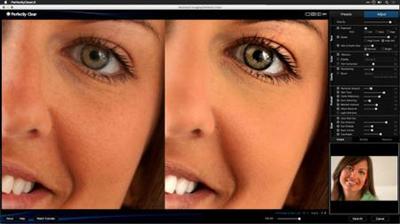
Enhancing Photos with Perfectly Clear
MP4 | Video: 720p | Duration: 3:16:39 | English | Subtitles: VTT | 2443.0 MB​


Learn how to enhance your images with Perfectly Clear. This plugin for Photoshop and Lightroom analyzes photos and makes corrections by combining image analysis and customized user settings. In this course, Rich Harrington shows how to enhance photos and fix common problems for a wide range of images using Perfectly Clear's presets and manual adjustment tools. Start watching to learn how to correct exposure, enhance color, sharpen details, retouch portraits, and develop raw files. Plus, get an inside look at the Lucid standalone apps, which harness the power of Perfectly Clear's one-click image adjustments for iOS devices and Windows and Mac computers.

Topics include:
Installing Perfectly ClearApplying Perfectly Clear in Photoshop and LightroomChoosing presetsRefining adjustments manuallyControlling exposureRestoring and removing colorSharpening imagesRemoving noiseRetouching skin, eyes, and other featuresWorking with raw filesUsing the Lucid desktop and mobile apps

Recommend Download Link Hight Speed | Please Say Thanks Keep Topic Live ​

 

e99915f50a7ebbbba9b4487cd9538c80.jpg


After Effects CS5.5: New Creative Techniques
MP4 | Video: 540p | Duration: 1:58:46 | English | Subtitles: VTT | 309.6 MB​


This course highlights some of the most exciting features in the latest release. These include enhanced 3D lights, cameras, and effects; the Warp Stabilizer; new stereoscopic tools; and the simplified audio workflow between Audition and After Effects. The course also includes bonus tips, "Tweaks for Geeks," on working more efficiently in After Effects, including searching, sorting, saving, and more.

After Effects CS5.5 New Creative Techniques was created and produced by Trish and Chris Meyer. We are honored to host their material in the lynda.com Online Training Library®.

Topics include:
Adjusting the parameters in Warp StabilizerCreating orbiting camera rigsUsing the Camera Lens Blur effectUnderstanding focus and convergenceProcessing audio dynamically

Recommend Download Link Hight Speed | Please Say Thanks Keep Topic Live ​

 

c0f47835704617d5abcd380509aad30d.jpg


SharePoint 2013 for Site Champions and Power Users
MP4 | Video: 720p | Duration: 2:57:56 | English | Subtitles: VTT | 490.9 MB​


So you've just been assigned the task of administering and maintaining your team's SharePoint site. What now? Join Mark Abdelnour, as he shows you exactly what you need to know to be a SharePoint site champion. Learn how to create libraries, override checkouts, and set alerts. Then discover how to use Explorer to upload, download, print, and email multiple documents at once. Mark also shows how to work with metadata and columns and manage end-user permissions. Plus, learn how to edit existing webpages and add and modify web parts-without the need for HTML. Finally, to help with end-user adoption, Mark shows you how to create some of the most popular views.

Topics include:
Creating a document libraryOverriding checkoutsDeleting and restoring filesSetting and managing alertsWorking with multiple filesEditing and deleting columns in a list or librarySetting permissionsAdding and modifying web partsCreating popular views

Recommend Download Link Hight Speed | Please Say Thanks Keep Topic Live ​
 

f2d5e9fb88e3e80bfe93f4458ea75813.jpg


Underwater Photography: Wide Angle
MP4 | Video: 720p | Duration: 2:41:53 | English | Subtitles: VTT | 659.5 MB​


Forget landscape photography-it's time to try shooting seascapes. Wide-angle underwater photography enables you to capture the broad vistas of undersea life. In this course, Deke McClelland and master diver and professional underwater photographer Hergen Spalink take you below the surface to explore the creative options, gear, and techniques behind wide-angle underwater photography. Learn how to adjust strobe strength, aperture, and ISO with in-camera histograms; capture blended and contrasted images; expertly light underwater scenes; and distinguish your photos from the rest of the pack by capturing sunballs, rays of light, and over-unders. Plus, get an introduction to close-focus wide-angle techniques for producing even more attention-grabbing compositions.

Topics include:
Wide-angle opticsBlending and contrasting exposureControlling exposure with apertureLighting underwaterShooting on walls and slopesComposing underwater shotsCapturing rays of sunlightGoing in for close focusPost-processing in Lightroom

Recommend Download Link Hight Speed | Please Say Thanks Keep Topic Live ​
 

966dd6f85e24ab2cf8443453d10f5303.jpg


Illustrator: Symbols
MP4 | Video: 720p | Duration: 2:05:03 | English | Subtitles: VTT | 403.9 MB​


Illustrator symbols can save designers a ton of time. They allow you to reuse pieces of artwork and update all the instances where you've used it all at once. And, as Justin Seeley explains, they also happen to reduce your document's file size. Follow along with Justin in this course as he shows you how to create your own symbols, save them to libraries, and make changes to symbols and their instances. You'll learn to scale, nest, resize, colorize, and even randomize the symbols in your documents. Plus, get three different practical uses for symbols: a simulated "master page" like you'd find in Adobe InDesign, a product mockup, and a website prototype.

Topics include:
What are symbols?Creating your own symbolsSaving and loading symbol librariesModifying registration pointsWorking with nested symbolsUsing 9-slice scalingResizing symbols in a setAdjusting symbol transparencyMapping symbols to artwork

Recommend Download Link Hight Speed | Please Say Thanks Keep Topic Live ​
 

796c754e7fa5f8cd643695a4aa39032d.jpg


Learning Print Production (2012)
MP4 | Video: 720p | Duration: 4:26:54 | English | Subtitles: VTT | 2105.0 MB​


Join author Claudia McCue on a journey that introduces the printing process and reveals the keys to designing a document that prints as well as it looks onscreen. This course takes you on the floors of two commercial print houses (BurdgeCooper and Lithographix), to better understand the life cycle of a print job and observe printing presses in action. Along the way, discover how to better communicate with your printer, choose the correct paper, inks, colors, and fonts for your project, and how to correctly lay out your documents in Adobe Illustrator and InDesign. This course is designed to help you and your printer produce a professionally finished print job, whether it's a business card, brochure, or multipage magazine.

lynda.com thanks the BurdgeCooper and Lithographix printing companies for access to their facilities and permission to film on site. Learn more at and
Topics include:
Understanding the importance of contact proofsHandling corrections and alterationsChoosing from offset, letterpress, thermographic, or digital printing optionsUnderstanding how the inks, colors, and paper interactBuilding a document at the correct sizeFolding and trimmingChoosing fontsWorking in Illustrator with swatches, effects, and moreLaying out a document in InDesignGenerating a final PDFTroubleshooting print issuesPreflighting your print job in AcrobatSubmitting files to the printer

Recommend Download Link Hight Speed | Please Say Thanks Keep Topic Live ​
 

327a6220ef09a6641177a8cad5bc8330.jpg


Unity 4.3 Essential Training
MP4 | Video: 720p | Duration: 6:49:20 | English | Subtitles: VTT | 7819.9 MB​


Interested in game making? Start in Unity-a game engine for mobile and desktop games and real-time simulations. Author Adam Crespi shows techniques used in game development with Unity and introduces the basics of scripting and game functionality. First, learn how to import models and textures, organize your project and hierarchies, and add terrain, water, and foliage. Next, Adam explores how to use lighting to bring the game to life, and add rendering, particles, and interactivity. The end result is a sample game with a lush environment, fully animated characters, and some basic interactive gameplay.

Topics include:
Designing the gameCreating and transforming objectsImporting and configuring models and texturesSetting properties in the InspectorCreating the terrain geometryBuilding materials and adding shadersCreating GameObjectsExploring physicsAnimating objectsLighting the sceneCreating 2D game elementsAdding special effects

Recommend Download Link Hight Speed | Please Say Thanks Keep Topic Live ​

 
b40c66f628218142cf8e3229b3765116.jpg


Designing Solutions for SQL Server
MP4 | Video: AVC 1280x720 | Audio: AAC 44KHz 2ch | Duration: 4 Hours 42M | 1.63 GB
Genre: eLearning | Language: English​

Are you preparing for Exam 70-465: Designing Database Solutions for Microsoft SQL Server? This course offers the help you need. A team of experts walks you through key design considerations and recommendations for SQL Server data solutions.Take a look at managing a SQL Server environment, along with helpful tools. Explore database security, backup and recovery solutions, and high availability. Plus, explore database troubleshooting and maintenance.Note: Demonstration files are available for download in the Recommended Resources & Next Steps section of this course.


78fa1fe752eb03730fc1c05d7d2e2ac7.jpg


Recommend Download Link Hight Speed | Please Say Thanks Keep Topic Live ​
 

68c1ff1f73965c1a9ddc68b9c60f6b1f.jpg


Triple-Threat Project Management
MP4 | Video: 720p | Duration: 27:20 | English | Subtitles: VTT | 258.9 MB​


Meet the modern project manager: a triple threat who's savvy in project management, business analysis, and change management. In this short course, author and PMP Bob McGannon teaches you how these three fields are coming together and reinventing project management to produce better business outcomes. Discover how they intertwine and help project managers deliver projects with clearer scope, tighter budget, and better results.

Recommend Download Link Hight Speed | Please Say Thanks Keep Topic Live ​
 

08bb56269af700f2fe414e785eefe143.jpg


Lindsey Pollard: Supervising Animation Director
MP4 | Video: 720p | Duration: 23:30 | English | Subtitles: VTT | 425.5 MB​


Lindsey Pollard has worked on some of the most influential animated shows in recent memory, including The Simpsons and Drawn Together. She is currently the supervising animator director (for the third year) on Sanjay and Craig. In this interview, Lindsey talks about her role: matching dialog to storyboards, balancing audio and visuals, and timing and supplementing action. She discusses the different properties she's worked on over the years, including her first feature film, The Simpsons Movie, and offers advice to new animators who want to get a foothold in the industry.

Recommend Download Link Hight Speed | Please Say Thanks Keep Topic Live ​
 

ef1d374e6d8db80d5e38ee6580edd148.jpg


Windows 10: Security
MP4 | Video: 720p | Duration: 1:37:49 | English | Subtitles: VTT | 218.4 MB​


Whether you are upgrading or starting afresh with a new operating system out of the box, having the peace of mind that your system will be secure is possible by taking a few necessary actions. Protecting your Windows 10 system includes updating authentication and authorization settings, reviewing encryption options, selecting an anti-virus solution, and configuring network settings. Activating native solutions or adding compatible third-party solutions can improve your system's defenses. Completing a few crucial steps and configuring settings according to your needs is the focus of this course, Windows 10: Security.
In this course, Martin Guidry helps you work through each essential security step. He takes you through familiar ground, standard account setup, covering accounts, passwords, users groups, and permissions. He also takes you through unfamiliar territory, enhanced features and new products, examining BitLocker, Wi-Fi Sense, Windows Defender, and Edge, the new web browser. This course provides instructional step-by-step walkthroughs in addition to best practice discussions. Learn how to protect your computer from a network attack, apply security policies in Group Policy, use remote desktop, and more.

Topics include:
Setting up passwords, smart cards, and biometricsCreating groups and assigning permissionsAssigning permissionsEncrypting full discs, file transfers, and networksUsing anti-virus and anti-malware solutionsConfiguring firewall settingsSecuring remote desktop connections

Recommend Download Link Hight Speed | Please Say Thanks Keep Topic Live ​
 
c501eeeabe961f9b2324a159c65b5d08.jpg


A Beginners Guide to Developing Apple TV Apps With TVML Kit
MP4 | Video: AVC 1280x720 | Audio: AAC 44KHz 2ch | Duration: 5.5 Hours | Lec: 53 | 1.23 GB
Genre: eLearning | Language: English​

Learn rapid Apple TV (tvOS) development with no coding experience by developing 2 full Apple TV apps for streaming media

Hey guys! Welcome to the most comprehensive course on the internet that actually teaches you how to develop a fully functional app that streams media content.

This course is focused on learning how to develop Apple TV applications using the TVMLKit Framework. The TVMLKit Framework allows for rapid (quick) development of Apple TV apps. This course is developed to show you how TVMLKit allows for a consistent way of developing tvOS apps based on a template system, whilst still maintaining the intuitive native familiar experince.

My name is Tinashe Munyaka, a developer and designer, and a lover of anything creative! and I'll be walking on this journey with you while we explore the world of Apple TV apps.

What should you expect to learn?

Developing Apple TV apps without any programming or coding knowledge.
Understanding tvOS and TVMLKit
How to go about developing your own apps using TVMLKit
Understand how to design your own Apple TV apps
Learn how to run your Apple TV apps locally in the simulator
Where to get image resources to use in your Apple TV app
Where to find video streaming URL's to use within your app
Where to find audio streaming URL's to use within your app
How to pull in content locally as well as dynamically in your Apple TV app
How to run your own app on your own Apple TV
And loads moreR30;
So why this course on TVML? WellR30;

If you're looking to develop Apple TV apps with much less effort then this course is for you. This course will show you how you can reduce the development time and effort in creating Apple TV apps, as well as shorten the time for you to take your Apple TV app to market.

So, if you want to develop rich media apps where people browse and consume media, with no performance tuning or optimization of the user interface then this course is for you!

Join me as I show you how to create awesome Apple TV apps that offer a great user experience. Cool, can't wait to meet you inside!


f0ef90183ff92a8c83718a53885438d1.jpg


Recommend Download Link Hight Speed | Please Say Thanks Keep Topic Live ​
 
Zurück
Oben Unten