




• Regeln für den Video-Bereich:

    In den Börsenbereich gehören nur Angebote die bereits den Allgemeinen Regeln entsprechen.

    Einteilung

    - Folgende Formate gehören in die angegeben Bereiche:
    - Filme: Encodierte Filme von BluRay, DVD, R5, TV, Screener sowie Telesyncs im Format DivX, XviD und x264.
    - DVD: Filme im Format DVD5, DVD9 und HD2DVD.
    - HD: Encodierte Filme mit der Auflösung 720p oder darüber von BluRay, DVD, R5, TV, Screener sowie Telesyncs im Format x264.
    - 3D: Encodierte Filme von BluRay, die in einem 3D Format vorliegen. Dies gilt auch für Dokus, Animation usw.
    - Serien: Cartoon/Zeichentrick, Anime, Tutorials, Dokumentationen, Konzerte/Musik, Sonstiges sind demnach in die entsprechenden Bereiche einzuordnen, auch wenn sie beispielsweise im High Definition-Format oder als DVD5/DVD9/HD2DVD vorliegen. Ausnahme 3D.
    - Bereich Englisch: Englische Releases gehören immer in diesen Bereich.
    - Bereich Talk: Der Bereich, in dem über die Releases diskutiert werden kann, darf, soll und erwünscht ist.


    Angebot/Beitrag erstellen

    - Ein Beitrag darf erst dann erstellt werden, wenn der Upload bei mindestens einem OCH komplett ist. Platzhalter sind untersagt.
    - Bei einem Scenerelease hat der Threadtitel ausschließlich aus dem originalen, unveränderten Releasenamen zu bestehen. Es dürfen keine Veränderungen wie z.B. Sterne, kleine Buchstaben o.ä. vorgenommen werden. Ausnahme Serienbörse:
    - Bei einem Sammelthread für eine Staffel entfällt aus dem Releasename natürlich der Name der Folge. Beispiel: Die Simpsons S21 German DVDRip XviD - ITG
    - Dementsprechend sind also u.a. verboten: Erweiterungen wie "Tipp", "empfehlenswert", "only", "reup", usw. / jegliche andere Zusatzinformation oder Ergänzung, welche nicht in obiger Beschreibung zu finden ist.

    Aufbau des Angebots und Threadtitel

    Der Titel nach folgendem Muster erstellt zu werden. <Name> [3D] [Staffel] [German] <Jahr> <Tonspur> [DL] [Auflösung] <Quelle> <Codec> - <Group>
    Beispiel: The Dark Knight German 2008 AC3 DVDRip XviD - iND
    Beispiel: The Dark Knight 2008 DTS DL BDRip x264 - iND
    Beispiel: The Dark Knight 2008 AC3 DL BDRip XviD - iND
    Beispiel: The Dark Knight German 2008 AC3 720p BluRay x264 iND
    Beispiel: The Dark Knight 2008 DTS DL 1080p BluRay x264 iND
    Beispiel: Die Simpsons S01 German AC3 DVDRip XviD iND
    Beispiel: Die Simpsons S20 German AC3 720p BluRay x264 iND
    Beispiel: Sword Art Online II Ger Sub 2014 AAC 1080p WEBRip x264 - peppermint
    Entsprechend sind also u.a. verboten: Sonderzeichen wie Klammern, Sterne, Ausrufezeichen, Unterstriche, Anführungszeichen / Erweiterungen wie "Tipp", "empfehlenswert", "only", "reup", usw. / jegliche andere Zusatzinformation oder Ergänzung, welche nicht in obiger Beschreibung zu finden ist
    Ausnahmen hiervon können in den Bereichen geregelt sein.

    Die Beiträge sollen wie folgt aufgebaut werden:
    Überschrift entspricht dem Threadtitel
    Cover
    kurze Inhaltsbeschreibung
    Format, Größe, Dauer sind gut lesbar für Downloader außerhalb des Spoilers zu vermerken
    Nfo sind immer Anzugeben und selbige immer im Spoiler in Textform.
    Sind keine Nfo vorhanden z.B. Eigenpublikationen, sind im Spoiler folgende Dateiinformationen zusätzlich anzugeben :
    Quelle
    Video (Auflösung und Bitrate)
    Ton (Sprache, Format und Bitrate der einzelnen Spuren)
    Untertitel (sofern vorhanden)
    Hosterangabe in Textform außerhalb eines Spoiler mit allen enthaltenen Hostern.
    Bei SD kann auf diese zusätzlichen Dateiinformationen verzichtet werden.

    Alle benötigten Passwörter sind, sofern vorhanden, in Textform im Angebot anzugeben.
    Spoiler im Spoiler mit Kommentaren :"Schon Bedankt?" sind unerwünscht.


    Releases

    - Sind Retail-Release verfügbar, sind alle anderen Variationen untersagt. Ausnahmen: Alle deutschen Retail-Release sind CUT, in diesem Fall sind dubbed UNCUT-Release zulässig.
    - Im Serien-Bereich gilt speziell: Wenn ein Retail vor Abschluss einer laufenden Staffel erscheint, darf diese Staffel noch zu Ende gebracht werden.62
    - Gleiche Releases sind unbedingt zusammenzufassen. Das bedeutet, es ist zwingend erforderlich, vor dem Erstellen eines Themas per Suchfunktion zu überprüfen, ob bereits ein Beitrag mit demselben Release besteht. Ist dies der Fall, ist der bereits vorhandene Beitrag zu verwenden.
    - P2P und Scene Releases dürfen nicht verändert oder gar unter einem iND Tag eingestellt werden.


    Support, Diskussionen und Suche

    - Supportanfragen sind entweder per PN oder im Bereich Talk zu stellen.
    - Diskussionen und Bewertungen sind im Talk Bereich zu führen. Fragen an die Uploader haben ausschließlich via PN zu erfolgen, und sind in den Angeboten untersagt.
    - Anfragen zu Upload-Wünschen sind nur im Bereich Suche Video erlaubt. Antworten dürfen nur auf Angebote von MyBoerse.bz verlinkt werden.


    Verbote

    - Untersagt sind mehrere Formate in einem einzigen Angebotsthread, wie beispielsweise das gleichzeitige Anbieten von DivX/XviD, 720p und 1080p in einem Thread. Pro Format, Release und Auflösung ist ein eigener Thread zu eröffnen.
    - Grundsätzlich ebenso verboten sind Dupes. Uploader haben sich an geeigneter Stelle darüber zu informieren, ob es sich bei einem Release um ein Dupe handelt.
    - Gefakte, nur teilweise lauffähige oder unvollständige Angebote sind untersagt. Dies gilt auch für eigene Publikationen, die augenscheinlich nicht selbst von z.B. einer DVD gerippt wurden. Laufende Serien, bei denen noch nicht alle Folgen verfügbar sind, dürfen erstellt und regelmäßig geupdatet werden.
    - Untersagt sind Angebote, welche nur und ausschließlich in einer anderen Sprache als deutsch oder englisch vorliegen. Ausnahmen sind VORHER mit den Moderatoren zu klären.


    Verstoß gegen die Regeln

    - Angebote oder Beiträge, die gegen die Forenregeln verstoßen, sind über den "Melden"-Button im Beitrag zu melden.
  • Bitte registriere dich zunächst um Beiträge zu verfassen und externe Links aufzurufen.

++ Premium IPTV ++ 7000 Live Sender ++ UHD Qualität ++ Mediathek mit 18.000 Inhalten ++


VenneTV


Englische Tutorials


2c896ed6ecef2f292924135c489cd8e8.jpg


Illustrator CS5 One-on-One: Mastery
MP4 | Video: 540p | Duration: 13:05:22 | English | Subtitles: VTT | 2226.1 MB​


In Illustrator CS5 One-on-One: Mastery, the third and final part of the comprehensive Illustrator One-on-One series, author and industry expert Deke McClelland shows how to take advantage of the wide array of dynamic effects in Illustrator CS5. Deke explores Illustrator's powerful Gradient Mesh feature, great for creating photorealistic airbrushing effects. He also covers graphic styles, the liquify tools, envelope-style distortions, the new Bristle Brushes, 3D text, and perspective drawing. Exercise files accompany the course.

Topics include:
Working with dynamic effectsPlacing artwork as a Photoshop Smart ObjectCreating and editing a Gradient MeshDistorting artwork with an Envelope MeshUsing the Calligraphic, Art, and Scatter BrushesCreating an intricate Pattern BrushImporting and graphing dataCreating a complex pictographDrawing and editing a perspective shapeWorking with the new Perspective Grid toolUsing the 3D Revolve effectCreating 3D type with Extrude & BevelRecording and playing automated actions

Recommend Download Link Hight Speed | Please Say Thanks Keep Topic Live ​

 

9b8223c0a7a29c93c7a8b18d05b72d6b.jpg


Teaching Techniques: Classroom Management
MP4 | Video: 720p | Duration: 52:37 | English | Subtitles: VTT | 413.4 MB​


K-12 educators: create a classroom culture that increases achievement and decreases disruptionâ€"without inhibiting your students' creativity or desire to learn. In this course (our first with real **** in a classroom setting), Aaron Quigley shows you how to create learning-focused environments by minimizing off-task behavior and increasing student engagement. Learn how to develop the traits of effective classroom managers, reduce distraction, give clear instruction, and escalate problems when necessary. Aaron will also provide guides for building a positive classroom culture that sets students up for success, wherever they go next.

Topics include:
Developing your voice and confidenceBeing consistently proactiveSetting up procedures and routinesTiming everythingIntervening and redirectingMaking student learning the center of it all

Recommend Download Link Hight Speed | Please Say Thanks Keep Topic Live ​

 

3d6524b046a1455e9b6c81565f35a6a1.jpg


Outlook for iOS and Android First Look
MP4 | Video: 720p | Duration: 12:51 | English | Subtitles: VTT | 30.5 MB​


Get a first look at the new Outlook app for iOS and Android, a mobile version of your favorite email and calendaring program. Jess Stratton shows how to navigate the app, link your email and cloud storage accounts, and work with mail, calendar events, contacts, and files in the new interface-now optimized for small screens!

Recommend Download Link Hight Speed | Please Say Thanks Keep Topic Live ​
 

a975d02614714af70683dd3d708b4b75.jpg


Building and Deploying Applications with Cake
MP4 | Video: AVC 1280x720 | Audio: AAC 44KHz 2ch | Duration: 4 Hours | 428 MB
Genre: eLearning | Language: English​

Cake (C# Make) is a cross-platform build automation system with a beautiful DSL and a rich ecosystem of tool integrations. This course will teach you how to use Cake to compile, test, version, package, and deploy your .NET or .NET Core application.

These days, .NET applications consist of an ever increasing number of libraries, frameworks, and tools. Building and deploying them requires you to combine lots of different command-line programs-each with its own set of rules and syntax-and make them work together seamlessly to take your code from source to running software. It really doesn't take much before it gets quite challenging. In this course, Building and Deploying Applications with Cake, you will learn how to automate your build and deployment pipeline using Cake. Cake (C# Make) is a modern cross-platform build automation system with a beautiful C# DSL and a rich ecosystem of integrations to third-party tools and services. You will learn how to create readable and maintainable build scripts that compile, test, version, package and install your web application both using the full .NET Framework as well as .NET Core. By the end of this course, you'll know how to manage the complexity of your build and deployment process using the language (C#) and platform (.NET) you already know and love.


6a951e06a2b9ee65876576d5b84d01e8.jpg


Recommend Download Link Hight Speed | Please Say Thanks Keep Topic Live ​
 

3b0872d2ce7784f66800f370ab0201b0.jpg


Putting ITIL® into Practice: Problem Management Techniques
MP4 | Video: 720p | Duration: 1:52:32 | English | Subtitles: VTT | 292.9 MB​


Problem management is about preventing and resolving the problems underlying interruptions of IT services. A set of shared techniques can make the difference between success and failure. ITIL® mentions a set of techniques as best practice, but does not cover how to apply them. This course bridges the gap for IT pros, giving them a concise introduction to the seven problem management techniques endorsed by ITIL®, including:
BrainstormingIshikawa diagramsKepner-Tregoe root cause analysisFault tree analysisComponent failure impact analysisService outage analysisPost-implementation and major problem review
ITIL® trainer David Pultorak outlines the what, why, where, and how of each technique, and provide examples so you can practice with the goal of placing each technique into "muscle memory." He examines the 4 Ps that can contribute to or help resolve every problem-people, processes, products, and partners-and provides tips on where to go next.

Recommend Download Link Hight Speed | Please Say Thanks Keep Topic Live ​
 
de7d33f71078f44ce76ca145e5b3875a.jpg


Adobe InDesign
MP4 | Video: AVC 1280x720 | Audio: AAC 44KHz 2ch | Duration: 3 Hours 20M | 1.55 GB
Genre: eLearning | Language: English​

Adobe InDesign is a layout software that takes images and text and lay them out across pages. InDesign is best used for working with multiple page documents like books, magazines, brochures, portfolios and can even be used to create business cards, letterheads, posters and flyers. Graphic designers and production artists are the primary users of this desktop publishing software. It can also be used in conjunction with other Adobe products primarily Photoshop and Illustrator. In the InDesign course, you will be instructed by a top professional in the design industry that holds the titles of 2D Animator and Adjunct Professor of Animation and Digital Art. You will first be shown how to navigate through the InDesign work area and how to create a new document and import images. You will be introduced to "master pages", an important tool in creating multi-page projects, then you move onto other tools like creating tables and packaging. This course will be also go through more advanced techniques and design methods as well as types of exports.


bfe007f89589c9c4b2611e530f7b6fca.jpg


Recommend Download Link Hight Speed | Please Say Thanks Keep Topic Live ​
 

bc2a0443465ff2dafdf0b5246538fb24.jpg


Running a Profitable Business: Understanding Financial Ratios
MP4 | Video: 720p | Duration: 2:13:40 | English | Subtitles: VTT | 814.1 MB​


Financial ratios-such as ROI (return on investment) or ROA (return on assets)- are a valuable tool for measuring a company's progress against a financial goal, a certain competitor, or the overall industry. In this course, professors Jim and Kay Stice explain the financial ratios found on balance sheets, income statements, and cash-flow statements and provide examples from real-world companies such as Walmart, Nordstrom, and McDonald's. They help you understand how to use financial ratios to analyze or benchmark your company against other companies.

Topics include:
What are financial statements?Understanding the DuPont frameworkWorking with common-size financial statementsReviewing profitability, efficiency, and leverage ratiosAnalyzing potential-pitfall ratio

Recommend Download Link Hight Speed | Please Say Thanks Keep Topic Live ​

 

c849a73c4836eb4129e79fbeb4c32ccc.jpg


Windows 8 Essential Training
MP4 | Video: 720p | Duration: 4:57:23 | English | Subtitles: VTT | 831.7 MB​


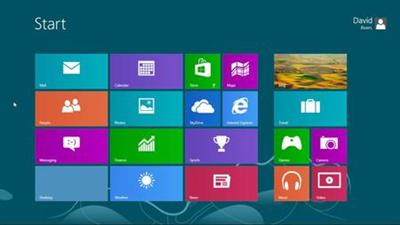
Windows 8 is a significant departure from previous versions of the operating system, offering new mobile integration, cloud storage, and security enhancements. This course shows you all the essential features you'll need to jump-start Windows 8â€"whether you work with it closely at the office or use it casually at home. Author David Rivers discusses the migration path from older versions of Windows to Windows 8, tours the new interface, reviews the new file and folder behaviors, and introduces the most useful apps, including Calendar, Photos, and Music. He also shows how to adjust system settings like default programs and volume, and how to work with external devices and setup networks. The final chapters show you how to keep your computer even more secure with Access Control and Windows Defender, and how to troubleshoot potential issues, like reversing fatal crashes.

Topics include:
Upgrading from other Windows versionsTransferring files to Windows 8Organizing files and foldersManaging your inbox with the Mail appSending instant messages with MessagingWorking with Notepad, WordPad, and PaintControlling system sounds, volume, and accessibility optionsGetting connected to the InternetKeeping your PC secure with Windows UpdateUsing parental controls to block unwanted contentPrinting from Windows 8Fixing issues with the Problem Steps RecorderKeeping file backups with File HistoryNavigating the web with Internet Explorer 10

Recommend Download Link Hight Speed | Please Say Thanks Keep Topic Live ​
 

ff71ac64a38e274b4dccf26c08602a9b.jpg


Affinity Designer for UX Design
MP4 | Video: 720p | Duration: 1:18:51 | English | Subtitles: VTT | 2030.7 MB​


Serif's Affinity Designer offers a lightweight vector design tool for Mac that's simple, streamlined, and easy to use for UX design. Learn how to incorporate Affinity Designer's features into your own design process. Here Ronnie McBride shows how to set up your preferences, use artboards, create custom color themes in the Swatches panel, apply styles and gradients, and create wireframes, mockups, UI assets, and hero graphics-all with Affinity Designer's versatile toolset. Once you find out what you can do with Affinity Designer, you may never go back to expensive design software again.

Topics include:
Setting up your preferences and interfaceCreating new documentsUsing artboardsCreating a wireframe or mockupCreating UI assetsExporting for prototyping

Recommend Download Link Hight Speed | Please Say Thanks Keep Topic Live ​
 

4b2ff1bb1143d898b170e499feb66a02.jpg


Premiere Pro CS5.5: Compositing
MP4 | Video: 720p | Duration: 2:18:29 | English | Subtitles: VTT | 989.2 MB​


Adobe Premiere Pro CS5.5 is primarily a nonlinear editing system designed for fast cutting of multiple media types, but it is also an advanced special effects and compositing tool. In this course, master editor Maxim Jago describes the tools and options available to create complex compositions using just Premiere Pro, without involving After Effects or Photoshop. Learn how to adjust opacity, use garbage mattes and track mattes, and create nested sequences, as well as how to work with chroma keys, luma keys, and the Ultra Keyer. Maxim shares all the techniques necessary to layer multiple media elements and produce advanced sequences as compositions.

Topics include:
Introducing Premiere Pro: the compositing programUnderstanding transparency and alpha channelsAdjusting opacityWorking with garbage mattesLuma keys and chroma keysThe Ultra KeyerNesting sequencesUnderstanding and using blend modesCreating track mattes

Recommend Download Link Hight Speed | Please Say Thanks Keep Topic Live ​
 

afb318a02a6861cf522f57558bb00bd0.jpg


Networking Foundations: Network Media (LANs)
MP4 | Video: 720p | Duration: 1:09:05 | English | Subtitles: VTT | 248.4 MB​


Learn how to connect and secure a LAN (local area network), WAN (wide area network), or wireless area network. LANs and WANs are necessary to connect the computers in an organization: to each other, to printers and servers, to the Internet, and to the world. Whether you need to set up a simple LAN at your home or a complicated cable system for an entire office, this course will provide the training you need to set up different kinds of networks. Author Greg Sowell introduces the various network cables and connectors, from coaxial to Cat 5, and discusses how to set up a wireless network, including coverage of the 802.11 standards and security considerations. Need to "go long"? The course concludes with coverage of fiber-optic media, which improves data transmission over long distances.

Topics include:
Exploring cable typesCreating coaxial cableTerminating Cat 5 cableMitigating EMISetting up wireless LANsComparing Wi-Fi frequenciesSecuring a wireless networkUsing fiber-optic cable in LAN and WAN applications

Recommend Download Link Hight Speed | Please Say Thanks Keep Topic Live ​
 
23b62feef2f88ab8f0ff36e58bc0d1da.jpg


Learn Operating Systems
MP4 | Video: AVC 1280x720 | Audio: AAC 44KHz 2ch | Duration: 2 Hours | Lec: 36 | 222 MB
Genre: eLearning | Language: English
Master all concepts of Operating systems from basic to advanced levels​

Hello Students. Welcome to the course on Operating Systems!

Implementing concurrency in an operating system really helps you reason about concurrent code in other situations. Though most computer science majors won't work with operating systems directly, most probably will work with concurrent code.

Additionally, with almost any programming work, despite loads of abstractions, you'll be exposed in some way to the actual computers running your code. That means having a deep understanding the stack, the heap, virtual memory, and more is really valuable.

In general we find that any difficult coursework in computer science-from systems-level stuff like operating systems to theoretical stuff like type theory and logic-to be helpful with general problem-solving ability. Trying to solve hard operating systems problems makes you smarter and better at solving problems in general. This probably applies more broadly even-if you had taken some tough physics classes it would have made you a smarter programmer-but operating systems problems are surprisingly similar to some web development ones and that's what makes it important.

AssumingR30;

int a[][] = new int[1000][1000];

R30;one of the following loops will run much more efficiently than the other. Can you figure out which one?

for (int i = 0; i
for (int j = 0; j
a[j] = 0;
}
}

OR

for (int i = 0; i
for (int j = 0; j
a[j] = 0;
}
}

A course in operating systems is important for a software developer. You can abstract away complexity but in practice you need to understand the system so you can write well performing programs.

In this course, you will learning all the concepts of Operating Systems. These include Processes, Threads, Inter-process communication, Concurrency, Synchronization, Deadlock, CPU Scheduling, Memory Management, Virtual Memory and File Systems.


9bbb167d9907c85d50fb082aed4db786.jpg


Recommend Download Link Hight Speed | Please Say Thanks Keep Topic Live ​
 
Zurück
Oben Unten