• Regeln für den Video-Bereich:

    In den Börsenbereich gehören nur Angebote die bereits den Allgemeinen Regeln entsprechen.

    Einteilung

    - Folgende Formate gehören in die angegeben Bereiche:
    - Filme: Encodierte Filme von BluRay, DVD, R5, TV, Screener sowie Telesyncs im Format DivX, XviD und x264.
    - DVD: Filme im Format DVD5, DVD9 und HD2DVD.
    - HD: Encodierte Filme mit der Auflösung 720p oder darüber von BluRay, DVD, R5, TV, Screener sowie Telesyncs im Format x264.
    - 3D: Encodierte Filme von BluRay, die in einem 3D Format vorliegen. Dies gilt auch für Dokus, Animation usw.
    - Serien: Cartoon/Zeichentrick, Anime, Tutorials, Dokumentationen, Konzerte/Musik, Sonstiges sind demnach in die entsprechenden Bereiche einzuordnen, auch wenn sie beispielsweise im High Definition-Format oder als DVD5/DVD9/HD2DVD vorliegen. Ausnahme 3D.
    - Bereich Englisch: Englische Releases gehören immer in diesen Bereich.
    - Bereich Talk: Der Bereich, in dem über die Releases diskutiert werden kann, darf, soll und erwünscht ist.


    Angebot/Beitrag erstellen

    - Ein Beitrag darf erst dann erstellt werden, wenn der Upload bei mindestens einem OCH komplett ist. Platzhalter sind untersagt.
    - Bei einem Scenerelease hat der Threadtitel ausschließlich aus dem originalen, unveränderten Releasenamen zu bestehen. Es dürfen keine Veränderungen wie z.B. Sterne, kleine Buchstaben o.ä. vorgenommen werden. Ausnahme Serienbörse:
    - Bei einem Sammelthread für eine Staffel entfällt aus dem Releasename natürlich der Name der Folge. Beispiel: Die Simpsons S21 German DVDRip XviD - ITG
    - Dementsprechend sind also u.a. verboten: Erweiterungen wie "Tipp", "empfehlenswert", "only", "reup", usw. / jegliche andere Zusatzinformation oder Ergänzung, welche nicht in obiger Beschreibung zu finden ist.

    Aufbau des Angebots und Threadtitel

    Der Titel nach folgendem Muster erstellt zu werden. <Name> [3D] [Staffel] [German] <Jahr> <Tonspur> [DL] [Auflösung] <Quelle> <Codec> - <Group>
    Beispiel: The Dark Knight German 2008 AC3 DVDRip XviD - iND
    Beispiel: The Dark Knight 2008 DTS DL BDRip x264 - iND
    Beispiel: The Dark Knight 2008 AC3 DL BDRip XviD - iND
    Beispiel: The Dark Knight German 2008 AC3 720p BluRay x264 iND
    Beispiel: The Dark Knight 2008 DTS DL 1080p BluRay x264 iND
    Beispiel: Die Simpsons S01 German AC3 DVDRip XviD iND
    Beispiel: Die Simpsons S20 German AC3 720p BluRay x264 iND
    Beispiel: Sword Art Online II Ger Sub 2014 AAC 1080p WEBRip x264 - peppermint
    Entsprechend sind also u.a. verboten: Sonderzeichen wie Klammern, Sterne, Ausrufezeichen, Unterstriche, Anführungszeichen / Erweiterungen wie "Tipp", "empfehlenswert", "only", "reup", usw. / jegliche andere Zusatzinformation oder Ergänzung, welche nicht in obiger Beschreibung zu finden ist
    Ausnahmen hiervon können in den Bereichen geregelt sein.

    Die Beiträge sollen wie folgt aufgebaut werden:
    Überschrift entspricht dem Threadtitel
    Cover
    kurze Inhaltsbeschreibung
    Format, Größe, Dauer sind gut lesbar für Downloader außerhalb des Spoilers zu vermerken
    Nfo sind immer Anzugeben und selbige immer im Spoiler in Textform.
    Sind keine Nfo vorhanden z.B. Eigenpublikationen, sind im Spoiler folgende Dateiinformationen zusätzlich anzugeben :
    Quelle
    Video (Auflösung und Bitrate)
    Ton (Sprache, Format und Bitrate der einzelnen Spuren)
    Untertitel (sofern vorhanden)
    Hosterangabe in Textform außerhalb eines Spoiler mit allen enthaltenen Hostern.
    Bei SD kann auf diese zusätzlichen Dateiinformationen verzichtet werden.

    Alle benötigten Passwörter sind, sofern vorhanden, in Textform im Angebot anzugeben.
    Spoiler im Spoiler mit Kommentaren :"Schon Bedankt?" sind unerwünscht.


    Releases

    - Sind Retail-Release verfügbar, sind alle anderen Variationen untersagt. Ausnahmen: Alle deutschen Retail-Release sind CUT, in diesem Fall sind dubbed UNCUT-Release zulässig.
    - Im Serien-Bereich gilt speziell: Wenn ein Retail vor Abschluss einer laufenden Staffel erscheint, darf diese Staffel noch zu Ende gebracht werden.62
    - Gleiche Releases sind unbedingt zusammenzufassen. Das bedeutet, es ist zwingend erforderlich, vor dem Erstellen eines Themas per Suchfunktion zu überprüfen, ob bereits ein Beitrag mit demselben Release besteht. Ist dies der Fall, ist der bereits vorhandene Beitrag zu verwenden.
    - P2P und Scene Releases dürfen nicht verändert oder gar unter einem iND Tag eingestellt werden.


    Support, Diskussionen und Suche

    - Supportanfragen sind entweder per PN oder im Bereich Talk zu stellen.
    - Diskussionen und Bewertungen sind im Talk Bereich zu führen. Fragen an die Uploader haben ausschließlich via PN zu erfolgen, und sind in den Angeboten untersagt.
    - Anfragen zu Upload-Wünschen sind nur im Bereich Suche Video erlaubt. Antworten dürfen nur auf Angebote von MyBoerse.bz verlinkt werden.


    Verbote

    - Untersagt sind mehrere Formate in einem einzigen Angebotsthread, wie beispielsweise das gleichzeitige Anbieten von DivX/XviD, 720p und 1080p in einem Thread. Pro Format, Release und Auflösung ist ein eigener Thread zu eröffnen.
    - Grundsätzlich ebenso verboten sind Dupes. Uploader haben sich an geeigneter Stelle darüber zu informieren, ob es sich bei einem Release um ein Dupe handelt.
    - Gefakte, nur teilweise lauffähige oder unvollständige Angebote sind untersagt. Dies gilt auch für eigene Publikationen, die augenscheinlich nicht selbst von z.B. einer DVD gerippt wurden. Laufende Serien, bei denen noch nicht alle Folgen verfügbar sind, dürfen erstellt und regelmäßig geupdatet werden.
    - Untersagt sind Angebote, welche nur und ausschließlich in einer anderen Sprache als deutsch oder englisch vorliegen. Ausnahmen sind VORHER mit den Moderatoren zu klären.


    Verstoß gegen die Regeln

    - Angebote oder Beiträge, die gegen die Forenregeln verstoßen, sind über den "Melden"-Button im Beitrag zu melden.
  • Bitte registriere dich zunächst um Beiträge zu verfassen und externe Links aufzurufen.

++ Premium IPTV ++ 7000 Live Sender ++ UHD Qualität ++ Mediathek mit 18.000 Inhalten ++


VenneTV


Englische Tutorials


db5e0e774faf1df8f7ad3699b74412d3.jpg

Udemy - Color Harmony and Retouching in Photoshop
MP4 | Video: AVC 1280x720 | Audio: AAC 44KHz 2ch | Duration: 2 Hours | 703 MB
Genre: eLearning | Language: English​

Learn Color Harmony and How to apply it to Your work in Photoshop with Portrait Editing!
Why I decided to record this course? You can master retouching and have great knowledge of skin retouching. Though, at the end of the day the colors are something that makes Your images unique.What is Color Harmony?
Color harmony is theory of combining colors in design, fashion and photography that - in simple words - are working well together for the eye. Color Harmony stays behind almost all of the color designs in the industry, such as comic books, posters, photography, web design and many others.What You will learn in this course?
I am going to start very simple, so even You are starting Your adventure with the colors, You will have a basic understanding of the Theory. I believe I am easy going person, so friendly approach of the course will make it even easier for You!
We will have an introduction to color wheel. And after You get enough theoretical knowledge we will start our practical work with different color harmonies. Through this course, You will learn how to define different color harmonic over few different sections. Since very beginning we will start developing different ways of approaching the color, and different techniques of color grading.

Recommend Download Link Hight Speed | Please Say Thanks Keep Topic Live ​
 

5e5e4688ef3d15f80e651443f7b31613.jpg


Lynda - Capture One Pro 9 Essential Training
MP4 | AVC 285kbps | English | 1280x800 | 15fps | 5h 48mins | AAC stereo 160kbps | 2.65 GB
Genre: Video Training​

Capture One Pro is a powerful program that combines photo management, photo enhancement, and raw-format conversion, as well as features for tethered shooting.

In this course, photographer, author, and educator Derrick Story embarks on an in-depth exploration of Capture One Pro. The course structure mirrors the design of the software itself, with chapters that step through each of the tabs in Capture One Pro, from organizing to editing to refining to outputting images. Derrick investigates Capture One Pro's intuitive library structure, its robust editing tools, its tethered shooting mode for going directly from camera to computer, and its photo printing and sharing features, including options for creating web pages and slideshows straight from Capture One Pro. These tutorials are ideal for former Aperture users who are looking for a new photo editing application, as well as current Lightroom subscribers who are interested in Capture One Pro's more powerful import, color grading, and tethering features.

Topics include:
Choosing the right version of Capture One Pro
Setting preferences
Creating catalogues
Importing images
Organizing images in projects, albums, and groups
Adjusting color
Converting to black and white
Using levels and curves to adjust exposure
Cropping, rotating, and flipping
Reducing noise and sharpening
Adding metadata in Capture One Pro
Exporting images from Capture One Pro
Working with Aperture and Lightroom catalogs
Shooting in tethered mode
Making local adjustments with Capture One Pro
Making prints
Backing up Capture One Pro catalogs

Recommend Download Link Hight Speed | Please Say Thanks Keep Topic Live ​
 

698065e3b470d94e46e036e89bf2cd6b.jpg

HTML & CSS For Beginners with HTML5
Duration: 4 Hours | Video: h264, yuv420p 1280x720 | Audio: aac, 44100 Hz, 2 ch | 3.76 GB
Genre: eLearning | Language: English | Project Files Included​

There isn't a web site out there- whether it be WhiteHouse.gov, IBM.com or the site for your local high school- that isn't written in HTML. If you do any level of web development- from editing pages on a WordPress site to designing original pages from scratch, understanding and being able to code in HTML and CSS can give you a level of control, and power over your designs that you've never experienced before. This course helps you learn HTML and CSS (versions 4.01 and XHTML) as well as prepares you for the future with coverage of HTML5.

In this course, designed, authored and hosted by master trainer Mark Lassoff, you will learn HTML and CSS, including everything you need to create a creative, quality and professional web site. Almost four hours of video instruction in punctuated lab exercises where you apply the very skills taught in the course. With an instructor available to answer your questions, and course with both wide coverage of HTML and CSS topics and deep discussion of those topics, there is no better or faster way to learn HTML and CSS for Beginners!

When you've completed the course, become a certified developer by passing LearnToProgram's Certified HTML Developer exam. Certified developers are listed on the LearnToProgram web site and sent a printed certificate, digital badges and other materials relating to their certified status.

Recommend Download Link Hight Speed | Please Say Thanks Keep Topic Live ​
 

1eaf60e6e73f93941162eb76448ec94f.jpg

The Complete Google Go Programming Course For Beginners
4.5h | Video: AVC (.MP4) 1280x720 30fps | Audio: AAC 44.1KHz 2ch | 969 MB
Genre: eLearning | Language: English​

In this complete Google Go (Golang) Programming course for beginners students will learn...

What am I going to get from this course?

Compile and run Google Go (Golang) Programs
Create your own fully featured programs in Google Go (Golang).
Really understand how computers work, what programming is and how to develop programs.
Use the Community Version of IntelliJ IDEA, to edit, compile and run Google Go programs
Be an effective beginner Google Go (Golang) Ninja! At the end of this course you will have a competent foundation in all the essential concepts of Google Go (Golang).
Find their way to using and undrestanding advanced Google Go (Golang) resources, to moving
Learn the basics of programming in one of the hottest new languages - without loosing your mind!

Recommend Download Link Hight Speed | Please Say Thanks Keep Topic Live ​
 

3fcabda5ab22bfb1377e5afedeeebc72.jpg


Udemy - Drawing for Beginners - Bring Your Ideas to Life on Paper (2016)
MP4 | AVC 597kbps | English | 1280x720 | 10fps | 4 hours | AAC stereo 60kbps | 1.69 GB
Genre: Video Training​

Welcome! In this course, you'll learn how to draw more effectively and confidently by using artistic techniques and drawing methods including.

timed gesture drawing
timed contour drawing
drawing from touch
drawing as response to music
continuous line drawing
1-point and 2-point linear perspective
reductive charcoal method
drawing ellipses to show angle and depth
still life drawing
You'll understand how to add value or lighting and tonality to your drawings, including using blending, stippling, hatching, and cross-hatching. You'll also learn how to add depth to drawings using various techniques. You can then post photos or scans of your drawings and post them to the discussion forum for critique.
This course is taught by Jon Seals, an accomplished artist who has had work exhibited in various venues, has curated various visual art shows, and has taught visual art at the high school and university levels. Jon Seals has an MFA in Painting from Savannah College of Art and Design and an MAR from Yale University.
Enroll now and start improving your drawings!
Basic supplies needed to follow along include pencils for most lessons, as well as charcoal drawing tools for a few lessons. A sample drawing kit is shown and described in the lecture on materials.

Recommend Download Link Hight Speed | Please Say Thanks Keep Topic Live ​
 

7cbcc1c1adc5e23665473ffa3eddaa76.jpg

Learning Modular Synthesis: Arturia Modular V
MP4 | Video: AVC 1280x720 | Audio: AAC 48KHz 2ch | Duration: 3 Hours | 860 MB
Genre: eLearning | Language: English | Beginner​

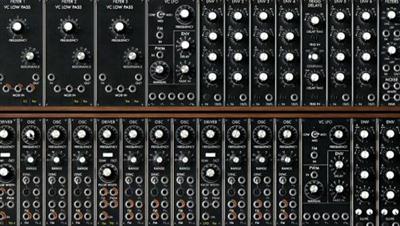
One of the most exciting areas of music creation is modular synthesis, where you get to interconnect the fundamental building blocks of a synthesizer to create your own instrument. In this course, music industry veteran and synth designer Chris Meyer uses the Arturia Modular V software-a realistic emulation of the original Moog modular synths of the 1960s and 1970s-to teach you how to "patch" a modular synth to create your own sounds. Chris starts with the fundamentals of how harmonics and sound work, as well as how to connect the modules together. He then goes through the main modules individually, explaining the differences between oscillator waveshapes, filter types, and more, while demonstrating how to use them in a musical context. The third chapter teaches advanced techniques such as frequency and amplitude modulation, as well as using the effects and advanced filters in Arturia Modular V.

Recommend Download Link Hight Speed | Please Say Thanks Keep Topic Live ​
 

c83d4f5b16d9ba9e594783243c491e66.jpg

Crystal Reports 2016 Essential Training
MP4 | Video: AVC 1280x720 | Audio: AAC 48KHz 2ch | Duration: 2 Hours | 603 MB
Genre: eLearning | Language: English | Level Beginner​

Maximize the power of SAP Crystal Reports 2016. Crystal Reports helps you to import and analyze data from a variety of places, including Excel, Access, groupware applications like Lotus Notes, HTML and XML files, SAP, and more. Join author Curt Frye as he shows the essentials you need to get started, and provides tips to get more reporting power from the program. Learn how to create reports using the Design Wizard, link to multiple data sources, work with sections, sort and group data, use report templates, format reports and individual fields, summarize data, visualize data using charts, focus analysis by selecting which data a report summarizes, display data in subreports and cross-tab reports, and export data.

Topics include:
Setting program and report options
Changing the page layout
Linking to a data source
Adding fields to a report
Creating sections
Sorting and grouping data
Formatting number, dates, and other fields and objects
Adding charts
Selecting records
Managing reports with parameter fields
Summarizing data with formulas and cross-tabs
Adding subreports
Exporting reports

Recommend Download Link Hight Speed | Please Say Thanks Keep Topic Live ​
 

318aeeb7d80ef210b1760b7e7310ca5b.jpg


JavaScript: The Good Parts
WEBRip | English | MP4 | 1024 x 768 | AVC ~473 kbps | 24 fps
AAC | 128 Kbps | 44.1 KHz | 2 channels | 4h 52mn | 1.23 GB​

Genre: Video Tutorial
JavaScript has bad parts that many times overshadow it's good parts. Douglas claims JavaScript has, "some of the best parts of any programming language ever created." He explains why in this course, quizzes you on functional programming and covers the monad in the final lecture of the course.

Content:

01. Introduction
01. Introduction.mp4

02. Programming Style & Your Brain
01. The Way We Think.mp4
02. The Programming Thought Process.mp4
03. JavaScript Good Parts and Bad Parts.mp4
04. Understanding Good Programming Style.mp4
05. Avoiding Confusing Code (A).mp4
06. Avoiding Confusing Code (B).mp4
07. Using JSLint.mp4

03. And Then There Was JavaScript
01. The History of JavaScript.mp4
02. JavaScript Fundamentals.mp4
03. Numbers.mp4
04. Strings and Arrays.mp4
05. Objects.mp4
06. Common JavaScript Statements.mp4

04. Function the Ultimate
01. Background on Functions.mp4
02. Functions as Subroutines.mp4
03. Prototypal Inheritance (A).mp4
04. Prototypal Inheritance (B).mp4

05. Problems
01. Problems 1-5.mp4
02. Problems 6-9.mp4
03. Problems 10-12.mp4
04. Problems 13-15.mp4

06. Monads & Gonads
01. Introduction to Monads.mp4
02. The Identity Monad.mp4
03. The Ajax Monad.mp4
04. The Maybe Monad.mp4
05. The Promise Monad (A).mp4
06. The Promise Monad (B).mp4
07. Audience Questions.mp4

Recommend Download Link Hight Speed | Please Say Thanks Keep Topic Live ​
 

ef692c24fab1c82e14f65f28e1131d6b.jpg


Digital Tutors - Advanced Creature Painting Techniques in Photoshop
MP4 | AVC 639kbps | English | 1280x720 | 15fps | 2 hours | AAC mono 55kbps | 957 MB
Genre: Video Training​

In this Photoshop tutorial, we'll learn how to paint compelling and great looking characters. We'll address a wide variety of common painting challenges that character artists encounter by painting three separate characters. Along the way, we'll cover everything from painting realistic musculature and eyes to creating believable cloth and metal textures. By the end of this Photoshop training, you'll be able to take your own character sketches and polish them into professional level, marketable assets.

Content:
1 Introduction and project overview
2 Reviewing our three character sketches
3 Introducing our humanoid
4 Painting the arms and legs
5 Converting to skin tones
6 Adding light and textures
7 Introducing our slimy monster
8 Converting more to skin tones
9 Rendering teeth and eyes
10 Adding more light and textures
11 Introducing our armored character
12 Rendering metal
13 Adding lights and textures
14 Reviewing our three final characters


Recommend Download Link Hight Speed | Please Say Thanks Keep Topic Live ​
 

c060276f95d96c95e546d6628fc433c6.jpg


Udemy - iOS 8 Mobile App Design: Learn UI/UX and Start a New Career
MP4 | AVC 374kbps | English | 1280x720 | 30fps | 5 hours | AAC stereo 61kbps | 980 MB
Genre: Video Training​

Learn How to Design Mobile Apps Using UI / UX Techniques, Become UI/UX Designer and Make Big With Profitable Freelancing.

COURSE DESCRIPTION

JOIN OVER 1400 SUCCESSFUL STUDENTS WHO HAVE ALREADY TAKEN THIS COURSE!

LATEST: Course updated on January 20th, 2015.

Added a Short and Simple to Use Guide on How to Make $4,000 a Month (via PDF) with All Resources and Tips.

--------------------------------------------------------

You're going about your day as usual and BAM! you think of this awesome app idea. It's simple, people would love it and you can't find it ANYWHERE in the app store.

But now you are thinking on "How I suppose to start creating it?"

Or maybe you want to develop a highly profitable skill with which you can make a profitable income EVERY DAY by working when you want from where ever you want?

In this course you are going to learn how to design user friendly, enganging, beautiful looking mobile apps for Apple iOS 8 from scratch, by doing assignments, quizes, and practical work between the lessons.

After completing Mobile App Design Course, you are going to develop a skill, with which you are going to start designing Mobile Apps not only for iOS 8, but also for Android, Windows Phone and, of course, for older iOS versions.

Course content:

Learn how to start from scratch with your own app idea
Go through all the user researching steps on finding your target audience.
How to figure out who to target (marketing tips).
Learn how to create sketches and wireframes.
Learn User Experience Design (UX) techniques which are trending in job market right now.
Learn how to use Adobe Photoshop for designing User Interface (UI) Designs.
I'm going to show you my workflow and how I'm going to start design my own app idea, News Reader App, from absolute zero to the great looking iOS 8 design style.
You are going to implement everything you learned in the previous lessons and in the final section, I'm going to show you a bunch of different tips and resources, how to start making big money with your new skills.
Assignments which are going to help you learn UI / UX Design for Mobile App
Quizes, which will help you recap what you learned in the previous section

Learn iOS 8 Mobile App Design and Make Money is a comprehensive course where you are going to earn exactly those skills and make money instantly.

Mobile App UI / UX Designers typically earns around $100K/per year working for companies and startups.

But if you decide to work as a freelancer online, you can expect to get $100/hour for the work as a UI / UX designer.

Where is no coding or programming required.

Now, as the newest Apple iPhone iOS 8 came into the market, you have an opportunity to learn every new aspect about iOS 8 Design patterns.

Become the first one who already knows how to design for iOS 8 and be at the top instantly from other graphic designers, who doesn't know about iOS 8 yet.

++++++++++++++++++++++

After this course, you can go to the world and start seeking for a jobs at the biggest world companies or startups, or start freelancing online on your own and in your own home.

With those freelancing tips applied, you can expect to earn $100/h of your work.

Where is no problem if you don't know Photoshop at all.

Plus you are going to get Adobe Photoshop for free for the first 30 days, so you don't need to buy it.

All in all, you are going to get 5 course in one:

·How to come up with your own app idea

·User Experience skills to research your target audience and create sketches and wireframes for the app

·Learn Adobe photoshop from ground zero

·Design your own app in Adobe Photoshop

·How to make money with your new skills, so effective freelancing and job seeking in the companies and startups.

Plus, you are going to get fast and responsive answers from me, your instructor so you ain't going to wait days to get response if you have any problems or want to consult with me.

Also, if you don't like my course you have 30 days money back guarantee, so you don't lose anything! NO QUESTIONS ASKED!

What am I going to get from this course?

Over 93 lectures and 5.5 hours of content!
Learn How to Come Up with App Idea
Learn User Experience Design
Learn User Interface Design Using Adobe Photoshop
Design iOS 8 Mobile App from Scratch
Effective and Profitable Freelancing Tips
Earn Money by Learning
Start a New Career as a Mobile App Designer


Recommend Download Link Hight Speed | Please Say Thanks Keep Topic Live ​

 

0d6f93ec9438ad803dc532f6cb8a95cc.jpg


Jeff Scheetz's - Blues-Rock: Secret Sauce
DATA-DVD | English | SWF + PDF tabs + MP3 jam tracks | 320 x 240 | H.263 ~1293 kbps | 29 fps
MPEG Audio 128 Kbps 44.1 KHz | 2 channels | ~2 hours | 1.2 GB​

Genre: eLearning Video / Guitar lesson
Top studio, touring and recording artist, Jeff Scheetz cooked up five essential formulas for busting out of that proverbial rut. Spinning your wheels with those same old pentatonic licks? No worries ... sprinkle a little of Jeff's "secret sauce" into your blues-rock bag for ear-to-ear grins!

Scheetz travels the world over demonstrating his "secret sauce" in private standing-room-only clinics. The collection of blues-rock video guitar lessons in Jeff's Blues Rock: Secret Sauce course equips you with five essential concepts and techniques that you can apply in any blues-rock setting.
Blues Rock: Secret Sauce teaches you how to slip "outside" and back again and how to incorporate and pull off intervallic lines in your solos. You'll also learn the ins and outs of dynamic phrasing, melodic playing and modal playing - all with an emphasis on how to create and play tasty, original solos and comps.

Ready to bust that rut and majorly spice up your blues-rock bag? Grab a stool at the counter and pour a few heaping servings of Blues Rock: Secret Sauce on your plate!

Five blues rock instrumentals are broken up into four rhythm and four solo lessons. 40 video lessons in all.
The rhythm lessons demonstrate the parts, then presents and examines the "secret sauce" for that part.
The solo lessons demonstrate the solos, then breaks them down, emphasizing the "secret sauce" elements.
Each pair of lessons (rhythm and solo) feature a corresponding backing track to practice over.
Text descriptions provide overviews of the tune along with recipes for creating your own "secret sauce".

Recommend Download Link Hight Speed | Please Say Thanks Keep Topic Live ​

 

c9676afb0193639d260397396430564b.jpg


Digital Tutors - Digital Drawing and Painting in Illustrator and Photoshop
MP4 | AVC 815kbps | English | 1280x720 | 15fps | 5h 15mins | AAC mono 55kbps | 2.92 GB
Genre: Video Training​

In this Illustrator and Photoshop tutorial, we'll introduce new strategies and techniques in character design and realization by unlocking different ways of drawing, inking and applying color to character studies. This course emphasizes looseness in initial treatment as a way of keeping the drawing energetic and fluid while depicting modeled form in Illustrator and Photoshop. By the end of this Illustrator and Photoshop training, you'll have learned several new techniques to improve your ability as an animator.

Content:
1 Introduction and project overview
2 Discussing scale of marks and resolution
3 Creating thumbnail sketches
4 Drawing gesture poses
5 Discussing mass gesture
6 Creating volumes
7 Cleaning up volume drawings
8 Exploring contour drawing
9 Completing contour drawing
10 Utilizing Illustrator
11 Creating brushes
12 Tracing contour drawing
13 Applying brushes
14 Repairing and restating lines
15 Drawing the interior contours
16 Finishing interior contours
17 Adjusting line work
18 Expanding appearance and converting lines
19 Editing the contour lines
20 Combining lines
21 Creating color palettes
22 Completing color palettes
23 Creating brushes in Photoshop
24 Painting skin tones
25 Applying light and dark tones
26 Adding separate paint layers
27 Painting the hair and face
28 Creating a lycra texture
29 Correcting line work and finishing the face
30 Arranging the final drawing
31 Creating a logotype in Illustrator
32 Printing the final image


Recommend Download Link Hight Speed | Please Say Thanks Keep Topic Live ​

 
Zurück
Oben Unten