• Regeln für den Video-Bereich:

    In den Börsenbereich gehören nur Angebote die bereits den Allgemeinen Regeln entsprechen.

    Einteilung

    - Folgende Formate gehören in die angegeben Bereiche:
    - Filme: Encodierte Filme von BluRay, DVD, R5, TV, Screener sowie Telesyncs im Format DivX, XviD und x264.
    - DVD: Filme im Format DVD5, DVD9 und HD2DVD.
    - HD: Encodierte Filme mit der Auflösung 720p oder darüber von BluRay, DVD, R5, TV, Screener sowie Telesyncs im Format x264.
    - 3D: Encodierte Filme von BluRay, die in einem 3D Format vorliegen. Dies gilt auch für Dokus, Animation usw.
    - Serien: Cartoon/Zeichentrick, Anime, Tutorials, Dokumentationen, Konzerte/Musik, Sonstiges sind demnach in die entsprechenden Bereiche einzuordnen, auch wenn sie beispielsweise im High Definition-Format oder als DVD5/DVD9/HD2DVD vorliegen. Ausnahme 3D.
    - Bereich Englisch: Englische Releases gehören immer in diesen Bereich.
    - Bereich Talk: Der Bereich, in dem über die Releases diskutiert werden kann, darf, soll und erwünscht ist.


    Angebot/Beitrag erstellen

    - Ein Beitrag darf erst dann erstellt werden, wenn der Upload bei mindestens einem OCH komplett ist. Platzhalter sind untersagt.
    - Bei einem Scenerelease hat der Threadtitel ausschließlich aus dem originalen, unveränderten Releasenamen zu bestehen. Es dürfen keine Veränderungen wie z.B. Sterne, kleine Buchstaben o.ä. vorgenommen werden. Ausnahme Serienbörse:
    - Bei einem Sammelthread für eine Staffel entfällt aus dem Releasename natürlich der Name der Folge. Beispiel: Die Simpsons S21 German DVDRip XviD - ITG
    - Dementsprechend sind also u.a. verboten: Erweiterungen wie "Tipp", "empfehlenswert", "only", "reup", usw. / jegliche andere Zusatzinformation oder Ergänzung, welche nicht in obiger Beschreibung zu finden ist.

    Aufbau des Angebots und Threadtitel

    Der Titel nach folgendem Muster erstellt zu werden. <Name> [3D] [Staffel] [German] <Jahr> <Tonspur> [DL] [Auflösung] <Quelle> <Codec> - <Group>
    Beispiel: The Dark Knight German 2008 AC3 DVDRip XviD - iND
    Beispiel: The Dark Knight 2008 DTS DL BDRip x264 - iND
    Beispiel: The Dark Knight 2008 AC3 DL BDRip XviD - iND
    Beispiel: The Dark Knight German 2008 AC3 720p BluRay x264 iND
    Beispiel: The Dark Knight 2008 DTS DL 1080p BluRay x264 iND
    Beispiel: Die Simpsons S01 German AC3 DVDRip XviD iND
    Beispiel: Die Simpsons S20 German AC3 720p BluRay x264 iND
    Beispiel: Sword Art Online II Ger Sub 2014 AAC 1080p WEBRip x264 - peppermint
    Entsprechend sind also u.a. verboten: Sonderzeichen wie Klammern, Sterne, Ausrufezeichen, Unterstriche, Anführungszeichen / Erweiterungen wie "Tipp", "empfehlenswert", "only", "reup", usw. / jegliche andere Zusatzinformation oder Ergänzung, welche nicht in obiger Beschreibung zu finden ist
    Ausnahmen hiervon können in den Bereichen geregelt sein.

    Die Beiträge sollen wie folgt aufgebaut werden:
    Überschrift entspricht dem Threadtitel
    Cover
    kurze Inhaltsbeschreibung
    Format, Größe, Dauer sind gut lesbar für Downloader außerhalb des Spoilers zu vermerken
    Nfo sind immer Anzugeben und selbige immer im Spoiler in Textform.
    Sind keine Nfo vorhanden z.B. Eigenpublikationen, sind im Spoiler folgende Dateiinformationen zusätzlich anzugeben :
    Quelle
    Video (Auflösung und Bitrate)
    Ton (Sprache, Format und Bitrate der einzelnen Spuren)
    Untertitel (sofern vorhanden)
    Hosterangabe in Textform außerhalb eines Spoiler mit allen enthaltenen Hostern.
    Bei SD kann auf diese zusätzlichen Dateiinformationen verzichtet werden.

    Alle benötigten Passwörter sind, sofern vorhanden, in Textform im Angebot anzugeben.
    Spoiler im Spoiler mit Kommentaren :"Schon Bedankt?" sind unerwünscht.


    Releases

    - Sind Retail-Release verfügbar, sind alle anderen Variationen untersagt. Ausnahmen: Alle deutschen Retail-Release sind CUT, in diesem Fall sind dubbed UNCUT-Release zulässig.
    - Im Serien-Bereich gilt speziell: Wenn ein Retail vor Abschluss einer laufenden Staffel erscheint, darf diese Staffel noch zu Ende gebracht werden.62
    - Gleiche Releases sind unbedingt zusammenzufassen. Das bedeutet, es ist zwingend erforderlich, vor dem Erstellen eines Themas per Suchfunktion zu überprüfen, ob bereits ein Beitrag mit demselben Release besteht. Ist dies der Fall, ist der bereits vorhandene Beitrag zu verwenden.
    - P2P und Scene Releases dürfen nicht verändert oder gar unter einem iND Tag eingestellt werden.


    Support, Diskussionen und Suche

    - Supportanfragen sind entweder per PN oder im Bereich Talk zu stellen.
    - Diskussionen und Bewertungen sind im Talk Bereich zu führen. Fragen an die Uploader haben ausschließlich via PN zu erfolgen, und sind in den Angeboten untersagt.
    - Anfragen zu Upload-Wünschen sind nur im Bereich Suche Video erlaubt. Antworten dürfen nur auf Angebote von MyBoerse.bz verlinkt werden.


    Verbote

    - Untersagt sind mehrere Formate in einem einzigen Angebotsthread, wie beispielsweise das gleichzeitige Anbieten von DivX/XviD, 720p und 1080p in einem Thread. Pro Format, Release und Auflösung ist ein eigener Thread zu eröffnen.
    - Grundsätzlich ebenso verboten sind Dupes. Uploader haben sich an geeigneter Stelle darüber zu informieren, ob es sich bei einem Release um ein Dupe handelt.
    - Gefakte, nur teilweise lauffähige oder unvollständige Angebote sind untersagt. Dies gilt auch für eigene Publikationen, die augenscheinlich nicht selbst von z.B. einer DVD gerippt wurden. Laufende Serien, bei denen noch nicht alle Folgen verfügbar sind, dürfen erstellt und regelmäßig geupdatet werden.
    - Untersagt sind Angebote, welche nur und ausschließlich in einer anderen Sprache als deutsch oder englisch vorliegen. Ausnahmen sind VORHER mit den Moderatoren zu klären.


    Verstoß gegen die Regeln

    - Angebote oder Beiträge, die gegen die Forenregeln verstoßen, sind über den "Melden"-Button im Beitrag zu melden.
  • Bitte registriere dich zunächst um Beiträge zu verfassen und externe Links aufzurufen.


Englische Tutorials


83ae184c995a676490b26c509c0a16bd.jpg

Arduino 101 - Intel Curie
MP4 | Video: AVC 1280x720 | Audio: AAC 44KHz 2ch | Duration: 2 Hours | 569 MB
Genre: eLearning | Language: English

Learn about the latest Arduino that contains the Intel Curie Module. The Arduino 101


Learn the basic concepts of the latest Arduino 101. This development board includes the new Intel Curie Model.

With a built in Dual Core Processes Architecture, the Curie has an X86 Core and ARC Core built onboard both running at 32 Mhz. Built in Bluetooth Low Energy and other interfaces make this a strong building block for any IoT project.

Arduino Sketch programming language

Mac OSX used in the class.

Arduino IDE 1.6.5 used in the class

Learn the fundamentals of using this new board and open your mind to new possibilities.

Content and Overview

This course explains how to setup and use the new Arduino 101 board, the latest Arduino combined with the new Intel Curie Module.

Recommend Download Link Hight Speed | Please Say Thanks Keep Topic Live
 

81d96d2505216094f0b8c7fdc7e40b41.jpg

CGCookie - The Pixel Course: Fundamentals
Duration: 2 Hours | Video: h264, yuv420p, 1280x720 30fps | Audio: aac, 44100 Hz, 1 ch | 2.01 GB
Genre: eLearning | Language: English​


This course is set to teach you the fundamentals of pixel art from learning the different terms to setting up Photoshop to work specifically for pixel art.

We will go through the pixel specific terms such as anti-aliasing, dithering, pillow shading, and outlining, to help better understand pixel art. From there we will take a quick look at color and how to use techniques such as hue shifting to give your work a boost in value and saturation on such a small scale. For each of the objects we will be creating (rock, tree, character) I will take a classic and modern approach to show different ways of going about the many different styles of pixel art.


CGCookie - The Pixel Course: Fundamentals

Recommend Download Link Hight Speed | Please Say Thanks Keep Topic Live
 

a5cb629b399205e14d5a768800b70f1d.jpg

Complete Linux Shell Training for Beginners
MP4 | Video: AVC 1280x720 | Audio: AAC 44KHz 2ch | Duration: 4 Hours | 2.28 GB
Genre: eLearning | Language: English

Learn Linux Shell Programming with Bash, GREP and SED for Beginners


This course is teaches the fundamentals of linux shell using the terminal, some insight on bash shell and we will investigate various aspects of the shell, for example scripting, using utilities like grep and sed, C and Perl programming in linux, controll flow as well as the file structure. You will also find out how to navigate the directory structure, reveal the contents of directories, the best way to understand and work with file permissions, how to replicate, move, and remove directories and files. We'll also cover regular expression syntax in the context of learning grep, then use what we have learned as we work.

The course is in six units, and contains over four hours of demos and discussion.

Some of the topics are as below :

Everything about directories
Understanding and working with file permissions
Copying, moving, and removing files.
Using redirection and piping.
Make executable scripts
Variables and how to use them
The if statement and demos
Handling command line arguments
Loops (while, until, and for)
The case statement
Understand Grep
Regular expression syntax
Various validations
What is sed
Various Sed Usage Examples

I hope you join me as we explore linux together.

Recommend Download Link Hight Speed | Please Say Thanks Keep Topic Live
 

0e450d24c09d3f619927bc6c3e0105f9.jpg

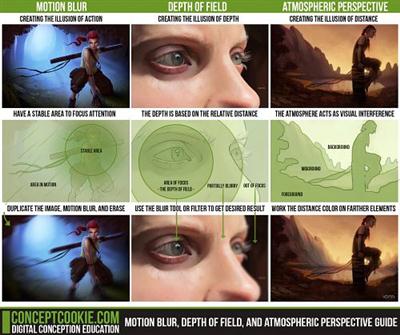
CGCookie - Concept - Motion Blur, Depth of Field, and Atmospheric Perspective
Photoshop CS6 | h264 yuv420p 1280x720 30.00 fps l Audio: aac 44100 Hz stereo | 308 MB
Genre : eLearning | Intermediate​


In this tutorial, Tim Von Rueden takes you through the basic understanding of the three visual illusion concepts. This tutorial is the direct result from being the number one requested tutorial from the third week of this month's November Citizen Tutorial Request Month. These results were featured from the poll on our Deviantart Page. Stay tuned for future polls in which we will once again ask, "What tutorial would you like to see?"

What you'll learn in this tutorial :
In this tutorial we will go through the entire process of understanding character dynamics from the fundamentals of character art!
Motion Blur: This is the result of capturing a few frames in motion caught in a single image. A stable image should be one that is more crisp/sharp while the objects in motion should have a "doubling" effect which often looks like blur.
Depth of Field: This is the result of focusing of focusing on a particular distance on a subject matter. This makes the areas further and before the focused field appear blurry and has a tendency to add more of the "blur" effect the farther the distance.

Atmospheric Perspective: This is the result of the atmosphere interference while viewing an image. This tends to happen mostly in environment art but it's when the atmosphere is causing the illusion that objects are "disappearing" the further away the are.

Recommend Download Link Hight Speed | Please Say Thanks Keep Topic Live
 

49b264fe64f32d77f2b73b4469e4c1f5.jpg

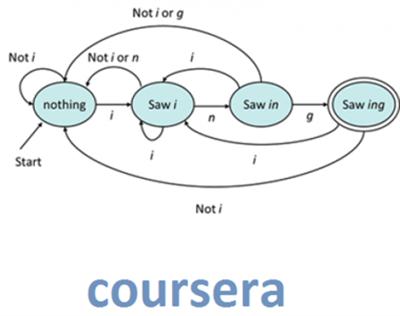
Coursera: Stanford University - Automata
WEBRip | English | MP4 + PDF Slides | 960 x 540 | AVC ~25.3 kbps | 15 fps
AAC | 128 Kbps | 44.1 KHz | 2 channels | Subs: English (.srt) | 11:38:38 | 798.6 MB​

Genre: eLearning Video / Development, Programming
The course will have a number of homeworks that are designed using the Gradiance technology. The objective of these homeworks is to enable everyone to get 100% and learn the underlying material. While questions look like multiple choice,
you should think of them as more conventional "solve this problem and submit the solution" questions. That is, you are given a problem to solve, which you should work completely. Then, you are given a random choice of responses that are designed to figure out whether you got the right solution or not. If you do have the right solution, you should be able to answer the question easily, regardless of the choices presented.
If you get it wrong, you will be given a hint and allowed to try again. Your score on a homework is the maximum of any try. We group about 5 questions together, so you can't repeatedly guess each question independently, without actually doing the work.

In the first week's videos, you will begin with an introduction to the whole course. I want to try to convince you of the value of learning the four big concepts that you can take away from this course: finite automata, context-free grammars, undecidable problems, and intractable problems (NP-completeness). The second video is an informal introduction to finite automata. Both these two first videos are "light," and I expect you to have little trouble. The third video introduces deterministic finite automata, and at this point we start to get more formal. In the fourth video, the important concept of nondeterminism is introduced. We learn the remarkable fact that despite the almost "magic" capability of nondeterminism, it does not add power to the finite automaton (although it does make description of many applications of automata a lot easier).

Courses list:
Week 1: Finite Automata
Week 2: Regular Expression and Properties of Regular Languages
Week 3: Context-Free Grammars and Pushdown Automata
Week 4: Pushdown Automata and Properties of Context-Free Languages
Week 5: Turing Machine
Week 6: Intractable Problems and NP-completeness
Problem Session

Recommend Download Link Hight Speed | Please Say Thanks Keep Topic Live
 

4d0bfc44c7091c55bcd62601118456d1.jpg

Coursera - Game Theory
WEBRip | English | MP4 + PDF Slides | 960 x 540 | AVC ~83.8 kbps | 29.970 fps
AAC | 128 Kbps | 44.1 KHz | 2 channels | Subs: English (.srt) | 07:38:49 | 704 MB​

Genre: eLearning Video / Computer Science: Theory & Artificial Intelligence / Economics & Finance
The course covers the basics: representing games and strategies, the extensive form (which computer scientists call game trees), repeated and stochastic games, coalitional games, and Bayesian games (modeling things like auctions).

Popularized by movies such as "A Beautiful Mind", game theory is the mathematical modeling of strategic interaction among rational (and irrational) agents. Beyond what we call 'games' in common language, such as chess, poker, soccer, etc., it includes the modeling of conflict among nations, political campaigns, competition among firms, and trading behavior in markets such as the NYSE. How could you begin to model eBay, Google keyword auctions, and peer to peer file-sharing networks, without accounting for the incentives of the people using them? The course will provide the basics: representing games and strategies, the extensive form (which computer scientists call game trees), Bayesian games (modeling things like auctions), repeated and stochastic games, and more. We'll include a variety of examples including classic games and real-world applications.

Course Syllabus

Week 1. Introduction: Introduction, overview, uses of game theory, some applications and examples, and formal definitions of: the normal form, payoffs, strategies, pure strategy Nash equilibrium, dominated strategies.

Week 2. Mixed-strategy Nash equilibria: Definitions, examples, real-world evidence.

Week 3. Alternate solution concepts: iterative removal of strictly dominated strategies, minimax strategies and the minimax theorem for zero-sum game, correlated equilibria.

Week 4. Extensive-form games: Perfect information games: trees, players assigned to nodes, payoffs, backward Induction, subgame perfect equilibrium, introduction to imperfect-information games, mixed versus behavioral strategies.

Week 5. Repeated games: Repeated prisoners dilemma, finite and infinite repeated games, limited-average versus future-discounted reward, folk theorems, stochastic games and learning.

Week 6. Coalitional games: Transferable utility cooperative games, Shapley value, Core, applications.

Week 7. Bayesian games: General definitions, ex ante/interim Bayesian Nash equilibrium.

Recommend Download Link Hight Speed | Please Say Thanks Keep Topic Live
 

09020eb7ae042430daf21046290c5d7f.jpg

Coursera - Natural Language Processing
Dan Jurafsky, Professor of Linguistics - Stanford University
WEBRip | English | MP4 + PDF Slides | 960 x 540 | AVC ~57.4 kbps | 29.970 fps​

AAC | 76 Kbps | 44.1 KHz | 1 channel | Subs: English (.srt) | 17:50:24 | 1.27 GB
Genre: eLearning Video / Linguistics
This course covers a broad range of topics in natural language processing, including word and sentence tokenization, text classification and sentiment analysis, spelling correction, information extraction, parsing, meaning extraction, and question answering, We will also introduce the underlying theory from probability,
statistics, and machine learning that are crucial for the field, and cover fundamental algorithms like n-gram language modeling, naive bayes and maxent classifiers, sequence models like Hidden Markov Models, probabilistic dependency and constituent parsing, and vector-space models of meaning.
We are offering this course on Natural Language Processing free and online to students worldwide, continuing Stanford's exciting forays into large scale online instruction. Students have access to screencast lecture videos, are given quiz questions, assignments and exams, receive regular feedback on progress, and can participate in a discussion forum. Those who successfully complete the course will receive a statement of accomplishment. Taught by Professors Jurafsky and Manning, the curriculum draws from Stanford's courses in Natural Language Processing. You will need a decent internet connection for accessing course materials, but should be able to watch the videos on your smartphone.

Courses list:
Week 1 - Course Introduction
Week 1 - Basic Text Processing
Week 1 - Edit Distance
Week 2 - Language Modeling
Week 2 - Spelling Correction
Week 3 - Text Classification
Week 3 - Sentiment Analysis
Week 4 - Discriminative classifiers: Maximum Entropy classifiers
Week 4 - Named entity recognition and Maximum Entropy Sequence Models
Week 4 - Relation Extraction
Week 5 - Advanced Maximum Entropy Models
Week 5 - POS Tagging
Week 5 - Parsing Introduction
Week 5 - Instructor Chat
Week 6 - Probabilistic Parsing
Week 6 - Lexicalized Parsing
Week 6 - Dependency Parsing (Optional)
Week 7 - Information Retrieval
Week 7 - Ranked Information Retrieval
Week 8 - Semantics
Week 8 - Question Answering
Week 8 - Summarization
Week 8 - Instructor Chat II

Recommend Download Link Hight Speed | Please Say Thanks Keep Topic Live
 

4fc7b278a138c819d4b1c5f0694e4204.jpg

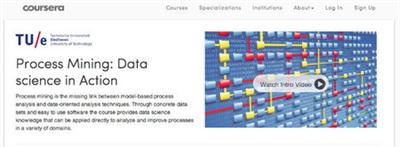
Coursera - Process Mining: Data Science in Action
WEBRip | English | MP4 | 960 x 540 | AVC ~151 kbps | 29.970 fps
AAC | 128 Kbps | 44.1 KHz | 2 channels | 13:23:25 | 1.68 GB​

Genre: eLearning Video / Computer Science, Engineering and Technology
Process mining is the missing link between model-based process analysis and data-oriented analysis techniques. Through concrete data sets and easy to use software the course provides data science knowledge that can be applied directly to analyze and improve processes in a variety of domains. Data science is the profession of the future, because organizations that are unable to use (big) data in a smart way will not survive. It is not sufficient to focus on data storage and data analysis. The data scientist also needs to relate data to process analysis. Process mining bridges the gap between traditional model-based process analysis (e.g., simulation and other business process management techniques) and data-centric analysis techniques such as machine learning and data mining.
Process mining seeks the confrontation between event data (i.e., observed behavior) and process models (hand-made or discovered automatically). This technology has become available only recently, but it can be applied to any type of operational processes (organizations and systems). Example applications include: analyzing treatment processes in hospitals, improving customer service processes in a multinational, understanding the browsing behavior of customers using a booking site, analyzing failures of a baggage handling system, and improving the user interface of an X-ray machine. All of these applications have in common that dynamic behavior needs to be related to process models. Hence, we refer to this as "data science in action".

The course explains the key analysis techniques in process mining. Participants will learn various process discovery algorithms. These can be used to automatically learn process models from raw event data. Various other process analysis techniques that use event data will be presented. Moreover, the course will provide easy-to-use software, real-life data sets, and practical skills to directly apply the theory in a variety of application domains.

The course covers the three main types of process mining.

The first type of process mining is discovery. A discovery technique takes an event log and produces a process model without using any a-priori information. An example is the Alpha-algorithm that takes an event log and produces a process model (a Petri net) explaining the behavior recorded in the log.
The second type of process mining is conformance. Here, an existing process model is compared with an event log of the same process. Conformance checking can be used to check if reality, as recorded in the log, conforms to the model and vice versa.
The third type of process mining is enhancement. Here, the idea is to extend or improve an existing process model using information about the actual process recorded in some event log. Whereas conformance checking measures the alignment between model and reality, this third type of process mining aims at changing or extending the a-priori model. An example is the extension of a process model with performance information, e.g., showing bottlenecks. Process mining techniques can be used in an offline, but also online setting. The latter is known as operational support. An example is the detection of non-conformance at the moment the deviation actually takes place. Another example is time prediction for running cases, i.e., given a partially executed case the remaining processing time is estimated based on historic information of similar cases.
Process mining provides not only a bridge between data mining and business process management; it also helps to address the classical divide between "business" and "IT". Evidence-based business process management based on process mining helps to create a common ground for business process improvement and information systems development.

The course uses many examples using real-life event logs to illustrate the concepts and algorithms. After taking this course, one is able to run process mining projects and have a good understanding of the Business Process Intelligence field.

After taking this course you should:
- have a good understanding of Business Process Intelligence techniques (in particular process mining),
- understand the role of Big Data in today's society,
- be able to relate process mining techniques to other analysis techniques such as simulation, business intelligence, data mining, machine learning, and verification,
- be able to apply basic process discovery techniques to learn a process model from an event log (both manually and using tools),
- be able to apply basic conformance checking techniques to compare event logs and process models (both manually and using tools),
- be able to extend a process model with information extracted from the event log (e.g., show bottlenecks),
- have a good understanding of the data needed to start a process mining project,
- be able to characterize the questions that can be answered based on such event data,
- explain how process mining can also be used for operational support (prediction and recommendation), and
- be able to conduct process mining projects in a structured manner

Recommend Download Link Hight Speed | Please Say Thanks Keep Topic Live
 

0a290dfb864c5937c2849cf36f5161fe.jpg

Coursera - Web Application Architectures I
Greg Heileman, Univercity of New Mexico
WEBRip | English | MP4 + PDF Slides | 960 x 540 | AVC ~124 kbps | 29.970 fps​

AAC | 128 Kbps | 44.1 KHz | 2 channels | Subs: English (.srt) | 6h 43mn | 919 MB
Genre: Video Tutorial / Development, Programming
Learn how to build and deploy modern web application architectures - applications that run over the Internet, in the "cloud," using a browser as the user interface.
This course explores the development of web application architectures from an engineering perspective. We will consider the fundamental design patterns and philosophies associated with modern web application architectures, along with their major components. By the end of this course, I expect you to be able to:

Design, develop and deploy a modern web application. This course is not about how to build a pretty web page, it's about how to build and deploy the full stack of protocols and technologies associated with a complete web app. That said, it is not possible for you to become an expert in this area in a few weeks. My goal, rather, is to put you on the right path by providing a solid foundation and framework for understanding web applications, allowing you to dig deeper and learn more on your own. The next bullet points describe how we're going to do this.
Understand the major architectural components in web apps, and how they fit together. Modern web apps are complex. A typical application has a database along with numerous scripts on one end of the web stack, a web server in the middle that delivers information over the Internet, and a user's browser on the other end of the web stack. Even getting started in trying to understand these components can be overwhelming. Consider just the programming languages involved in a typical web stack: from the database (SQL), to the web server (scripting language), to the browser (JavaScript, HTML, CSS), we're dealing with five different programming languages, not to mention the protocols they're operating over - and you need to know a little about them too! We'll introduce a number of software design patterns throughout the course that are aimed at helping you to manage this complexity.
Use Ruby on Rails. We're going to learn about web apps through the Ruby on Rails framework. Rails is a framework for creating web applications that is built on top of the Ruby programming language. I believe this is one of the best frameworks for learning about web applications, and it's also proving highly successful as a platform for commercial offerings. That said, there are many other frameworks available, and the concepts you will learn using Rails are transferable to these other frameworks.
Better understand modern software engineering practice. We'll be using the latest tools and practices in software development, source code control, testing, and application deployment. This will include exposure to agile development practices, the numerous tools that software engineers are expected to know how to use, and the cloud-based resources that are becoming increasingly important in web applications.

Module 1: Introduction and Background
Lecture 1: Historical Perspective
Lecture 2: What is a Web Application?
Lecture 3: Web 1.0, 2.0, 3.0 Application Architectures
Lecture 4: Design Patterns
Lecture 5: Setting up Your Development Environment

Module 2: Ruby on Rails
Lecture 1: Rails Overview
Lecture 2: Your First Rails App
Lecture 3: The Blog App - Iteration 1
Lecture 4: Rails Philosophy
Lecture 5: Version Control
Lecture 6: Git and Rails

Module 3: Database Interactions
Lecture 1: Relational Databases
Lecture 2: Databases in Rails
Lecture 3: The Active Record Design Pattern
Lecture 4: The Blog App - Iteration 2 (Associations)
Lecture 5: The Blog App - Iteration 3 (Validations)

Module 4: The Ruby Programming Language
Lecture 1: Ruby Background
Lecture 2: Classes and Inheritance
Lecture 3: Objects and Variables
Lecture 4: Strings, Regular Expressions and Symbols
Lecture 5: Expressions and Control Structures
Lecture 6: Collections, Blocks and Iterators

Module 5: Middleware
Lecture 1: What is Middleware?
Lecture 2: The Hypertext Transfer Protocol (HTTP) - Introduction
Lecture 3: HTTP - Request
Lecture 4: HTTP - Response
Lecture 5: The Model-View-Controller (MVC) Design Pattern
Lecture 6: Rails Controllers - Request Handling
Lecture 7: Rails Controllers - Response
Lecture 8: MVC Implementation in Rails
Lecture 9: The Blog App - Iteration 4

Module 6: Presentation/User Interface
Lecture 1: Introduction and Background
Lecture 2: HTML - Basic Syntax
Lecture 3: HTML - Document Structure
Lecture 4: HTML - Forms
Lecture 5: Dynamic Content
Lecture 6: Cascading Style Sheets (CSS)
Lecture 7: JavaScript and jQuery
Lecture 8: Ajax
Lecture 9: The Blog App - Iteration 5

Recommend Download Link Hight Speed | Please Say Thanks Keep Topic Live
 

2f49382eaa6d40475d86011bc001115e.jpg

Coursera: Stanford University - Computer Science 101
WEBRip | English | MP4 + PDF Slides | 960 x 540 | AVC ~93.5 kbps | 29.970 fps
AAC | 128 Kbps | 44.1 KHz | 2 channels | Subs: English (.srt) | 6h 35mn | 775.7 MB​

Genre: eLearning Video / Computer Science, Development, Programming
CS101 teaches the essential ideas of Computer Science for a zero-prior-experience audience. Computers can appear very complicated, but in reality, computers work within just a few, simple patterns. CS101 demystifies and brings those patterns to life, which is useful for anyone using computers today.
In CS101, students play and experiment with short bits of "computer code" to bring to life to the power and limitations of computers. Everything works within the browser, so there is no extra software to download or install. CS101 also provides a general background on computers today: what is a computer, what is hardware, what is software, what is the internet. No previous experience is required other than the ability to use a web browser.

Courses list:
Week 1
Introduction to Computing Principles (19:44)
Variables (6:15)
Introduction to Digital Images (13:30)
Image Code (9:04)

Week 2
For Loops (10:32)
Expressions (14:14)
Puzzles (4:06)
Grayscale (14:14)

Week 3
If Logic (16:48)
Bluescreen (11:54)
Hardware (15:12)
Optional Video- Hard-drive (6:03)
Bits Bytes I (9:23)
Bits Bytes II (6:49)

Week 4
Software I (8:46)
Software II (11:47)
Networking (16:31)
TCP/IP (16:39)
Table Data (16:16)

Week 5
Strings (4:33)
Boolean Logic (11:31)
Count I (5:26)
Count II (15:02)
Analog Digital I (22:21)

Week 6
Optional Video - Office Hours (18:55)
Analog Digital II (23:57)
Digital Media (21:46)
Security (29:46)
Conclusions (14:31)

Recommend Download Link Hight Speed | Please Say Thanks Keep Topic Live
 

60cba754be05a8a6812e7bda47aad54b.jpg

Coursera - Cryptography
Dan Boneh, Professor, Stanford University
WEBRip | English | MP4 + PDF Slides | 960 x 540 | AVC ~19.3 kbps | 15 fps​

AAC | 126 Kbps | 44.1 KHz | 2 channels | Subs: English (.srt) | ~15 hours | 1.02 GB
Genre: eLearning Video / Cryptography, Database, Security
Cryptography is an indispensable tool for protecting information in computer systems. This course explains the inner workings of cryptographic primitives and how to correctly use them. Students will learn how to reason about the security of cryptographic constructions and how to apply this knowledge to real-world applications.

The course begins with a detailed discussion of how two parties who have a shared secret key can communicate securely when a powerful adversary eavesdrops and tampers with traffic. We will examine many deployed protocols and analyze mistakes in existing systems. The second half of the course discusses public-key techniques that let two or more parties generate a shared secret key. We will cover the relevant number theory and discuss public-key encryption, digital signatures, and authentication protocols. Towards the end of the course we will cover more advanced topics such as zero-knowledge, distributed protocols such as secure auctions, and a number of privacy mechanisms. Throughout the course students will be exposed to many exciting open problems in the field.
The course will include written homeworks and programming labs. The course is self-contained, however it will be helpful to have a basic understanding of discrete probability theory.

Courses list:

Introduction (week 1)

Course Overview (11 min)
What is cryptography? (15 min)
History of cryptography (19 min)
Discrete probability (16 min)

Stream Ciphers (week 1)

Information theoretic security and the one time pad (19 min)
Stream ciphers and pseudo random generators (20 min)
Attacks on stream ciphers and the one time pad (24 min)
Real-world stream ciphers (20 min)
PRG Security Definitions (25 min)
Semantic Security (16 min)
Stream ciphers are semantically secure (11 min)

Block Ciphers (week 2)

What are block ciphers? (17 min)
The Data Encryption Standard (22 min)
Exhaustive search attacks (20 min)
More attacks on block ciphers (16 min)
The AES block cipher (14 min)
Block ciphers from PRGs(12 min)

Using Block Ciphers (week 2)

Review: PRPs and PRFs (12 min)
Modes of operation: one time key (8 min)
Security for many-time key (23 min)
Modes of operation: many time key (CBC) (16 min)
Modes of operation: many time key (CTR) (10 min)

Message Integrity (week 3)

Message Authentication Codes (16 min)
MACs Based On PRFs (10 min)
CBC-MAC and NMAC (20 min)
MAC padding (9 min)
PMAC and the Carter-Wegman MAC (16 min)

Collision Resistance (week 3)

Introduction (11 min)
Generic birthday attack (16 min)
The Merkle-Damgard Paradigm (12 min)
Constructing compression functions (8 min)
HMAC (7 min)
Timing attacks on MAC verification (9 min)

Authenticated Encryption (week 4)

Active attacks on CPA-secure encryption (13 min)
Definitions (6 min)
Chosen ciphertext attacks (12 min)
Constructions from ciphers and MACs (21 min)
Case study: TLS (18 min)
CBC padding attacks (14 min)
Attacking non-atomic decryption (10 min)

Odds and ends (week 4)

Key Derivation (14 min)
Deterministic Encryption (15 min)
Deterministic Encryption:SIV and wide PRP (21 min)
Tweakable encryption (15 min)
Format preserving encryption (13 min)

Basic key exchange (week 5)

Trusted 3rd parties (11 min)
Merkle Puzzles (11 min)
The Diffie-Hellman protocol (19 min)
Public-key encryption (11 min)

Intro. Number Theory (week 5)

Notation (15 min)
Fermat and Euler (18 min)
Modular e'th roots (17 min)
Arithmetic algorithms (13 min)
Intractable problems (19 min)

Public Key Encryption from trapdoor permutations (week 6)

Definitions and security (16 min)
Constructions (11 min)
The RSA trapdoor permutation (18 min)
PKCS 1 (23 min)
Is RSA a one-way function? (17 min)
RSA in practice (14 min)

Public key encryption from Diffie-Hellman (week 6)

The ElGamal Public-key System (23 min)
ElGamal Security (14 min)
ElGamal Variants With Better Security (11 min)
A Unifying Theme (12 min)
Farewell (for now) (6 min)

Recommend Download Link Hight Speed | Please Say Thanks Keep Topic Live

 

1780792c1505f46e025eac86e9682a1a.jpg

Coursera: Stanford University - Human-Computer Interaction
WEBRip | English | MP4 + PDF Slides | 960 x 540 | AVC ~123 kbps | 30 fps
AAC | 128 Kbps | 44.1 KHz | 2 channels | Subs: English (.srt) | 6h 35mn | 884 MB​

Genre: eLearning Video / Computer Engineering and Technology
In this course, you will learn how to design technologies that bring people joy, rather than frustration. You'll learn several techniques for rapidly prototyping and evaluating multiple interface alternatives - and why rapid prototyping and comparative evaluation are essential to excellent interaction design.

You'll learn how to conduct fieldwork with people to help you get design ideas. How to make paper prototypes and low-fidelity mock-ups that are interactive - and how to use these designs to get feedback from other stakeholders like your teammates, clients, and users.
You'll learn principles of visual design so that you can effectively organize and present information with your interfaces. You'll learn principles of perception and cognition that inform effective interaction design. And you'll learn how to perform and analyze controlled experiments online. In many cases, we'll use Web design as the anchoring domain. A lot of the examples will come from the Web, and we'll talk just a bit about Web technologies in particular. When we do so, it will be to support the main goal of this course, which is helping you build human-centered design skills, so that you have the principles and methods to create excellent interfaces with any technology.

Courses list:

Week 1 - Introduction
1.1 Human Computer Interaction (4:18)
1.2 The Power of Prototyping (13:49)
1.3 Evaluating Designs (12:15)
1.4 The Birth of HCI (8:48)

Week 2 - Needfinding
2.1 Participant Observation (12:55)
2.2 Interviewing (11:37)
2.3 Additional Needfinding Strategies (11:54)

Week 3 - Rapid Prototyping
3.1 Paper Prototypes and Mockups (12:47)
3.2 Faking it - Wizard of Oz (14:30)
3.3 Faking it - Video Prototyping (11:48)
3.4 Creating and Comparing Alternatives (8:55)

Week 4 - Heuristic Evaluation
4.1 Heuristic Evaluation - Why and How? (16:41)
4.2 Design Heuristics (Part 1/2) (20:02)
4.3 Design Heuristics (Part 2/2) (17:00)
4.4 Creating and Comparing Alternatives (8:55)

Week 5 - Direct Manipulation and Representations
5.1 Direct Manipulation (16:53)
5.2 Mental Models (15:28)
5.3 Representation Matters (17:11)
5.4 Distributing Cognition (Part 1/2) (16:44)
5.5 Distributing Cognition (Part 2/2) (13:11)

Week 6 - Visual Design and Information Design
6.1 Visual Design (7:37)
6.2 Typography (10:47)
6.3 Grids and Alignment (17:33)
6.4 Reading and Navigating (13:31)
Week 7 - Designing Experiments
7.1 Designing Studies you can learn from (15:52)
7.2 Assign Participants to Conditions (18:39)
7.3 In person experiments (12:24)
7.4a Running web experiments: introduction (9:48)
7.4b Running web experiments (6:18)
7.4c Running web experiments (5:37)
7.5 Comparing rates (20:03)

Additional Resources
What to Do in Need Finding
Don Norman. "Things that make us smart"
Chapter 1: Human-Centered Technology
Chapter 3: The Power of Representation In "Designing Interfaces"
Edward Tufte. "The Visual Display of Quantitative Information"
Eric von Hippel. "Democratizing Innovation": Application: Toolkits for User Innovation and Custom Design
Suzanne Ginsburg. "Designing the iPhone User Experience: A User-Centered Approach to Sketching and Prototyping iPhone Apps"
Chapter 1: iPhone Application Overview
Chapter 3: Introduction to User Research
Chapter 4: Analyzing User Research
Chapter 6: Exploring App Concepts
Chapter 7: Prototyping App Concept
Suzanne Ginsburg. Case Studies: "Designing the iPhone User Experience: A User-Centered Approach to Sketching and Prototyping iPhone Apps"
"The Cartoon Guide to Statistics"
In "Designing the User Interface: Strategies for Effective Human-Computer Interaction" Collaboration and Social Media Participation
Jeff Raskin. "The Humane Interface: New Directions for Designing Interactive Systems"
Jenifer Tidwell. "Designing Interfaces"
Practical Guide to Controlled Experiments on the Web

Recommend Download Link Hight Speed | Please Say Thanks Keep Topic Live

 
Zurück
Oben Unten