• Regeln für den Video-Bereich:

    In den Börsenbereich gehören nur Angebote die bereits den Allgemeinen Regeln entsprechen.

    Einteilung

    - Folgende Formate gehören in die angegeben Bereiche:
    - Filme: Encodierte Filme von BluRay, DVD, R5, TV, Screener sowie Telesyncs im Format DivX, XviD und x264.
    - DVD: Filme im Format DVD5, DVD9 und HD2DVD.
    - HD: Encodierte Filme mit der Auflösung 720p oder darüber von BluRay, DVD, R5, TV, Screener sowie Telesyncs im Format x264.
    - 3D: Encodierte Filme von BluRay, die in einem 3D Format vorliegen. Dies gilt auch für Dokus, Animation usw.
    - Serien: Cartoon/Zeichentrick, Anime, Tutorials, Dokumentationen, Konzerte/Musik, Sonstiges sind demnach in die entsprechenden Bereiche einzuordnen, auch wenn sie beispielsweise im High Definition-Format oder als DVD5/DVD9/HD2DVD vorliegen. Ausnahme 3D.
    - Bereich Englisch: Englische Releases gehören immer in diesen Bereich.
    - Bereich Talk: Der Bereich, in dem über die Releases diskutiert werden kann, darf, soll und erwünscht ist.


    Angebot/Beitrag erstellen

    - Ein Beitrag darf erst dann erstellt werden, wenn der Upload bei mindestens einem OCH komplett ist. Platzhalter sind untersagt.
    - Bei einem Scenerelease hat der Threadtitel ausschließlich aus dem originalen, unveränderten Releasenamen zu bestehen. Es dürfen keine Veränderungen wie z.B. Sterne, kleine Buchstaben o.ä. vorgenommen werden. Ausnahme Serienbörse:
    - Bei einem Sammelthread für eine Staffel entfällt aus dem Releasename natürlich der Name der Folge. Beispiel: Die Simpsons S21 German DVDRip XviD - ITG
    - Dementsprechend sind also u.a. verboten: Erweiterungen wie "Tipp", "empfehlenswert", "only", "reup", usw. / jegliche andere Zusatzinformation oder Ergänzung, welche nicht in obiger Beschreibung zu finden ist.

    Aufbau des Angebots und Threadtitel

    Der Titel nach folgendem Muster erstellt zu werden. <Name> [3D] [Staffel] [German] <Jahr> <Tonspur> [DL] [Auflösung] <Quelle> <Codec> - <Group>
    Beispiel: The Dark Knight German 2008 AC3 DVDRip XviD - iND
    Beispiel: The Dark Knight 2008 DTS DL BDRip x264 - iND
    Beispiel: The Dark Knight 2008 AC3 DL BDRip XviD - iND
    Beispiel: The Dark Knight German 2008 AC3 720p BluRay x264 iND
    Beispiel: The Dark Knight 2008 DTS DL 1080p BluRay x264 iND
    Beispiel: Die Simpsons S01 German AC3 DVDRip XviD iND
    Beispiel: Die Simpsons S20 German AC3 720p BluRay x264 iND
    Beispiel: Sword Art Online II Ger Sub 2014 AAC 1080p WEBRip x264 - peppermint
    Entsprechend sind also u.a. verboten: Sonderzeichen wie Klammern, Sterne, Ausrufezeichen, Unterstriche, Anführungszeichen / Erweiterungen wie "Tipp", "empfehlenswert", "only", "reup", usw. / jegliche andere Zusatzinformation oder Ergänzung, welche nicht in obiger Beschreibung zu finden ist
    Ausnahmen hiervon können in den Bereichen geregelt sein.

    Die Beiträge sollen wie folgt aufgebaut werden:
    Überschrift entspricht dem Threadtitel
    Cover
    kurze Inhaltsbeschreibung
    Format, Größe, Dauer sind gut lesbar für Downloader außerhalb des Spoilers zu vermerken
    Nfo sind immer Anzugeben und selbige immer im Spoiler in Textform.
    Sind keine Nfo vorhanden z.B. Eigenpublikationen, sind im Spoiler folgende Dateiinformationen zusätzlich anzugeben :
    Quelle
    Video (Auflösung und Bitrate)
    Ton (Sprache, Format und Bitrate der einzelnen Spuren)
    Untertitel (sofern vorhanden)
    Hosterangabe in Textform außerhalb eines Spoiler mit allen enthaltenen Hostern.
    Bei SD kann auf diese zusätzlichen Dateiinformationen verzichtet werden.

    Alle benötigten Passwörter sind, sofern vorhanden, in Textform im Angebot anzugeben.
    Spoiler im Spoiler mit Kommentaren :"Schon Bedankt?" sind unerwünscht.


    Releases

    - Sind Retail-Release verfügbar, sind alle anderen Variationen untersagt. Ausnahmen: Alle deutschen Retail-Release sind CUT, in diesem Fall sind dubbed UNCUT-Release zulässig.
    - Im Serien-Bereich gilt speziell: Wenn ein Retail vor Abschluss einer laufenden Staffel erscheint, darf diese Staffel noch zu Ende gebracht werden.62
    - Gleiche Releases sind unbedingt zusammenzufassen. Das bedeutet, es ist zwingend erforderlich, vor dem Erstellen eines Themas per Suchfunktion zu überprüfen, ob bereits ein Beitrag mit demselben Release besteht. Ist dies der Fall, ist der bereits vorhandene Beitrag zu verwenden.
    - P2P und Scene Releases dürfen nicht verändert oder gar unter einem iND Tag eingestellt werden.


    Support, Diskussionen und Suche

    - Supportanfragen sind entweder per PN oder im Bereich Talk zu stellen.
    - Diskussionen und Bewertungen sind im Talk Bereich zu führen. Fragen an die Uploader haben ausschließlich via PN zu erfolgen, und sind in den Angeboten untersagt.
    - Anfragen zu Upload-Wünschen sind nur im Bereich Suche Video erlaubt. Antworten dürfen nur auf Angebote von MyBoerse.bz verlinkt werden.


    Verbote

    - Untersagt sind mehrere Formate in einem einzigen Angebotsthread, wie beispielsweise das gleichzeitige Anbieten von DivX/XviD, 720p und 1080p in einem Thread. Pro Format, Release und Auflösung ist ein eigener Thread zu eröffnen.
    - Grundsätzlich ebenso verboten sind Dupes. Uploader haben sich an geeigneter Stelle darüber zu informieren, ob es sich bei einem Release um ein Dupe handelt.
    - Gefakte, nur teilweise lauffähige oder unvollständige Angebote sind untersagt. Dies gilt auch für eigene Publikationen, die augenscheinlich nicht selbst von z.B. einer DVD gerippt wurden. Laufende Serien, bei denen noch nicht alle Folgen verfügbar sind, dürfen erstellt und regelmäßig geupdatet werden.
    - Untersagt sind Angebote, welche nur und ausschließlich in einer anderen Sprache als deutsch oder englisch vorliegen. Ausnahmen sind VORHER mit den Moderatoren zu klären.


    Verstoß gegen die Regeln

    - Angebote oder Beiträge, die gegen die Forenregeln verstoßen, sind über den "Melden"-Button im Beitrag zu melden.
  • Bitte registriere dich zunächst um Beiträge zu verfassen und externe Links aufzurufen.

++ Premium IPTV ++ 7000 Live Sender ++ UHD Qualität ++ Mediathek mit 18.000 Inhalten ++


VenneTV


Englische Tutorials


0d7813ed90b0156316a27860737d1bde.jpg


Diversity, Inclusion, and Belonging
MP4 | Video: 720p | Duration: 51:57 | English | Subtitles: VTT | 988.6 MB​

Diversity has come to mean havinga culture that values uniqueness. Inclusion means inviting diverse groups in-ensuring that people with different viewpoints, cultures, genders, and races can take part in company life. If you're tuned in to conversations about HR, you've probably heard these terms come up quite often. But there's also a third piece which works to fully actualize the first two: belonging. It's belonging that helps make each individual fully known and accepted for who they are. This is the critical key to fully honoring and engaging the whole person at work. In this course, explore the Diversity, Inclusion, and Belonging(DIBs) approach, and discover how to activate it in your organization. Join HR luminary Pat Wadors as she explains how to drive the conversation on DIBs, hire and retain diverse talent, listen to your employees, and integrate DIBs into your employee lifecycle.

Recommend Download Link Hight Speed | Please Say Thanks Keep Topic Live ​

 

a27faf4e494a55f505bed386762595d1.jpg


Emotional Intelligence in Design
MP4 | Video: 1080p | Duration: 2:31:33 | English | 299.1 MB​

Recent discoveries in neuroplasticity of the brain give marketers more insight into the motivations of consumers and how Emotional Intelligence (EQ) influences our decisions. Neuroplasticity of the brain gives us new opportunities to create an engaging brand that connects with people on a deeper level. We must see the world from other perspectives and understand the key feelings supporting consumers choices. Brand building means engaging users from the point of their worldview. In this talk, learn how Anticipatory Design considers EQ into the design of websites and digital advertising.

Emotional Intelligence (EQ) is an important topic right now and cultivating EQ is an effective way to see your brand from a new perspective. We used to think the brain was static, but it is not. Neuroplasticity of the brain means we are capable of creating new neuropathways, giving marketers another method for understanding the motivations influencing users.

Recommend Download Link Hight Speed | Please Say Thanks Keep Topic Live ​

 

cf30c65fc9e76263e0910f86b8b03a82.jpg


Digital Painting in Photoshop: Street Scene
MP4 | Video: 720p | Duration: 4:00:15 | English | Subtitles: VTT | 1768.8 MB​

Learn to think like a painter and render images from photographs that look like they were created with oils or acrylics, using the latest digital artist's tools. Author and artist John Derry introduces the process of interpreting a photograph into a painted work of art. He begins by explaining his system of visual vocabularies, which describe how to replace the elements of an image with expressive painterly qualities, and also shares the custom brush sets and actions he uses to achieve these results in Photoshop. The course also covers working with filters, layers, effects, and more to add further detail and texture.

Topics include:
Understanding that resolution is in the brush strokesUnderstanding the subjectRemoving lens distortionsUsing the traditional paint color swatch setMaking shadow and highlight adjustmentsSimplifying details with filters and Smart BlurCloning layersUsing custom actionsWorking with canvas textureCreating physical surface texture effects

Recommend Download Link Hight Speed | Please Say Thanks Keep Topic Live ​
 

bff68e3c02ee6cb6f3e8e7a7320a7e23.jpg


Getting Started with React.js
MP4 | Video: 720p | Duration: 5:38:02 | English | Subtitles: n/a | 791.9 MB​

In this workshop, we'll cover the different parts of the React.js library, how to write clean reusable components, the concepts of the Virtual DOM, the JSX syntax, React components lifecycle hooks, and Universal Applications with React.

Recommend Download Link Hight Speed | Please Say Thanks Keep Topic Live ​
 

77f405a488e606a1cbdbd1bea11cb6e2.jpg


3ds Max: Textures and Materials
MP4 | Video: 540p | Duration: 7:44:00 | English | Subtitles: VTT | 1000.4 MB​

Textures and Materials in 3ds Max with instructor Steve Nelle takes an in-depth look at the art of creating lifelike skins and textures for three-dimensional surfaces using 3ds Max, one of the world's most widely used 3D packages. This course covers popular material and shader types, including mental ray ProMaterials, methods for properly positioning maps, and some of the lesser-known advanced features of the Material Editor. Techniques are demonstrated using three practical project examples. Exercise files accompany the course.

Topics include:
Creating surfaces and textures with mapsMaking 3D object surfaces look believableMapping sub-object materialsLayering images with composite mapsCreating realistic glass and reflectionsUsing mental ray Arch & Design and ProMaterialsExploring the Material Library

Recommend Download Link Hight Speed | Please Say Thanks Keep Topic Live ​
 

e2b810540c419e00cb16cab939aa0492.jpg


WordPress Themes: Food Blogs
MP4 | Video: 720p | Duration: 1:24:22 | English | Subtitles: VTT | 291.6 MB​

Learn how to set up a food blog using WordPress and work with two different themes and a plugin to make the blog and its recipes stand out. Morten Rand-Hendriksen, author of the Start with a Theme series, focuses on how to get up and running quickly with these two free themes (Gallery and Truly Minimal) and how to add recipes the smart way with the ReciPress plugin. First, Morten offers tips on running a successful food blog and points out interesting examples of food blogs "in the wild." Then find out how to use the themes to their fullest and get a custom look without having to write or understand the code behind it. And finally, add the ReciPress plugin to share your recipes with the world.

Topics include:
What are WordPress themes?Installing and activating a themeUsing post formats for better visibilityExploring the theme options for Gallery and Truly MinimalAdding recipes with ReciPress

Recommend Download Link Hight Speed | Please Say Thanks Keep Topic Live ​
 

5ccd4a53bcfc2e6a287da55257a3370e.jpg


StealJS Overview and Walkthrough
MP4 | Video: 720p | Duration: 2:46:26 | English | 263.0 MB​

In this workshop, we will get an overview of StealJS and use it to build a multi-page progressively loaded site, that uses hot-module swapping, advanced code-splitting, npm packages and modules written in any format (ES6, AMD, UMD, or CommonJS).

Recommend Download Link Hight Speed | Please Say Thanks Keep Topic Live ​
 

095c2a9236c054f59b9193a944352fe6.jpg


Hacking the Front End Interview
MP4 | Video: 720p | Duration: 2:41:57 | English | Subtitles: n/a | 313.9 MB​

Be prepared for your current or future job search. Learn the 80 / 20 of what you need to know to ace the front end interview and get the job that you want. This workshop will go over how to break down typical CS coding challenges, JS gotchas, HTML & CSS trivia, architecture questions.

Recommend Download Link Hight Speed | Please Say Thanks Keep Topic Live ​
 

676431368eb82051fb252039fe199522.jpg


Migrating from Final Cut Pro 7 to Final Cut Pro X
MP4 | Video: 720p | Duration: 2:41:16 | English | Subtitles: VTT | 3650.9 MB​

Migrating from Final Cut Pro 7 to Final Cut Pro X gives video editors a comprehensive tour of the new tools and interface makeover for Apple's premiere video editing software. It showcases the differences from Final Cut Pro 7 and paves the way for a painless upgrade experience. Author Jeff Greenberg covers the new interface and workflows in Final Cut Pro X, the magnetic timeline, connected clips, and the deep integration of color correction and sound editing.

Topics include:
Touring the Final Cut Pro X interfaceRunning Final Cut Pro 7 and X on the same machineIngesting footageBrowsing and organizing mediaAdjusting metadataNew editing methods (including working with connected clips)Timeline editing (including trim, split, slip, slide, and nudge edits)Mixing audioAdding and adjusting effects and transitionsCreating titlesApplying motion effects to clipsPerforming color correctionsCompressing and exporting video

Recommend Download Link Hight Speed | Please Say Thanks Keep Topic Live ​
 

03d4c862acc7c4f90a4096c0d7b4d569.jpg


Keynote: Using Photos and Videos Effectively for Great Presentations
MP4 | Video: 720p | Duration: 2:39:07 | English | Subtitles: VTT | 2164.1 MB​

Keynote is a great tool for businesses, educators, and creative professionals who want to pitch their idea or show off their portfolios. Join Rich Harrington as he shows you how to embed photos and videos in your Keynote presentations. Learn how to resize and insert images, enhance their color and contrast, and mask them with shapes. Then on the video front, find out how to adjust the duration, set the playback volume, and optimize video files for embedding in Keynote. Rich also shows you how to add transitions and music, animate your slides, and export your final presentation.

This course was created and produced by Rich Harrington. We're honored to host this content on our library.

Topics include:
Choosing imagesFinding free images on the webUsing the Media BrowserInserting images manuallyAdjusting exposure, contrast, and colorMasking and straightening photosAnimating a presentationUsing Smart BuildsInserting video filesPrepping images and video in Photoshop

Recommend Download Link Hight Speed | Please Say Thanks Keep Topic Live ​
 

14cae9b923548136296a025bd75686b9.jpg


Learning Minitab
MP4 | Video: 720p | Duration: 1:16:47 | English | Subtitles: VTT | 195.3 MB​

Put your data to work with Minitab. Data scientists and decision makers worldwide use Minitab to analyze and visualize their data. With Minitab, you can draw graphs and charts, run descriptive statistics, and conduct basic inferential tests for data-driven decision making. This beginner-level course will introduce new users to all its features.

Dr. Richard Chua shows how to import and organize data; open, save, and share Minitab worksheets and projects; create graphs and charts; and use descriptive statistics and statistical tests in Minitab to make inferences and data-driven decisions. Then learn how to make inferences on continuous data-running normality tests, variance tests, correlations, and simple regression tests. Finally, discover how to share your findings with others using reports and simple copy-and-paste techniques. Start watching to learn why Minitab is one of the world's most popular statistical software tools.

Topics include:
Inputting data in MinitabCreating display graphs and charts, including bar and Pareto charts and scatterDescriptionsDescribing data with statisticsComparing variance, multiple means, and mediansRunning multiple regression testsComparing proportionsSaving worksheets and Minitab projectsSharing your work and generating reports

Recommend Download Link Hight Speed | Please Say Thanks Keep Topic Live ​
 

d829fb16f2a3389d7372dfb8d15a9168.jpg


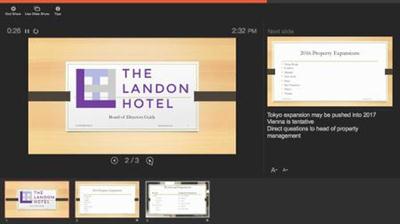
Office 365: Learning PowerPoint
MP4 | Video: 720p | Duration: 1:03:55 | English | Subtitles: VTT | 323.3 MB​

Learn the basics of creating engaging presentations with PowerPoint 2016 for Office 365. This course first explores the interface and helps viewers create and format great PowerPoint presentations. Author Garrick Chow then shows how to best work with text, images, and multimedia and use the presentation tools to deliver a compelling presentation. The course wraps with instructions for sharing and exporting the finished presentation.

Topics include:
Creating a new PowerPoint presentationAdding slides and sectionsAdding and formatting textAdding video, audio, pictures, and hyperlinksChanging themesWorking with transitionsPresenting and navigating your slide deckPrinting slides and notesSharing and collaborating with others

Recommend Download Link Hight Speed | Please Say Thanks Keep Topic Live ​
 
Zurück
Oben Unten