




Last updated 2/2018
MP4 | Video: h264, 1280x720 | Audio: AAC, 44.1 KHz
Language: English | Size: 2.46 GB | Duration: 9h 13m
Learn to create amazing likeness sculpt in ZBrush with my special techniques
What you'll learn
Confidently have all the tools to tackle character design
Be able to create a great likeness sculpts
Have a better knowledge of ZBrush
Requirements
In this course I will be using ZBrush 4 R8
Description
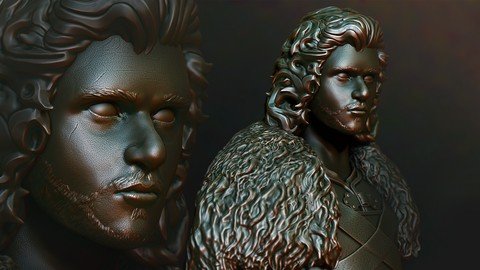
Welcome to this course on creating a likeness sculpt of John Snow "King of the North" from the epic series "The Game of Thrones"
In this course my main aim is to teach you how to create likeness sculpt of people, I have specially designed this course for non artist , using my special techniques it should be possible if you have good reference images to create fairly accurate likenesses. Now on saying that its not going to be easy the more you practice these techniques the better you will become FACT!
I give you all the tools and a pletherer of skills to be able to achieve your visions!
Some of what we cover is bulleted below
Building a base mesh from a meshBuilding up detail in dynamesh and using a few practical brushesProjecting details from one mesh to anotherRetoplogy techniques for clean geometryCreation and implementation of vector Displacement brushesThe all new gizmo for R8Customisation and material, doc and view saving and loadingFInal render and compositing in ZBrushIn this course I will be using ZBrush 4 R8 and Photoshop for the compositing workThis course is the next step in ZBrush training and reigns in a new era in creative techniques.FInal thoughts!The most important thing is for you to have fun dont rush, follow along and create amazing sculpts in ZBrush!
Overview
Section 1: ZBrush: Game of Thrones John Snow Likeness Sculpt - Introduction
Lecture 1 ZBrush Game of Thrones Likeness Sculpt - Full introduction
Lecture 2 ZBrush Game of Thrones Likeness Sculpt - Short Intro
Lecture 3 ZBrush Game of Thrones Likeness Sculpt - Download your Assets
Section 2: ZBrush Game of Thrones John Snow Likeness Sculpt - The Course
Lecture 4 ZBrush Game of Thrones Likeness Sculpt - Get Familiar
Lecture 5 ZBrush Game of Thrones Likeness Sculpt - Getting in the Mood
Lecture 6 ZBrush Game of Thrones Likeness Sculpt - The Basemesh
Lecture 7 ZBrush Game of Thrones Likeness Sculpt - Getting the Base ready
Lecture 8 ZBrush Game of Thrones Likeness Sculpt - Dynamesh our Base
Lecture 9 ZBrush Game of Thrones Likeness Sculpt - Matching Features to an Image
Lecture 10 ZBrush Game of Thrones Likeness Sculpt - Custom Setup Shelf
Lecture 11 ZBrush Game of Thrones Likeness Sculpt - Face Sculpting Part 1
Lecture 12 ZBrush Game of Thrones Likeness Sculpt - Face Sculpting Part 2
Lecture 13 ZBrush Game of Thrones Likeness Sculpt - Its in the Eyes
Lecture 14 ZBrush Game of Thrones Likeness Sculpt - ZSpheres Base
Lecture 15 ZBrush Game of Thrones Likeness Sculpt - Creating the Robe
Lecture 16 ZBrush Game of Thrones Likeness Sculpt - Rigging Technique for the Vest
Lecture 17 ZBrush Game of Thrones Likeness Sculpt - Create the Armour
Lecture 18 ZBrush Game of Thrones Likeness Sculpt - Face and Hair Proxy
Lecture 19 ZBrush Game of Thrones Likeness Sculpt - Sculpting the Face Part 1
Lecture 20 ZBrush Game of Thrones Likeness Sculpt - Sculpting the Face Part 2
Lecture 21 ZBrush Game of Thrones Likeness Sculpt - Fur primary shapes
Lecture 22 ZBrush Game of Thrones Likeness Sculpt - Finishing the first fur version
Lecture 23 ZBrush Game of Thrones Likeness Sculpt - Detailing the fur timelapse
Lecture 24 ZBrush Game of Thrones Likeness Sculpt - Using Vector Displacement
Lecture 25 ZBrush Game of Thrones Likeness Sculpt - Creating vector Displacements
Lecture 26 ZBrush Game of Thrones Likeness Sculpt - Finishing the fur with VD brushes
Lecture 27 ZBrush Game of Thrones Likeness Sculpt - Adding noise
Lecture 28 ZBrush Game of Thrones Likeness Sculpt - Folds for the Robe
Lecture 29 ZBrush Game of Thrones Likeness Sculpt - Creating the Buckle Part 1
Lecture 30 ZBrush Game of Thrones Likeness Sculpt - Creating the Buckle Part 2
Lecture 31 ZBrush Game of Thrones Likeness Sculpt - Top Armour Plate
Lecture 32 ZBrush Game of Thrones Likeness Sculpt - Armour straps
Lecture 33 ZBrush Game of Thrones Likeness Sculpt - Mesh Extraction Eyebrows
Lecture 34 ZBrush Game of Thrones Likeness Sculpt - Thinking about the Hair
Lecture 35 ZBrush Game of Thrones Likeness Sculpt - Hair front lock
Lecture 36 ZBrush Game of Thrones Likeness Sculpt - Second front lock
Lecture 37 ZBrush Game of Thrones Likeness Sculpt - Side of Hair
Lecture 38 ZBrush Game of Thrones Likeness Sculpt - Refining the side
Lecture 39 ZBrush Game of Thrones Likeness Sculpt - Back Hair
Lecture 40 ZBrush Game of Thrones Likeness Sculpt - Resolutions thoughts
Lecture 41 ZBrush Game of Thrones Likeness Sculpt - Creating the Beard
Lecture 42 ZBrush Game of Thrones Likeness Sculpt - Finishing the Vest
Lecture 43 ZBrush Game of Thrones Likeness Sculpt - Adding more detail to the Buckle
Lecture 44 ZBrush Game of Thrones Likeness Sculpt - Library of ZTools
Lecture 45 ZBrush Game of Thrones Likeness Sculpt - Retopologising the Hair
Lecture 46 ZBrush Game of Thrones Likeness Sculpt - Retopologising the Fur
Lecture 47 ZBrush Game of Thrones Likeness Sculpt - Retopologising the Body
Lecture 48 ZBrush Game of Thrones Likeness Sculpt - Getting rid of geometry
Lecture 49 ZBrush Game of Thrones Likeness Sculpt - Polishing and detailing
Lecture 50 ZBrush Game of Thrones Likeness Sculpt - What we have done to date
Lecture 51 ZBrush Game of Thrones Likeness Sculpt - Details from Images
Lecture 52 ZBrush Game of Thrones Likeness Sculpt - Getting an alpha from polypaint!
Lecture 53 ZBrush Game of Thrones Likeness Sculpt - Getting Alphas into the Lightbox
Lecture 54 ZBrush Game of Thrones Likeness Sculpt - Adding secondary Face Detailing
Lecture 55 ZBrush Game of Thrones Likeness Sculpt - Hand detailing
Lecture 56 ZBrush Game of Thrones Likeness Sculpt - Transpose to Pose our Model
Lecture 57 ZBrush Game of Thrones Likeness Sculpt - Materials
Lecture 58 ZBrush Game of Thrones Likeness Sculpt - Setting up the final render
Lecture 59 ZBrush Game of Thrones Likeness Sculpt - Compositing in Photoshop
Lecture 60 BONUS LECTURE - HELP AND ADVICE
Anyone who wants to create engaging characters and likenesses
Homepage
Recommend Download Link Hight Speed | Please Say Thanks Keep Topic Live
Links are Interchangeable - No Password - Single Extraction
