





KAMAL
MyBoerse.bz Pro Member
Xilinx Zynq-7000 SoC Board Support Packages 2019.2 x64 (Linux)
Xilinx Zynq-7000 SoC Board Support Packages 2019.2 x64 (Linux) | 308 MB
Xilinx, Inc., the leader in adaptive and intelligent computing, is pleased to announce the availability of Zynq-7000 SoC Board Support Packages 2019.2 is a collection of libraries and drivers that will form the lowest layer of your application software stack.
Board Support Package (BSP) is the collective term referring to all of the software components required to match a given operating system (and its environment) to a given hardware design (board). BSPs commonly contain low-level operating system and device driver code that is dependent on the hardware and upon which the rest of the operating system layers. In addition, a BSP might also contain other files containing directives, compilation parameters, and hardware parameters that are used to configure the operating system. Since a given Xilinx hardware platform is configurable, fixed board support packages are not possible. Therefore, a custom board support package must be generated for each hardware design that you create.
SDK can be used to create board support packages for third-party operating systems that are supported on the Xilinx processors. The board support package appears as a project in the SDK Navigator view. You can configure each BSP project in various ways and then run a BSP generation process. The BSP generation process typically ends with a collection of files generated in the workspace, which you must then take into the third-party environment to proceed with building the operating system and applications. The specifics of what files must be collected and how they must be used depends on the third-party operating system in question.
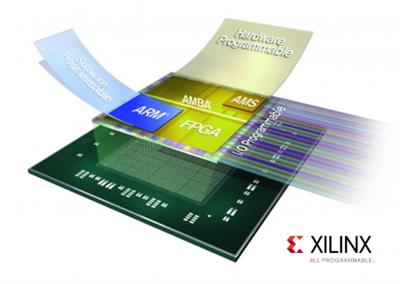
This short video is an introduction to the Zynq-7000 All Programmable SoC silicon hardware features. It presents at a high level the major elements of the devices: the Processing System, the Programmable Logic and the I/Os and also reviews the difference between the members of the Zynq-7000 family.
Xilinx is the inventor of the FPGA, programmable SoCs, and now, the ACAP. Our highly-flexible programmable silicon, enabled by a suite of advanced software and tools, drives rapid innovation across a wide span of industries and technologies - from consumer to cars to the cloud. Xilinx delivers the most dynamic processing technology in the industry, enabling rapid innovation with its adaptable, intelligent computing.
Product: Xilinx Zynq-7000 SoC Board Support Packages
Version: 2019.2 *
Supported Architectures: x64
Website Home Page :
Language: english
System Requirements: Linux **
Supported Operating Systems: **
Size: 308.1 MB
BSPs supported for the 2019.2 PetaLinux Release. Below contains list supported BSPs for Zynq-7000 SoC Board included in this release
xilinx-zc702-v2019.2-final.bsp
This BSP contains:
- Hardware: Design contains Zynq-7000 PS block (DDR, UART, SD, QSPI, Ethernet etc.) and AXI GPIO connected with led_4bits.
- Software: FSBL, U-boot, Linux, device-tree (includes Open AMP), rootfs (minimal packages).
- Pre-built Images: Ready to test images bitstream, FSBL, u-boot, Linux and rootfs for booting u-boot and Linux.
xilinx-zc706-v2019.2-final.bsp
This BSP contains:
- Hardware: Design contains Zynq-7000 PS block (DDR, UART, SD, QSPI, Ethernet etc.) and AXI GPIO connected with led_4bits, dip_switches_4bits, gpio_sws_3bits.
- Software: FSBL, U-boot, Linux, device-tree (includes Open AMP), rootfs (minimal packages).
- Pre-built Images: Ready to test images bitstream, FSBL, u-boot, Linux and rootfs for booting u-boot and Linux.
avnet-digilent-zedboard-v2019.2-final.bsp
This BSP contains:
- Hardware: Design contains Zynq-7000 PS block (DDR, UART, SD, QSPI, Ethernet etc.) and AXI GPIO connected with led_8bits, btns_5bits, sws_8bits.
- Software: FSBL, U-boot, Linux, device-tree (includes Open AMP), rootfs (minimal packages).
- Pre-built Images: Ready to test images bitstream, FSBL, u-boot, Linux and rootfs for booting u-boot and Linux.
Installation Requirements
The PetaLinux Tools Installation requirements are:
Minimum workstation requirements:
- 8 GB RAM (recommended minimum for Xilinx tools)
- 2 GHz CPU clock or equivalent (minimum of 8 cores)
- 100 GB free HDD space
Supported OS:
- Red Hat Enterprise Workstation/Server 7.4, 7.5, 7.6 (64-bit)
- CentOS Workstation/Server 7.4, 7.5, 7.6 (64-bit)
- Ubuntu Linux Workstation/Server 16.04.5, 16.04.6, 18.04.1,18.04.02 (64-bit)
DOWNLOAD LINKS:
Xilinx Zynq-7000 SoC Board Support Packages 2019.2 x64 (Linux) | 308 MB
Xilinx, Inc., the leader in adaptive and intelligent computing, is pleased to announce the availability of Zynq-7000 SoC Board Support Packages 2019.2 is a collection of libraries and drivers that will form the lowest layer of your application software stack.
Board Support Package (BSP) is the collective term referring to all of the software components required to match a given operating system (and its environment) to a given hardware design (board). BSPs commonly contain low-level operating system and device driver code that is dependent on the hardware and upon which the rest of the operating system layers. In addition, a BSP might also contain other files containing directives, compilation parameters, and hardware parameters that are used to configure the operating system. Since a given Xilinx hardware platform is configurable, fixed board support packages are not possible. Therefore, a custom board support package must be generated for each hardware design that you create.
SDK can be used to create board support packages for third-party operating systems that are supported on the Xilinx processors. The board support package appears as a project in the SDK Navigator view. You can configure each BSP project in various ways and then run a BSP generation process. The BSP generation process typically ends with a collection of files generated in the workspace, which you must then take into the third-party environment to proceed with building the operating system and applications. The specifics of what files must be collected and how they must be used depends on the third-party operating system in question.
This short video is an introduction to the Zynq-7000 All Programmable SoC silicon hardware features. It presents at a high level the major elements of the devices: the Processing System, the Programmable Logic and the I/Os and also reviews the difference between the members of the Zynq-7000 family.
Xilinx is the inventor of the FPGA, programmable SoCs, and now, the ACAP. Our highly-flexible programmable silicon, enabled by a suite of advanced software and tools, drives rapid innovation across a wide span of industries and technologies - from consumer to cars to the cloud. Xilinx delivers the most dynamic processing technology in the industry, enabling rapid innovation with its adaptable, intelligent computing.
Product: Xilinx Zynq-7000 SoC Board Support Packages
Version: 2019.2 *
Supported Architectures: x64
Website Home Page :
Language: english
System Requirements: Linux **
Supported Operating Systems: **
Size: 308.1 MB
BSPs supported for the 2019.2 PetaLinux Release. Below contains list supported BSPs for Zynq-7000 SoC Board included in this release
xilinx-zc702-v2019.2-final.bsp
This BSP contains:
- Hardware: Design contains Zynq-7000 PS block (DDR, UART, SD, QSPI, Ethernet etc.) and AXI GPIO connected with led_4bits.
- Software: FSBL, U-boot, Linux, device-tree (includes Open AMP), rootfs (minimal packages).
- Pre-built Images: Ready to test images bitstream, FSBL, u-boot, Linux and rootfs for booting u-boot and Linux.
xilinx-zc706-v2019.2-final.bsp
This BSP contains:
- Hardware: Design contains Zynq-7000 PS block (DDR, UART, SD, QSPI, Ethernet etc.) and AXI GPIO connected with led_4bits, dip_switches_4bits, gpio_sws_3bits.
- Software: FSBL, U-boot, Linux, device-tree (includes Open AMP), rootfs (minimal packages).
- Pre-built Images: Ready to test images bitstream, FSBL, u-boot, Linux and rootfs for booting u-boot and Linux.
avnet-digilent-zedboard-v2019.2-final.bsp
This BSP contains:
- Hardware: Design contains Zynq-7000 PS block (DDR, UART, SD, QSPI, Ethernet etc.) and AXI GPIO connected with led_8bits, btns_5bits, sws_8bits.
- Software: FSBL, U-boot, Linux, device-tree (includes Open AMP), rootfs (minimal packages).
- Pre-built Images: Ready to test images bitstream, FSBL, u-boot, Linux and rootfs for booting u-boot and Linux.
Installation Requirements
The PetaLinux Tools Installation requirements are:
Minimum workstation requirements:
- 8 GB RAM (recommended minimum for Xilinx tools)
- 2 GHz CPU clock or equivalent (minimum of 8 cores)
- 100 GB free HDD space
Supported OS:
- Red Hat Enterprise Workstation/Server 7.4, 7.5, 7.6 (64-bit)
- CentOS Workstation/Server 7.4, 7.5, 7.6 (64-bit)
- Ubuntu Linux Workstation/Server 16.04.5, 16.04.6, 18.04.1,18.04.02 (64-bit)
DOWNLOAD LINKS:
