



• Regeln für den Video-Bereich:

    In den Börsenbereich gehören nur Angebote die bereits den Allgemeinen Regeln entsprechen.

    Einteilung

    - Folgende Formate gehören in die angegeben Bereiche:
    - Filme: Encodierte Filme von BluRay, DVD, R5, TV, Screener sowie Telesyncs im Format DivX, XviD und x264.
    - DVD: Filme im Format DVD5, DVD9 und HD2DVD.
    - HD: Encodierte Filme mit der Auflösung 720p oder darüber von BluRay, DVD, R5, TV, Screener sowie Telesyncs im Format x264.
    - 3D: Encodierte Filme von BluRay, die in einem 3D Format vorliegen. Dies gilt auch für Dokus, Animation usw.
    - Serien: Cartoon/Zeichentrick, Anime, Tutorials, Dokumentationen, Konzerte/Musik, Sonstiges sind demnach in die entsprechenden Bereiche einzuordnen, auch wenn sie beispielsweise im High Definition-Format oder als DVD5/DVD9/HD2DVD vorliegen. Ausnahme 3D.
    - Bereich Englisch: Englische Releases gehören immer in diesen Bereich.
    - Bereich Talk: Der Bereich, in dem über die Releases diskutiert werden kann, darf, soll und erwünscht ist.


    Angebot/Beitrag erstellen

    - Ein Beitrag darf erst dann erstellt werden, wenn der Upload bei mindestens einem OCH komplett ist. Platzhalter sind untersagt.
    - Bei einem Scenerelease hat der Threadtitel ausschließlich aus dem originalen, unveränderten Releasenamen zu bestehen. Es dürfen keine Veränderungen wie z.B. Sterne, kleine Buchstaben o.ä. vorgenommen werden. Ausnahme Serienbörse:
    - Bei einem Sammelthread für eine Staffel entfällt aus dem Releasename natürlich der Name der Folge. Beispiel: Die Simpsons S21 German DVDRip XviD - ITG
    - Dementsprechend sind also u.a. verboten: Erweiterungen wie "Tipp", "empfehlenswert", "only", "reup", usw. / jegliche andere Zusatzinformation oder Ergänzung, welche nicht in obiger Beschreibung zu finden ist.

    Aufbau des Angebots und Threadtitel

    Der Titel nach folgendem Muster erstellt zu werden. <Name> [3D] [Staffel] [German] <Jahr> <Tonspur> [DL] [Auflösung] <Quelle> <Codec> - <Group>
    Beispiel: The Dark Knight German 2008 AC3 DVDRip XviD - iND
    Beispiel: The Dark Knight 2008 DTS DL BDRip x264 - iND
    Beispiel: The Dark Knight 2008 AC3 DL BDRip XviD - iND
    Beispiel: The Dark Knight German 2008 AC3 720p BluRay x264 iND
    Beispiel: The Dark Knight 2008 DTS DL 1080p BluRay x264 iND
    Beispiel: Die Simpsons S01 German AC3 DVDRip XviD iND
    Beispiel: Die Simpsons S20 German AC3 720p BluRay x264 iND
    Beispiel: Sword Art Online II Ger Sub 2014 AAC 1080p WEBRip x264 - peppermint
    Entsprechend sind also u.a. verboten: Sonderzeichen wie Klammern, Sterne, Ausrufezeichen, Unterstriche, Anführungszeichen / Erweiterungen wie "Tipp", "empfehlenswert", "only", "reup", usw. / jegliche andere Zusatzinformation oder Ergänzung, welche nicht in obiger Beschreibung zu finden ist
    Ausnahmen hiervon können in den Bereichen geregelt sein.

    Die Beiträge sollen wie folgt aufgebaut werden:
    Überschrift entspricht dem Threadtitel
    Cover
    kurze Inhaltsbeschreibung
    Format, Größe, Dauer sind gut lesbar für Downloader außerhalb des Spoilers zu vermerken
    Nfo sind immer Anzugeben und selbige immer im Spoiler in Textform.
    Sind keine Nfo vorhanden z.B. Eigenpublikationen, sind im Spoiler folgende Dateiinformationen zusätzlich anzugeben :
    Quelle
    Video (Auflösung und Bitrate)
    Ton (Sprache, Format und Bitrate der einzelnen Spuren)
    Untertitel (sofern vorhanden)
    Hosterangabe in Textform außerhalb eines Spoiler mit allen enthaltenen Hostern.
    Bei SD kann auf diese zusätzlichen Dateiinformationen verzichtet werden.

    Alle benötigten Passwörter sind, sofern vorhanden, in Textform im Angebot anzugeben.
    Spoiler im Spoiler mit Kommentaren :"Schon Bedankt?" sind unerwünscht.


    Releases

    - Sind Retail-Release verfügbar, sind alle anderen Variationen untersagt. Ausnahmen: Alle deutschen Retail-Release sind CUT, in diesem Fall sind dubbed UNCUT-Release zulässig.
    - Im Serien-Bereich gilt speziell: Wenn ein Retail vor Abschluss einer laufenden Staffel erscheint, darf diese Staffel noch zu Ende gebracht werden.62
    - Gleiche Releases sind unbedingt zusammenzufassen. Das bedeutet, es ist zwingend erforderlich, vor dem Erstellen eines Themas per Suchfunktion zu überprüfen, ob bereits ein Beitrag mit demselben Release besteht. Ist dies der Fall, ist der bereits vorhandene Beitrag zu verwenden.
    - P2P und Scene Releases dürfen nicht verändert oder gar unter einem iND Tag eingestellt werden.


    Support, Diskussionen und Suche

    - Supportanfragen sind entweder per PN oder im Bereich Talk zu stellen.
    - Diskussionen und Bewertungen sind im Talk Bereich zu führen. Fragen an die Uploader haben ausschließlich via PN zu erfolgen, und sind in den Angeboten untersagt.
    - Anfragen zu Upload-Wünschen sind nur im Bereich Suche Video erlaubt. Antworten dürfen nur auf Angebote von MyBoerse.bz verlinkt werden.


    Verbote

    - Untersagt sind mehrere Formate in einem einzigen Angebotsthread, wie beispielsweise das gleichzeitige Anbieten von DivX/XviD, 720p und 1080p in einem Thread. Pro Format, Release und Auflösung ist ein eigener Thread zu eröffnen.
    - Grundsätzlich ebenso verboten sind Dupes. Uploader haben sich an geeigneter Stelle darüber zu informieren, ob es sich bei einem Release um ein Dupe handelt.
    - Gefakte, nur teilweise lauffähige oder unvollständige Angebote sind untersagt. Dies gilt auch für eigene Publikationen, die augenscheinlich nicht selbst von z.B. einer DVD gerippt wurden. Laufende Serien, bei denen noch nicht alle Folgen verfügbar sind, dürfen erstellt und regelmäßig geupdatet werden.
    - Untersagt sind Angebote, welche nur und ausschließlich in einer anderen Sprache als deutsch oder englisch vorliegen. Ausnahmen sind VORHER mit den Moderatoren zu klären.


    Verstoß gegen die Regeln

    - Angebote oder Beiträge, die gegen die Forenregeln verstoßen, sind über den "Melden"-Button im Beitrag zu melden.
  • Bitte registriere dich zunächst um Beiträge zu verfassen und externe Links aufzurufen.

*** Bestes IPTV *** bester Preis *** gratis Test ***


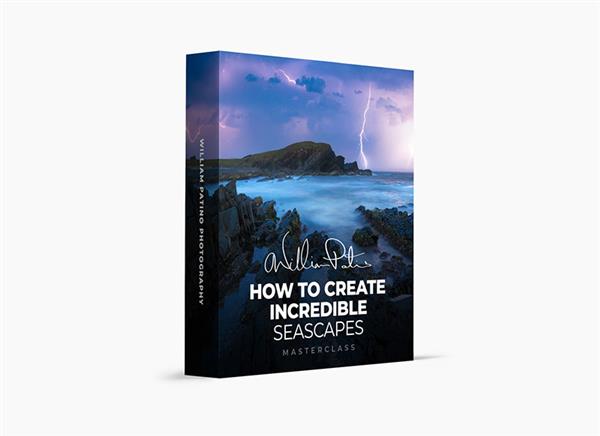
William Patino Photography - How to Create Incredible Seascapes

Tutorials

MyBoerse.bz Pro Member
8a6c40939838b00141fd1396c59e304e.jpeg

Instructors: William Patino | Duration: 7h 45m * 28 Lessons
Video: MP4 3840x2160 48 KHz | English | Size: 11.55 GB


Learn how to master seascape photography - even in "boring" locations.
From composition theory, settings for various effects, tips for working with water flow, post-processing techniques for focus stacking, exposure blending, and more, I cover everything in this masterclass.
You don't need an epic location to create an epic image. You need a workflow that works.
Learn everything from scouting an amazing image, to editing your final masterpiece!
This Masterclass is for you if...
You've struggled at capturing moving water with a slow shutter.
You are unsure how to compose and capture seascapes well.
Your processing is lacking a refined, finished look.
Imagine you could...
Create images you're proud of, regardless of the conditions!
Understand light and how it interacts with water and the landscape!
Have complete confidence in exposing and composing a scene!
Hear what my students are saying...
"As a landscape fanatic, I've always struggled when photographing the coast, water, sand, etc. This course has totally changed my photography. Will is an amazing teacher and his enthusiasm really made me feel like I can improve!"
-Ben R.
"I've not been shooting the coast much as there isn't a "nice" beach near me. But man, your techniques for photographing in those situations have changed that. I recently created a series of images and have my first exhibition...of the beach...which I've never photographed before! Thank you!"
-Denia P.
"Most photographers I've watched teach how to shoot like them. Will is not like that. He has an infectious love of nature and a desire to teach me how to communicate what I see, in my own way. I'm now actually confident at all shutterspeeds on the beach and getting amazing shots!"
-Jacob S.
What's Inside?
Introduction
A brief introduction to the course and what to expect.
A Deep Dive Into Seascape Photography
As we dive in, I want to share my thoughts and philosophy on seascapes. Let's look through some images and start by thinking about this unique subject. I'll help you develop and decide ...
Understanding your Camera & Settings
Shooting in manual mode can be a little scary when you first start out. Relying on auto mode is going to hold you back though. In this lesson, I'll teach you the settings I like to use to cre...
Capturing Amazing Images on Any Beach
All you need is sand, water, and sky. You might think you have to travel to key locations around the world with epic sea stacks and feel limited by the coastline you do have access to. In this less...
Creating Light in an Edit
In this first editing lesson, I'll work on an image I took that doesn't is pretty dull and needs some atmosphere and drama. I'll share a simple workflow for really pulling out som...
Building Texture in a Slower Shutterspeed Shot
Working on this tele-shot, I'll teach you how to work on an image to add drama, develop texture, and attract the eye to our main subject.
Editing Intentional Camera Movement
Having learned how to capture this kind of image, I'll take you through a full edit. Working to build the RAW composition into a journey for the viewer.
Sunset Retouch
This edit is all about building on the beautiful light we had at sunset.
Processing Water & Light
Follow along with the raw files and learn how to edit an image to bring out tones, color and adjust light to lead the eye.
Photographing Iconic Locations
Join me at sunset on the epic Motukiekie beach in New Zealand and learn techniques for capturing sea stacks, working with a high dynamic range and utilizing moving water to create smooth flow.
Post-Processing General Adjustments
Take a look at the Motukiekie sunset RAW files and learn powerful techniques for bringing out the file's details.
Exposure Blending
Learn how to blend 2 exposures together for dynamic range and water movement.
Light Painting
In this lesson, I'll teach you my methods for creating and enhancing natural light in the raw file, in order to lead the eye and create effective transitions from front to back. &n...
Creating Atmosphere & Dodging
See how to further enhance natural light and create a hazy atmospheric depth.
Color Grade, Final Adjustments & Overview
Learn how to adjust the colours for an accurate and effective result in the midtones and highlights, plus some final tweaks. I'll also do an overview of this image and the techniques we covered.
Looking for Your Own Interpretation of a Seascape
In this lesson, I'll tackle a pretty iconic location. I'll teach you my approach for finding my own story to tell. I'll also share some thoughts on what to look for in the landsca...
Processing General RAW Adjustments in ACR
Learn RAW file adjustments for revealing detail and color.
Focus Stacking in Photoshop
This image required a focus stack to get all the details I wanted. I'll teach you my process for doing this seamlessly in Photoshop. It's really easy and an amazing technique which I th...
Fixing an Image with the Clone Stamp Tool
Learn how the clone stamp tool is used to clean up inconsistencies in a focus stack blend.
Improving and Adding Light to Maximize your Composition
In this lesson, I'll go through my techniques for painting in and improving light. This lets us control how the image is viewed, maximizing the flow of your composition.
Warping & Finalising the Shot
In this lesson, I'll go through further boosting of light for depth and see how the warp tool can effectively be used for edge control.
Long Exposures & Crashing Waves
Let's head back out in the field to capture a long exposure in blue hour. I'll also show you how to capture multiple wave crash exposures for a wave blend.
Wave Exposure Blending
Learn how to manually blend together a series of exposures for crashing wave action.
Adding Birds with Exposure Blending
What if there's an element missing in the frame you ended up using? Well, I'll teach you how I mask and add in little details to a final image.
Outro
Before we end, I have a final message for you and my hopes for your photography moving forward.
Homepage

Recommend Download Link Hight Speed | Please Say Thanks Keep Topic Live
Links are Interchangeable - No Password - Single Extraction

 
Zurück
Oben Unten