• Regeln für den Software-Bereich:


    Allgemeines:

    - In erster Linie sind unsere Boardregeln zu beachten, zu finden HIER.
    - Software zur Audiobearbeitung sollte ausschließlich im Unterforum "Audio" eingestellt werden.
    - Für Cracks, Keygens oder sonstige Freischaltungssoftware gibt es das Unterforum "Freischaltung".
    - Portable Software bitte im entsprechenden Unterforum "Portable Software" eintragen.
    - Diskussionen zur Installation und anderen Problemen mit der Software, bitte im enstprechenden Unterforum "Talk" führen.
    - Bei Unklarheiten und Fragen zu den Regeln bitte die Moderatoren kontaktieren.


    Angebot erstellen

    - Die Struktur des Threadtitels muss wie folgt umgesetzt werden: Herstellername - Softwarename - Versionsnummer
    - Unnötige Zusätze im Threadtitel wie "HOT", "NEW" oder Punkte zwischen den Wörtern sind nicht erlaubt.
    - Achtet darauf immer nur die Hauptversion und deren Updates in einem Thread zusammenfassen, konkretes Beispiel: SoftwareXY v3.12 gehört in den selben Thread mit SoftwareXY v3.13; SoftwareXY v.4.1 gehört in einen neuen eigenen Thread. Ausgenommen hiervon sind Sammelthreads und Dauerangebote.
    - Bei nicht bekannten Herstellern oder Angebote einer privaten Software, ist die Programmbezeichnung + Versionsnummer ausreichend.
    - Besondere Beachtung gilt für den ersten Beitrag eines Angebots. Dort muss eine kurze Beschreibung der Software in deutscher Sprache angegeben werden. Für offizielle Releases ist es Pflicht die NFO im Beitrag einzustellen(Spoiler, siehe nächster Punkt).
    - Weitere Informationen wie NFOs oder Changelogs, versteckt ihr bitte in einem Spoiler.


    Software Suche

    - Für Suchanfragen haben wir das Unterforum "Suche" erstellt.
    - Auch hier sollte vorher die Suchfunktion benutzt werden, um Doppelthreads vorzubeugen. Sollte es bereits eine Suchanfrage geben, könnt ihr den Thread gerne mit einem "Danke" pushen.


    Trojaner- und Virusalarm

    - Falls Euer Virenscanner bei einem Angebot Alarm schlägt, solltet ihr zunächst Ruhe bewahren. Viele Virenscanner erkennen Cracks/Keygens oft fälschlicherweise als Bedrohung.
    - Prüft die verdächtige Datei zuerst mit http://virustotal.com , sollte es sich hierbei wirklich um eine Bedrohung handeln, meldet den Beitrag und/oder wendet euch mit dem Bericht von VirusTotal.com an einen Moderator.


    Unerwünschte Angebote

    - Keylogger, Spionagetools, alles rund ums Thema Hacking/Cracking ist nicht erwünscht.
  • Bitte registriere dich zunächst um Beiträge zu verfassen und externe Links aufzurufen.

*** Bestes IPTV *** bester Preis *** gratis Test ***


[WIN] Virtual Audio Cable v4

feigenlaub

MyBoerse.bz Pro Member
Virtual Audio Cable v4.13-[WiN]


AiR | Feb 2014 | 525kB

Virtual Audio Cable software allows you to transfer audio (wave) streams between applications and/or devices. It creates a set of virtual audio devices named "Virtual Cables", each of them consists of a pair of the waveform input/output devices. Any application can send audio stream to an output side of a cable, and any other application can receive this stream from an input side. All transfers are made digitally, providing NO sound quality loss (a bitperfect streaming).

OVERVIEW

Uploaded.net


Pass-->by feigenlaub
 
Zuletzt bearbeitet von einem Moderator:
NTONYX Virtual Audio Cable 4.10


Virtual Audio Cable 4.10


Virtualaudiocable1.jpeg


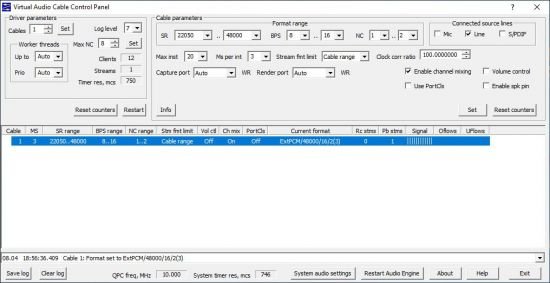
Mit "Virtual Audio Cable" können Sie beliebige Soundsignale in andere Anwendungen leiten.

Sie möchten einen Webradio-Stream zum Bearbeiten direkt in einen Audio-Editor umleiten? Mit dem "Virtual Audio Cable" ist das problemlos möglich.

Wie der Name bereits verrät, erstellt das Tool ein virtuelles Audiokabel, über das der Audio-Stream geleitet wird. Der Clou: Sie können mehrere Kabel parallel anlegen, die sich aber nicht überschneiden müssen oder automatisch zusammengemixt werden.

Das Programm ist mit 7z Komprimiert und muss zum Installieren entpackt werden! [GRÖßE: 3MB] - Link: HideRef


Zuletzt bearbeitet:
Virtual Audio Cable 4.70

fbb1aa5b6ac6e90d3c52091e4ba2c826.jpg


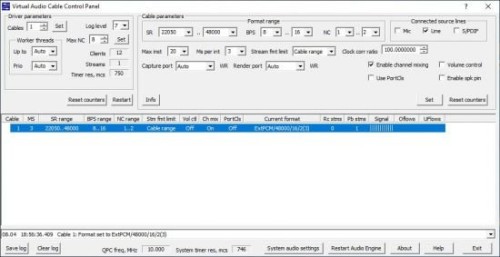
Virtual Audio Cable software allows you to transfer audio (wave) streams between applications and/or devices. It creates a set of virtual audio devices named "Virtual Cables", each of them consists of a pair of the waveform input/output devices. Any application can send audio stream to an output side of a cable, and any other application can receive this stream from an input side. All transfers are made digitally, providing NO sound quality loss (a bitperfect streaming).

VAC behavior is similar to "What You Hear" (or "What U Hear", "Stereo Mix") feature of Sound Blaster Live! and Audigy cards. But it is only similar, not equivalent. If you simply need a function like "Stereo Mix" under Vista/Win7/Win8, there could be better to try to enable it in your audio adapter.
If more than one applications are sending audio to Virtual Cable device, VAC mixes all streams together. If more than one applications are receiving audio from Virtual Cable device, VAC distributes the same audio data among all targets.

VAC is useful to record application's audio output in real time (audio player, instant messenger or software synthesizer), or transfer a sound stream to another application processing it. You can, for example, use two or more software audio players/generators/synthesizers/sequencers to produce audio streams, sending them to Virtual Cablet device and record a mixed stream from the same Virtual Cable device, using any recording software - Windows Sound Recorder, Audacity, Sound Forge, WaveLab, Adobe Audition (formerly Cool Edit Pro), Gold Wave, Cakewalk/Sonar, Cubase/Nuendo etc.

With an ASIO wrapper like ASIO4ALL from Michael Tippach, you can use VAC in ASIO supporting applications.
If you use an audio encoder application that encodes a stream coming from a sound card, you can use VAC to supply such encoder with a stream produced by other application.
You can use VAC to capture an output sound stream from the application that doesn't allow to write it into WAV file directly. Unlike Total Recorder allowing you to simply save audio stream, VAC allows to route it in real time.
If you are using some Voice Over IP (VoIP) and/or Internet Telephony applications like Skype, you can use VAC to record your calls and conversations.

VAC needs no hardware audio card; it is a "virtual audio card" itself.
A detailed description is included into a free trial package.
Since VAC 4 is a WDM driver, there are some benefits but some (generally older) applications that use MME (waveIn/waveOut) interface can work better with the older VAC 3 version. This version also supports Windows 98/ME.
If you need to simply share your In/Out wave ports among several applications under Windows 2000 and earlier Windows versions, take a look to the Wave Clone software.

Features
Local (console) session only (does not work via Remote Desktop or Terminal Services).
Windows 5.x, 6.x and 10.x platforms (32-bit and 64-bit).
Up to 256 virtual cable devices (some systems limit number of MME devices).
1..20 milliseconds per interrupt/event.
1..100 pin instances.
Almost any of fixed point PCM audio formats (1000..384000 samples per second, 8..32 bits per sample, 1..8 channels). Floating point formats are not supported.
Almost no sound latency with maximal interrupt/event frequency.
RTAudio support with notification events, clock and position registers. Clock registers are bound to Virtual Cables so all streams in each cable are coherent.
Unlimited number of Kernel Streaming clients connected to each port.
Signal mixing (with saturation) between output port clients.
PCM format conversion (sampling rate, bits per sample, number of channels).
Volume control features (both attenuation and boost).
Channel scattering/gathering mode.
Watermark control technique to improve stream stability with unstable applications.
Stream buffering technique to partially compensate bad application buffering algorithms.
Control Panel application to configure cables and watch their state.
Audio Repeater application that transfers from any recording to any playback device.

Language: English

File Size: 1.3 MB

Format: RAR, EXE

Platform: Windows 7, 8/8.1, 10, 11 (32/64Bit)


Hoster:

RapidGator

ddownload


DOWNLOAD



Virtual Audio Cable v.4.70

vo0xplpvzix5.jpg


Virtual Audio Cable v.4.70 || by garfield59 || 1.29 MB || Sprache: Englisch


Beschreibung:


Sprache: Englisch
File Size: 1.29 MB
Format: .Zip und .Exe
Plattform: Windows 11, 10, 8.1, 8, 7 (32 und 64 Bit)
Passwort: Wird nicht benötigt
Hoster: nitroflare.com , ddownload.com , uploadgig.com , rapidgator.net

Mirrors sind untereinander kompatibel


Download Links


Virtual Audio Cable v4.71

2235498e5ba8f2f50282abde8bbf7a21.jpg


Virtual Audio Cable v4.71 || Retail (Just install) || 976.78 KB || Sprache: Englisch


Beschreibung:


Sprache: Englisch
File Size: 976.78 KB
Format: .Rar und .Exe
Plattform: Windows 11, 10, 8.1, 8, 7 (32 und 64 Bit)
Passwort: Wird nicht benötigt
Hoster: nitroflare.com , ddownload.com , rapidgator.net

Mirrors sind untereinander kompatibel


Zurück
Oben Unten