• Regeln für den Video-Bereich:

    In den Börsenbereich gehören nur Angebote die bereits den Allgemeinen Regeln entsprechen.

    Einteilung

    - Folgende Formate gehören in die angegeben Bereiche:
    - Filme: Encodierte Filme von BluRay, DVD, R5, TV, Screener sowie Telesyncs im Format DivX, XviD und x264.
    - DVD: Filme im Format DVD5, DVD9 und HD2DVD.
    - HD: Encodierte Filme mit der Auflösung 720p oder darüber von BluRay, DVD, R5, TV, Screener sowie Telesyncs im Format x264.
    - 3D: Encodierte Filme von BluRay, die in einem 3D Format vorliegen. Dies gilt auch für Dokus, Animation usw.
    - Serien: Cartoon/Zeichentrick, Anime, Tutorials, Dokumentationen, Konzerte/Musik, Sonstiges sind demnach in die entsprechenden Bereiche einzuordnen, auch wenn sie beispielsweise im High Definition-Format oder als DVD5/DVD9/HD2DVD vorliegen. Ausnahme 3D.
    - Bereich Englisch: Englische Releases gehören immer in diesen Bereich.
    - Bereich Talk: Der Bereich, in dem über die Releases diskutiert werden kann, darf, soll und erwünscht ist.


    Angebot/Beitrag erstellen

    - Ein Beitrag darf erst dann erstellt werden, wenn der Upload bei mindestens einem OCH komplett ist. Platzhalter sind untersagt.
    - Bei einem Scenerelease hat der Threadtitel ausschließlich aus dem originalen, unveränderten Releasenamen zu bestehen. Es dürfen keine Veränderungen wie z.B. Sterne, kleine Buchstaben o.ä. vorgenommen werden. Ausnahme Serienbörse:
    - Bei einem Sammelthread für eine Staffel entfällt aus dem Releasename natürlich der Name der Folge. Beispiel: Die Simpsons S21 German DVDRip XviD - ITG
    - Dementsprechend sind also u.a. verboten: Erweiterungen wie "Tipp", "empfehlenswert", "only", "reup", usw. / jegliche andere Zusatzinformation oder Ergänzung, welche nicht in obiger Beschreibung zu finden ist.

    Aufbau des Angebots und Threadtitel

    Der Titel nach folgendem Muster erstellt zu werden. <Name> [3D] [Staffel] [German] <Jahr> <Tonspur> [DL] [Auflösung] <Quelle> <Codec> - <Group>
    Beispiel: The Dark Knight German 2008 AC3 DVDRip XviD - iND
    Beispiel: The Dark Knight 2008 DTS DL BDRip x264 - iND
    Beispiel: The Dark Knight 2008 AC3 DL BDRip XviD - iND
    Beispiel: The Dark Knight German 2008 AC3 720p BluRay x264 iND
    Beispiel: The Dark Knight 2008 DTS DL 1080p BluRay x264 iND
    Beispiel: Die Simpsons S01 German AC3 DVDRip XviD iND
    Beispiel: Die Simpsons S20 German AC3 720p BluRay x264 iND
    Beispiel: Sword Art Online II Ger Sub 2014 AAC 1080p WEBRip x264 - peppermint
    Entsprechend sind also u.a. verboten: Sonderzeichen wie Klammern, Sterne, Ausrufezeichen, Unterstriche, Anführungszeichen / Erweiterungen wie "Tipp", "empfehlenswert", "only", "reup", usw. / jegliche andere Zusatzinformation oder Ergänzung, welche nicht in obiger Beschreibung zu finden ist
    Ausnahmen hiervon können in den Bereichen geregelt sein.

    Die Beiträge sollen wie folgt aufgebaut werden:
    Überschrift entspricht dem Threadtitel
    Cover
    kurze Inhaltsbeschreibung
    Format, Größe, Dauer sind gut lesbar für Downloader außerhalb des Spoilers zu vermerken
    Nfo sind immer Anzugeben und selbige immer im Spoiler in Textform.
    Sind keine Nfo vorhanden z.B. Eigenpublikationen, sind im Spoiler folgende Dateiinformationen zusätzlich anzugeben :
    Quelle
    Video (Auflösung und Bitrate)
    Ton (Sprache, Format und Bitrate der einzelnen Spuren)
    Untertitel (sofern vorhanden)
    Hosterangabe in Textform außerhalb eines Spoiler mit allen enthaltenen Hostern.
    Bei SD kann auf diese zusätzlichen Dateiinformationen verzichtet werden.

    Alle benötigten Passwörter sind, sofern vorhanden, in Textform im Angebot anzugeben.
    Spoiler im Spoiler mit Kommentaren :"Schon Bedankt?" sind unerwünscht.


    Releases

    - Sind Retail-Release verfügbar, sind alle anderen Variationen untersagt. Ausnahmen: Alle deutschen Retail-Release sind CUT, in diesem Fall sind dubbed UNCUT-Release zulässig.
    - Im Serien-Bereich gilt speziell: Wenn ein Retail vor Abschluss einer laufenden Staffel erscheint, darf diese Staffel noch zu Ende gebracht werden.62
    - Gleiche Releases sind unbedingt zusammenzufassen. Das bedeutet, es ist zwingend erforderlich, vor dem Erstellen eines Themas per Suchfunktion zu überprüfen, ob bereits ein Beitrag mit demselben Release besteht. Ist dies der Fall, ist der bereits vorhandene Beitrag zu verwenden.
    - P2P und Scene Releases dürfen nicht verändert oder gar unter einem iND Tag eingestellt werden.


    Support, Diskussionen und Suche

    - Supportanfragen sind entweder per PN oder im Bereich Talk zu stellen.
    - Diskussionen und Bewertungen sind im Talk Bereich zu führen. Fragen an die Uploader haben ausschließlich via PN zu erfolgen, und sind in den Angeboten untersagt.
    - Anfragen zu Upload-Wünschen sind nur im Bereich Suche Video erlaubt. Antworten dürfen nur auf Angebote von MyBoerse.bz verlinkt werden.


    Verbote

    - Untersagt sind mehrere Formate in einem einzigen Angebotsthread, wie beispielsweise das gleichzeitige Anbieten von DivX/XviD, 720p und 1080p in einem Thread. Pro Format, Release und Auflösung ist ein eigener Thread zu eröffnen.
    - Grundsätzlich ebenso verboten sind Dupes. Uploader haben sich an geeigneter Stelle darüber zu informieren, ob es sich bei einem Release um ein Dupe handelt.
    - Gefakte, nur teilweise lauffähige oder unvollständige Angebote sind untersagt. Dies gilt auch für eigene Publikationen, die augenscheinlich nicht selbst von z.B. einer DVD gerippt wurden. Laufende Serien, bei denen noch nicht alle Folgen verfügbar sind, dürfen erstellt und regelmäßig geupdatet werden.
    - Untersagt sind Angebote, welche nur und ausschließlich in einer anderen Sprache als deutsch oder englisch vorliegen. Ausnahmen sind VORHER mit den Moderatoren zu klären.


    Verstoß gegen die Regeln

    - Angebote oder Beiträge, die gegen die Forenregeln verstoßen, sind über den "Melden"-Button im Beitrag zu melden.
  • Bitte registriere dich zunächst um Beiträge zu verfassen und externe Links aufzurufen.

*** Bestes IPTV *** bester Preis *** gratis Test ***


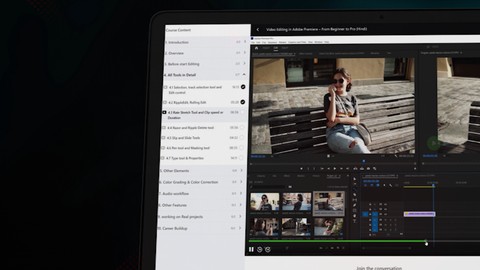
Video Editing In Adobe Premiere Pro - Beginner To Pro (2024)

Tutorials

MyBoerse.bz Pro Member
62165c434fc5c28e45a8512a498a35ec.jpeg

Free Download Video Editing In Adobe Premiere Pro - Beginner To Pro (2024)
Published 4/2024
MP4 | Video: h264, 1920x1080 | Audio: AAC, 44.1 KHz
Language: English | Size: 4.82 GB | Duration: 6h 40m
Are you eager to enhance your video editing skills and unleash your creativity?

What you'll learn
Understand the Premiere Pro interface.
How to create a new sequence.
How to add transitions.
Usages of markers.
How to work with a nest.
How to do color grading.
How to do audio mixing.
How to export files with maximum settings.
How to create a film trailer.
How to share files with someone.
How to find jobs on LinkedIn.
How to import footage and organize media.
How to cut and edit videos properly.
How to use different effects.
How to Animate objects.
How to do color correction.
How to work with BGM and SFX.
How to remove noise from audio.
How to create cinematics travel Vlog.
How to review your work by using frame io.
How to create a good-looking portfolio and CV.
Requirements
Minimum System Requirements for Adobe Premiere Pro
OS: Windows 10 (64-bit) version 1803+ or macOS 10.13+
CPU: Intel 6th Gen or newer, or AMD equivalent (SSE4.2+ support)
RAM: 8 GB
Storage: 8 GB+ available hard-disk space
GPU: Compatible with at least 2 GB VRAM (Check Adobe website for supported GPUs)
Monitor Resolution: 1280 x 800 display
Description
In this course, you'll learn: Premiere Pro interface and essential tools Importing, organizing, and managing media assets Basic video editing techniques: trimming, cutting, and merging clips Adding transitions, effects, and titles to enhance your videos Mastering audio editing and applying sound effects Color correction and grading for cinematic visuals Advanced editing techniques: multi-cam editing, keyframes, and motion graphics Exporting and delivering your final projects in various formats Our experienced instructor will guide you through hands-on exercises and real-world examples, ensuring a practical learning experience. You'll gain a deep understanding of Premiere Pro's features and functionalities while honing your editing skills. Join our video editing course today and unlock your full potential as a visual storyteller!Learning video editing offers a gateway to creative expression in the digital age. It empowers individuals to convey ideas, tell stories, and evoke emotions through visual media. Mastering video editing enhances communication skills, fosters technical proficiency, and opens doors to diverse career opportunities in fields such as filmmaking, advertising, and content creation.Adobe Premiere Pro is the leading editing software for creating any kind of video. Add transitions and effects, finesse color, mix audio, create animated titles and get all the tools to tell your story.
Overview
Section 1: Introduction
Lecture 1 Introduction
Lecture 2 What will you learn
Section 2: 2. Overview
Lecture 3 2.1 Premiere Pro Interface
Lecture 4 2.2 Project panel & Source panel
Lecture 5 2.3 Program Panel, Timeline & Tools
Section 3: 3. Before start Editing
Lecture 6 3.1 Creatr new project & Seq settings
Lecture 7 3.2 Importing and Organizing Media
Section 4: 4. All Tools in Detail
Lecture 8 4.1 Selection, track selection tool and Edit control
Lecture 9 4.2 RippleEdit, Rolling Edit
Lecture 10 4.3 Rate Stretch Tool and Clip speed or Duration
Lecture 11 4.4 Razor and Ripple Delete tool
Lecture 12 4.5 Slip and Slide Tools
Lecture 13 4.6 Pen tool and Masking tool
Lecture 14 4.7 Type Tool & Properties
Section 5: 5. Other Elements
Lecture 15 5.1 Video Transitions
Lecture 16 5.2 Key framing & Animation
Lecture 17 5.3 Video Effects
Lecture 18 5.4 markers and it's Usages
Lecture 19 5.5 Nest and un-Nest Sequences
Lecture 20 5.6 File Exporting
Section 6: 6. Color grading & Color Correction
Lecture 21 6.1 Understanding Lumetri Color & Lumetri Scopes
Lecture 22 6.2 Basic correction & Creative Section
Lecture 23 6.3 Curves, Color Wheels & Math Section
Lecture 24 6.4 HSL Secondary
Lecture 25 6.5 LUT Workflow
Section 7: 7. Audio workflow
Lecture 26 7.1 The Basics of Audio Editing
Lecture 27 7.2 Audio Editing Workflow
Lecture 28 7.3 Noise Reduction From Audio
Section 8: 8. Other Features
Lecture 29 8.1 Frame-io workflow
Lecture 30 8.2 Tips and Tricks
Lecture 31 8.3 How to Copy and Share a Premiere Pro Project With Someone
Section 9: 9. working on Real projects
Lecture 32 9.1 Cinematic Travel Video Editing
Lecture 33 9.2 Cinematic Trailer Editing
Section 10: 10. Career Buildup
Lecture 34 10.1 How to Create CV and Portfolio
Lecture 35 10.2 How to create a account and find a job on LinkedIn
Premiere pro is a professional video editing software devloped by Adobe. It allows users to edit videos, add effects, transitions, and audio, and export them in various formats for different platforms.

Homepage


Recommend Download Link Hight Speed | Please Say Thanks Keep Topic Live
No Password - Links are Interchangeable

 
79a0320c16cfc5dd451fbaef56a0d148.jpg


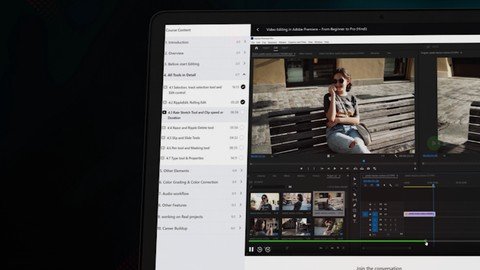
Video Editing In Adobe Premiere Pro - Beginner To Pro
Published 4/2024
MP4 | Video: h264, 1920x1080 | Audio: AAC, 44.1 KHz
Language: English
| Size: 4.82 GB
| Duration: 6h 40m
Are you eager to enhance your video editing skills and unleash your creativity?

What you'll learn

Understand the Premiere Pro interface.

How to create a new sequence.

How to add transitions.

Usages of markers.

How to work with a nest.

How to do color grading.

How to do audio mixing.

How to export files with maximum settings.

How to create a film trailer.

How to share files with someone.

How to find jobs on LinkedIn.

How to import footage and organize media.

How to cut and edit videos properly.

How to use different effects.

How to Animate objects.

How to do color correction.

How to work with BGM and SFX.

How to remove noise from audio.

How to create cinematics travel Vlog.

How to review your work by using frame io.

How to create a good-looking portfolio and CV.

Requirements

Minimum System Requirements for Adobe Premiere Pro:

OS: Windows 10 (64-bit) version 1803+ or macOS 10.13+

CPU: Intel 6th Gen or newer, or AMD equivalent (SSE4.2+ support)

RAM: 8 GB

Storage: 8 GB+ available hard-disk space

GPU: Compatible with at least 2 GB VRAM (Check Adobe website for supported GPUs)

Monitor Resolution: 1280 x 800 display

Description

In this course, you'll learn: Premiere Pro interface and essential tools Importing, organizing, and managing media assets Basic video editing techniques: trimming, cutting, and merging clips Adding transitions, effects, and titles to enhance your videos Mastering audio editing and applying sound effects Color correction and grading for cinematic visuals Advanced editing techniques: multi-cam editing, keyframes, and motion graphics Exporting and delivering your final projects in various formats Our experienced instructor will guide you through hands-on exercises and real-world examples, ensuring a practical learning experience. You'll gain a deep understanding of Premiere Pro's features and functionalities while honing your editing skills. Join our video editing course today and unlock your full potential as a visual storyteller!Learning video editing offers a gateway to creative expression in the digital age. It empowers individuals to convey ideas, tell stories, and evoke emotions through visual media. Mastering video editing enhances communication skills, fosters technical proficiency, and opens doors to diverse career opportunities in fields such as filmmaking, advertising, and content creation.Adobe Premiere Pro is the leading editing software for creating any kind of video. Add transitions and effects, finesse color, mix audio, create animated titles and get all the tools to tell your story.

Overview

Section 1: Introduction

Lecture 1 Introduction

Lecture 2 What will you learn

Section 2: 2. Overview

Lecture 3 2.1 Premiere Pro Interface

Lecture 4 2.2 Project panel & Source panel

Lecture 5 2.3 Program Panel, Timeline & Tools

Section 3: 3. Before start Editing

Lecture 6 3.1 Creatr new project & Seq settings

Lecture 7 3.2 Importing and Organizing Media

Section 4: 4. All Tools in Detail

Lecture 8 4.1 Selection, track selection tool and Edit control

Lecture 9 4.2 RippleEdit, Rolling Edit

Lecture 10 4.3 Rate Stretch Tool and Clip speed or Duration

Lecture 11 4.4 Razor and Ripple Delete tool

Lecture 12 4.5 Slip and Slide Tools

Lecture 13 4.6 Pen tool and Masking tool

Lecture 14 4.7 Type Tool & Properties

Section 5: 5. Other Elements

Lecture 15 5.1 Video Transitions

Lecture 16 5.2 Key framing & Animation

Lecture 17 5.3 Video Effects

Lecture 18 5.4 markers and it's Usages

Lecture 19 5.5 Nest and un-Nest Sequences

Lecture 20 5.6 File Exporting

Section 6: 6. Color grading & Color Correction

Lecture 21 6.1 Understanding Lumetri Color & Lumetri Scopes

Lecture 22 6.2 Basic correction & Creative Section

Lecture 23 6.3 Curves, Color Wheels & Math Section

Lecture 24 6.4 HSL Secondary

Lecture 25 6.5 LUT Workflow

Section 7: 7. Audio workflow

Lecture 26 7.1 The Basics of Audio Editing

Lecture 27 7.2 Audio Editing Workflow

Lecture 28 7.3 Noise Reduction From Audio

Section 8: 8. Other Features

Lecture 29 8.1 Frame-io workflow

Lecture 30 8.2 Tips and Tricks

Lecture 31 8.3 How to Copy and Share a Premiere Pro Project With Someone

Section 9: 9. working on Real projects

Lecture 32 9.1 Cinematic Travel Video Editing

Lecture 33 9.2 Cinematic Trailer Editing

Section 10: 10. Career Buildup

Lecture 34 10.1 How to Create CV and Portfolio

Lecture 35 10.2 How to create a account and find a job on LinkedIn

Premiere pro is a professional video editing software devloped by Adobe. It allows users to edit videos, add effects, transitions, and audio, and export them in various formats for different platforms.


Free search engine download: Udemy Video Editing In Adobe Premiere Pro Beginner To Pro BOOKWARE-SOFTiMAGE
 
Zurück
Oben Unten