



Farid_Khan
MyBoerse.bz Pro Member
USB Device Tree Viewer 3.7.7
File Size : 0.7 Mb
USB Device Tree Viewer is designed to provide you with fast access to information concerning the USB host controllers and devices connected to your computer.
Based on the USBView sample application provided by Microsoft within the Windows Driver Kit, this application offers end users an intuitive GUI that allows the easy management of USB devices and ports.
Although the interface is simple and easy to accustom with, USB Device Tree Viewer is intended mostly for tech savvy users, who know how to interpret and use the displayed information.
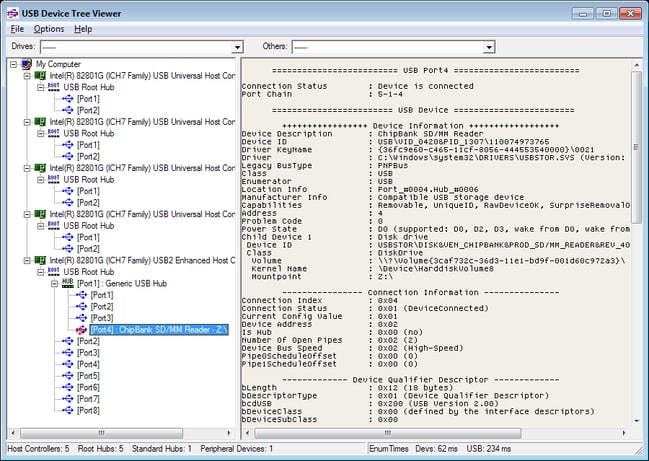
USB Device Tree Viewer analyzes you system configuration and displays details about the connected host controllers, such as the manufacturer, the drivers, bus type, enumerators, location, child devices, drive letters, COM and debug ports, bus statistics, power state and bandwidth info.
Aside from this, you can view the configuration of each connected USB drive and port. The device keyname, description and address, the connection status, the service and enumerator, the location ID, additional capabilities (for instance, if the device is removable), the power state, the descriptors are just some of the available details that this application can read.
The total number of the connected hubs and devices is displayed in the status bar, while the 'Options' menu enables you to optionally read the descriptor hex dump and disable automatic device refresh. In addition to this, the application features automatic retries for previously failed USB requests.
For computers that have a large number of devices connected using USB ports, the treeview can become rather complex, but this application can handle such situations as well, providing you with jump-lists that can be used for quick navigation.
USB Device Tree Viewer is capable of querying the registry and enumerating host controllers, root hubs, as well as the attached devices to each port. It displays extended information regarding the USB ports and devices, providing a user-friendly management tool for all the controllers
Whats New

File Size : 0.7 Mb
USB Device Tree Viewer is designed to provide you with fast access to information concerning the USB host controllers and devices connected to your computer.
Based on the USBView sample application provided by Microsoft within the Windows Driver Kit, this application offers end users an intuitive GUI that allows the easy management of USB devices and ports.
Although the interface is simple and easy to accustom with, USB Device Tree Viewer is intended mostly for tech savvy users, who know how to interpret and use the displayed information.
USB Device Tree Viewer analyzes you system configuration and displays details about the connected host controllers, such as the manufacturer, the drivers, bus type, enumerators, location, child devices, drive letters, COM and debug ports, bus statistics, power state and bandwidth info.
Aside from this, you can view the configuration of each connected USB drive and port. The device keyname, description and address, the connection status, the service and enumerator, the location ID, additional capabilities (for instance, if the device is removable), the power state, the descriptors are just some of the available details that this application can read.
The total number of the connected hubs and devices is displayed in the status bar, while the 'Options' menu enables you to optionally read the descriptor hex dump and disable automatic device refresh. In addition to this, the application features automatic retries for previously failed USB requests.
For computers that have a large number of devices connected using USB ports, the treeview can become rather complex, but this application can handle such situations as well, providing you with jump-lists that can be used for quick navigation.
USB Device Tree Viewer is capable of querying the registry and enumerating host controllers, root hubs, as well as the attached devices to each port. It displays extended information regarding the USB ports and devices, providing a user-friendly management tool for all the controllers
Whats New
