



• Regeln für den Video-Bereich:

    In den Börsenbereich gehören nur Angebote die bereits den Allgemeinen Regeln entsprechen.

    Einteilung

    - Folgende Formate gehören in die angegeben Bereiche:
    - Filme: Encodierte Filme von BluRay, DVD, R5, TV, Screener sowie Telesyncs im Format DivX, XviD und x264.
    - DVD: Filme im Format DVD5, DVD9 und HD2DVD.
    - HD: Encodierte Filme mit der Auflösung 720p oder darüber von BluRay, DVD, R5, TV, Screener sowie Telesyncs im Format x264.
    - 3D: Encodierte Filme von BluRay, die in einem 3D Format vorliegen. Dies gilt auch für Dokus, Animation usw.
    - Serien: Cartoon/Zeichentrick, Anime, Tutorials, Dokumentationen, Konzerte/Musik, Sonstiges sind demnach in die entsprechenden Bereiche einzuordnen, auch wenn sie beispielsweise im High Definition-Format oder als DVD5/DVD9/HD2DVD vorliegen. Ausnahme 3D.
    - Bereich Englisch: Englische Releases gehören immer in diesen Bereich.
    - Bereich Talk: Der Bereich, in dem über die Releases diskutiert werden kann, darf, soll und erwünscht ist.


    Angebot/Beitrag erstellen

    - Ein Beitrag darf erst dann erstellt werden, wenn der Upload bei mindestens einem OCH komplett ist. Platzhalter sind untersagt.
    - Bei einem Scenerelease hat der Threadtitel ausschließlich aus dem originalen, unveränderten Releasenamen zu bestehen. Es dürfen keine Veränderungen wie z.B. Sterne, kleine Buchstaben o.ä. vorgenommen werden. Ausnahme Serienbörse:
    - Bei einem Sammelthread für eine Staffel entfällt aus dem Releasename natürlich der Name der Folge. Beispiel: Die Simpsons S21 German DVDRip XviD - ITG
    - Dementsprechend sind also u.a. verboten: Erweiterungen wie "Tipp", "empfehlenswert", "only", "reup", usw. / jegliche andere Zusatzinformation oder Ergänzung, welche nicht in obiger Beschreibung zu finden ist.

    Aufbau des Angebots und Threadtitel

    Der Titel nach folgendem Muster erstellt zu werden. <Name> [3D] [Staffel] [German] <Jahr> <Tonspur> [DL] [Auflösung] <Quelle> <Codec> - <Group>
    Beispiel: The Dark Knight German 2008 AC3 DVDRip XviD - iND
    Beispiel: The Dark Knight 2008 DTS DL BDRip x264 - iND
    Beispiel: The Dark Knight 2008 AC3 DL BDRip XviD - iND
    Beispiel: The Dark Knight German 2008 AC3 720p BluRay x264 iND
    Beispiel: The Dark Knight 2008 DTS DL 1080p BluRay x264 iND
    Beispiel: Die Simpsons S01 German AC3 DVDRip XviD iND
    Beispiel: Die Simpsons S20 German AC3 720p BluRay x264 iND
    Beispiel: Sword Art Online II Ger Sub 2014 AAC 1080p WEBRip x264 - peppermint
    Entsprechend sind also u.a. verboten: Sonderzeichen wie Klammern, Sterne, Ausrufezeichen, Unterstriche, Anführungszeichen / Erweiterungen wie "Tipp", "empfehlenswert", "only", "reup", usw. / jegliche andere Zusatzinformation oder Ergänzung, welche nicht in obiger Beschreibung zu finden ist
    Ausnahmen hiervon können in den Bereichen geregelt sein.

    Die Beiträge sollen wie folgt aufgebaut werden:
    Überschrift entspricht dem Threadtitel
    Cover
    kurze Inhaltsbeschreibung
    Format, Größe, Dauer sind gut lesbar für Downloader außerhalb des Spoilers zu vermerken
    Nfo sind immer Anzugeben und selbige immer im Spoiler in Textform.
    Sind keine Nfo vorhanden z.B. Eigenpublikationen, sind im Spoiler folgende Dateiinformationen zusätzlich anzugeben :
    Quelle
    Video (Auflösung und Bitrate)
    Ton (Sprache, Format und Bitrate der einzelnen Spuren)
    Untertitel (sofern vorhanden)
    Hosterangabe in Textform außerhalb eines Spoiler mit allen enthaltenen Hostern.
    Bei SD kann auf diese zusätzlichen Dateiinformationen verzichtet werden.

    Alle benötigten Passwörter sind, sofern vorhanden, in Textform im Angebot anzugeben.
    Spoiler im Spoiler mit Kommentaren :"Schon Bedankt?" sind unerwünscht.


    Releases

    - Sind Retail-Release verfügbar, sind alle anderen Variationen untersagt. Ausnahmen: Alle deutschen Retail-Release sind CUT, in diesem Fall sind dubbed UNCUT-Release zulässig.
    - Im Serien-Bereich gilt speziell: Wenn ein Retail vor Abschluss einer laufenden Staffel erscheint, darf diese Staffel noch zu Ende gebracht werden.62
    - Gleiche Releases sind unbedingt zusammenzufassen. Das bedeutet, es ist zwingend erforderlich, vor dem Erstellen eines Themas per Suchfunktion zu überprüfen, ob bereits ein Beitrag mit demselben Release besteht. Ist dies der Fall, ist der bereits vorhandene Beitrag zu verwenden.
    - P2P und Scene Releases dürfen nicht verändert oder gar unter einem iND Tag eingestellt werden.


    Support, Diskussionen und Suche

    - Supportanfragen sind entweder per PN oder im Bereich Talk zu stellen.
    - Diskussionen und Bewertungen sind im Talk Bereich zu führen. Fragen an die Uploader haben ausschließlich via PN zu erfolgen, und sind in den Angeboten untersagt.
    - Anfragen zu Upload-Wünschen sind nur im Bereich Suche Video erlaubt. Antworten dürfen nur auf Angebote von MyBoerse.bz verlinkt werden.


    Verbote

    - Untersagt sind mehrere Formate in einem einzigen Angebotsthread, wie beispielsweise das gleichzeitige Anbieten von DivX/XviD, 720p und 1080p in einem Thread. Pro Format, Release und Auflösung ist ein eigener Thread zu eröffnen.
    - Grundsätzlich ebenso verboten sind Dupes. Uploader haben sich an geeigneter Stelle darüber zu informieren, ob es sich bei einem Release um ein Dupe handelt.
    - Gefakte, nur teilweise lauffähige oder unvollständige Angebote sind untersagt. Dies gilt auch für eigene Publikationen, die augenscheinlich nicht selbst von z.B. einer DVD gerippt wurden. Laufende Serien, bei denen noch nicht alle Folgen verfügbar sind, dürfen erstellt und regelmäßig geupdatet werden.
    - Untersagt sind Angebote, welche nur und ausschließlich in einer anderen Sprache als deutsch oder englisch vorliegen. Ausnahmen sind VORHER mit den Moderatoren zu klären.


    Verstoß gegen die Regeln

    - Angebote oder Beiträge, die gegen die Forenregeln verstoßen, sind über den "Melden"-Button im Beitrag zu melden.
  • Bitte registriere dich zunächst um Beiträge zu verfassen und externe Links aufzurufen.

*** Bestes IPTV *** bester Preis *** gratis Test ***


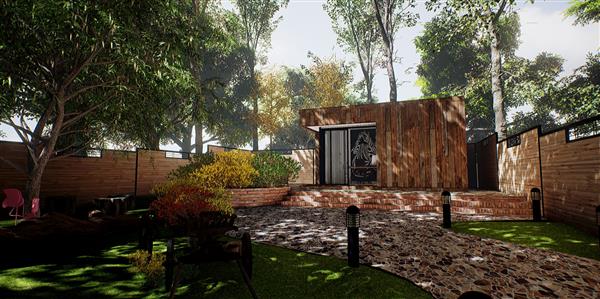
Unreal Archviz Exterior and Interior Tutorial - The Garden Office

Tutorials

MyBoerse.bz Pro Member
4wqnuvpmbkh8dn8qotly3uk99nwlhnvl.jpg

Instructors: Unreal Archviz Tutorial
12 sections • 16 lectures • N/A total length
Video: MP4 1920x1080 48 KHz | English | Size: 18.6 GB


This tutorial series builds upon the lesson 1-6 fundamental lessons and guides you step by step on creating an exterior and interior archviz scene - The Garden Office.
We will teach you how to set up the lighting required for a good exterior and interior scene and also some materials technique that we use to make more realistic looking materials.
Check out the video teaser here:

At the end of my course
1. Students will have a practical experience and understand the lighting setup needed in creating a good looking exterior+interior visualisation project.
2. Students will be able to take their Archviz work in 3ds max and transfer them into Unreal Engine 4 to make it 'Playable' in VR or touch based laptops
3. Students will be able to understand the general workflow of using the unreal engine 4 for their interior/exterior Archviz work.
4. Students will learn the different lighting methods use to light interior and exterior scenes
5. Students will learn various nodes in the material editor to create good looking materials
Who should take my course
1. 3d Artists, Environment Artists, Interior Designers, Architects, Game developers getting started with UE4.
2. Architect/Interior Design Students doing a final year piece
Prerequisites
1. Basic 3d Modelling using 3ds max
For a more detailed breakdown of the tutorial subject, please refer to below.
Lesson 7: Setting up Swarm Agent for faster light building/rendering
In this lesson, I will show you how we can use the swarm agent to hook up various PCs to help in the light building process (A.K.A Light Baking process). Getting good looking visualisations in UE4 requires lots of indirect lighting and shadow calculations. Setting up a 'Swarm' farm will help reduce the time needed for this process.
1) Reason and concept for 'Render Farm'
2) Downloading and Installing Unreal Engine on Slave PCS.
3) Choosing Swarm coordinator and checking the IP address
4) Configuring the Swarm.exe in Slave PCs
5) Testing your first build
Lesson 8: Building the interior and interior lighting
In this lesson, we will use the skills gained in the first 6 lessons to import and setup the materials for our interior scene. We will also discuss the lighting techniques we will use if we are doing a pure interior scene and some lightmass(UE4's global illumination solution) setting that is commonly used by artists to get realistic contact shadows.
I will also show how i manually unwrap some meshes to make an object look good without the need to increase its lightmap resolution.
1) Lesson 1-7 - Quick Recap of Past Lessons and use the lessons learnt to create interior scene.
2) Skylight with lightmass portal
3) World settings and Baselightmass.ini settings for realistic contact shadows.
4) Advanced Lightmass studies
5) Manually Unwrap UV lightmaps using pelt mapping
Lesson 9: Advanced Materials
In this lesson, we take our materials to the next level. I will show you some more commonly used materials that we can build for our project.
1) Tesselation and Bump Offset
2) Lerp and Clamp
3) Normal Multiplier
4) Base Material for instancing
5) Moire Effect
6) Our very own glass
7) Timelapse For Garden Office Interior
8) Mirror Material
9) Play video on computer screen
10) Vertex Painting
Lesson 10: Landscape and foliage tools
In this lesson, we begin to work on the exterior scene. I will show you how i create the grass material and a technique i use to remove the repeating pattern of the grass, so that it looks much more natural and real. I will also show you how we can optimize our trees for best visuals and best performance.
1) Landscape tools used in Garden Office
2) Grass materials - Advanced technique to remove tiling effect.
3) Trees from speedtree
4) Trees from 3dsmax
5) Wind animations on Non-Speedtree trees
6) Foliage tools
7) Time Lapse for The Garden Office Exterior
Lesson 11: Outdoor Lighting
In this lesson, i will show you the lighting setup that i use to light up our exterior scene. I will also discuss some of the techniques i use to remove the artifacts that arise due to the exterior lighting models that we use. I will also how we can turn off the outdoor lighting effect in real time when our actor goes indoor.
1) Introduction to outdoor lighting
2) DFAO and movable skylight
3) Artifacts due to DFAO
4) Replacement mesh to remove DFAO artifacts
5) Lightmass and outdoor lighting
Lesson 12: Final post process and optimization
Crank up the visuals by using post process techniques. I will show you how we can use our own LUT to create the mood we want, and how we can increase the sharpness of our scene so that it will look crisp and clear. I will also discuss some optimization techniques to increase the frame rates of our project.
1) Fog
2) Unsharp Masking
3) LUT
4) Other Post process settings used for the Garden Office
5) Optimizing trees using auto LOD reduction
6) Combining meshes to reduce draw calls
7) Post Process Volume for interior
8) Using bluprint to turn off Movable Skylight
Lesson 13: Sequencer and music for high quality animation
With the sequencer, we can now create beautiful animations in unreal engine without long render time. In this lesson, i will show you how we can use the sequencer tools to do that.
1) Music
2) Sequencer
3) Lens setting
4) Taking high resolution
5) Generating movies for further processing
Lesson 14: Presentation of projects
In this lesson, i will discuss how we can setup our project for various presentation. I will show you how we can present our project in a mobile phone using the appstream app. I will also show you how you can setup the project to control the movement using a controller. I will also show you how we can package our project for virtual reality.
1) Moving around using touch controls
2) NAV volume
3) Virtual Reality and controller settings


Recommend Download Link Hight Speed | Please Say Thanks Keep Topic Live
Links are Interchangeable - No Password - Single Extraction

 
Zurück
Oben Unten