




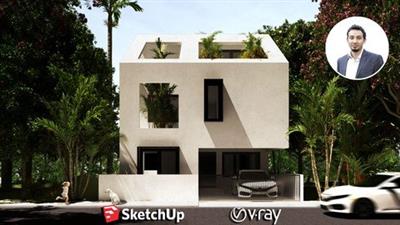
Genre: eLearning | MP4 | Video: h264, 1280x720 | Audio: aac, 48000 Hz
Language: English | SRT | Size: 4.20 GB | Duration: 4h 56m
What you'll learn
Learn the core Sketchup skills required to model a Home faster & more efficiently.
Learn how to use certain Sketchup Plugins to take your modeling skills to the next level.
Understand Vray lighting, materials, settings, render elements & more to create amazing Photorealistic Exterior Renders
Learn from a Real-Life Residential Project as we model & render a Contemporary Home, Site, Surroundings & more, STEP-BY-STEP.
Understand Residential Design standards and styles required to design homes functionally and efficiently.
Requirements
A computer with either Windows or Mac to install all the software & sketchup plugins to model & render your Dream Home.
A strong work ethic, willingness to learn, and plenty of excitement about the awesome new Sketchup modeling & Vray rendering skills you will acquire in this Exterior Design course.
Nothing else! It's just you, your computer and your hunger to get started today.
Description
You've just stumbled upon the most complete, in-depth Sketchup & Vray course for Exterior Design. These comprehensive Sketchup & Vray tutorials cover everything you'll ever need to become the best Architect out there.
This course is designed to jumpstart your Sketchup,Vray & Architecture Journey, wherein we take you Step by Step with a Real-Life Residential Project and get you up & running to design your favourite Residential Home efficiently, quickly and in the right way.
Why this Course?
Comprehensive coverage of the essentials tools to design a Residence like walls, openings, elevations, stairs & more - Learn not only how every tool works but also how to apply it in the right way in your Sketchup workflow.
Downloadable Resources - Exercise files like ****Sketchup Models for every lecture & section so you can follow along step by step.
Learn from an Expert - I've been using Sketchup for over 10 years and I will be sharing all my skills and secrets which has helped me model faster, efficiently and most importantly, amaze clients.
Monthly Updates - This course will be updated on a monthly basis with new high quality tutorials and resources and you will get an in-depth understanding of how to design a modern contemporary bedroom, modular kitchen & more.
Taught by an Architect & BIM Consultant - We not only learn about modelling & rendering in Sketchup, but you will also learn useful interior design tips, standards, and secrets along the way from the instructor who has over 6+ years experience in the Industry.
Access to Exclusive Sketchup & Vray Library - All our students will get exclusive access to our Sketchup Library for every Exterior Design space worth over 150$. These models can be imported directly into your scene and rendered since it comes preloaded with Vray materials.
Who is this Course For?
Architects
Architecture Students
Design Professionals who want to learn 3D
Construction Professionals
Anyone with an interest in 3D Modelling in Sketchup
Anyone with an interest in 3D Rendering with Vray Next for Sketchup
Real Estate Agents
Agencies and Corporations - If you want to get team members within your company up to standard, we can do that for you..
3D Artists - If you want to build a reputation as a 3D Artist this program will give you that foundation.
Beginner to Advanced Sketchup Users
(note that this course will be taught on the Windows version but the same techniques can be applied in Mac as well)
What you will Learn?
It is crucial that when you learn Sketchup, you start with the right fundamentals (which is also easy to pickup). Once you've picked up on the fundamentals of 3D Modelling, we jump into more advanced topics using specific Sketchup plugins, to take your modelling to the Next Level.
This course is divided into Four Sections
Prior to Section 01, we will have the introduction and how to install Sketchup, Vray & all the essential plugins
Section 01 - An Introduction to Sketchup
In Section 01, we will start with the fundamentals
We will learn about the Sketchup Interface & it's simplicity.
Understand most-used common tools
Importance of modeling with Groups & Components.
Assign shortcuts & learn to model faster & efficiently.
Create Sections & export views into CAD drawings
Section 02 - Sketchup (Modeling a Contemporary Residence
In Section 02, we will learn to model our entire home in Sketchup as per residential standards.
We will start this section with a brief introduction to Residential Design & the importance of vastu in residences.
We will learn to import our CAD drawing into Sketchup
How to model walls, openings, floor slabs, roof slabs, doors & windows in Sketchup
How to model Balcony doors & railings in sketchup
Learn to create a dog-legged stairs in Sketchup
Create a Parametric Glass Facade using plugins like curviloft, bezier spline, joint push tool & more.
We then learn some Landscape Modelling Techniques Taught in this Section.
Learn to model Site & its surroundings in Sketchup.
Learn to model Terrain using the Sandbox tools & Artisan Tools in Sketchup.
Learn to use the Laubwerk plugin to add trees & plants to scene.
Setting up Camera Angles using Scenes in Sketchup
Section 03 - Vray Next for Sketchup
In Section 03, we jump into the world of photorealistic rendering with Vray Next for Sketchup.
We will be introduce to the Vray Interface & the Vray Asset Editor
Learn to set up lights in Vray (Photographic Approach with the Archgyan Lighting System)
Create a Studio, add 3D Warehouse models, adjust lights & materials, and create a final render of our Hyundai Car in the Studio.
Create a Vray Library and Apply Materials.
Final Adjustments in Sketchup & Vray Next
Finally rendering of our scene with appropriate render elements for post-production in photoshop.
Section 04 - Post-Production in Photoshop
In Section 04, we enhance our render even more through post-production techniques in Photoshop
Learn to bring in render elements the right way into photoshop & apply the right blending effects.
Adding Skies & Trees in the background.
Using Brushes in photoshop & locking layers.
Adding Cutouts like humans & animals into the scene.
Adding a Concrete Texture to Walls, Roads & Footpaths.
Final Adjustments in Photoshop using adjustment layers.
By the end of this section, you will have created an amazing Modern Residence in under 2 hours. But that's not all!!
This is not a create and forget course. We will keep updating this course with new course content and add it to future section on a monthly basis. We will be updating our course description here as and when we release new tutorials and downloadable resources.
Special Features Provided
Downlodable Scenes, complete with all V-Ray Settings
Exclusive Student Group on Facebook
Exclusive Sketchup & Vray Library for Exterior Design
By the end of the course, you will have a solid understanding of Sketchup & Vray Next, and you will be well on your way to creating amazing renders for your clients.
Who this course is for:
Architects
Architecture students
Design professionals who want to learn 3D
Anyone with an interest in 3d
Construction Professionals
Real Estate Agents
Agencies and Corporations - If you want to get team members within your company up to standard, we can do that for you.
3D Artists - If you want to build a reputation as a 3D Artist this program will give you that foundation.
Homepage
Recommend Download Link Hight Speed | Please Say Thanks Keep Topic Live
Links are Interchangeable - No Password - Single Extraction
