• Regeln für den Video-Bereich:

    In den Börsenbereich gehören nur Angebote die bereits den Allgemeinen Regeln entsprechen.

    Einteilung

    - Folgende Formate gehören in die angegeben Bereiche:
    - Filme: Encodierte Filme von BluRay, DVD, R5, TV, Screener sowie Telesyncs im Format DivX, XviD und x264.
    - DVD: Filme im Format DVD5, DVD9 und HD2DVD.
    - HD: Encodierte Filme mit der Auflösung 720p oder darüber von BluRay, DVD, R5, TV, Screener sowie Telesyncs im Format x264.
    - 3D: Encodierte Filme von BluRay, die in einem 3D Format vorliegen. Dies gilt auch für Dokus, Animation usw.
    - Serien: Cartoon/Zeichentrick, Anime, Tutorials, Dokumentationen, Konzerte/Musik, Sonstiges sind demnach in die entsprechenden Bereiche einzuordnen, auch wenn sie beispielsweise im High Definition-Format oder als DVD5/DVD9/HD2DVD vorliegen. Ausnahme 3D.
    - Bereich Englisch: Englische Releases gehören immer in diesen Bereich.
    - Bereich Talk: Der Bereich, in dem über die Releases diskutiert werden kann, darf, soll und erwünscht ist.


    Angebot/Beitrag erstellen

    - Ein Beitrag darf erst dann erstellt werden, wenn der Upload bei mindestens einem OCH komplett ist. Platzhalter sind untersagt.
    - Bei einem Scenerelease hat der Threadtitel ausschließlich aus dem originalen, unveränderten Releasenamen zu bestehen. Es dürfen keine Veränderungen wie z.B. Sterne, kleine Buchstaben o.ä. vorgenommen werden. Ausnahme Serienbörse:
    - Bei einem Sammelthread für eine Staffel entfällt aus dem Releasename natürlich der Name der Folge. Beispiel: Die Simpsons S21 German DVDRip XviD - ITG
    - Dementsprechend sind also u.a. verboten: Erweiterungen wie "Tipp", "empfehlenswert", "only", "reup", usw. / jegliche andere Zusatzinformation oder Ergänzung, welche nicht in obiger Beschreibung zu finden ist.

    Aufbau des Angebots und Threadtitel

    Der Titel nach folgendem Muster erstellt zu werden. <Name> [3D] [Staffel] [German] <Jahr> <Tonspur> [DL] [Auflösung] <Quelle> <Codec> - <Group>
    Beispiel: The Dark Knight German 2008 AC3 DVDRip XviD - iND
    Beispiel: The Dark Knight 2008 DTS DL BDRip x264 - iND
    Beispiel: The Dark Knight 2008 AC3 DL BDRip XviD - iND
    Beispiel: The Dark Knight German 2008 AC3 720p BluRay x264 iND
    Beispiel: The Dark Knight 2008 DTS DL 1080p BluRay x264 iND
    Beispiel: Die Simpsons S01 German AC3 DVDRip XviD iND
    Beispiel: Die Simpsons S20 German AC3 720p BluRay x264 iND
    Beispiel: Sword Art Online II Ger Sub 2014 AAC 1080p WEBRip x264 - peppermint
    Entsprechend sind also u.a. verboten: Sonderzeichen wie Klammern, Sterne, Ausrufezeichen, Unterstriche, Anführungszeichen / Erweiterungen wie "Tipp", "empfehlenswert", "only", "reup", usw. / jegliche andere Zusatzinformation oder Ergänzung, welche nicht in obiger Beschreibung zu finden ist
    Ausnahmen hiervon können in den Bereichen geregelt sein.

    Die Beiträge sollen wie folgt aufgebaut werden:
    Überschrift entspricht dem Threadtitel
    Cover
    kurze Inhaltsbeschreibung
    Format, Größe, Dauer sind gut lesbar für Downloader außerhalb des Spoilers zu vermerken
    Nfo sind immer Anzugeben und selbige immer im Spoiler in Textform.
    Sind keine Nfo vorhanden z.B. Eigenpublikationen, sind im Spoiler folgende Dateiinformationen zusätzlich anzugeben :
    Quelle
    Video (Auflösung und Bitrate)
    Ton (Sprache, Format und Bitrate der einzelnen Spuren)
    Untertitel (sofern vorhanden)
    Hosterangabe in Textform außerhalb eines Spoiler mit allen enthaltenen Hostern.
    Bei SD kann auf diese zusätzlichen Dateiinformationen verzichtet werden.

    Alle benötigten Passwörter sind, sofern vorhanden, in Textform im Angebot anzugeben.
    Spoiler im Spoiler mit Kommentaren :"Schon Bedankt?" sind unerwünscht.


    Releases

    - Sind Retail-Release verfügbar, sind alle anderen Variationen untersagt. Ausnahmen: Alle deutschen Retail-Release sind CUT, in diesem Fall sind dubbed UNCUT-Release zulässig.
    - Im Serien-Bereich gilt speziell: Wenn ein Retail vor Abschluss einer laufenden Staffel erscheint, darf diese Staffel noch zu Ende gebracht werden.62
    - Gleiche Releases sind unbedingt zusammenzufassen. Das bedeutet, es ist zwingend erforderlich, vor dem Erstellen eines Themas per Suchfunktion zu überprüfen, ob bereits ein Beitrag mit demselben Release besteht. Ist dies der Fall, ist der bereits vorhandene Beitrag zu verwenden.
    - P2P und Scene Releases dürfen nicht verändert oder gar unter einem iND Tag eingestellt werden.


    Support, Diskussionen und Suche

    - Supportanfragen sind entweder per PN oder im Bereich Talk zu stellen.
    - Diskussionen und Bewertungen sind im Talk Bereich zu führen. Fragen an die Uploader haben ausschließlich via PN zu erfolgen, und sind in den Angeboten untersagt.
    - Anfragen zu Upload-Wünschen sind nur im Bereich Suche Video erlaubt. Antworten dürfen nur auf Angebote von MyBoerse.bz verlinkt werden.


    Verbote

    - Untersagt sind mehrere Formate in einem einzigen Angebotsthread, wie beispielsweise das gleichzeitige Anbieten von DivX/XviD, 720p und 1080p in einem Thread. Pro Format, Release und Auflösung ist ein eigener Thread zu eröffnen.
    - Grundsätzlich ebenso verboten sind Dupes. Uploader haben sich an geeigneter Stelle darüber zu informieren, ob es sich bei einem Release um ein Dupe handelt.
    - Gefakte, nur teilweise lauffähige oder unvollständige Angebote sind untersagt. Dies gilt auch für eigene Publikationen, die augenscheinlich nicht selbst von z.B. einer DVD gerippt wurden. Laufende Serien, bei denen noch nicht alle Folgen verfügbar sind, dürfen erstellt und regelmäßig geupdatet werden.
    - Untersagt sind Angebote, welche nur und ausschließlich in einer anderen Sprache als deutsch oder englisch vorliegen. Ausnahmen sind VORHER mit den Moderatoren zu klären.


    Verstoß gegen die Regeln

    - Angebote oder Beiträge, die gegen die Forenregeln verstoßen, sind über den "Melden"-Button im Beitrag zu melden.
  • Bitte registriere dich zunächst um Beiträge zu verfassen und externe Links aufzurufen.

++ Premium IPTV ++ 7000 Live Sender ++ UHD Qualität ++ Mediathek mit 18.000 Inhalten ++


VenneTV


Udemy - Golang Complete Course

Tutorials

MyBoerse.bz Pro Member
bfabfacb76c22e9f0885ab1632aa3376.jpeg

Created by Edcorner Learning | Published 4/2021
Duration: 10h18m | 12 sections | 67 lectures | Video: 1280x720, 44 KHz | 3.4 GB
Genre: eLearning | Language: English + Sub

Learn Go Programming Language Complete Course
What you'll learn
Golang
Methods
Implementation
Arrays
Implementing Interfaces
Channel
Rate Limiting
Atomic Counter and Mutex
Collection Functions
String Functions
Expressions
Reading
Show more
Show less
Requirements
Eager to learn Golang
Description
Golang Complete Course - Learn Go Programming Language Complete Course
Go, or Golang, is an open source programming language. It's statically typed and produces compiled machine code binaries. Developers say that Google's Go language is the C for the twenty-first century when it comes to syntax. However, this new programming language includes tooling that allows you to safely use memory, manage objects, collect garbage, and provide static (or strict) typing along with concurrency.
The world was first introduced to Go in 2009 thanks to Google's Rob Pike, Robert Griesemer, and Ken Thompson. The main goal of creating Go was to combine the best features of other programming languages:
Ease of use together with state-of-the-art productivity
High-level efficiency along with static typing
Advanced performance for networking and the full use of multi-core power

Recommend Download Link Hight Speed | Please Say Thanks Keep Topic Live
Links are Interchangeable - No Password - Single Extraction
 

af45636f31a595d2b0c26c55203334ca.jpg

Go - Complete Course On Go (Golang)
Published 7/2025
MP4 | Video: h264, 1920x1080 | Audio: AAC, 44.1 KHz
Language: English | Size: 12.68 GB | Duration: 25h 2m​

Master the Go language from scratch: variables, functions, structs, maps, interfaces, goroutines, and error handling.

What you'll learn

Learn how to install Go, set up VS Code, and write your first programs while compiling and formatting code according to Go best practices.

Understand variables, constants, and types; learn to use Printf, grasp static typing, and default values.

Master functions, arrays, slices, maps, structs, interfaces, and pointers including closures, methods, and passing by reference.

Learn how to handle errors, use panic and recover, and write concurrent code using goroutines, channels, and wait groups.

Requirements

Basic knowledge of working with a computer, installing software, and navigating the file system

A desire to learn a modern programming language and apply it with practical examples

No prior programming experience required - everything is explained from scratch

Description

The Go programming language (or Golang), developed by Google, is rapidly growing in popularity thanks to its simplicity, high performance, and built-in support for concurrent execution. This course is designed for anyone who wants to learn Go from scratch and start building reliable, scalable, and efficient programs.We begin by installing Go and setting up the development environment in Visual Studio Code. You'll learn how to work with packages, write basic programs, compile and format your code. We'll dive into variables, basic types, constants, and functions including closures and named return values.Next, you'll explore pointers, arrays, slices, conditional statements, and loops. As we move into more advanced topics, you'll learn how to work with maps and structs, including their specific behaviors and differences. Special attention is given to interfaces and how they are implemented - an essential concept that makes Go a powerful language for development.A large part of the course focuses on error handling: from simple error checks to advanced use of panic, recover, and creating custom error types. We conclude with an in-depth look at goroutines, channels, and synchronization -enabling you to write concurrent applications with confidence.The course follows a "from simple to complex" approach, filled with real-world examples, exercises, and hands-on practice. You'll not only understand how Go works but also learn how to apply your knowledge to practical coding tasks.Key topics you'll master:Setting up the development environment and writing your first Go programWorking with variables, types, constants, and functionsPointers, arrays, slices, conditionals, and loopsUsing maps and structs; understanding value and reference typesInterfaces: implementation, multiple implementations, and generic interfacesError handling: panic, recover, and custom error typesConcurrency: goroutines, channels, and wait groupsEach video lesson includes clear explanations, examples, and exercises. By the end of the course, you'll gain not only strong foundational knowledge but also ready-to-use templates for your own projects.And don't forget - Udemy offers a 30-day money-back guarantee. You risk nothing by starting your learning journey today!

Overview

Section 1: Introduction to Go

Lecture 1 IMPORTANT - Download course project files

Lecture 2 Let's get connected!

Section 2: Installing Go and Go Commands

Lecture 3 Installing Go

Lecture 4 Go Commands

Lecture 5 Installing Visual Studio Code Editor

Lecture 6 Configuring VS Code for Go

Section 3: Go Basics

Lecture 7 main Function and main Package

Lecture 8 fmt Package and Println Function

Lecture 9 Compiling Go Programs

Lecture 10 Formatting Go Code

Lecture 11 External Packages for Go Applications

Lecture 12 Creating a Module and Using External Packages

Lecture 13 Summary of First Go Program

Section 4: Variables and Basic Types

Lecture 14 Preparing to Discuss Variables in Go

Lecture 15 Declaring and Assigning Variables

Lecture 16 Adding Another File with main Function

Lecture 17 Resolving Multiple main Function Error

Lecture 18 Different Ways to Declare Variables

Lecture 19 Using Printf to Format Strings

Lecture 20 Determining Variable Types

Lecture 21 Reassigning Variable Values

Lecture 22 Static Typing in Go

Lecture 23 Declaring Variables Separately

Lecture 24 Default Zero Values for Variables

Lecture 25 Strong Typing in Go

Lecture 26 Declaring Multiple Variables in One Line

Section 5: Constants

Lecture 27 Constants in Go

Lecture 28 Constants and Type Adaptation

Lecture 29 Grouping Variables and Constants

Lecture 30 Summary of Variables in Go

Section 6: Functions

Lecture 31 Preparing to Discuss Functions in Go

Lecture 32 Creating and Calling Functions

Lecture 33 Function Parameters and Arguments

Lecture 34 Multiple Parameters in Functions

Lecture 35 Returning Values from Functions

Lecture 36 Using Result of One Function in Another

Lecture 37 Returning Multiple Values from Function

Lecture 38 Named Return Values

Lecture 39 Named Function Literals

Lecture 40 Closures in Functions

Lecture 41 Summary of Functions in Go

Section 7: Pointers

Lecture 42 Using Pointers to Get Memory Addresses

Lecture 43 Changing Memory Values with Pointers

Lecture 44 Functions Without Pointers

Lecture 45 Functions With Pointers

Lecture 46 Summary of Pointers in Go

Section 8: Arrays and Slices

Lecture 47 Creating Arrays

Lecture 48 Assigning Arrays and len Function

Lecture 49 Creating Slice from Array

Lecture 50 Relationship Between Array and Slice

Lecture 51 Different Ways to Create Slices

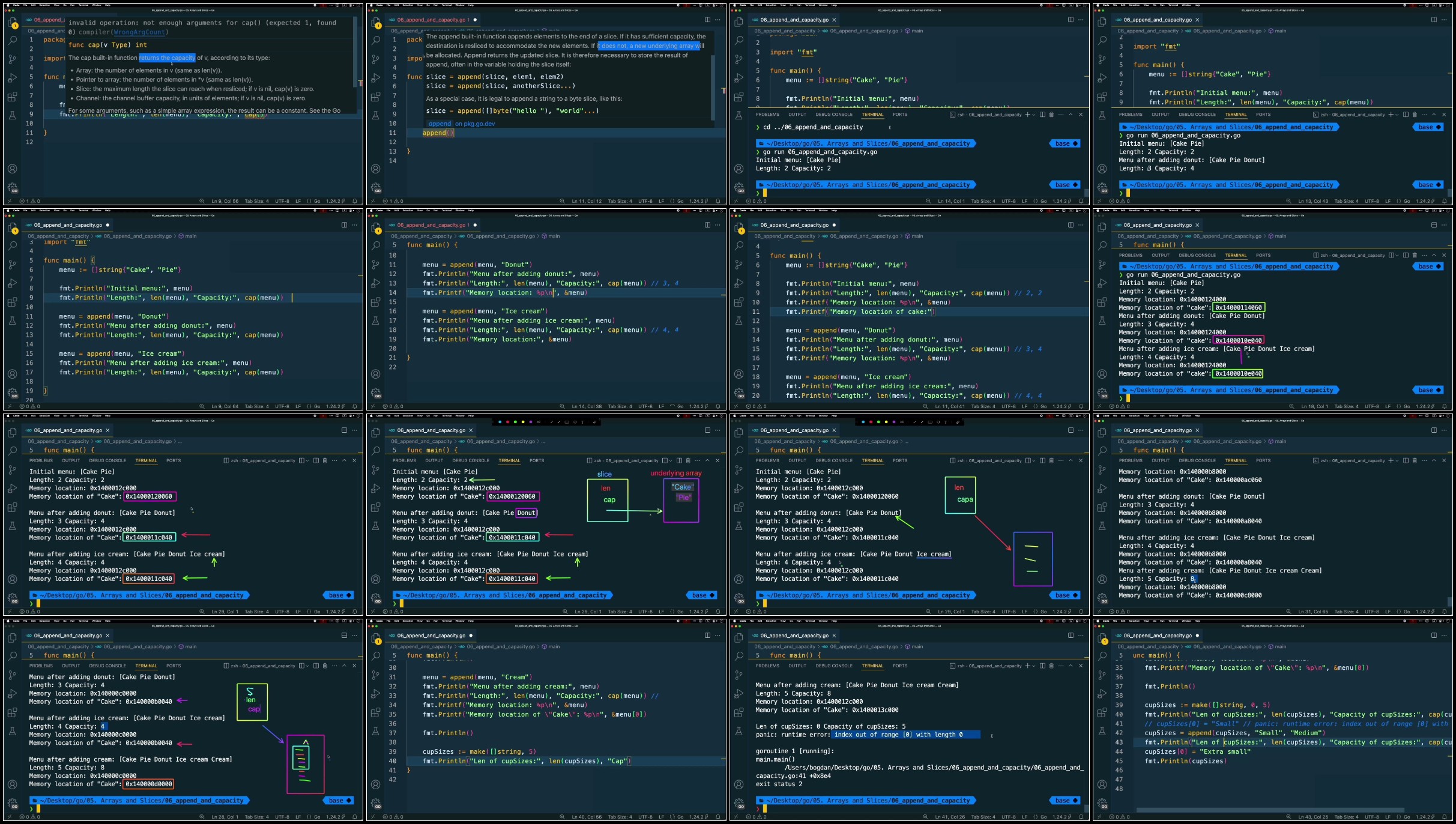
Lecture 52 Adding Elements to Slice and cap Function

Lecture 53 Exceeding Maximum Size in Slice

Lecture 54 Removing Elements from Slice

Lecture 55 Iterating with for Loop

Lecture 56 Summary of Arrays and Slices

Section 9: Conditionals: if and switch

Lecture 57 if Statement

Lecture 58 if else Statement

Lecture 59 if else if Statement

Lecture 60 Nested if and Combining Conditions

Lecture 61 Initializers in if Statements

Lecture 62 switch Statement

Section 10: Loops: for and for-range

Lecture 63 for Loop with Counter

Lecture 64 for Loop with Condition

Lecture 65 Infinite Loop with break and continue

Lecture 66 for range Loop

Lecture 67 Using break and continue in for range

Lecture 68 Summary of if, switch, and for

Section 11: Map Type

Lecture 69 Creating and Using map

Lecture 70 Checking Key Existence in map

Lecture 71 Deleting Keys from map

Lecture 72 Iterating Over map

Lecture 73 What is nil

Lecture 74 Using make Function to Create map

Lecture 75 Passing map to a Function

Lecture 76 Summary of map Usage

Section 12: Struct Type

Lecture 77 Introduction to struct Type

Lecture 78 Using Struct Literals

Lecture 79 Passing Struct to Function by Value

Lecture 80 Passing Struct to Function by Pointer

Lecture 81 Struct Fields of Type func

Lecture 82 Methods for struct

Lecture 83 Methods for Other Types

Lecture 84 Differences Between struct and map

Lecture 85 Summary of struct

Section 13: Interfaces

Lecture 86 What is an Interface (Coffee Shop Example)

Lecture 87 Basic Interface Implementation

Lecture 88 Multiple Implementations of an Interface

Lecture 89 Interface as Function Parameter

Lecture 90 Implementing the Built-in Stringer Interface

Lecture 91 Task: Representing Slice as String

Lecture 92 Task: Implementing Interface for a Struct Type

Lecture 93 Implementing Multiple Interfaces

Lecture 94 Creating Slice of Interface Type

Lecture 95 Using the Empty Interface

Lecture 96 Summary of Interfaces

Section 14: Errors

Lecture 97 Runtime Errors

Lecture 98 Avoiding Division by Zero Error

Lecture 99 Deferred Named Function Calls

Lecture 100 Deferred Anonymous Function Calls

Lecture 101 Recovering from Errors in Deferred Functions

Lecture 102 Getting Errors from a Function

Lecture 103 Creating error

Lecture 104 Implementing error Interface and panic

Lecture 105 Creating and Returning Error from Function

Lecture 106 Creating Error with errors.New

Lecture 107 Summary of Error Handling

Section 15: Goroutines & Concurrency

Lecture 108 Intro to Concurrent Execution

Lecture 109 What is the main Goroutine

Lecture 110 Creating a Goroutine

Lecture 111 Multiple Goroutines

Lecture 112 Using WaitGroups

Lecture 113 Using Channels Between Goroutines

Lecture 114 One Channel for Multiple Goroutines

Lecture 115 Summary of Goroutines

Beginners who want to learn Go from the ground up to a confident level,Developers familiar with other languages who want to switch to Go and understand its unique features,Anyone interested in learning a language with built-in support for concurrency and strong typing

DELGV11s_o.jpg


7d5f9a6f770d06584c02217885f5c161.jpg

Go - Complete Course On Go (Golang)
Published 7/2025
MP4 | Video: h264, 1920x1080 | Audio: AAC, 44.1 KHz
Language: English | Size: 12.68 GB | Duration: 25h 2m​

Master the Go language from scratch: variables, functions, structs, maps, interfaces, goroutines, and error handling.

What you'll learn

Learn how to install Go, set up VS Code, and write your first programs while compiling and formatting code according to Go best practices.

Understand variables, constants, and types; learn to use Printf, grasp static typing, and default values.

Master functions, arrays, slices, maps, structs, interfaces, and pointers including closures, methods, and passing by reference.

Learn how to handle errors, use panic and recover, and write concurrent code using goroutines, channels, and wait groups.

Requirements

Basic knowledge of working with a computer, installing software, and navigating the file system

A desire to learn a modern programming language and apply it with practical examples

No prior programming experience required - everything is explained from scratch

Description

The Go programming language (or Golang), developed by Google, is rapidly growing in popularity thanks to its simplicity, high performance, and built-in support for concurrent execution. This course is designed for anyone who wants to learn Go from scratch and start building reliable, scalable, and efficient programs.We begin by installing Go and setting up the development environment in Visual Studio Code. You'll learn how to work with packages, write basic programs, compile and format your code. We'll dive into variables, basic types, constants, and functions including closures and named return values.Next, you'll explore pointers, arrays, slices, conditional statements, and loops. As we move into more advanced topics, you'll learn how to work with maps and structs, including their specific behaviors and differences. Special attention is given to interfaces and how they are implemented - an essential concept that makes Go a powerful language for development.A large part of the course focuses on error handling: from simple error checks to advanced use of panic, recover, and creating custom error types. We conclude with an in-depth look at goroutines, channels, and synchronization -enabling you to write concurrent applications with confidence.The course follows a "from simple to complex" approach, filled with real-world examples, exercises, and hands-on practice. You'll not only understand how Go works but also learn how to apply your knowledge to practical coding tasks.Key topics you'll master:Setting up the development environment and writing your first Go programWorking with variables, types, constants, and functionsPointers, arrays, slices, conditionals, and loopsUsing maps and structs; understanding value and reference typesInterfaces: implementation, multiple implementations, and generic interfacesError handling: panic, recover, and custom error typesConcurrency: goroutines, channels, and wait groupsEach video lesson includes clear explanations, examples, and exercises. By the end of the course, you'll gain not only strong foundational knowledge but also ready-to-use templates for your own projects.And don't forget - Udemy offers a 30-day money-back guarantee. You risk nothing by starting your learning journey today!

Overview

Section 1: Introduction to Go

Lecture 1 IMPORTANT - Download course project files

Lecture 2 Let's get connected!

Section 2: Installing Go and Go Commands

Lecture 3 Installing Go

Lecture 4 Go Commands

Lecture 5 Installing Visual Studio Code Editor

Lecture 6 Configuring VS Code for Go

Section 3: Go Basics

Lecture 7 main Function and main Package

Lecture 8 fmt Package and Println Function

Lecture 9 Compiling Go Programs

Lecture 10 Formatting Go Code

Lecture 11 External Packages for Go Applications

Lecture 12 Creating a Module and Using External Packages

Lecture 13 Summary of First Go Program

Section 4: Variables and Basic Types

Lecture 14 Preparing to Discuss Variables in Go

Lecture 15 Declaring and Assigning Variables

Lecture 16 Adding Another File with main Function

Lecture 17 Resolving Multiple main Function Error

Lecture 18 Different Ways to Declare Variables

Lecture 19 Using Printf to Format Strings

Lecture 20 Determining Variable Types

Lecture 21 Reassigning Variable Values

Lecture 22 Static Typing in Go

Lecture 23 Declaring Variables Separately

Lecture 24 Default Zero Values for Variables

Lecture 25 Strong Typing in Go

Lecture 26 Declaring Multiple Variables in One Line

Section 5: Constants

Lecture 27 Constants in Go

Lecture 28 Constants and Type Adaptation

Lecture 29 Grouping Variables and Constants

Lecture 30 Summary of Variables in Go

Section 6: Functions

Lecture 31 Preparing to Discuss Functions in Go

Lecture 32 Creating and Calling Functions

Lecture 33 Function Parameters and Arguments

Lecture 34 Multiple Parameters in Functions

Lecture 35 Returning Values from Functions

Lecture 36 Using Result of One Function in Another

Lecture 37 Returning Multiple Values from Function

Lecture 38 Named Return Values

Lecture 39 Named Function Literals

Lecture 40 Closures in Functions

Lecture 41 Summary of Functions in Go

Section 7: Pointers

Lecture 42 Using Pointers to Get Memory Addresses

Lecture 43 Changing Memory Values with Pointers

Lecture 44 Functions Without Pointers

Lecture 45 Functions With Pointers

Lecture 46 Summary of Pointers in Go

Section 8: Arrays and Slices

Lecture 47 Creating Arrays

Lecture 48 Assigning Arrays and len Function

Lecture 49 Creating Slice from Array

Lecture 50 Relationship Between Array and Slice

Lecture 51 Different Ways to Create Slices

Lecture 52 Adding Elements to Slice and cap Function

Lecture 53 Exceeding Maximum Size in Slice

Lecture 54 Removing Elements from Slice

Lecture 55 Iterating with for Loop

Lecture 56 Summary of Arrays and Slices

Section 9: Conditionals: if and switch

Lecture 57 if Statement

Lecture 58 if else Statement

Lecture 59 if else if Statement

Lecture 60 Nested if and Combining Conditions

Lecture 61 Initializers in if Statements

Lecture 62 switch Statement

Section 10: Loops: for and for-range

Lecture 63 for Loop with Counter

Lecture 64 for Loop with Condition

Lecture 65 Infinite Loop with break and continue

Lecture 66 for range Loop

Lecture 67 Using break and continue in for range

Lecture 68 Summary of if, switch, and for

Section 11: Map Type

Lecture 69 Creating and Using map

Lecture 70 Checking Key Existence in map

Lecture 71 Deleting Keys from map

Lecture 72 Iterating Over map

Lecture 73 What is nil

Lecture 74 Using make Function to Create map

Lecture 75 Passing map to a Function

Lecture 76 Summary of map Usage

Section 12: Struct Type

Lecture 77 Introduction to struct Type

Lecture 78 Using Struct Literals

Lecture 79 Passing Struct to Function by Value

Lecture 80 Passing Struct to Function by Pointer

Lecture 81 Struct Fields of Type func

Lecture 82 Methods for struct

Lecture 83 Methods for Other Types

Lecture 84 Differences Between struct and map

Lecture 85 Summary of struct

Section 13: Interfaces

Lecture 86 What is an Interface (Coffee Shop Example)

Lecture 87 Basic Interface Implementation

Lecture 88 Multiple Implementations of an Interface

Lecture 89 Interface as Function Parameter

Lecture 90 Implementing the Built-in Stringer Interface

Lecture 91 Task: Representing Slice as String

Lecture 92 Task: Implementing Interface for a Struct Type

Lecture 93 Implementing Multiple Interfaces

Lecture 94 Creating Slice of Interface Type

Lecture 95 Using the Empty Interface

Lecture 96 Summary of Interfaces

Section 14: Errors

Lecture 97 Runtime Errors

Lecture 98 Avoiding Division by Zero Error

Lecture 99 Deferred Named Function Calls

Lecture 100 Deferred Anonymous Function Calls

Lecture 101 Recovering from Errors in Deferred Functions

Lecture 102 Getting Errors from a Function

Lecture 103 Creating error

Lecture 104 Implementing error Interface and panic

Lecture 105 Creating and Returning Error from Function

Lecture 106 Creating Error with errors.New

Lecture 107 Summary of Error Handling

Section 15: Goroutines & Concurrency

Lecture 108 Intro to Concurrent Execution

Lecture 109 What is the main Goroutine

Lecture 110 Creating a Goroutine

Lecture 111 Multiple Goroutines

Lecture 112 Using WaitGroups

Lecture 113 Using Channels Between Goroutines

Lecture 114 One Channel for Multiple Goroutines

Lecture 115 Summary of Goroutines

Beginners who want to learn Go from the ground up to a confident level,Developers familiar with other languages who want to switch to Go and understand its unique features,Anyone interested in learning a language with built-in support for concurrency and strong typing

XnnwznEn_o.jpg


8706d8adcbd27ea39f3db4b0bbd21cbc.jpg

Go - Complete Course On Go (Golang)
Published 7/2025
MP4 | Video: h264, 1920x1080 | Audio: AAC, 44.1 KHz
Language: English | Size: 12.68 GB | Duration: 25h 2m​

What you'll learn

Learn how to install Go, set up VS Code, and write your first programs while compiling and formatting code according to Go best practices.

Understand variables, constants, and types; learn to use Printf, grasp static typing, and default values.

Master functions, arrays, slices, maps, structs, interfaces, and pointers including closures, methods, and passing by reference.

Learn how to handle errors, use panic and recover, and write concurrent code using goroutines, channels, and wait groups.

Requirements

Basic knowledge of working with a computer, installing software, and navigating the file system

A desire to learn a modern programming language and apply it with practical examples

No prior programming experience required - everything is explained from scratch

Description

The Go programming language (or Golang), developed by Google, is rapidly growing in popularity thanks to its simplicity, high performance, and built-in support for concurrent execution. This course is designed for anyone who wants to learn Go from scratch and start building reliable, scalable, and efficient programs.We begin by installing Go and setting up the development environment in Visual Studio Code. You'll learn how to work with packages, write basic programs, compile and format your code. We'll dive into variables, basic types, constants, and functions including closures and named return values.Next, you'll explore pointers, arrays, slices, conditional statements, and loops. As we move into more advanced topics, you'll learn how to work with maps and structs, including their specific behaviors and differences. Special attention is given to interfaces and how they are implemented - an essential concept that makes Go a powerful language for development.A large part of the course focuses on error handling: from simple error checks to advanced use of panic, recover, and creating custom error types. We conclude with an in-depth look at goroutines, channels, and synchronization -enabling you to write concurrent applications with confidence.The course follows a "from simple to complex" approach, filled with real-world examples, exercises, and hands-on practice. You'll not only understand how Go works but also learn how to apply your knowledge to practical coding tasks.Key topics you'll master:Setting up the development environment and writing your first Go programWorking with variables, types, constants, and functionsPointers, arrays, slices, conditionals, and loopsUsing maps and structs; understanding value and reference typesInterfaces: implementation, multiple implementations, and generic interfacesError handling: panic, recover, and custom error typesConcurrency: goroutines, channels, and wait groupsEach video lesson includes clear explanations, examples, and exercises. By the end of the course, you'll gain not only strong foundational knowledge but also ready-to-use templates for your own projects.And don't forget - Udemy offers a 30-day money-back guarantee. You risk nothing by starting your learning journey today!

Overview

Section 1: Introduction to Go

Lecture 1 IMPORTANT - Download course project files

Lecture 2 Let's get connected!

Section 2: Installing Go and Go Commands

Lecture 3 Installing Go

Lecture 4 Go Commands

Lecture 5 Installing Visual Studio Code Editor

Lecture 6 Configuring VS Code for Go

Section 3: Go Basics

Lecture 7 main Function and main Package

Lecture 8 fmt Package and Println Function

Lecture 9 Compiling Go Programs

Lecture 10 Formatting Go Code

Lecture 11 External Packages for Go Applications

Lecture 12 Creating a Module and Using External Packages

Lecture 13 Summary of First Go Program

Section 4: Variables and Basic Types

Lecture 14 Preparing to Discuss Variables in Go

Lecture 15 Declaring and Assigning Variables

Lecture 16 Adding Another File with main Function

Lecture 17 Resolving Multiple main Function Error

Lecture 18 Different Ways to Declare Variables

Lecture 19 Using Printf to Format Strings

Lecture 20 Determining Variable Types

Lecture 21 Reassigning Variable Values

Lecture 22 Static Typing in Go

Lecture 23 Declaring Variables Separately

Lecture 24 Default Zero Values for Variables

Lecture 25 Strong Typing in Go

Lecture 26 Declaring Multiple Variables in One Line

Section 5: Constants

Lecture 27 Constants in Go

Lecture 28 Constants and Type Adaptation

Lecture 29 Grouping Variables and Constants

Lecture 30 Summary of Variables in Go

Section 6: Functions

Lecture 31 Preparing to Discuss Functions in Go

Lecture 32 Creating and Calling Functions

Lecture 33 Function Parameters and Arguments

Lecture 34 Multiple Parameters in Functions

Lecture 35 Returning Values from Functions

Lecture 36 Using Result of One Function in Another

Lecture 37 Returning Multiple Values from Function

Lecture 38 Named Return Values

Lecture 39 Named Function Literals

Lecture 40 Closures in Functions

Lecture 41 Summary of Functions in Go

Section 7: Pointers

Lecture 42 Using Pointers to Get Memory Addresses

Lecture 43 Changing Memory Values with Pointers

Lecture 44 Functions Without Pointers

Lecture 45 Functions With Pointers

Lecture 46 Summary of Pointers in Go

Section 8: Arrays and Slices

Lecture 47 Creating Arrays

Lecture 48 Assigning Arrays and len Function

Lecture 49 Creating Slice from Array

Lecture 50 Relationship Between Array and Slice

Lecture 51 Different Ways to Create Slices

Lecture 52 Adding Elements to Slice and cap Function

Lecture 53 Exceeding Maximum Size in Slice

Lecture 54 Removing Elements from Slice

Lecture 55 Iterating with for Loop

Lecture 56 Summary of Arrays and Slices

Section 9: Conditionals: if and switch

Lecture 57 if Statement

Lecture 58 if else Statement

Lecture 59 if else if Statement

Lecture 60 Nested if and Combining Conditions

Lecture 61 Initializers in if Statements

Lecture 62 switch Statement

Section 10: Loops: for and for-range

Lecture 63 for Loop with Counter

Lecture 64 for Loop with Condition

Lecture 65 Infinite Loop with break and continue

Lecture 66 for range Loop

Lecture 67 Using break and continue in for range

Lecture 68 Summary of if, switch, and for

Section 11: Map Type

Lecture 69 Creating and Using map

Lecture 70 Checking Key Existence in map

Lecture 71 Deleting Keys from map

Lecture 72 Iterating Over map

Lecture 73 What is nil

Lecture 74 Using make Function to Create map

Lecture 75 Passing map to a Function

Lecture 76 Summary of map Usage

Section 12: Struct Type

Lecture 77 Introduction to struct Type

Lecture 78 Using Struct Literals

Lecture 79 Passing Struct to Function by Value

Lecture 80 Passing Struct to Function by Pointer

Lecture 81 Struct Fields of Type func

Lecture 82 Methods for struct

Lecture 83 Methods for Other Types

Lecture 84 Differences Between struct and map

Lecture 85 Summary of struct

Section 13: Interfaces

Lecture 86 What is an Interface (Coffee Shop Example)

Lecture 87 Basic Interface Implementation

Lecture 88 Multiple Implementations of an Interface

Lecture 89 Interface as Function Parameter

Lecture 90 Implementing the Built-in Stringer Interface

Lecture 91 Task: Representing Slice as String

Lecture 92 Task: Implementing Interface for a Struct Type

Lecture 93 Implementing Multiple Interfaces

Lecture 94 Creating Slice of Interface Type

Lecture 95 Using the Empty Interface

Lecture 96 Summary of Interfaces

Section 14: Errors

Lecture 97 Runtime Errors

Lecture 98 Avoiding Division by Zero Error

Lecture 99 Deferred Named Function Calls

Lecture 100 Deferred Anonymous Function Calls

Lecture 101 Recovering from Errors in Deferred Functions

Lecture 102 Getting Errors from a Function

Lecture 103 Creating error

Lecture 104 Implementing error Interface and panic

Lecture 105 Creating and Returning Error from Function

Lecture 106 Creating Error with errors.New

Lecture 107 Summary of Error Handling

Section 15: Goroutines & Concurrency

Lecture 108 Intro to Concurrent Execution

Lecture 109 What is the main Goroutine

Lecture 110 Creating a Goroutine

Lecture 111 Multiple Goroutines

Lecture 112 Using WaitGroups

Lecture 113 Using Channels Between Goroutines

Lecture 114 One Channel for Multiple Goroutines

Lecture 115 Summary of Goroutines

Beginners who want to learn Go from the ground up to a confident level,Developers familiar with other languages who want to switch to Go and understand its unique features,Anyone interested in learning a language with built-in support for concurrency and strong typing

007-Adding-Elements-to-Slice-and-cap-Function.jpg

 
Zurück
Oben Unten