• Regeln für den Software-Bereich:


    Allgemeines:

    - In erster Linie sind unsere Boardregeln zu beachten, zu finden HIER.
    - Software zur Audiobearbeitung sollte ausschließlich im Unterforum "Audio" eingestellt werden.
    - Für Cracks, Keygens oder sonstige Freischaltungssoftware gibt es das Unterforum "Freischaltung".
    - Portable Software bitte im entsprechenden Unterforum "Portable Software" eintragen.
    - Diskussionen zur Installation und anderen Problemen mit der Software, bitte im enstprechenden Unterforum "Talk" führen.
    - Bei Unklarheiten und Fragen zu den Regeln bitte die Moderatoren kontaktieren.


    Angebot erstellen

    - Die Struktur des Threadtitels muss wie folgt umgesetzt werden: Herstellername - Softwarename - Versionsnummer
    - Unnötige Zusätze im Threadtitel wie "HOT", "NEW" oder Punkte zwischen den Wörtern sind nicht erlaubt.
    - Achtet darauf immer nur die Hauptversion und deren Updates in einem Thread zusammenfassen, konkretes Beispiel: SoftwareXY v3.12 gehört in den selben Thread mit SoftwareXY v3.13; SoftwareXY v.4.1 gehört in einen neuen eigenen Thread. Ausgenommen hiervon sind Sammelthreads und Dauerangebote.
    - Bei nicht bekannten Herstellern oder Angebote einer privaten Software, ist die Programmbezeichnung + Versionsnummer ausreichend.
    - Besondere Beachtung gilt für den ersten Beitrag eines Angebots. Dort muss eine kurze Beschreibung der Software in deutscher Sprache angegeben werden. Für offizielle Releases ist es Pflicht die NFO im Beitrag einzustellen(Spoiler, siehe nächster Punkt).
    - Weitere Informationen wie NFOs oder Changelogs, versteckt ihr bitte in einem Spoiler.


    Software Suche

    - Für Suchanfragen haben wir das Unterforum "Suche" erstellt.
    - Auch hier sollte vorher die Suchfunktion benutzt werden, um Doppelthreads vorzubeugen. Sollte es bereits eine Suchanfrage geben, könnt ihr den Thread gerne mit einem "Danke" pushen.


    Trojaner- und Virusalarm

    - Falls Euer Virenscanner bei einem Angebot Alarm schlägt, solltet ihr zunächst Ruhe bewahren. Viele Virenscanner erkennen Cracks/Keygens oft fälschlicherweise als Bedrohung.
    - Prüft die verdächtige Datei zuerst mit http://virustotal.com , sollte es sich hierbei wirklich um eine Bedrohung handeln, meldet den Beitrag und/oder wendet euch mit dem Bericht von VirusTotal.com an einen Moderator.


    Unerwünschte Angebote

    - Keylogger, Spionagetools, alles rund ums Thema Hacking/Cracking ist nicht erwünscht.
  • Bitte registriere dich zunächst um Beiträge zu verfassen und externe Links aufzurufen.

*** Bestes IPTV *** bester Preis *** gratis Test ***


TuneMobie Spotify Music Converter v3

Murtadoc

MyBoerse.bz Pro Member
TuneMobie Spotify Music Converter 3.0.0 Multilingual
Requirements:Windows 7/8/10
Overview:
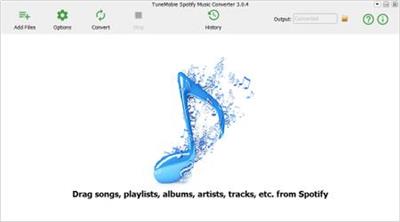
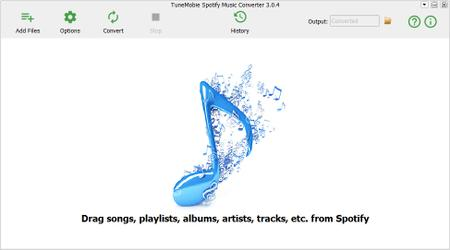
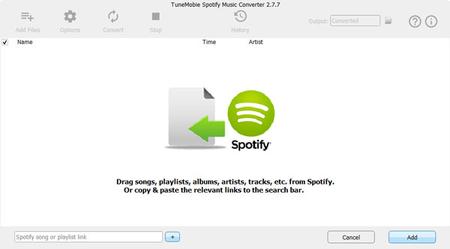
TuneMobie Spotify Music Converter - Either free or premium subscribers can download and convert Spotify songs, albums or playlists to MP3/M4A.

iQobx9W.jpg

Features:

Download and convert Spotify music on Windows :

Download Spotify songs, albums and playlists to PC for offline listening
Get Spotify music offline in plain MP3, M4A, WAV, FLAC or OGG format
Enjoy Spotify music offline with your free or premium account
Skip audio ads automatically when using Spotify Free
Get rid of protected Ogg Vorbis format when using Spotify Premium
Support both standalone Spotify and Microsoft Store version of Spotify
Enjoy unlimited songs on any device without 10,000 songs limitation
Listen to Spotify songs on multiple devices without 5-device limitation

Convert losslessly, keep song info & organize output:
Download and convert Spotify music with 100% audio quality retained
Get high-quality offline music in 320kbps with free or premium account
Preserve all the metadata tags like song title, artist, album, artwork, track number, genre, etc. in the output songs
Sort output files easily by artist, album or artist/album
Easily rename the output files by the combination of hyphen, space, title, album, artist and track number

5X faster to download & convert Spotify music in 2 ways:
With the program and Spotify application opened on the screen, you can directly drag and drop song, album or playlist to Spotify music converter
Right-click on Spotify song, album or playlist to copy the URL and paste in Spotify Music Converter's search bar
5X faster conversion speed helps you download Spotify songs much faster than using audio recording software, or choose 1X if necessary

Intuitive, convenient and flexible :
straightforward interface and get conversion done in only a few clicks
Uncheck any unwanted tracks before adding to conversion list
Rename output songs before converting
Check what you have downloaded and converted in History
Set parameters like bitrate and framerate for output audio as you like
Local MP3 songs added to Spotify software can be converted as well

More Info:
Download Instructions:
42.8 Mb
rar/zip archive
Language: Multilingual

 

TuneMobie Spotify Music Converter v3.0.8 Multilingual


5e017f32b8aa1dec6898f4a0db7a0c87.jpeg


TuneMobie Spotify Music Converter v3.0.8 Multilingual | 53 MB | Language: Multilanguage


TuneMobie Spotify Music Converter - either free or premium subscribers can download and convert Spotify songs, albums or playlists to MP3/M4A.


Download and convert Spotify music on Windows:
Download Spotify songs, albums and playlists to PC for offline listening
Get Spotify music offline in plain MP3, M4A, WAV, FLAC or OGG format
Enjoy Spotify music offline with your free or premium account
Skip audio ads automatically when using Spotify Free
Get rid of protected Ogg Vorbis format when using Spotify Premium
Support both standalone Spotify and Microsoft Store version of Spotify
Enjoy unlimited songs on any device without 10,000 songs limitation
Listen to Spotify songs on multiple devices without 5-device limitation
Convert losslessly, keep song info & organize output:
Download and convert Spotify music with 100% audio quality retained
Get high-quality offline music in 320kbps with free or premium account
Preserve all the metadata tags like song title, artist, album, artwork, track number, genre, etc. in the output songs
Sort output files easily by artist, album or artist/album
Easily rename the output files by the combination of hyphen, space, title, album, artist and track number
5X faster to download & convert Spotify music in 2 ways:
With the program and Spotify application opened on the screen, you can directly drag and drop song, album or playlist to Spotify music converter
Right-click on Spotify song, album or playlist to copy the URL and paste in Spotify Music Converter's search bar
5X faster conversion speed helps you download Spotify songs much faster than using audio recording software, or choose 1X if necessary
Intuitive, convenient and flexible:
straightforward interface and get conversion done in only a few clicks
Uncheck any unwanted tracks before adding to conversion list
Rename output songs before converting
Check what you have downloaded and converted in History
Set parameters like bitrate and framerate for output audio as you like
Local MP3 songs added to Spotify software can be converted as well

System Requirements:
Windows: Windows 10, 8.1, 8, 7 (32-bit & 64-bit)
Input Formats
Audio: URL of Spotify songs, albums or playlists
Output Formats
Output: MP3, M4A, WAV, FLAC, OGG.

Home Page -


Größe: 53 MB
Sprache: Multilingual-Deutsch
Format: .rar / .exe
Plattform: Windows (32 Bit 64 Bit)


HOSTER:

K2s.cc (Keep2Share)

Rapidgator.net

Nitroflare.com

Uploadgig.com


DOWNLOAD


TuneMobie Spotify Music Converter v3.2.4 Multilingual


0a07936f0bff1a2d6bc0a3c8165a4cbf.jpeg


TuneMobie Spotify Music Converter v3.2.4 Multilingual | 53 MB | Language: Multilanguage


TuneMobie Spotify Music Converter - either free or premium subscribers can download and convert Spotify songs, albums or playlists to MP3/M4A.


Download and convert Spotify music on Windows:
Download Spotify songs, albums and playlists to PC for offline listening
Get Spotify music offline in plain MP3, M4A, WAV, FLAC or OGG format
Enjoy Spotify music offline with your free or premium account
Skip audio ads automatically when using Spotify Free
Get rid of protected Ogg Vorbis format when using Spotify Premium
Support both standalone Spotify and Microsoft Store version of Spotify
Enjoy unlimited songs on any device without 10,000 songs limitation
Listen to Spotify songs on multiple devices without 5-device limitation
Convert losslessly, keep song info & organize output:
Download and convert Spotify music with 100% audio quality retained
Get high-quality offline music in 320kbps with free or premium account
Preserve all the metadata tags like song title, artist, album, artwork, track number, genre, etc. in the output songs
Sort output files easily by artist, album or artist/album
Easily rename the output files by the combination of hyphen, space, title, album, artist and track number
5X faster to download & convert Spotify music in 2 ways:
With the program and Spotify application opened on the screen, you can directly drag and drop song, album or playlist to Spotify music converter
Right-click on Spotify song, album or playlist to copy the URL and paste in Spotify Music Converter's search bar
5X faster conversion speed helps you download Spotify songs much faster than using audio recording software, or choose 1X if necessary

Intuitive, convenient and flexible:
straightforward interface and get conversion done in only a few clicks
Uncheck any unwanted tracks before adding to conversion list
Rename output songs before converting
Check what you have downloaded and converted in History
Set parameters like bitrate and framerate for output audio as you like
Local MP3 songs added to Spotify software can be converted as well

System Requirements:
Windows: Windows 10, 8.1, 8, 7 (32-bit & 64-bit)
Input Formats
Audio: URL of Spotify songs, albums or playlists
Output Formats
Output: MP3, M4A, WAV, FLAC, OGG

Home Page-


Größe: 53 MB
Sprache: Multilingual-Deutsch
Format: .rar / .exe
Medizin: Crack / Patch
Plattform: Windows 10 , Windows 8/8.1 , Windows 7
Bit depth: 32bit 64bit


HOSTER:

K2s.cc (Keep2share)

Rapidgator.net

Nitroflare.com

Uploadgig.com


DOWNLOAD


TuneMobie Spotify Music Converter 3.2.5 Multilingual


8da0cb7c83dc720d0028d383208dfbdd.png


TuneMobie Spotify Music Converter 3.2.5 Multilingual


TuneMobie Spotify Music Converter - entweder kostenlose oder Premium-Abonnenten können Spotify-Songs, -Alben oder -Wiedergabelisten herunterladen und in MP3/M4A konvertieren.


Sprache: Deutsch, Multi | Größe: 49 MB | Format: RAR, EXE | Plattform: Windows 7, 8, 8.1, 10 (32 oder 64Bit)


Hoster:
UploadGig.com | RapidGator.net | DDownload.com


DOWNLOAD Links:


TuneMobie Spotify Music Converter v3.2.5 Multilingual


b1c061b3392df30143b1ad4295419b11.jpeg


TuneMobie Spotify Music Converter v3.2.5 Multilingual | 48 MB | Language: Multilanguage


Größe: 48 MB
Sprache: Multilingual-Deutsch
Format: .rar / .exe
Medizin: Present
Plattform: Windows 10 , Windows 8/8.1 , Windows 7
Bit depth: 32bit 64bit


HOSTER:

K2s.cc (Keep2share)

Rapidgator.net

Nitroflare.com

Uploadgig.com


DOWNLOAD


TuneMobie Spotify Music Converter v3.2.6 Multilingual


dda4cd51b48be71022aayijk2.jpeg


TuneMobie Spotify Music Converter v3.2.6 Multilingual | 55 MB | Language: Multilanguage


Homepage:


Größe: 55 MB
Sprache: Multilingual-Deutsch
Format: .rar / .exe
Medizin: Present
Plattform: Windows 11/10/8.1/8/7
Bit depth: 32bit 64bit


HOSTER:

K2s.cc (Keep2share)

Rapidgator.net

Nitroflare.com

Uploadgig.com


DOWNLOAD


Zurück
Oben Unten