Free Download TubeMate Downloader 6.5.30 (x64) | 163 Mb
TubeMate Downloader is a Windows application for downloading videos and audio from YouTube and numerous other online video platforms. It combines video downloading, format conversion, playlist support, and media playback in one desktop interface.
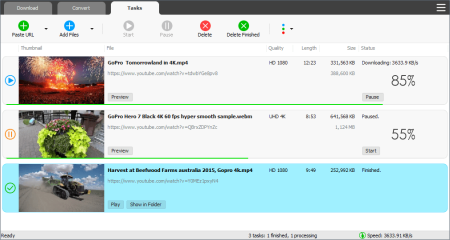
The software supports high-resolution video downloads, including UHD and HD quality options, as well as extracting audio streams for offline listening. Its download manager includes acceleration, simultaneous transfers, pause-and-resume controls, and video previews.
Software Overview
TubeMate Downloader is designed to simplify the process of saving online videos and converting media files. It supports popular platforms such as YouTube, Facebook, Instagram, and Dailymotion, along with thousands of other video websites.
Users can select available video resolutions, download complete playlists or individual entries, and extract audio without necessarily downloading the full video. The built-in converter also handles existing video and audio files, providing options for different formats and devices.
Key Features
- Online Video Downloader: Download videos from YouTube, Facebook, Instagram, Dailymotion, and many other supported websites.
- High-Resolution Downloads: Supports available video qualities up to UHD 8K, 5K, 4K, QHD 2K, Full HD 1080p, and HD 720p.
- YouTube to MP3: Extract the audio stream from YouTube videos and save it as an MP3 file.
- Playlist Downloader: Download entire playlists or select specific videos from a playlist.
- Download Acceleration: Uses a multi-threaded download engine advertised to increase speeds by up to 500% or more.
- Simultaneous Downloads: Process multiple video downloads at the same time.
- Pause and Resume: Pause active transfers and continue them whenever needed.
- Drag-and-Drop Support: Start downloads by dragging video links from a browser into the application or its drop area.
- Download Preview: Preview video or audio content while the file is being downloaded.
- Video and Audio Converter: Convert media between formats including MP4, FLV, AVI, WMV, MOV, MP3, and AAC.
- Video to Audio Extraction: Extract audio tracks and save them in formats such as MP3, WAV, and AC3.
- Device Optimization: Provides optimization presets for mobile devices, including iPhone, iPad, and Android devices.
- Custom Conversion Presets: Choose ready-made audio and video settings or configure custom output formats.
- iTunes Integration: Optionally add downloaded videos and music to an iTunes library for synchronization with supported Apple devices.
- Built-in Media Player: Play local media files using the application's integrated player.
Why Choose TubeMate Downloader
TubeMate Downloader offers more than basic online video downloading. Its combination of playlist handling, high-resolution downloads, audio extraction, and media conversion makes it a versatile tool for managing online and locally stored content.
The drag-and-drop interface helps simplify downloading, while simultaneous transfers and pause-and-resume controls provide flexibility when handling larger files. Built-in presets also make it easier to prepare media for different playback devices.
System Requirements
- Operating System: Windows 11, Windows 10, Windows 8, Windows 7, Windows Vista, Windows XP, Windows 2000
- Architecture: x64
- Disk Space: 163 Mb for the application package; additional storage is required for downloaded and converted media files.
Important Notes
Available resolutions, formats, and download options depend on the source website and the original media. Some platforms may restrict downloads or change their supported streaming methods over time.
Download and use media in accordance with applicable copyright laws and the terms of service of the relevant websites.
FAQ
Which websites does TubeMate Downloader support?
The application lists YouTube, Facebook, Instagram, Dailymotion, and thousands of other video websites among its supported sources.
Can TubeMate download 4K and 8K videos?
Yes. It advertises support for resolutions up to 8K, including 5K, 4K, 2K, 1080p, and 720p when those qualities are available from the source.
Can I download only the audio from a video?
Yes. TubeMate can extract audio streams and save them in formats such as MP3, WAV, and AC3.
Does it support playlist downloads?
Yes. You can download an entire playlist or choose selected videos from it.
Can TubeMate convert videos already stored on my computer?
Yes. Its converter supports a range of video and audio formats, including MP4, AVI, WMV, MOV, MP3, and AAC.
Home Page
Product Information
- Software Name: TubeMate Downloader
- Version: 6.5.30
- Architecture: x64
- Languages: English
- License type: Full Version
- File Size: 163 Mb
FileHost : RapidGator | FreeDL | DDownload | AlfaFile