




KAMAL
MyBoerse.bz Pro Member
Tipard MXF Converter 9.2.32 Multilingual
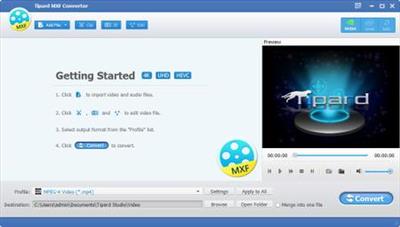
Tipard MXF Converter 9.2.32 Multilingual | 39 MB | Language: Multilanguage
Tipard MXF Converter is a professional and multi-functional application, which supports converting any MXF/P2 MXF footages from SD, HD camcorders and cameras (Canon/Panasonic/Sony/JVC/Nikon). The converted MXF file can be viewed on portable Apple/Android devices and media players, like iPhone, iPad, Samsung, Kindle Fire. Moreover, if you want to edit .mxf file with Sony Vegas, Adobe Premiere, Avid Media Composer, Windows Movie Maker or other editing software, you are allowed to export your MXF files to these editing software for professional editing.
With this flexible MXF video converting app, you can make personalized videos and convert MXF files to other audio/video files, like MP4, MOV, MPG, 3GP, MKV, AVI, WMV, FLV, VOB, AAC, AC3, MP3, etc. Tipard MXF Converter is HD video converter that can easily convert any TS, MTS, M2TS, TRP, TP, MXF video to HD MOV, HD AVI, HD MP4 video, etc. Also as 3D converter, you can translate MXF video to 3D and customize it with numerous editing features for better visual effect.
Convert any MXF file to MOV, AVI, MP4, etc. for portable devices and editing software
You can easily transcode any MXF files recorded from Canon, Panasonic, Sony which have their own special MXF HD video camcorders to mainstream .mp4/.mov/.avi and HD video, etc. Not only MXF files, but also AVCHD MTS, M2TS, MOD, TOD, TRP, TS, XAVC MXF, XAVC MP4, XAVC-S MP4 and 4K videos from SD/HD camcorders, this MXF converting software can convert all of them to MP4, MKV, WMV, AVI, MOV, H.265, H.264/MPEG-4 AVC, FLV, 3GP, DivX, VOB, Avid, DV, MPG/MPEG, M4V, WebM, SWF, MTV, etc. and even the High Definition video files (HD/AVCHD videos).
This MXF file converter can extract and convert audios from .mxf video files and convert them to AAC, AC3, AIFF, MP3, MP2, WAV, WMA, OGG, etc.
MXF format is not an acceptable and common format for most media players and editing software. This MXF Video Converter is the best solution to help you out, it can easily transcode Panasonic P2/Sony XDCAM/Canon XF MXF recordings to various editing software tools(like Avid Media Composer, Windows Movie Maker, Adobe Premiere Pro, iMovie, Final Cut Pro, Sony Vegas Pro, Magix Video Pro, Prores, Cyberlink Powerdirector, iMovie, Quicktime, etc.) and media devices/players(like iPhone XS/XS Max/XR/X/8/7/6/SE/5s/5/4s, iPad Pro/Air/mini, Samsung, Motorola Xoom, HTC, PS3, Xbox360, Wii, YouTube, Facebook, etc.).
Free numerous editing features to customize MXF videos
Tipard MXF Converter also as free video editor, it allows you to set the video Brightness, Contrast, and Saturation. Use Deinterlacing to convert interlaced video to the progressive video.
This MXF conversion software gives you precise control over enhancing video quality, rotating video direction, clipping any segment of your video, adjusting the playing region of the video to fit for your player and removing the black region. And it can help you join your several MXF video files into one file. You can add watermark using text or picture on your videos and even adjust its position, transparency, text color and text size. This function can optimize the video effect according to needs.
Free set output parameters
To get further customized output video, you can set the Video Encoder, Resolution, Frame Rate, Video Bitrate, Audio Encoder, Sample Rate, Channels and Audio Bitrate according to your needs. You can also save all the output settings as your preference, which is saved in the user-defined column automatically.
What's more, The MXF Conversion app gives you the ability to select audio track or subtitle you need for your output video.
It has broad profile for you to select. The MXF file Converter sorts the profile by the devices, General video/audio, HD videos, 3D videos, etc. and then it's easy for you to find what format you want. You can get multiple files with the same content at one time by adding multiple profiles to one source simultaneously.
Fastest converting process and convenience operation
The new technology will make the operation more comfortable. The newly adopted NVIDIA® CUDA™ technology can totally accelerate your PC GPU, so as to finish your converting task with ultra-high speed and best output quality.
The converting software gives you 6X faster conversion speed, it supports multi-core CPUs, which can take full advantage of your PC power to accelerate the converting speed.
You are enabled to preview the original MXF video and the output video for your operation at the same time. And you can take pictures while watching videos in the preview window. It is easy for both beginner and practician. Just a few clicks can finish the process of converting MXF files with convenient operations.
System Requirements:
OS Supported: Windows XP (SP2 or later), Windows Vista, Windows 7, Windows 8, Windows 10
CPU: 1.2GHz Intel or AMD CPU, or above
RAM: 1G RAM or more
Home Page -
DOWNLOAD LINKS:
Tipard MXF Converter 9.2.32 Multilingual | 39 MB | Language: Multilanguage
Tipard MXF Converter is a professional and multi-functional application, which supports converting any MXF/P2 MXF footages from SD, HD camcorders and cameras (Canon/Panasonic/Sony/JVC/Nikon). The converted MXF file can be viewed on portable Apple/Android devices and media players, like iPhone, iPad, Samsung, Kindle Fire. Moreover, if you want to edit .mxf file with Sony Vegas, Adobe Premiere, Avid Media Composer, Windows Movie Maker or other editing software, you are allowed to export your MXF files to these editing software for professional editing.
With this flexible MXF video converting app, you can make personalized videos and convert MXF files to other audio/video files, like MP4, MOV, MPG, 3GP, MKV, AVI, WMV, FLV, VOB, AAC, AC3, MP3, etc. Tipard MXF Converter is HD video converter that can easily convert any TS, MTS, M2TS, TRP, TP, MXF video to HD MOV, HD AVI, HD MP4 video, etc. Also as 3D converter, you can translate MXF video to 3D and customize it with numerous editing features for better visual effect.
Convert any MXF file to MOV, AVI, MP4, etc. for portable devices and editing software
You can easily transcode any MXF files recorded from Canon, Panasonic, Sony which have their own special MXF HD video camcorders to mainstream .mp4/.mov/.avi and HD video, etc. Not only MXF files, but also AVCHD MTS, M2TS, MOD, TOD, TRP, TS, XAVC MXF, XAVC MP4, XAVC-S MP4 and 4K videos from SD/HD camcorders, this MXF converting software can convert all of them to MP4, MKV, WMV, AVI, MOV, H.265, H.264/MPEG-4 AVC, FLV, 3GP, DivX, VOB, Avid, DV, MPG/MPEG, M4V, WebM, SWF, MTV, etc. and even the High Definition video files (HD/AVCHD videos).
This MXF file converter can extract and convert audios from .mxf video files and convert them to AAC, AC3, AIFF, MP3, MP2, WAV, WMA, OGG, etc.
MXF format is not an acceptable and common format for most media players and editing software. This MXF Video Converter is the best solution to help you out, it can easily transcode Panasonic P2/Sony XDCAM/Canon XF MXF recordings to various editing software tools(like Avid Media Composer, Windows Movie Maker, Adobe Premiere Pro, iMovie, Final Cut Pro, Sony Vegas Pro, Magix Video Pro, Prores, Cyberlink Powerdirector, iMovie, Quicktime, etc.) and media devices/players(like iPhone XS/XS Max/XR/X/8/7/6/SE/5s/5/4s, iPad Pro/Air/mini, Samsung, Motorola Xoom, HTC, PS3, Xbox360, Wii, YouTube, Facebook, etc.).
Free numerous editing features to customize MXF videos
Tipard MXF Converter also as free video editor, it allows you to set the video Brightness, Contrast, and Saturation. Use Deinterlacing to convert interlaced video to the progressive video.
This MXF conversion software gives you precise control over enhancing video quality, rotating video direction, clipping any segment of your video, adjusting the playing region of the video to fit for your player and removing the black region. And it can help you join your several MXF video files into one file. You can add watermark using text or picture on your videos and even adjust its position, transparency, text color and text size. This function can optimize the video effect according to needs.
Free set output parameters
To get further customized output video, you can set the Video Encoder, Resolution, Frame Rate, Video Bitrate, Audio Encoder, Sample Rate, Channels and Audio Bitrate according to your needs. You can also save all the output settings as your preference, which is saved in the user-defined column automatically.
What's more, The MXF Conversion app gives you the ability to select audio track or subtitle you need for your output video.
It has broad profile for you to select. The MXF file Converter sorts the profile by the devices, General video/audio, HD videos, 3D videos, etc. and then it's easy for you to find what format you want. You can get multiple files with the same content at one time by adding multiple profiles to one source simultaneously.
Fastest converting process and convenience operation
The new technology will make the operation more comfortable. The newly adopted NVIDIA® CUDA™ technology can totally accelerate your PC GPU, so as to finish your converting task with ultra-high speed and best output quality.
The converting software gives you 6X faster conversion speed, it supports multi-core CPUs, which can take full advantage of your PC power to accelerate the converting speed.
You are enabled to preview the original MXF video and the output video for your operation at the same time. And you can take pictures while watching videos in the preview window. It is easy for both beginner and practician. Just a few clicks can finish the process of converting MXF files with convenient operations.
System Requirements:
OS Supported: Windows XP (SP2 or later), Windows Vista, Windows 7, Windows 8, Windows 10
CPU: 1.2GHz Intel or AMD CPU, or above
RAM: 1G RAM or more
Home Page -
DOWNLOAD LINKS:
