KAMAL
MyBoerse.bz Pro Member
Thea For Cinema 4D 2.2.483.1875 (x64)
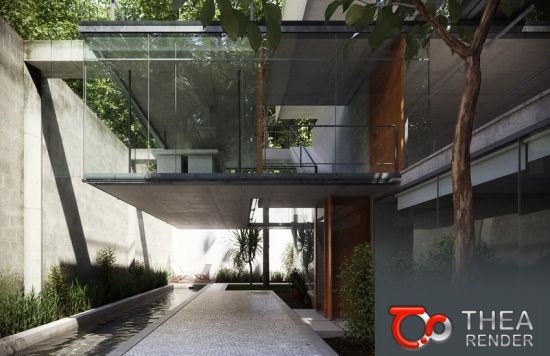
Thea For Cinema 4D 2.2.483.1875 (x64) | 543 MB | Language: English
Thea for Cinema 4D is the perfect companion for Cinema 4D users who want the highest quality photorealistic rendering inside their modeling application. The plugin offers a list of advanced tools while being actively developed to meet the most demanding visualization requirements.
Content Browser with Online Repository:
-The Content Browser makes it easier to add materials and HDR images in the scene. Materials can either be applied to selected objects or added to the material manager.
-Adding HDR images in the scene is easier since skies are now being added as a Sky object with a Thea Sky tag already assigned to it.
-It is also possible to add your own local folders in the Custom Folders area.
Thea Shaders:
In v2.2, the Thea Material Editor is fully integrated inside Cinema 4D. Thea Shaders can be helpful to make it easier to apply tonemapping and modify the texture coordinates for every bitmap and also add advanced procedurals like Fresnel Ramp.
Backface Material Support:
-With the Backface material support, it is now possible to create material like, sheets of paper, labels, leaves, etc.
-It is integrated inside Cinema 4D supporting the Front & Back side option of the Texture tag.
More features:
Instancing Support:
-Cinema 4D offers various ways of instancing and we have paid attention to support them all, matching the native renderer. Whether you are using MoGraph cloners, arrays or render instances, the result will be always as it should be.
Animation:
-Thea Render can handle the animation rendering inside Cinema 4D and render all the frames out of the box. Furthermore, by supporting Team Render, one can distribute these frames over the network for ultra-fast animation sequence rendering. Accurate Motion Blur is fully supported for any animation produced in Cinema 4D (Camera, Mograph, Particle Emitters, Dynamics, e.t.c).
Render Channels:
Thea Render supports a big variety of render channels such as Normal, Depth, Alpha, Ambient Occlusion, Shadow and many more. These channels can be used to add various post process effects on the final rendered image.
-Interface improvements & simplifications.
-Seen by Rays & Seen by Camera options.
-Point Lights (Omni, Spot, IES)
-32-bit support in Picture Viewer
System Requirements:
-OS:Windows 7/8/10 64-bit,
-CPU:Intel SSE3 CPU (or compatible),
-GPU:for Presto GPU Nvidia CUDA Graphics Card (Compute Capability 2.x/3.x/5.x/6.x/7.0/7.5) with latest graphics driver or AMD Graphics Card (Hawaii, Tahiti, Pitcairn, Capeverde, Bonaire) with latest OpenCL and graphics drivers,
-Support:Cinema 4D R16-R21
Home Page -
DOWNLOAD LINKS:
Thea For Cinema 4D 2.2.483.1875 (x64) | 543 MB | Language: English
Thea for Cinema 4D is the perfect companion for Cinema 4D users who want the highest quality photorealistic rendering inside their modeling application. The plugin offers a list of advanced tools while being actively developed to meet the most demanding visualization requirements.
Content Browser with Online Repository:
-The Content Browser makes it easier to add materials and HDR images in the scene. Materials can either be applied to selected objects or added to the material manager.
-Adding HDR images in the scene is easier since skies are now being added as a Sky object with a Thea Sky tag already assigned to it.
-It is also possible to add your own local folders in the Custom Folders area.
Thea Shaders:
In v2.2, the Thea Material Editor is fully integrated inside Cinema 4D. Thea Shaders can be helpful to make it easier to apply tonemapping and modify the texture coordinates for every bitmap and also add advanced procedurals like Fresnel Ramp.
Backface Material Support:
-With the Backface material support, it is now possible to create material like, sheets of paper, labels, leaves, etc.
-It is integrated inside Cinema 4D supporting the Front & Back side option of the Texture tag.
More features:
Instancing Support:
-Cinema 4D offers various ways of instancing and we have paid attention to support them all, matching the native renderer. Whether you are using MoGraph cloners, arrays or render instances, the result will be always as it should be.
Animation:
-Thea Render can handle the animation rendering inside Cinema 4D and render all the frames out of the box. Furthermore, by supporting Team Render, one can distribute these frames over the network for ultra-fast animation sequence rendering. Accurate Motion Blur is fully supported for any animation produced in Cinema 4D (Camera, Mograph, Particle Emitters, Dynamics, e.t.c).
Render Channels:
Thea Render supports a big variety of render channels such as Normal, Depth, Alpha, Ambient Occlusion, Shadow and many more. These channels can be used to add various post process effects on the final rendered image.
-Interface improvements & simplifications.
-Seen by Rays & Seen by Camera options.
-Point Lights (Omni, Spot, IES)
-32-bit support in Picture Viewer
System Requirements:
-OS:Windows 7/8/10 64-bit,
-CPU:Intel SSE3 CPU (or compatible),
-GPU:for Presto GPU Nvidia CUDA Graphics Card (Compute Capability 2.x/3.x/5.x/6.x/7.0/7.5) with latest graphics driver or AMD Graphics Card (Hawaii, Tahiti, Pitcairn, Capeverde, Bonaire) with latest OpenCL and graphics drivers,
-Support:Cinema 4D R16-R21
Home Page -
DOWNLOAD LINKS: