



• Regeln für den Video-Bereich:

    In den Börsenbereich gehören nur Angebote die bereits den Allgemeinen Regeln entsprechen.

    Einteilung

    - Folgende Formate gehören in die angegeben Bereiche:
    - Filme: Encodierte Filme von BluRay, DVD, R5, TV, Screener sowie Telesyncs im Format DivX, XviD und x264.
    - DVD: Filme im Format DVD5, DVD9 und HD2DVD.
    - HD: Encodierte Filme mit der Auflösung 720p oder darüber von BluRay, DVD, R5, TV, Screener sowie Telesyncs im Format x264.
    - 3D: Encodierte Filme von BluRay, die in einem 3D Format vorliegen. Dies gilt auch für Dokus, Animation usw.
    - Serien: Cartoon/Zeichentrick, Anime, Tutorials, Dokumentationen, Konzerte/Musik, Sonstiges sind demnach in die entsprechenden Bereiche einzuordnen, auch wenn sie beispielsweise im High Definition-Format oder als DVD5/DVD9/HD2DVD vorliegen. Ausnahme 3D.
    - Bereich Englisch: Englische Releases gehören immer in diesen Bereich.
    - Bereich Talk: Der Bereich, in dem über die Releases diskutiert werden kann, darf, soll und erwünscht ist.


    Angebot/Beitrag erstellen

    - Ein Beitrag darf erst dann erstellt werden, wenn der Upload bei mindestens einem OCH komplett ist. Platzhalter sind untersagt.
    - Bei einem Scenerelease hat der Threadtitel ausschließlich aus dem originalen, unveränderten Releasenamen zu bestehen. Es dürfen keine Veränderungen wie z.B. Sterne, kleine Buchstaben o.ä. vorgenommen werden. Ausnahme Serienbörse:
    - Bei einem Sammelthread für eine Staffel entfällt aus dem Releasename natürlich der Name der Folge. Beispiel: Die Simpsons S21 German DVDRip XviD - ITG
    - Dementsprechend sind also u.a. verboten: Erweiterungen wie "Tipp", "empfehlenswert", "only", "reup", usw. / jegliche andere Zusatzinformation oder Ergänzung, welche nicht in obiger Beschreibung zu finden ist.

    Aufbau des Angebots und Threadtitel

    Der Titel nach folgendem Muster erstellt zu werden. <Name> [3D] [Staffel] [German] <Jahr> <Tonspur> [DL] [Auflösung] <Quelle> <Codec> - <Group>
    Beispiel: The Dark Knight German 2008 AC3 DVDRip XviD - iND
    Beispiel: The Dark Knight 2008 DTS DL BDRip x264 - iND
    Beispiel: The Dark Knight 2008 AC3 DL BDRip XviD - iND
    Beispiel: The Dark Knight German 2008 AC3 720p BluRay x264 iND
    Beispiel: The Dark Knight 2008 DTS DL 1080p BluRay x264 iND
    Beispiel: Die Simpsons S01 German AC3 DVDRip XviD iND
    Beispiel: Die Simpsons S20 German AC3 720p BluRay x264 iND
    Beispiel: Sword Art Online II Ger Sub 2014 AAC 1080p WEBRip x264 - peppermint
    Entsprechend sind also u.a. verboten: Sonderzeichen wie Klammern, Sterne, Ausrufezeichen, Unterstriche, Anführungszeichen / Erweiterungen wie "Tipp", "empfehlenswert", "only", "reup", usw. / jegliche andere Zusatzinformation oder Ergänzung, welche nicht in obiger Beschreibung zu finden ist
    Ausnahmen hiervon können in den Bereichen geregelt sein.

    Die Beiträge sollen wie folgt aufgebaut werden:
    Überschrift entspricht dem Threadtitel
    Cover
    kurze Inhaltsbeschreibung
    Format, Größe, Dauer sind gut lesbar für Downloader außerhalb des Spoilers zu vermerken
    Nfo sind immer Anzugeben und selbige immer im Spoiler in Textform.
    Sind keine Nfo vorhanden z.B. Eigenpublikationen, sind im Spoiler folgende Dateiinformationen zusätzlich anzugeben :
    Quelle
    Video (Auflösung und Bitrate)
    Ton (Sprache, Format und Bitrate der einzelnen Spuren)
    Untertitel (sofern vorhanden)
    Hosterangabe in Textform außerhalb eines Spoiler mit allen enthaltenen Hostern.
    Bei SD kann auf diese zusätzlichen Dateiinformationen verzichtet werden.

    Alle benötigten Passwörter sind, sofern vorhanden, in Textform im Angebot anzugeben.
    Spoiler im Spoiler mit Kommentaren :"Schon Bedankt?" sind unerwünscht.


    Releases

    - Sind Retail-Release verfügbar, sind alle anderen Variationen untersagt. Ausnahmen: Alle deutschen Retail-Release sind CUT, in diesem Fall sind dubbed UNCUT-Release zulässig.
    - Im Serien-Bereich gilt speziell: Wenn ein Retail vor Abschluss einer laufenden Staffel erscheint, darf diese Staffel noch zu Ende gebracht werden.62
    - Gleiche Releases sind unbedingt zusammenzufassen. Das bedeutet, es ist zwingend erforderlich, vor dem Erstellen eines Themas per Suchfunktion zu überprüfen, ob bereits ein Beitrag mit demselben Release besteht. Ist dies der Fall, ist der bereits vorhandene Beitrag zu verwenden.
    - P2P und Scene Releases dürfen nicht verändert oder gar unter einem iND Tag eingestellt werden.


    Support, Diskussionen und Suche

    - Supportanfragen sind entweder per PN oder im Bereich Talk zu stellen.
    - Diskussionen und Bewertungen sind im Talk Bereich zu führen. Fragen an die Uploader haben ausschließlich via PN zu erfolgen, und sind in den Angeboten untersagt.
    - Anfragen zu Upload-Wünschen sind nur im Bereich Suche Video erlaubt. Antworten dürfen nur auf Angebote von MyBoerse.bz verlinkt werden.


    Verbote

    - Untersagt sind mehrere Formate in einem einzigen Angebotsthread, wie beispielsweise das gleichzeitige Anbieten von DivX/XviD, 720p und 1080p in einem Thread. Pro Format, Release und Auflösung ist ein eigener Thread zu eröffnen.
    - Grundsätzlich ebenso verboten sind Dupes. Uploader haben sich an geeigneter Stelle darüber zu informieren, ob es sich bei einem Release um ein Dupe handelt.
    - Gefakte, nur teilweise lauffähige oder unvollständige Angebote sind untersagt. Dies gilt auch für eigene Publikationen, die augenscheinlich nicht selbst von z.B. einer DVD gerippt wurden. Laufende Serien, bei denen noch nicht alle Folgen verfügbar sind, dürfen erstellt und regelmäßig geupdatet werden.
    - Untersagt sind Angebote, welche nur und ausschließlich in einer anderen Sprache als deutsch oder englisch vorliegen. Ausnahmen sind VORHER mit den Moderatoren zu klären.


    Verstoß gegen die Regeln

    - Angebote oder Beiträge, die gegen die Forenregeln verstoßen, sind über den "Melden"-Button im Beitrag zu melden.
  • Bitte registriere dich zunächst um Beiträge zu verfassen und externe Links aufzurufen.

*** Bestes IPTV *** bester Preis *** gratis Test ***


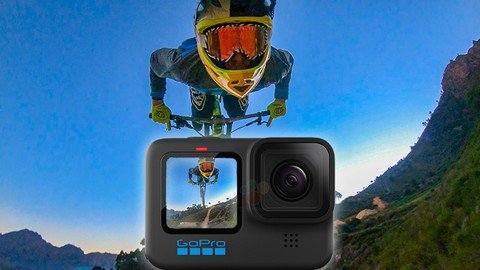
The Ultimate Guide To The Gopro Hero 12

Tutorials

MyBoerse.bz Pro Member
162716ee4cefa10aaa72776de3df9e43.jpeg

Free Download The Ultimate Guide To The Gopro Hero 12
Published 11/2023
MP4 | Video: h264, 1920x1080 | Audio: AAC, 44.1 KHz
Language: English | Size: 5.66 GB | Duration: 4h 6m
Go From Beginner To Expert With Thee GoPro Hero 12

What you'll learn
How to use the GoPro Hero 12
The best settings for Video, Photo and Time Lapse
Basic composition, storytelling and mountaing
Editing using the Free GoPro Quik App
Requirements
none
Description
Embark on an exhilarating journey to unleash the full potential of your GoPro Hero 12 with a course led by a seasoned adventurer and former member of the GoPro Media Team! Dive into the heart of action sports and adventure filmmaking as you discover the secrets behind capturing breathtaking moments.Unleash the power of your GoPro by unraveling the mysteries of its settings and modes tailored for every scenario. From mastering the art of GoPro mounting to delving into the realms of photography, videography, and video editing, this course is your gateway to becoming a GoPro virtuoso.Decode the enigma of each mode and setting, understanding the nuances of when, where, and why to deploy them. Skillfully navigate through mode selection, resolution choices, frame rates, and aspect ratios to craft dynamic footage that stands out.Become the master of HyperSmooth stabilization, Smart Capture settings, and horizon leveling, transforming your videos into seamless cinematic experiences. Elevate your creativity with captivating time lapses, TimeWarps, and night lapses that defy the boundaries of ordinary storytelling.Unlock the professional realm with ProTune settings and Presets, creating visuals that rival top-level productions. Explore the vast array of unique photo modes, from Raw to Super and HDR photos, capturing moments with unparalleled clarity.Discover the best mounts for unprecedented angles in various sports, adding a dynamic dimension to your footage. Immerse yourself in the art of photography and filmmaking, honing your composition and framing skills to create visually stunning content.Demystify the elements of storytelling and video editing with insights into basic story structure and the four building blocks of a GoPro edit. Craft a strategic shot list for your filming day, ensuring you capture every thrilling moment.Experience the magic of editing as you learn to weave together videos with music, graphics, and slow-motion effects using the GoPro App. In just ten minutes, download footage directly to your phone and transform it into exciting, fun edits that leave a lasting impression.With over 3 hours of captivating video content featuring examples from professional productions with top-level athletes, this course is your gateway to unlocking the full potential of your GoPro Hero 11. Led by an action sports/adventure filmmaker, the author of the Ultimate Guide to GoPro book series, and a former GoPro employee, you're in expert hands to elevate your filming skills to new heights. Get ready to capture the extraordinary and make your moments legendary!
Overview
Section 1: Introduction
Lecture 1 Introduction
Section 2: Getting Started With The GoPro Hero 12
Lecture 2 What Come In The Box
Lecture 3 Basic Functionality
Lecture 4 Updating The Camera's Firmware
Lecture 5 Basic Functionality 2
Lecture 6 Pro Vs Easy Controls
Lecture 7 Quick Preferences
Lecture 8 Preferences
Lecture 9 GoPro Quik App
Section 3: Video
Lecture 10 Video Easy Controls
Lecture 11 Video Profile
Lecture 12 Video Resolutions
Lecture 13 Frame Rate
Lecture 14 Aspect Ratio
Lecture 15 Field Of View
Lecture 16 My Favorite Settings
Lecture 17 Hypersmooth
Lecture 18 Vertical Video
Lecture 19 Smart Capture
Lecture 20 Voice Control
Lecture 21 ProTune
Lecture 22 Presets
Lecture 23 My Video Presets
Section 4: Time Lapse
Lecture 24 Standard Time Lapse
Lecture 25 Time Warp
Lecture 26 Night Lapse
Lecture 27 Night Lapse Presets
Lecture 28 Shooting Time Lapses
Lecture 29 Time Lapse Presets
Section 5: Photo
Lecture 30 Photo Easy Controls
Lecture 31 Single Photo
Lecture 32 Photo Interval
Lecture 33 Burst Photo
Lecture 34 Night Photo
Lecture 35 Photo ProTune
Lecture 36 Photo Presets
Section 6: Mounting
Lecture 37 Mounting
Lecture 38 Sticky Mount
Lecture 39 3 Way
Lecture 40 Head Strap
Lecture 41 Chest Mount
Lecture 42 Bar Mounts
Lecture 43 Handler
Lecture 44 El Grande
Lecture 45 Jaws
Lecture 46 Mini Tripods
Lecture 47 Hand Strap
Lecture 48 Extensions and Twists
Lecture 49 Unicorn Mount
Lecture 50 Creative Extensions
Lecture 51 Spinny Mount
Lecture 52 Mouth Mount
Lecture 53 Backpack Mount
Lecture 54 Dome Port
Lecture 55 Aerial
Lecture 56 Max Lens Mod
Lecture 57 Gumby
Lecture 58 GoPro Accessories
Section 7: Getting Amazing Shots
Lecture 59 Pre-Filming Checklist
Lecture 60 Composition
Lecture 61 Light
Lecture 62 Story
Lecture 63 Uniqueness
Section 8: Storytelling
Lecture 64 Storytelling
Lecture 65 A Shot Vs B Shot
Lecture 66 Building Blocks Of A Story
Section 9: GoPro Quik App
Lecture 67 Edit A Single Clip
Lecture 68 Make A Full Edit
Lecture 69 Livestreaming
Lecture 70 GoPro Subscription
Lecture 71 GoPro Labs
Section 10: Final Thoughts
Lecture 72 Final Thoughs
GoPro Users
Homepage


Recommend Download Link Hight Speed | Please Say Thanks Keep Topic Live
No Password - Links are Interchangeable

 
Zurück
Oben Unten