



• Regeln für den Dokumente-Bereich:

    In den Börsenbereich gehören nur Angebote die bereits den Allgemeinen Regeln entsprechen.

    Allgemeines:

    Nicht erlaubt im Dokumente-Bereich sind:

    - indizierte Titel (inkl. Comics)
    - extremistische Werke, Zeitschriften und Comics (egal, welche Richtung)
    - jegliche Art von Pornographie
    - Anleitungen zu kriminellen Handlungen, gleich welcher Art
    - sadistische, menschenverachtende oder ähnliche Werke

    Nutzt den "Bedanken"-Button, bei Sammelthreads führen jegliche Kommentare, positiv wie negativ, sehr schnell zu einer Unübersichtlichkeit des Threads. Downmeldungen sind an den Uploader zu richten

    Vor dem Einstellen zu beachten:

    - Suchfunktion

    Vergewissert euch, dass es euer Dokument noch nicht im Board gibt, Doppelposts werden kommentarlos gelöscht. Ist es schon vorhanden, tragt es als Mirror im bestehenden Post ein.

    - Threadtitel

    Idealerweise ist sofort zu erkennen um was es sich handelt. Verseht euren Titel mit den relevanten Informationen, das hilft euch und damit auch uns und allen Suchenden erheblich weiter.

    Beispiel: [Thriller] Dan Brown - Inferno oder bei Magazinen:

    Computerbild - 14/2014 (es muss ersichtlich sein, um welche Ausgabe und welches Magazin es sich handelt)

    Folgende Präfixe stehen im Unterforum "Unterhaltung" zur Verfügung:

    [Humor]
    [Drama]
    [Erotik]
    [Fantasy]
    [Krimi]
    [Roman]
    [Thriller]
    [Horror]
    [Science Fiction]

    Inhalt des Beitrags:

    Folgende Pflichtangaben gilt es einzuhalten:

    - Autor
    - Titel
    - Präfix
    - Cover
    - Genre
    - Inhaltsbeschreibung
    - enthaltene Formate
    - Gesamtgröße des Downloads
    - Hoster
    - ggf. Passwort

    Nicht erlaubt sind alle Dateien, die den Download unnötig aufblähen um eine Affiliategrenze zu erreichen, wie zB. mp3-files, übergroße Bilder, etc.

    Ebenso nicht erlaubt sind sämtliche Dateien mit DRM, persönlichen Daten, etc., diese werden kommentarlos zu eurem eigenem Schutz gelöscht.

    Achtet bitte bei der Konvertierung der Formate auf die Lesbarkeit, ein epub, was nur einfach durch Calibre gejagt wird um ein PDF zu erhalten, ist zu 99% eben nicht lesbar. Wenn ihr es nicht könnt, dann lasst es besser oder lest euch ein, wie man es richtig macht.


    Unterforum Comics:

    Threadtitel:

    Ähnlich, wie bei Unterhaltung und Magazinen, sollte der Titel alle relevanten Informationen enthalten, hier bitte

    - den Titel des Comics
    - den Verlag (einige Comics sind in verschiedenen Verlagen erschienen)
    - das Erscheinungsjahr

    Erlaubt sind folgende Formate:

    - CBR
    - CBZ

    Grundsätzlich gilt: jede Version eines Comics erhält einen eigenen Thread, Ersteller eines Comics können ihre Bände gerne mit dem Zusatz (Original-Release) versehen.

    Bei Unsicherheiten zur korrekten Benennung bitte die Informationen von www.comicguide.de nutzen.

    Inhalt des Beitrags:

    Pflichtangaben hier sind:

    - Titel des Bandes und ggf. Nummer
    - Cover
    - falls bekannt technische Daten (DPI, Breite, Speicherqualität)
    - Größe des Downloads
    - Hoster
    - ggf. Passwort
    - falls bekannt Releasenamen
  • Bitte registriere dich zunächst um Beiträge zu verfassen und externe Links aufzurufen.

*** Bestes IPTV *** bester Preis *** gratis Test ***


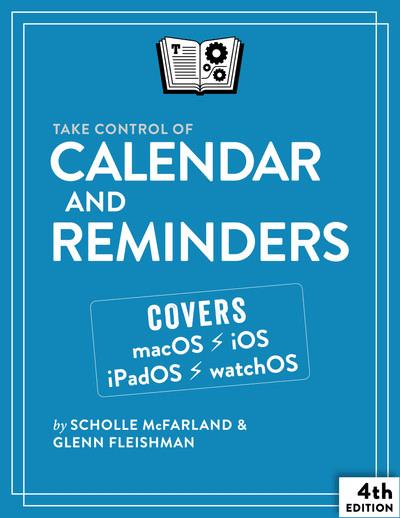
Take Control of Calendar and Reminders 4th Edition (Version 4.0.1)

mitsumi

MyBoerse.bz Pro Member

31ae4f8f37c8b6083663376f3072d1c5.jpeg


English | 2022 | ISBN: 9781990783166 | 166 pages | EPUB | 20 MB​


Manage your schedule more effectively using Calendar and Reminders!
Version 4.0.1, updated November 21, 2022
Learn how to unlock the full potential of Apple's Calendar and Reminders! Take Control of Calendar and Reminders helps you get the most out of these apps, showing you how to customize them, sync data across devices, and share meeting invitations and reminder lists. You'll also learn how to use Siri as a shortcut and how to fix common problems.
In the days before personal computers and mobile devices, we had to rely on paper calendars and to-do lists to help us organize our time and activities. Now, we have powerful tools, like Apple's Calendar and Reminders, that are much more responsive to our needs. Put an event on your schedule, invite others to join, or set yourself an alarm (or more than one). Or, keep a list of to-do items, add to it and view it on all your Apple devices, and share your list with family or friends.
This book was originally written by veteran Mac journalist and editor Scholle McFarland, and the fourth edition was updated by Glenn Fleishman, with complete coverage of macOS 12 Monterey, macOS 13 Ventura, iOS 15/iPadOS 15, and iOS 16/iPadOS 16. Scholle and Glenn guide you through getting to know these incredibly helpful apps, including lesser-known (but handy) features. For example, did you know that Calendar lets you set an alert that factors in public transportation schedules and time to get to your starting point, so you can leave early enough to catch the train, bus, tram, or ferry you need-and any connections-and arrive at your event on time? Or that Reminders can prompt you to do something not only at a certain time, but also once you've reached a specific destination, like the grocery store?
If you've never taken the opportunity to explore Calendar and Reminders, this book will show you how to make them an important part of your daily routine. If you've already been using Calendar and Reminders, you'll learn how to use them more effectively, troubleshoot common problems, and delve deeper into their capabilities.
This fully revised fourth edition is now up to date with macOS 13 Ventura, iOS 16/iPadOS 16, and watchOS 9 (as well as covering the previous version of each operating system), and it has been expanded with new topics and additional tips.
Learn how to get the best out of Calendar and Reminders, including how to
Customize Calendar to your liking, from setting time zones, to color coding specific calendars
Create events, making them repeat at regular intervals or on certain dates
Set up notifications and alerts, so you never miss an event
Invite people to events, or share your calendar with them
Create, manage, and share lists in Reminders, including powerful new smart lists
Set alarms in Reminders at a certain time or a certain place
Tag entries for better searching and organizing in Reminders
Use Siri to save time when creating events or reminders
Easily check events and reminders on your Mac, iPhone, iPad, Apple Watch, or HomePod
Troubleshoot common problems in Calendar and Reminders
Share calendars and reminders using iCloud Family Sharing, and assign reminders to a specific person
Sort reminders on your Mac
Print a calendar (to paper or PDF)
Embed video links in Calendar events for quick launching

DOWNLOAD

rapidgator.net:

nitroflare.com:

 
Zurück
Oben Unten