• Regeln für den Software-Bereich:


    Allgemeines:

    - In erster Linie sind unsere Boardregeln zu beachten, zu finden HIER.
    - Software zur Audiobearbeitung sollte ausschließlich im Unterforum "Audio" eingestellt werden.
    - Für Cracks, Keygens oder sonstige Freischaltungssoftware gibt es das Unterforum "Freischaltung".
    - Portable Software bitte im entsprechenden Unterforum "Portable Software" eintragen.
    - Diskussionen zur Installation und anderen Problemen mit der Software, bitte im enstprechenden Unterforum "Talk" führen.
    - Bei Unklarheiten und Fragen zu den Regeln bitte die Moderatoren kontaktieren.


    Angebot erstellen

    - Die Struktur des Threadtitels muss wie folgt umgesetzt werden: Herstellername - Softwarename - Versionsnummer
    - Unnötige Zusätze im Threadtitel wie "HOT", "NEW" oder Punkte zwischen den Wörtern sind nicht erlaubt.
    - Achtet darauf immer nur die Hauptversion und deren Updates in einem Thread zusammenfassen, konkretes Beispiel: SoftwareXY v3.12 gehört in den selben Thread mit SoftwareXY v3.13; SoftwareXY v.4.1 gehört in einen neuen eigenen Thread. Ausgenommen hiervon sind Sammelthreads und Dauerangebote.
    - Bei nicht bekannten Herstellern oder Angebote einer privaten Software, ist die Programmbezeichnung + Versionsnummer ausreichend.
    - Besondere Beachtung gilt für den ersten Beitrag eines Angebots. Dort muss eine kurze Beschreibung der Software in deutscher Sprache angegeben werden. Für offizielle Releases ist es Pflicht die NFO im Beitrag einzustellen(Spoiler, siehe nächster Punkt).
    - Weitere Informationen wie NFOs oder Changelogs, versteckt ihr bitte in einem Spoiler.


    Software Suche

    - Für Suchanfragen haben wir das Unterforum "Suche" erstellt.
    - Auch hier sollte vorher die Suchfunktion benutzt werden, um Doppelthreads vorzubeugen. Sollte es bereits eine Suchanfrage geben, könnt ihr den Thread gerne mit einem "Danke" pushen.


    Trojaner- und Virusalarm

    - Falls Euer Virenscanner bei einem Angebot Alarm schlägt, solltet ihr zunächst Ruhe bewahren. Viele Virenscanner erkennen Cracks/Keygens oft fälschlicherweise als Bedrohung.
    - Prüft die verdächtige Datei zuerst mit http://virustotal.com , sollte es sich hierbei wirklich um eine Bedrohung handeln, meldet den Beitrag und/oder wendet euch mit dem Bericht von VirusTotal.com an einen Moderator.


    Unerwünschte Angebote

    - Keylogger, Spionagetools, alles rund ums Thema Hacking/Cracking ist nicht erwünscht.
  • Bitte registriere dich zunächst um Beiträge zu verfassen und externe Links aufzurufen.


StartIsBack++ v1

StartisBack ++ 1.2.1
Multilingual/Deutsch / Activator


8obEWyH.jpg


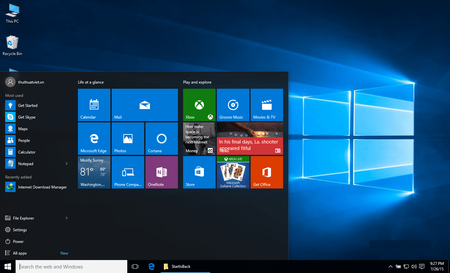
Das klassische Startmenü holen Sie sich unter Windows 10 mit StartIsBack++ zurück.

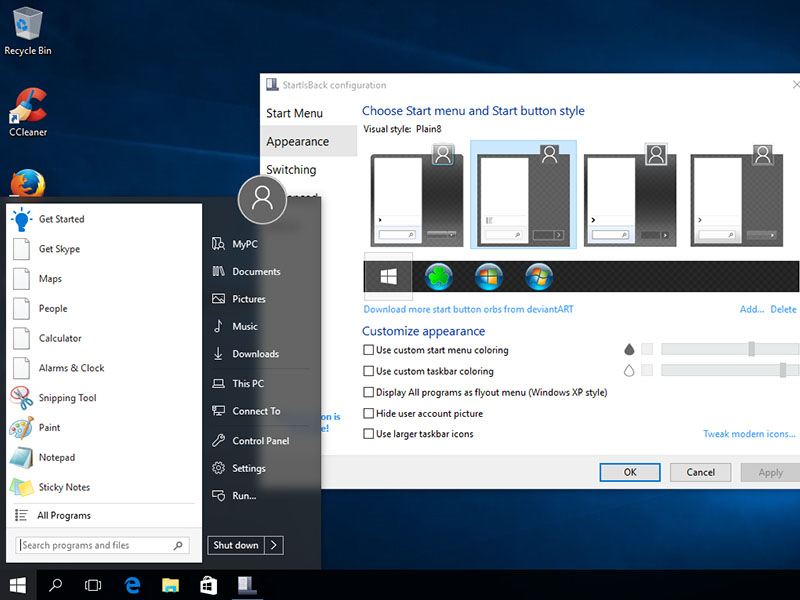
Wer ein klassisches Startmenü wie bis Windows 7 dem neuen Startbildschirm unter Windows 10 vorzieht, kann jetzt aufatmen: Das Tool StartIsBack++ bringt das originale Startmenü wieder zurück.

StartIsBack Plus: Startmenü für Windows 10
StartIsBack+ ist nach der Installation umgehend einsatzbereit, bringt aber auch eine Reihe von Einstellungsmöglichkeiten mit. So stehen etwa vier unterschiedliche Designs für das Startmenü und den Startbutton bereit. Sehr genau können Sie außerdem das Zusammenspiel mit mehreren Monitoren steuern und festlegen, wann und wie Sie zur nativen Startoberfläche von Windows 10 gelangen - etwa indem Sie mit dem Mausrad auf den Startbutton klicken.


Größe: 1,40 MB
Sprache: Multi/Deutsch
Format: Exe
Plattform: Windows 32 + 64 Bits
Hoster: Uploaded, Share-Online, Oboom


Pid0hyO.png


StartIsBack++ 1.3.1 Final Multilingual


003e254a_mediumb0khk.png


The missing Windows 10 start menu is back. Get the most useful and authentic start menu for Windows 10. StartIsBack is a tiny application that gives you the possibility of assigning the classical Start button and Start menu to Windows 10. It packs a few configuration settings that can be handled by users of any level of experience.

Unlike other similar apps which return the old Start menu and button, the side menu of StartIsBack is transparent and highlights every new program in the list.

When it comes to functionality, StartIsBack integrates some useful features. For example, if you search the computer for a new item, this is instantly shown in the results area (if it was previously indexed by Windows).

As we have mentioned before, StartIsBack comes with a multitude of configuration settings; these concern the Start menu items and behavior (e.g. display My Computer as a link, hide Default Programs and Device and Printers), appearance (e.g. disable taskbar translucency, hide the Start button) and switching rules (e.g. show the desktop when logging onto the PC, switch to the last used application when clicking the Start screen).

Other options refer to uncluttering items in the Start screen (by renaming the Start screen to "Apps" and by keeping only the modern apps in that location), the advanced system commands menu (combine the Start button context menu with the one of the Start screen) and Windows tweaks (e.g. store and display recently opened programs). Furthermore, you can disable StartIsBack for the current user.

OS: Windows
Lang: Multi
Size: 1,17 MB
Format: .exe
Hoster: Uploaded
PW: boerse


Directload
 

StartIsBack++ 1.3.1 Final | Win10

Deutsch | 01.07.2016 | pre-patched

otrj5w79.png


Beschreibung

Das neue Startmenü von Windows 10 gefällt nicht jedem. Gerade zu Beginn ist es für den ein oder anderen Nutzer schwierig, bekannte Windows-Funktionen wiederzufinden. Wer sich die Eingewöhnungsphase schenken will, holt mit Start10 das klassische Windows-7-Startmenü wieder zurück. Nach der Installation des Tools taucht die bekannte Windows-Kugel wieder in der Taskleiste auf. Beim Klick darauf erscheint ein Startmenü, das dem von Windows 7 gleicht. Wer einen optisch etwas außergewöhnlicheren Startbutton wünscht, darf sich aus den mitgelieferten Grafiken bedienen - vom XP-Button bis hin zu Eigenkreationen wie Raubtiertatzen sind viele Varianten dabei.


Plattform: Windows 10, 8.1, 7 --- x64 & x32
Format: EXE
Größe: 1 MB
Sprache: multi/de
Hoster: share-online | uploaded.net


jiuma6lc.png

 
StartIsBack++ v.1.3.1 Final + 300 Orbs

Multilingual/Deutsch // 32 + 64-Bit // PRE-Patched // 01.07.2016


Home:


Beschreibung:
Das klassische Startmenü holen Sie sich unter Windows 10 mit StartIsBack++ zurück.

Wer ein klassisches Startmenü wie bis Windows 7 dem neuen Startbildschirm unter Windows 10 vorzieht, kann jetzt aufatmen: Das Tool StartIsBack++ bringt das originale Startmenü wieder zurück.

StartIsBack Plus: Startmenü für Windows 10
StartIsBack+ ist nach der Installation umgehend einsatzbereit, bringt aber auch eine Reihe von Einstellungsmöglichkeiten mit. So stehen etwa vier unterschiedliche Designs für das Startmenü und den Startbutton bereit. Sehr genau können Sie außerdem das Zusammenspiel mit mehreren Monitoren steuern und festlegen, wann und wie Sie zur nativen Startoberfläche von Windows 10 gelangen - etwa indem Sie mit dem Mausrad auf den Startbutton klicken.

What's hot about StartIsBack on Windows 10 now?
- Live badges for modern apps on taskbar and Start menu!
- Ability to reduce resource usage by disabling newer Start menu and Cortana processes from prelaunching
- Ability to use adequately sized (32x32) large icons and larger start menu button on taskbar
- Modern icon glyphs on Start menu right hand pane
- Modern blur, drop shadow and immersive context menus for start menu
- Fully dynamic DPI aware start menu and configuration app
- New modern style with round user picture
- Lots of new minor additions and tweaks


Hoster:
Uploaded
Größe
5 Mb (RAR/EXE)
Sprache
Deutsch/Englisch
Plattform
Microsoft Windows 10 (32 oder 64-Bit)
Parts: 1


StartIsBack++ | v1.3.1 | Deutsch | Cracked
StartIsBackPlusPlus.v1.3.1.MULTILINGUAL-CRD


hclhkyfw.jpg


_ .: Beschreibung :. _

Das klassische Startmenü holen Sie sich unter Windows 10 mit StartIsBack++ zurück.

Wer ein klassisches Startmenü wie bis Windows 7 dem neuen Startbildschirm unter Windows 10 vorzieht, kann jetzt aufatmen: Das Tool StartIsBack++ bringt das originale Startmenü wieder zurück. StartIsBack+ ist nach der Installation umgehend einsatzbereit, bringt aber auch eine Reihe von Einstellungsmöglichkeiten mit. So stehen etwa vier unterschiedliche Designs für das Startmenü und den Startbutton bereit. Sehr genau können Sie außerdem das Zusammenspiel mit mehreren Monitoren steuern und festlegen, wann und wie Sie zur nativen Startoberfläche von Windows 10 gelangen - etwa indem Sie mit dem Mausrad auf den Startbutton klicken.


_ .: NFO :. _
sidvklwb.png


Plattform: Windows
Format: .exe
Sprache(n): Multi inkl. Deutsch
Hoster: Uploaded, Share-Online, Alfafile, Oboom
Größe: 1 MB
Parts: 1

sidvklwb.png

zccpz698.png

_ .: Download :. _

sidvklwb.png
 

StartIsBack++ 1.3.2 Final Multilingual


003e254a_mediumb0khk.png


The missing Windows 10 start menu is back. Get the most useful and authentic start menu for Windows 10. StartIsBack is a tiny application that gives you the possibility of assigning the classical Start button and Start menu to Windows 10. It packs a few configuration settings that can be handled by users of any level of experience.

Unlike other similar apps which return the old Start menu and button, the side menu of StartIsBack is transparent and highlights every new program in the list.

When it comes to functionality, StartIsBack integrates some useful features. For example, if you search the computer for a new item, this is instantly shown in the results area (if it was previously indexed by Windows).

As we have mentioned before, StartIsBack comes with a multitude of configuration settings; these concern the Start menu items and behavior (e.g. display My Computer as a link, hide Default Programs and Device and Printers), appearance (e.g. disable taskbar translucency, hide the Start button) and switching rules (e.g. show the desktop when logging onto the PC, switch to the last used application when clicking the Start screen).

Other options refer to uncluttering items in the Start screen (by renaming the Start screen to "Apps" and by keeping only the modern apps in that location), the advanced system commands menu (combine the Start button context menu with the one of the Start screen) and Windows tweaks (e.g. store and display recently opened programs). Furthermore, you can disable StartIsBack for the current user.

OS: Windows
Lang: Multi
Size: 1,17 MB
Format: .exe
Hoster: Uploaded
PW: boerse


Directload
 

StartIsBack++ 1.3.2 Final

Deutsch | 22.07.2016 | aktiviert

ko8qdy22.png


Beschreibung

Mit Start10 holen Sie sich unter Windows 10 das altbekannte Windows-7-Startmenü zurück auf Ihren Desktop.

Das neue Startmenü von Windows 10 gefällt nicht jedem. Gerade zu Beginn ist es für den ein oder anderen Nutzer schwierig, bekannte Windows-Funktionen wiederzufinden. Wer sich die Eingewöhnungsphase schenken will, holt mit Start10 das klassische Windows-7-Startmenü wieder zurück. Nach der Installation des Tools taucht die bekannte Windows-Kugel wieder in der Taskleiste auf. Beim Klick darauf erscheint ein Startmenü, das dem von Windows 7 gleicht. Wer einen optisch etwas außergewöhnlicheren Startbutton wünscht, darf sich aus den mitgelieferten Grafiken bedienen - vom XP-Button bis hin zu Eigenkreationen wie Raubtiertatzen sind viele Varianten dabei.


Plattform: Windows 10 x64 & x32
Format: EXE
Größe: 1 MB
Sprache: multi/de
Hoster: share-online | uploaded.net


jiuma6lc.png


StartIsBack++ 1.3.3 Final Multilingual


003e254a_mediumb0khk.png


The missing Windows 10 start menu is back. Get the most useful and authentic start menu for Windows 10. StartIsBack is a tiny application that gives you the possibility of assigning the classical Start button and Start menu to Windows 10. It packs a few configuration settings that can be handled by users of any level of experience.

Unlike other similar apps which return the old Start menu and button, the side menu of StartIsBack is transparent and highlights every new program in the list.

When it comes to functionality, StartIsBack integrates some useful features. For example, if you search the computer for a new item, this is instantly shown in the results area (if it was previously indexed by Windows).

As we have mentioned before, StartIsBack comes with a multitude of configuration settings; these concern the Start menu items and behavior (e.g. display My Computer as a link, hide Default Programs and Device and Printers), appearance (e.g. disable taskbar translucency, hide the Start button) and switching rules (e.g. show the desktop when logging onto the PC, switch to the last used application when clicking the Start screen).

Other options refer to uncluttering items in the Start screen (by renaming the Start screen to "Apps" and by keeping only the modern apps in that location), the advanced system commands menu (combine the Start button context menu with the one of the Start screen) and Windows tweaks (e.g. store and display recently opened programs). Furthermore, you can disable StartIsBack for the current user.

OS: Windows
Lang: Multi
Size: 1,17 MB
Format: .exe
Hoster: Uploaded
PW: boerse


Directload
 

StartIsBack++ 1.3.4 Final Multilingual


003e254a_mediumb0khk.png


The missing Windows 10 start menu is back. Get the most useful and authentic start menu for Windows 10. StartIsBack is a tiny application that gives you the possibility of assigning the classical Start button and Start menu to Windows 10. It packs a few configuration settings that can be handled by users of any level of experience.

Unlike other similar apps which return the old Start menu and button, the side menu of StartIsBack is transparent and highlights every new program in the list.

When it comes to functionality, StartIsBack integrates some useful features. For example, if you search the computer for a new item, this is instantly shown in the results area (if it was previously indexed by Windows).

As we have mentioned before, StartIsBack comes with a multitude of configuration settings; these concern the Start menu items and behavior (e.g. display My Computer as a link, hide Default Programs and Device and Printers), appearance (e.g. disable taskbar translucency, hide the Start button) and switching rules (e.g. show the desktop when logging onto the PC, switch to the last used application when clicking the Start screen).

Other options refer to uncluttering items in the Start screen (by renaming the Start screen to "Apps" and by keeping only the modern apps in that location), the advanced system commands menu (combine the Start button context menu with the one of the Start screen) and Windows tweaks (e.g. store and display recently opened programs). Furthermore, you can disable StartIsBack for the current user.

OS: Windows
Lang: Multi
Size: 1,17 MB
Format: .exe
Hoster: Uploaded
PW: boerse


Directload
 
StartIsBack++ v.1.3.4 Final + 300 Orbs

Multilingual/Deutsch // 32 + 64-Bit // PRE-Patched // 10.10.2016


Home:


Beschreibung:
Das klassische Startmenü holen Sie sich unter Windows 10 mit StartIsBack++ zurück.

Wer ein klassisches Startmenü wie bis Windows 7 dem neuen Startbildschirm unter Windows 10 vorzieht, kann jetzt aufatmen: Das Tool StartIsBack++ bringt das originale Startmenü wieder zurück.

StartIsBack Plus: Startmenü für Windows 10
StartIsBack+ ist nach der Installation umgehend einsatzbereit, bringt aber auch eine Reihe von Einstellungsmöglichkeiten mit. So stehen etwa vier unterschiedliche Designs für das Startmenü und den Startbutton bereit. Sehr genau können Sie außerdem das Zusammenspiel mit mehreren Monitoren steuern und festlegen, wann und wie Sie zur nativen Startoberfläche von Windows 10 gelangen - etwa indem Sie mit dem Mausrad auf den Startbutton klicken.

What's hot about StartIsBack on Windows 10 now?
- Live badges for modern apps on taskbar and Start menu!
- Ability to reduce resource usage by disabling newer Start menu and Cortana processes from prelaunching
- Ability to use adequately sized (32x32) large icons and larger start menu button on taskbar
- Modern icon glyphs on Start menu right hand pane
- Modern blur, drop shadow and immersive context menus for start menu
- Fully dynamic DPI aware start menu and configuration app
- New modern style with round user picture
- Lots of new minor additions and tweaks


Hoster:
Uploaded
Größe
5 Mb (RAR/EXE)
Sprache
Deutsch/Englisch
Plattform
Microsoft Windows 10 (32 oder 64-Bit)
Parts: 1

 
startisbackshkf4.gif


Multilingual/Deutsch // x86 x64 // Setup // Patched

Lieferant:
Genre: Windows-Tools
Freischaltung: Activator/Patch/Patched
Plattform: Microsoft Windows Vista/7/8/8.1/10 x86 x64
Sprache: Multilingual/Deutsch
Packer: WinRAR
Format: *.rar > *.exe (Setup)
Größe (gepackt): 500 MB (Split-Archiv)
Hoster:
uploadedz0khb.png
Uploaded.net
Passwort zum Entpacken: "MrOliver" ohne die "

Beschreibung:
Das klassische Startmenü holen Sie sich unter Windows 10 mit StartIsBack++ zurück.

Wer ein klassisches Startmenü, wie das unter Windows 7, dem neuen Startmenü unter Windows 10 vorzieht, kann jetzt aufatmen: Das Tool StartIsBack++ bringt das alte Windows-Startmenü wieder zurück.

[Release 2016] - Größe: 9,20 MB
[Release 2016] - Größe: 11,15 MB
[Release 2016] - Größe: 93,86 MB
[Release 2015] - Größe: 1,91 MB
[Release 2019] - Größe: 1,21 MB
[Release 2020] - Größe: 1,30 MB
[Release 2020] - Größe: 1,23 MB
[Release 2020] - Größe: 1,39 MB
[Release 2020] - Größe: 1,27 MB
[Release 2020] - Größe: 1,27 MB
[Release 2020] - Größe: 1,27 MB
[Release 2020] - Größe: 1,24 MB
[Release 2021] - Größe: 1,25 MB
[Release 2021] - Größe: 1,27 MB
[Release 2021] - Größe: 1,28 MB
[Release 2021] - Größe: 1,31 MB
[Release 2021] - Größe: 1,29 MB
[Release 2021] - Größe: 1,29 MB
[Release 2021] - Größe: 1,31 MB
[Release 2021] - Größe: 1,44 MB


Kein Support meinerseits bei Download-/ Installations-/ oder Anwendungsproblemen.
 
Zuletzt bearbeitet:
Zurück
Oben Unten