



Farid_Khan
MyBoerse.bz Pro Member
Sidify Music Converter 2.5.0 Multilingual
File size: 118 MB
Spotify Music Converter is the best choice for those who wish to download songs from Spotify to the local drive. It allows us to download any songs, playlists, podcasts, or radio and keeps 100% original audio quality. After downloading the songs to the local disk, you can transfer them to any other devices like iPod, iPhone, Zune, PSP, MP3 player, Walkman, DJ software, and other portable devices.
Features
Convert Spotify Song/Playlist/Podcast/Radio to MP3/AAC/WAV/FLAC
Spotify Music Converter helps you convert Spotify music to plain MP3, AAC, WAV, and FLAC format at 5X speed just in three steps. Looking to convert a full Spotify playlist? No worries, Sidify also supports batch conversion by dragging & dropping a playlist link from Spotify to Sidify.
Edit and Keep Metadata for a More Origanized Music Library
It could be a time-consuming and exhausting process to fulfill the metadata of a song, especially if you have a massive collection of music. Spotify Music Converter won't let you mess up with your music. By converting Spotify songs with Sidify, you could get almost all ID3 tags including title, artwork, artist, album, genre, track number to organize your music library.
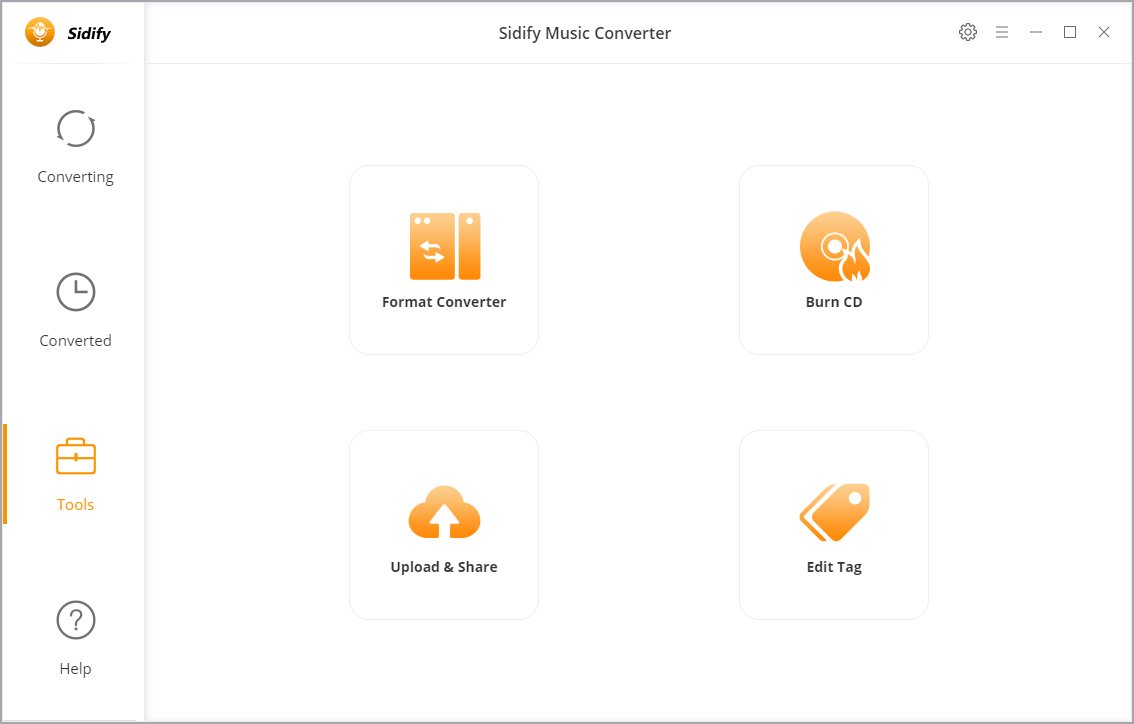
If you have a large selection of music tracks that needing the tag information, you can use the built-in music tag editors for editing song information.
Burn Spotify Music to CD or Upload & Share to iTunes and Cloud Drive
Sidify's Music Converter for Spotify supports burning CDs directly from converted Spotify songs in one click. All you have to do is, inserting a blank CD, click on the "Burn CD" button to start the burning process. Moreover, Sidify is capable of uploading & sharing both converted Spotify songs and local music to OneDrive, including one-click to export music to iTunes library.
Convert Local Audio Files to MP3/M4A/AAC/WAV/OGG
With the built-in "Format Converter", you can convert almost all popular and non-protected audio files to MP3, M4A, AAC, WAV, OGG for playback on other portable devices. If you're unable to play or edit a certain audio file because the format isn't supported by the software or devices you're using, you can always use Sidify Music Converter to convert the audio formats from one to another.
Highly Compatibility & Free Updates and Technical Support
Sidify Music Converter for Spotify is fully compatible with Windows 10/8/7/ and the latest version of Spotify. It will be constantly upgraded to correspond to every update from Spotify. Besides, auto-check for updates ensures you get the latest version of the program whenever the new version is available.
What's new

File size: 118 MB
Spotify Music Converter is the best choice for those who wish to download songs from Spotify to the local drive. It allows us to download any songs, playlists, podcasts, or radio and keeps 100% original audio quality. After downloading the songs to the local disk, you can transfer them to any other devices like iPod, iPhone, Zune, PSP, MP3 player, Walkman, DJ software, and other portable devices.
Features
Convert Spotify Song/Playlist/Podcast/Radio to MP3/AAC/WAV/FLAC
Spotify Music Converter helps you convert Spotify music to plain MP3, AAC, WAV, and FLAC format at 5X speed just in three steps. Looking to convert a full Spotify playlist? No worries, Sidify also supports batch conversion by dragging & dropping a playlist link from Spotify to Sidify.
Edit and Keep Metadata for a More Origanized Music Library
It could be a time-consuming and exhausting process to fulfill the metadata of a song, especially if you have a massive collection of music. Spotify Music Converter won't let you mess up with your music. By converting Spotify songs with Sidify, you could get almost all ID3 tags including title, artwork, artist, album, genre, track number to organize your music library.
If you have a large selection of music tracks that needing the tag information, you can use the built-in music tag editors for editing song information.
Burn Spotify Music to CD or Upload & Share to iTunes and Cloud Drive
Sidify's Music Converter for Spotify supports burning CDs directly from converted Spotify songs in one click. All you have to do is, inserting a blank CD, click on the "Burn CD" button to start the burning process. Moreover, Sidify is capable of uploading & sharing both converted Spotify songs and local music to OneDrive, including one-click to export music to iTunes library.
Convert Local Audio Files to MP3/M4A/AAC/WAV/OGG
With the built-in "Format Converter", you can convert almost all popular and non-protected audio files to MP3, M4A, AAC, WAV, OGG for playback on other portable devices. If you're unable to play or edit a certain audio file because the format isn't supported by the software or devices you're using, you can always use Sidify Music Converter to convert the audio formats from one to another.
Highly Compatibility & Free Updates and Technical Support
Sidify Music Converter for Spotify is fully compatible with Windows 10/8/7/ and the latest version of Spotify. It will be constantly upgraded to correspond to every update from Spotify. Besides, auto-check for updates ensures you get the latest version of the program whenever the new version is available.
What's new
