Murtadoc
MyBoerse.bz Pro Member
Security Eye 4.6

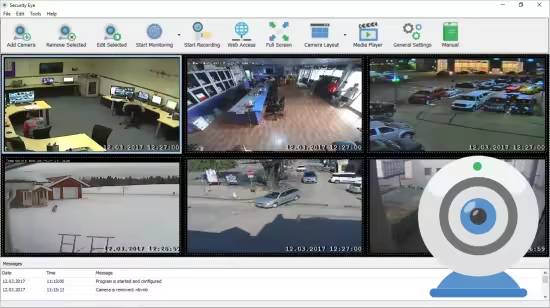
Security Eye is a personal surveillance system that enables you to monitor multiple IP cameras or webcams.The software offers motion detection recording, continuous and scheduled recordings. If you are using motion detection, it will automatically record (or take snapshots) when motion is detected take photos and optionally sound an alarm, send you an email or SMS notification. Video Surveillance
Installed on your PC, Security Eye uses IP cameras and webcams to perform unbeatable video monitoring. The program supports more than 1200 models of IP cameras, and virtually all webcams. Video stream can be viewed from 64 sources simultaneously. You can also watch live stream via browser, from any place in the world!
Motion Detector
Motion detector is one of the main tools available in Security Eye. It is based on the video frame analyzing algorihm. You can use it to protect your home or company from intruders. The motion sensor and masking tool are fully customizable so you can be sure you will not get the false alerts.
Task Scheduler
Video recording and motion monitoring are useful when you need it. The software allows you to setup the periods of a day and special dates for these tasks. For example, you can start monitoring your home at the beginning of your working day, and to finish the task at the evening. Or if you are a boss, you can schedule recording the video in your office rooms on the working hours only, and then watch it later, to make sure your employees do the job.
Video Recording
The software uses xVid encoding engine for quality video recording. You can record the events in your home, office or shop while you are away. The easy-to-use, integrated video player allows you to playback recorded video anytime, on any speed. You can run recording at special periods of a day and the week.
Alerts via Email & SMS
If Security Eye detects motion, it can turn on a loud sound (siren). It can also send you an alert message to your email, with attached photos from cameras. In addition, it can send sms to your cell phone.
Capture the Incident
It is not only important to identify the security threat, but also to capture the evidence. When the program detects the motion, it can make snapshots on cameras, and to record video. The captured media files are saved to the local folder, or on the cloud.
Typical Scenarios and Uses:
Home Security
Keep an eye on your home when you are away. Just install Security Eye software, and use existing USB webcam connected to your computer. Your home security system is complete! Now in case of intrusion, you'll instantly be alerted with photos of the thieves sent to your email and mobile
Business Monitoring
As well as your home, your office or retail store also needs a good security system. At night, you can use it as a motion detection system, and on working hours - for recording the work process. Your staff needs to be monitored as well! WIth Security Eye, you'll always know what's happening at work.
Baby Surveillance
Keep a constant eye on your child anytime, anywhere. Follow what is happening in your baby's room when you are away. Do you have any suspicions about your nanny? Use Security Eye to collect an evidence - you'll have it all on tape!
Pet Monitoring
Have you ever wondered what your favorite animal is doing while you are not at home? Download Security Eye now and create the next buzz on YouTube.
37.3 MB
rar/zip archive
Download Link:
Security Eye is a personal surveillance system that enables you to monitor multiple IP cameras or webcams.The software offers motion detection recording, continuous and scheduled recordings. If you are using motion detection, it will automatically record (or take snapshots) when motion is detected take photos and optionally sound an alarm, send you an email or SMS notification. Video Surveillance
Installed on your PC, Security Eye uses IP cameras and webcams to perform unbeatable video monitoring. The program supports more than 1200 models of IP cameras, and virtually all webcams. Video stream can be viewed from 64 sources simultaneously. You can also watch live stream via browser, from any place in the world!
Motion Detector
Motion detector is one of the main tools available in Security Eye. It is based on the video frame analyzing algorihm. You can use it to protect your home or company from intruders. The motion sensor and masking tool are fully customizable so you can be sure you will not get the false alerts.
Task Scheduler
Video recording and motion monitoring are useful when you need it. The software allows you to setup the periods of a day and special dates for these tasks. For example, you can start monitoring your home at the beginning of your working day, and to finish the task at the evening. Or if you are a boss, you can schedule recording the video in your office rooms on the working hours only, and then watch it later, to make sure your employees do the job.
Video Recording
The software uses xVid encoding engine for quality video recording. You can record the events in your home, office or shop while you are away. The easy-to-use, integrated video player allows you to playback recorded video anytime, on any speed. You can run recording at special periods of a day and the week.
Alerts via Email & SMS
If Security Eye detects motion, it can turn on a loud sound (siren). It can also send you an alert message to your email, with attached photos from cameras. In addition, it can send sms to your cell phone.
Capture the Incident
It is not only important to identify the security threat, but also to capture the evidence. When the program detects the motion, it can make snapshots on cameras, and to record video. The captured media files are saved to the local folder, or on the cloud.
Typical Scenarios and Uses:
Home Security
Keep an eye on your home when you are away. Just install Security Eye software, and use existing USB webcam connected to your computer. Your home security system is complete! Now in case of intrusion, you'll instantly be alerted with photos of the thieves sent to your email and mobile
Business Monitoring
As well as your home, your office or retail store also needs a good security system. At night, you can use it as a motion detection system, and on working hours - for recording the work process. Your staff needs to be monitored as well! WIth Security Eye, you'll always know what's happening at work.
Baby Surveillance
Keep a constant eye on your child anytime, anywhere. Follow what is happening in your baby's room when you are away. Do you have any suspicions about your nanny? Use Security Eye to collect an evidence - you'll have it all on tape!
Pet Monitoring
Have you ever wondered what your favorite animal is doing while you are not at home? Download Security Eye now and create the next buzz on YouTube.
37.3 MB
rar/zip archive
Download Link: