




Last updated 6/2020
MP4 | Video: h264, 1280x720 | Audio: AAC, 44.1 KHz
Language: English | Size: 14.54 GB | Duration: 18h 33m
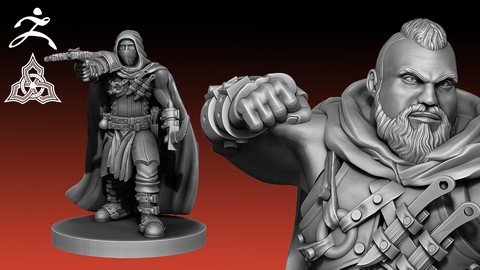
Create a Whole Thieves Guild of Unique Rogue Models
What you'll learn
Learn how to digitally sculpt in the industry leading software: zbrush
Learn how to navigate zbrush
Learn to use many brushes: what each does and when to use them
Learn how to create many various weapons and armors
Learn how to pose your characters
Learn how to optimize your characters for 3d printing
Learn beginning skills of hard surface modeling in the industry leading software: Autodesk Maya
Learn to navigate Autodesk Maya
Learn how to export beautiful renders of your models
Requirements
Must be able to speak the English Language
Must have a computer with internet access
You will need access to Zbrush - free 30 day trial is available for first time users
You will need access to Autodesk Maya - free 30 day trial is available for first time users
A drawing tablet is highly recommended
Description
Created with the absolute first timer in mind, this course will teach you to become proficient in many of Autodesk Maya and Zbrush's more complex features - some of which are unknown to more advanced users. By the end of this course, you will have the knowledge and skills to create professional-quality 3D models fit for 3D printing and sales.*This course builds on our previous course:*"Sculpting Male Characters in Zbrush", but it is not necessary to have taken that class before this one. This course is completely approachable to a first time beginner using Zbrush and Autodesk Maya. Join our lead 3D Modeler Josh O'hala as he recreates the exact same Rogue models that we sell to customers as well as unique models created just for this course. You will be guided through our professional production pipeline:You will learn how to become comfortable navigating Zbrush.You will learn how to add simple geometry to your project which will be used later. Learn to create many weapons and Armors Learn to create various accessories to bring your Rogues to lifeYou will learn how to use many commonly used brushes as well as specialized brushes to create beautiful and accurate sculpts. The lessons learned will be reinforced as Josh guides you through creating many Rogue models. You will learn how to pose your Rogues to create many variations of models. You will learn how to optimize your models for 3D printing.You will learn the process of making your model 3D printable.and much more! visit us on youtube (runeforge studios) for examples of our models and tutorials.
Overview
Section 1: Introduction
Lecture 1 Introduction
Lecture 2 What you'll need
Lecture 3 What you'll need - Part 2
Lecture 4 Before We Get Started
Section 2: Creating Sword and Dagger base mesh with Autodesk Maya
Lecture 5 Opening Maya
Lecture 6 Modeling Keybinds
Lecture 7 Importing Reference Images
Lecture 8 Shaping the Sword Blade
Lecture 9 Creating the Sharp Edge
Lecture 10 Smoothing and Sharpening Edges
Lecture 11 Creating Sword Handle
Lecture 12 Turning Sword into Dagger
Section 3: Creating Throwing knife Base Mesh in Maya
Lecture 13 Throwing Knife
Section 4: Creating Large Crossbow Base Mesh in Maya
Lecture 14 Large Crossbow - Part 1
Lecture 15 Large Crossbow - Part 2
Section 5: Creating Hand Crossbow Base Mesh in Maya
Lecture 16 Hand Crossbow - Part 1
Lecture 17 Hand Crossbow - Part 2
Section 6: Getting Started in Zbrush
Lecture 18 Opening Zbrush
Lecture 19 General Navigation
Lecture 20 Dynamesh and Zremesher
Lecture 21 General Use Brushes
Section 7: Enhancing Sword in Zbrush
Lecture 22 Sword - Part 1
Lecture 23 Sword - Part 2
Section 8: Enhancing the Dagger in Zbrush
Lecture 24 Dagger
Section 9: Enhancing the Throwing Knife in Zbrush
Lecture 25 Throwing Knife
Section 10: Enhancing Heavy Crossbow in Zbrush
Lecture 26 Heavy Crossbow - Part 1
Lecture 27 Heavy Crossbow - Part 2
Lecture 28 Heavy Crossbow - Part 3
Lecture 29 Heavy Crossbow - Part 4
Lecture 30 Crossbow Bolt - Part 1
Lecture 31 Crossbow Bolt - Part 2
Section 11: Enhancing Hand Crossbow in Zbrush
Lecture 32 Hand Crossbow - Part 1
Lecture 33 Hand Crossbow - Part 2
Lecture 34 Hand Crossbow - Part 3
Section 12: Sculpting a Bow in Zbrush
Lecture 35 Bow - Part 1
Lecture 36 Bow - Part 2
Lecture 37 Bow - Part 3
Section 13: Creating a Base Mesh Tool
Lecture 38 Bringing in Human Base Mesh
Section 14: Sculpting the Hood
Lecture 39 Hood - Part 1
Lecture 40 Hood - Part 2
Lecture 41 Hood - Part 3
Section 15: Sculpting the Chest Armor
Lecture 42 Chest Armor - Part 1
Lecture 43 Chest Armor - Part 2
Lecture 44 Chest Armor - Part 3
Lecture 45 Chest Armor - Part 4
Section 16: Sculpting Pouch and Coin Purse
Lecture 46 Sculpting the Side Pouch
Lecture 47 Sculpting the Coin Purse
Section 17: Sculpting Shoulderpads
Lecture 48 Shoulderpads
Section 18: Sculpting the Handguards
Lecture 49 Handguards - Part 1
Lecture 50 Handguards - Part 2
Section 19: Sculpting Boots
Lecture 51 Boots - Part 1
Lecture 52 Boots - Part 2
Section 20: Sculpting the Belt
Lecture 53 Belt
Section 21: Sculpting the Leg Guards
Lecture 54 Leg Guards - Part 1
Lecture 55 Leg Guards - Part 2
Section 22: Sculpting the Crotch Flap
Lecture 56 Crotch Flap
Section 23: Prepping Your Assets
Lecture 57 Importing the Weapons
Lecture 58 Combining the Props
Lecture 59 Lowering Poly Count
Section 24: Sculpting Quivers
Lecture 60 Sculpting Arrow Quiver
Lecture 61 Sculpting Bolt Quiver
Section 25: Posing Legs for First Position
Lecture 62 Posing the Legs - Part 1
Lecture 63 Posing the Legs - Part 2
Lecture 64 Touch ups
Section 26: Sculpting the Cloak
Lecture 65 Cloak - Part 1
Lecture 66 Cloak - Part 2
Lecture 67 Cloak - Part 3
Lecture 68 Cloak - Part 4
Section 27: Dagger and Sword Pose
Lecture 69 Dagger and Sword Pose - Part 1
Lecture 70 Dagger and Sword Pose - Part 2
Section 28: Dagger and Hand Crossbow Pose
Lecture 71 Dagger and Hand Crossbow Pose - Part 1
Lecture 72 Dagger and Hand Crossbow Pose - Part 2
Lecture 73 Dagger and Hand Crossbow Pose - Part 3
Section 29: Fat Rogue
Lecture 74 Prepping Fat Rogue - Part 1
Lecture 75 Prepping Fat Rogue - Part 2
Lecture 76 Prepping Fat Rogue - Part 3
Lecture 77 Prepping Fat Rogue - Part 4
Lecture 78 Prepping Fat Rogue - Part 5
Lecture 79 Posing Fat Rogue - Part 1
Lecture 80 Posing Fat Rogue - Part 2
Lecture 81 Posing Fat Rogue - Part 3
Lecture 82 Posing Fat Rogue - Part 4
Section 30: Muscular Rogue
Lecture 83 Prepping Muscular Rogue - Part 1
Lecture 84 Prepping Muscular Rogue - Part 2
Lecture 85 Posing Muscular Rogue - Part 1
Lecture 86 Muscular Pose - Part 2
Lecture 87 Muscular Pose - Part 3
Lecture 88 Muscular Pose - Part 4
Section 31: Dadbod Rogue
Lecture 89 Prepping the Dadbod Rogue
Lecture 90 Prepping the Dadbod Rogue - Part 2
Lecture 91 Posing the Dadbod Rogue - Part 1
Lecture 92 Posing the Dadbod Rogue - Part 2
Section 32: Strongman Rogue
Lecture 93 Prepping the Strongman Rogue
Lecture 94 Posing the Strongman Rogue - Part 1
Lecture 95 Posing the Strongman Rogue - Part 2
Lecture 96 Posing the Strongman Rogue - Part 3
Section 33: Finishing Touches
Lecture 97 Dynameshing and Decimating
Lecture 98 Sizing and Placing on Bases
Section 34: Rendering
Lecture 99 Render Settings
Lecture 100 Rendering a Turntable
Section 35: Preparing for 3D Printing
Lecture 101 Making Ready for 3D Print
Lecture 102 Sizing, Repairing, and Printing
This course is intended for anyone who wants to learn how to create professional quality digital sculptures.,This course is intended for anyone who wants to learn how to create their own models for 3D printing.,This course is intended for anyone who wants to learn how to create their own miniatures for tabletop games.
Homepage
Recommend Download Link Hight Speed | Please Say Thanks Keep Topic Live
Links are Interchangeable - No Password - Single Extraction
