• Regeln für den Software-Bereich:


    Allgemeines:

    - In erster Linie sind unsere Boardregeln zu beachten, zu finden HIER.
    - Software zur Audiobearbeitung sollte ausschließlich im Unterforum "Audio" eingestellt werden.
    - Für Cracks, Keygens oder sonstige Freischaltungssoftware gibt es das Unterforum "Freischaltung".
    - Portable Software bitte im entsprechenden Unterforum "Portable Software" eintragen.
    - Diskussionen zur Installation und anderen Problemen mit der Software, bitte im enstprechenden Unterforum "Talk" führen.
    - Bei Unklarheiten und Fragen zu den Regeln bitte die Moderatoren kontaktieren.


    Angebot erstellen

    - Die Struktur des Threadtitels muss wie folgt umgesetzt werden: Herstellername - Softwarename - Versionsnummer
    - Unnötige Zusätze im Threadtitel wie "HOT", "NEW" oder Punkte zwischen den Wörtern sind nicht erlaubt.
    - Achtet darauf immer nur die Hauptversion und deren Updates in einem Thread zusammenfassen, konkretes Beispiel: SoftwareXY v3.12 gehört in den selben Thread mit SoftwareXY v3.13; SoftwareXY v.4.1 gehört in einen neuen eigenen Thread. Ausgenommen hiervon sind Sammelthreads und Dauerangebote.
    - Bei nicht bekannten Herstellern oder Angebote einer privaten Software, ist die Programmbezeichnung + Versionsnummer ausreichend.
    - Besondere Beachtung gilt für den ersten Beitrag eines Angebots. Dort muss eine kurze Beschreibung der Software in deutscher Sprache angegeben werden. Für offizielle Releases ist es Pflicht die NFO im Beitrag einzustellen(Spoiler, siehe nächster Punkt).
    - Weitere Informationen wie NFOs oder Changelogs, versteckt ihr bitte in einem Spoiler.


    Software Suche

    - Für Suchanfragen haben wir das Unterforum "Suche" erstellt.
    - Auch hier sollte vorher die Suchfunktion benutzt werden, um Doppelthreads vorzubeugen. Sollte es bereits eine Suchanfrage geben, könnt ihr den Thread gerne mit einem "Danke" pushen.


    Trojaner- und Virusalarm

    - Falls Euer Virenscanner bei einem Angebot Alarm schlägt, solltet ihr zunächst Ruhe bewahren. Viele Virenscanner erkennen Cracks/Keygens oft fälschlicherweise als Bedrohung.
    - Prüft die verdächtige Datei zuerst mit http://virustotal.com , sollte es sich hierbei wirklich um eine Bedrohung handeln, meldet den Beitrag und/oder wendet euch mit dem Bericht von VirusTotal.com an einen Moderator.


    Unerwünschte Angebote

    - Keylogger, Spionagetools, alles rund ums Thema Hacking/Cracking ist nicht erwünscht.
  • Bitte registriere dich zunächst um Beiträge zu verfassen und externe Links aufzurufen.

*** Bestes IPTV *** bester Preis *** gratis Test ***


Scrivener v3

gibson75

MyBoerse.bz Pro Member
Scrivener 3.0.0.0 (x64)

Multilingual / Inkl. Crack


2c49c77d9d2d6c770889fdcjmo.jpg


Details:

Größe: 150 MB
Sprache: Multi/Deutsch
Format: Rar / Exe
Plattform: Windows (64-Bit)
Hoster: Rapidgator.net, Turbobit.net,Nitroflare.com

Beschreibung :

Scrivener is a powerful content-generation tool for writers that allows you to concentrate on composing and structuring long and difficult documents. While it gives you complete control of the formatting, its focus is on helping you get to the end of that awkward first draft.

Your complete writing studio

Writing a novel, research paper, script or any long-form text involves more than hammering away at the keys until youre done. Collecting research, ordering fragmented ideas, shuffling index cards in search of that elusive structuremost writing software is fired up only after much of the hard work is over. Enter Scrivener: a word processor and project management tool that stays with you from that first, unformed idea all the way through to the final draft. Outline and structure your ideas, take notes, view research alongside your writing and compose the constituent pieces of your text in isolation or in context. Scrivener won't tell you how to writeit just makes all the tools you have scattered around your desk available in one application.

Write, structure, revise

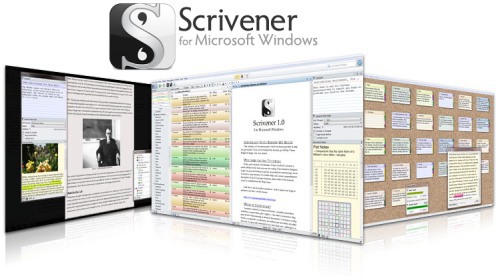
Scrivener puts everything you need for structuring, writing and editing long documents at your fingertips. On the left of the window, the binder allows you to navigate between the different parts of your manuscript, your notes, and research materials, with ease. Break your text into pieces as small or large as you wantso you can forget wrestling with one long document. Restructuring your draft is as simple as drag and drop. Select a single document to edit a section of your manuscript in isolation, or use Scrivenings mode to work on multiple sections as though they were one: Scrivener makes it easy to switch between focussing on the details and stepping back to get a wider view of your composition.

With access to a powerful underlying text engine, you can add tables, bullet points, images and mark up your text with comments and footnotes. Format as you go using the format bar at the top of the page, or use any font you want for the writing and let Scrivener reformat your manuscript after you're doneallowing you to concentrate on the words rather than their presentation.

Create order from chaos

Most word processors approach composing a long-form text the same as typing a letter or flyerthey expect you to start on page one and keep typing until you reach the end. Scrivener lets you work in any order you want and gives you tools for planning and restructuring your writing. In Scrivener, you can enter a synopsis for each document on a virtual index card and then stack and shuffle the cards in the corkboard until you find the most effective sequence. Plan out your work in Scriveners outliner and use the synopses you create as prompts while you write. Or just get everything down into a first draft and break it apart later for rearrangement on the outliner or corkboard. Create collections of documents to read and edit related text without affecting its place in the overall draft label and track connected documents or mark what still needs to be done. Whether you like to plan everything in advance, write first and structure lateror do a bit of bothScrivener supports the way you work.

Your researchalways within reach

No more switching between multiple applications to refer to research files: keep all of your background materialimages, PDF files, movies, web pages, sound filesright inside Scrivener. And unlike other programs that only let you view one document at a time, in Scrivener you can split the editor to view research in one pane while composing your text right alongside it in another. Transcribe an interview or conversation, make notes on an image or article, or just refer back to another chapter, all without leaving the document youre working on.

Getting it out there
Compile your draft into a single document for printing or exporting

Scrivener provides all the tools you need to prepare your manuscript for submission or self-publishing. Once youre ready to go, control everything from how footnotes, headers and footers appear to fine-tuning the formatting of each level of your draftor keep it simple by choosing from one of Scriveners convenient presets. Print a novel using standard manuscript formatting. Export your finished document to a wide variety of file formats, including Microsoft Word, RTF, PDF and HTMLmaking it easy to share your work with others. Or self-publish by exporting to ePub or Kindle formats to share your work via iBooks or Amazon, or for reading on any e-reader.

Who Uses Scrivener?

Scrivener is used by all sorts of professional and amateur writers, from best-selling and aspiring novelists to Hollywood scriptwriters, from students and academics to lawyers and journalists: anyone who works on long and difficult writing projects. While many other writing project management tools impose their own workflows or limit themselves to fiction-writing, Scrivener recognises that all writers of
long-form texts often face similar problems, and provides an array of flexible tools that allow you to do things your way, no matter what kind of writing you do.

Download :

Turbobit


Rapidgator


Nitroflare


Scrivener v3.0.1.0 Multilingual (x86/x64)


c2bbd8ea89d4d35db7d3189632eb0071.jpg


Scrivener v3.0.1.0 Multilingual (x86/x64) | 132/145 MB | Language: Multilanguage


Scrivener is a powerful content-generation tool for writers that allows you to concentrate on composing and structuring long and difficult documents. While it gives you complete control of the formatting, its focus is on helping you get to the end of that awkward first draft.


Your complete writing studio
Writing a novel, research paper, script or any long-form text involves more than hammering away at the keys until you are done. Collecting research, ordering fragmented ideas, shuffling index cards in search of that elusive structure most writing software is fired up only after much of the hard work is over.

Enter Scrivener: a word processor and project management tool that stays with you from that first, unformed idea all the way through to the final draft. Outline and structure your ideas, take notes, view research alongside your writing and compose the constituent pieces of your text in isolation or in context. Scrivener would not tell you how to write it just makes all the tools you have scattered around your desk available in one application.

Write, structure, revise
Scrivener puts everything you need for structuring, writing and editing long documents at your fingertips. On the left of the window, the binder allows you to navigate between the different parts of your manuscript, your notes, and research materials, with ease. Break your text into pieces as small or large as you want so you can forget wrestling with one long document. Restructuring your draft is as simple as drag and drop. Select a single document to edit a section of your manuscript in isolation, or use Scrivenings mode to work on multiple sections as though they were one: Scrivener makes it easy to switch between focussing on the details and stepping back to get a wider view of your composition.

With access to a powerful underlying text engine, you can add tables, bullet points, images and mark up your text with comments and footnotes. Format as you go using the format bar at the top of the page, or use any font you want for the writing and let Scrivener reformat your manuscript after you're done allowing you to concentrate on the words rather than their presentation.

Create order from chaos
Most word processors approach composing a long-form text the same as typing a letter or flyer they expect you to start on page one and keep typing until you reach the end. Scrivener lets you work in any order you want and gives you tools for planning and restructuring your writing. In Scrivener, you can enter a synopsis for each document on a virtual index card and then stack and shuffle the cards in the corkboard until you find the most effective sequence. Plan out your work in Scriveners outliner and use the synopses you create as prompts while you write.

Or just get everything down into a first draft and break it apart later for rearrangement on the outliner or corkboard. Create collections of documents to read and edit related text without affecting its place in the overall draft; label and track connected documents or mark what still needs to be done. Whether you like to plan everything in advance, write first and structure later or do a bit of both Scrivener supports the way you work.

Your research always within reach
No more switching between multiple applications to refer to research files: keep all of your background material images, PDF files, movies, web pages, sound files right inside Scrivener. And unlike other programs that only let you view one document at a time, in Scrivener you can split the editor to view research in one pane while composing your text right alongside it in another. Transcribe an interview or conversation, make notes on an image or article, or just refer back to another chapter, all without leaving the document you are working on.

Getting it out there
Scrivener provides all the tools you need to prepare your manuscript for submission or self-publishing. Once you are ready to go, control everything from how footnotes, headers and footers appear to fine-tuning the formatting of each level of your draft or keep it simple by choosing from one of Scriveners convenient presets. Print a novel using standard manuscript formatting. Export your finished document to a wide variety of file formats, including Microsoft Word, RTF, PDF and HTML making it easy to share your work with others. Or self-publish by exporting to ePub or Kindle* formats to share your work via iBooks or Amazon, or for reading on any e-reader.

Who Uses Scrivener?
Scrivener is used by all sorts of professional and amateur writers, from best-selling and aspiring novelists to Hollywood scriptwriters, from students and academics to lawyers and journalists: anyone who works on long and difficult writing projects. While many other writing project management tools impose their own workflows or limit themselves to fiction-writing, Scrivener recognises that all writers of long-form texts often face similar problems, and provides an array of flexible tools that allow you to do things your way, no matter what kind of writing you do.

Those currently using Scrivener include:
- Novelists
- Short-Story Writers
- Screenwriters
- Playwrights
- Comedians
- Lawyers
- Journalists
- Lecturers
- Academics and Students
- Biographers and Memoirists
- Business and Technical Writers
- Comics and Graphic Novel Writers
- Translators
- And more

Requirements: Scrivener requires Windows XP (SP3), Vista, Windows 7, 8.1 or 10.

Homepage:


Größe: 132/145 MB
Sprache: Multilingual-Deutsch
Format: .rar / .exe
Medizin: Crack / Patch
Plattform: Windows (32 Bit 64 Bit)


HOSTER:

K2s.cc (Keep2Share)

Rapidgator.net

Nitroflare.com

Uploadgig.com


DOWNLOAD


Scrivener 3.0.1.0 (x64/x86)

Multilingual / Inkl. Crack


2c49c77d9d2d6c770889fdcjmo.jpg


Details:

Größe: 301 MB
Sprache: Multi/Deutsch
Format: Rar / Exe
Plattform: Windows (64-Bit)
Hoster: Rapidgator.net, Turbobit.net,Nitroflare.com

Beschreibung :

Scrivener is a powerful content-generation tool for writers that allows you to concentrate on composing and structuring long and difficult documents. While it gives you complete control of the formatting, its focus is on helping you get to the end of that awkward first draft.

Your complete writing studio

Writing a novel, research paper, s***** or any long-form text involves more than hammering away at the keys until youre done. Collecting research, ordering fragmented ideas, shuffling index cards in search of that elusive structuremost writing software is fired up only after much of the hard work is over. Enter Scrivener: a word processor and project management tool that stays with you from that first, unformed idea all the way through to the final draft. Outline and structure your ideas, take notes, view research alongside your writing and compose the constituent pieces of your text in isolation or in context. Scrivener won't tell you how to writeit just makes all the tools you have scattered around your desk available in one application.

Write, structure, revise

Scrivener puts everything you need for structuring, writing and editing long documents at your fingertips. On the left of the window, the binder allows you to navigate between the different parts of your manus*****, your notes, and research materials, with ease. Break your text into pieces as small or large as you wantso you can forget wrestling with one long document. Restructuring your draft is as simple as drag and drop. Select a single document to edit a section of your manus***** in isolation, or use Scrivenings mode to work on multiple sections as though they were one: Scrivener makes it easy to switch between focussing on the details and stepping back to get a wider view of your composition.

With access to a powerful underlying text engine, you can add tables, bullet points, images and mark up your text with comments and footnotes. Format as you go using the format bar at the top of the page, or use any font you want for the writing and let Scrivener reformat your manus***** after you're doneallowing you to concentrate on the words rather than their presentation.

Create order from chaos

Most word processors approach composing a long-form text the same as typing a letter or flyerthey expect you to start on page one and keep typing until you reach the end. Scrivener lets you work in any order you want and gives you tools for planning and restructuring your writing. In Scrivener, you can enter a synopsis for each document on a virtual index card and then stack and shuffle the cards in the corkboard until you find the most effective sequence. Plan out your work in Scriveners outliner and use the synopses you create as prompts while you write. Or just get everything down into a first draft and break it apart later for rearrangement on the outliner or corkboard. Create collections of documents to read and edit related text without affecting its place in the overall draft label and track connected documents or mark what still needs to be done. Whether you like to plan everything in advance, write first and structure lateror do a bit of bothScrivener supports the way you work.

Your researchalways within reach

No more switching between multiple applications to refer to research files: keep all of your background materialimages, PDF files, movies, web pages, sound filesright inside Scrivener. And unlike other programs that only let you view one document at a time, in Scrivener you can split the editor to view research in one pane while composing your text right alongside it in another. Transcribe an interview or conversation, make notes on an image or article, or just refer back to another chapter, all without leaving the document youre working on.

Getting it out there
Compile your draft into a single document for printing or exporting

Scrivener provides all the tools you need to prepare your manus***** for submission or self-publishing. Once youre ready to go, control everything from how footnotes, headers and footers appear to fine-tuning the formatting of each level of your draftor keep it simple by choosing from one of Scriveners convenient presets. Print a novel using standard manus***** formatting. Export your finished document to a wide variety of file formats, including Microsoft Word, RTF, PDF and HTMLmaking it easy to share your work with others. Or self-publish by exporting to ePub or Kindle formats to share your work via iBooks or Amazon, or for reading on any e-reader.

Who Uses Scrivener?

Scrivener is used by all sorts of professional and amateur writers, from best-selling and aspiring novelists to Hollywood s*****writers, from students and academics to lawyers and journalists: anyone who works on long and difficult writing projects. While many other writing project management tools impose their own workflows or limit themselves to fiction-writing, Scrivener recognises that all writers of
long-form texts often face similar problems, and provides an array of flexible tools that allow you to do things your way, no matter what kind of writing you do.

Download :

Turbobit


Rapidgator


Nitroflare


Scrivener 3.1.5.1 Multilingual


7c1f934563ecb40900cac2c8b686de1a.png


Scrivener 3.1.5.1 Multilingual


Zum Schreiben. Und schreiben. Und schreiben. Scrivener ist die ideale App für Autoren aller Art, die täglich von Bestsellerautoren, Drehbuchautoren, Sachbuchautoren, Studenten, Akademikern, Anwälten, Journalisten, Übersetzern und mehr verwendet wird. Scrivener sagt Ihnen nicht, wie Sie schreiben sollen – es bietet einfach alles, was Sie brauchen, um mit dem Schreiben zu beginnen und weiterzuschreiben.


Sprache: Deutsch, Multi | Größe: 186 MB | Format: RAR, EXE | Plattform: Windows 7, 8/8.1, 10, 11 (32/64Bit)


Hoster:
RapidGator.net | NitroFlare.com | DDownload.com


DOWNLOAD Links:


Zuletzt bearbeitet:
Scrivener v3.0.1.0

Multilingual/Deutsch // Crack

w3lifzp25296jg8.png


Beschreibung:

Scrivener ist ein leistungsstarkes Tool zur Erstellung von Inhalten für Autoren, mit dem Sie sich auf das Erstellen und Strukturieren langer und schwieriger Dokumente konzentrieren können. Während Sie die vollständige Kontrolle über die Formatierung haben, liegt der Fokus darauf, Ihnen zu helfen, das Ende dieses umständlichen ersten Entwurfs zu erreichen.

Ihr komplettes Schreibstudio
Das Schreiben eines Romans, einer Forschungsarbeit, eines Skripts oder eines Textes in Langform umfasst mehr als das Klopfen der Tasten, bis Sie fertig sind. Nachforschungen sammeln, fragmentierte Ideen ordnen, Karteikarten mischen, um diese schwer fassbare Struktur zu finden - die meisten Schreibprogramme werden erst gestartet, nachdem ein Großteil der harten Arbeit beendet ist. Enter Scrivener: Ein Textverarbeitungs- und Projektmanagement-Tool, das von der ersten, ungeformten Idee bis zum endgültigen Entwurf bei Ihnen bleibt. Skizzieren und strukturieren Sie Ihre Ideen, machen Sie sich Notizen, sehen Sie sich Recherchen neben Ihrem Schreiben an und verfassen Sie die Bestandteile Ihres Textes einzeln oder im Kontext. Scrivener sagt Ihnen nicht, wie Sie schreiben sollen, sondern stellt alle Werkzeuge, die Sie auf Ihrem Schreibtisch verteilt haben, in einer Anwendung zur Verfügung.

Schreiben, strukturieren, überarbeiten
Scrivener bietet alles, was Sie zum Strukturieren, Schreiben und Bearbeiten langer Dokumente benötigen. Auf der linken Seite des Fensters können Sie mit dem Ordner mühelos zwischen den verschiedenen Teilen Ihres Manuskripts, Ihren Notizen und Forschungsmaterialien navigieren. Teilen Sie Ihren Text so klein oder groß auf, wie Sie möchten - so können Sie das Ringen mit einem langen Dokument vergessen. Die Umstrukturierung Ihres Entwurfs ist so einfach wie Drag & Drop. Wählen Sie ein einzelnes Dokument aus, um einen Abschnitt Ihres Manuskripts einzeln zu bearbeiten, oder verwenden Sie den Modus „Scrivenings“, um mehrere Abschnitte wie einen zu bearbeiten: Scrivener erleichtert das Umschalten zwischen dem Fokussieren auf Details und dem Zurücktreten, um eine breitere Ansicht zu erhalten deiner Komposition.

Mit dem Zugriff auf eine leistungsfähige zugrunde liegende Text-Engine können Sie Tabellen, Aufzählungszeichen und Bilder hinzufügen und Ihren Text mit Kommentaren und Fußnoten versehen. Formatieren Sie das Dokument nach und nach mithilfe der Formatierungsleiste oben auf der Seite oder verwenden Sie eine beliebige Schriftart für das Schreiben und lassen Sie das Manuskript von Scrivener neu formatieren, damit Sie sich auf die Wörter und nicht auf deren Präsentation konzentrieren können.

Ordnung schaffen aus Chaos
Die meisten Textverarbeitungsprogramme verfassen einen langen Text genauso wie einen Brief oder einen Flyer. Sie erwarten, dass Sie auf Seite eins beginnen und so lange tippen, bis Sie das Ende erreicht haben. Mit Scrivener können Sie in beliebiger Reihenfolge arbeiten und erhalten Werkzeuge für die Planung und Umstrukturierung Ihres Schreibens. In Scrivener können Sie für jedes Dokument auf einer virtuellen Karteikarte eine Übersicht eingeben und die Karten in der Pinnwand stapeln und mischen, bis Sie die effektivste Reihenfolge gefunden haben. Planen Sie Ihre Arbeit in Scriveners Outliner und verwenden Sie die von Ihnen erstellten Synopsen als Eingabeaufforderungen, während Sie schreiben.

Oder machen Sie einfach einen ersten Entwurf und zerlegen Sie ihn später, um ihn auf dem Outliner oder der Pinnwand neu anzuordnen. Erstellen Sie Dokumentensammlungen, um verwandten Text zu lesen und zu bearbeiten, ohne seinen Platz im Gesamtentwurf zu beeinträchtigen. Beschriften und verfolgen Sie verbundene Dokumente oder markieren Sie, was noch zu tun ist. Egal, ob Sie alles im Voraus planen, erst schreiben und später strukturieren oder beides tun möchten - Scrivener unterstützt Ihre Arbeitsweise.

Ihre Forschung - immer in Reichweite
Sie müssen nicht mehr zwischen mehreren Anwendungen wechseln, um auf Forschungsdateien zuzugreifen: Behalten Sie Ihr gesamtes Hintergrundmaterial - Bilder, PDF-Dateien, Filme, Webseiten, Audiodateien - direkt in Scrivener. Und im Gegensatz zu anderen Programmen, mit denen Sie nur ein Dokument gleichzeitig anzeigen können, können Sie in Scrivener den Editor aufteilen, um die Recherche in einem Bereich anzuzeigen, während Sie Ihren Text direkt daneben in einem anderen verfassen. Transkribieren Sie ein Interview oder eine Unterhaltung, machen Sie sich Notizen zu einem Bild oder Artikel oder verweisen Sie einfach auf ein anderes Kapitel, ohne das Dokument zu verlassen, an dem Sie gerade arbeiten.

Bring es da raus
Scrivener bietet alle Tools, die Sie benötigen, um Ihr Manuskript für die Einreichung oder Selbstveröffentlichung vorzubereiten. Sobald Sie bereit sind, können Sie alles steuern, von der Anzeige von Fußnoten, Kopf- und Fußzeilen bis hin zur Feinabstimmung der Formatierung der einzelnen Ebenen Ihres Entwurfs. Alternativ können Sie eine der praktischen Vorgaben von Scrivener verwenden, um die Formatierung zu vereinfachen. Drucken Sie einen Roman im Standard-Manuskriptformat. Exportieren Sie Ihr fertiges Dokument in eine Vielzahl von Dateiformaten, einschließlich Microsoft Word, RTF, PDF und HTML. So können Sie Ihre Arbeit ganz einfach mit anderen teilen. Oder veröffentlichen Sie sie selbst, indem Sie sie in das ePub- oder Kindle * -Format exportieren, um Ihre Arbeit über iBooks oder Amazon zu teilen oder auf einem beliebigen E-Reader zu lesen.

Wer benutzt Scrivener?
Scrivener wird von allen Arten von professionellen und Amateurautoren verwendet, von Bestsellern und aufstrebenden Schriftstellern bis hin zu Hollywood-Drehbuchautoren, von Studenten und Akademikern bis hin zu Anwälten und Journalisten: von jedem, der an langen und schwierigen Schreibprojekten arbeitet. Während viele andere Tools für das Schreibprojektmanagement ihre eigenen Arbeitsabläufe festlegen oder sich auf das Schreiben von Belletristik beschränken, erkennt Scrivener, dass alle Autoren von Langformtexten häufig mit ähnlichen Problemen konfrontiert sind, und bietet eine Reihe flexibler Tools

_________________________________________________

Größe: 285 MB
Sprache: Multi/Deutsch
Format: Exe
Plattform: Windows 7 SP1/8/8.1/10 (32 oder 64-Bit)
Hoster: RapidGator|Ddownload|Nitroflare
________________________________________

35E1EFC1F2.png


Scrivener 3.1.1.0 (x64) Multilingual


6115e8e3982323b4a7a46dda0b2dbc61.png


Scrivener 3.1.1.0 (x64) Multilingual


Scrivener ist ein leistungsstarkes Tool zur Erstellung von Inhalten für Autoren, mit dem Sie sich auf das Verfassen und Strukturieren langer und schwieriger Dokumente konzentrieren können. Während es Ihnen die vollständige Kontrolle über die Formatierung gibt, liegt der Schwerpunkt darauf, Ihnen zu helfen, das Ende dieses umständlichen ersten Entwurfs zu erreichen.


Sprache: Deutsch, Multi | Größe: 152 MB | Format: RAR, EXE | Plattform: Windows 7, 8, 8.1, 10 (64Bit)


Hoster:
UploadGig.com | RapidGator.net | DDownload.com


DOWNLOAD Links:


<<>> SCRIVENER.V3.1.1.0.WIN64.MULTILINGUAL <<>>

772eb9d32f2a084a068c3a7318cc1a02.png


Titel: SCRIVENER V3.1.1.0 WIN64 MULTILINGUAL

Genre: Office Software

Sprache: Englisch, Deutsch
Hoster: Rapidgator.net, ddownload.com, Turbobit.net, Nitroflare.com
Groesse: 153 MB
Format: EXE
Plattform: Microsoft Windows 7/8/8.1/10 (64-Bit)


Beschreibung:

Zum Schreiben. Und Schreiben. Und zum Schreiben.


Scrivener ist die erste Wahl für Autoren aller Art und wird täglich von Bestsellerautoren, Drehbuchautoren, Sachbuchautoren, Studenten, Akademikern, Anwälten, Journalisten, Übersetzern und vielen mehr verwendet. Scrivener sagt Ihnen nicht, wie Sie schreiben sollen - es bietet Ihnen einfach alles, was Sie brauchen, um mit dem Schreiben anzufangen und weiterzuschreiben.

NFO:


Download via Filecrypt


Download via Filecrypt


Download via Filecrypt


Download via Filecrypt


<<>> SCRIVENER.V3.1.1.0.WIN32.MULTILINGUAL <<>>

3774787d985c0813f6999f05959125e2.png


Titel: SCRIVENER V3.1.1.0 WIN32 MULTILINGUAL

Genre: Office Software

Sprache: Englisch, Deutsch
Hoster: Rapidgator.net, ddownload.com
Groesse: 142 MB
Format: EXE
Plattform: Microsoft Windows 7/8/8.1/10 (32-Bit)


Beschreibung:

Zum Schreiben. Und Schreiben. Und zum Schreiben.


Scrivener ist die erste Wahl für Autoren aller Art und wird täglich von Bestsellerautoren, Drehbuchautoren, Sachbuchautoren, Studenten, Akademikern, Anwälten, Journalisten, Übersetzern und vielen mehr verwendet. Scrivener sagt Ihnen nicht, wie Sie schreiben sollen - es bietet Ihnen einfach alles, was Sie brauchen, um mit dem Schreiben anzufangen und weiterzuschreiben.

NFO:


Download via Filecrypt


Download via Filecrypt


  • Like
Reaktionen: p3n


Scrivener 3.1.2.0 Multilingual


7c1f934563ecb40900cac2c8b686de1a.png


Scrivener 3.1.2.0 Multilingual


Zum Schreiben. Und schreiben. Und schreiben. Scrivener ist die ideale App für Autoren aller Art, die täglich von Bestsellerautoren, Drehbuchautoren, Sachbuchautoren, Studenten, Akademikern, Anwälten, Journalisten, Übersetzern und mehr verwendet wird. Scrivener sagt Ihnen nicht, wie Sie schreiben sollen – es bietet einfach alles, was Sie brauchen, um mit dem Schreiben zu beginnen und weiterzuschreiben.


Sprache: Deutsch, Multi | Größe: 277 MB | Format: RAR, EXE | Plattform: Windows 7, 8/8.1, 10, 11 (32/64Bit)


Hoster:
UploadGig.com | RapidGator.net | DDownload.com | NitroFlare.com


DOWNLOAD Links:


6115e8e3982323b4a7a46vne7p.png


Scrivener 3.1.2.0 (32 oder 64-Bit)


Plattform: windows 10 , 8 , 8.1 , 7 , 11 (32 oder 64-Bit)
Größe: 131.89 MB /145.47 MB
Sprache(n) -> Englisch
Format: rar / exe
Hoster: rapidgator / ddownload / nitroflare


Zum Schreiben. Und schreiben. Und schreiben. Scrivener ist die ideale App für Autoren aller Art, die täglich von Bestsellerautoren, Drehbuchautoren, Sachbuchautoren, Studenten, Akademikern, Anwälten, Journalisten, Übersetzern und mehr verwendet wird. Scrivener sagt Ihnen nicht, wie Sie schreiben sollen – es bietet einfach alles, was Sie brauchen, um mit dem Schreiben zu beginnen und weiterzuschreiben. Erweitern Sie Ihr Manuskript nach Ihren Wünschen bestellen, in Abschnitten so groß oder klein, wie Sie möchten. Du hast eine tolle Idee, weißt aber nicht, wo sie hinpasst? Schreiben Sie, wenn die Inspiration zuschlägt, und finden Sie später ihren Platz. Erweitern Sie Ihr Manuskript organisch, Idee für Idee. Sehen Sie den Wald oder die Bäume. Ob Sie planen oder stürzen, Scrivener arbeitet Ihren Weg: Hämmern Sie jedes kleinste Detail heraus, bevor Sie ein Wort eingeben, oder schnitzen Sie einen Entwurf aus und strukturieren Sie ihn später neu. Oder mischen Sie Ihre Methoden und machen Sie ein bisschen von beidem. In Scrivener ist alles, was Sie schreiben, in eine benutzerfreundliche Projektskizze integriert. Die Arbeit mit einer Übersicht Ihres Manuskripts ist also immer nur einen Klick entfernt, und das Verwandeln von Kapitel Vier in Kapitel Eins ist so einfach wie Drag-and-Drop.Recherche in Reichweite Müssen Sie auf Recherche verweisen? In Scrivener ist Ihr Hintergrundmaterial immer griffbereit und Sie können es direkt neben Ihrer Arbeit öffnen. Schreiben Sie eine Beschreibung anhand eines Fotos. Ein Interview transkribieren. Machen Sie sich Notizen zu einer PDF-Datei oder Webseite. Oder überprüfen Sie die Konsistenz, indem Sie auf ein früheres Kapitel neben dem laufenden verweisen. Veröffentlichen Sobald Sie bereit sind, Ihre Arbeit mit der Welt zu teilen, kompilieren Sie alles in einem einzigen Dokument zum Drucken, Selbstveröffentlichen oder Exportieren in gängige Formate wie Word, PDF, Final Draft oder einfacher Text. Sie können sogar mit unterschiedlichen Formatierungen teilen, sodass Sie in Ihrer bevorzugten Schriftart schreiben und dennoch diese Übermittlungsrichtlinien erfüllen können.

Download:
3n4lcsdgx9kme.gif


Scrivener 3.1.3 (x86/x64)

Multilingual/Deutsch + crack


d844a7210d7205ee04b45b5dl9.jpg


Details:

Größe: 277 MB
Sprache: Multi/Deutsch
Format: Rar/Exe
Plattform: Windows 7 SP1/8/8.1/10/11 (32 oder 64-Bit)
Hoster: Rapidgator.net, Turbobit.net,Nitroflare.com

Beschreibung :

Scrivener is a powerful content-generation tool for writers that allows you to concentrate on composing and structuring long and difficult documents. While it gives you complete control of the formatting, its focus is on helping you get to the end of that awkward first draft.


Download :

Turbobit:


Rapidgator:


Nitroflare:


Zurück
Oben Unten