• Regeln für den Software-Bereich:


    Allgemeines:

    - In erster Linie sind unsere Boardregeln zu beachten, zu finden HIER.
    - Software zur Audiobearbeitung sollte ausschließlich im Unterforum "Audio" eingestellt werden.
    - Für Cracks, Keygens oder sonstige Freischaltungssoftware gibt es das Unterforum "Freischaltung".
    - Portable Software bitte im entsprechenden Unterforum "Portable Software" eintragen.
    - Diskussionen zur Installation und anderen Problemen mit der Software, bitte im enstprechenden Unterforum "Talk" führen.
    - Bei Unklarheiten und Fragen zu den Regeln bitte die Moderatoren kontaktieren.


    Angebot erstellen

    - Die Struktur des Threadtitels muss wie folgt umgesetzt werden: Herstellername - Softwarename - Versionsnummer
    - Unnötige Zusätze im Threadtitel wie "HOT", "NEW" oder Punkte zwischen den Wörtern sind nicht erlaubt.
    - Achtet darauf immer nur die Hauptversion und deren Updates in einem Thread zusammenfassen, konkretes Beispiel: SoftwareXY v3.12 gehört in den selben Thread mit SoftwareXY v3.13; SoftwareXY v.4.1 gehört in einen neuen eigenen Thread. Ausgenommen hiervon sind Sammelthreads und Dauerangebote.
    - Bei nicht bekannten Herstellern oder Angebote einer privaten Software, ist die Programmbezeichnung + Versionsnummer ausreichend.
    - Besondere Beachtung gilt für den ersten Beitrag eines Angebots. Dort muss eine kurze Beschreibung der Software in deutscher Sprache angegeben werden. Für offizielle Releases ist es Pflicht die NFO im Beitrag einzustellen(Spoiler, siehe nächster Punkt).
    - Weitere Informationen wie NFOs oder Changelogs, versteckt ihr bitte in einem Spoiler.


    Software Suche

    - Für Suchanfragen haben wir das Unterforum "Suche" erstellt.
    - Auch hier sollte vorher die Suchfunktion benutzt werden, um Doppelthreads vorzubeugen. Sollte es bereits eine Suchanfrage geben, könnt ihr den Thread gerne mit einem "Danke" pushen.


    Trojaner- und Virusalarm

    - Falls Euer Virenscanner bei einem Angebot Alarm schlägt, solltet ihr zunächst Ruhe bewahren. Viele Virenscanner erkennen Cracks/Keygens oft fälschlicherweise als Bedrohung.
    - Prüft die verdächtige Datei zuerst mit http://virustotal.com , sollte es sich hierbei wirklich um eine Bedrohung handeln, meldet den Beitrag und/oder wendet euch mit dem Bericht von VirusTotal.com an einen Moderator.


    Unerwünschte Angebote

    - Keylogger, Spionagetools, alles rund ums Thema Hacking/Cracking ist nicht erwünscht.
  • Bitte registriere dich zunächst um Beiträge zu verfassen und externe Links aufzurufen.


ScreenHunter Pro v7

57f7bdca4ee1a4de8b23511cff67b22c.jpg


ScreenHunter Pro 7.0.1135 + Crack-UZ1 | 127.12 MB

Information:


Language: English
Format before unpacking: .rar
Format after unpacking: exe
Platform: Windows
Size: 127.12 MB
Hoster: UploadGIG, NitroFlare, RapidGator


​
 
Zuletzt bearbeitet:

ScreenHunter Pro v7.0.1145


f398171a057c0083c693fb851018c89a.jpg


ScreenHunter Pro v7.0.1145 | 128 MB | Language: English


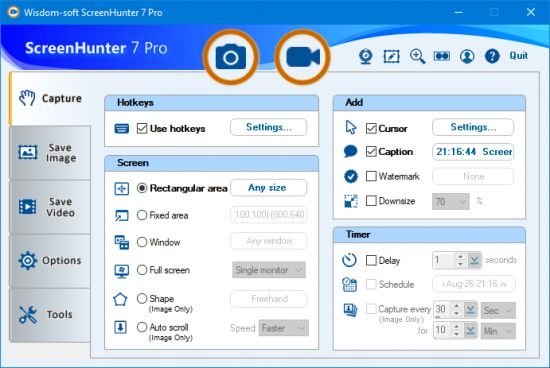
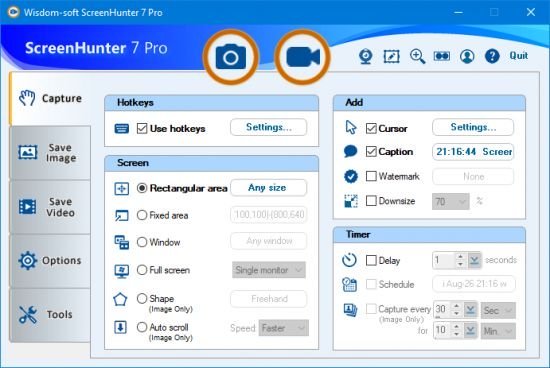
ScreenHunter 7 is an award-winning solution to all-in-one image capture, print, edit and video recording. Its the total capture solution to save you time and boost productivity. Also with auto-scroll web pages, auto-capture, webcam and video screen capture. It captures what you see as an image even whilst recording. It has an easy-to-use interface. All the features are visible in 4 easy-to-use tabs, so everyone from beginners to professionals can use ScreenHunter 7. The process is simple, the options are easy to manage, and the results are flawless. Powerful and intelligent, ScreenHunter has proven to be an incomparable helper of your business.


The software supports full screen capture up to 6K for multiple monitors and records 4K videos for a single monitor. Supports frame rate up to 100 fps.

Using DirectX lets ScreenHunter 7 produce professional quality videos. It is a perfect tool for recording movies and courses online.

Moreover, ScreenHunter 7 captures and records windows covered by another window or even minimized windows. Optimal for automatic or scheduled captures and recording.

Furthermore, you can show your webcam anywhere at any given time, so you can integrate it into your recording the way you want.

ScreenHunter Pro 7 is the most advanced version with all the necessary tools included for your screen capture needs. Its the total capture solution to save you time and boost productivity. With this tool, you can capture screen to image or PDF files, immediately see the benefits of numerous time-saving features and deliver the highest quality screenshots. As well, it offers easy-to-use user interface and maximum flexibility for a more interactive capture experience.

Capturing Features:
Rectangular area
Adjustable rectangle
Object / Window
Auto-scroll
Multi-object
Text
Active Window
Fixed area (user defined)
Specific window (lock-in window)
Full screen
DOS program
DirectX / Screen saver
Movie / video
Freehand
Round area (Ellipse)
Round Rectangular area
Polygon
Web capture
Scanning images

Addition Features:
Mouse pointer
Multiple monitors
Transparent window
AutoText (date/time stamps, note)
Watermark
Border

Timing Features:
Delayed capture
Timed auto-capture
Scheduled auto-capture
Recurring capture

Viewing and Editing Features:
Image editing, adding text & annotation
Advanced image processing
High-quality zooming, resizing & cropping
Viewing 100 images & conversion
Drag & drop images from desktop

Saving Features:
Automatic naming and saving to files
Clipboard
Auto-email
Auto-scale
Saving in the smallest file size
Optimized JPEG, GIF and PNG
High quality and transparent GIF
Saving to TIFF

Other Features:
Screen Color Picker
System tray
Zoombox
Flexible hotkey
Multiple hotkey
Direct printing
Wysiwyg printing
Developer support

Release Notes:
Homepage:


Größe: 128 MB
Sprache: English
Format: .rar / .exe
Plattform: Windows (32 Bit 64 Bit)


HOSTER:

K2s.cc (Keep2Share)

Rapidgator.net

Nitroflare.com

Uploadgig.com


DOWNLOAD


​
 
ScreenHunter Pro v7.0.1147

965185826c10bbe97b3b5eokkb.png


ScreenHunter Pro v7.0.1147

Größe: 140 MB
Sprache: Englisch
Format: Exe/ISO
Plattform: Windows
Medizin: Crack/Patch

ScreenHunter 7 ist eine preisgekrönte Lösung für die Erfassung, den Druck, die Bearbeitung und die Videoaufnahme von Bildern in einem Bild.

Es ist die vollständige Erfassungslösung, mit der Sie sparen und die Produktivität steigern können. Auch mit Auto-Scroll-Webseiten, Auto-Capture, Webcam und Video-Screen-Capture. Es erfasst das, was Sie als Bild sehen, auch während der Aufnahme. Es hat eine einfach zu bedienende Oberfläche. Alle Funktionen sind in 4 benutzerfreundlichen Registerkarten sichtbar, sodass jeder, vom Bner bis zum Profi, ScreenHunter 7 verwenden kann. Der Prozess ist einfach, die Optionen sind einfach zu verwalten und die Ergebnisse sind fehlerfrei. ScreenHunter ist leistungsstark und intelligent und hat sich als unvergleichlicher Helfer Ihres Unternehmens erwiesen.
Die Software unterstützt die Vollbildaufnahme von bis zu 6K für mehrere Monitore und zeichnet 4K-Videos für einen einzelnen Monitor auf. Unterstützt Bildraten bis zu 100 fps.

Mit DirectX kann ScreenHunter 7 Videos in professioneller Qualität erstellen. Es ist ein perfektes Werkzeug, um Filme und Kurse online aufzunehmen.

Darüber hinaus erfasst und zeichnet ScreenHunter 7 Fenster auf, die von einem anderen Fenster abgedeckt werden, oder minimiert sogar Fenster. Optimal für automatische oder geplante Aufnahmen und Aufzeichnungen.

Uploaded.net
Rapidgator.net
DDownload.com

8B5C8FB8BF.png


​
 

ScreenHunter Pro v7.0.1149


ab274ff348159fb692a01170ff3f6086.jpeg


ScreenHunter Pro v7.0.1149 | 140 MB | Language: English


ScreenHunter 7 is an award-winning solution to all-in-one image capture, print, edit and video recording. It's the total capture solution to save you time and boost productivity. Also with auto-scroll web pages, auto-capture, webcam and video screen capture. It captures what you see as an image even whilst recording. It has an easy-to-use interface.


All the features are visible in 4 easy-to-use tabs, so everyone from beginners to professionals can use ScreenHunter 7. The process is simple, the options are easy to manage, and the results are flawless.

Powerful and intelligent, ScreenHunter has proven to be an incomparable helper of your business.
The software supports full screen capture up to 6K for multiple monitors and records 4K videos for a single monitor. Supports frame rate up to 100 fps.

Using DirectX lets ScreenHunter 7 produce professional quality videos. It is a perfect tool for recording movies and courses online.

Moreover, ScreenHunter 7 captures and records windows covered by another window or even minimized windows. Optimal for automatic or scheduled captures and recording.

Furthermore, you can show your webcam anywhere at any given time, so you can integrate it into your recording the way you want.

ScreenHunter Pro 7 is the most advanced version with all the necessary tools included for your screen capture needs. It's the total capture solution to save you time and boost productivity. With this tool, you can capture screen to image or PDF files, immediately see the benefits of numerous time-saving features and deliver the highest quality . As well, it offers easy-to-use user interface and maximum flexibility for a more interactive capture experience.

Capturing Features
* Rectangular area
* Adjustable rectangle
* Object / Window
* Auto-scroll
* Multi-object
* Text
* Active Window
* Fixed area (user defined)
* Specific window (lock-in window)
* Full screen
* DOS program
* DirectX / Screen saver
* Movie / video
* Freehand
* Round area (Ellipse)
* Round Rectangular area
* Polygon
* Web capture
* Scanning images

Addition Features
* Mouse pointer
* Multiple monitors
* Transparent window
* AutoText (date/time stamps, note)
* Watermark
* Border

Timing Features
* Delayed capture
* Timed auto-capture
* Scheduled auto-capture
* Recurring capture

Viewing and Editing Features
* Image editing, adding text & annotation
* Advanced image processing
* High-quality zooming, resizing & cropping
* Viewing 100 images & conversion
* Drag & drop images from desktop

Saving Features
* Automatic naming and saving to files
* Clipboard
* Auto-email
* Auto-scale
* Saving in the smallest file size
* Optimized JPEG, GIF and PNG
* High quality and transparent GIF
* Saving to TIFF

Other Features
* Screen Color Picker
* System tray
* Zoombox
* Flexible hotkey
* Multiple hotkey
* Direct printing
* Wysiwyg printing
* Developer support

Home Page:


Größe: 140 MB
Sprache: English
Format: .rar / .exe
Medizin: Crack / Patch
Plattform: Windows (32 Bit 64 Bit)


HOSTER:

K2s.cc (Keep2Share)

Rapidgator.net

Nitroflare.com

Uploadgig.com


DOWNLOAD



​
 

ScreenHunter Pro v7.0.1151


f266bac35eeff435ce9b68529d5db364.jpg


ScreenHunter Pro v7.0.1151 | 135 MB | Language: English


ScreenHunter 7 is an award-winning solution to all-in-one image capture, print, edit and video recording. Its the total capture solution to save you time and boost productivity. Also with auto-scroll web pages, auto-capture, webcam and video screen capture. It captures what you see as an image even whilst recording. It has an easy-to-use interface. All the features are visible in 4 easy-to-use tabs, so everyone from beginners to professionals can use ScreenHunter 7. The process is simple, the options are easy to manage, and the results are flawless. Powerful and intelligent, ScreenHunter has proven to be an incomparable helper of your business.


The software supports full screen capture up to 6K for multiple monitors and records 4K videos for a single monitor. Supports frame rate up to 100 fps.

Using DirectX lets ScreenHunter 7 produce professional quality videos. It is a perfect tool for recording movies and courses online.

Moreover, ScreenHunter 7 captures and records windows covered by another window or even minimized windows. Optimal for automatic or scheduled captures and recording.

Furthermore, you can show your webcam anywhere at any given time, so you can integrate it into your recording the way you want.

ScreenHunter Pro 7 is the most advanced version with all the necessary tools included for your screen capture needs. Its the total capture solution to save you time and boost productivity. With this tool, you can capture screen to image or PDF files, immediately see the benefits of numerous time-saving features and deliver the highest quality screenshots. As well, it offers easy-to-use user interface and maximum flexibility for a more interactive capture experience.

Capturing Features:
Rectangular area
Adjustable rectangle
Object / Window
Auto-scroll
Multi-object
Text
Active Window
Fixed area (user defined)
Specific window (lock-in window)
Full screen
DOS program
DirectX / Screen saver
Movie / video
Freehand
Round area (Ellipse)
Round Rectangular area
Polygon
Web capture
Scanning images

Addition Features:
Mouse pointer
Multiple monitors
Transparent window
AutoText (date/time stamps, note)
Watermark
Border

Timing Features:
Delayed capture
Timed auto-capture
Scheduled auto-capture
Recurring capture

Viewing and Editing Features:
Image editing, adding text & annotation
Advanced image processing
High-quality zooming, resizing & cropping
Viewing 100 images & conversion
Drag & drop images from desktop

Saving Features:
Automatic naming and saving to files
Clipboard
Auto-email
Auto-scale
Saving in the smallest file size
Optimized JPEG, GIF and PNG
High quality and transparent GIF
Saving to TIFF

Other Features:
Screen Color Picker
System tray
Zoombox
Flexible hotkey
Multiple hotkey
Direct printing
Wysiwyg printing
Developer support

Release Notes:
Homepage:


Größe: 135 MB
Sprache: English
Format: .rar / .exe
Medizin: Crack / Patch
Plattform: Windows (32 Bit 64 Bit)


HOSTER:

K2s.cc (Keep2Share)

Rapidgator.net

Nitroflare.com

Uploadgig.com


DOWNLOAD



​
 

ScreenHunter Pro v7.0.1157


0653919efe8dc6f4162fed7bd2eb68be.jpg


ScreenHunter Pro v7.0.1157 | 164 MB | Language: English


ScreenHunter 7 is an award-winning solution to all-in-one image capture, print, edit and video recording. Its the total capture solution to save you time and boost productivity. Also with auto-scroll web pages, auto-capture, webcam and video screen capture. It captures what you see as an image even whilst recording. It has an easy-to-use interface. All the features are visible in 4 easy-to-use tabs, so everyone from beginners to professionals can use ScreenHunter 7. The process is simple, the options are easy to manage, and the results are flawless. Powerful and intelligent, ScreenHunter has proven to be an incomparable helper of your business.


The software supports full screen capture up to 6K for multiple monitors and records 4K videos for a single monitor. Supports frame rate up to 100 fps.

Using DirectX lets ScreenHunter 7 produce professional quality videos. It is a perfect tool for recording movies and courses online.

Moreover, ScreenHunter 7 captures and records windows covered by another window or even minimized windows. Optimal for automatic or scheduled captures and recording.

Furthermore, you can show your webcam anywhere at any given time, so you can integrate it into your recording the way you want.

ScreenHunter Pro 7 is the most advanced version with all the necessary tools included for your screen capture needs. Its the total capture solution to save you time and boost productivity. With this tool, you can capture screen to image or PDF files, immediately see the benefits of numerous time-saving features and deliver the highest quality screenshots. As well, it offers easy-to-use user interface and maximum flexibility for a more interactive capture experience.

Capturing Features
Rectangular area
Adjustable rectangle
Object / Window
Auto-scroll
Multi-object
Text
Active Window
Fixed area (user defined)
Specific window (lock-in window)
Full screen
DOS program
DirectX / Screen saver
Movie / video
Freehand
Round area (Ellipse)
Round Rectangular area
Polygon
Web capture
Scanning images

Addition Features
Mouse pointer
Multiple monitors
Transparent window
AutoText (date/time stamps, note)
Watermark
Border

Timing Features
Delayed capture
Timed auto-capture
Scheduled auto-capture
Recurring capture

Viewing and Editing Features
Image editing, adding text & annotation
Advanced image processing
High-quality zooming, resizing & cropping
Viewing 100 images & conversion
Drag & drop images from desktop

Saving Features
Automatic naming and saving to files
Clipboard
Auto-email
Auto-scale
Saving in the smallest file size
Optimized JPEG, GIF and PNG
High quality and transparent GIF
Saving to TIFF

Other Features
Screen Color Picker
System tray
Zoombox
Flexible hotkey
Multiple hotkey
Direct printing
Wysiwyg printing
Developer support

Release Notes:
Improved Desktop Toolbar to not bounce up/down extra times when sliding
Improved Freehand image capture with clear edges
Improved cursors for high resolution monitors
Improved Option tree checkboxes and radio buttons for better visual

Homepage:


Größe: 164 MB
Sprache: English
Format: .rar / .exe
Medizin: Crack / Patch
Plattform: Windows (32 Bit 64 Bit)


HOSTER:

K2s.cc (Keep2Share)

Rapidgator.net

Nitroflare.com

Uploadgig.com


DOWNLOAD



​
 

ScreenHunter Pro v7.0.1175


66bd8d9771e9c3fd0f3a3b9d7281b8de.jpg


ScreenHunter Pro v7.0.1175 | 127 MB | Language: English


ScreenHunter 7 is an award-winning solution to all-in-one image capture, print, edit and video recording. Its the total capture solution to save you time and boost productivity. Also with auto-scroll web pages, auto-capture, webcam and video screen capture. It captures what you see as an image even whilst recording. It has an easy-to-use interface. All the features are visible in 4 easy-to-use tabs, so everyone from beginners to professionals can use ScreenHunter 7. The process is simple, the options are easy to manage, and the results are flawless. Powerful and intelligent, ScreenHunter has proven to be an incomparable helper of your business.


The software supports full screen capture up to 6K for multiple monitors and records 4K videos for a single monitor. Supports frame rate up to 100 fps.

Using DirectX lets ScreenHunter 7 produce professional quality videos. It is a perfect tool for recording movies and courses online.

Moreover, ScreenHunter 7 captures and records windows covered by another window or even minimized windows. Optimal for automatic or scheduled captures and recording.

Furthermore, you can show your webcam anywhere at any given time, so you can integrate it into your recording the way you want.

ScreenHunter Pro 7 is the most advanced version with all the necessary tools included for your screen capture needs. Its the total capture solution to save you time and boost productivity. With this tool, you can capture screen to image or PDF files, immediately see the benefits of numerous time-saving features and deliver the highest quality screenshots. As well, it offers easy-to-use user interface and maximum flexibility for a more interactive capture experience.

Capturing Features:
Rectangular area
Adjustable rectangle
Object / Window
Auto-scroll
Multi-object
Text
Active Window
Fixed area (user defined)
Specific window (lock-in window)
Full screen
DOS program
DirectX / Screen saver
Movie / video
Freehand
Round area (Ellipse)
Round Rectangular area
Polygon
Web capture
Scanning images

Addition Features:
Mouse pointer
Multiple monitors
Transparent window
AutoText (date/time stamps, note)
Watermark
Border

Timing Features:
Delayed capture
Timed auto-capture
Scheduled auto-capture
Recurring capture

Viewing and Editing Features:
Image editing, adding text & annotation
Advanced image processing
High-quality zooming, resizing & cropping
Viewing 100 images & conversion
Drag & drop images from desktop

Saving Features:
Automatic naming and saving to files
Clipboard
Auto-email
Auto-scale
Saving in the smallest file size
Optimized JPEG, GIF and PNG
High quality and transparent GIF
Saving to TIFF

Other Features:
Screen Color Picker
System tray
Zoombox
Flexible hotkey
Multiple hotkey
Direct printing
Wysiwyg printing
Developer support

Release Notes:
Homepage:


Größe: 127 MB
Sprache: English
Format: .rar / .exe
Medizin: Crack / Patch
Plattform: Windows (32 Bit 64 Bit)


HOSTER:

K2s.cc (Keep2Share)

Rapidgator.net

Nitroflare.com

Uploadgig.com


DOWNLOAD



​
 
Zurück
Oben Unten