




Published 12/2022
MP4 | Video: h264, 1280x720 | Audio: AAC, 44.1 KHz
Language: English | Size: 943.68 MB | Duration: 0h 41m
25 Brushes and Assets Included and Instructions to Make and Edit More
What you'll learn
Learn step-by-step methods for making marble in Procreate
Learn tips for creating floral compositions for a varied and appealing layout
Learn the workflow for use of layers and clipping masks and other great features like snapping
Learn tips for helping the watercolour flowers really stand out
Requirements
No pre-requisite but Procreate experience is an asset
Description
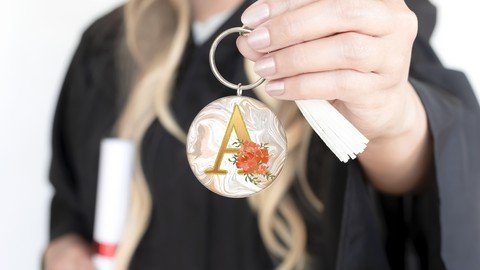
I have always admired beautiful monograms. I have recently seen gorgeous ones sporting watercolor flowers and vines, and that was my incentive to create one for myself. It turned out to use many of the daily Procreate functions that I have been teaching you, including the use of clipping masks and the like. Once I realized that, I had a light-bulb moment, and thought it would be a great topic for a quick class. Even though you may know all about the use of clipping masks, repetition will give you even more ideas. There is always a little twist! And, the end product is gorgeous!Another thing I incorporated was the use of the liquify tool to create a sumptuous marble background on which our glitter and gold monogram will sit. It complements the design so well you will be impressed. We will do a two-step process for the purpose of adding the brushed gold to the marble. And if that isn't enough bling, I have included 3 of my Glitter and Gold brushes. With those, you can add that extra little something. And then you will have all of these brushes to use again and again.In this class I'll walk you through:my step-by-step method for making marble in Procreatetips for creating floral compositions for a varied and appealing layoutmy workflow for use of layers and clipping masks and other great features like snappingtips for helping the watercolour flowers really stand outmethods for creating vining leavesIf you're an aspiring graphic designer with a good basic knowledge of Procreate, you'll be able to go through all the steps. This class will benefit anyone who wishes to create assets for sale too.The key concepts I will include:review of my brush alterations and adjustmentsa look at Procreate brushes and their various idiosyncrasiesapproaches you can take in your creative workThis is an ideal class for you, even if you are not sure what you will use the pattern for, whether it be for fabric design for sites like Spoonflower, scrapbooking paper, custom web graphics, or whatever! Learning new Procreate workflows is always desirable. I guarantee you will create something really appealing, and it's so much fun, once you get the hang of it!Note: Have you had a chance to take my other Procreate classes, including Fantasy Gardens with Procreate and Simple Brushes in Procreate for Quick Compositions? If you have, you've learned plenty about custom Procreate brushes, but I still have more info for you! I have a series of pattern design classes too. Check it out!Intro to Rose Gold Enhanced Monogram on MarbleThis short intro will give you an overview of the class and then we will get right into setting up the document.Lesson 1: Discussing the Overview and ObjectivesIn this lesson, I will show you the objectives for class and explain how we will go about starting the project. I show you the layered file I created. I walk you through the beginning of planning.Lesson 2: Creating the Marble BackgroundIn this lesson, I will break down the complete process of creating your marble background. I show you everything from creating the source file, using Push and Twirl Liquify functions, and adjusting curves settings. Knowing how to adjust layers is very important in Procreate and I give you a great inside tip. We complete the process by inserting and using a gold background that I have supplied.Lesson 3: Setting Up the LetteringIn this lesson, we will be inserting the monogram letter and then adding the brushed gold finish. Once that is done, I will show you how to apply the gold glitter as a border. I will show you some of the key techniques I use and explain every step of the way. By the end of the lesson, you will have the beginnings of a lovely layout with plenty of interest, and you will know how to use most of the assets in the accompanying download.Lesson 4: Adding the Flower ArrangementThis is the lesson in which we create the flower arrangement for enhancing the monogram. I show you a bunch more adjustments for brushes as we work our way through this lesson.Lesson 5: Setting Up the Vine & Leaf EmbellishmentsIn this lesson, we start getting to the nitty gritty of the final artwork. You will see me use several different techniques to add interest and detail, including vines and leaves. I show you the brushes I have included in the resources package, and I explain the settings and how to achieve good results. We will also add color variation to the leaves. Throughout the process you learn much more about brushes.Lesson 6: Finalizing the Background with Foil DetailsAt this stage, we pull our layout together, and I will correct the small details that make it work. I bump up the contrast on the white of the leaves and many other small adjustments. We take a quick look at color adjustments and talk about next steps. This is the last step, and in this lesson, I will be wrapping up. This will show you just how versatile this technique can be and how valuable experimentation is in your development as a surface pattern designer.Lesson 7: Conclusion, Mockup and Next StepsWe will conclude everything in this lesson. I show you a couple of quick mock-ups with the monogram and we end with a chat about next steps.Concepts covered:Concepts covered include but are not limited to Procreate pattern design, inserting text into a Procreate document, layering, transparency, Procreate brush stamps, Gaussian Blur, Procreate canvas settings, Procreate snapping and guides, Procreate floral brush use, methods to brighten using hue and saturation, the Brush Studio in Procreate, adjusting Procreate brushes, working with pressure variability, sizing of documents and brushes, compositions with brush stamps, adding texture with brush stamps, procreate brushes for adding interest, workflow best practices, typography in Procreate, Procreate composites, techniques with paints and blending, and much more.You will get .51 minutes of direction from an instructor who has been in graphic design business and education for over 40 yearsknowledge of multiple ways to solve each design challengean outline with links to further researcha list of helpful online sites to further your education into surface pattern designProject DescriptionChallenge yourself today and download and install the Procreate brushes provided to get started on your design. Start by creating the marble background. Work through each of the lessons, applying the concepts as I teach them to create the monogram with the gold assets I have provided. Try to edit at least one brush, and experiment with changing settings on the brushes provided (remember to make a copy first!). Create a watercolour floral grouping to position on the finalized letter.
Overview
Section 1: Introduction
Lecture 1 Discussing the Overview and Objectives
Lecture 2 Creating the Marble Background
Lecture 3 Setting Up the Lettering
Lecture 4 Adding the Flower Arrangement
Lecture 5 Setting Up the Vine & Leaf Embellishments
Lecture 6 Finalizing the Background with Foil Details
Lecture 7 Conclusion, Mockup and Next Steps
This class will show you another fun technique in Procreate
Homepage
Recommend Download Link Hight Speed | Please Say Thanks Keep Topic Live
Links are Interchangeable - No Password - Single Extraction
