



same6tamei
MyBoerse.bz Pro Member
Reminder Pro v3.9.2 [Paid] [Bundle]
Requirements: 10+
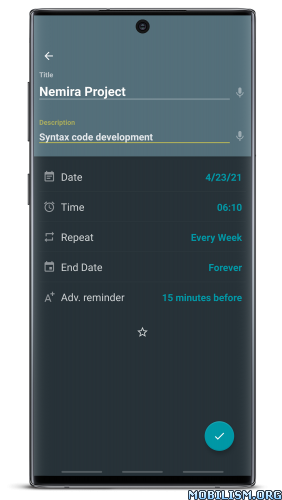
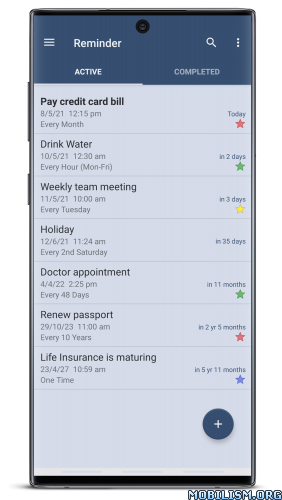
Overview: Never forget an important task again! Finally a simple and easy way to set a reminder or deadline notification. This app gets straight to the point. Set notifications to remind you of all the tasks, errands and to do list items and sit back and put your mind at ease.
 [break]
Are you looking for a simple pop up reminder app?
Do you want to create reminders for one-time and recurring tasks?
Get Reminder and skyrocket your productivity.
No unnecessary or complicated features. Reminders can be set in a matter of seconds. Add reminder or deadline notification for anything!
The Reminder App is a simple but versatile productivity tool to organize your life! From using it as a med reminder, important week reminder, pill reminder alarm, to appointment reminder, deadline reminder, meal reminder and recurring reminder, you can truly benefit from adding Reminder in your daily life.
CHECK OUT HOW THOUSANDS OF USERS ARE ALREADY USING REMINDER:
★ Deadline Notification
Stay on track with school, work, or personal deadlines by entering them into the do Reminder
app.
★ Homework and Assignments
Create pop up reminders for when homework or other school assignments are due.
★ Meetings
Work schedules can get busy. Set reminders for all your meetings each week and sit back
and let Reminder notify you when you need to attend.
★ Daily Tasks
All those daily tasks can stack up. Assign a date and time to all your tasks and be on your
way to organizing your life! Also, use it as a recurring task reminder to never forget doing those routine tasks that improve your life such as water consumption.
★ Birthdays
It can be difficult to remember all the birthdays of your friends and family members. With
do Reminder you can set a deadline notification for each birthday so you never forget to say happy birthday.
★ Anniversaries
Use Reminder to notify you of that special date. You can even add remember me notes for plans, dinner
reservations or gift ideas
★ Errands
Set up a schedule to take care of all your errands with ease using our task reminder with alarm. Set date, time and detailed
notes so you can remember to do all the errands in your to-do list.
★ Important Calls
Reminder can also be your day planner with reminders. Add reminder alarm so you don’t forget that important call or plan multiple calls during the day and add notes to your reminder like
names, phone numbers, etc.
★ Paying Bills
Never get charged for a late fee again! Use our list reminder to set an alarm to remind you to pay a bill.
★ Taking Medication
Set a daily reminder to take your medication and use Reminder as your pill reminder. Set once and you’ll never have to remember again!
★ Event planner
Plan your events in advance with our to-do reminder.
★ And so much more!
OTHER GREAT FEATURES AVAILABLE:
★ Custom recurring reminders
★ Popup Notifications
★ Snooze option
★ Widget
★ Daily summary reminder
★ Quiet hours settings for hourly reminders
★ Advance reminders
★ Multiple Themes
★ Search functionality
★ Auto Backup / Manual Backup
★ Categories with different colours and settings
★ Standard, Compact and monthly grouping view options for list of reminders.
Now it’s time to remind yourself of doing the important task in your life.
What’s New:
Minor design changes
=====================
SAI Instructions: [no root]
1. Download and install latest SAI app (Split APK Installer) -
2. Download this .apks archive app;
3. Install and Open SAI / Choose "Install APKs" button / Find and Select downloaded .apks archive app;
4. Wait for install and done. Enjoy!
Lucky Patcher Instructions: [no root]
1. Download and install latest Lucky Patcher app;
2. Install and Open Lucky Patcher and choose 'Rebuild & Install';
3. Find and Select downloaded this .apks archive app;
4. Wait for install and done. Enjoy!
PS: Make sure after open SAI or Lucky Patcher you allowed STORAGE Permission and Install Unknown Apps Permission!
=====================
Package Info:
This app has no advertisements
More Info:
Download Instructions:
Requirements: 10+
Overview: Never forget an important task again! Finally a simple and easy way to set a reminder or deadline notification. This app gets straight to the point. Set notifications to remind you of all the tasks, errands and to do list items and sit back and put your mind at ease.
Are you looking for a simple pop up reminder app?
Do you want to create reminders for one-time and recurring tasks?
Get Reminder and skyrocket your productivity.
No unnecessary or complicated features. Reminders can be set in a matter of seconds. Add reminder or deadline notification for anything!
The Reminder App is a simple but versatile productivity tool to organize your life! From using it as a med reminder, important week reminder, pill reminder alarm, to appointment reminder, deadline reminder, meal reminder and recurring reminder, you can truly benefit from adding Reminder in your daily life.
CHECK OUT HOW THOUSANDS OF USERS ARE ALREADY USING REMINDER:
★ Deadline Notification
Stay on track with school, work, or personal deadlines by entering them into the do Reminder
app.
★ Homework and Assignments
Create pop up reminders for when homework or other school assignments are due.
★ Meetings
Work schedules can get busy. Set reminders for all your meetings each week and sit back
and let Reminder notify you when you need to attend.
★ Daily Tasks
All those daily tasks can stack up. Assign a date and time to all your tasks and be on your
way to organizing your life! Also, use it as a recurring task reminder to never forget doing those routine tasks that improve your life such as water consumption.
★ Birthdays
It can be difficult to remember all the birthdays of your friends and family members. With
do Reminder you can set a deadline notification for each birthday so you never forget to say happy birthday.
★ Anniversaries
Use Reminder to notify you of that special date. You can even add remember me notes for plans, dinner
reservations or gift ideas
★ Errands
Set up a schedule to take care of all your errands with ease using our task reminder with alarm. Set date, time and detailed
notes so you can remember to do all the errands in your to-do list.
★ Important Calls
Reminder can also be your day planner with reminders. Add reminder alarm so you don’t forget that important call or plan multiple calls during the day and add notes to your reminder like
names, phone numbers, etc.
★ Paying Bills
Never get charged for a late fee again! Use our list reminder to set an alarm to remind you to pay a bill.
★ Taking Medication
Set a daily reminder to take your medication and use Reminder as your pill reminder. Set once and you’ll never have to remember again!
★ Event planner
Plan your events in advance with our to-do reminder.
★ And so much more!
OTHER GREAT FEATURES AVAILABLE:
★ Custom recurring reminders
★ Popup Notifications
★ Snooze option
★ Widget
★ Daily summary reminder
★ Quiet hours settings for hourly reminders
★ Advance reminders
★ Multiple Themes
★ Search functionality
★ Auto Backup / Manual Backup
★ Categories with different colours and settings
★ Standard, Compact and monthly grouping view options for list of reminders.
Now it’s time to remind yourself of doing the important task in your life.
What’s New:
Minor design changes
=====================
SAI Instructions: [no root]
1. Download and install latest SAI app (Split APK Installer) -
2. Download this .apks archive app;
3. Install and Open SAI / Choose "Install APKs" button / Find and Select downloaded .apks archive app;
4. Wait for install and done. Enjoy!
Lucky Patcher Instructions: [no root]
1. Download and install latest Lucky Patcher app;
2. Install and Open Lucky Patcher and choose 'Rebuild & Install';
3. Find and Select downloaded this .apks archive app;
4. Wait for install and done. Enjoy!
PS: Make sure after open SAI or Lucky Patcher you allowed STORAGE Permission and Install Unknown Apps Permission!
=====================
Package Info:
- Languages: Full Multi Languages;
- CPUs: universal architecture;
- Screen DPIs: 160dpi, 240dpi, 320dpi, 480dpi, 640dpi;
- Untouched [Paid] apk with Original Hash Signature, no [Mod] or changes was applied;
- Certificate MD5 digest: 763a156f00cc2ed681952ec04c19f8a0
This app has no advertisements
More Info:
Download Instructions:

