




Last updated 4/2020
MP4 | Video: h264, 1280x720 | Audio: AAC, 44.1 KHz
Language: English | Size: 9.94 GB | Duration: 10h 37m
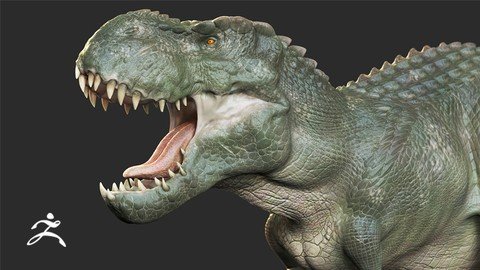
Sculpting, Poly Painting, Posing & Rendering a Realistic Dinosaur For Film | Intermediate students.
What you'll learn
Dinosaur Anatomy
Skin Sculpting Technics
Poly Painting
Posing for Presentation
Rendering for Portfolio
Requirements
Basic knowledge of Zbrush is required.
Description
Here's what folks are saying about the course
 aul Redmond says : Very in depth . Have learned a lot with this one.Jon Moore says : excellent course, learned a lot, looking forward to the next one. P.S. I thought your English was great I understood everything.Mik Nie says : Fantastic course!Welcome and Instructor IntroHi, Welcome to Realistic Dinosaur Sculpting & Texturing in Zbrush for Film. In this course you will be learning to create a photo realistic Dinosaur from scratch step by step.Do you find it difficult to make your creature or dinosaur looks photo realistic life like ?Is your creature looks cartooni and unrealistic ?If so then this is the perfect course for you.About Instructor : My name is Nalin, I am a 3d Modelling and Texturing Artist com Educator.I have been teaching since 2008 at various Institution such as ZICA, Reliance Education and Arena Animation. I have also worked as a Character Modelling and Texturing Artist at Lakshya Digital and Dhruva Interactive.Why you should EnrollAt the end of the course You will be able to sculpt & texture highly realistic creatures and dinosaurs for film using Zbrush.List of Major ComponentsDinosaur Base Mesh Blocking with ZsphereAnatomy & Muscle SculptingSkin DetailingPoly PaintingPosingRenderingIdeal StudentsI designed this course for basic Zbrush users & freelancers who wants to create realistic creatures and Dinosaurs for film but struggles with making the model look life like realistic and believable. No Risk|Enroll NowThere is a 30 days money back guaranty. Which means if you aren't satisfied with the course then you can refund it within 30 days.So literally there isn't any risk at all, so go ahead and click on the enroll button. I can't wait to see you modelling & texturing realistic dinosaurs and creatures..This is Nalin, I thank you for enrolling to the course and I will see you in the first lesion.Thank youNalini kanta jena
Overview
Section 1: Introduction
Lecture 1 Introduction
Lecture 2 Download Project Files
Lecture 3 Finding Reference Images of V-Rex
Lecture 4 Research About V-Rex
Lecture 5 Making a Reference Image Collage Using PureRef
Section 2: Making V-Rex Basic Shape
Lecture 6 Customizing Zbrush For Efficiency
Lecture 7 Setting Background Image in Zbrush
Lecture 8 Modeling the Base Mesh Using Zsphere
Lecture 9 Adjusting the Proportions and Basic Forms in Low Divisions
Lecture 10 Sculpting Big Primary Shapes
Section 3: V-Rex Anatomy and Primary Forms Sculpting
Lecture 11 Head Anatomy and Primary Forms Sculpting
Lecture 12 Body Anatomy and Primary Forms Sculpting
Lecture 13 Leg Anatomy and Primary Forms Sculpting
Lecture 14 Tail Anatomy and Primary Forms Sculpting
Lecture 15 Front Small Hand Sculpting
Section 4: V-Rex Secondary Forms Sculpting
Lecture 16 V-Rex Head Secondary Forms
Lecture 17 V-Rex Teeth Sculpting
Lecture 18 V-Rex Teeth and Head Sculpting
Lecture 19 Finishing The Secondary Forms of the Head
Lecture 20 Body Secondary Form Sculpting
Lecture 21 Leg Secondary Form Sculpting
Section 5: V-Rex Skin Detailing
Lecture 22 Projecting Dynamesh Details Into New Topology Mesh
Lecture 23 Working on the Face Secondary Forms
Lecture 24 Sculpting Face Skin Scales Part01
Lecture 25 Sculpting Face Skin Scales Part02
Lecture 26 Sculpting Face Skin Scales Part03
Lecture 27 Detailing the Mouth
Lecture 28 Creating Costume Scale Alphas
Lecture 29 Neck Detailing Part01
Lecture 30 Detailing the Body Part01
Lecture 31 Detailing the Neck
Lecture 32 Detailing the Front Hand Part 01
Lecture 33 Detailing the Front Hand Part 02
Lecture 34 Detailing the Body Scales
Lecture 35 Creating Belly Scales
Lecture 36 Detailing the Leg Part01
Lecture 37 Detailing the Leg Part02
Lecture 38 Detailing the Leg Part03
Lecture 39 Detailing the Lower Leg Part01
Lecture 40 Adding Scales to the Lower Leg
Lecture 41 Detailing The Tail
Lecture 42 Finishing The Tail Detail
Lecture 43 Finishing the Leg
Lecture 44 Final Touch and Wrap Up
Section 6: Poly Painting the Dinosaur
Lecture 45 Adding Skin Base color
Lecture 46 Adding Pink Tone to the Skin
Lecture 47 Adding Cavity Details
Lecture 48 Painting Teeth
Lecture 49 Painting Toung and Mouth
Lecture 50 Painting the Eye
Lecture 51 Painting Nails
Lecture 52 Finishing Touch
Section 7: Posing and Rendering
Lecture 53 Posing the Dinosaur
Lecture 54 Making a Ground
Lecture 55 Rendering
Lecture 56 Compositing Render Passes in Photoshop
Section 8: Conclusion
Lecture 57 Bonus Lecture - What's Next?
Intermediate level student who wants to improve their ability to create hyper realistic creatures.,This course is not for absolute beginners who never have opened Zbrush software.
Homepage
Recommend Download Link Hight Speed | Please Say Thanks Keep Topic Live
Links are Interchangeable - No Password - Single Extraction
