




Published 12/2022
MP4 | Video: h264, 1280x720 | Audio: AAC, 44.1 KHz
Language: English | Size: 1.17 GB | Duration: 0h 52m
10 Brushes and Paper Textures Document Included
What you'll learn
Creating texture brushes so quickly you won't believe it
Step-by-step method for making flowers using the drawing assist for the radial repeat
Workflow for use of layers and other great features like Gaussian Blur
Adjusting art by using tapping to move layers incrementally
Requirements
No pre-requisite though Procreate experience is an asset
Description
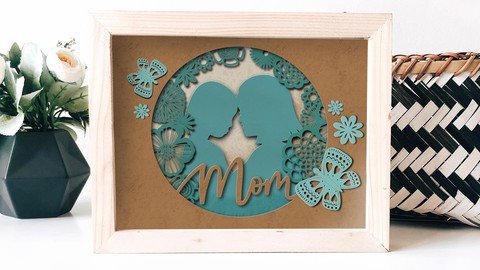
Sometimes, a quick and fun project is what we are looking for, right? I was experimenting in Procreate, practicing the use of shadows to create a cut paper look and I decided to steer into the Mother's Day weekend coming up soon. Thus was born the idea for this class, creating a Paper Cut Silhouette Greeting Card for Mother's Day.This new class, Paper Cut Silhouette Greeting Card for Mother's Day, will show you some of my illustration methodology, and ways to use brushes to create the floral wreath that will punctuate the silhouette. We will do a total of 4 shadow layers. In the class, I take you from start to finish in creating the full illustration and all the add-ons. We will do a lot of creative problem-solving along the way and make design decisions on the fly. One of my goals is to show you how to create the shadows and highlights. But the star of the show is definitely creating and using brushes to create this layout.In this class I'll walk you through:my step-by-step method for making flowers using the drawing assist for the radial repeattips for creating texture brushes so quickly you won't believe itmy workflow for use of layers and other great features like Gaussian Bluradjusting art by using tapping to move layers incrementallymethods for keeping the art fully editable for later adjustments and recoloringIf you're an artist or hobbyist, with a good basic knowledge of Procreate, you'll be able to go through all the steps easily. This class will benefit anyone who wishes to simplify creation of art for use on greeting cards or digital prints.The key concepts I will include:review of my brush alterations and adjustmentsa look at Procreate brushes and how to adjustapproaches you can take in your creative workLearning new Procreate workflows is always desirable. I guarantee you will create something really appealing, and once you know the technique, you will want to use it for many more art pieces.Intro to Easy Watercolour Seamless Patterns in Procreate using BrushesThis short intro will give you an overview of the class.Lesson 1: Inspiration and Making BrushesIn this lesson, I will give an overview of the set-up. You will also receive an overview of the making of the flower stamp brush and the paper texture. I show you where to grab a silhouette for use and how I created mine.Lesson 2: Starting on the LayoutIn this lesson, I will break down the complete process of choosing what brushes to use as well as showing you how to add the lettering, which I modify. I show you several of the brushes from the resources package and explain how to position the stamped flowers. With every move I make with the flowers, I explain the reasoning behind the choices I make.Lesson 3: Layering for That Paper Cut LookIn this lesson, I will explain some of the key techniques I use for layering and adding shadow and explain every step of the way. By the end of the lesson, you will have the beginnings of the shadowing technique, and you will know how to use the brushes in the accompanying download or that you made for yourself earlier. We will add that texture to the layer to make it look like real paper. I will show you how I built up the layers and then started to apply the shading.Lesson 4: Adding Realistic Highlights and EffectsIn this lesson I will show you two methods to add a slight hairline of highlight along the edges to simulate thickness on the paper. I also continue with adding shadows and highlights to the remaining layers.Lesson 5: Adding Extra Peripheral ElementsIn this lesson, we will do a bunch of the finishing touches. I show you how to make a butterfly brush to use as a peripheral element to enhance the layout. I speak to the directionality of the highlights and shadows, too. We are now a step closer to finalizing our design now.Lesson 6: Finishing Touches and TimelapseAdding all the finishing touches is the focus of this lesson. I will be adding all the background textures into the piece and then further enhance all the foreground items with a combination of the textures and adjustments to color and the size of the shadows.Lesson 7: Conclusion, Mockup and Next StepsWe will conclude everything in this lesson. I show you a couple of quick mock-ups with the pattern and we end with a chat about next steps.Concepts covered:Concepts covered include but are not limited to Procreate brush creation, Procreate layout with stamp brushes, layering, transparency, Procreate canvas settings, Procreate snapping and guides, Procreate floral brush creation, Procreate texture brush creation, the Brush Studio in Procreate, adjusting Procreate brushes, adding shadows and highlights, sizing of documents and brushes, compositions with brush stamps, adding texture with brushes, mockups, procreate brushes for adding other interesting details, workflow best practices, painting best practice, Procreate composites, techniques with paints and blending, and much more.You will get .50 minutes of direction from an instructor who has been in graphic design business and education for over 40 yearsknowledge of multiple ways to solve each design challengean outline with links to further researcha list of helpful online sites to further your education into surface pattern designProject DescriptionChallenge yourself today and download and install the Procreate brushes provided to get started on your pattern design. Start by creating the at least a couple of the brushes as described in the first lesson. Work through each of the lessons, applying the concepts as I teach them. Try to create a butterfly brush at some point too, and experiment with changing settings on the brushes provided. Create a layered and shadowed silhouette. If you don't wish to use people in your silhouette, that's fine too. A flower would be just as lovely!
Overview
Section 1: Introduction
Lecture 1 Inspiration and Making Brushes
Lecture 2 Starting on the Layout
Lecture 3 Layering for That Paper Cut Look
Lecture 4 Adding Realistic Highlights and Effects
Lecture 5 Adding Extra Peripheral Elements
Lecture 6 Finishing Touches and Timelapse
Lecture 7 Conclusion, Mockup and Next Steps
Procreate artists looking for alternative and interesting new methods for creating a greeting card
Homepage
Recommend Download Link Hight Speed | Please Say Thanks Keep Topic Live
Links are Interchangeable - No Password - Single Extraction
