




Ahmedtamer890
MyBoerse.bz Pro Member
PicWish: AI Photo Editor v1.7.9 [Pro]
Requirements: 5.0+
Overview: Try the easiest AI photo editor app! Automatic background eraser, background remover, photo enhancer, photo retouch, unblur photo. No skills required. Super easy-to-use.
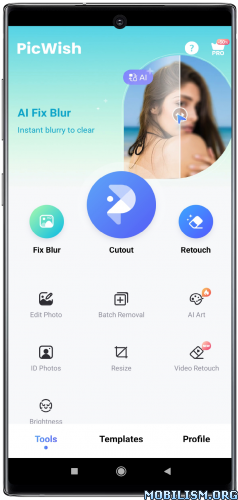
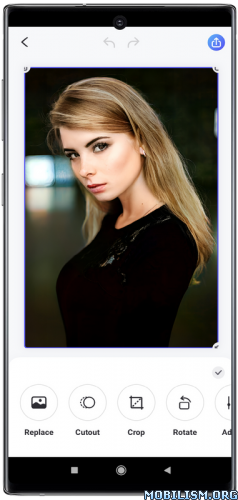
Try the easiest AI photo editor app! Remove background and unblur photo to make your products stand out! Here is your 100% automatic background eraser, photo enhancer ,photo retouch, AI face swap, and AI background generator app. No skills required. Super easy-to-use.
See our featured AI photo editing tools:
#1: Background Remover & Eraser
-Remove background automatically. Manual eraser is also available.
-Change backgrounds, add multiple cutouts on one project, resize, add shadows, etc.
-Accurate background eraser, powered by AI.
-One-tap white background changing for online business.
#2: Photo Enhancer
-Unblur photo, and bring clarity to the whole picture.
#3: Photo Retouch
-Remove unwanted objects from your image including folds, smudges, text, etc.
#4: AI Face Swap (New Releases)
-Uplaod one photo and swap the face with AI. Explore the diverse styles of yourself.
-AI face swap: Ideal for social media, business profiles, etc.
#5: AI Background
-Automatically remove background, and let AI generate the right background for your product shot or any photo.
-Best AI background generator both for eCommerce and personal use.
#6: ID Photos
-Change background color and size to meet ID photo standards. Custom and common sizes such as 2x2 photos are available.
-You can choose to remove the blur from your ID photo with one click.
#7: Add Logo
-Add a text or image logo to your photo.
-Tile effect is supported.
#8: Batch mode
-Batch background removal or enhancement, up to 30 images at a time. That's your easiest batch background eraser and photo enhancer!
#9: Edit Photo
- Resize, add text to photo, adjust brightness, and more editing options.
#10: Video Retouch
-Instantly remove the boring things from a video.
Want a free trial? Upgrade to PicWish Pro, you'll have access to the following features.
* Remove PicWish Logo
* High Definition Export
* 450 AI credits/mo
* Save preview images
* All Templates
* Unlock all features
PicWish Pro Subscriptions:
Subscriptions are available weekly, monthly, and annually (with a free trial).
Explore all features with a 3-day Free Trail. Once the trial is over, you'll be charged a subscription fee.
PicWish, the AI photo editor recommended for designers, resellers, and merchants.
Require a stunning product photo to increase sales? Use background eraser tool to get a high-quality white background or transparent background to highlight your product. Use photo enhancer tool to unblur photo to showcase clear details to customers.
Want to boost your design efficiency? PicWish offers batch background remover, AI photo eraser and more photo editor features to free you up from repetitive tasks for more valuable creative work.
Are you involved in the home industry or other online sales? Our AI background generator can quickly match your products with unique AI backgrounds. PicWish AI greatly reduces the time and cost of product photo production.
Download PicWish and light up your products today!
Terms: _
Privacy policy: _
People love our background eraser and photo enhancer. Now, PicWish provides more AI photo editor features to speed up your workflow.
Have questions, problems, or feedback? Reach out to us at [email protected]
Follow us on TikTok @picwish_official for video tutorials and design tips.
Join us, and share PicWish on Twitter @picwishcom to win the prize.
★ PRO / Paid features Unlocked
★ .source attributes of the corresponding java files removed
★ All Debug code removed
➡ Languages: Multi Languages
➡ CPU architectures: arm64-v8a, armeabi-v7a
➡ Screen DPIs: 120dpi, 160dpi, 240dpi, 320dpi, 480dpi, 640dpi
Notes:
Please ignore and skip Unlock dialog on the first launch
AI Instant Background / AI Face Swap features will not work as they are server-side features
What's New:
This update enhances your editing experience.
‒ Imporve the Refine tool for removing backgrounds. You can now clearly distinguish between your original background and subject.
‒ Add the Enhance option to the Cutout and Edit Photo tools.
This app has no advertisements
More Info:
Code:
Download Instructions:
Requirements: 5.0+
Overview: Try the easiest AI photo editor app! Automatic background eraser, background remover, photo enhancer, photo retouch, unblur photo. No skills required. Super easy-to-use.
Try the easiest AI photo editor app! Remove background and unblur photo to make your products stand out! Here is your 100% automatic background eraser, photo enhancer ,photo retouch, AI face swap, and AI background generator app. No skills required. Super easy-to-use.
See our featured AI photo editing tools:
#1: Background Remover & Eraser
-Remove background automatically. Manual eraser is also available.
-Change backgrounds, add multiple cutouts on one project, resize, add shadows, etc.
-Accurate background eraser, powered by AI.
-One-tap white background changing for online business.
#2: Photo Enhancer
-Unblur photo, and bring clarity to the whole picture.
#3: Photo Retouch
-Remove unwanted objects from your image including folds, smudges, text, etc.
#4: AI Face Swap (New Releases)
-Uplaod one photo and swap the face with AI. Explore the diverse styles of yourself.
-AI face swap: Ideal for social media, business profiles, etc.
#5: AI Background
-Automatically remove background, and let AI generate the right background for your product shot or any photo.
-Best AI background generator both for eCommerce and personal use.
#6: ID Photos
-Change background color and size to meet ID photo standards. Custom and common sizes such as 2x2 photos are available.
-You can choose to remove the blur from your ID photo with one click.
#7: Add Logo
-Add a text or image logo to your photo.
-Tile effect is supported.
#8: Batch mode
-Batch background removal or enhancement, up to 30 images at a time. That's your easiest batch background eraser and photo enhancer!
#9: Edit Photo
- Resize, add text to photo, adjust brightness, and more editing options.
#10: Video Retouch
-Instantly remove the boring things from a video.
Want a free trial? Upgrade to PicWish Pro, you'll have access to the following features.
* Remove PicWish Logo
* High Definition Export
* 450 AI credits/mo
* Save preview images
* All Templates
* Unlock all features
PicWish Pro Subscriptions:
Subscriptions are available weekly, monthly, and annually (with a free trial).
Explore all features with a 3-day Free Trail. Once the trial is over, you'll be charged a subscription fee.
PicWish, the AI photo editor recommended for designers, resellers, and merchants.
Require a stunning product photo to increase sales? Use background eraser tool to get a high-quality white background or transparent background to highlight your product. Use photo enhancer tool to unblur photo to showcase clear details to customers.
Want to boost your design efficiency? PicWish offers batch background remover, AI photo eraser and more photo editor features to free you up from repetitive tasks for more valuable creative work.
Are you involved in the home industry or other online sales? Our AI background generator can quickly match your products with unique AI backgrounds. PicWish AI greatly reduces the time and cost of product photo production.
Download PicWish and light up your products today!
Terms: _
Privacy policy: _
People love our background eraser and photo enhancer. Now, PicWish provides more AI photo editor features to speed up your workflow.
Have questions, problems, or feedback? Reach out to us at [email protected]
Follow us on TikTok @picwish_official for video tutorials and design tips.
Join us, and share PicWish on Twitter @picwishcom to win the prize.
★ PRO / Paid features Unlocked
★ .source attributes of the corresponding java files removed
★ All Debug code removed
➡ Languages: Multi Languages
➡ CPU architectures: arm64-v8a, armeabi-v7a
➡ Screen DPIs: 120dpi, 160dpi, 240dpi, 320dpi, 480dpi, 640dpi
Notes:
Please ignore and skip Unlock dialog on the first launch
AI Instant Background / AI Face Swap features will not work as they are server-side features
What's New:
This update enhances your editing experience.
‒ Imporve the Refine tool for removing backgrounds. You can now clearly distinguish between your original background and subject.
‒ Add the Enhance option to the Cutout and Edit Photo tools.
This app has no advertisements
More Info:
Code:
Download Instructions:
