




Ahmedtamer890
MyBoerse.bz Pro Member
Photo Editor v10.9 [Unlocked] [Mod Extra]
Requirements: 6.0+
Overview: Adjust color, add effects, rotate, crop, resize, frame, clone, and draw on your photos.
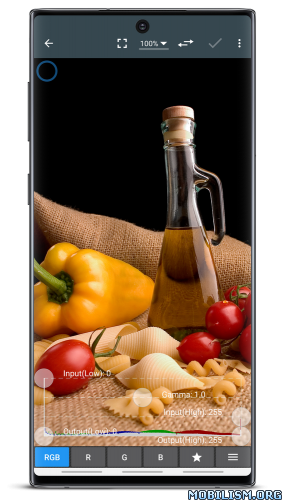
Photo Editor is a simple and easy application for photo manipulation.
Photo Editor is an advanced editor for pictures allowing a wide range of photo manipulation features for your mobile. You can do easy tasks to enhance your photos like choosing filters on through advanced operations such as modifying curves and more. Adjust color, add effects, rotate, crop, resize, frame, clone, and draw on your photos. Color adjustment options include hue, saturation, contrast, and brightness. Additionally, Photo Editor offers many effects for your photos including gamma correction, auto contrast, auto tone, blur, sharpen, oil paint, sketch, black & white high contrast, sepia, and more.
Features
* Adjust color, add effects, frame, clone and draw on your photos
* Curves interface that allows fine-tuning of colors
* Drawing tools
* Adding text, images or shapes
* Easy rotation, crop or resize of photos
* Perspective, red-eye, white balance and backlight corrections
* Easily edit with the touch and pinch-to-zoom interface
* Use photos from your gallery and camera
* Save images in JPEG, PNG, GIF, WebP and PDF. Flexible control of JPEG quality.
* View, edit, or delete Metadata (EXIF, IPTC, XMP)
* Save your final result to your gallery, as wallpaper, or on your SD card
* Share photos via e-mail, Picasa, Facebook, Twitter, etc.
* Batch, Crop(Puzzle), Compress to ZIP, Create PDF, Animated GIF
* Webpage Capture, Video Capture(ICS+)
* Ad-free option is available (Settings -> Purchase Items)
*** Links
Google+:
Blog:
Tutorials:
*** PHOTO EDITOR IS NOT SPYWARE/VIRUS!!!
Photo Editor does not contain virus or malicious code.
If your antivirus program identifies Photo Editor as virus/malware, please email me.
*** Language Support: English, Korean, Russian, Spanish, Dutch, Finnish, German, French, Japanese, Portuguese(Brazil), Italian, Catalan, Traditional Chinese, Hebrew, Simplified Chinese, Czech, Romanian, Polish, Hungarian, Swedish, Greek, Arabic, Turkish, Bengali, Indonesian, Persian, Vietnamese, Malay, Azerbaijani, Hindi
If you would like to participate in the translation, please contact me.
What's New:
Version 10.9
• Crash & Bug fixes
Mod Info:
This app has no advertisements
More Info:
Code:
Download Instructions:
Requirements: 6.0+
Overview: Adjust color, add effects, rotate, crop, resize, frame, clone, and draw on your photos.
Photo Editor is a simple and easy application for photo manipulation.
Photo Editor is an advanced editor for pictures allowing a wide range of photo manipulation features for your mobile. You can do easy tasks to enhance your photos like choosing filters on through advanced operations such as modifying curves and more. Adjust color, add effects, rotate, crop, resize, frame, clone, and draw on your photos. Color adjustment options include hue, saturation, contrast, and brightness. Additionally, Photo Editor offers many effects for your photos including gamma correction, auto contrast, auto tone, blur, sharpen, oil paint, sketch, black & white high contrast, sepia, and more.
Features
* Adjust color, add effects, frame, clone and draw on your photos
* Curves interface that allows fine-tuning of colors
* Drawing tools
* Adding text, images or shapes
* Easy rotation, crop or resize of photos
* Perspective, red-eye, white balance and backlight corrections
* Easily edit with the touch and pinch-to-zoom interface
* Use photos from your gallery and camera
* Save images in JPEG, PNG, GIF, WebP and PDF. Flexible control of JPEG quality.
* View, edit, or delete Metadata (EXIF, IPTC, XMP)
* Save your final result to your gallery, as wallpaper, or on your SD card
* Share photos via e-mail, Picasa, Facebook, Twitter, etc.
* Batch, Crop(Puzzle), Compress to ZIP, Create PDF, Animated GIF
* Webpage Capture, Video Capture(ICS+)
* Ad-free option is available (Settings -> Purchase Items)
*** Links
Google+:
Blog:
Tutorials:
*** PHOTO EDITOR IS NOT SPYWARE/VIRUS!!!
Photo Editor does not contain virus or malicious code.
If your antivirus program identifies Photo Editor as virus/malware, please email me.
*** Language Support: English, Korean, Russian, Spanish, Dutch, Finnish, German, French, Japanese, Portuguese(Brazil), Italian, Catalan, Traditional Chinese, Hebrew, Simplified Chinese, Czech, Romanian, Polish, Hungarian, Swedish, Greek, Arabic, Turkish, Bengali, Indonesian, Persian, Vietnamese, Malay, Azerbaijani, Hindi
If you would like to participate in the translation, please contact me.
What's New:
Version 10.9
• Crash & Bug fixes
Mod Info:
- AdFree / Paid features unlocked;
- Disabled / Removed unwanted Permissions + Receivers + Providers + Services;
- Optimized and zipaligned graphics and cleaned resources for fast load;
- Ads Permissions / Services / Providers removed from AndroidManifest;
- Ads links removed and invokes methods nullified;
- Ads layouts visibility disabled;
- Google Play Store install package check disabled;
- Debug code removed;
- Remove default .source tags name of the corresponding java files;
- Analytics / Crashlytics / Firebase disabled;
- No active trackers or advertisements;
- AOSP compatible mode;
- Languages: Full Multi Languages;
- CPUs: armeabi-v7a, arm64-v8a, x86, x86_64;
- Screen DPIs: 120dpi, 160dpi, 240dpi, 320dpi, 480dpi, 640dpi;
- Original package signature changed;
- Release by Balatan.
This app has no advertisements
More Info:
Code:
Download Instructions:
