• Regeln für den Software-Bereich:


    Allgemeines:

    - In erster Linie sind unsere Boardregeln zu beachten, zu finden HIER.
    - Software zur Audiobearbeitung sollte ausschließlich im Unterforum "Audio" eingestellt werden.
    - Für Cracks, Keygens oder sonstige Freischaltungssoftware gibt es das Unterforum "Freischaltung".
    - Portable Software bitte im entsprechenden Unterforum "Portable Software" eintragen.
    - Diskussionen zur Installation und anderen Problemen mit der Software, bitte im enstprechenden Unterforum "Talk" führen.
    - Bei Unklarheiten und Fragen zu den Regeln bitte die Moderatoren kontaktieren.


    Angebot erstellen

    - Die Struktur des Threadtitels muss wie folgt umgesetzt werden: Herstellername - Softwarename - Versionsnummer
    - Unnötige Zusätze im Threadtitel wie "HOT", "NEW" oder Punkte zwischen den Wörtern sind nicht erlaubt.
    - Achtet darauf immer nur die Hauptversion und deren Updates in einem Thread zusammenfassen, konkretes Beispiel: SoftwareXY v3.12 gehört in den selben Thread mit SoftwareXY v3.13; SoftwareXY v.4.1 gehört in einen neuen eigenen Thread. Ausgenommen hiervon sind Sammelthreads und Dauerangebote.
    - Bei nicht bekannten Herstellern oder Angebote einer privaten Software, ist die Programmbezeichnung + Versionsnummer ausreichend.
    - Besondere Beachtung gilt für den ersten Beitrag eines Angebots. Dort muss eine kurze Beschreibung der Software in deutscher Sprache angegeben werden. Für offizielle Releases ist es Pflicht die NFO im Beitrag einzustellen(Spoiler, siehe nächster Punkt).
    - Weitere Informationen wie NFOs oder Changelogs, versteckt ihr bitte in einem Spoiler.


    Software Suche

    - Für Suchanfragen haben wir das Unterforum "Suche" erstellt.
    - Auch hier sollte vorher die Suchfunktion benutzt werden, um Doppelthreads vorzubeugen. Sollte es bereits eine Suchanfrage geben, könnt ihr den Thread gerne mit einem "Danke" pushen.


    Trojaner- und Virusalarm

    - Falls Euer Virenscanner bei einem Angebot Alarm schlägt, solltet ihr zunächst Ruhe bewahren. Viele Virenscanner erkennen Cracks/Keygens oft fälschlicherweise als Bedrohung.
    - Prüft die verdächtige Datei zuerst mit http://virustotal.com , sollte es sich hierbei wirklich um eine Bedrohung handeln, meldet den Beitrag und/oder wendet euch mit dem Bericht von VirusTotal.com an einen Moderator.


    Unerwünschte Angebote

    - Keylogger, Spionagetools, alles rund ums Thema Hacking/Cracking ist nicht erwünscht.
  • Bitte registriere dich zunächst um Beiträge zu verfassen und externe Links aufzurufen.

*** Bestes IPTV *** bester Preis *** gratis Test ***


PanFone WhatsApp Transfer v2

KAMAL

MyBoerse.bz Pro Member
PanFone WhatsApp Transfer v2.0.0 Multilingual

9aa2fc09e7777e051767f187efba52bd.jpeg


PanFone WhatsApp Transfer v2.0.0 Multilingual | 120 MB | Language: Multilanguage


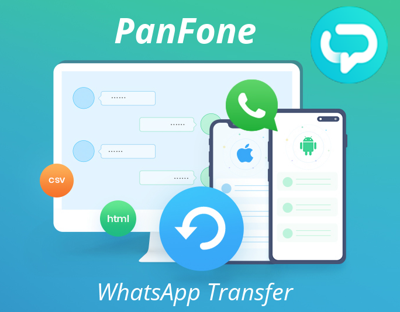
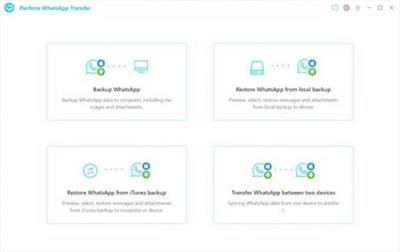
The Best Solution to backup, restore, and transfer iOS/Android WhatsApp messages, and export WhatsApp messages to HTML and CSV files.


Features:
Transfer WhatsApp data between Android and iOS devices.
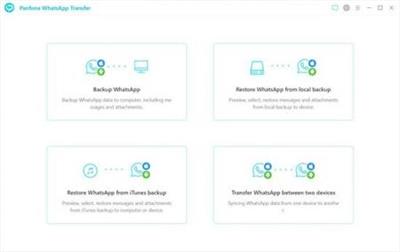
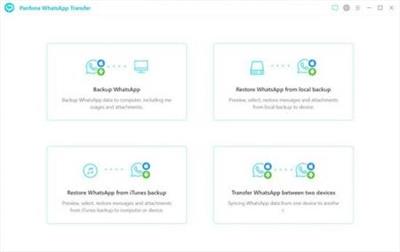
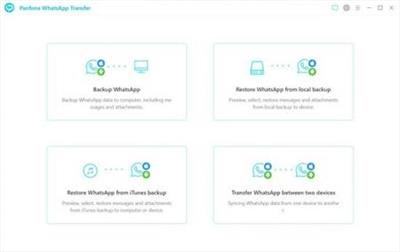
Back up WhatsApp chats, photos, videos, attachments, and more on iPhone/iPad/Android to the computer.
Restore WhatsApp backups to iOS/Android devices.
Export WhatsApp backups to the computer in HTML and CSV formats.
Preview the backup content and restore only the data you want.
Compatible with the latest iOS 14 and Android 10.

Transfer WhatsApp Data between Android and iOS Devices :
Did you upgrade to a new phone and need to transfer your WhatsApp chats to it? This phone to phone WhatsApp transfer tool allows you to transfer WhatsApp data between your iPhone and Android as simple as a swipe of your finger.
Seamlessly transfer all WhatsApp chat histories, including messages, photos, videos, attachments, and more from iPhone to Android, Android to Android, Android to iPhone and iPhone to iPhone.
It works perfectly with almost all Apple and Android devices: iPad, iPhone, iPod, Samsung, Huawei, OnePlus, Xiaomi, HTC, Sony, etc.

Back up WhatsApp Chats & Restore to iOS/Android Devices :
This iOS to Android WhatsApp Transfer can be a handy tool to help you back up and restore WhatsApp data more easily and securely. It won't overwrite or delete previous backups. You can restore the WhatsApp backups to your phone anytime you want.
Export your WhatsApp data including conversions and attachments from the iOS or Android device to your computer. All files can be previewed anytime.
Restore the WhatsApp backup of one device to another (different systems supported).
Restore the WhatsApp data from iTunes backup to your iOS/Android devices or computer.
Each backup will be kept individually and forever, so both current and earlier data can be saved.

Choose the Format You Prefer to Export WhatsApp Chats :
PanFone WhatsApp Transfer supports exporting WhatsApp chats from Android/iOS devices to HTML and CSV files. You can preview and print WhatsApp chats as they appear on the phone or read them as a log file.
Export WhatsApp chat to HTML and read it as it appears on the phone.
Export WhatsApp chat to HTML/CSV and read it as a log file.
Export one WhatsApp chat or all WhatsApp chats at once.
Export WhatsApp photos, videos, audios, contacts and more in 1 click.

Home Page:


DOWNLOAD LINKS:



PanFone WhatsApp Transfer v2.1.2 Multilingual


19259e43fc82870d60848c3fbc62897f.jpeg


PanFone WhatsApp Transfer v2.1.2 Multilingual | 121 MB | Language: Multilanguage


The Best Solution to backup, restore, and transfer iOS/Android WhatsApp messages, and export WhatsApp messages to HTML and CSV files.


Features:
Transfer WhatsApp data between Android and iOS devices.
Back up WhatsApp chats, photos, videos, attachments, and more on iPhone/iPad/Android to the computer.
Restore WhatsApp backups to iOS/Android devices.
Export WhatsApp backups to the computer in HTML and CSV formats.
Preview the backup content and restore only the data you want.
Compatible with the latest iOS 14 and Android 10.

Transfer WhatsApp Data between Android and iOS Devices :
Did you upgrade to a new phone and need to transfer your WhatsApp chats to it? This phone to phone WhatsApp transfer tool allows you to transfer WhatsApp data between your iPhone and Android as simple as a swipe of your finger.
Seamlessly transfer all WhatsApp chat histories, including messages, photos, videos, attachments, and more from iPhone to Android, Android to Android, Android to iPhone and iPhone to iPhone.
It works perfectly with almost all Apple and Android devices: iPad, iPhone, iPod, Samsung, Huawei, OnePlus, Xiaomi, HTC, Sony, etc.

Back up WhatsApp Chats & Restore to iOS/Android Devices :
This iOS to Android WhatsApp Transfer can be a handy tool to help you back up and restore WhatsApp data more easily and securely. It won't overwrite or delete previous backups. You can restore the WhatsApp backups to your phone anytime you want.

Export your WhatsApp data including conversions and attachments from the iOS or Android device to your computer. All files can be previewed anytime.

Restore the WhatsApp backup of one device to another (different systems supported).
Restore the WhatsApp data from iTunes backup to your iOS/Android devices or computer.
Each backup will be kept individually and forever, so both current and earlier data can be saved.

Choose the Format You Prefer to Export WhatsApp Chats :
PanFone WhatsApp Transfer supports exporting WhatsApp chats from Android/iOS devices to HTML and CSV files. You can preview and print WhatsApp chats as they appear on the phone or read them as a log file.
Export WhatsApp chat to HTML and read it as it appears on the phone.
Export WhatsApp chat to HTML/CSV and read it as a log file.
Export one WhatsApp chat or all WhatsApp chats at once.
Export WhatsApp photos, videos, audios, contacts and more in 1 click.

Home Page:


Größe: 121 MB
Sprache: Multilingual-Deutsch
Format: .rar / .exe
Plattform: Windows (32 Bit 64 Bit)


HOSTER:

K2s.cc (Keep2Share)

Rapidgator.net

Nitroflare.com

Uploadgig.com


DOWNLOAD


PanFone WhatsApp Transfer 2.2.0 Multilingual

info-square-bluephjui.png


bzmhc5gq.png


PanFone.WhatsApp.Transfer.2.2.0.Multilingual.7z • 129 MB
downloadpfeiltvjj3.gif

● Selektives Sichern, Wiederherstellen und Übertragen von WhatsApp-Daten

✔ Übertragen von WhatsApp-Daten zwischen Android- und iOS-Geräten
✔ Sichern von WhatsApp-Chats, Fotos, Videos, Anhängen und mehr auf iPhone/iPad/Android auf dem Computer
✔ WhatsApp-Backups auf iOS-/Android-Geräten wiederherstellen
✔ WhatsApp-Backups in den Formaten HTML und CSV auf den Computer exportieren
✔ Vorschau des Backup-Inhalts und Wiederherstellung nur der gewünschten Daten
✔ Kompatibel mit dem neuesten iOS 14 und Android 10
 
PanFone WhatsApp Transfer v2.3.0

Multilingual/Deutsch // Voraktiviert

jawt7z0k9mkwr.png


Beschreibung:

Die beste Lösung zum Sichern, Wiederherstellen und Übertragen von iOS / Android-WhatsApp-Nachrichten sowie zum Exportieren von WhatsApp-Nachrichten in HTML- und CSV-Dateien.

Übertragen Sie WhatsApp-Daten zwischen Android- und iOS-Geräten.
Sichern Sie WhatsApp-Chats, Fotos, Videos, Anhänge und mehr auf iPhone / iPad / Android auf dem Computer.
Stellen Sie WhatsApp-Sicherungen auf iOS- / Android-Geräten wieder her.
Exportieren Sie WhatsApp-Sicherungen in den Formaten HTML und CSV auf den Computer.
Zeigen Sie eine Vorschau des Sicherungsinhalts an und stellen Sie nur die gewünschten Daten wieder her.
Kompatibel mit den neuesten iOS 14 und Android 10.

WhatsApp-Daten zwischen Android- und iOS-Geräten übertragen:
Haben Sie ein Upgrade auf ein neues Telefon durchgeführt und müssen Ihre WhatsApp-Chats darauf übertragen? Mit diesem WhatsApp-Übertragungstool von Telefon zu Telefon können Sie WhatsApp-Daten so einfach wie ein Fingerwisch zwischen Ihrem iPhone und Android übertragen.

Übertragen Sie nahtlos alle WhatsApp-Chat-Historien, einschließlich Nachrichten, Fotos, Videos, Anhänge und mehr, von iPhone auf Android, Android auf Android, Android auf iPhone und iPhone auf iPhone.
Es funktioniert perfekt mit fast allen Apple- und Android-Geräten: iPad, iPhone, iPod, Samsung, Huawei, OnePlus, Xiaomi, HTC, Sony usw.

Sichern Sie WhatsApp-Chats und stellen Sie sie auf iOS- / Android-Geräten wieder her:
Diese WhatsApp-Übertragung von iOS auf Android kann ein praktisches Tool sein, mit dem Sie WhatsApp-Daten einfacher und sicherer sichern und wiederherstellen können. Vorherige Sicherungen werden nicht überschrieben oder gelöscht. Sie können die WhatsApp-Sicherungen jederzeit auf Ihrem Telefon wiederherstellen.

Exportieren Sie Ihre WhatsApp-Daten einschließlich Conversions und Anhänge vom iOS- oder Android-Gerät auf Ihren Computer. Alle Dateien können jederzeit in der Vorschau angezeigt werden.
Stellen Sie die WhatsApp-Sicherung eines Geräts auf einem anderen wieder her (verschiedene unterstützte Systeme).
Stellen Sie die WhatsApp-Daten aus dem iTunes-Backup auf Ihren iOS- / Android-Geräten oder Ihrem Computer wieder her.
Jedes Backup wird einzeln und für immer aufbewahrt, sodass sowohl aktuelle als auch frühere Daten gespeichert werden können.

Wählen Sie das Format, das Sie zum Exportieren von WhatsApp-Chats bevorzugen:
PanFone WhatsApp Transfer unterstützt das Exportieren von WhatsApp-Chats von Android- / iOS-Geräten in HTML- und CSV-Dateien. Sie können WhatsApp-Chats so anzeigen und drucken, wie sie auf dem Telefon angezeigt werden, oder sie als Protokolldatei lesen.

Exportieren Sie den WhatsApp-Chat in HTML und lesen Sie ihn so, wie er auf dem Telefon angezeigt wird.
Exportieren Sie den WhatsApp-Chat in HTML / CSV und lesen Sie ihn als Protokolldatei.
Exportieren Sie einen WhatsApp-Chat oder alle WhatsApp-Chats gleichzeitig.
Exportieren Sie WhatsApp-Fotos, -Videos, -Audios, -Kontakte und mehr mit einem Klick.

_________________________________________________

Größe: 146 MB
Sprache: Multi/Deutsch
Format: RAR/EXE
Plattform: Windows 7/8/8.1/10 (32 oder 64-Bit)
Hoster: RapidGator|Nitroflare|Ddownload|Alfafile
________________________________________

0541BDC5BB.png


PanFone WhatsApp Transfer 2.4.8 Multilingual


abc53edc3a880cb6623b252a200ed8c5.png


PanFone WhatsApp Transfer 2.4.8 Multilingual


Eine unkomplizierte Softwarelösung zum Übertragen von WhatsApp-Daten von Ihrem Telefon auf ein anderes mit Backup- und Wiederherstellungsfunktionen.


Sprache: Deutsch, Multi | Größe: 165 MB | Format: RAR, EXE | Plattform: Windows 7, 8/8.1, 10, 11 (32/64Bit)


Hoster:
RapidGator.net | NitroFlare.com | DDownload.com


DOWNLOAD Links:


Zuletzt bearbeitet:

PanFone WhatsApp Transfer v2.3.4 Multilingual


f571ad309bad8adfe1bdda0bfed1c867.jpeg


PanFone WhatsApp Transfer v2.3.4 Multilingual | 123 MB | Language: Multilanguage


Homepage:


Größe: 123 MB
Sprache: Multilingual-Deutsch
Format: .rar / .exe
Medizin: Present
Plattform: Windows 10/8.1/8/7
Bit depth: 32bit 64bit


HOSTER:

K2s.cc (Keep2share)

Rapidgator.net

Nitroflare.com

Uploadgig.com


DOWNLOAD


PanFone WhatsApp Transfer v2.3.6

Multilingual/Deutsch // Keygen

panfonewhats6kfcu.png


Beschreibung:

PanFone WhatsApp-Übertragung
WhatsApp-Daten sicher sichern, wiederherstellen und übertragen.

Übertragen Sie WhatsApp-Daten direkt zwischen iOS-/Android-Geräten.

Sichern Sie WhatsApp-Chats, Fotos, Videos und Anhänge von Android/iOS auf dem Computer.

Stellen Sie WhatsApp iTunes-Backups auf Android-/iOS-Geräten wieder her.

WhatsApp-Backups als HTML- und CSV-Dateien exportieren und ausdrucken.

Vollständig kompatibel mit dem neuesten iOS 16 und Android 11.

_________________________________________________

Größe: 131 MB
Sprache: Multi/Deutsch
Format: RAR/EXE (1x gepackt)
Plattform: Windows Vista/7/8/10/11 (32 oder 64-Bit)
Hoster: RapidGator|Ddownload|Nitroflare
________________________________________


PanFone WhatsApp Transfer 2.4.5 Multilingual

opf-TSvsec-CMmaqi-Cr8u-NRtoiv2-QXXm-R2.png


A staightforward software solution for transfering WhatsApp data from your phone to another one, while also supporting backup and restore functions.


Language: Multi/Deutsch

File Size: 158 MB

Format: RAR, EXE

Platform: Windows 7, 8/8.1, 10, 11 (32/64Bit)


Hoster:

RapidGator
Ddownload


DOWNLOAD

1542b02c1dc93a1775aec0bc739865cd.gif


Zurück
Oben Unten