




KAMAL
MyBoerse.bz Pro Member
NUMECA Fine/Turbo v15.1 x64

NUMECA Fine/Turbo v15.1 x64 | 6.08 GB | Language: English
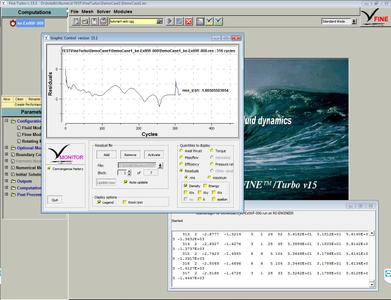
NUMECA International is delighted to announce the official release new version of FINE/Turbo simulation software. Release 15.1 present increased usability for an easier optimization workflow in FINE/Design3D and new wall distance computation algorithm in FINE/Turbo.
FINE/Turbo is the fastest CFD suite for rotating machinery with incompressible and compressible fluids, from subsonic to hypersonic flow regimes. All types of multi-stage axial, radial or mixed-flow configurations are supported: compressors, turbines, pumps, fans, propellers or contra-rotating propellers. From meshing to results visualization, the FINE/Turbo application-oriented graphical user interface is intuitive, enabling fast project set-up and analysis.
FINE/Design3D is an integrated environment for the design and optimization of turbomachinery channels and blades, bringing together the best-in-class preliminary turbomachinery design tools and the fastest and most accurate CFD suite as recognized by the worldwide turbomachinery community.
Dresser Rand Rotating Stall Study
Numeca International Inc. is a leading developer and provider of Grid Generation, Multi-physics - CFD software systems for analysis, design, and optimization of industrial products and processes, with an emphasis in the domains of turbomachinery, marine, aeronautics, aerospace, energy, chemical processes and multi-physics. NUMECA offers an extended suite of software systems covering a broad range of applications for both internal and external flows, including fluid-structure, fluid thermal, aero-acoustic interactions.
Product: NUMECA FINE/Turbo
Version: 15.1 with Documentation & Tutorials
Supported Architectures: x64
Website Home Page : Language: english
System Requirements: PC / Linux *
Size: 6.08 Gb
Supported platforms and operating systems
NUMECA software is supported in 64 bits on x86_64 processors only (64 bits processors that are compatible with Intel 8086 set of instructions).
Formally tested on (Windows)
- Windows 8.1 Professional
- Windows 10 Professional
Formally tested on (Linux)
- Fedora Core 28
- (K)Ubuntua 18.04
- CentOS 7
Please also notice that the following limitations apply:
- Computations under Windows (except Windows Server) are limited to one PVM daemon running at a time. As a consequence, access to multiple users on a given machine is not allowed,
- Parasolid uses SSE2 instruction for high performance. If your platform is not supporting the SSE2 instruction, the FINE GUI cannot be started.
- AMD EPYC and RYZEN processors are slower on Windows 10 compare to Linux.
Multiprocessors calculations
Multiprocessors calculations are allowed on shared and homogeneous distributed platforms. Non-homogeneous configurations are not allowed.
The following limitations additionally apply:
- Multiprocessors calculations are allowed on distributed platforms in local user configurations provided that the same account is used for all machines,
- Domain administrators are not allowed to run multiprocessors calculations.
- MPICH2 library needs Microsoft .net Framework package before installing NUMECA software otherwise execution of mpiexec.exe will lead to a Windows error message.
Hardware requirements
Next to the standard hardware (monitor, keyboard and mouse), some specific recommendations apply in the use of NUMECA software:
- a mouse with scroll wheel is strongly recommended.
- the monitor should support 24-bit color graphics and have a 1280 x 1024 pixel resolution for adequate visualization.
- an Ethernet card should be installed and properly configured.
- NUMECA Software does not support CXFS (Clustered XFS) and IBRIX disk file systems. (Windows)
Memory and disk space requirements
The Random Access Memory (RAM) required to run NUMECA software depends upon several factors, in particular including the number of grid points inserted in the grid, the physical models selected (turbulence, adaptation,...), the introduction of non-matching boundary conditions and the selected calculation mode (mixed or double precision).
Similarly, a minimum disk space is required on the hard disk to allow the storage of the project files. The size of these files largely depends upon the number of grid points generated.
More product specific details:
FINE/Turbo
As a general guideline, a minimum 100 MB is required to store the mesh and solution file (one file, no full non-matching connections, solution stored after one iteration) when running a one million nodes project.
The memory (RAM) required to run FINE/Turbo depends upon several factors, in particular including the number of grid points inserted in the grid, the physical models selected (turbulence, optional modules,...) and the introduction of non-matching boundary conditions. The use of minimum 1 GB RAM is strongly recommended. As a general guideline, about 0.5 to 0.7 GB RAM are generally required to run a one million nodes project. Furthermore, the FINE/Turbo solver has a memory limit of 8.59 GB per process. This is thus the maximum memory requirement for a sequential computation. The suggested swap space should be equivalent to at least 3 times the RAM installed
IGG/AutoGrid5
The memory (RAM) required to run IGG/AutoGrid5 depends upon several factors, in particular including the number of grid points inserted in the grid. The use of minimum 1 GB RAM is strongly recommended. As a general guideline, about 0.5 to 0.7 GB RAM are generally required to run a one million nodes project. The suggested swap space should be equivalent to at least 3 times the RAM installed.
As a general guideline, a minimum of 50 MB is required to store the project files (geometry not defined by Parasolid™ or CATIA v5 files) for a one million nodes project.
CFView
The use of minimum 1 GB RAM is strongly recommended. As a general guideline, about 250 MB RAM are required to visualize a one million nodes project. The suggested swap space should be equivalent to at least 3 times the RAM installed.
No specific disk space is required on the hard disk for CFView except if images or data files are saved or if the meridional average is created in CFView (turbomachinery application).
Graphics requirements
NVidia graphics cards are fully supported, installed together with the latest drivers.
NUMECA software makes use of the advantages of the available Graphics Card. Some trouble may however come up with the default driver OPENGL since it may not be supported by the user host computer and machine display. In order to set the system compatible with a more portable driver, typically MSW driver is used under Windows instead. Note however that the proposed drivers are usually less efficient in terms of graphical speed than the default driver. (Windows)
NUMECA software makes use of the advantages of the available Graphics Card. By default, the driver OPENGL is used. (Linux)
DOWNLOAD LINKS:
NUMECA Fine/Turbo v15.1 x64 | 6.08 GB | Language: English
NUMECA International is delighted to announce the official release new version of FINE/Turbo simulation software. Release 15.1 present increased usability for an easier optimization workflow in FINE/Design3D and new wall distance computation algorithm in FINE/Turbo.
FINE/Turbo is the fastest CFD suite for rotating machinery with incompressible and compressible fluids, from subsonic to hypersonic flow regimes. All types of multi-stage axial, radial or mixed-flow configurations are supported: compressors, turbines, pumps, fans, propellers or contra-rotating propellers. From meshing to results visualization, the FINE/Turbo application-oriented graphical user interface is intuitive, enabling fast project set-up and analysis.
FINE/Design3D is an integrated environment for the design and optimization of turbomachinery channels and blades, bringing together the best-in-class preliminary turbomachinery design tools and the fastest and most accurate CFD suite as recognized by the worldwide turbomachinery community.
Dresser Rand Rotating Stall Study
Numeca International Inc. is a leading developer and provider of Grid Generation, Multi-physics - CFD software systems for analysis, design, and optimization of industrial products and processes, with an emphasis in the domains of turbomachinery, marine, aeronautics, aerospace, energy, chemical processes and multi-physics. NUMECA offers an extended suite of software systems covering a broad range of applications for both internal and external flows, including fluid-structure, fluid thermal, aero-acoustic interactions.
Product: NUMECA FINE/Turbo
Version: 15.1 with Documentation & Tutorials
Supported Architectures: x64
Website Home Page : Language: english
System Requirements: PC / Linux *
Size: 6.08 Gb
Supported platforms and operating systems
NUMECA software is supported in 64 bits on x86_64 processors only (64 bits processors that are compatible with Intel 8086 set of instructions).
Formally tested on (Windows)
- Windows 8.1 Professional
- Windows 10 Professional
Formally tested on (Linux)
- Fedora Core 28
- (K)Ubuntua 18.04
- CentOS 7
Please also notice that the following limitations apply:
- Computations under Windows (except Windows Server) are limited to one PVM daemon running at a time. As a consequence, access to multiple users on a given machine is not allowed,
- Parasolid uses SSE2 instruction for high performance. If your platform is not supporting the SSE2 instruction, the FINE GUI cannot be started.
- AMD EPYC and RYZEN processors are slower on Windows 10 compare to Linux.
Multiprocessors calculations
Multiprocessors calculations are allowed on shared and homogeneous distributed platforms. Non-homogeneous configurations are not allowed.
The following limitations additionally apply:
- Multiprocessors calculations are allowed on distributed platforms in local user configurations provided that the same account is used for all machines,
- Domain administrators are not allowed to run multiprocessors calculations.
- MPICH2 library needs Microsoft .net Framework package before installing NUMECA software otherwise execution of mpiexec.exe will lead to a Windows error message.
Hardware requirements
Next to the standard hardware (monitor, keyboard and mouse), some specific recommendations apply in the use of NUMECA software:
- a mouse with scroll wheel is strongly recommended.
- the monitor should support 24-bit color graphics and have a 1280 x 1024 pixel resolution for adequate visualization.
- an Ethernet card should be installed and properly configured.
- NUMECA Software does not support CXFS (Clustered XFS) and IBRIX disk file systems. (Windows)
Memory and disk space requirements
The Random Access Memory (RAM) required to run NUMECA software depends upon several factors, in particular including the number of grid points inserted in the grid, the physical models selected (turbulence, adaptation,...), the introduction of non-matching boundary conditions and the selected calculation mode (mixed or double precision).
Similarly, a minimum disk space is required on the hard disk to allow the storage of the project files. The size of these files largely depends upon the number of grid points generated.
More product specific details:
FINE/Turbo
As a general guideline, a minimum 100 MB is required to store the mesh and solution file (one file, no full non-matching connections, solution stored after one iteration) when running a one million nodes project.
The memory (RAM) required to run FINE/Turbo depends upon several factors, in particular including the number of grid points inserted in the grid, the physical models selected (turbulence, optional modules,...) and the introduction of non-matching boundary conditions. The use of minimum 1 GB RAM is strongly recommended. As a general guideline, about 0.5 to 0.7 GB RAM are generally required to run a one million nodes project. Furthermore, the FINE/Turbo solver has a memory limit of 8.59 GB per process. This is thus the maximum memory requirement for a sequential computation. The suggested swap space should be equivalent to at least 3 times the RAM installed
IGG/AutoGrid5
The memory (RAM) required to run IGG/AutoGrid5 depends upon several factors, in particular including the number of grid points inserted in the grid. The use of minimum 1 GB RAM is strongly recommended. As a general guideline, about 0.5 to 0.7 GB RAM are generally required to run a one million nodes project. The suggested swap space should be equivalent to at least 3 times the RAM installed.
As a general guideline, a minimum of 50 MB is required to store the project files (geometry not defined by Parasolid™ or CATIA v5 files) for a one million nodes project.
CFView
The use of minimum 1 GB RAM is strongly recommended. As a general guideline, about 250 MB RAM are required to visualize a one million nodes project. The suggested swap space should be equivalent to at least 3 times the RAM installed.
No specific disk space is required on the hard disk for CFView except if images or data files are saved or if the meridional average is created in CFView (turbomachinery application).
Graphics requirements
NVidia graphics cards are fully supported, installed together with the latest drivers.
NUMECA software makes use of the advantages of the available Graphics Card. Some trouble may however come up with the default driver OPENGL since it may not be supported by the user host computer and machine display. In order to set the system compatible with a more portable driver, typically MSW driver is used under Windows instead. Note however that the proposed drivers are usually less efficient in terms of graphical speed than the default driver. (Windows)
NUMECA software makes use of the advantages of the available Graphics Card. By default, the driver OPENGL is used. (Linux)
DOWNLOAD LINKS:

