




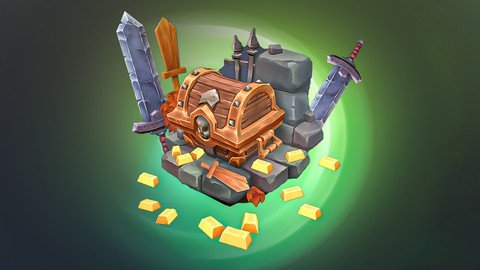
Free Download New Way Of Texture Painting Game Assets In Blender 3.6
Published 9/2023
MP4 | Video: h264, 1280x720 | Audio: AAC, 44.1 KHz
Language: English | Size: 6.04 GB | Duration: 6h 31m
Learn easy and fastly low poly Modeling & Hand Painting ready for game in Blender for Beginners
What you'll learn
Use Blender and understand it's interface
Edit Mode and many techniques of modeling
UV Unwrapping in a clever way
Learn UV map and unwrap all the Models and how to add mark seams
Project file and all assets, including grass, trees, barrel, textures and more
Hand painting/ texture painting in Blender
Requirements
Mac or PC capable of Running Blender Version 3.0 or above
You will learn all of the tools that will be needed for this course.
I used graphic Tablet for texture painting but it will work with mouse as well but recommend using a graphic tablet.
Description
Welcome to our new course about Modeling and Texture Painting in Blender!I am Morteza from artstudio313. netIn this course, we will go on an attractive journey together to Step by step learn the Blender. We start from the interface overview until we reach the modeling and finally Texture Painting in Blender. I will take you through the low poly modeling and most important thing that we are going to Focus on, is the texture painting in Blender. I used graphic Tablet for texture painting but it will work with mouse as well but recommend using a graphic tablet.This Course starts from learning fundamental of Blender and goes up to modeling and texture painting.UV UnwrappingNext, we learn how to UV Unwrap those three models. You learn a lot about unwrapping such as mark seams and what they are and what they do and where should we add them how to unwrap hole model into on UV map. Now we are ready to move into the shading tab. You learn how to create image texture and apply it to the model and prepare everything for Texture Painting tab. In this tab, I tried to teach you the necessary tools for Texture Painting. You will learn:Modeling / low-polyUV unwrapping in a very fast and easy and clever methodWhere to place mark seamsWhat is bleed & what is used for Brush setting and how to Paint the AO, shadow highlightsTexture paints the cuts and holesUse your own brush and pain in a professional wayTexture painting problem solving like flipped normalIf you learn these parts, then you are ready to paint over any model in Blender. We paint the models one by one, and each one has only one texture, which is ready to be used in game engine.I hope you learn a lot from this trip journey

Overview
Section 1: Introduction
Lecture 1 01 - 01 - Intro to image ref
Lecture 2 01 - 02 - Intro to blender interface
Section 2: Modeling
Lecture 3 02 - 03 - Modeling the wooden sword
Lecture 4 02 - 04 - Modeling the iron sword
Lecture 5 02 - 05 - 01 Modeling the Treasure box
Lecture 6 02 - 05 - 02 modeling the treasure details
Lecture 7 02 - 05 - 03 modeling the treasure details
Lecture 8 02 - 06 modeling the landscape & gold
Lecture 9 02 - 07 Rescaling the assets
Section 3: UV Unwrapping & Hand painting the wooden sword
Lecture 10 03 - 08 - 01 UV unwrapping the wooden sword-
Lecture 11 03 - 08 - 02 Creating first texture slot & painting tools
Lecture 12 03 - 08 - 03 Color pallet & Mix different color
Lecture 13 03 - 08 - 04 Hand painting the cracks and dents
Lecture 14 03 - 08 - 05 Hand painting the cracks and dents
Lecture 15 03 - 08 - 06 Hand painting the cracks and dents
Section 4: UV Unwrapping & Hand painting the Iron sword
Lecture 16 03 - 09 - 01 Intro to brushes
Lecture 17 03 - 09 - 02 UV Unwrapping Iron sword
Lecture 18 03 - 09 - 03 Color pallet and importing brushes
Lecture 19 03 - 09 - 04 Hand painting the cracks and dents
Lecture 20 03 - 09 - 05 Hand painting the highlights
Lecture 21 03 - 10 - 01 Hand painting a round the edges
Lecture 22 03 - 10 - 02 Hand painting a round the edges
This course is from beginners to better Blender users,Game Developers who wish to expand their Skill Set.,People who are curious about the world of 3D modeling and animation.,Blender user that will start learning Hand Painting as a beginner
Homepage
Recommend Download Link Hight Speed | Please Say Thanks Keep Topic Live
No Password - Links are Interchangeable
