• Regeln für den Software-Bereich:


    Allgemeines:

    - In erster Linie sind unsere Boardregeln zu beachten, zu finden HIER.
    - Software zur Audiobearbeitung sollte ausschließlich im Unterforum "Audio" eingestellt werden.
    - Für Cracks, Keygens oder sonstige Freischaltungssoftware gibt es das Unterforum "Freischaltung".
    - Portable Software bitte im entsprechenden Unterforum "Portable Software" eintragen.
    - Diskussionen zur Installation und anderen Problemen mit der Software, bitte im enstprechenden Unterforum "Talk" führen.
    - Bei Unklarheiten und Fragen zu den Regeln bitte die Moderatoren kontaktieren.


    Angebot erstellen

    - Die Struktur des Threadtitels muss wie folgt umgesetzt werden: Herstellername - Softwarename - Versionsnummer
    - Unnötige Zusätze im Threadtitel wie "HOT", "NEW" oder Punkte zwischen den Wörtern sind nicht erlaubt.
    - Achtet darauf immer nur die Hauptversion und deren Updates in einem Thread zusammenfassen, konkretes Beispiel: SoftwareXY v3.12 gehört in den selben Thread mit SoftwareXY v3.13; SoftwareXY v.4.1 gehört in einen neuen eigenen Thread. Ausgenommen hiervon sind Sammelthreads und Dauerangebote.
    - Bei nicht bekannten Herstellern oder Angebote einer privaten Software, ist die Programmbezeichnung + Versionsnummer ausreichend.
    - Besondere Beachtung gilt für den ersten Beitrag eines Angebots. Dort muss eine kurze Beschreibung der Software in deutscher Sprache angegeben werden. Für offizielle Releases ist es Pflicht die NFO im Beitrag einzustellen(Spoiler, siehe nächster Punkt).
    - Weitere Informationen wie NFOs oder Changelogs, versteckt ihr bitte in einem Spoiler.


    Software Suche

    - Für Suchanfragen haben wir das Unterforum "Suche" erstellt.
    - Auch hier sollte vorher die Suchfunktion benutzt werden, um Doppelthreads vorzubeugen. Sollte es bereits eine Suchanfrage geben, könnt ihr den Thread gerne mit einem "Danke" pushen.


    Trojaner- und Virusalarm

    - Falls Euer Virenscanner bei einem Angebot Alarm schlägt, solltet ihr zunächst Ruhe bewahren. Viele Virenscanner erkennen Cracks/Keygens oft fälschlicherweise als Bedrohung.
    - Prüft die verdächtige Datei zuerst mit http://virustotal.com , sollte es sich hierbei wirklich um eine Bedrohung handeln, meldet den Beitrag und/oder wendet euch mit dem Bericht von VirusTotal.com an einen Moderator.


    Unerwünschte Angebote

    - Keylogger, Spionagetools, alles rund ums Thema Hacking/Cracking ist nicht erwünscht.
  • Bitte registriere dich zunächst um Beiträge zu verfassen und externe Links aufzurufen.

*** Bestes IPTV *** bester Preis *** gratis Test ***


MyLanViewer v6

alexz

MyBoerse.bz Pro Member


MyLanViewer Enterprise 6.7.6 Multilingual + Portable


a581b40b52df84621fd0bffdfc4fb7e5.jpg


MyLanViewer Enterprise 6.7.6 Multilingual + Portable


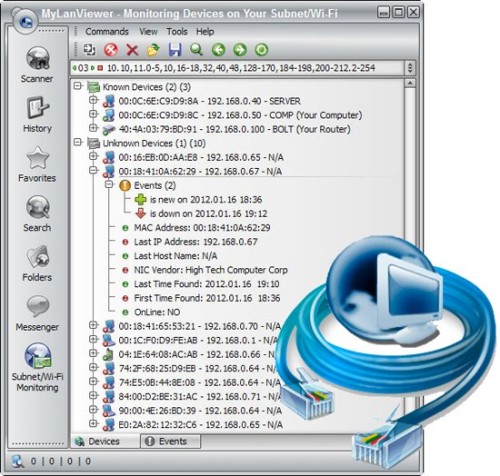
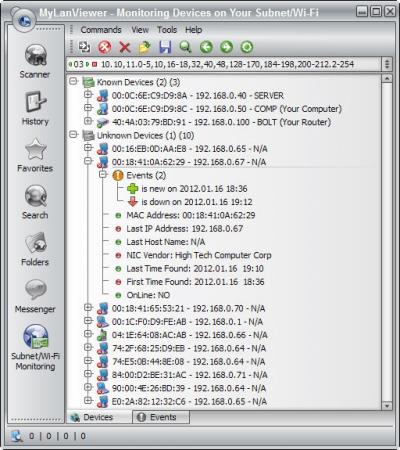
MyLanViewer Network/IP Scanner ist ein leistungsstarker Netbios- und LAN/Netzwerk-IP-Adressscanner für Windows, Whois- und Traceroute-Tool, Remote-Shutdown und Wake On LAN (WOL)-Manager, WLAN-Scanner und Monitor. Diese Anwendung hilft Ihnen, alle IP-Adressen, MAC-Adressen und freigegebenen Ordner von Computern in Ihrem kabelgebundenen oder drahtlosen (Wi-Fi) Netzwerk zu finden.


Sprache: Deutsch, Multi | Größe: 19 MB | Format: RAR, EXE | Plattform: Windows 7, 8/8.1, 10, 11 (32/64Bit)


Hoster:
RapidGator.net | NitroFlare.com | DDownload.com


DOWNLOAD Links:


Zuletzt bearbeitet:
MyLanViewer 6.0.4 Enterprise

43dae6db2b6b71417baa78977a8a3a92.jpeg


MyLanViewer is a simple LAN scanner for your home network. It displays your network computers an easy to read, buddy-list style window that provides the machine names, IP addresses, MAC addresses, shared resources and other technical details for each computer. You can also view and access shared folders, terminate user sessions and disable shared resources. Easy to install and use, has friendly and beautiful interface.

MyLanViewer Network/IP Scanner is a powerful Netbios and LAN/Network IP address scanner for Windows, whois and traceroute tool, remote shutdown and Wake On LAN (WOL) manager, wireless network scanner and monitor. This application will help you find all IP addresses, MAC addresses and shared folders of computers on your wired or wireless (Wi-Fi) network. The program scans network and displays your network computers in an easy to read, buddy-list style window that provides the computer name, IP address, MAC address, NIC vendor, OS version, logged users, shared folders and other technical details for each computer. MyLanViewer Network/IP Scanner supports remote shutdown, wake-on-lan, lock workstation, log off, sleep, hibernate, reboot and power off. It is able to monitor IP address and show notifications when the states of some computers change. MyLanViewer Network/IP Scanner can also view and access shared folders, terminate user sessions, disable shared folders, show netstat information and detect rogue DHCP servers. The software can monitor all devices (even hidden) on your subnet, and show notifications when the new devices will be found (for example, to know who is connected to your WiFi router or wireless network). The program easy to install and use, and has a user-friendly and beautiful interface.

Language: English

File Size: 5.9 MB

Format: RAR, EXE

Platform: Windows 7, 8/8.1, 10, 11 (32/64Bit)


Hoster:

RapidGator

ddownload


DOWNLOAD


MyLanViewer 6.0.2 Enterprise

5287f97cfebe88ab564az6dsm.jpeg


MyLanViewer is a simple LAN scanner for your home network. It displays your network computers an easy to read, buddy-list style window that provides the machine names, IP addresses, MAC addresses, shared resources and other technical details for each computer. You can also view and access shared folders, terminate user sessions and disable shared resources. Easy to install and use, has friendly and beautiful interface.

MyLanViewer Network/IP Scanner is a powerful Netbios and LAN/Network IP address scanner for Windows, whois and traceroute tool, remote shutdown and Wake On LAN (WOL) manager, wireless network scanner and monitor. This application will help you find all IP addresses, MAC addresses and shared folders of computers on your wired or wireless (Wi-Fi) network. The program scans network and displays your network computers in an easy to read, buddy-list style window that provides the computer name, IP address, MAC address, NIC vendor, OS version, logged users, shared folders and other technical details for each computer. MyLanViewer Network/IP Scanner supports remote shutdown, wake-on-lan, lock workstation, log off, sleep, hibernate, reboot and power off. It is able to monitor IP address and show notifications when the states of some computers change. MyLanViewer Network/IP Scanner can also view and access shared folders, terminate user sessions, disable shared folders, show netstat information and detect rogue DHCP servers. The software can monitor all devices (even hidden) on your subnet, and show notifications when the new devices will be found (for example, to know who is connected to your WiFi router or wireless network). The program easy to install and use, and has a user-friendly and beautiful interface.

Language: English

File Size: 8.22 MB

Format: RAR, EXE

Platform: Windows 7, 8/8.1, 10, 11 (32/64Bit)


DOWNLOAD


MyLanViewer v6.2.0 Enterprise

wo7yImc.jpg


MyLanViewer v6.2.0 Enterprise || Crack-UZ1 || 7.98 MB || Sprache: Englisch


Beschreibung:


Sprache: Englisch
File Size: 7.98 MB
Format: .Rar und .Exe
Plattform: Windows 11, 10, 8.1, 8, 7 (32 und 64 Bit)
Passwort: Wird nicht benötigt
Hoster: nitroflare.com , ddownload.com , rapidgator.net

Mirrors sind untereinander kompatibel


Download Links


MyLanViewer v6.3 Enterprise

wo7yImc.jpg


MyLanViewer v6.3 Enterprise || Readme.txt || 5.7 MB || Sprache: Englisch


Beschreibung:


Sprache: Englisch
File Size: 5.7 MB
Format: .Rar und .Exe
Plattform: Windows 11, 10, 8.1, 8, 7, Vista, XP (32 und 64 Bit)
Passwort: Wird nicht benötigt
Hoster: nitroflare.com , ddownload.com , rapidgator.net

Mirrors sind untereinander kompatibel


Download Links


MyLanViewer 6.3.1 Enterprise


43dae6db2b6b71417baa78977a8a3a92.jpeg


MyLanViewer is a simple LAN scanner for your home network. It displays your network computers an easy to read, buddy-list style window that provides the machine names, IP addresses, MAC addresses, shared resources and other technical details for each computer. You can also view and access shared folders, terminate user sessions and disable shared resources. Easy to install and use, has friendly and beautiful interface.

MyLanViewer Network/IP Scanner is a powerful Netbios and LAN/Network IP address scanner for Windows, whois and traceroute tool, remote shutdown and Wake On LAN (WOL) manager, wireless network scanner and monitor. This application will help you find all IP addresses, MAC addresses and shared folders of computers on your wired or wireless (Wi-Fi) network. The program scans network and displays your network computers in an easy to read, buddy-list style window that provides the computer name, IP address, MAC address, NIC vendor, OS version, logged users, shared folders and other technical details for each computer. MyLanViewer Network/IP Scanner supports remote shutdown, wake-on-lan, lock workstation, log off, sleep, hibernate, reboot and power off. It is able to monitor IP address and show notifications when the states of some computers change. MyLanViewer Network/IP Scanner can also view and access shared folders, terminate user sessions, disable shared folders, show netstat information and detect rogue DHCP servers. The software can monitor all devices (even hidden) on your subnet, and show notifications when the new devices will be found (for example, to know who is connected to your WiFi router or wireless network). The program easy to install and use, and has a user-friendly and beautiful interface.

Language: English

File Size: 4.2 MB

Format: RAR, EXE

Platform: Windows XP, Vista, 7, 8, 10, 11, 2000, 2003, 2008, 2012, 2016, 2019, 2022. 32-bit or 64-bit. Net Framework is not required. (32/64Bit)


DOWNLOAD



MyLanViewer v6.3.2 Enterprise

wo7yImc.jpg


MyLanViewer v6.3.2 Enterprise || Crack-UZ1 || 6.84 MB || Sprache: Englisch


Beschreibung:


Sprache: Englisch
File Size: 6.84 MB
Format: .Rar und .Exe
Plattform: Windows 11, 10, 8.1, 8, 7, Vista, XP (32 und 64 Bit)
Passwort: Wird nicht benötigt
Hoster: nitroflare.com , ddownload.com , rapidgator.net

Mirrors sind untereinander kompatibel


Download Links


MyLanViewer 6.3.4 Enterprise


43dae6db2b6b71417baa78977a8a3a92.jpeg


MyLanViewer is a simple LAN scanner for your home network. It displays your network computers an easy to read, buddy-list style window that provides the machine names, IP addresses, MAC addresses, shared resources and other technical details for each computer. You can also view and access shared folders, terminate user sessions and disable shared resources. Easy to install and use, has friendly and beautiful interface.

MyLanViewer Network/IP Scanner is a powerful Netbios and LAN/Network IP address scanner for Windows, whois and traceroute tool, remote shutdown and Wake On LAN (WOL) manager, wireless network scanner and monitor. This application will help you find all IP addresses, MAC addresses and shared folders of computers on your wired or wireless (Wi-Fi) network. The program scans network and displays your network computers in an easy to read, buddy-list style window that provides the computer name, IP address, MAC address, NIC vendor, OS version, logged users, shared folders and other technical details for each computer. MyLanViewer Network/IP Scanner supports remote shutdown, wake-on-lan, lock workstation, log off, sleep, hibernate, reboot and power off. It is able to monitor IP address and show notifications when the states of some computers change. MyLanViewer Network/IP Scanner can also view and access shared folders, terminate user sessions, disable shared folders, show netstat information and detect rogue DHCP servers. The software can monitor all devices (even hidden) on your subnet, and show notifications when the new devices will be found (for example, to know who is connected to your WiFi router or wireless network). The program easy to install and use, and has a user-friendly and beautiful interface.

Language: English

File Size: 7.05 MB

Format: RAR, EXE

Platform: Windows XP, Vista, 7, 8, 10, 11, 2000, 2003, 2008, 2012, 2016, 2019, 2022. 32-bit or 64-bit. Net Framework is not required. (32/64Bit)


DOWNLOAD



MyLanViewer v6.3.7 Enterprise

wo7yImc.jpg


MyLanViewer v6.3.7 Enterprise || Crack-UZ1 || 7.13 MB || Sprache: Englisch


Beschreibung:


Sprache: Englisch
File Size: 7.13 MB
Format: .Rar und .Exe
Plattform: Windows 11, 10, 8.1, 8, 7, Vista, XP (32 und 64 Bit)
Passwort: Wird nicht benötigt
Hoster: nitroflare.com , ddownload.com , rapidgator.net

Mirrors sind untereinander kompatibel


Download Links


MyLanViewer 6.5.0 Enterprise


43dae6db2b6b71417baa78977a8a3a92.jpeg


MyLanViewer is a simple LAN scanner for your home network. It displays your network computers an easy to read, buddy-list style window that provides the machine names, IP addresses, MAC addresses, shared resources and other technical details for each computer. You can also view and access shared folders, terminate user sessions and disable shared resources. Easy to install and use, has friendly and beautiful interface.

MyLanViewer Network/IP Scanner is a powerful Netbios and LAN/Network IP address scanner for Windows, whois and traceroute tool, remote shutdown and Wake On LAN (WOL) manager, wireless network scanner and monitor. This application will help you find all IP addresses, MAC addresses and shared folders of computers on your wired or wireless (Wi-Fi) network. The program scans network and displays your network computers in an easy to read, buddy-list style window that provides the computer name, IP address, MAC address, NIC vendor, OS version, logged users, shared folders and other technical details for each computer. MyLanViewer Network/IP Scanner supports remote shutdown, wake-on-lan, lock workstation, log off, sleep, hibernate, reboot and power off. It is able to monitor IP address and show notifications when the states of some computers change. MyLanViewer Network/IP Scanner can also view and access shared folders, terminate user sessions, disable shared folders, show netstat information and detect rogue DHCP servers. The software can monitor all devices (even hidden) on your subnet, and show notifications when the new devices will be found (for example, to know who is connected to your WiFi router or wireless network). The program easy to install and use, and has a user-friendly and beautiful interface.

Hoster:

RapidGator
Ddownload


Language: English

File Size: 7.28 MB

Format: RAR, EXE

Platform: Windows XP, Vista, 7, 8, 10, 11, 2000, 2003, 2008, 2012, 2016, 2019, 2022. 32-bit or 64-bit. Net Framework is not required. (32/64Bit)


DOWNLOAD



MyLanViewer 6.5.1 Enterprise


43dae6db2b6b71417baa78977a8a3a92.jpeg


MyLanViewer is a simple LAN scanner for your home network. It displays your network computers an easy to read, buddy-list style window that provides the machine names, IP addresses, MAC addresses, shared resources and other technical details for each computer. You can also view and access shared folders, terminate user sessions and disable shared resources. Easy to install and use, has friendly and beautiful interface.

MyLanViewer Network/IP Scanner is a powerful Netbios and LAN/Network IP address scanner for Windows, whois and traceroute tool, remote shutdown and Wake On LAN (WOL) manager, wireless network scanner and monitor. This application will help you find all IP addresses, MAC addresses and shared folders of computers on your wired or wireless (Wi-Fi) network. The program scans network and displays your network computers in an easy to read, buddy-list style window that provides the computer name, IP address, MAC address, NIC vendor, OS version, logged users, shared folders and other technical details for each computer. MyLanViewer Network/IP Scanner supports remote shutdown, wake-on-lan, lock workstation, log off, sleep, hibernate, reboot and power off. It is able to monitor IP address and show notifications when the states of some computers change. MyLanViewer Network/IP Scanner can also view and access shared folders, terminate user sessions, disable shared folders, show netstat information and detect rogue DHCP servers. The software can monitor all devices (even hidden) on your subnet, and show notifications when the new devices will be found (for example, to know who is connected to your WiFi router or wireless network). The program easy to install and use, and has a user-friendly and beautiful interface.

Hoster:

RapidGator

Ddownload


Language: English

File Size: 7.26 MB

Format: RAR, EXE

Platform: Windows XP, Vista, 7, 8, 10, 11, 2000, 2003, 2008, 2012, 2016, 2019, 2022. 32-bit or 64-bit. Net Framework is not required. (32/64Bit)


DOWNLOAD

 
Zurück
Oben Unten