




Published 12/2022
MP4 | Video: h264, 1280x720 | Audio: AAC, 44.1 KHz
Language: English | Size: 762.02 MB | Duration: 0h 40m
With 10 Brushes and Paper Textures Document Included
What you'll learn
Layering techniques in Procreate
Professional techniques to clean up and perfect your art
Workflow for use of layers and other great features like snapping
Working with a monochromatic color scheme
Requirements
Procreate experience is an asset but not a prerequisite
Description
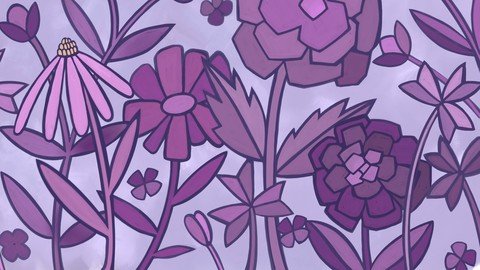
On the surface, gouache (pronounced 'gwash') and watercolor seem confusingly similar. Gouache is a member of the watermedia family and can absolutely be used like watercolor. However, in this class,*Monochromatic Textural Gouache Floral in Procreate, we will create the flat style digital gouache painting style reminiscent of the 70's advertising. This style is really oh so popular right now, and we will do it in Procreate! You'll learn the basics of the flat digital gouache digital painting style and how to create a chunky, bold floral artwork. To make this even more fun and challenging, we will create it all in one color!There are Procreate gouache paint brushes included with your enrollment, so you can follow along with every video. I have even included 5 floral outline brushes to jumpstart your sketch if you need them. Nothing beats traditional painting and those happy accidents that can happen with gouache. Digital painting can be equally fun, therapeutic and relaxing, and it can really up your illustration game. Restricting yourself to one color is a fun challenge too because there is no way your artwork's color scheme cannot work. Start painting your own custom and beautifully textured gouache floral today!This class,*Monochromatic Textural Gouache Floral in Procreate, will show you some of my illustration and color choice methodology. In the class, I take you from start to finish in creating a complete illustration. One of my goals is to show you how you can sell your work once it is created. We explore the Society 6 website and important considerations in sizing your art.In this class I'll walk you through:creating a sketch to guide us with the paintingmanipulating layers to be as efficient as possiblemy workflow for use of layers and other great features like snappingworking with a monochromatic color schememethods for keeping the art fully editable for later adjustments and recoloringJoin me in this class to paint a gouache illustration on your iPad in Procreate. I am going to walk you through all the steps to creating a digital gouache painting and you'll learn all the skills you need to make more artwork in the future with this style.The key concepts I will include:layering techniqueshow to clean up and perfect your artwhat to do with your art when it is completeThis is an ideal class for you, even if you are not sure what you will use the art for, uploading to a POD site or whatever! Learning new Procreate workflows is always desirable. I guarantee you will create something really appealing, and it's so much fun, once you get the hang of it!Intro to*Monochromatic Textural Gouache Floral in ProcreateThis short intro will give you an overview of the class.Lesson 1: Overview and Document Set UpIn this lesson, we will take a quick look at inspiration on Pinterest. I will give an overview of the document set-up. I explain how to use two of the brushes in the provided set to create a variable cloud-like base of paint as a starting off point.Lesson 2: Rough Sketch and Painting PointersIn this lesson, I will break down the process of choosing what brushes to use as well as showing you how to block in all the main shapes of the flowers. I show you brushes from the resources package and explain my technique of painting roughly and then using the eraser to sharpen up some of the points.Lesson 3: Adding Color to the MotifsIn this lesson, I will explain the sizing of the brushes in relation to the look we are trying to achieve. I will show you some of the key techniques I use and explain every step of the way. I go through one flower from start to finish, including touch-ups, so you get the idea.Lesson 4: Completing the Full Coloring ProcessThis video is about completing the full coloring process. I talk you through the time lapses and explain my entire process. The whole idea is to keep it looking like it is hand painted. I do some touch up here to ensure there is consistency between motifs.Lesson 5: Consistent Spacing Around the MotifsIn this lesson, I go through and do all the touch-ups. I adjust anything else that I can see. Adding all the finishing touches is the focus of this lesson. I will be checking all the flower "outlines" then further enhancing all the foreground items by sharpening edges and generally cleaning everything up. This is a quick lesson featuring a time-lapse.Lesson 6: Uploading to Society 6 and Mock-UpsIn this lesson, I suggest some additional steps you can take. One is uploading to Society 6 and I take you through all the steps. I explain the sizing of the artwork for fitting various pieces. I will also talk briefly about mock ups.Lesson 7: Conclusion, Mockup and Next StepsWe will conclude everything in this lesson. I show you a couple of quick mock-ups with the artwork and we end with a chat about next steps.Concepts covered:Concepts covered include but are not limited to Procreate floral design, gouache paint techniques in Procreate, layering, Procreate brushes, Procreate canvas settings, gouache brush settings, gouache-specific issues, working from a sketch, the Brush Studio in Procreate, adjusting Procreate brushes, sizing of documents and brushes, compositions with brushes, procreate brushes for adding interesting details, gouache workflow best practices, painting best practice, Procreate composites, techniques with paints and blending, uploading to Society 6, mock ups, and much more.You will get .46 minutes of direction from an instructor who has been in graphic design business and education for over 40 yearsknowledge of multiple ways to solve each illustration challengea sampler brush set including flower outlines to expedite the production of the initial sketch
Overview
Section 1: Introduction
Lecture 1 Introduction
Lecture 2 Blocking In the Flower Shapes
Lecture 3 Adding Color to the Motifs
Lecture 4 Completing the Full Coloring Process
Lecture 5 Consistent Spacing Around the Motifs
Lecture 6 Uploading to Society 6 and Mock-Ups
Lecture 7 Conclusion, Mockup and Next Steps
Illustrators wanting to improve their Procreate Skills,Artists wanting to learn new digital techniques
Homepage
Recommend Download Link Hight Speed | Please Say Thanks Keep Topic Live
Links are Interchangeable - No Password - Single Extraction
