




KAMAL
MyBoerse.bz Pro Member
mimoLive 5.7 (MacOSX)
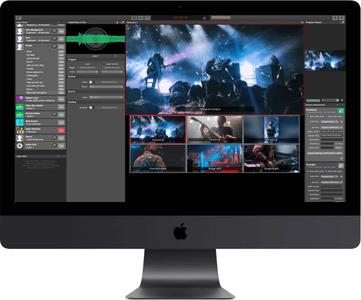
mimoLive 5.7 (MacOSX) | 65 MB | Language: English
mimoLive is the all-in-one video encoder, switcher and streaming software for Mac. It enables you to switch multiple cameras, insert presentations, add layered graphics like weather maps, lower-thirds, social media feeds, green screens, and much more.
Creating and directing multi camera live shows is challenging. Keeping an overview of tasks like switching the active camera, replay prerecorded sequences and adding layered graphical elements is essential. For a one-person live production that is almost an impossible task. But what if there is a solution, designed exactly for this? mimoLive makes professional broadcast tools accessible for everyone.
Here is the tool which allows you to get prepared for every scene of your show, the software which performs multiple actions simultaneously on a single keystroke, the instrument which you can adjust to your individual needs.
mimoLive is the all-in-one solution for live streaming professionals and it supports NDI input and NDI playout.
Create your live video streams - step by step
Capture Audio&VideoManage multiple input feedsDirect your live showManage multiple output streams
Professional video switcher and live streaming for Mac
The live video workflow with mimoLive follows four major steps. First, capture your video footage using any given camera. Followed by the second step, the input into the computer. Conventional using professional graphic cards, externs SDI / HDMI Converter and more recently NDI 4 camcorders. Today we believe in the future of the network standard NDI 4, that's why it is our recommendation to you to check if NDI 4 delivers good results for your sort of live video stream.
Encoding, switching videos stream, graphics and decoding at once
Once the video streams are coming into your Mac - it's time for mimoLive to take over encoding, switching video streams, adding graphics and decoding the final stream. This is the third major workflow step for the director of the show. We enpower video producer to control comprehensive live shows by small teams. Finally, mimoLive uses several presets for the major streaming platforms to simply your work life, and to make the fourth step of your workflow as easy as possible.
Fields of applications for mimoLive
Interactive YouTube Live and Facebook Live Video StreamsCommunity TV, Public Access TVRecord presentationsLive Video ProjectionsPodcastsScreencastGame streaming, from your Mac, iPad, or iPhoneJumbotron in Sport StadiumsSports TVReligious Service Broadcasting360° Live StreamingeSports ConventionsWeddings
Major New Features:
New: Added a Scale & Transform filter to be able to resize, scale, rotate and crop any video source.New: Made animated GIFs work.New: Added a Automation layer to automate stuff in mimoLive.New: Added transitions to the Stop Watch layer.New: Added an option to the ATEM Controller layer to switch to a certain camera when turned on.New: Slideshow layer and source are sorting the images by name now. If new images are dropped into the folder they are displayed immediately.New: Extended the option to align the video sources at the top border in the Presenter 2D-Layer.New: Added a duplicate option to the context menu of sources (right click on a source).New: Updated NDI to version 4.5New: Added a button in the video sources settings of an NDI source to open the remote control panel for this NDI source in a webbrowser.New: Extended the HTTP API to be able to set a video source of a layer image input remotely.New: Added a context menu to the layer paramte buttons to be able to copy the API endpoint to the clipboard.
Important Bug Fixes:
Fixed: Worked on audio timing issues.Fixed: When doing ISO recording with File Recording Output Destination the audio source was randomly selected.Fixed: A corrupt FMLE file could crash mimoLive when read in in order to configure a Custom RTMP Live Streaming output destination.Fixed: When drag&dropping a Media Playlist source with associated media files those media files weren't copied to the new document and lead to a crash of mimoLive when saving the document.Fixed: Audio gain of sources wasn't restored after document reload.Fixed: mimoLive did hang in rare cases if the mimoLive document was very complex.Fixed: Copy/Paste layers caused an inconsistency in the mimoLive document and lead to undefined behaviour when working with HTTP API.Fixed: Split Screen layer flashed when changed layer variants.Fixed: Video Sync layer: Name tags of selected sources weren't updated correctly.Fixed: In the Lower Third layer the Text Alignment option was hiding when changing the background option.Fixed: The Interview layer unnecessarily consumed lot of CPU performance.Fixed: Using two different YouTube accounts with identical names didn't work.
Video Input Sources
Cameras: Thunderbolt, USB, HDMI, SDI SD/HD, NDIUSB connected iOS Devices (via App mimoCam)Network connected iOS Devices (via App mimoLive Reporter)Screen recordingIP CamerasApple Syphon Technology3rd party applications via NDI 4Remote Video Call (mimoCall) from any supported browser
Audio Sources
Cameras: Thunderbolt, USB, HDMI, SDI SD/HD, NDIiOS Devices USB (via App mimoCam)iOS Devices Cellular/WiFi (via App mimoLive Reporter)Mic In / Line in
Hardware
Apple Mac computer
OS
macOS 10.13 or higher. We highly recommend using macOS 10.15 (Catalina)
Capture Cards
PCIeThunderboldUSB 3.0Blackmagic Design Decklink
External Video Switcher
Blackmagic Design ATEM
Software: mimoLive
Live switching video sourcesTransitionsLower ThirdsChroma Keying, Green ScreenPicture-in-PictureMix Audio InputsSports LayerLive ScoreboardsInstant ReplaySocial Media IntegrationsmimoLive Remote - Control switcher & graphics from your iPhone, iPad, or even from any browser.
Live Streaming
Facebook liveYouTube LiveBoxcast.comPeriscopeCustom RTMP
Record to Disk
Recording of the final program outputSeparate file recording of every audio and/or video input
Output
HDMI / NDIVirtual Camera2nd mimoLive Project using Syphon Technology3rd party software using Syphon Technology
Playout
SDI Playout fillSDI Playout Key
DOWNLOAD LINKS:
mimoLive 5.7 (MacOSX) | 65 MB | Language: English
mimoLive is the all-in-one video encoder, switcher and streaming software for Mac. It enables you to switch multiple cameras, insert presentations, add layered graphics like weather maps, lower-thirds, social media feeds, green screens, and much more.
Creating and directing multi camera live shows is challenging. Keeping an overview of tasks like switching the active camera, replay prerecorded sequences and adding layered graphical elements is essential. For a one-person live production that is almost an impossible task. But what if there is a solution, designed exactly for this? mimoLive makes professional broadcast tools accessible for everyone.
Here is the tool which allows you to get prepared for every scene of your show, the software which performs multiple actions simultaneously on a single keystroke, the instrument which you can adjust to your individual needs.
mimoLive is the all-in-one solution for live streaming professionals and it supports NDI input and NDI playout.
Create your live video streams - step by step
Capture Audio&VideoManage multiple input feedsDirect your live showManage multiple output streams
Professional video switcher and live streaming for Mac
The live video workflow with mimoLive follows four major steps. First, capture your video footage using any given camera. Followed by the second step, the input into the computer. Conventional using professional graphic cards, externs SDI / HDMI Converter and more recently NDI 4 camcorders. Today we believe in the future of the network standard NDI 4, that's why it is our recommendation to you to check if NDI 4 delivers good results for your sort of live video stream.
Encoding, switching videos stream, graphics and decoding at once
Once the video streams are coming into your Mac - it's time for mimoLive to take over encoding, switching video streams, adding graphics and decoding the final stream. This is the third major workflow step for the director of the show. We enpower video producer to control comprehensive live shows by small teams. Finally, mimoLive uses several presets for the major streaming platforms to simply your work life, and to make the fourth step of your workflow as easy as possible.
Fields of applications for mimoLive
Interactive YouTube Live and Facebook Live Video StreamsCommunity TV, Public Access TVRecord presentationsLive Video ProjectionsPodcastsScreencastGame streaming, from your Mac, iPad, or iPhoneJumbotron in Sport StadiumsSports TVReligious Service Broadcasting360° Live StreamingeSports ConventionsWeddings
Major New Features:
New: Added a Scale & Transform filter to be able to resize, scale, rotate and crop any video source.New: Made animated GIFs work.New: Added a Automation layer to automate stuff in mimoLive.New: Added transitions to the Stop Watch layer.New: Added an option to the ATEM Controller layer to switch to a certain camera when turned on.New: Slideshow layer and source are sorting the images by name now. If new images are dropped into the folder they are displayed immediately.New: Extended the option to align the video sources at the top border in the Presenter 2D-Layer.New: Added a duplicate option to the context menu of sources (right click on a source).New: Updated NDI to version 4.5New: Added a button in the video sources settings of an NDI source to open the remote control panel for this NDI source in a webbrowser.New: Extended the HTTP API to be able to set a video source of a layer image input remotely.New: Added a context menu to the layer paramte buttons to be able to copy the API endpoint to the clipboard.
Important Bug Fixes:
Fixed: Worked on audio timing issues.Fixed: When doing ISO recording with File Recording Output Destination the audio source was randomly selected.Fixed: A corrupt FMLE file could crash mimoLive when read in in order to configure a Custom RTMP Live Streaming output destination.Fixed: When drag&dropping a Media Playlist source with associated media files those media files weren't copied to the new document and lead to a crash of mimoLive when saving the document.Fixed: Audio gain of sources wasn't restored after document reload.Fixed: mimoLive did hang in rare cases if the mimoLive document was very complex.Fixed: Copy/Paste layers caused an inconsistency in the mimoLive document and lead to undefined behaviour when working with HTTP API.Fixed: Split Screen layer flashed when changed layer variants.Fixed: Video Sync layer: Name tags of selected sources weren't updated correctly.Fixed: In the Lower Third layer the Text Alignment option was hiding when changing the background option.Fixed: The Interview layer unnecessarily consumed lot of CPU performance.Fixed: Using two different YouTube accounts with identical names didn't work.
Video Input Sources
Cameras: Thunderbolt, USB, HDMI, SDI SD/HD, NDIUSB connected iOS Devices (via App mimoCam)Network connected iOS Devices (via App mimoLive Reporter)Screen recordingIP CamerasApple Syphon Technology3rd party applications via NDI 4Remote Video Call (mimoCall) from any supported browser
Audio Sources
Cameras: Thunderbolt, USB, HDMI, SDI SD/HD, NDIiOS Devices USB (via App mimoCam)iOS Devices Cellular/WiFi (via App mimoLive Reporter)Mic In / Line in
Hardware
Apple Mac computer
OS
macOS 10.13 or higher. We highly recommend using macOS 10.15 (Catalina)
Capture Cards
PCIeThunderboldUSB 3.0Blackmagic Design Decklink
External Video Switcher
Blackmagic Design ATEM
Software: mimoLive
Live switching video sourcesTransitionsLower ThirdsChroma Keying, Green ScreenPicture-in-PictureMix Audio InputsSports LayerLive ScoreboardsInstant ReplaySocial Media IntegrationsmimoLive Remote - Control switcher & graphics from your iPhone, iPad, or even from any browser.
Live Streaming
Facebook liveYouTube LiveBoxcast.comPeriscopeCustom RTMP
Record to Disk
Recording of the final program outputSeparate file recording of every audio and/or video input
Output
HDMI / NDIVirtual Camera2nd mimoLive Project using Syphon Technology3rd party software using Syphon Technology
Playout
SDI Playout fillSDI Playout Key
DOWNLOAD LINKS:
Code:
Code:
Code:

