• Regeln für den Software-Bereich:


    Allgemeines:

    - In erster Linie sind unsere Boardregeln zu beachten, zu finden HIER.
    - Software zur Audiobearbeitung sollte ausschließlich im Unterforum "Audio" eingestellt werden.
    - Für Cracks, Keygens oder sonstige Freischaltungssoftware gibt es das Unterforum "Freischaltung".
    - Portable Software bitte im entsprechenden Unterforum "Portable Software" eintragen.
    - Diskussionen zur Installation und anderen Problemen mit der Software, bitte im enstprechenden Unterforum "Talk" führen.
    - Bei Unklarheiten und Fragen zu den Regeln bitte die Moderatoren kontaktieren.


    Angebot erstellen

    - Die Struktur des Threadtitels muss wie folgt umgesetzt werden: Herstellername - Softwarename - Versionsnummer
    - Unnötige Zusätze im Threadtitel wie "HOT", "NEW" oder Punkte zwischen den Wörtern sind nicht erlaubt.
    - Achtet darauf immer nur die Hauptversion und deren Updates in einem Thread zusammenfassen, konkretes Beispiel: SoftwareXY v3.12 gehört in den selben Thread mit SoftwareXY v3.13; SoftwareXY v.4.1 gehört in einen neuen eigenen Thread. Ausgenommen hiervon sind Sammelthreads und Dauerangebote.
    - Bei nicht bekannten Herstellern oder Angebote einer privaten Software, ist die Programmbezeichnung + Versionsnummer ausreichend.
    - Besondere Beachtung gilt für den ersten Beitrag eines Angebots. Dort muss eine kurze Beschreibung der Software in deutscher Sprache angegeben werden. Für offizielle Releases ist es Pflicht die NFO im Beitrag einzustellen(Spoiler, siehe nächster Punkt).
    - Weitere Informationen wie NFOs oder Changelogs, versteckt ihr bitte in einem Spoiler.


    Software Suche

    - Für Suchanfragen haben wir das Unterforum "Suche" erstellt.
    - Auch hier sollte vorher die Suchfunktion benutzt werden, um Doppelthreads vorzubeugen. Sollte es bereits eine Suchanfrage geben, könnt ihr den Thread gerne mit einem "Danke" pushen.


    Trojaner- und Virusalarm

    - Falls Euer Virenscanner bei einem Angebot Alarm schlägt, solltet ihr zunächst Ruhe bewahren. Viele Virenscanner erkennen Cracks/Keygens oft fälschlicherweise als Bedrohung.
    - Prüft die verdächtige Datei zuerst mit http://virustotal.com , sollte es sich hierbei wirklich um eine Bedrohung handeln, meldet den Beitrag und/oder wendet euch mit dem Bericht von VirusTotal.com an einen Moderator.


    Unerwünschte Angebote

    - Keylogger, Spionagetools, alles rund ums Thema Hacking/Cracking ist nicht erwünscht.
  • Bitte registriere dich zunächst um Beiträge zu verfassen und externe Links aufzurufen.

*** Bestes IPTV *** bester Preis *** gratis Test ***


[Dauerangebot] Microsoft Windows 11 Integrated und Modified

JNUlqa.rjCc.jpeg


Windows 11 Pro Lite / SuperLite 23H2 Build 22631.5699 (64-Bit) Multilingual July 2025 AnkhTech


Plattform: windows 11 (64-Bit)
Größe: 2.8 GB
Sprache(n) -> multi / deutsch / englisch
Format: rar / iso
Hoster: rapidgator / ddownload / nitroflare


Wir präsentieren eines der besten modifizierten ISO-Images für Windows 11 Pro 24H2 mit multifunktionalem Boot.Es unterstützt 5 Sprachen weitere Sprachen zu installieren.Es sieht original und nativ von Microsoft aus, bietet aber deutlich mehr Leistung, Stabilität.Multifunktionaler Boot mit professionellen die Taskleiste auszublenden.Bewegen Sie den Mauszeiger um die Taskleiste einzublenden.Alle Programme befinden sich im Startmenü.Erstellen und Wiederherstellen von Backups, Testen der PC-/Laptop-Hardware.Führen Sie Datenträgerverwaltungsaufgaben durch, verschieben Sie Dateien.Verwalten Sie Ihre Dateien vor der Windows-Installation.

Sprache: Englisch, Arabisch, Spanisch, Portugiesisch, Französisch

Download:
jndlpic.gif


th_aSwgcz0ucAQv9UbwLdBAIj8ElumIfRVH.jpg

Windows 11 Pro Lite / SuperLite 23H2 Build 22631.5699 x64 Multilanguage Preactivated AnkhTech
WPE+ Bootable | Language: English, Arabic, Spanish, Portuguese, French | File Size: 2.8 GB

Introducing 1 of best Windows 11 Pro 24H2 Modified ISO with a Multi functional/Multi Purpose Boot 5 Languages in installation and the ability to install more languages. Looks original and native by Microsoft, but way much faster performance, speed and stability.

Multi Functional Boot (WinPE)
- Multi Functional Powerful Boot with Professional Programs to help you
- Taskbar is Hidden, Move your Mouse Cursor Down in the Screen to show the Taskbar. All Programs are in the Start Menu
- Take and Restore Backups, Test Your PC/Laptop Hardware
- Do disk management tasks, Move Files Manage your files before installing the windows

Programs in Boot
- Monitor Test
- Unlocker
- 7zip
- AOMEI Partition Assistant
- Battery Mon
- BitlockerKey
- Boot Sect Gui
- BOOTICE
- Core Temp
- CPU-Z
- Crystal Disk Info
- Crystal Disk Mark
- Disk2VHD
- Everything
- Fast Copy
- File Explorer
- gimagex
- HD Speed
- HW Monitor
- HWinfo
- ImDisk
- Minitool Partitions wizard Ultimate
- NTFS Driver Protection
- NTPWedit
- PEPassPass
- Q-Dir
- Quick Memory Test
- Ram Test
- Search
- SearchMyFiles
- Snapshot
- Symantec Ghost
- Terabyte Image
- Windows Login Unlocker
- WinNT Setup

With 5 Editions you have the choice
1 - Windows 11 Pro Lite + Windows Defender
Windows Features can be Modified , Install more Languages , Protection against Viruses

2 - Windows 11 Pro Lite
Windows Features can be Modified , Install more Languages

3 - Windows 11 Pro SuperLite + Windows Defender
Windows Features Can Not be Modified , Can Not Install more Languages , Protection against Viruses , Very Fast installation and small sized Footprint after installation and higher speed system

4 - Windows 11 Pro SuperLite
Windows Features Can Not be Modified , Can Not Install more Languages , Very Fast installation and small sized Footprint after installation and higher speed system

Minimal amount of UWP Apps
- Microsoft Store
- Xbox , Xbox game bar
- Snipping tool
- Calculator
- Camera
- Sound Recorder
- Alarms & Clock

Tweaks
- Photo Viewer Enabled , Reserved Storage disabled
- Fast Startup enabled , Reduce shutdown time
- Hibernation Disabled
- Updates Paused until 2050
- Context Menu : Take Ownership Added

Enabled
- Direct Play , Legacy Components
- Net framework 3.5 installed

- Microsoft store applications and xbox games working
- Microsoft account Sign in working
- printing and sharing files fully functional
- Bitlocker Functional
- Microsoft Games added (Spider solitaire , Minesweeper , etc..)

Please Note
- Burn on USB flash drive or DVD
- Don't Resume updates because updates will Fail in Installation
- Fresh install only supported using USB flash drive or DVD

What's Not Working
- Windows Updates (Not Fully Functional)
- Windows Media Player
- Face Recognition
- Voice Recognition
- Windows System Assessment Tool
- Eye Control
- Recovery Driver Creator
- System Reset Platform
- Windows Recovery Environment (WinRE.wim)
- Storage Spaces

Note. AnkhTech uses boot from Windows 7 for their WinPE. If you want to install it on Virtual PC, just choose Windows 7 in the very beginning.

What's New:


Screenshot
th_wyPTEMPKsbEtSoSTRBTUIE4k5FvrX67w.jpg

th_6HjEH6Tr522QxkWXHoEs5bp02WImncpG.avif

th_Vw60uNrTfP3jou7RQ3W7d8kLOtK6xnza.avif


Hoster:
RapidGator.net | DDownload.com


Download from RapidGator


Download from DDownload


Zuletzt bearbeitet:

th_qmcuctiE918eKMgaXvalxkFDkKNAOsCp.png


Windows 11 Pro 24H2 Build 26100.4946 (No TPM Required) Preactivated Multilingual August 2025

Windows (x64) | Languages:Arabic,English,German,Greek,French,Spanish,Italian,Portuguese-Portuguese,Portuguese-Brazil,Turkish,Dutch,Czech | File Size: 5.45 GB

Windows 11, version 24H2, also known as the Windows 11 2024 Update, is now available through Windows Server Update Services (WSUS) and Windows Update for Business.

Today marks the start of 36 months of support for Enterprise and Education editions of Windows 11, version 24H2. We recommend that you begin a targeted deployment in your organization now to validate that your apps, devices, and infrastructure work as expected with the new release. To help you plan, this post outlines some of the features and enhancements that help you power exceptional experiences while helping secure your corporate data, apps, and people on any device.
Windows 11, version 24H2 includes all the features and capabilities delivered as part of continuous innovation to Windows 11, now enabled by default. These include
Windows Local Administrator Password Solution (LAPS) policy improvements and new automatic account management feature
Personal Data Encryption (PDE) so that known Windows folders (Documents, Desktop, and Pictures) are protected using user authenticated encryption
App Control for Business (formerly Windows Defender Application Control) to better protect your digital property from malicious code
Windows protected print mode, eliminating the need to rely on third-party software installers for Morpia certified printers
Local Security Authority (LSA) protection to help protect against the theft of secrets and credentials used for logon
Support for Wi-Fi 7
Bluetooth® LE audio support for assistive devices
New controls to help manage which apps have access to the list of Wi-Fi networks around you
Rust in the Windows kernel
SHA-3 support
With Windows 11, version 24H2, we've also introduced numerous Server Message Block (SMB) protocol changes. These include firewall rule changes, support for blocking NTLM, dialect management, alternative network port connections, SMB over QUIC (an alternative to TCP and RDMA), and changes to SMB signing and encryption.
This scoped release also features enhancements designed to improve your overall experience with Windows 11, such as
A scrollable list (vs. single pane) of Quick Settings in the system tray that can be arranged in the way that makes sense for how you work best
Text labels to the cut, copy, rename, share, and delete actions available at the top of the File Explorer context menu
Support for creating 7-zip and TAR archives
Energy saver, an easy way to extend battery life and reduce energy use that can be configured to run automatically or toggled on and off manually via Quick Settings
Extended adaptive brightness control[3] on laptops and 2-in-1s even when they are plugged in
Expanded availability of Voice Clarity, which cancels echo, suppresses background noise, and reduces reverberation in real-time
We've also added new capabilities to control audio presets, ambient sounds, and more for Bluetooth® LE Audio. We made it so that people can adjust audio presets for their hearing aids from Settings or Quick Settings.

Whats New


Screenshot
ROcVCjvMpU0b7bzPVoQVSPG2CKsv1v3X.avif

a6AbRVteWVMPwpuIm2khUSsmWkz789mY.avif

0m0if1kyiW49TlAOCEBuBecTya15ctV7.avif

th_pabj43ywRbIlC6gEKy9FT7pqB9ye1eAU.avif


System Requirements
Processor: 2 gigahertz (GHz) or faster.
RAM: 2 gigabyte (GB).
Free space on hard disk: 25 gigabytes (GB).
Graphics card: DirectX 9 graphics device or a newer version.
Additional requirements to use certain features.
To use touch you need a tablet or monitor that supports multitouch.
To access the Windows store to download and run apps, you need an active Internet connection and a screen resolution of at least 1024 x 768 pixels

Homepage


Hoster:
RapidGator.net | DDownload.com:


Download from RapidGator


Download from DDownload


zGLjA4.Fhwc.png


Windows 11 Pro 24H2 Build 26100.4946 No TPM Required Preactivated (64-Bit) Multilingual August 2025


Plattform: windows 11 (64-Bit)
Größe: 5.45 GB
Sprache(n) -> multi / deutsch / englisch
Format: rar / iso
Hoster: rapidgator / ddownload / nitroflare


Windows 11, Version 24H2, auch bekannt als Windows 11 2024 Update, ist jetzt über Windows Server Update Services (WSUS) und Windows Update for Business verfügbar.Heute beginnt der 36-monatige Support für die Enterprise und Education-Editionen von Windows 11, Version 24H2.Wir empfehlen Ihnen, jetzt mit einer gezielten Bereitstellung in Ihrer Organisation zu beginnen, Infrastruktur mit der neuen Version wie erwartet funktionieren.Um Ihnen bei der Planung zu helfen, werden in diesem Beitrag einige der Funktionen außergewöhnliche Erfahrungen zu ermöglichen und gleichzeitig Ihre Unternehmensdaten, Apps und Personen auf jedem Gerät zu schützen.Windows 11, Version 24H2, enthält alle Funktionen und Fähigkeiten, die im Rahmen der kontinuierlichen Innovation für Windows 11 bereitgestellt wurden und jetzt standardmäßig aktiviert sind.

Sprachen: Arabisch, Englisch, Deutsch, Griechisch, Französisch, Spanisch, Italienisch, Portugiesisch-Portugiesisch, Portugiesisch-Brasilien, Türkisch, Niederländisch, Tschechisch

Download:
jndlpic.gif


177c288fab1a0a131611defbf1e43306.jpg

Windows 11 AIO 16in1 24H2 Build 26100.4946 (No TPM Required) Preactivated August 2025
Windows (x64) | Languages: English | File Size: 6.19 GB


Windows 11, version 24H2, also known as the Windows 11 2024 Update, is now available through Windows Server Update Services (WSUS) and Windows Update for Business.

Today marks the start of 36 months of support for Enterprise and Education editions of Windows 11, version 24H2. We recommend that you begin a targeted deployment in your organization now to validate that your apps, devices, and infrastructure work as expected with the new release. To help you plan, this post outlines some of the features and enhancements that help you power exceptional experiences while helping secure your corporate data, apps, and people on any device.
Windows 11, version 24H2 includes all the features and capabilities delivered as part of continuous innovation to Windows 11, now enabled by default. These include
Windows Local Administrator Password Solution (LAPS) policy improvements and new automatic account management feature
Personal Data Encryption (PDE) so that known Windows folders (Documents, Desktop, and Pictures) are protected using user authenticated encryption
App Control for Business (formerly Windows Defender Application Control) to better protect your digital property from malicious code
Windows protected print mode, eliminating the need to rely on third-party software installers for Morpia certified printers
Local Security Authority (LSA) protection to help protect against the theft of secrets and credentials used for logon
Support for Wi-Fi 7
Bluetooth® LE audio support for assistive devices
New controls to help manage which apps have access to the list of Wi-Fi networks around you
Rust in the Windows kernel
SHA-3 support
With Windows 11, version 24H2, we've also introduced numerous Server Message Block (SMB) protocol changes. These include firewall rule changes, support for blocking NTLM, dialect management, alternative network port connections, SMB over QUIC (an alternative to TCP and RDMA), and changes to SMB signing and encryption.
This scoped release also features enhancements designed to improve your overall experience with Windows 11, such as
A scrollable list (vs. single pane) of Quick Settings in the system tray that can be arranged in the way that makes sense for how you work best
Text labels to the cut, copy, rename, share, and delete actions available at the top of the File Explorer context menu
Support for creating 7-zip and TAR archives
Energy saver, an easy way to extend battery life and reduce energy use that can be configured to run automatically or toggled on and off manually via Quick Settings
Extended adaptive brightness control[3] on laptops and 2-in-1s even when they are plugged in
Expanded availability of Voice Clarity, which cancels echo, suppresses background noise, and reduces reverberation in real-time
We've also added new capabilities to control audio presets, ambient sounds, and more for Bluetooth® LE Audio. We made it so that people can adjust audio presets for their hearing aids from Settings or Quick Settings.

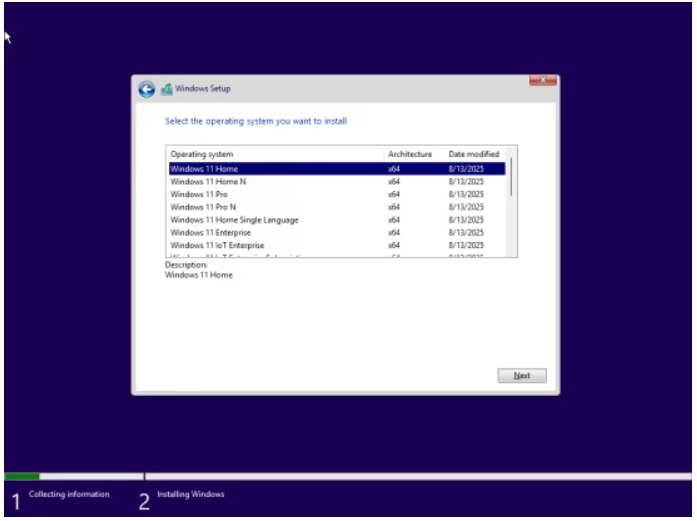
Editions Includes
1. Windows 11 Home
2. Windows 11 Home N
3. Windows 11 Pro
4. Windows 11 Pro N
5. Windows 11 Home Single Language
6. Windows 11 Enterprise
7. Windows 11 IoT Enterprise
8. Windows 11 IoT Enterprise Subscription
9. Windows 11 Enterprise multi-session
10. Windows 11 Education
11. Windows 11 Pro Education
12. Windows 11 Pro for Workstations
13. Windows 11 Enterprise N
14. Windows 11 Education N
15. Windows 11 Pro Education N
16. Windows 11 Pro N for Workstations

Whats New


Screenshot
0b57c190c21d2201a19dc38233f67474.jpg

b5506fdaeac2f0204b3dec4bceb22bb9.jpg

ebe05f0c88763f38e9d32ec230662257.jpg

873ea521e6f7950ad6421c7b83130a30.jpg


System Requirements
Processor: 2 gigahertz (GHz) or faster.
RAM: 2 gigabyte (GB).
Free space on hard disk: 25 gigabytes (GB).
Graphics card: DirectX 9 graphics device or a newer version.
Additional requirements to use certain features.
To use touch you need a tablet or monitor that supports multitouch.
To access the Windows store to download and run apps, you need an active Internet connection and a screen resolution of at least 1024 x 768 pixels

Homepage


48a7ffb180cede51c238cb7aa3a2d4c2.png


Download RapidGator


Download DDownload



Microsoft Windows 11 Moment 5 AiO 23H2 Build 22631.5768

Deutsch // Voraktiviert // Originale Microsoft Dateien // 100% Clean // 64-Bit

Diese Windows Version ist 100% Original und wurde nicht modifiziert!


Die Installation umgeht alle Mindestanforderungen von Windows 11 (CPU-RAM-Festplattengröße-TPM-Secure Boot)


47185111sf.jpg


Beschreibung:

Diese ISO enthält folgende Versionen:

Windows 11 23H2 Home
Windows 11 23H2 Home N
Windows 11 23H2 Pro
Windows 11 23H2 Pro N
Windows 11 23H2 Home Single Language
Windows 11 23H2 Pro Education
Windows 11 23H2 Pro Education N
Windows 11 23H2 Pro for Workstations
Windows 11 23H2 Pro N for Workstations
Windows 11 23H2 Pro Single Language
Windows 11 23H2 Education
Windows 11 23H2 Education N
Windows 11 23H2 Enterprise
Windows 11 23H2 Enterprise N
Windows 11 23H2 Enterprise Multi-Session
Windows 11 23H2 IoT Enterprise

_________________________________________________

Größe: 7.21 GB
Sprache: Deutsch
Format: RAR/ISO
Plattform: Windows 11 23H2 (64-Bit)
Hoster: RapidGator|Ddownload
________________________________________

49759657zh.png


Microsoft Windows 11 AiO 24H2 Build 26100.4946

Deutsch // Voraktiviert // Originale Microsoft Dateien // 100% Clean // 64-Bit

Diese Windows Version ist 100% Original und wurde nicht modifiziert!


Die Installation umgeht alle Mindestanforderungen von Windows 11 (CPU-RAM-Festplattengröße-TPM-Secure Boot)


47545712jr.jpg


Beschreibung:


Diese ISO enthält folgende Versionen:

Windows 11 24H2 Home
Windows 11 24H2 Home N
Windows 11 24H2 Pro
Windows 11 24H2 Pro N
Windows 11 24H2 Enterprise
Windows 11 24H2 Education
Windows 11 24H2 Pro Education
Windows 11 24H2 Pro for Workstations
Windows 11 24H2 Enterprise N
Windows 11 24H2 Education N
Windows 11 24H2 Pro Education N
Windows 11 24H2 Pro N for Workstations
Windows 11 24H2 Home Single Language
Windows 11 24H2 Enterprise for Virtual Desktops
Windows 11 24H2 IoT Enterprise
Windows 11 24H2 IoT Enterprise Subscription

_________________________________________________

Größe: 7.72 GB
Sprache: Deutsch
Format: RAR/ISO
Plattform: Windows 11 24H2 (64-Bit)
Hoster: RapidGator|Ddownload
________________________________________

49759657zh.png


g3bSn1.th-Zcqj8kmewuK4P3IsUqIMnGnaoIKYUKC8.png


Windows 11 Enterprise 24H2 Build 26100.4946 No TPM Required Preactivated (64-Bit) Multilingual August 2025


Plattform: windows 11 (64-Bit)
Größe: 5.61 GB
Sprache(n) -> multi / deutsch / englisch
Format: rar / iso
Hoster: rapidgator / ddownload / nitroflare


Windows 11, Version 24H2, auch bekannt als Windows 11 2024 Update, ist jetzt über Windows Server Update Services (WSUS) und Windows Update for Business verfügbar.Heute beginnt der 36-monatige Support für die Enterprise und Education-Editionen von Windows 11, Version 24H2. Wir empfehlen Ihnen, jetzt mit einer gezielten Bereitstellung in Ihrer Organisation zu beginnen, um zu überprüfen, ob Ihre Apps, Geräte und Infrastruktur mit der neuen Version wie erwartet funktionieren.Um Ihnen bei der Planung zu helfen, werden in diesem Beitrag einige der Funktionen und Verbesserungen beschrieben, die Ihnen helfen, außergewöhnliche Erfahrungen zu ermöglichen und gleichzeitig Ihre Unternehmensdaten, Apps und Personen auf jedem Gerät zu schützen.Windows 11, Version 24H2, enthält alle Funktionen und Fähigkeiten, die im Rahmen der kontinuierlichen Innovation für Windows 11 bereitgestellt wurden und jetzt standardmäßig aktiviert sind. Dazu gehören

Sprachen: Arabisch, Englisch, Deutsch, Griechisch, Französisch, Spanisch, Italienisch, Portugiesisch-Portugiesisch, Portugiesisch-Brasilien, Türkisch, Niederländisch, Tschechisch

Download:
jndlpic.gif


Microsoft Windows 11 AiO 19in1 24H2 Build 26100.5061

Deutsch // Originale Microsoft Dateien 100% Clean

Windows ist mit einer digitalen Lizenz voraktiviert


Diese ISO enthält:

- .NET 3.5 und .NET 4.8
- Microsoft Windows-Tool zum Entfernen bösartiger Software 5.135
- PowerShell 7.5.2
- WinRAR 7.13


Diese ISO enthält folgende Version:

- Windows 11 24H2 Home
- Windows 11 24H2 Home N
- Windows 11 24H2 Pro
- Windows 11 24H2 Pro N
- Windows 11 24H2 Team
- Windows 11 24H2 Home Single Language
- Windows 11 24H2 SE
- Windows 11 24H2 SE N
- Windows 11 24H2 Pro Education
- Windows 11 24H2 Pro Education N
- Windows 11 24H2 Pro for Workstations
- Windows 11 24H2 Pro N for Workstations
- Windows 11 24H2 Pro Single Language
- Windows 11 24H2 Education
- Windows 11 24H2 Education N
- Windows 11 24H2 Enterprise
- Windows 11 24H2 Enterprise N
- Windows 11 24H2 Enterprise multi-session
- Windows 11 24H2 IoT Enterprise


Desktopsymbole:

Benutzer, Dieser PC, Netzwerk, Systemsteuerung

Sonstige Reg-Tweaks:

Altes Kontextmenü
Benutzerkontensteuerung Deaktiviert
Dateinamenerweiterungen eingeblendet
Desktop Verknüpfungspfeile entfernt
Kompakte Ansicht im Datei Explorer
Kontextmenü Abgesicherter Modus
Kontextmenü Benutzerkonten
Kontextmenü Computerverwaltung
Kontextmenü Datei Explorer
Kontextmenü Datei Explorer Optionen
Kontextmenü Datei Explorer neustarten
Kontextmenü Eingabeaufforderung (Administrator)
Kontextmenü Geräte - Manager
Kontextmenü Hell Dunkel Modus Windows und Apps
Kontextmenü Kopieren
Kontextmenü Powershell
Kontextmenü Programme hinzufügen oder entfernen
Kontextmenü Registry Editor
Kontextmenü Systemsteuerung
Kontextmenü Task-Manager
Kontextmenü UAC-Einstellungen anpassen
Kontextmenü Windows Firewall
Windows 11 Explorer Kompakte Ansicht

46888248zj.png

Hoster:
DDownload
Größe:
6,66 Gb (RAR/ISO/EXE)
Sprache:
Deutsch
Plattform:
Windows 11 24H2 64-Bit
Hashwert:
E2A31F250B123AFD3F7C74A5E1664015360136B3
46888248zj.png


8BC47D8DAF.png


Microsoft Windows 11 Enterprise 24H2 LTSC Build 26100.4946

Deutsch // Voraktiviert // Originale Microsoft Dateien // 100% Clean // 64-Bit

Diese Windows Version ist 100% Original und wurde nicht modifiziert!


Die Installation umgeht alle Mindestanforderungen von Windows 11 (CPU-RAM-Festplattengröße-TPM-Secure Boot)


48865821im.png


Beschreibung:


Diese ISO enthält folgende Versionen:

Windows 11 Enterprise LTSC x64
Windows 11 Enterprise N LTSC x64
Windows 11 IoT Enterprise LTSC x64
Windows 11 IoT Enterprise Subscription LTSC x64

_________________________________________________

Größe: 6.57 GB
Sprache: Deutsch
Format: RAR/ISO
Plattform: Windows 11 LTSC 24H2 (64-Bit)
Hoster: RapidGator|Ddownload
________________________________________

49759657zh.png


Zurück
Oben Unten